
 I started feeling a mild burning sensation in my left wrist a few weeks ago. This is a classic early sign of Repetitive Strain Injury. Uh-oh. I had an email exchange not long ago with someone who now has to use voice activation because typing is too painful. I can’t imagine how frustrating that must be. I decided to ignore Jane Fonda’s advice to “feel the burn” and looked for a way to alleviate the problem.
One approach is to reduce the amount of typing I do. But that is tough when you are running a microISV and writing a blog. I already use the text expander capabilities of the excellent Direct Access software to save a lot of typing (it tells me that it has saved me 51 hours of typing so far). I decided to try an ergonomic keyboard.
I bought myself a Microsoft 4000 Ergonomic keyboard. This is shaped to allow more natural positioning of the forearms and elbows.

Microsoft Natural Ergonomic Keyboard 4000
For more comfortable wrist positioning it also has a built-in wrist rest and the front of the keyboard is higher than the back.
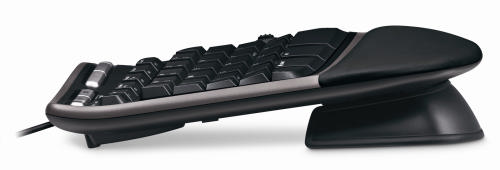
Note the front of the keyboard (right) is higher than the back (left)
I was quite surprised how physically large it was when it turned up. The shape of the keyboard felt very strange to start with and it took me a few days of slow typing to get used it. The feel of the keys is nothing special and I haven’t yet used the extra gizmos, such as the integral zoom button. But I feel it is an improvement in comfort over the conventional keyboard I had before.
An unexpected advantage of the new keyboard is that it has improved my typing. If you watch a good touch typist, their hands hardly move. I (unfortunately) never learnt to touch type, I just didn’t have the patience. The clearer separation between keys for the left hand and keys for the right hand on the new keyboard made me realise that I was moving both hands left and right, more like a concert pianist than a touch typist. I am now moving my hands less and I think my typing speed has improved as a consequence.
I didn’t feel the new keyboard on it’s own was going to solve my impending RSI problems though. The major problem seems to be the continual Ctrl-C, Ctrl-V, Ctrl-A, Windows-D, Windows-E and Alt-Tab key combinations I do with my left hand, hundreds of times a day. Using the right hand Ctrl key instead of the left one helped a bit. But it occurred to me – why are my hands doing all the work? My legs are doing so little that I often feel stiff when I stand up from a long programming session. Why not put them to use?
I Googled for foot pedals for computers. After wading through lots of hits for music and dictation foot pedals I finally found the Savant Elite Triple Foot Switch. This is a programmable 3-pedal foot-switch that plugs into a USB port.
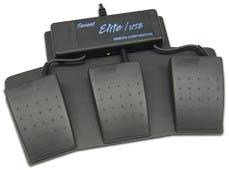
Savant Elite Triple Foot Switch
At £86.00+VAT it isn’t cheap. But what price do you put on your health? I ordered one.
When it arrived I wanted to program the pedals to map to the Ctrl, Shift and Windows keys. But I couldn’t install the device driver to program the pedals. After a call to the retailer it turns out the device driver doesn’t work on Vista, despite assurance on the website that the pedals could be used with “virtually any computer”[1]. Grrrrr. How long has Vista been out? I finally managed to program the pedals using my wife’s laptop – my last remaining XP box.
So now I can type using my feet for most of the modifier keys. I am using the pedals as I type this. I am still getting used to them, but the burning in my left wrist has definitely reduced. I think I can also type a little faster, but I am too lazy to do the speed tests with and without the pedals to verify this. On the negative side:
- Working out where to put your feet when you aren’t typing can be a little awkward.
- The pedals tend to move around the carpet, despite being metal and quite heavy. Some small spikes might have helped.
- Although the travel on the pedals is small, they are surprisingly stiff.
When I told a friend about the pedals he asked – why stop there? I could also be using my elbows, knees and head like a one-man-band. I could be working-out and typing at the same time. It is an intriguing prospect.
I just hope I don’t end up with burning ankles.
[1] System requirements have since been added to the website.
 Developing software is an indoor job with no heavy lifting. How dangerous can it be? Actually, the long term dangers to your health are all too real. Humans have bodies evolved for running around the African savanna, not sitting motionless in front of a computer for hours at a time. I have heard several stories of developer careers cut short by
  Successful Software


