Tag Archives: microISV

33 tips for giving great technical support at a small software company without being swamped

To have the best chance of success you need a great product, great marketing and great support. Many companies with great products and marketing fall down on the support.

Good support is essential to a good user experience. Any non-trivial piece of software is going to result in questions that need to be answered and issues that need to be resolved. But supporting customers is often seen as an onerous chore. An overhead. Something to be done by those not talented enough to be developers.  This is a very unfortunate attitude. But it also an opportunity, as software companies that provide great support can really stand out from their competitors. The lower they set the bar, the more opportunity you have to shine.

The fact that the support staff and the developers are often the same people in a small company is a real strength. Because the developer knows the product better than anyone else, they can give better answers. Also, the direct feedback developers get from customers can be very helpful in further improving the product. This means that a small company can often provide much better support than a large company that has multiple layers of support between the customer and the developer. The downside is that the more time developers spend on support, the less time they can spend doing development. Eventually you may reach a level of sales where you are spending nearly all your time doing support, with very little left for the development and marketing required to grow the business. The challenge is to provide great support without being swamped by support work.

I have been supporting my own wedding table plan software since it was first released in 2005. I have managed to grow my sales for 7 consecutive years without being overwhelmed by support. In fact technical support emails have stayed at roughly 40 per week for the last few years despite increasing sales. Before that I had never really done much technical support, so it has been a learning experience. Here are some of the things I have learnt along the way.

Manage customer expectations

Make the level of support clear to the customer:

  • Is it free or does it have to be paid for?
  • Is it email only or is telephone support also available?
  • What sort of response time can they expect?
  • What languages do you provide support in – just English?

I don’t provide technical support by telephone or instant messaging, because it is too disruptive to me as a one-man-band.

Manage your own expectations

Your software is a means to an end for the customer. Very few customers will read the documentation you spent all those hours writing if they can possibly avoid it. Some of them won’t even read to the end of a 1 sentence error message (really). Some of your customers will be ‘technically’ challenged (often without even realizing). Sometimes the problem exists between keyboard and chair. Get used to it, because human nature isn’t going to change any time soon.

Make it easy for the customer to contact you

Don’t hide your support email address. Allow the customer to email you from the software itself. This also gives you the opportunity to add some useful information to the email (the software version, their OS, whether they have a licence etc).

Be responsive

Generally speaking, the faster you respond, the better. When I send an email to support I expect to get a response by the same time on the next working day and hopefully within a few hours. I try to answer my support emails at least twice a day, 364 days a year. I do this because I want to give a great service, but it also means I don’t come in to a massive pile of support emails every Monday morning. It means taking a laptop with me whenever I am away for a night. But I find it isn’t a huge chore to spend an hour a day answering support emails on holiday. Especially when I remember that the business is paying for the holiday!

But not too responsive

The downside of being very responsive is that it makes some customers lazy. If they know they will get a response within a few hours they may email you about things they could easily look up themselves. The best response to this is ‘throttling’ (NB/ I don’t mean strangling) – when you notice that a customer is being lazy, take longer and longer to respond to each email. Eventually they will take the hint.

If you are trying to look like a bigger company than you are, then you probably don’t want to answer support emails outside of normal work hours.

Respond as clearly as possible

  • Quote the customers email in your reply where appropriate for context.
  • Number step-by-step instructions.
  • Use quotes to refer to elements in your software, e.g. select ‘Help’>’About’ from the main menu.
  • Write in short paragraphs, not big chunks of text.
  • Avoid technical jargon unless you are sure that your customer will understand. For example, say “window” rather than “modal dialog”.
  • Use proper grammar and check the spelling.
  • Avoid long email signatures.

Use images and videos

It is often helpful to include an annotated image with your response. For example you can do a screenshot, highlight important items in the screenshot and then email this as an attachment, along with some text. I find the screen capture tool SnagIt is excellent for doing this (available for both Windows and Mac). In some cases it may also be worth doing a short screencast, uploading it and then sending the customer a link (SnagIt can also do this).

Restate unclear questions

Support questions can be very vague. I have even had people email me just “It doesn’t work” – it wasn’t even clear whether they were referring to the website, the installer or the software. It often takes a few emails to understand what the problem is. If you aren’t 100% sure what they mean, make your best guess at what they are trying to say and restate it in your own words followed by “Did I understand correctly?”. Ask them if there are any error messages. Ask them to send you a screenshot (include a link to instructions on how to do this).

Finish an email exchange

If the customer started the exchange, you should generally finish it (i.e. send the last email). But it is probably not worth responding to an email that is just a 1-line thank you.

Pick up the phone when required

Even if you don’t officially offer telephone support, it sometimes can sometimes save a lot of time and aggravation on both sides if you pick up the phone and talk to the customer.

Put your documentation online

If you have your documentation online you can easily include links to relevant pages in your documentation in your email. This might also encourage the customer to look in the documentation first next time. But don’t just send a link. Answer their question in the email and then include the link as supplemental information.

Help the customers to help themselves

The beauty of a software product business is scalability. In theory, you only need to create your product once and then you can sell it to as many people as you can convince to buy it with negligible marginal cost. In theory. In reality, while a software product business is inherently much more scalable than a consulting business, the marginal cost per sale is not negligible. Far from it. Customers need support.  Here are some of the way you can reduce the support cost per customer:

  • improve the user interface and documentation, based on customer feedback
  • add an FAQ
  • allow customers to retrieve their licence key direct from your website (emailed to the registered email address, for obvious reasons)
  • encourage customers to look at documentation, FAQs, forums etc before emailing you (below is the window I show when customers select Help>Technical support in PerfectTablePlan).
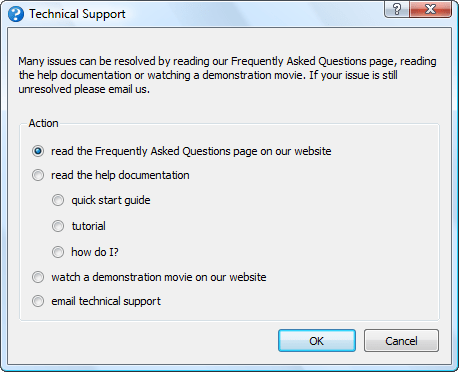
Note that it has been shown experimentally that the more text you show someone, the lower the percentage of it they read. So it is generally more productive to concentrate on simplifying the user interface, rather than writing more documentation.

Of course, you can also reduce support requests by making it difficult for the customer to contact you (the Amazon model). But this leads to less feedback and a worse user experience, so I wouldn’t recommend it.

Allow customers to help each other

If you have a sizeable user base you can set-up a forum to encourage users to help each other. This can have various benefits:

  • customers may be able to get answers straight-away by searching existing content on the forum
  • customers may answer some questions for you
  • customers may respond faster than you can
  • it increases your SEO footprint

But it also has its drawbacks:

  • nothing looks sadder than a deserted forum
  • a forum has to be actively moderated or it will end up reflecting badly on your company
  • spam can be a problem

Automatically report crashes

It is often possible to detect that the software is going to crash or has crashed and send yourself some diagnostic information. This allows you to monitor how stable the software is and gives you some clues for debugging. For example, on Windows you can use the Win32 API method SetUnhandledExceptionFilter() to detect when things have gone horribly wrong. Don’t send it without their permission though. Give them the option to see the information you are going to send and then allow them to send it with a single button click.

Remember that every computer is different

There is a rumour that there are 2 identically configured PCs somewhere in Nebraska. But I don’t believe it. The customer may have configured their OS with all sorts of strange options you have never heard of. Anti-virus software, malware, DLL hell and hardware issues can cause problems. A cosmic ray might have even passed through their RAM! So I generally don’t spend too much time on a bug report unless either I can replicate it myself or 2 separate people have reported it.

Be proactive

I actively seek feedback from my customers. It increases the support burden somewhat, but I think this is more than compensated for by increased customer satisfaction and improved feedback.

Make use of feedback

I think all developers should spend at least some time supporting the products they developed. A few days every now and then in the support trenches answering customer emails and phone calls would give developers a better appreciation of how customers think and of the real costs of that cool feature shoe-horned into the release a week before the ship date.

Look at every support request as a possible way to improve your product. The first time you get a support request you answer it. The second time you get the same request you need to start thinking about how you can improve the product so that question doesn’t get asked a third time. By continually improving your product in this way you can greatly reduce the average amount of support time required per customer over time. Obviously you need to make it easy for customers to contact you to make this work.

Don’t take things personally

No matter how hard you try some people are not going to like your software. I once got so angry with Microsoft Project that I nearly threw a monitor out of a window. An angry customer might send you an angry email. Try not to take the criticism personally (link note: funny, but sweary). Maybe the customer is having a bad day. Perhaps they just don’t have any manners. As long as they remain a small minority, try not to lose any sleep over it. On the plus side – at least they cared! And it is often possible to turn a passionately angry customer into a passionate advocate for the product. Indifference is much harder to convert into a sale.

Don’t shoot the messenger

If someone reports what they think is a bug, you should thank them, rather than taking it as an insult to your programming skills. Experience shows me that most people who encounter a bug won’t bother to report it. If you have ever tried reporting a problem to a big company like Microsoft, you will understand why. An unreported bug can result in a lot of unhappy customers and lost sales. Customers who report bugs are a precious resource and should be treated accordingly.

Tell a customer when you have fixed their bug

Whenever a customer reports a bug  I record their email address along with the bug report. When it is fixed I then email them. This encourages them to report other bugs they find in future. Similarly for feature requests.

Give credit where credit is due

When I list bugs fixed in a release I also give the names of the customers who reported the bugs (first name + initial of last name). If a customer has been particularly helpful, e.g. putting significant effort into helping me find a bug, I may also list them in the software ‘credits’ window. It doesn’t cost me anything and it encourages these customers to feel more ownership of the product and report more bugs.

Google translate is your friend

I only officially provide support in English. But if someone emails me in another language I will use Google translate to read their email and reply in English, including a translation of my reply from Google translate. The quality of the translation may not be great, but it is probably good enough.

Use the right tone

Being professional doesn’t have to mean cold and impersonal. Try to sound like a real person, rather than a robot. Include your name in your signature. I address people by their first name (where known) and I’m not above including a smiley, where I think it is appropriate. Different markets and cultures may demand different levels of formality. Usually you can take your cue from how formal the customer is. Above all, try not to blame your customer or make them feel stupid.

Only support your own product

It isn’t your job to teach your customer how to use a computer. Try to steer clear of providing support that isn’t directly related to your own product. Otherwise you might find you end up as their general IT helpdesk.

Get the price right

If you are swamped in support emails, consider raising your price. Depending on the price elasticity of your product, you may be  able to generate the same or more revenue with less customers and therefore (hopefully) less support emails.

Firing a customer is the final resort

Sometimes a customer will buy your product when they really shouldn’t have, either because it is the wrong tool for the job or because they don’t have the skills required to use it. They will then bombard you with email after email. In such cases it may be best to refund them. Allow them to keep using the software, but tell them that you won’t be able to provide any further support. Something along the lines of “It appears that our software is not a good fit for your requirements. We have therefore refunded your purchase in full. Please feel free to keep using the software, but please note that we won’t be able to provide further technical support.”. This is the nuclear option. I have only had to resort to it a handful of times in 7 years.

Don’t tolerate abusive customers

The customer is not always right. Buying your product does not give them a right to be abusive, no matter how much they paid. Politely and professionally fire them if they can’t behave like a decent human being.

Never send an email in anger

People can sometimes be unreasonable, even downright rude, especially when they are safely at the other end of an Internet connection. But never, under any circumstances, respond with a rude or sarcastic email. Your email might be posted onto forums for all the world to see, forever more, devoid of its original context. Not good. Also, sending a rude response is only going to pour petrol on the fire. Always keep your emails polite and professional. If you find yourself getting angry, go and do something else for a while, until you can send a calm reply. If you can’t reply professionally, don’t reply at all.

Use the right tools

You don’t need a lot of tools to provide good support. I mainly use:

  • an email client (Thunderbird)
  • a bug/feature request tracking database (OnTime)
  • a screen capture tool (SnagIt)
  • a phrase expander for quickly typing common phrases (PhraseExpander)
  • a database of licence keys (home rolled)
  • VM software for emulating different operating systems (WMWare Workstation)

As I am the only one doing support I find that it is sufficient for me to use my Thunderbird email client to check previous correspondence (search by email address), track status (using different coloured tags for: awaiting their response, follow-up later etc) and enforce a simple workflow (move to different folders). If you have multiple people doing support you may also need helpdesk software (such as Helpspot) and/or a ticketing system.

You can use remote access software such as CoPilot to remotely log in to a customers computer. But I try to avoid this where possible, as it is time consuming and also the customer might blame me for any problem they have with their computer afterwards (e.g. a virus infection).

Think twice before outsourcing support

It is cheap to outsource your support to e-workers in developing countries. But they won’t know or care about your product as much as you do. And moving yourself further away from the customer reduces that all important feedback that you need to keep improving the product.

Time new releases carefully

You are going to get the most support emails after you put out a new release. So try to avoid putting out a new release just before you go on holiday.

Have the right attitude

While it can be frustrating to provide support to someone less technically minded than yourself, remember that not everyone is a computer geek and these people are paying your salary.

Remember the golden rule

The basic rule of technical support is to treat your customers how you would wish to be treated. If you bear that in mind, you shouldn’t go far wrong.

Further reading:

If You Want to Write Useful Software, You Have to Do Tech Support (Nick Bradbury)

Did I miss anything? What have been your experiences supporting your software? What surprised you?


The microISV test

Ok, so you’ve set yourself up as a one man software company and you’ve made some sales. But are you a real microISV/micropreneur/indie/startup? Take the test below and find out.

  1. You checked the number of sales you made overnight before you had your breakfast this morning.
  2. You measure the price of desirable objects (cars, houses, Xboxes) in terms of the number of licences you need to sell.
  3. You’ve outsourced some work to someone with no idea what they look like and only a vague idea where they live.
  4. When booking a hotel you are more interested in how good the Internet connection is than how good the restaurant is.
  5. Your product has at least 20 five star awards from download sites.
  6. You know what CTR, CPC and CPM mean.
  7. You have begged all your friends and family to ‘like’ your product’s Facebook page.
  8. You set up your computer or phone so it makes a special noise each time you get a sale.
  9. Your software has been cracked at least once.
  10. You have suggested to a particularly problematic customer that one of your competitors might have a more suitable product.
  11. You’ve done technical support while wearing a dressing gown/bathrobe (or less).
  12. You have Google alerts and Twitter searches set up for your product name.
  13. You start to get anxious after not checking your email for more than half a day.
  14. The last time you set an alarm clock it was because you were going on holiday and didn’t want to miss the flight.
  15. Your relatives think you don’t have a ‘real job’.
  16. You own at least 10 domain names.
  17. You have had to fix problems with your software or website while on holiday.
  18. You have had a least one chargeback.
  19. Your software has been flagged as malware by at least one anti-virus package.
  20. You use at least 3 different email addresses in the course of a day.
  21. You have explained what you do to someone and they said “And you make a living from that???”.
  22. You have used Google translate to answer a support email in a language you don’t understand.
  23. You use “we” when talking about your company, even though its really only you.
  24. Someone told you a half-baked idea they had in the shower that morning and said they would be willing to give you 50% of the profit if you did 100% of the work to  implement it.
  25. The last time you wore a suit and tie was to a wedding or a funeral.

I scored 25/25, of course (it’s my test). How did you do? Are there any other questions I should have added? Let me know in the comments.

Thanks to fellow microISVs Steph, Oliver, Terrell, Clay and Ian for suggesting some of the above.

A curated list of 200 articles for microISVs and startups

I have been steadily adding to the curated list of links on this site. Currently there are links to 200 articles, loosely categorized into topics such as ecommerce, market research, product naming, Pay Per Click and SEO. I have tried to select articles that contain ‘actionable’ information, rather than wafflely articles about ill-defined subjects such as time management and motivation. Some of the articles linked to were written by me, but the majority weren’t. I hope you find something useful. I would be surprised if you don’t.

Go to the links page

Success is always one feature away

In my consulting and various other dealings with aspiring microISVs, I notice certain recurring patterns. One of the most common is the belief that it is just one missing feature that is holding back a product from the commercial success it deserves. As soon as that feature is coded the sales are going to come pouring in! When they don’t, then maybe it was that other missing feature that our competitor has. It is a horizon that keeps receding until you run out of money or enthusiasm. But, in my experience, poor sales are almost always due to insufficient marketing. A fact that is borne out by these 13 case studies. It doesn’t matter how great your software is if no-one know about it, or if you can’t persuade them to try it when they do find out about it.

It isn’t surprising that microISVs fixate on features. MicroISVs tend to come from a programming background and learn marketing  on the job (I have yet to meet a microISV who started off in marketing and taught themself programming). Features and coding are what we like to do best and it feels like ‘real work’. But all too often the warm embrace of an IDE is just an excuse to stay in our comfort zone. Of course, features are important. No features = no product. But, if you have got low traffic to your website and/or you are doing a lousy job of communicating with people that arrive at your site, then adding more features really isn’t going to help much. If you are in a hole, stop digging. Successful marketing is about being different from your competitors. You can even make a virtue of your lack of features. If you are competing against more feature-rich competitors, then emphasize the simplicity and ease-of-use of your product instead. It certainly seems to work for 37Signals.

Marketing can seem like a very alien discipline for someone from a programming background. But you can learn it like any other skill. There is loads of great information out there, for example Eric Sink’s marketing for geeks. Also, some elements of online marketing are actually quite technical with plenty of opportunites for number crunching. Analytics, A/B testing and Adwords will give you more data than you know what to do with. This can give programmers a considerable advantage over people from a more traditional marketing background, many of whom don’t seem to be able to handle anything more complicated than a 2×2 matrix. You don’t have to be a marketing genius, you just need to be better than your competitors (in the same way that you don’t need to be able to run faster than a lion to survive a lion attack, you just need to be able to run faster than the next guy). Given that your competitors are likely to be other programmers (who are probably also not doing enough marketing) or people from a marketing background (who don’t really understand software and are probably more interested in long lunches) that may not be as hard as you think.

ESWC 2011 registration is now open

Registration is now open for the European Software Conference 2011. It is on 19th-20th November in London, with informal drinks the evening before. This is the top European event for microISVs and other small software businesses. It is always good to meet up with other microISVs and London is a great city to visit, even if only to remind yourself how glad you are you don’t live in a big city. The early bird rates are just 55 Euros (with no meals) and 155 Euros (including 2 networking dinners). The schedule is still being fleshed out. I will be doing a talk, provisionally titled “Promoting your software”. Watch this space for more details. There are still some spare speaking slots. It would be nice to see some new faces doing talks, so why not volunteer?

Sadly there might not be a Software Industry Conference this year. But if you are based in the USA you might want to consider MicroConf 2011 in Vegas 6th-7th June. There is also Business of Software 2011 in Boston 24th-26th October, but I think this is aimed more at larger software companies (or those that want to be larger software companies).

Is it possible to run a successful software business with a 4 hour work week?

Tim Ferriss’ ‘Four Hour Work Week’ is a thought provoking, but controversial, book. One of the central ideas he promotes is that you should be able to use outsourcing to create a money making business (‘muse’) that you can run in only a few hours per week. Leaving you with enough free time and income to travel the world, learn to tango or otherwise amuse yourself. But I am highly sceptical that anyone can sustain, let alone grow, a software business long term, working only 4 hours per week. I have run my own business working less than 10 hours week for a month or two at a time while travelling or doing house renovations. But it only gave me enough time to keep things ticking over. I wasn’t able to improve my product or marketing. I am sure my business would decline in the face of technological changes and hungrier competitors if I kept this up for too long. I have spoken to other owners of small software businesses and they were of a similar opinion.

So I was interested to see a case study on the Four Hour Work Week blog from someone running a software business. Brandon Pearce owns musicsteachershelper.com, a slick-looking web based app for music teachers.

He says that after 5 years he is making $25k in sales per month with $10-12k in expenses per month[1] and no employees[2]. So that is a net profit of around $168k per year. That’s not too shabby, especially when you consider that he lives in Costa Rica and says he works just 5 hours per week. That’s nearly $650 per hour!

But he doesn’t say how many hours per week he worked to build the business. He also says in the case study:

With a complex web application, you can’t write it once and be done; you need to continue making enhancements and listen to user feedback in order to have a successful product.

I couldn’t see how this squared with working only 5 hours per week. Even if you are outsourcing everything you still need to manage the outsourcing, which can be time consuming in itself. I emailed him for some clarification and he was kind enough to give some more details:

It’s hard to give an average time worked over the past five years, since it’s changed so much. The first two years I was also working full-time as a programmer, but spent most of my free time working on the site – probably 10-20 hours per week. Once I quit my job (years 3-4) I worked probably 40 hours per week on the site. The past year or two, it varies from week to week. Some weeks I’ll only work 2 hours on it, some I’ll work more like 15, if I’m preparing for a new feature, special offer, or doing a big launch of some kind. But these days I’m averaging about 5 hours per week, and it’s been that way for well over a year.

Yes, I can definitely sustain and improve profit levels at this number of hours. The business is a well-oiled machine, and I have teams that are working to help continue to improve and grow the business in various ways, largely without my constant supervision. The business continues to grow every month, regardless of how much I work.

What do I spend these 5 hours doing? Mainly reviewing the new features or bug fixes the programmers have been working on, the requests from customers that the support team has submitted, and determining which items I want the programmers working on next. I also spend a little time handling some of the more difficult support or billing issues, paying my workers, managing a few PPC campaigns, answering e-mails, and checking stats. Recently, I’ve also been writing the scripts for some new video tutorials, and finding people to help produce the videos, too.

So, pretty much everything I do at this point could also be outsourced, allowing me to work even less, but at this point, I still enjoy this work, and it allows me to keep some important aspect of control on the business. Some day I may decide to work even less, but I’m pretty happy with 5 hours at the moment. :)

So, unsurprisingly, it took a lot more than 5 hours per week to reach this point. And only time will tell whether he can continue to maintain (let alone grow) this business with such minimal input. It will be an impressive achievement if he can. But I think Brandon is the exception rather than the rule. Perhaps he is particularly talented or lucky. Very few of the successful software business owners I know work short hours for extended periods. Also I have no way to verify Brandon’s numbers. So I would recommend viewing Brandon’s case study as something to aspire to, rather than a likely outcome.

Brandon has a blog and is writing a book about his experiences creating MusicTeachersHelper.com “in the hopes that it will help others who want to do something similar”. It should be an interesting read. Given all the spare time he has it shouldn’t take him long to finish it!

Further reading:

http://brandonpearce.com/2009/02/i-lived-a-4-hour-work-week/

http://brandonpearce.com/2009/04/how-i-spend-my-time/

[1] He mentions the expenses in the comments.

[2] He does use several contractors, some of whom work full time.

Does the world *really* need yet another Twitter client, RSS reader, ToDo list or backup application?

My heart sinks every time I hear a would-be-entrepreneur announcing they have written yet another Twitter client, RSS reader, ToDo list or backup application. Haven’t we got enough of those already? There are more than 1,900 Twitter apps already (possibly a lot more). Somebody probably released another one while I was writing this post. We have passed the Twitter app event horizon, where it is probably quicker to write your own custom app than it is to try and work out if any of the existing apps fulfils your requirements.

Even if you have done something radically new, interesting and different in one of these markets, how are you ever going to get noticed amongst thousands of more established competitors? Wouldn’t it be better to find a market that is currently under-served by software? It may be less fashionable than writing software for other techies, but it will probably contribute more to the sum of human happiness and be a lot more profitable.

There must be thousands of niches where there is a real need for software, but limited competition. You just need to open your eyes to the bigger world around you. It may mean having to learn about an unfamiliar domain. But it is generally much easier for a software developer to learn some domain knowledge about, say, butterfly collecting, than it is for the average butterfly collector to learn to create a software product. Next time you are talking to a non-techie about their job or hobbies, just ask them “Do you use software for that?” and “Is it any good?”. The ideal answers you are looking for are “Yes” (if there are existing software packages, there is probably a market) and “No” (maybe you can do better).

How to remove software cracks and keygens from file hosting sites

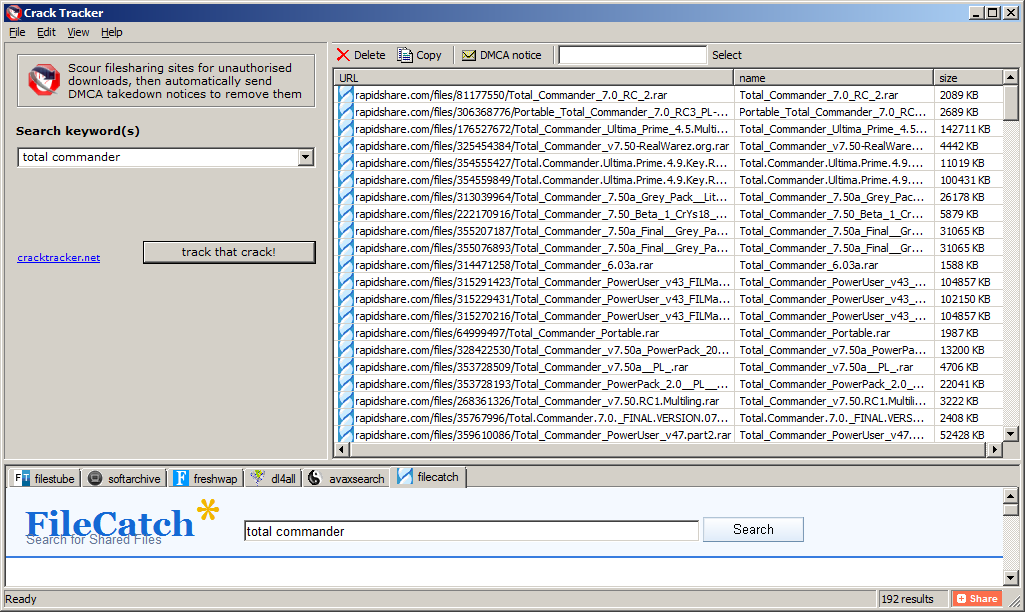
Software piracy is a real issue for every software company, large and small, and it isn’t going away any time soon. So when I heard that fellow microISV owner Nikos Bozinis had created a tool to help software vendors fight  piracy, I asked him to write a guest post. He kindly agreed to write this post about software piracy, the Digital Millennium Copyright Act and his CrackTracker product.

Why buy something when you can download it ‘for free’? Billions of dollars are lost every year from illegal downloads of music, movies and software. People around the world seem to have very lax morals when it comes to abusing digital content. Downloading the latest movie or windows software from rapidshare.com somehow doesn’t strike them as theft — it’s not like stealing a loaf of bread! The traditional music industry is already down on its knees as a result, and software may be the next to follow.

Software authors and music enterprises are fighting back by tightening the DRM (Digital Rights Management) of their products in a futile effort to stop online piracy. But usually crackers have no problem circumventing any protection system that we can dream up. To add insult to injury legitimate customers are usually hurt by such reinforced software protection and activation systems. A little bit like the war on terror, isn’t it?

A different line of defense for ailing copyright owners is the Digital Millennium Copyright Act (DMCA), a US law with global reach for copyright protection (the european EUCD equivalent is not as broadly known). This law is very broad, and not without controversy, but it works – closing down websites that distribute illegal content and removing copyright infringing downloads from file-hosting websites with summary procedures, among other things. So if you discover your software illegally distributed in some warez website, you can send a so called “DMCA section 512 takedown notice” to the website host and they are expected to remove that particular file from circulation — or risk the wrath of the law.

Software Piracy

I have been a microISV for over 10 years so lets forget about the entertainment industry and concentrate on my field, software. There are over 200,000 programs listed on download.com and that’s just for Windows. Many are created by very small to medium sized companies — many even run by a single programmer/webmaster/marketer/entrepreneur. I bet that all these programs are cracked in one way or another — at least those popular enough for crackers to care about them. If you search for warez or torrents you will find the software you want for free, either the latest or an older working version.

Piracy statistics from Business Software Alliance report 2009 (click image to enlarge).

I sell a file manager called xplorer². I track how many people install the program every day and also I have a good guesstimate for the number of people using cracked versions of xplorer². I estimate over 70% of the regular users use one of the known keygens. Imagine if this 70% didn’t exist or it was converted to regular paying customers!

How is it done?

Downloadable software falls into 2 categories: those that run in trial mode until you buy a key to unlock the full functionality; and those that are special downloads for customers that pay the registration fee. In all cases some sort of unlocking takes place using a plain key, or a license file, or online activation, or some combination thereof. Many ISVs write their own licensing code, while others rely on off-the-shelf protection and licensing products (Armadillo, WinLicense etc).

Imagine you shipped your source code along with your program, then it would be trivial for even amateur crackers to bypass your protection and run the program without paying. Very few vendors supply source code, but people in the know can read off your licensing logic like an open book using specialized reverse engineering tools (softICE, IDA and other debuggers and disassemblers). Then they can create a ‘patch’ or modification to your executable that bypasses the protection.

An even worse type of compromise is a keygen. When the cracker uncovers the logic of your unlock keys, he can create a program to generate such keys which look and behave exactly like the legitimate ones you sell to your customers. Then he doesn’t need to patch your program, he just supplies this keygen to the warez community and everyone can help themselves to your program. You can guard yourself against such attacks using asymmetric encryption algorithms for your keys.

Is there a perfect protection system?

In short, no. If you consider that your program is presenting its logic to anyone with moderate experience in machine language, then sooner or later any protection can be circumvented. Professional protection schemes utilize encryption to protect sensitive parts of your code, but even they won’t withstand the cracker test. And remember the harder your DRM the more likely your program will be mistaken for malware (!) as many viruses and trojans use encryption tricks.

Even if there was a perfect system, your sales would still be at risk. All that’s required is some of your customers to post their unlock key in a warez site, and the game is lost. You would then blacklist that serial, until another one was leaked and so on.

The warez scene

There are people who don’t spend any time in Facebook or YouTube. They surf the internet for free stuff. Cracked versions of commercial software (aka warez) circulate in some shady forums that bring together the crackers with the downloaders e.g. http://www.warez-bb.org.  Browse a warez site and you will find any software, movie or music you fancy, with an assortment of popups and dodgy advertisements of the usual internet 3P products (Pills, Poker and Girls [sic]). For your convenience there are even specialized search engines that search a number of such forums simultaneously, e.g. http://www.warez.com.

These forums do not host the actual files. They refer the traffic to specialized file hosting services like rapidshare.com. To make the most of warez you need to buy a subscription to access such file hosting sites (e.g. unlimited downloads from $9/month). Incurable cheapskates could get away without paying anything though, as you can download for free after a forced (nag) waiting of a minute or two.

A bit more up-market are download sites where to gain access you need to purchase a subscription, e.g. http://www.nowdownloadall.com. I have never paid to enter such a site, but they promise access to any download you can imagine. So you pay a monthly fee to download as much as you like. Note that this is different from paid-for hosting mentioned above. I suppose that you need a file hosting subscription on top to get the actual files downloaded. With so much stuff available for free I don’t know if this approach makes economic sense.

Finally there are traditional peer-to-peer file sharing networks, where people share their software music and video through torrents. After the demise of Napster torrents are still strong, with completely decentralized databases immune to legal intervention. The downside of torrents is their inherent unreliability, so people in a hurry will prefer the immediate gratification of a full download from rapidshare.com and the like.

Why do they do it?

It is easy to understand why someone will prefer ‘free’ software instead of paying up. But what about the crackers, the people who circumvent the DRM and distribute these warez. Why do they do it? Here are a few plausible motives:

  • For kicks. The traditional hacker stereotype is a geeky person whose pastime is breaking into computer networks. Cracking into a software’s protection and stripping it clean must be a pleasure in itself, a ritual destruction of the evil Death Star.
  • For glory. Marxist theory claims that private property is theft. This concept has struggled with real tangible property, but digital property is the ideal trophy. Many groups feel that software and music should be free (!) so taking down the big media and software corporations is a noble cause for them. But many small ISVs fall victims too, and the real motives are far less revolutionary…
  • For profit. Marx is dead; long live Das Kapital. Warez downloads are big business in a number of ways:
    • Direct subscriptions charges to access the downloads
    • Selling password unlockers (e.g. you download something in a ZIP archive which is locked and you need to buy some software to unlock it)
    • Distributing malware. Many downloads are packed with malware (sample report for a keygen), from straightforward scams and ransomware to trojans that turn your computer to a zombie, waiting for instructions to launch a DDoS attack or send spam.

You *can* remove illegal downloads

If your software is available to download from warez sites, either compromised (patched or keygened) or simply accompanied by a simple serial number to unlock it, you will definitely lose sales. The good news is that, using DMCA provisions, you can have these unauthorized downloads removed. Without these downloads prospective users will have no choice but to buy your software — or move on to your competitor’s cracked software.

Here is how to remove illegal downloads:

  1. Find your download links. All illegal downloads end up in a host like rapidshare.com or megaupload.com (I know of more than 100, but there are 10-20 big player websites). A standard Google search for your software name plus ‘crack’, ‘keygen’ or ‘rapidshare’ will find some hits, especially if you search in groups or blogs. Even better use specialized warez search engines like http://www.filestube.com with just your software name as a keyword — the results will be just downloads.
  2. Validate download URLs. Some of the download links you discover may be dead (e.g. very old). Click on each one to see if they are valid or 404.
  3. Send DCMA notices. Group the download links by provider (rapidshare, hotfile, etc), and send a DMCA notice to the abuse email address of each website. Usually this is abuse@website.com (e.g. abuse@rapidshare.com). Each website lists the steps for filing DMCA notices for file removal.

This sounds like a lot of hard work, and it can be, but it works. File sharing websites like rapidshare.com run a legitimate business — they are not responsible for cracks — so if you send them a polite DMCA takedown notice they will remove the copyright infringing downloads.

The DCMA takedown notice

Strictly speaking when you send a DMCA notice you are making allegations of copyright infringement, which is a serious crime. You would imagine that a formal complaint should be launched under the guidance of a solicitor/lawyer. Given the amount of copyright infringement that goes on, the red tape would bring everything to a standstill. The beauty of the DMCA law is that it simplifies the procedure. Sometimes a plain English email explaining the situation to the download site, along with a list of your download locations is all that’s required to have the links removed.

A few websites require a more formal DMCA email including details such as your company address, contact telephone numbers, and some boilerplate statements like “I swear, under penalty of perjury, that the information in the notification is accurate…”. You can find many sample DMCA notices online so I won’t repeat them here. The general idea is that you present yourself as the copyright owner and declare the download URLs as unauthorized, and therefore infringing your copyright.

Torrents slip by

DMCA is very good for removing illegal downloads hosted in popular file sharing websites, but it is powerless against torrents. There is no single source for the download, as the files are kept in many computers. You would have to contact each and every person who shares illegal copies of your software in the peer-to-peer network. This would be hopeless and a waste of effort. Thankfully for the ISV, torrent use is on the decline. People prefer direct downloads of the full package instead of slower peer-to-peer downloads.

The sales pitch

Anyone can search and remove illegal downloads manually. I was doing it the hard way for quite some time, each time I released a new version of my software tool (there’s a lot of cracker activity for each release as they need to update their patches and keygens). However this is very tedious, as you must:

  • enter shady warez forums to search for your keyword, facing annoying popups and adverts you wouldn’t want your wife to see
  • search many locations to ensure you get as many download URLs as possible
  • validate each download URL to see if it is still alive or dead
  • organize download URLs and write DMCA takedown emails for each file hosting website

Even if one wipes all the illegal downloads, new ones will appear over time. So the locate-report-remove cycle must be repeated regularly. This was the motivation for writing Crack Tracker, a tool that simplifies the removal of illegal downloads.

Crack Tracker is a desktop tool, with a meta search engine that securely scans warez databases for your downloads. You supply the search keyword (e.g. your software title or company name) then crack tracker will do an exhaustive search, collect a list of suspect download locations and verify the links with robotic efficiency. After you examine the results you just hit a button and the relevant DMCA emails are sent automatically. It doesn’t get any easier than that.

Crack Tracker doesn’t have a fancy user interface but it is very easy to use. It knows of more than 120 file hosting websites and works with 6 major warez search engines (the list is expanding). It is free to try as a search engine; to send the actual DMCA emails you need a registration, but I believe the price is very reasonable, especially if you consider the money you lose in pirated versions of your software.

Why don’t you try it for free and see how many cracks of your software it finds?

Download CrackTracker for Windows (318KB)

Nikos Bozinis ditched his Process Systems Engineering PhD to run his own microISV ZABKAT since 1999. He also writes a weekly blog focusing on file management and occasionally on programming, debugging and running a software business.

Reminder – microISV pub meetup in Wiltshire

In case you missed the previous post, I am organizing a get together for microISVs in Swindon on Thursday 27th January. More details here.

An interview with Terrell Miller of CattleMax

Software developers are usually so busy writing software for other techies, that they often forget there is a bigger world out there. Terrell Miller has a successful herd management software product for cattle ranchers. He generously agreed to share his experiences on what it has been like building a software business in a non-techie niche market.

Can you tell us a bit about CattleMax?

CattleMax is herd management software designed specifically for beef (meat) cattle, and helps ranchers keep track of their cattle records including births, purchases, sales, breeding history, measurements, lineage, and more. Having the records in one location enables producers to stay organized and helps them make better decisions – which in turn helps them be more efficient and profitable in their operation.

What was your background before CattleMax?

My wife Penny and I met at Texas A&M University while we were both in Undergraduate programs. My degree in Information Systems in the College of Business and family member’s involvement in cattle, along with Penny’s degree in Agricultural Leadership and years of showing cattle, proved to be a great compliment for us to start a business where we could work together.

How long have you been working on CattleMax?

I started working on the first version of CattleMax, which started out as a custom application for a local ranch, in July 1999 right after I graduated and have worked for Cattlesoft ever since. Penny worked at the local university on a full and then part time basis for 18 months before joining the business on a full-time basis.

What technologies and languages do you use to develop CattleMax?

CattleMax is developed in Microsoft Access 2007. Access has been a key ingredient to our desktop software’s success. A lot of developers don’t give Access the credit it deserves as a powerful and rapid development tool. We have done extensive customizations to our interface to differentiate from the Access default templates and many customers don’t realize we are even using Access.

If you were starting CattleMax from scratch today would you go for a web based solution? Or would you stick with a desktop solution?

That’s a hard choice to make right now in January 2011 because I think we are in a transitionary period.  Developers want to embrace the latest technology because it’s clearly the future. However, you don’t want to create a product that cannot be utilized by all of your customers (Internet in rural areas can still be spotty).  Though we are in the process of developing a web-based version of our CattleMax, I expect the desktop version to continue selling well for years to come.
While a desktop software offers a larger revenue up front to cover customer acquisition costs, a web app can potentially offer more revenue in the long run assuming you have good customer retention.  I think it’s easier to get started with a desktop app because you can use the up-front revenue to reinvest in marketing.
Why did you choose this market? How confident were you that it was a commercially viable market?

You could say the market chose us. Initially, we wanted to create a side project that involved both of our interests. Being students at Texas A&M helped open doors to talk with professors and experts about our product and ideas. Through these talks, we were introduced to a nearby ranch who needed an easy-to-use cattle record keeping system. They became our first customer and continue to use our software today.

How long did it take you you to get CattleMax to v1.0?

It took about 9 months to get CattleMax marketable and stable. Our first public release date was at a local trade show where we received great response. Being a student, we didn’t really have any income to replace – it was the ideal time for us to have started Cattlesoft and the software. We had little to lose and the rest of our life to recover from any business or financial mistakes made.

How technically proficient are your customers? Can you reach them with online marketing?

Our average customer is in the 45 – 65 age range. Over the years, cattle ranchers have become much more knowledgeable with technology. Our marketing is primarily online (PPC, SEO, direct website advertising) along with some print advertising.

The CattleMax user interface looks very slick and intuitive. Do you do any usability testing? Did you find the switch to a ribbon bar difficult for you or your customers?

In the beginning, I would go to a customer’s ranch and watch them use the software. By listening and watching how they interacted with the software, I was able to identify areas of confusion and see ways that we could make processes and areas easier to work with.

The ribbon was mandatory when we switched to Access 2007. While I was initially apprehensive about the change, I now see that the ribbon has made CattleMax easier to use, since it allows priority of certain menu items/common areas by giving them larger icons and visibility.

I see you have a Facebook widget on your home page. Have you found Facebook to be a useful marketing tool?

We use Facebook to post upcoming events, interesting articles and ask our customers for their feedback, plus it’s another way for customers to ask us questions. While advertising on Facebook allows for laser targeting based on interests, our in-house email list is larger than the number of ranchers on Facebook according to their PPC platform. Therefore most of our communications efforts are through our email newsletter and Cattle Management blog.

How did you choose the price of the product?

In the beginning, we chose prices that were comparable to other cattle software programs. We have two editions of our software, one for the commercial/beef producer and another for the purebred/seedstock producer. Each of these editions is available in a Small Herd (50 cow limit) and Standard (no record limit). We chose two editions so that it would be easy for a rancher to confidently choose the edition right for their herd. The two herd size options are so we can offer a solution to small herd producers while providing additional value for larger herds that may require additional support. See Camels and Rubber Duckies.

You have a generous 60-day money back guarantee. Do you have to give many refunds?

We may have one customer, at most, per year return the software because of dissatisfaction. We may have 5 returns a year from people who bought without downloading our trial and wanted a refund – a few of those reasons are receiving it as a gift and not wanting it, software not working on their computer (Windows 95 anyone?), or lacking a key feature. I highly recommend a satisfaction guarantee as it does help customers buy with confidence, knowing that you will stand by your product. No software company wants a dissatisfied customer who feels you “took their money.”

Do you charge for upgrades? Is this a significant source of income?

Our upgrades have been on about a 2-3 year schedule, and current customers can purchase them at half the price of the full version. While upgrade purchases are a double-digit percent of our business, we focus more on new sales. One of the challenges of making a good product is it takes an even better product for customers to understand the value in upgrading.

Do you outsource much work?

We work frequently with independent contractors and freelancers. While we’ve had 6 or more full and part-time employees over the years, I find employee management and “keeping people busy” to be too distracting from working on the big picture. Having people working from their own locations gives us more flexibility, plus we are not limited to just our physical location/city for finding experienced workers.

Do you have any products besides CattleMax?

We adapted CattleMax into LonghornMax, a software for Texas Longhorn cattle that enables breeders to record horn measurements in addition. LonghornMax primarily arose from our connections with the Texas Longhorn Breeders Association where we were previously their official software program. We also raise Texas Longhorn cattle on our ranch near College Station, which is about 90 miles west of Houston. Another spinoff is EquineMax, a software program for horse owners to keep track of their horse records.

Stepping beyond software in 2010, we launched CattleTags.com which is a website for purchasing cattle ear tags. In 2011 we launched LivestockSupplies.com which includes additional equipment and supplies for the ranch. Selling livestock supplies has proven to be a nice complement to our software as it helps us offer additional services and value to customers by offering them convenience and variety of selections, without them even needing to leave the ranch!

Would you recommend others to start a business straight out of college? Or should they work for other people first to gain experience?

The younger you are and the less commitments you have, the easier it is to get started, because your opportunity cost on your time is lower than it will ever be.  Also if your business fails, you have the rest of your life to recover.  I think entrepreneurs can have the best of both: starting their own business while gaining experience.  I’ve learned a lot through in-person networking as well as online communities like Business of Software, Hacker News, SEOBook.

Given that you started the business straight out of college, how did you learn all the business and marketing skills you needed? Did you make a lot of mistakes?

I learned much of my business & marketing skills through three sources: formal academic learning, informal discussions with other entrepreneurs and mentors, and of course personal experience.  Several years out of college, I realized that my business skills and not technology skills were holding me back, so I decided to return to school and pursue my Masters of Business Administration (MBA).
As far as mistakes, I asked one of my mentors about his biggest mistake and he replied “I’ve not made any mistakes, but I’ve bought a lot of expensive learning lessons”.  Many of my learning lessons have been as a result of losing focus and could have been avoided by asking myself “is this the highest priority and best use of my time?”.

Any advice you would like to give to aspiring software entrepreneurs?

I’ve visited with many software entrepreneurs over the years and frequently find an imbalance of priorities.  As programmers we tend to gravitate towards technology and automation.  However, once you’ve built a great product, often times the best return on your time and money is in marketing (blogs, PPC, SEO, print advertising, talking with customers).
Another bit of advice would be to embrace the lifestyle aspect of your business.  Owning your own business helps you be in control of when you work, where you work, how you work, and what you work on.  I consider it a good day when I can wake up in my house, walk down the hall to my office, work for a while, and then spend time outside on our ranch with my family.

Terrell and “Dude”, an 80 inch (200cm) tip-to-tip 2,000 pound (900kg) Texas Longhorn steer.