
 I have looked at quite a few Google Adwords accounts as part of a 1-day consulting package I do for other microISVs and small software vendors. I have also talked to a lot of people at conferences and on forums about Adwords. It clear that a lot of people are wasting a lot of money on Google Adwords, sometimes with really basic mistakes.
For example:
- paying $1.50 per click to advertise a $20 utility
- paying $1 per click for an expensive, English language only development tool in some of the poorest, non-English speaking countries in the world.
Ouch.
Below I list 5 great ways to waste money in Adwords. I have seen them far too often. I have considerable admiration for what Google has achieved. But I think Larry and Sergey are probably rich enough already. I would like to see a lot less people throwing money at them and getting nothing useful in return.
1. Don’t use conversion tracking
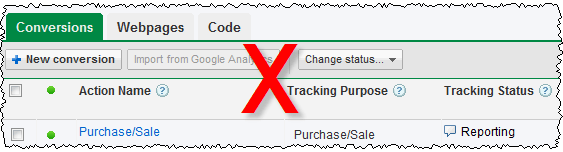
With conversion tracking you decide a goal to track (typically a customer buys your software) and put a small script provided by Google on the appropriate page (e.g. the ‘thank you for buying’ page). Google will then use cookie tracking to calculate the cost per conversion for your ads and keywords. It is that simple and you can set it up in a few minutes. I can’t understand why anyone wouldn’t use conversion tracking. With conversion tracking you will soon notice that some ads and keywords convert consistently better than others, often much better. Armed with this information you can optimise Adwords by changing bid prices and deleting under performing ads. Without conversion tracking it is pure guess work.
Conversion tracking isn’t perfect:
- Adwords cookies time out after 30 days. If someone buys 31 days after they click your ad it won’t be tracked. And the cookie may be pushed out of the cache before 30 days.
- If someone clicks your ad on one computer and then buys it on another computer (or even using a different browser on the same computer) the conversion won’t be tracked.
- Some customers may have cookies disabled.
But imperfect data has to be better than no data. Obviously the 30 day limit on cookies is problematic if you are selling software with a sales cycle that is typically 30 days or longer (e.g. software with a 30 day trial). In that case you are probably better off tracking downloads, rather than sales. The fact that someone takes time to download your software, rather than bouncing straight out of your site, at least shows some interest. If you have stats which show your typical download to sale ratio (and you should) you can use this to work out what a download is worth, and set your bid price accordingly.
2. Don’t use negative keywords
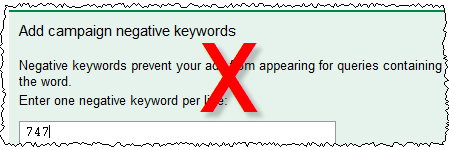
My own experiences with Adwords quickly showed me that people will click an ad, even if it isn’t at all relevant to what they are searching for. For example people searching for “747 seating plan” will click on an ad with the title “wedding seating plan”. It is the nature of the web that people are surfing rather than reading, and clicking on an irrelevant ad doesn’t cost them anything. You can avoid a lot of wasted clicks with carefully set-up negative keywords. For example, you can be sure that I have “747” set up as a negative keyword.
Ways to find negative keywords include:
- Generating ‘Search Query Performance’ reports from Google Adwords reporting
- looking through your web logs/analytics for the sort of terms people are typing into search engines to find your site
- using Google’s keyword suggestion tool
- using Google suggest
There is also a useful list of negative keyword suggestions on Alwin Hoogerdijk’s blog.
3. Advertise in developing countries
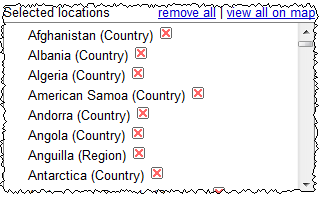
Over a billion people have access to the Internet. Many of them are in developing countries and aren’t realistically going to buy your software due to a combination of: cost (even $20 is a lot of money to people in many developing countries), payment issues (they may not have access to credit cards), language issues (your software isn’t localised for them) and cultural issues (there just isn’t much respect for intellectual property and copyright in many parts of the developing world). But that certainly won’t stop them clicking on your ads and you still have to pay for the clicks.
Start with wealthy countries where plenty of people speak a language your software has been localised into. If you really think you might be able to make a return in developing countries, then test it by creating a separate campaign that only runs in these countries and set your bids much lower (it is very easy to duplicate a campaign with Adwords Editor).
4. Bid too much
Lets use an example:
- Your software sells for $30, of which you get $20 after subtracting ecommerce fees and average support costs.
- Your typical visit to sale conversion ratio is about 1%.
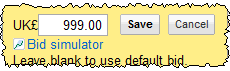
That means you will only break even if you pay $0.20 per click through Adwords. Personally I find it hard to justify paying more than 50% of my profit to Google. So I wouldn’t bid more than $0.10 per click. If I couldn”t get any impressions at $0.10 per click I would try to either improve my quality score (e.g. improve my ads or delete keywords with low clickthrough rates) or find cheaper ‘long tail’ keywords to bid on. Paying $0.20 or more just to ‘get on the first page’ of Google is crazy (unless perhaps, it is a loss leader for market research purposes). You can’t make up on volume what you lose on each sale!
5. Don’t monitor your results
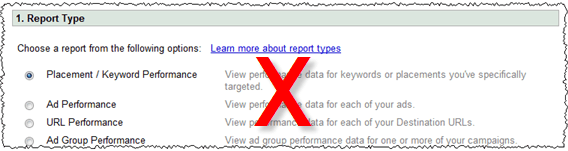
Leaving your adwords campaign running for months on ‘auto pilot’ is ill-advised. Adwords is a constantly changing landscape. Google is continually changing the system and your competitors are coming and going and changing their Adwords campaigns and their products. So you need to continuously monitor how you are doing. Google makes this very easy. For example, you can just set up Adwords reporting to email you a weekly summary of the number of conversions and the cost per conversion for each adgroup. A quick glance through this will let you know if things are going awry.
Conclusion
Adwords can be a very responsive, cost effective and well targeted form of advertising, if you take the time to learn the ropes and experiment. Below is a graph of my return on investment from Adwords for my table planning software over 5 years (almost certainly an underestimate due to the short-comings of conversion tracking, as discussed above). You can see that, after a few months finding my way, I was able to get a consistent ROI of around 4 or 5 to 1 and maintain this in the face of increasing competition.
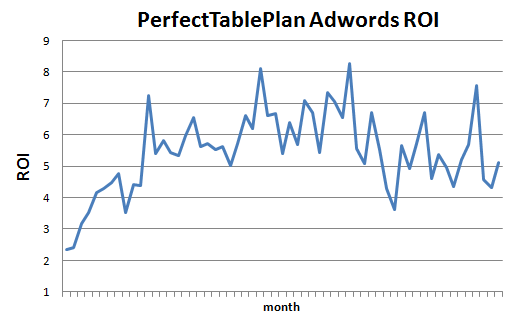
ROI = number of dollars in sales for each dollar spent on Adwords (1=break even).
Adwords is a complex system and the defaults are weighted in the house’s favour. In this article I have only touched on a few of the biggest mistakes I see. Google will give you plenty of rope to hang yourself and there are lots of other, less obvious ways to lose money. You really need to take the time to learn the system and experiment if you are going to have any chance of getting a decent return.
When I started with Adwords 5 years ago I read the Perry Marshall e-book on Adwords (beware – long copy!). I found it quite helpful. I assume they have kept it up to date. If nothing else, you will learn what it is like to be relentlessly marketed and upsold to. Google also has lots of free Adwords documentation and videos. If you go to conferences such as SIC or ESWC it well worth listening to Adwords specialists such as Dave Collins of softwarepromotions.com (formerly sharewarepromotions.com) talk about Adwords. There is also lots of useful information in the blogosphere. Start with a small daily budget and gradually increase it as you learn what works for you.
If you haven’t got the time or inclination to learn the system and experiment, pay someone who knows what they are doing to do it for you or stay well away from Adwords. Also bear in mind that Adwords works better for some products than others. If I was selling a $20 Mac-only product in a market with lots of more expensive competitors, I probably wouldn’t even bother trying Adwords.
** Update **
I used a deliberately provocative headline for this post, because I wanted to emphasize the fact that a lot of people are wasting a lot of money on Adwords. It seems to have worked in terms of traffic. But, judging by comments here and on Hacker News it has also confused some people. Sorry about that. To clarify, the sections heading are telling you how to waste money. To maximize your ROI you should do the opposite:
- use conversion tracking
- use negative keywords
- only advertise in richer countries
- not bid too much
- monitor your results

 One of the keys to success in Google Adwords (and other pay per click services) is to write good ad copy. This isn’t easy as the ads have a very restrictive format, reminiscent of a haiku:
 You can now find out what sites your Google content ads are appearing on, using the new ‘placement performance’ report. This will alllow you to spot under-performing sites in a content campaign. To exclude a site from your campaign click the ‘excluded site(s)’ link at the top of the appropriate campaign page.
 If you use Google Adwords you will want to read
  Google has a
  I have been using
  Just over a month ago I
