Category Archives: Windows

The great digital certificate ripoff?

digital certificateRipoff: A ripoff (or rip-off) is a bad deal. Usually it refers to an incident in which a person pays too much for something. A ripoff is distinguished from a scam in that a scam involves wrongdoing such as fraud. From Wikipedia.

Digitally signing your software allows you to show that you are the author of the software and that the application hasn’t been tampered with. If your software isn’t signed, Windows displays scary looking warnings when customers download it. So it makes a lot of sense to digitally sign your software if you are distributing it on Windows. So far so good.

Anyone can create their own digital signature, but Windows only ‘trusts’ signatures that have been created by certain third parties. While there are quite a few Microsoft root certificate program members, I am only aware of 3 that sell code signing (‘authenticode’) certificates. This is where it starts to get ugly. Here are their published prices per year:

Verisign: $499.00

Thawte: $299.00

Comodo: $119.95

That seems an awful lot considering that all they appear to do is check a document (e.g. a scan of your certificate of incorporation), check your whois record, multiply a couple of large prime numbers and then send you a certificate file. Much of this process is (or should be) automated. No wonder the founder of Thawte could afford to be one of the first space tourists.

Given that authenticode certificates from these three companies are functionally identical[1], as far as I can tell, why the price difference? It seems even more bizarre when you consider that Verisign now own Thawte. If you had the misfortune to sign up for the Microsoft ‘works with Vista’ program you could get a 1-year Verisign code signing certificate for $99. I doubt they were doing this at a loss, so how can they justify selling the exact same certificate for $499? I would guess that at least 99% of customers will never check who issued a certificate, so it can hardly be due to the power of the brand.

So why doesn’t someone just set up their own certificating authority, get approved by Microsoft, and undercut these 3 companies? Because their root certificate wouldn’t be installed on all the millions of PCs currently out there. It would be worthless until the vast majority of PCs had the new root certificate. What a fantastic lock-in!

The good news is that you can buy Comodo certificates for much more reasonable prices from these resellers:

Tucows: $75 [2]

KSoftware: $85 ($75 for ASP members)

Which rather begs the question – if resellers can make a profit at $75, why are Comodo charging $119? Because they can, I suppose. I emailed Verisign, Thawte and Comodo to ask about the disparities in price. I only received a reply from Comodo:

This [difference between their price and the reseller price] is simply due to Retail Vs Wholesale solutions we offer. Our Resellers commit to a specific program which enables discounted prices allowing them to make margins on the product as they see fit. Whether that be reduced prices, or make a cash profit from the sale.

All 3 companies have had major price hikes in the last few years. With so little competition, why wouldn’t they? So what is Microsoft’s role is in all of this? One would have thought that they would want to keep certificate prices low to encourage their wider adoption. I emailed Microsoft’s PR people to ask about pricing and whether they had any financial interest in Verisign. Here is the response:

1) Why does Microsoft “insist” on VeriSign certificates?

Microsoft Windows Quality Labs only recognizes files that are signed with a Verisign Class 3 Certificate of Authority (COA). Windows Quality Labs is evaluating recognizing other COA’s. There is a USD $399 offer for Class 3 COAs for those partners (IHVs, OEMS, ISVs) – who plan to submit solutions for Microsoft certification. More details are available at http://www.verisign.com/code-signing/msft-organizational-certificates/.

2) Does Microsoft have any comment to make on the disparity in price?

VeriSign also offers a USD $99 Organizational ID certificate. This provides authentication for organizations to Microsoft Windows Quality Labs, providing access to various services, such as creating submission IDs for products to undergo Microsoft testing. This certificate is not valid for signing drivers or executable files.

Information pertaining to Microsoft Investments can be located at the MSFT Investor Relations site, under Investments/Acquisitions: http://www.microsoft.com/msft/default.mspx.

Steve Bell, Senior Product Manager – Server Certification Programs, Windows Server

After a bit of surfing I found this page which says that Microsoft invested in Verisign in 1996. I don’t know how much they invested, but it certainly puts things in a rather different light. So Windows authenticode certificates are effectively controlled by just 2 companies, at least one of whom is part-owned by Microsoft[3]. Companies are in business to make profits, but it seems to me that these companies are using their effective monopoly to take advantage of the situation. I only see the situation getting worse as Windows displays ever more scary warnings for unsigned software. Perhaps this is something government regulators should be investigating. Let’s hope that Verisign don’t buy Comodo as well.

[1] Only Verisign certificates are recognised for some of the Microsoft certification programs, for example x64 Vista driver signing.

[2] You need to register with Tucows to login.

[3] Assuming they haven’t sold their Verisign stock. I am not aware that Microsoft owns any Comodo stock. I haven’t been able to find any further details by Googling.


Windows Vista service pack 1

vista.gifMicrosoft have announced that service pack 1 for Windows Vista has been released to manufacturing. Microsoft claim “great progress in performance, reliability and compatibility”. SP1 will be rolled out through Windows update from mid-March.

My own stats show that Vista has been slowly increasing market share at 1% per month. At this rate it will take it another 5 years to reach the 75% share currently held by XP. But perhaps a lot of people have been wisely waiting for SP1 before committing?

I have been using Vista on my main development machine for the last few months. It is OK once you turn the deeply annoying UAC off. But it is still hard to see any compelling reason to upgrade from XP.

Optimising your application

When I first released PerfectTablePlan I considered 50-200 guests as a typical event size, with 500+ guests a large event. But my customers have been using the software for ever larger events, with some as large as 3000 guests. While the software could cope with this number of guests, it wasn’t very responsive. In particular the genetic algorithm I use to optimise seating arrangements (which seats people together or apart, depending on their preferences) required running for at least an hour for the largest plans. This is hardly surprising when you consider that seating assignment is a combinatorial problem in the same NP-hard class as the notorious travelling salesman problem. The number of seating combinations for 1000 guests in 1000 seats is 1000!, which is a number with 2,658 digits. Even the number of seating combinations for just 60 guests is more than the number of atoms in the known universe. But customers really don’t care about how mathematically intractable a problem is. They just want it solved. Now. Or at least by the time they get back from their coffee. So I made a serious effort to optimise the performance in the latest release, particularly for the automatic seat assignment. Here are the results:

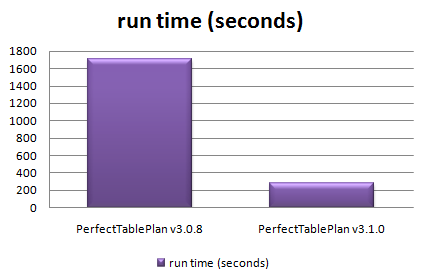
ptp308_vs_ptp_310.png

Total time taken to automatically assign seats in 128 sample table plans varying in size from 0 to 1500 guests

The chart shows that the new version automatically assigns seats more than 5 times faster over a wide range of table plans. The median improvement in speed is 66%, but the largest plans were solved over ten times faster. How did I do it? Mostly by straightening out a few kinks.

Some years ago I purchased my first dishwasher. I was really excited about being freed from the unspeakable tyranny of having to wash dishes by hand (bear with me). I installed it myself – how hard could it be? It took 10 hours to do a wash cycle. Convinced that the dishwasher was faulty I called the manufacturer. They sent out an engineer who quickly spotted that I had kinked the water inlet pipe as I had pushed the dishwasher into place. It was taking at least 9 hours to get enough water to start the cycle. Oops. As soon as the kink was straightened it worked perfectly, completing a cycle in less than an hour. Speeding up software is rather similar – you just need to straighten out the kinks. The trick is knowing where the kinks are. Experience has taught me that it is pretty much impossible to guess where the performance bottlenecks are in any non-trivial piece of software. You have to measure it using a profiler.

Unfortunately Visual Studio 2005 Standard doesn’t seem to include profiling tools. You have to pay for one of the more expensive versions of Visual Studio to get a profiler. This seems rather mean. But then again I was given a copy of VS2005 Standard for free by some nice Microsofties – after I had spent 10 minutes berating them on the awfulness of their “works with vista” program (shudder). So I used an evaluation version of LTProf. LTProf samples your running application a number of times per second, works out which line and function is being executed and uses this to build up a picture of where the program is spending most time.

After a bit of digging through the results I was able to identify a few kinks. Embarrassingly one of them was that the automatic seat assignment was reading a value from the Windows registry in a tight inner loop. Reading from the registry is very slow compared to reading from memory. Because the registry access was buried a few levels deep in function calls it wasn’t obvious that this was occurring. It was trivial to fix once identified. Another problem was that some intermediate values were being continually recalculated, even though none of the input values had changed. Again this was fairly trivial to fix. I also found that one part of the seat assignment genetic algorithm took time proportional to the square of the number of guests ( O(n^2) ). After quite a bit of work I was able to reduce this to a time linearly proportional to the number of guests (O(n) ). This led to big speed improvements for larger table plans. I didn’t attempt any further optimisation as I felt was getting into diminishing returns. I also straightened out some kinks in reading and writing files, redrawing seating charts and exporting data. The end result is that the new version of PerfectTablePlan is now much more usable for plans with 1000+ guests.

I was favourably impressed with LTProf and will probably buy a copy next time I need to do some optimisation. At $49.95 it is very cheap compared to many other profilers (Intel VTune is $699). LTProf was relatively simple to use and interpret, but it did have quirks. In particular, it showed some impossible call trees (showing X called by Y, where this wasn’t possible). This may have been an artefect of the sampling approach taken. I will probably also have a look at the free MacOSX Shark profiler at some point.

I also tried tweaking compiler settings to see how much difference this made. Results are shown below. You can see that there is a marked difference with and without compiler optimisation, and a noticeable difference between the -O1 and -O2 optimisations (the smaller the bar, the better, obviously):

vs2005_optimisation_speed.png

Effect of VS2005 compiler optimisation on automatic seating assignment run time

Obviously the results might be quite different for your own application, depending on the types of calculations you are doing. My genetic algorithm is requires large amounts of integer arithmetic and list traversal and manipulation.

The difference in executable sizes due to optimisation is small:

vs2005_optimisation_size.png

I tried the two other optimisation flags in addition to -O2.

  • /OPT:NOWIN98 – section alignment does not have to be optimal for Windows 98.
  • /GL – turns on global optimisation (e.g. across source files, instead of just within source files).

Neither made much noticeable difference:

vs2005_additional_opt.png

However it should be noted that most of the genetic algorithm is compiled in a single file already, so perhaps /GL couldn’t be expected to add much. I compared VC++6 and VS2005 version of the same program and found that VS2005 was significantly faster[1]:

vc6_vs_vs2005_optimisation_speed1.png

I also compared GCC compiler optimisation for the MacOSX version. Compared with VS2005 GCC has a more noticeable difference between optimised and unoptimised, but a smaller difference between the different optimisations:

gcc_optimisation_speed.png

Surprisingly -O3 was slower than -O2. Again the effect of optimisation on executable size is small.

gcc_optimisation_size2.png

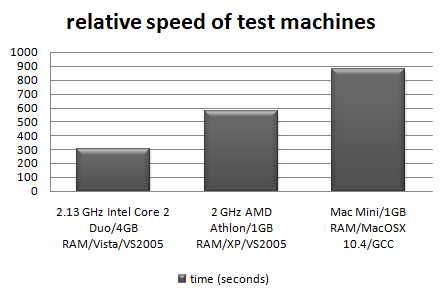
I also tested the relative speeds of my 3 main development machines[2]:

relative-machine-speed.png

It is interesting to note that the XP box runs the seat assignment at near 100% CPU utilisation, but the Vista box never goes above 50% CPU utilisation. This is because the Vista box is a dual core, but my the seat assignment is currently only single threaded. I will probably add multi-threading in a future version to improve the CPU utilisation on multi-core machines.

In conclusion:

  • Don’t assume, measure. Use a profiler to find out where your application is spending all its time. It almost certainly won’t be where you expected.
  • Get the algorithm right. This can make orders of magnitude difference to the runtime.
  • Compiler optimisation is worth doing, perhaps giving a 2-4 times speed improvement over an application built without compiler optimisation. It probably isn’t worth spending too much time tweaking compiler settings though.
  • Don’t let a software engineer fit your dishwasher.

Further reading:

“Programming pearls” by Jon Bentley a classic book on programming and algorithms

“Everything is fast for small n” by Jeff Atwood on the Coding Horror blog

[1] Not strictly like-for-like as the VC++6 version used dynamic Qt libraries, while the VS2005 version used static Qt libraries.

[2] I am assuming that VS2005 and GCC produce comparably fast executables when both set to -O2.

Codekana

codekanaI don’t remember when or where I first saw an editor with syntax highlighting. But I do remember that I was ‘blown away’ by it. It was immediately obvious that it was going to make code easier to understand and syntax errors easier to spot. I would now hate to have to program without it. So I was interested to try version 1.1of CodeKana, a recently released C/C++/C# syntax highlighting add-in for Visual Studio.
Codekana features include:

  • Finer grained syntax highlighting than VS2005 provides.
  • Highlighting of non-matching brackets and braces as you type.
  • Easy switching between header and body files.

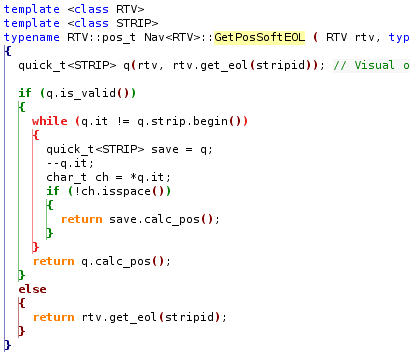
In the code below Codekana colours the if/else/while blocks differently and visually pairs the braces:

syntax highlighting

I have only been using Codekana a few hours, but I am already impressed. I find the ability to quickly switch between C++ header and body files particularly useful. VS2005 only appears to allows switching body to header, not header to body (doh!). You need the dexterity of a concert pianist for the default Codekana keyboard shortcut (Ctrl-Shift-Alt-O), but it can be customised. I changed it to Ctrl+. (dot) .

Codekana also has other features, such as the ability to zoom in/out on code. This is quite ‘cool’, but I’m not sure yet whether it will be of much use. Time will tell.

I am new to VS2005 and I have yet to try out other add-ins, such as Visual Assist, but Codekana certainly seems to have a lot of potential and is excellent value at $39. I look forward to seeing what other features get added in future versions. Find out more and download the free trial here.

Disclosure: The author of Codekana is a JoS regular who I have corresponded with in the past and was kind enough to send me a complimentary licence.