Category Archives: software

Learning from failure – contributions wanted

We hear plenty about the businesses that succeed, but little about the businesses that fail. This can lead to a very skewed perspective on what works and what doesn’t. But I think failure can often teach us as much as success. So I am interested in trying to put together an article on my blog about commercial software products that have not been successful. If you have been involved in a failed product, or at least one that hasn’t been successful so far, I would love to hear from you. I need to know:

  • A brief description of the product – (URL and/or product name optional, you can be deliberately vague if you want to stay anonymous).
  • Why you consider it to have failed commercially. Did you sell any?
  • What you did wrong (ideally 3-5 bullet points) or would do differently if you could do it again.
  • How much time/money you invested in it and what impact that had on your personal finances and circumstances.
  • What happened? Are you still trying to make it succeed? Have you given up? Did you succeed with another product?
  • Do you regret doing it?
  • Anything else you think might be useful to others thinking of creating their own commercial software product.

Maybe you can save someone from making the same mistakes you made? Please email me at andy {at} oryxdigital.com. Hopefully I can get enough contributions to make a viable article. Links to articles about failed products would also be great.

New Software Marketing Facebook group

Alwin Hoogerdijk has created a ‘Software marketing’ Facebook discussion group. Personally I’m not a fan of Facebook, as will be obvious to anyone that checks out the howling void that is my Facebook account. But Alwin is a very smart online marketer, so I have tried to overcome my aversion to Facebook and joined the group. Just don’t expect me to care how you are doing at Farmville …

How to find a great software product name

A while back I exchanged a few ideas with Dennis Gurock about names for their new testing product. Choosing a name is difficult, but it is something every product developer has to do. So I asked Dennis to write a guest post about the process they went through before they ended up with ‘TestRail’.

Coming up with a great name for your new business, product or service is hard. I’m sure you already noticed that! But what is a good name anyway? Deciding if you like a name is, of course, pretty subjective. But there are some useful criteria that can help you find a great name.

Around a year ago we desperately needed a name for the new test management software we had been working on. We aren’t very good with names. In fact, we used a codename for the project until the very last minute, so that we didn’t have to come up with the product name earlier. Still, even with many months to think about a name, it was difficult to find one that we liked.

So what did we do to finally decide a name? We made a list, of course (we are programmers for a reason). A list of objective criteria that the new name should meet. This helped us quickly evaluate new names that we brainstormed. So I figured, if it helped us coming up with a name, why not share our tips with other fellow programmers? So here are the criteria that we used to find a name for our new product.

#1 The shorter, the better

A good, catchy name needs to be short. Do you think Google would be used as a verb today if it had six syllables? I don’t think so either. But even if you don’t plan to become the next Google, having a short name that can be used in everyday discussions is a powerful way to make your brand stick. “Have you seen the bug report in Jira?”, “Could you post your meeting notes to Basecamp?”, “What’s the project status in TestRail?”

#2 Make it easy to spell

Coming up with “creative” and “hip” ways to spell your new name is generally not a very good idea. I’m pretty sure Joel Spolsky has regretted more than once naming his bug tracker FogBugz. I once talked to a customer who kept calling it fog bug zed and I’m sure he is not alone. You don’t want a customer’s purchasing department not find your product on the web because they are unable to spell it correctly.

#3 Own the .com domain

Did you notice that a lot of companies don’t own the .com domain of their new brand names lately? There’s a good reason for it: most good .com domains are taken. If you have been trying to register a good domain name recently you know how frustrating that can be. Still, I don’t believe it’s a good idea to just own widgethq.com, or foobarapp.com. Invest the time and resources to come up with a name that you can  register or buy the .com domain for. You don’t want a competitor to purchase “your” .com domain from a domain squatter after you invested tens of thousands of dollars to promote your brand name.

#4 Trademarks, or: how not to get sued

This one is important. You really want to make sure that you are not infringing on someone else’s trademark. So make sure your new name is not already used or registered (at least in your industry) and that it’s not similar to an existing mark. Ideally you come up with a name that you can easily register with your country’s trademark office (and then do so when you actually use it). I’m not going to pretend that I know everything about trademarks and I’m not a lawyer. So make sure to either contact a lawyer or do your own research on this topic. I found Trademark: Legal Care for Your Business & Product Name from Nolo pretty helpful.

#5 Google is your friend

I’m sure Microsoft didn’t foresee how a simple name could impact developers’ life so negatively when they decided to name their new software platform .NET over ten years ago. It turned out that such a generic name (especially with a leading dot) made it really difficult for developers to find related resources online using a search engine. Don’t make the same mistake. Choose a name that is unique and can be easily found on Google. It can also help your search rankings if your product name contains relevant search terms. For example, our new product is related to software testing and having the term ‘test’ in the product name helped us considerably with this.

#6 Consult a native speaker

Are you not a native speaker of the language your primary market communicates in (e.g. English)? Have you found a great name that is unique, that no one uses, has no trademark registration and is available as a .com domain? Congratulations, you’ve probably found a name that is severely offensive to native speakers in one way or another! If it weren’t so embarrassing, this would now be the place where I told you a story about how I once almost named a product similar to a body part you don’t usually want to talk about in a business conversation. The moral of the story is that you should always discuss your name ideas with a native speaker before making a complete fool of yourself.

It can be a challenge to find a name that meets all these criteria perfectly. Some of the criteria are obviously more important than others, but I still recommend trying to come up with a name that meets most of them.

So how did we end up naming our new product? We called it TestRail. It’s not the best name in the world, but we are happy that we came up with a name we like. And most importantly, having finally found a name allowed us to concentrate on doing what we enjoy most: building great tools for software teams.

Dennis Gurock is the director and co-founder of Gurock Software, a company specialized in tools for software development teams and quality assurance departments. Gurock’s first product SmartInspect is a .NET, Java and Delphi logging tool. Gurock’s second product TestRail is comprehensive web-based test case management software to efficiently manage, track and organize software testing efforts. Dennis can also be found on Twitter as @dgurock.

It can also help your search rankings if your product name contains
relevant search terms. For example, our new product is related to
software testing and having the term 'test' in the product name helped
us considerably with this.

SQL Pretty Printer

I did some consulting a few months back for James Wang of SQL Pretty Printer, concentrating mainly on marketing and usability. James was kind enough to send me an update on his progress and allow me to reproduce it here:

I launched my product SQL Pretty Printer several years ago, but I wasn’t satisfied with sales. So I contacted Andy to do some consulting about my product and website.

After several rounds of questions, Andy looked at my product and website and did some research. Andy’s final report is easy to read and understand, and lists about 100 actionable points about my product and website. After that, it took me about 3-4 weeks to apply this advice with the help of Andy. 3 months later, I’m really satisfied with the result: the downloads have increased 36%, and the sales increased 25%.

So my conclusion is if you have a product, and want to sell more, Andy is the person you need to approach.

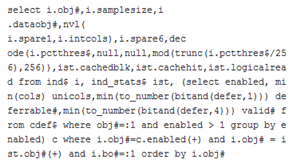
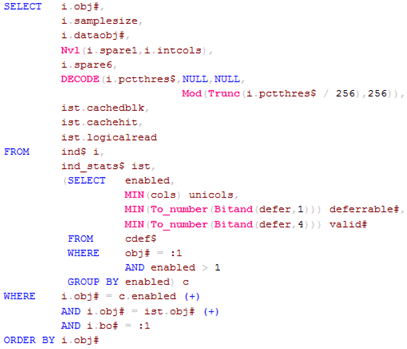
SQL Pretty Printer is a good example of focussing on a single, well-defined problem and really nailing it, allowing you to turn this:

ugly sql

Into this:

pretty sql

SQL Pretty Printer has a wide range of formatting options and comes as a standalone Windows app, Visual Studio add-in, SSMS add-in and even an API for integration into your own app. If you have to work with less than beautiful SQL I recommend you try it.

2Checkout fail

I use 2Checkout.com as a backup payment processor (useful for when PayPal reject a valid card or for people who don’t want to use PayPal). I got this email from 2Checkout a few days ago:

Dear PerfectTablePlan,

The following notes have been added to your account.

Please review this information and take corrective action, if needed by: as soon as possible.

Details: It has come to our attention that you have one or more orders that did not bill because they have not been marked as shipped in the Vendor Admin(VA). 2Checkout.com’s policy will not allow an order for tangible goods to bill if the order is not marked shipped.

We strongly suggest that you notify customers before re-authorizing a charge for any order older than 30 days to prevent unexpected charges and/or bank overdraft fees. Here is a list of your order(s) not marked shipped:

[order no snipped]

To re-authorize and mark your orders as shipped, please follow these steps:

1. Log in to your account.

2. Click on the “Shipping” Tab

3. Click on the “Marked Shipped” sub-tab

4. Choose the option for “re-authorize” and click on “Find Sales”.

5. If the orders have been shipped click on “re-authorize card”

6. If the re-authorization is successful return to the mark shipped tab and choose “Unshipped”.

7. Mark each order as shipped. You are required to enter tracking information or “tracking number not available”.

8. Orders marked shipped will bill within 48 hours.

Please contact our Customer Care Center if you need further assistance.

Thank you,

[signature removed]

Because the customer ordered a CD, 2Checkout doesn’t bill them until I manually marked the order ‘shipped’. I forgot (I have other things to do). They waited nearly 3 months to remind me that I hadn’t marked the order shipped. Then I had to go through 8 steps in their clunky control panel to mark the order as shipped. Why do I have to manually mark the order shipped when other payment processors don’t require it? Why didn’t their email include a link that took me straight to the appropriate page? Why did they wait 3 months to remind me, when 3 days would make a lot more sense? The net result is a waste of my time and (much worse) a customer who may be unhappy about being billed nearly 3 months after the expected date.

I tried to send them some feedback about this through their feedback form, but the form returned:

Fail.

Consider this post as my feedback.

Donationware – An interview with Hillel Stoler of GetSocial

This blog is hosted on WordPress.com. This has its advantages, but it means that I can’t use the huge range of add-ins that are available to those that host their own WordPress server. In my attempts to find a simple way to add social bookmarking to WordPress posts I stumbled across GetSocial, a Windows desktop program that generates the social bookmarking icons you see at the bottom of my recent posts. GetSocial is donationware – the author requests a small donation if you find the software useful. But the software is not crippled or time limited in any way and the donation is optional. I found the software useful so I made a small donation.

I use a number of donationware products. Human nature being what it is, I rarely get round to making donations – despite the best of intentions. It just never quite makes it to the top of my ever expanding TODO list. I have also heard various tales about how dismal the donation rates are. So I was curious about how well the donationware model works in this particular case. I emailed the author of GetSocial, Hillel Stoler, and he was kind enough to do this interview.

What was the motivation behind GetSocial?

GetSocial is not a business – it’s my contribution to the WordPress.com community. I needed a way to generate social bookmarking buttons for my own blog, and when I saw none was available I made GetSocial. I decided to request donations because I too was curious about the feasibility of donationware, and wanted to investigate the subject. I hate spammy “business models” such as installing Toolbars, embedding ads and so forth and wanted to make software that I would like to use.

Does anyone actually make a donation?

Surprisingly, yes. Many people donate, and I think all of them are glad to do so.

What is the average donation?

At the beginning I was only asking for a fixed amount (5 USD). The reason for this was that a fixed donation simplifies the donation process (because the potential benefactor needs to make one less decision). I’ve selected 5 USD because it was the lowest sum of money for which the PayPal commissions amounted to less than 10% of the donation.

Recently I’ve enabled donations in different currencies and variable amounts (but only on my websites, donations made from inside the application are still fixed). I’ve seen some decline in the ratio of donations per download (although it could be explained by many factors, and cannot be directly attributed to the added complexity of the process without applying proper A/B testing methods). However, the average donation has increased to 9.19 USD, and I’ve also received donations of over 20 USD. This is interesting because 19.99 USD is enough to purchase many commercial software products. To date, no one has donated less than 5 USD.

What is the donation/download ratio?

First of all, please consider that GetSocial is upgraded frequently, and I cannot differentiate between a new download and an upgrade download. Also, I can only count downloads which originated from my own websites. That said, dividing the number of the donations by the total number of documented downloads yields a donate/download ratio of about 0.55 percent (e.g. a single donation is received on average about every 182 downloads).

Can you make any money out of donationware?

I do make some money out of GetSocial, but I’m far from making a living out of it. With the current donation/download ratio, GetSocial will only begin to become economically interesting when it hits the 500k download mark. It’s not impossible market-size wise (there are about 10 million bloggers in WordPress.com) but it’s not easy.

The amount of money one can make with donationware is directly proportional to the number of people involved. For example, in the case of GetSocial, take a million downloads, divide by 182 and multiply by 5 dollars and you have 27k USD (before PayPal commissions). This amount of money can cover the development costs for many small software products.

That said, a million is a big number, even for free software. If you’re thinking about making real money out of a donation based product, I would recommend that you research the size of your market carefully. Getting those million downloads is not an easy task.

I personally don’t think that money is the sole motivation for doing things though. When discussing profits, we should also take into account the indirect benefits I receive from GetSocial such as incoming links, a user base, visits to my website, comments, world fame (or at least some publicity), and even fan mail!

And hey, the donationware model works for Wikipedia, doesn’t it?

Why did you choose a donation model instead of selling licences?

The reason I made GetSocial was that when I started hillelstoler.com (on a WordPress.com platform), I wanted to add social bookmarking buttons for my visitors. When I realized no one was doing that (there was an old text file floating around for manual use) I decided to make GetSocial. I wanted to attract visitors to my new blog, and I knew that distributing a hyped piece of free software would help me build credibility and acquire an international audience. It did.

Why did you choose donationware over freeware?

Out of curiosity, I guess. I wanted to know if one could make any money this way, and if people actually pay when they don’t have to (especially in cases where no one is looking). Today I can clearly say that I was pleasantly surprised. I think that Donationware is a beautiful (and very user-friendly) concept, and I’m glad it’s not just another web myth. Besides, I knew that people needed GetSocial, but to be honest I didn’t really think that anyone would actually pay for such a service at the time. In the end, I think that my potential buyers are also the ones who made the effort and donated, even though they didn’t have to. I’ve actually received some donations larger than what I could possibly charge if GetSocial was a commercial product!

Another important factor in my decision was the fact that I could do it rather easily. Recall the old days, when Donationware DOS programs asked you to kindly snail-mail some cash to a P.O box? That’s the kind of thing I would never bother with, especially when we’re talking about an international market.

Do you think you have made more money through donations than you would have through selling licences?

Absolutely! When I’ve received my first donation I was surprised (so people do donate after all), and as donations kept pouring in I realized that there is a donation culture. Selling licenses also meant becoming a part-time police officer, and that’s not what I was after.

What really amazed me, is that even in this very specific niche of social bookmarking for WordPress.com blogs (where I offer an industry grade solution for free) competition still sprung!

How did you promote GetSocial?

I didn’t. I’ve posted about it on the WordPress.com forums several times, and wrote about it on my website, hillelstoler.com. Other people wrote about it too. No paid ads or anything like that. You’ll notice that I didn’t even include a link on the toolbar itself (the viral ‘Get one!’ link you see everywhere else) because it was important to me not to impose.

You now have a web version of GetSocial. How long did that take to create compared to the desktop version? How do the desktop and web version compare in terms of the amount of use and the amount of donations?

GetSocial Live (the on-line version) started as a weekend project actually. GetSocial is a Windows application, and many people wanted a Mac version. Since I don’t even own a Mac, I decided to make a cross-platform web service (currently, about 40% of GetSocial Live visitors are indeed Mac users). It was easy to make, because I copied some of the code directly from GetSocial. The images are all photos I took of the plants in my house. In the end it did mean additional costs (hosting, domain, etc), but originally it was hosted for free on (the late) Google Pages service.

Later on, I discovered that the on-line version made GetSocial much more flexible and dynamic. I can now post updates much more quickly and effectively. The web version is also much easier to upgrade and maintain because it lacks some of the internal complexity of the GetSocial application (things like self encryption).

Do you get any useful revenue from the Google ads on getsociallive.com ?

As in the case of the donations, I was curious about AdSense. I know for a fact that I never click sponsored links myself, but I guess some other people do because Google makes a living out of it. I didn’t bother with A/B testing and other cash boosters, I just added a single ribbon of ads.

So far revenue has been disappointing (this is also the place to mention that the process of getting my AdSense account approved was very annoying and arbitrary, with zero support). There were some cases where I got more than 1 dollar per click, but I currently get more money through donations than through AdSense. Interestingly, the ratio of ad clicks per page view is similar to (though a bit lower than) the ratio of donations per download.

You can find out more about GetSocial here and GetSocialLive here. Hillel’s blog is here.

Add to FacebookAdd to DiggAdd to Del.icio.usAdd to StumbleuponAdd to RedditAdd to BlinklistAdd to TwitterAdd to TechnoratiAdd to Yahoo BuzzAdd to Newsvine

Unskilled and unaware of it

Unskilled and unaware of itHave you ever noticed that you rarely (if ever) meet someone who admits to having below average driving skills? My Grandfather started driving a car before UK driving tests became compulsory in 1935. So he never had to take a driving test. This was lucky for him, because he was a terrible driver. He would get distracted and cross the line into oncoming traffic, veering back at the last second when his passenger started shouting. He claimed he had never been in accident, but I expect he would have seen quite a few if he had ever thought to look in his mirrors. Few people would accept a lift from him a second time. Even as a young boy, I realised that I was in mortal danger getting into his car. I would make an excuse and make my own way by bicycle. And yet, he considered himself a good driver. After having read the excellent book Bad science by Doctor, journalist and blogger Ben Goldacre, I think I know why.

The book contains this startling graph from the paper ‘Unskilled and Unaware of It: How Difficulties in Recognizing One’s Own Incompetence Lead to Inflated Self-Assessments’ by Kruger and Dunning :

Dunning-KrugerGraphics courtesy of explorativeapproach.com (click to enlarge)

The graph shows how good subjects were at logical reasoning as measured by a test (blue), how good they thought they were  (green) and how well they thought they did at the test (red). Apart from the top quartile, there was actually an inverse relationship between how skilled people thought they were and how skilled they actually were. The study also showed that the least competent individuals were also the least capable at recognizing the skill levels of others. This is the abstract from the paper:

People tend to hold overly favorable views of their abilities in many social and intellectual domains. The authors suggest that this overestimation occurs, in part, because people who are unskilled in these domains suffer a dual burden: Not only do these people reach erroneous conclusions and make unfortunate choices, but their incompetence robs them of the metacognitive ability to realize it. Across 4 studies, the authors found that participants scoring in the bottom quartile on tests of humor, grammar, and logic grossly overestimated their test performance and ability. Although their test scores put them in the 12th percentile, they estimated themselves to be in the 62nd. Several analyses linked this miscalibration to deficits in metacognitive skill, or the capacity to distinguish accuracy from error. Paradoxically, improving the skills of participants, and thus increasing their metacognitive competence, helped them recognize the limitations of their abilities.

Or, more succinctly:

Ignorance more frequently begets confidence than does knowledge. Charles Darwin

The findings fit in with the concept of ‘unconsciously incompetent’ in Maslow’s four stages of learning:

  1. Unconscious Incompetence:  The individual neither understands nor knows how to do something, nor recognizes the deficit, nor has a desire to address it.
  2. Conscious Incompetence:  Though the individual does not understand or know how to do something, he or she does recognize the deficit, without yet addressing it.
  3. Conscious Competence: The individual understands or knows how to do something. However, demonstrating the skill or knowledge requires a great deal of consciousness or concentration.
  4. Unconscious Competence: The individual has had so much practice with a skill that it becomes “second nature” and can be performed easily (often without concentrating too deeply). He or she may or may not be able to teach it to others, depending upon how and when it was learned.

The Dunning-Kruger effect might explain why every crank and barstool scientist appears to think they understand global warming better than the world’s top climate scientists. I am also reminded of my own experiences learning ju-jitsu. After a year or two of training, having reached the exalted rank of green belt, I thought I was pretty good. It was only some years later, as a black belt, that I realised how much I still had to learn.

What has this got to do with software? Well, it might explain some of the very poor website design, GUI design, graphics and copywriting I see from time to time. The perpetrators may be sufficiently unskilled, that they don’t even realise how unskilled they really are. It is a thorny problem. Firstly you don’t realise you have the problem. Secondly, even if someone convinces you to delegate or outsource that type of work, you are unable to accurately assess the work of others. It is particularly worrying for one man software companies (such as myself) who have to perform or oversee a very wide range of  skills including: website design, user interface design, programming, testing, copyrighting, marketing, PR, documentation, support and systems admin.

By the same token,  many customers with poor IT skills might not have any insight into the extent of their deficit. Below are the results of a survey I did with some of my own customers a couple of years ago:

skill survey

Note how skewed the results are and bear in mind that relatively few of my customers are IT professionals. Similarly skewed results were reported recently by Patrick McKenzie in his blog:

Surprisingly many of my customers self-evaluate as comfortable with computers.  50% were “very comfortable”, and 30% were “mostly comfortable”.  These numbers are, candidly speaking, not what I would have assigned on the basis of reading support requests for three years.

I don’t have any easy solutions for this problem. All you can do is:

  • accept that you might not be the best judge of your own competence in all areas
  • actively solicit feedback from your customers and your peers and listen carefully
  • be a bit more tolerant of newb@aol.com when they blame your software for problems arising from their lack of basic IT knowledge
  • console yourself that, whatever your IT shortcomings, at least you are a good driver

5 great ways to waste money in Google Adwords

google adwordsI have looked at quite a few Google Adwords accounts as part of a  1-day consulting package I do for other microISVs and small software vendors. I have also talked to a lot of people at conferences and on forums about Adwords. It clear that a lot of people are wasting a lot of money on Google Adwords, sometimes with really basic mistakes.
For example:

  • paying $1.50 per click to advertise a $20 utility
  • paying $1 per click for an expensive, English language only development tool in some of the poorest, non-English speaking countries in the world.

Ouch.

Below I list 5 great ways to waste money in Adwords. I have seen them far too often. I have considerable admiration for what Google has achieved. But I think Larry and Sergey are probably rich enough already. I would like to see a lot less people throwing money at them and getting nothing useful in return.

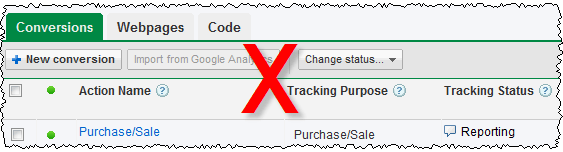
1. Don’t use conversion tracking

conversion tracking adwords

With conversion tracking you decide a goal to track (typically a customer buys your software) and put a small script provided by Google on the appropriate page (e.g. the ‘thank you for buying’ page). Google will then use cookie tracking to calculate the cost per conversion for your ads and keywords. It is that simple and you can set it up in a few minutes. I can’t understand why anyone wouldn’t use conversion tracking. With conversion tracking you will soon notice that some ads and keywords convert consistently better than others, often much better. Armed with this information you can optimise Adwords by changing bid prices and deleting under performing ads. Without conversion tracking it is pure guess work.

Conversion tracking isn’t perfect:

  • Adwords cookies time out after 30 days. If someone buys 31 days after they click your ad it won’t be tracked. And the cookie may be pushed out of the cache before 30 days.
  • If someone clicks your ad on one computer and then buys it on another computer (or even using a different browser on the same computer) the conversion won’t be tracked.
  • Some customers may have cookies disabled.

But imperfect data has to be better than no data. Obviously the 30 day limit on cookies is problematic if you are selling software with a sales cycle that is typically 30 days or longer (e.g. software with a 30 day trial). In that case you are probably better off tracking downloads, rather than sales. The fact that someone takes time to download your software, rather than bouncing straight out of your site, at least shows some interest. If you have stats which show your typical download to sale ratio (and you should) you can use this to work out what a download is worth, and set your bid price accordingly.

2. Don’t use negative keywords

adwords negative keywords

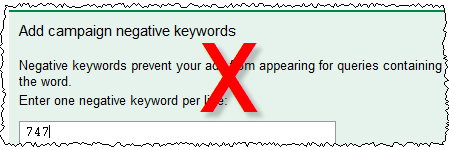
My own experiences with Adwords quickly showed me that people will click an ad, even if it isn’t at all relevant to what they are searching for. For example people searching for “747 seating plan” will click on an ad with the title “wedding seating plan”. It is the nature of the web that people are surfing rather than reading, and clicking on an irrelevant ad doesn’t cost them anything. You can avoid a lot of wasted clicks with carefully set-up negative keywords. For example, you can be sure that I have “747” set up as a negative keyword.

Ways to find negative keywords include:

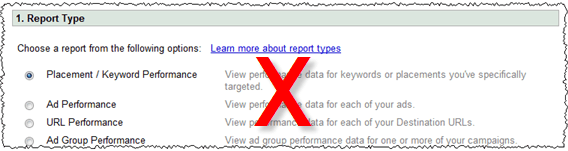
  • Generating ‘Search Query Performance’ reports from Google Adwords reporting
  • looking through your web logs/analytics for the sort of terms people are typing into search engines to find your site
  • using Google’s keyword suggestion tool
  • using Google suggest

There is also a useful list of negative keyword suggestions on Alwin Hoogerdijk’s blog.

3. Advertise in developing countries

adwords country selection
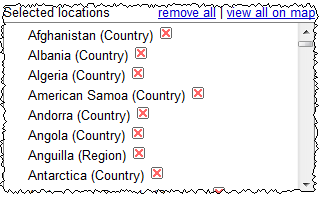
Over a billion people have access to the Internet. Many of them are in developing countries and aren’t realistically going to buy your software due to a combination of: cost (even $20 is a lot of money to people in many developing countries), payment issues (they may not have access to credit cards), language issues (your software isn’t localised for them) and cultural issues (there just isn’t much respect for intellectual property and copyright in many parts of the developing world). But that certainly won’t stop them clicking on your ads and you still have to pay for the clicks.

Start with wealthy countries where plenty of people speak a language your software has been localised into. If you really think you might be able to make a return in developing countries, then test it by creating a separate campaign that only runs in these countries and set your bids much lower (it is very easy to duplicate a campaign with Adwords Editor).

4. Bid too much

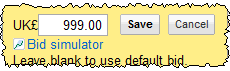
adwords bids

Lets use an example:

  • Your software sells for $30, of which you get $20 after subtracting ecommerce fees and average support costs.
  • Your typical visit to sale conversion ratio is about 1%.

That means you will only break even if you pay $0.20 per click through Adwords. Personally I find it hard to justify paying more than 50% of my profit to Google. So I wouldn’t bid more than $0.10 per click. If I couldn”t get any impressions at $0.10 per click I would try to either improve my quality score (e.g. improve my ads or delete keywords with low clickthrough rates) or find cheaper ‘long tail’ keywords to bid on. Paying $0.20 or more just to ‘get on the first page’ of Google is crazy (unless perhaps, it is a loss leader for market research purposes). You can’t make up on volume what you lose on each sale!

5. Don’t monitor your results

adwords reporting

Leaving your adwords campaign running for months on ‘auto pilot’ is ill-advised. Adwords is a constantly changing landscape. Google is continually changing the system and your competitors are coming and going and changing their Adwords campaigns and their products. So you need to continuously monitor how you are doing.  Google makes this very easy. For example, you can just set up Adwords reporting to email you a weekly summary of the number of conversions and the cost per conversion for each adgroup. A quick glance through this will let you know if things are going awry.

Conclusion

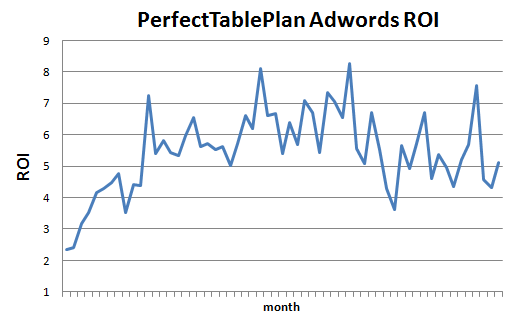
Adwords can be a very responsive, cost effective and well targeted form of advertising, if you take the time to learn the ropes and experiment. Below is a graph of my return on investment from Adwords for my table planning software over 5 years (almost certainly an underestimate due to the short-comings of conversion tracking, as discussed above). You can see that, after a few months finding my way, I was able to get a consistent ROI of around 4 or 5 to 1 and maintain this in the face of increasing competition.

adwords ROI graph

ROI = number of dollars in sales for each dollar spent on Adwords (1=break even).

Adwords is a complex system and the defaults are weighted in the house’s favour. In this article I have only touched on a few of the biggest mistakes I see. Google will give you plenty of rope to hang yourself and there are lots of other, less obvious ways to lose money. You really need to take the time to learn the system and experiment if you are going to have any chance of getting a decent return.

When I started with Adwords 5 years ago I read the Perry Marshall e-book on Adwords (beware – long copy!). I found it quite helpful. I assume they have kept it up to date. If nothing else, you will learn what it is like to be relentlessly marketed and upsold to. Google also has lots of free Adwords documentation and videos. If you go to conferences such as SIC or ESWC it well worth listening to Adwords specialists such as Dave Collins of softwarepromotions.com (formerly sharewarepromotions.com) talk about Adwords. There is also lots of useful information in the blogosphere. Start with a small daily budget and gradually increase it as you learn what works for you.

If you haven’t got the time or inclination to learn the system and experiment, pay someone who knows what they are doing to do it for you or stay well away from Adwords. Also bear in mind that Adwords works better for some products than others. If I was selling a $20 Mac-only product in a market with lots of more expensive competitors, I probably wouldn’t even bother trying Adwords.

** Update **

I used a deliberately provocative headline for this post, because I wanted to emphasize the fact that a lot of people are wasting a lot of money on Adwords. It seems to have worked in terms of traffic. But, judging by comments here and on Hacker News it has also confused some people. Sorry about that. To clarify, the sections heading are telling you how to waste money. To maximize your ROI you should do the opposite:

  • use conversion tracking
  • use negative keywords
  • only advertise in richer countries
  • not bid too much
  • monitor your results

Mailplane

I recently did a day of consulting for Ruben Bakker of  Mailplane. I looked in depth at his marketing and did a screencast of myself downloading, using and buying Mailplane. We also discussed some ideas for a new product. At the end of the process he was kind enough to write me this testimonial:

How can I improve my sales? How can I make my application more profitable? Which of my ideas could be the next software product? With these questions in mind I hired Andy. He evaluated my small business, tested the product, checked the product website/store, and we discussed my strategy. Andy knows the Micro-ISV life and business with all its specialities and constraints. As a result of his work, I’ve now a clear plan and even tools on how to improve my sales. I was already able to put some ideas to work, and they already yielded measurable improvements. And Andy helped me choose my next project, I am now very much looking forward to it.

Ruben Bakker, www.mailplaneapp.com

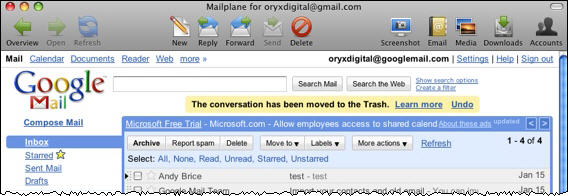
Mailplane is a Mac desktop app that embeds and extends Gmail. For example, Mailplane allows you to drag and drop attachments, something that isn’t possible with Gmail running in a standard browser. This web/desktop hybrid approach potentially gives the best of both world – the richness of a desktop client, with the ability to fall back on the bare web app if required (e.g. from an Internet cafe). I expect to see more web/desktop hybrids in future.

Mailplane is a very polished app and I recommend downloading the free trial if you use Gmail on Mac OS X.

An interesting application of genetic algorithms

I recently watched an interesting BBC documentary called “The secret life of chaos”. It did a good job of explaining how interesting patterns could arise from very simple rules and how these could be further shaped by evolution to create the sort of complexity we see in the living world. It is well worth watching in full.

I have been interested in genetic algorithms for some time and use a genetic algorithm to optimise seating plans in my own PerfectTablePlan software. So I was particularly interested in a segment towards the end, where they showed how naturalmotion.com have used bio-mechanical modelling and genetic algorithms to create virtual humans that can respond realistically to various (unpleasant) physical stimuli, e.g. being shot, being hit or falling off things. The details are sketchy in the TV program, but it appears that they have evolved genetic algorithms that mimic aspects of the human nervous system. For example a human will instinctively put their hands out to cushion a fall or put a hand to an area that has been hit. They then combine this nervous system modelling with physics and a realistic a bio-mechanical modelling of the human anatomy. The results are impressive. You can see them about 2 minutes into the video below.

They claim they can use these models to generate realistic movements for synthetic characters in real time. Their Euphoria software is already being used in computer games, such as Grand Theft Auto IV.

More videos by naturalmotion.com