
Category Archives: software

Problem exists between keyboard and chair

I like my customers. As well paying my salary, many of them have been incredibly helpful in tracking down bugs, suggesting improvements, giving me testimonials and recommending my event seating planner to other people. But every so often somebody buys my software and I really wish they hadn’t. They just don’t have the skills or attitude that is going to result in a happy relationship between me, my product and them.

It isn’t just me. Everyone who does software support has a few ‘war stories’ about crazy things their customers have said or done. I have collected a few of them here for your enjoyment. I hope they will also be educational to those considering selling software or (horror of horrors) working full-time in support. If nothing else, they might make you feel a bit more sympathetic to the person at the other end of the phone next time you have to email or phone someone in support. They come from the ASP forums and various microISVs of my acquaintance and are reprinted with permission. For obvious reasons the authors are anonymous.

Of course, we shouldn’t  feel too superior. Many (if not most) user errors could be avoid by better design and we’ve probably all done stupid things in areas outside our fields of expertise. But sometime the problem really does exist between keyboard and chair.

The litigious

A couple of weeks ago, we had one guy who threatened to sue us because he received a “second hand” CD from us. Turned out he installed our software from the CD and assumed that our included demo database was data from a previous customer.

The quart in a pint pot

Many years ago, back in the days before Hard Drives I spent some time on the phone with a chap who couldn’t get our software loaded. Eventually he issued the words “I had problems getting the disk into the machine in the first place, could that have something to do with it?” I tried to expand on this a little. He eventually said “The disk was too big, so I had to fold it in half”. He’d bought the 5.25″ floppy version and tried to fit it in a 3.5″ slot!!!

The dabbler

My favourite was the user who emailed me saying he’d tried every setting in the options dialog and the software wouldn’t work. I gave him instructions on how to set the options back to the defaults at which he mailed back saying it was now working.

The literalist

I told a customer to right-click on the desktop. I hear scribbling, then he says “I wrote it. Now what?”.

The shiftless

I spent time trying to figure out why someone couldn’t load our software. It was a CP/M based machine. I can’t remember the exact command now, but the instructions showed that to start the software you had to put the disk in the machine and type run “appname” then press enter. The customer on the phone kept getting some error saying file not found or something similar. I couldn’t figure out what was wrong. I’d got her to do a dir and the file was listed as on the disk. We’d scanned the disk for errors, no errors. Finally I had her read back to me what was on the screen. She said “run 2 appname 2”. Finally it clicked that she had no idea that she needed to press the shift key to get the quote character and she was just pressing the “2” key (UK keyboard). To be fair the application she was trying to run was a typing tutor.

The vague

Your program doesn’t work. Where do I have to click?

The misdirected

Someone calls for tech support. They tell me what they are tying to do. I tell them how to do it. They tell me either the steps I give them don’t exist or don’t work. Turns out, they arent using my software, they bought a different product.

The hasty

A customer told me that he had spent 8 hours on a task. What he had done was pretty bizarre, completely missing the entire point of the software. I gently point out that he could have done it in 10 minutes if he had spent 10 minutes reading the tutorial. He told me “I didn’t have the time to read the tutorial”.

The beyond help

My favorite of all time is a user who insisted that my app’s Options screen didn’t work.  He said he kept clicking on check-boxes and buttons but that nothing happened.  I had him reboot just to make sure there wasn’t a problem with Windows at the moment and he did so with the same complaint. Finally, while on the phone, I discovered he was clicking on the screen shot in the help file.  When I explained that images in help files aren’t the same as the application screens themselves he insisted that this was confusing and that I needed to put a large, bold notice below the picture in the help file explaining that the picture above was just a picture.

The blonde

I know im BLONDE trust me!! How the hell do I “DOWNLOAD & INSTALL XXXX”??? All I would truely would is my statement, Is that to hard to ask HELP? Im not the computer buffin. Got any suggestions to help blondie? I would be grateful.
XXXX

The irrelevant

Subject:
for father mobil problam
Message:
sir my father name is XXXX XXXX XXXX  live in india State is Rajasthan my Distt. is bharatpur and address is XXXX XXXX XXXX my father Mobil numbir is not work please help me.

The paranoid

tHIS IS THE  R EAL XXXX. WE HAVE REAL PROBLEMS…. iHAVE IDENITY THEIF GOIN ON AND YOUR FREE DOWNLOAD IS GETTIN SOMEONE INTO MY FILES AND COMPUTER AND THEY ARE SEEING ALL MY INFORMATION… tHIS HAS TO STOP. tHANKS XXXX LET ME KNOW I HAVE PEOPLE WORKING ON THIS ALREADY.

The clueless

There was this lady who had bought a license but could not enter it in the program. I politely responded and tried to guide her to the dialog where to enter it. Btw. this was all in the early days, I didn’t have canned responses yet, I didn’t have ready made screenshots yet, I think there wasn’t even a help file yet. Every day, for 10 days, she responded that she could not find it. I tried everything possible to politely explain it to her, also with screenshots. Her tone was getting nastier with the day, pointing out writing mistakes (UK “s” vs “USA “z”) etc. and claiming she “knew” computers as she had entered data for 40 years. Every day I digged deeper trying to figure this one out. The 10th day she explained that she had entered it in Windows Word, NotePad, Windows Run, and whatever else she could type the code in … yet *nothing had happened* that would rescue her CD data.

Turned out that she had not even installed the software yet. She fell from the sky when I told her to download and install the software first, THEN try to enter the code in the program.

The super signature

Subject:
the software did not work

Body:
Eschew cruelty. It is not only unkind, but unwise to start the spiraling decent that will lead to all parties falling to a lower level!.

Pray, for Obama, Psalm 109:8  “LET HIS DAYS BE FEW; AND LET ANOTHER TAKE HIS PLACE OF LEADERSHIP.”

What does the Lord require of you? To act justly, to love mercy, And to walk humbly with your God. (Micah 6:8)
[URL removed]
or e-smoke supplies at  [URL removed]
Never be arrogant.

[URL removed]

Whiskey makes you think you’re smarter than you are.

Always, always make sure you know who has the power.

Don’t mess with old men, they didn’t get old by being stupid.

The rambling

yes i’ve got to question the true & honest nature which encompasses your company as well as your free downloadeable software. it’s always been my personal experience when something “seems to good to be true”, more often than not it generally is. being a victim of a scam or two on & offline i’d be a complete idiot,  more honestly in laymans terms, that’s just “stupid”. i question everything, good, bad, or indifferent. point!, blank!, period!. so my bottom line question for whomever receives this msg. & responds is this; how do i know this isn’t another one of the 1,000s of  con/scam artists online waiting to take advantage of ignorant, naive people with the mind set of ” sure, why not? as long as it’s free,” type attitude to come along & with one click of a button fall prey just like i did years ago?  i learned real fast if i was going to continue surfing the net as such, i had alot of work/learning to do. as a result, i  became a vessel for stockpiling any/all information. i still look for the catch behind all FREE DOWNLOAD”, “JUST CLICK HERE & IT WILL TAKE CARE OF ANYTHING ELSE”, due to my lack of knowledge surrounding the internet & all the evil, dishonest, “i’m too lazy to get a real job & make an honest living”, “why work for someone else when i can be my own boss & constantly take advantage of all these stupid people?”. damn this is the life. inflate the truth a bit here & there;& wait,wait,& wait. hell, this is just like fishing. i’ve got my bait, my line,pole,&all the time it takes for someone to take hold of my hook, i so easily cast out there,. hell the hard parts over”_ now the easy part, slowly yet carefully reel them in,hence mission accomplished. ironically, they never added illegal activity & a jail /prison sentence into their day of fishing., but i digress &please respond as soon as possible. if nothing else, you’ve definitly sparked my curiousty. be advised in the event your response is filled with big $.50 words dressed in a blanket of bullshit you will be eventually facing several fraudulent type charges, a long time behind bars, not to mention a victiim of your own circumstance.

never again,

XXXX

If that isn’t enough check out Nico Westerdale growing increasingly exasperated by people confusing his magnifying glass application with the built in one on Windows (I’m not sure how many of the comments are other developers having a bit fun at Nico’s expense).

Thank you to everyone that contributed. Please feel free to add your own stories in the comments. If you are worried about the comments not being anonymous enough you can email them to me and I will post them for you.

Advertising your software on Facebook (=Fail)

Facebook previously didn’t allow the advertising of downloadable software. Someone told me that they had relaxed this policy, so I checked their guidelines. Sure enough they have removed the offending line in their guidelines that used to say:

No ad is permitted to contain or link, whether directly or indirectly, to a site that contains software downloads, freeware, or shareware.

It says in their guidelines that downloadable software that does naughty things such as “sneaks onto a user’s system and performs activities hidden to the user” is not allowed, which is fair enough (see section 14 of their ad guidelines for the details).

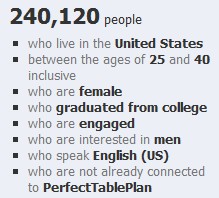
Woohoo! As part of my ongoing project to try every legitimate form of promotion known to man, I can try advertising my seating planner software to, for example:

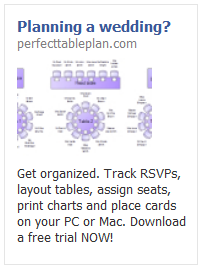
I ran 5 different ads over a couple of weeks. For example:

advertising software on facebookTrying to fit an attention grabbing and informative ad into the very limited strapline and image size was challenging. But I didn’t spend too long agonizing over the ‘creative’ (image and text), as this was just a feasibility study. The biggest problem was the minimum bid prices. Facebook was recommending I bid at least £0.40 per click. Given that the majority of my customers buy a single licence for £19.95 and typical conversion rates for clicks are around 1%, I would be likely to lose money if I bid £0.20 or more (especially when you consider ecommerce fees and support). I bid £0.10, but got no impressions at all. I bid £0.20 as an experiment and got a reasonable number of impressions. As soon as I dropped the bid to £0.15 the impressions slowed to a trickle.

Here are the stats from my experiments, as reported by Facebook:

Impressions: 357,366
Clicks: 310
Click through rate: 0.087%
Total cost: £46.60
Average cost per click: £0.15
Average cost per 1000 impressions: £0.13

Any of you who are used to Google Adwords might be surprised how low the CTR is. But apparently this is quite a reasonable CTR for Facebook. This isn’t too surprising when you consider that people are on Facebook to socialise, rather than to search for stuff.

Of course, the most important metric is the profit. So how many licences did I sell? According to my own cookie tracking: zero. Zilch, nada, nothing, not one. Cookie tracking isn’t 100% reliable, but it seems that a 1% conversion rate might be highly optimistic for a facebook ad. Advertising a £19.95 product on Facebook to people who might be planning to get married obviously wasn’t going to be profitable given my price point, the minimum bid prices and low conversion rate. So I created a new ad to try to target a more focussed demographic, who might convert better and perhaps buy one of the more expensive versions of my product. Ad number 6 was disallowed one minute after it had been approved.

Eh? This ad was very similar to the previous 5 approved ads and for the same product. Their email said:

The content advertised by this ad is restricted per section 5 of Facebook’s Advertising Guidelines. Restricted content includes, but is not limited to: 1. Downloadable products that may affect the user’s computer or browser performance in unexpected or undesirable ways; 2. Get rich quick and other money making opportunities that offer compensation for little or no investment, including “work from home” opportunities positioned as alternatives to part-time or full-time employment or promises of monetary gain with no strings attached. 3. “Free” offers that require users to complete several hidden steps or make additional purchases in order to receive the promised product. We reserve the right to determine what advertising we accept, and will not allow the creation of any further Facebook Ads of this type. Ads for this product, service or site should not be resubmitted.

I didn’t feel my ad/product violated any of those criteria. It was clear in the ad that only the trial was free (not the product) and it doesn’t do anything nasty or sneaky. I emailed them for clarification. Here is the response:

Hi Andy,

Thanks for your email. Please note that we don’t accept ads for downloadable products through our self-service advertising channel. We reserve the right to determine what advertising we accept, and will not allow the creation of any further Facebook Ads for this product.

In order to maintain legitimacy of the products and services promoted on Facebook, ads for downloadable or installable products are only permitted through a direct sales partnership with Facebook. At this time, we’re only able to provide this service to a small set of qualified advertisers.

We’re committed to providing high-quality support for all of our advertisers, and we’ll keep you and your business in mind for the future growth of our ads product. In the meantime, please continue to email us here with any questions you may have and we’ll be happy to answer them for you.

If you have any further questions about why your ad was disapproved for Restricted Content, please refer to our Help Center about downloads at:

http://www.facebook.com/help/?faq=18665

Thanks,

Gloria

Online Sales Operations

Facebook

So apparently, they still don’t accept advertising for downloadable software, unless you are an approved partner, because it ‘may affect the user’s computer’ (even if it doesn’t ). This wasn’t at all clear in their guidelines and they let me run 5 ads before they enforced it (these ads are still running BTW). Thanks Facebook, I like you less with every passing day (and I didn’t like you much to start with). At least I got enough data to show that I was unlikely to ever get a return on advertising a £20/$30 product. I also console myself with the fact that PerfectTablePlan is doing better financially than Facebook (after 7 years and with 500 million users Facebook are finally cash flow positive, but nowhere near recouping the estimated one billion dollars in venture capital) and my product will hopefully still be selling profitably after Facebook has  been buried by the ‘next great thing’ that comes along so regularly in the world of social media.

programmer-tshirts.com shutting shop

Back in 2008 I put together some programmer T-shirt designs to raise money for charity. The project was a modest success, selling 99 t-shirts (92 from zazzle.com and 7 from spreadshirt.com). I was hoping it would have done better, but was somewhat hampered by the high price of print-on-demand T-shirts (especially when you have a charity commission on top) and not finding anyone with the time and skills to make up for my lack of design talent. But it has still raised $302.33+£8.94 to be split between worthy charities sightsavers.org and jaipurfoot.org (plus a generous donation from microISV stalwart Patrick McKenzie).

The 3 most popular designs were:

  1. C++ programmers T-shirt
  2. engineer’s lament T-shirt
  3. I’m coding T-shirt

Sales have now slowed to a trickle. So I don’t intend to renew the programmer-tshirts.com domain and will shut down the shops in the next 7 days to pay out the rest of the commission. If you want to buy one of the t-shirt designs, I suggest you do it now! It would be nice to break 100. If anyone wants the domain I will transfer it for a donation to charity (email me).

Thanks for everyone who helped by sending me T-shirt ideas, linking from their blogs and buying T-shirts. Special thanks to Patrick McKenzie for setting up and hosting the programmer-tshirts.com web site and to Jeff Atwood for running some free ads on stackoverflow.com .

App stores set to dominate future software sales?

Following the success of the iPhone app store (over 6 billion downloads to date), app stores are becoming more and more of a feature of the software landscape. In case you missed it, Apple announced yesterday that there will be an App Store for Macs  ‘within 90 days’. In summary:

  • The Mac app store will be tightly integrated with Mac OS X, including automatic install and update.
  • There will be restrictions on technology, for example Java apps will not be allowed.
  • Apple will keep 30% of any revenue from sales.
  • $99/year subscription for developers.
  • Developers will still be able to sell their software outside the App store.

It is easy to see why Apple would want to do this:

  • A potentially huge new revenue stream from third party Mac software sales.
  • They get even more control over the customer experience.

And this could have advantages for Mac users:

  • Simpler payment and installation.
  • Screening out of low quality apps and malware.

And potential advantages for Mac developers:

  • Mac users might buy more software if it is easier to do so.
  • One main channel to concentrate your marketing efforts on.
  • Some of the boring infrastructure of selling software (licensing, shopping cart etc) can be taken care of by Apple.

But the disadvantages are all too obvious:

  • Your app could be rejected outright. And you won’t know until you submit it for approval. Apple are judge, jury and executioner. The iPhone app store has been infamous its capricious and opaque approval process.
  • 30% is a huge chunk of revenue. Typical payment processors take 5-10% of revenue. Where the new app store cannibalises existing sales (and it is hard to see that it won’t) vendors will lose 20-25% of existing sales revenues.
  • New apps and updates will be delayed by days or weeks as they go through the app store approval process.
  • A single centralised app store is likely to make it harder for niche/long-tail apps to make any sort of living. Certainly this is what seems to be happening in the iPhone App store.
  • Apple are control freaks and have traditionally taken a rather heavy handed approach with developers, including the liberal use of NDAs. The app store will give them even more control.

And worse might follow:

  • Apple makes a lot of their money from selling over-priced hardware. It may be in their interest to drive software prices down so they can sell more hardware. $5 is considered expensive in the iPhone App Store.
  • This could be the first step to making Mac OS X a closed system, like iPhone, where only Apple approved apps can be installed.

I guess they can’t piss off developers too much – a computer without third party applications isn’t going to be very attractive to customers. But I am finding it hard to work up any enthusiasm for a Mac app store. If it is successful I can either be in the store and give up a lot of freedom and cannibalize exisiting sales at a much lower margin, or stay out and be shut out of a large chunk of the market. It isn’t an attractive choice. As my app is written in C++/Qt, rather than Objective-C/Cocoa, I am not even sure that it will be eligible for inclusion in the store. I could just abandon Mac OS X, but Microsoft is also rumoured to be working on their own app store (despite the failure of DigitalLocker). That is a truly terrifying prospect given the awfulness of their ‘Works with Vista’ approval process (I speak from personal experience).

Suddenly web apps are looking more interesting.

First impressions count

Imagine you are on a blind date. You’ve heard great things about how funny and intelligent your date is and they are certainly very attractive. But it isn’t going well. They just sit there, staring at you with glassy eyes. Nothing you say gets more than a nod or a shake of the head. Maybe they are just shy, but you are never going to find out about their hidden depths if you climb out of the toilet window and run off into the night after twenty minutes.

Now imagine you have downloaded some new software. You have high expectations and your credit card to hand. But you just can’t figure out how to get started. It just sits there, a blank canvas. Totally inscrutable. Offering no clue as to what you should do next. How long would you click buttons and examine the menus before you gave up and downloaded a competing product. Two minutes perhaps? Competing products are only a few clicks away, after all.

As developers we spend months or years lovingly crafting our products. This makes it very hard for us to see them with the same eyes as potential customers. But those first few minutes are crucial for converting a download into a sale. Give the user some pointers on what to do first: show a set-up wizard, quick start guide or tutorial when the application first runs; populate the application with sample data; show hint text or images in the GUI (e.g. grey “start by typing your email here” text in the background of an edit field). If they feel they are making some progress within those first few minutes they are much more likely to buy. It really isn’t difficult to do, and yet it will probably have a bigger effect on your conversion rate than adding a complex feature that may take weeks or months to write.

I remember reading about usability problems with one of the early wordprocessor packages. Users weren’t used to wordprocessors and many just sat there, not knowing what to do. The solution was simple – to show a flashing cursor at the top of the page as a cue that this is where text would appear when they started typing. Usability improvements are usually simple in retrospect. But this apparently trivial change made a big difference to the initial experience.

How good a job are you doing at engaging users in those crucial first few minutes? Are they hitting the ground running, or just hitting a brick wall? Are you sure? Try comparing your download to conversion ratio to industry averages. Better still, do some testing. Find a few people in your target market that haven’t used your software before and watch them try to use it. Don’t help them, no matter how much you want to. It is often a painful experience, but I have yet to speak to anyone who has tried it and didn’t find it incredibly useful. Remember, you only get one chance to make a good first impression.

This article was also published as a guest post in the upload.com newsletter.

I’m a millionaire!

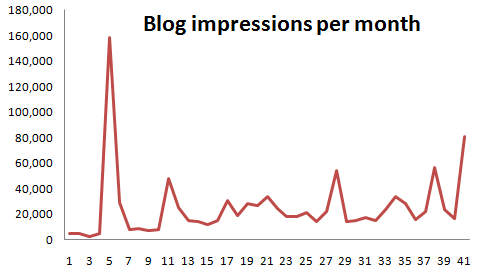
Well, not in pounds or dollars.  But, according to WordPress.com and to my considerable surprise, this blog has now had over a million impressions since I started it, 3 and a bit years ago.

OK, I know Joel Spolsky or Jeff Atwood probably wouldn’t get out of  bed for a meagre million impressions, but I still couldn’t resist crowing about it.

As you can see in the graph below the traffic is very uneven, dominated by a few posts that made it on to the front page of social news sites.

In fact over 40% of the total impressions come from just 5 (2%) of the posts:

Post Impressions
The software awards scam 234,909
10 things non-technical users don’t understand about your software 55,291
Lessons learned from 13 failed software products 51,676
Your harddrive *will* fail – it’s just a question of when 47,505
Where I program 47,075

Here are a few things I have learnt along the way:

  • As with many things in life, persistence is the key.
  • Choose your audience and write for that audience.
  • Pick a realistic posting schedule and try to stick to it.
  • Find your own voice.
  • The titles of posts are important.
  • Don’t expect lots of clickthroughs from social media sites to translate to lots of subscribers.
  • Get your posts proof read (thanks Claire!).
  • I am lousy at predicting how much interest a particular blog post will generate.
  • Don’t blog about blogging.
  • Be prepared to break the rules from time to time.

Although time is sometimes scarce for blogging I have lots of ideas for future blog posts. But if there is anything you would particularly like to see on this blog, please leave a comment.

10 things non-technical users don’t understand about your software

If you are writing consumer software you have to understand that you and your average user have a very different level of understanding of computers. When you first start doing support it can be a shock to realize just how vast this gulf is. It doesn’t mean that your users are stupid, just that they haven’t spent the thousands of hours in front of a computer that you have. Below I have summarized a few of the things I have come to understand about non-techies through answering thousands of support requests relating to my own table planning software.

1. Copy and paste

It is very clear from many support emails I have received that users will often re-type a licence key emailed to them because they don’t know how to (or even that they can) copy and paste text. Yes, really. You can mitigate this to some extent by including instructions on how to copy and paste where relevant and making licence keys easy to type (short and without ambiguous characters, e.g. ‘0’ and ‘o’).

2. The difference between web and native applications

Many users are used to web applications and don’t understand that they need to download and install new versions of desktop software to get access to the features in a new version. You can avoid this by automating the update process, but this can be pretty catastrophic if you get it wrong.

3. Data storage

Many users don’t understand how or where data is stored or even that it is separate from the application. They don’t understand that some data is stored on their local harddisk and some is stored ‘in the cloud’. And they don’t understand the difference between storage in a file, a database or the Windows registry. Consequently, when they install a desktop app on a new machine they are often surprised that it can’t automatically access the documents they created on a previous machine. So it is worth having something in your FAQ about moving from one machine to another.

Given that users don’t understand the basics of data storage it should come as no surprise that they also don’t understand the concept of file formats either. For example when told to ‘save a .xlsx file as a .csv file’ some users will simply change the file extension from .xlsx to .csv and be surprised when the resultant .csv file is gibberish when they open it in Excel. You can try to avoid this by providing clear step-by-step instructions on how to save a .xlsx file as a .csv file.

4. The jargon you use

Using terms that your users don’t understand can be very off-putting. For example, non-techies have no idea what a “dialog” is, let alone a “modal dialog”. Just call it a “window”.

5. Right click

Some users have not discovered (or will not think to try) clicking the right mouse button. You should therefore never put something only in a right click menu or anywhere else that it can’t easily be discovered.

6. Concurrency

Some applications can handle concurrent access (e.g. client-server and web-based apps) others can’t (e.g. most desktop apps). But many users assume that all software can be safely used by multiple concurrent users. If your software can’t it might be worth spelling this out in your marketing so as not to raise false expectations.

7. What changes can be reversed

Techies are happy to play with software to see what it does. They aren’t usually too worried about trying things because they can rely on some combination to undo, version control and backups to reverse most changes and they can usually judge when a change won’t be reversible. Non-technical users aren’t so confident and won’t try things in the same way. In fact some of them seem to think that a wrong move could cause the computer to burst into flames. So try to stick to conventions they will understand (e.g. on Windows those used by MS Office and Outlook) and offer step-by-step guidance for complex tasks.

8. The need for backups

Every few days I get an email from someone who has lost all their data because they had a major hardware problem and no backups on a separate device. Sometimes this is because they don’t even realize the data is stored on their computer. You can mention the need for back-ups in your documentation and/or in the software, but it is unlikely to make much difference. History shows that this is a lesson most people have to learn the hard way (techies included). Mentioning it doesn’t hurt though and it might help to defuse an angry users if you point it out to them after the event.

9. That they should read the documentation

People are using your software because they have things to do. Like it or not, your beloved software is just a means to that end. Although some users will read documentation, most consider it a waste of their precious time. In fact, support emails I receive provide incontrovertible evidence that some users won’t even read a single sentence of text in an error message explaining what the problem is. This means you need to write clear and concise documentation, but you also should develop your software under the assumption that most users won’t read it. That is where usability testing comes in.

10. Problem exists between keyboard and chair

Unskilled users often don’t realize how unskilled they are. Consequently they may blame your software for problems that are of their own making. One just has to be as polite as possible in such cases. Making your customer feel stupid is never great for business. If it is clear that the customer doesn’t have a sufficient level of skill to use your software, you should politely suggest that it “obviously isn’t ideal for their requirements” and offer to refund them. However, if several people have the same problem then you need to change your product to be a better fit for your users (changing your users to be a better fit to your software unfortunately not being an option for most of us).

Have you been caught out by assuming technical knowlege that your users don’t have? If so, please leave a comment below.

Selling your software in China

how to sell software in chinaI think a lot of people in the software business are wondering whether China will soon become a significant market for software and/or a source of competition in existing markets. So I was very interested to read a forum post about the realities of selling software in China from Felipe Albertao, an ex-Silicon Valley software engineer currently living in China. He kindly agreed to expand his forum post into an article for this blog.

Disclaimer: Although I live in China, I absolutely do not claim to be a China expert. I accepted Andy’s kind invitation because I have not seen anything at all written about the business of software in China for microISVs, and I humbly hope it will positively contribute to the discussion. This article is mainly based on my observations, and not on proven techniques. Use them at your own risk, and please report back your own findings!

Getting Paid

The first thing I need to say, right off the bat: Chinese users will not buy your software. Period. That does not mean that there is no money to be made, it simply means that they will not pay for your software license. The reasons are many, but for the sake of conciseness let’s suspend our “piracy is bad” mindset, and simply accept this fact as a reality. Think of the positive side: no payment processors or merchant accounts to worry about!

Chinese users will not buy your software, but Chinese companies might. Actually, let me clarify that: They will not buy the software license alone, but they are willing to pay for the license if it is part of a package that includes services (customization, installation, support, training, etc…). So, to get paid in China, you must offer services connected to your software. Of course, it would be very hard for westerners who do not speak the language nor have contacts in China to provide such services, but there are opportunities to partner with local independent professionals or small businesses in your target industry. More on that later.

Education is a huge business in China, especially for skills that give them a professional lead, like English language or IT. So, if you can somehow “plug-in” your software to an education-related service, that would also be another way to make money. For example, if you offer a component for ASP.NET, why not offer training on ASP.NET itself using your software? I am sure they will not pay for a self-paced course, but there is a good chance they will pay if you offer a hands-on remote live course. That is, a service rendered by a human, as there is no value perceived in the standalone immaterial software itself. Of course there is huge local competition, but one thing we have going for us is the fact that westerners enjoy a high degree of trust among Chinese people.

I suspect SAAS may be another way that Chinese users will pay for software (with a big question mark here). For example, today they do pay for services like site hosting, advertising and e-commerce presence, so we can assume there is at least a perceived value in subscription-based intangible products, though only the ones provided by well-known established companies, and not independent vendors. However, as the marketplace gets more fragmented and niche-oriented, I believe there will be opportunities for small players as well.

Web Site and Software Translation

Young Chinese people normally have a good grasp of written English, so I don’t think translation of the software itself is essential, although it always helps. IT professionals tend to be more English-proficient, as well as undergrad-level students. However, I do believe that the documentation must be translated, especially with IT-related software. Differently than western users, Chinese people actually have enough attention-span to thoroughly read a manual, and I have seen English-proficient programmers choosing frameworks and components based not only on the quality of the software itself, but whether the manual is in Mandarin Chinese or not (it’s always easier for them to read Chinese). So, translation here is not really a necessity, but a promotional strategy.

The “larger attention-span” assessment is also valid for the web site. We are used to the Web-2.0-ish recipe of a catchy one-liner plus 3 benefits and the big “Buy” orange button, and in China that probably works too, but users expect much more than that. I have observed that paid services almost always include some kind of workflow with arrows and circles and boxes explaining how the service works. Long explanations (not just a FAQ) are also quite common, and people actually read them! The fact is that here in China there is no such thing as “money back guarantee”, so people and companies normally think a lot before putting their hard-earned money into something. And forget the big “Buy” orange button: Instead, the call-to-action should be “Free Download” or “Free Sign Up”.

Sales

You are now probably asking yourself “Then where does the big ‘Buy’ orange button go?”, and the answer is: nowhere on your site! One fact you should be aware of is that here in China nothing happens without an established relationship (Google the keyword “guanxi” for more information). It is very unlikely that you will get any paid conversions originating from an ad or email. The goal of your conversion funnel should not be “sales” but instead “relationships”. Then, from the established relationship, the user can recommend your software to their boss, or whoever is the actual buyer. Of course the sales cycle is longer and it requires much more effort, but the rewards may be bigger too as you will be selling a package, and not only the license. Also, since guanxi is such an important part of making business, Chinese people are quite receptive when approached with a business proposition, differently than in the west where sales are normally met with resistance.

However, note that I have not suggested that you should be the one personally cultivating those relationships. Maybe it is possible to do it remotely and in English, but it would be more effective if you partner with locals and funnel the leads to them. They do not need to be sales professionals per se, but they need to know your software and be able to help prospects. They could be software students for example. Of course, at some point you must get involved, but your partner can help you to filter the good leads as they cultivate the relationship. The reward for them could be payment per hour or a percentage of the sale. Students might also be eager to help a foreign company, so they can add that experience to their resumes.

A word about consumer-oriented microISVs: I am extremely skeptical about independent microISV B2C sales in China, because I honestly cannot imagine an individual paying for independent software. That does not mean that microISV B2C cannot succeed in China. My point is that B2C sales are in fact B2B, because businesses who deal with consumers are more likely to pay. And B2B requires guanxi.

Approaching bloggers

As in the west, approaching bloggers is probably the most effective way to let users know about your product. You can use Google Translate to find sites and bloggers that you would like to contact: Google Translate does a good job in translating keywords (that you can use on searches on Baidu) as well as entire pages (so you can read the blog posts). For IT-related blogs, cnblogs.com (Microsoft-focused) and javaeye.com (you guessed correctly) are the most popular ones.

You can contact the bloggers directly in English, as most young Chinese people have a good grasp of written English. Foreigners in China are well-respected, especially in the IT industry, so this is a point in our favor.

Dealing with piracy

Actually “Dealing with piracy” is a misleading title, because in reality there is no way to deal with piracy. People will crack, copy and use your software as they wish, and they will not even feel guilty about it. Again, let’s not judge, but accept the fact that piracy is simply part of the culture (for some it is piracy, for others it is just sharing)

Instead of talking about code scramblers and licensing keys, let me offer here a contrarian (perhaps even controversial) point of view, in the wisdom of “if you can’t fight them, join them”. You should consider yourself lucky if your software gets pirated, because that means that it got traction. For every pirated software there is always a happy user behind it (after all, they chose to pirate your software, and not your competitor’s), and if this user convinces their employer to use your software, then there is a good chance that these companies will be your future clients.

SEM / SEO

By no means am I an SEO expert, let alone a China SEO expert. However, I can tell a little about the users’ search behaviors: Non-technical users very rarely use Google. In fact, my observation is that while Google is a somewhat known brand, people first turn to Baidu hands-down. Baidu has the best search results in Mandarin Chinese, and they have a service similar to AdWords (though you might need help to set-up an account, as the interface has not been translated to English)

Technical users have a different behavior: These are IT professionals and students, and because English is so pervasive in IT, they normally do have a good grasp of the language. So, for technical searches they might use both Mandarin and English keywords, but still Baidu is their first choice. However, interestingly enough, Gmail is also quite popular among Chinese techies. So, if you are selling IT-related software, your SEM/SEO strategy should include keywords in both Mandarin and English, and include both Baidu and Google (or more specifically, AdWords targeting Gmail).

Face

I cannot finish this article without mentioning such important part of the culture: Face. There is not enough space here to explain the concept (Google “mianzi” for more information), but it’s suffice to say that it’s basically the same as in the west (face as in reputation), except that in China face is much more important.

When it comes to software, always keep in mind that most (if not all) decisions are made based on face: Users will use your software to be more efficient in a certain job, and thus look better to the boss; or to show that they have knowledge that other colleagues don’t have; or to show to their clients what cool software they have, and not their competitor. The contrary (that is avoiding face lost) is also true: To finish a job quickly so they can deliver the project on time, and thus avoid getting the boss mad; or to learn a new skill that their colleagues already have; or to show their clients that they also have the same cool software their competitors use. In the west we also make decisions based on face, but in China it is so much more prevalent. Keep that in mind when creating your promotional material.

Conclusion

I have no doubts that China will become a major technology consumer in the very near future, not only because of the sheer size of its Internet user base (which today surpasses the size of the entire US population), but also due to the number of high-quality IT professionals graduating at their universities.

The key message I want to communicate is that your China strategy should be a long-term one. It takes time and effort, but the rewards are worthwhile. Even if you conclude that there are no opportunities to be pursued, at the very least you should have a strategy to protect your marketshare against competitors that decide to go to China.

You don’t necessarily need to be so enthusiastic like me and move to China (although I guarantee you would have an experience of a lifetime!), but at the same time you cannot simply ignore it. Chinese users will certainly knock on your door, and you can even ignore them, but your competitors won’t.

Felipe Albertao is a software engineer with more than 15 years of experience, and has been living in China since June 2009. He is a native from São Paulo, Brazil, and lived in Silicon Valley, USA for 8 years. Felipe blogs about software and China at shanzhaier.com.

2010 microISV Pain Point Survey

Russell Thackston is running a survey to try and find out which tasks cause microISVs the most pain. He is then going to use the results of this survey to guide further research at the microISV Research Alliance at Auburn University. I have completed the survey and will be interested to see what the results are. You can take the survey here. You could win an iPod touch or an iPod shuffle. The survey will run until 21st August.

Mike Dulin, 1944-2010

I was very sad to read in the ASP forums at the weekend of the death of ASP President, Mike Dulin. Mike and I crossed paths a number of times. I met him several times at ESWC and SIC events, often listened to his Shareware Radio podcasts, interviewed him for this blog and exchanged quite a few emails related to the Shareware is dead – long live Shareware! article I wrote recently for the ASP blog. I spoke to him by Skype only a few weeks ago. Despite long term health problems, Mike devoted considerable time and energy to the ASP and it was under his leadership that the ASP finally managed to drop the word ‘shareware’ from its name. Mike was a colourful character and his energy, gravelly voice and sense of humour will be sorely missed in the ASP and at industry events.

Photograph courtesy Anna Metcalfe