I’m a millionaire!

Well, not in pounds or dollars.  But, according to WordPress.com and to my considerable surprise, this blog has now had over a million impressions since I started it, 3 and a bit years ago.

OK, I know Joel Spolsky or Jeff Atwood probably wouldn’t get out of  bed for a meagre million impressions, but I still couldn’t resist crowing about it.

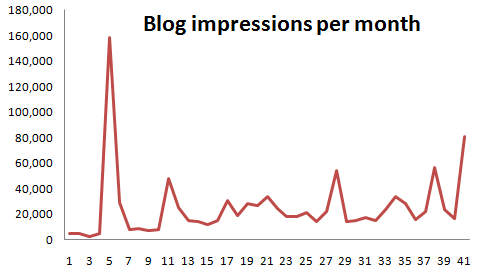
As you can see in the graph below the traffic is very uneven, dominated by a few posts that made it on to the front page of social news sites.

In fact over 40% of the total impressions come from just 5 (2%) of the posts:

Post Impressions
The software awards scam 234,909
10 things non-technical users don’t understand about your software 55,291
Lessons learned from 13 failed software products 51,676
Your harddrive *will* fail – it’s just a question of when 47,505
Where I program 47,075

Here are a few things I have learnt along the way:

  • As with many things in life, persistence is the key.
  • Choose your audience and write for that audience.
  • Pick a realistic posting schedule and try to stick to it.
  • Find your own voice.
  • The titles of posts are important.
  • Don’t expect lots of clickthroughs from social media sites to translate to lots of subscribers.
  • Get your posts proof read (thanks Claire!).
  • I am lousy at predicting how much interest a particular blog post will generate.
  • Don’t blog about blogging.
  • Be prepared to break the rules from time to time.

Although time is sometimes scarce for blogging I have lots of ideas for future blog posts. But if there is anything you would particularly like to see on this blog, please leave a comment.

10 things non-technical users don’t understand about your software

If you are writing consumer software you have to understand that you and your average user have a very different level of understanding of computers. When you first start doing support it can be a shock to realize just how vast this gulf is. It doesn’t mean that your users are stupid, just that they haven’t spent the thousands of hours in front of a computer that you have. Below I have summarized a few of the things I have come to understand about non-techies through answering thousands of support requests relating to my own table planning software.

1. Copy and paste

It is very clear from many support emails I have received that users will often re-type a licence key emailed to them because they don’t know how to (or even that they can) copy and paste text. Yes, really. You can mitigate this to some extent by including instructions on how to copy and paste where relevant and making licence keys easy to type (short and without ambiguous characters, e.g. ‘0’ and ‘o’).

2. The difference between web and native applications

Many users are used to web applications and don’t understand that they need to download and install new versions of desktop software to get access to the features in a new version. You can avoid this by automating the update process, but this can be pretty catastrophic if you get it wrong.

3. Data storage

Many users don’t understand how or where data is stored or even that it is separate from the application. They don’t understand that some data is stored on their local harddisk and some is stored ‘in the cloud’. And they don’t understand the difference between storage in a file, a database or the Windows registry. Consequently, when they install a desktop app on a new machine they are often surprised that it can’t automatically access the documents they created on a previous machine. So it is worth having something in your FAQ about moving from one machine to another.

Given that users don’t understand the basics of data storage it should come as no surprise that they also don’t understand the concept of file formats either. For example when told to ‘save a .xlsx file as a .csv file’ some users will simply change the file extension from .xlsx to .csv and be surprised when the resultant .csv file is gibberish when they open it in Excel. You can try to avoid this by providing clear step-by-step instructions on how to save a .xlsx file as a .csv file.

4. The jargon you use

Using terms that your users don’t understand can be very off-putting. For example, non-techies have no idea what a “dialog” is, let alone a “modal dialog”. Just call it a “window”.

5. Right click

Some users have not discovered (or will not think to try) clicking the right mouse button. You should therefore never put something only in a right click menu or anywhere else that it can’t easily be discovered.

6. Concurrency

Some applications can handle concurrent access (e.g. client-server and web-based apps) others can’t (e.g. most desktop apps). But many users assume that all software can be safely used by multiple concurrent users. If your software can’t it might be worth spelling this out in your marketing so as not to raise false expectations.

7. What changes can be reversed

Techies are happy to play with software to see what it does. They aren’t usually too worried about trying things because they can rely on some combination to undo, version control and backups to reverse most changes and they can usually judge when a change won’t be reversible. Non-technical users aren’t so confident and won’t try things in the same way. In fact some of them seem to think that a wrong move could cause the computer to burst into flames. So try to stick to conventions they will understand (e.g. on Windows those used by MS Office and Outlook) and offer step-by-step guidance for complex tasks.

8. The need for backups

Every few days I get an email from someone who has lost all their data because they had a major hardware problem and no backups on a separate device. Sometimes this is because they don’t even realize the data is stored on their computer. You can mention the need for back-ups in your documentation and/or in the software, but it is unlikely to make much difference. History shows that this is a lesson most people have to learn the hard way (techies included). Mentioning it doesn’t hurt though and it might help to defuse an angry users if you point it out to them after the event.

9. That they should read the documentation

People are using your software because they have things to do. Like it or not, your beloved software is just a means to that end. Although some users will read documentation, most consider it a waste of their precious time. In fact, support emails I receive provide incontrovertible evidence that some users won’t even read a single sentence of text in an error message explaining what the problem is. This means you need to write clear and concise documentation, but you also should develop your software under the assumption that most users won’t read it. That is where usability testing comes in.

10. Problem exists between keyboard and chair

Unskilled users often don’t realize how unskilled they are. Consequently they may blame your software for problems that are of their own making. One just has to be as polite as possible in such cases. Making your customer feel stupid is never great for business. If it is clear that the customer doesn’t have a sufficient level of skill to use your software, you should politely suggest that it “obviously isn’t ideal for their requirements” and offer to refund them. However, if several people have the same problem then you need to change your product to be a better fit for your users (changing your users to be a better fit to your software unfortunately not being an option for most of us).

Have you been caught out by assuming technical knowlege that your users don’t have? If so, please leave a comment below.

Selling your software in China

how to sell software in chinaI think a lot of people in the software business are wondering whether China will soon become a significant market for software and/or a source of competition in existing markets. So I was very interested to read a forum post about the realities of selling software in China from Felipe Albertao, an ex-Silicon Valley software engineer currently living in China. He kindly agreed to expand his forum post into an article for this blog.

Disclaimer: Although I live in China, I absolutely do not claim to be a China expert. I accepted Andy’s kind invitation because I have not seen anything at all written about the business of software in China for microISVs, and I humbly hope it will positively contribute to the discussion. This article is mainly based on my observations, and not on proven techniques. Use them at your own risk, and please report back your own findings!

Getting Paid

The first thing I need to say, right off the bat: Chinese users will not buy your software. Period. That does not mean that there is no money to be made, it simply means that they will not pay for your software license. The reasons are many, but for the sake of conciseness let’s suspend our “piracy is bad” mindset, and simply accept this fact as a reality. Think of the positive side: no payment processors or merchant accounts to worry about!

Chinese users will not buy your software, but Chinese companies might. Actually, let me clarify that: They will not buy the software license alone, but they are willing to pay for the license if it is part of a package that includes services (customization, installation, support, training, etc…). So, to get paid in China, you must offer services connected to your software. Of course, it would be very hard for westerners who do not speak the language nor have contacts in China to provide such services, but there are opportunities to partner with local independent professionals or small businesses in your target industry. More on that later.

Education is a huge business in China, especially for skills that give them a professional lead, like English language or IT. So, if you can somehow “plug-in” your software to an education-related service, that would also be another way to make money. For example, if you offer a component for ASP.NET, why not offer training on ASP.NET itself using your software? I am sure they will not pay for a self-paced course, but there is a good chance they will pay if you offer a hands-on remote live course. That is, a service rendered by a human, as there is no value perceived in the standalone immaterial software itself. Of course there is huge local competition, but one thing we have going for us is the fact that westerners enjoy a high degree of trust among Chinese people.

I suspect SAAS may be another way that Chinese users will pay for software (with a big question mark here). For example, today they do pay for services like site hosting, advertising and e-commerce presence, so we can assume there is at least a perceived value in subscription-based intangible products, though only the ones provided by well-known established companies, and not independent vendors. However, as the marketplace gets more fragmented and niche-oriented, I believe there will be opportunities for small players as well.

Web Site and Software Translation

Young Chinese people normally have a good grasp of written English, so I don’t think translation of the software itself is essential, although it always helps. IT professionals tend to be more English-proficient, as well as undergrad-level students. However, I do believe that the documentation must be translated, especially with IT-related software. Differently than western users, Chinese people actually have enough attention-span to thoroughly read a manual, and I have seen English-proficient programmers choosing frameworks and components based not only on the quality of the software itself, but whether the manual is in Mandarin Chinese or not (it’s always easier for them to read Chinese). So, translation here is not really a necessity, but a promotional strategy.

The “larger attention-span” assessment is also valid for the web site. We are used to the Web-2.0-ish recipe of a catchy one-liner plus 3 benefits and the big “Buy” orange button, and in China that probably works too, but users expect much more than that. I have observed that paid services almost always include some kind of workflow with arrows and circles and boxes explaining how the service works. Long explanations (not just a FAQ) are also quite common, and people actually read them! The fact is that here in China there is no such thing as “money back guarantee”, so people and companies normally think a lot before putting their hard-earned money into something. And forget the big “Buy” orange button: Instead, the call-to-action should be “Free Download” or “Free Sign Up”.

Sales

You are now probably asking yourself “Then where does the big ‘Buy’ orange button go?”, and the answer is: nowhere on your site! One fact you should be aware of is that here in China nothing happens without an established relationship (Google the keyword “guanxi” for more information). It is very unlikely that you will get any paid conversions originating from an ad or email. The goal of your conversion funnel should not be “sales” but instead “relationships”. Then, from the established relationship, the user can recommend your software to their boss, or whoever is the actual buyer. Of course the sales cycle is longer and it requires much more effort, but the rewards may be bigger too as you will be selling a package, and not only the license. Also, since guanxi is such an important part of making business, Chinese people are quite receptive when approached with a business proposition, differently than in the west where sales are normally met with resistance.

However, note that I have not suggested that you should be the one personally cultivating those relationships. Maybe it is possible to do it remotely and in English, but it would be more effective if you partner with locals and funnel the leads to them. They do not need to be sales professionals per se, but they need to know your software and be able to help prospects. They could be software students for example. Of course, at some point you must get involved, but your partner can help you to filter the good leads as they cultivate the relationship. The reward for them could be payment per hour or a percentage of the sale. Students might also be eager to help a foreign company, so they can add that experience to their resumes.

A word about consumer-oriented microISVs: I am extremely skeptical about independent microISV B2C sales in China, because I honestly cannot imagine an individual paying for independent software. That does not mean that microISV B2C cannot succeed in China. My point is that B2C sales are in fact B2B, because businesses who deal with consumers are more likely to pay. And B2B requires guanxi.

Approaching bloggers

As in the west, approaching bloggers is probably the most effective way to let users know about your product. You can use Google Translate to find sites and bloggers that you would like to contact: Google Translate does a good job in translating keywords (that you can use on searches on Baidu) as well as entire pages (so you can read the blog posts). For IT-related blogs, cnblogs.com (Microsoft-focused) and javaeye.com (you guessed correctly) are the most popular ones.

You can contact the bloggers directly in English, as most young Chinese people have a good grasp of written English. Foreigners in China are well-respected, especially in the IT industry, so this is a point in our favor.

Dealing with piracy

Actually “Dealing with piracy” is a misleading title, because in reality there is no way to deal with piracy. People will crack, copy and use your software as they wish, and they will not even feel guilty about it. Again, let’s not judge, but accept the fact that piracy is simply part of the culture (for some it is piracy, for others it is just sharing)

Instead of talking about code scramblers and licensing keys, let me offer here a contrarian (perhaps even controversial) point of view, in the wisdom of “if you can’t fight them, join them”. You should consider yourself lucky if your software gets pirated, because that means that it got traction. For every pirated software there is always a happy user behind it (after all, they chose to pirate your software, and not your competitor’s), and if this user convinces their employer to use your software, then there is a good chance that these companies will be your future clients.

SEM / SEO

By no means am I an SEO expert, let alone a China SEO expert. However, I can tell a little about the users’ search behaviors: Non-technical users very rarely use Google. In fact, my observation is that while Google is a somewhat known brand, people first turn to Baidu hands-down. Baidu has the best search results in Mandarin Chinese, and they have a service similar to AdWords (though you might need help to set-up an account, as the interface has not been translated to English)

Technical users have a different behavior: These are IT professionals and students, and because English is so pervasive in IT, they normally do have a good grasp of the language. So, for technical searches they might use both Mandarin and English keywords, but still Baidu is their first choice. However, interestingly enough, Gmail is also quite popular among Chinese techies. So, if you are selling IT-related software, your SEM/SEO strategy should include keywords in both Mandarin and English, and include both Baidu and Google (or more specifically, AdWords targeting Gmail).

Face

I cannot finish this article without mentioning such important part of the culture: Face. There is not enough space here to explain the concept (Google “mianzi” for more information), but it’s suffice to say that it’s basically the same as in the west (face as in reputation), except that in China face is much more important.

When it comes to software, always keep in mind that most (if not all) decisions are made based on face: Users will use your software to be more efficient in a certain job, and thus look better to the boss; or to show that they have knowledge that other colleagues don’t have; or to show to their clients what cool software they have, and not their competitor. The contrary (that is avoiding face lost) is also true: To finish a job quickly so they can deliver the project on time, and thus avoid getting the boss mad; or to learn a new skill that their colleagues already have; or to show their clients that they also have the same cool software their competitors use. In the west we also make decisions based on face, but in China it is so much more prevalent. Keep that in mind when creating your promotional material.

Conclusion

I have no doubts that China will become a major technology consumer in the very near future, not only because of the sheer size of its Internet user base (which today surpasses the size of the entire US population), but also due to the number of high-quality IT professionals graduating at their universities.

The key message I want to communicate is that your China strategy should be a long-term one. It takes time and effort, but the rewards are worthwhile. Even if you conclude that there are no opportunities to be pursued, at the very least you should have a strategy to protect your marketshare against competitors that decide to go to China.

You don’t necessarily need to be so enthusiastic like me and move to China (although I guarantee you would have an experience of a lifetime!), but at the same time you cannot simply ignore it. Chinese users will certainly knock on your door, and you can even ignore them, but your competitors won’t.

Felipe Albertao is a software engineer with more than 15 years of experience, and has been living in China since June 2009. He is a native from São Paulo, Brazil, and lived in Silicon Valley, USA for 8 years. Felipe blogs about software and China at shanzhaier.com.


2010 microISV Pain Point Survey

Russell Thackston is running a survey to try and find out which tasks cause microISVs the most pain. He is then going to use the results of this survey to guide further research at the microISV Research Alliance at Auburn University. I have completed the survey and will be interested to see what the results are. You can take the survey here. You could win an iPod touch or an iPod shuffle. The survey will run until 21st August.

Mike Dulin, 1944-2010

I was very sad to read in the ASP forums at the weekend of the death of ASP President, Mike Dulin. Mike and I crossed paths a number of times. I met him several times at ESWC and SIC events, often listened to his Shareware Radio podcasts, interviewed him for this blog and exchanged quite a few emails related to the Shareware is dead – long live Shareware! article I wrote recently for the ASP blog. I spoke to him by Skype only a few weeks ago. Despite long term health problems, Mike devoted considerable time and energy to the ASP and it was under his leadership that the ASP finally managed to drop the word ‘shareware’ from its name. Mike was a colourful character and his energy, gravelly voice and sense of humour will be sorely missed in the ASP and at industry events.

Photograph courtesy Anna Metcalfe

Hacker Monthly

Issue #3 of Hacker Monthly leads with the Lessons learned from 13 failed software products article that I posted here in May. They even put my face on the front cover, despite my warnings about the effect this might have on sales.

Hacker Monthly is an interesting experiment. It takes the most popular articles on the Hacker News site each month and repackages them in an attractive magazine format. This makes for some very varied content, with articles ranging from business topics to advanced programming techniques. It is available both as a paper magazine from MagCloud ($9.95+shipping) and a downloadable PDF (free) and is supported by advertising revenue and donations. I wish them every success with it.

iPhone App store economics

If you believe all the hype about iPhone apps, you can just hammer out an App in a few weeks, let that nice Mr Jobs take care of all that sordid marketing for you and then sit back to collect a big cheque every month. However the numbers in a recent sobering post about the economics of paid iPhone apps tell a rather different story:

  • average annual income for a paid iPhone app (after the App store 30%): $3,050
  • median annual income for a paid iPhone app (after the App store 30%): $682

The numbers are based on various published data from Apple and other sources, plus a few assumptions. I haven’t gone through the numbers and the analysis with a fine tooth comb, but I can’t say I am surprised.

The disconnect between the hype and the reality is so large because Apple (understandably) only want to tell developers about the success stories. The media and the public seem quite happy to go along with this because it makes a more interesting story. But when there are 225,000 apps shouting for attention, only one way to access them via a notoriously dictatorial third party and $5 is considered expensive, it is likely that the majority of developers will do badly. Hence the median is so much worse than the mean. Before you write your iPhone App I think you should ask yourself if it has got a realistic shot at making the top 10 in its App store category. If not, don’t give up the day job just yet.

Further reading:

The Sparrow problem

How to Evaluate a (paid) iPhone App Idea

Shareware is dead – long live shareware!

The Association of Shareware Professionals has renamed itself today to the Association of Software Professionals. I have written a guest post over on the ASP blog putting this name change into context. The article includes reactions from quite a few shareware industry veterans.

Read the article

** Update **

The ASP dissolved itsself in 2021. But you can still find the article on the Wayback Machine here.

Do customers need to see an advertisement seven times? – Update

Based on feedback and some further research I have published an update to my ‘Do customers need to see an advertisement seven times?’ post at the end of the original post.

Do customers need to see an advertisement seven times?

A few years ago, when I was buying magazine ad space  for my table planner software, I was told by an ad salesman that customers need to see an advertisement seven times before it is effective. How very convenient for his commission. I have heard variants of this “advertising rule of 7” quite a few times since, but I have never been able to find out where it originally comes from. I have now taken to asking people that quote it what evidence they have to back it up. So far no-one has been able to point me at a paper, study or any other form of credible evidence.

I have just searched google for see “ad seven times” and I found lots of mentions of the “advertising rule of 7”. Here are some of them that appeared high in the search results:

surveys prove people need to see the same ad seven times in order to buy

After all, they say, a person needs to be exposed to your ad seven times in order to create an impression.

The standard wisdom is that a consumer has to see a particular ad seven times before the message of the ad will even begin to sink in.

In fact, the Direct Marketing Association will tell you the average person needs to see an ad SEVEN TIMES before he responds to it.

Statics show that people see an ad seven times before responding.

The last statistic I saw pertaining to impressions stated that consumers must see your ad seven times before they really even notice it.

It’s estimated that potential members need to see an ad seven times before the marketing begins to register in their awareness.

This is not all bad since people generally need to see your ad seven times or more before they buy

A cardinal rule of advertising, known as “The Seven Times Factor,” says as a general rule, potential customers needs to see an ad seven times or more before they buy.

After all, research shows that, on average, you have to see an ad seven times before you even notice it.

In marketing, it is said that a customer has to see an ad seven times to remember it.

Marketers like to talk about “The Rule of Seven”: the idea that people need to see your marketing message seven times before they take action. Actually, research has shown that the number ranges from five to twelve, but seven is a good rule of thumb.

The Rule of Seven is an old marketing adage. It says that a prospect needs to see or hear your marketing message at least seven times before they take action and buy from you.

But again, no links, references or citations to back it up, even from the people that said it was based on “statistics”, “surveys” or “research”. What statistics/surveys/research? Is it based on some form of scientific study that can be reproduced, is it a rule of thumb that has been given more credit than it deserves or is  it total bullshit made up by a crafty ad salesman? I suspect the latter, but I would love to know. If you know the origin of  this “rule of 7”, please post a comment below.

** Update 09-Jun-10 **

I have had some useful feedback from this post, particular in the private ASP forums[1] (always a great resource). David Trump posted a link to this paper:

THE REPETITION/VARIATION HYPOTHESES CONCEPTUAL AND METHOLOGICAL ISSUES [Schumann & Clemons]

I used references and keywords in this paper to find 3 other relevant papers:

Beyond Effective Frequency: Evaluating Media Schedules Using Frequency Value Planning [Cannon & Leckenby]

The shape of the advertising response function [Simon & Arndt]

The Shape of Advertising Response Functions Revisited: A Model of Dynamic Probabilistic Thresholds [Vakratsas, Feinberg, Bass & Kalyanaram]

These papers talk about an ‘advertising response function’. This is a curve plotting the number of exposures to an ad against the customer likelihood of being influenced.  Some theorise that there is a threshold below which ads don’t have an effect, a saturation point above which exposures may have a negative effect and a sweet-spot in between. This ‘S’ shaped response function could provide some support for ‘you have to see an ad 7 times’, except support for the presence of a threshold effect seems to be weak to non-existent. Only one of the papers [Vakratsas, Feinberg, Bass & Kalyanaram] cited any evidence and that seemed less than convincing from my quick reading.

For effective frequency to be valid, advertising must be subject to a threshold effect, reflected in an S-shaped advertising response curve (Stankey 1989). But research suggests that, in actual advertising situations, response curves tend to be concave, characterized by Continually diminishing returns (Simon and Arndt 1980; Schultz and Block 1986; Zielske 1986). [Cannon and Leckenby]

In brief, then we are satisfied that the field experiments as a group show no solid evidence for increasing returns over operating ranges. … Taken together, the studies using physical and monetary variables add up to the conclusion that there are not increasing returns to advertising—that is, no S-shaped response function-over the normal operating range. [Simon & Arndt]

Futhermore, some of the papers mention a theory that a customer might have to see an ad 3 times, but none of them mention 7 times.

Krugman (1972; 1977) captured the imagination of the industry with his three-exposure theory, which described an intuitively appealing sequence of consumer responses to television advertising that appeared to be consistent with a communication threshold. He suggested that the first exposure causes consumers to ask, “What is it?” The second causes them to ask, “What of it?” The third exposure is both a reminder and the beginning of disengagement. … The magic number “three” came to be a commonly accepted industry standard (Lancaster, Kreshel and Harris 1986). [Cannon and Leckenby]

Al Harberg pointed out that those claiming a “7 times rule” might be confusing the ability to recall information (where 7 has been shown experimentally to be the “magic number” for short term memory) with the number of ad exposures taken to influence someone. Two completely different things.

So please shout “bullshit” very loudly next time you hear the “advertising rule of 7″ mentioned. Especially if it is by someone trying to sell you ad space.

[1]Private correspondence in the ASP forum referenced with permission.

** Update 13-Mar-19 **

Paul Moore writes:

“I read your blog post from a few years back, and thought you might find this of interest.  It’s a article passed around several newspapers at least as far back as 1859.   It showed up even in 1910.  Here’s the earliest iteration I was able to find on Google – the text is identical in several other American newspapers of the time.  I have no idea where it originated, but the theory has been around for a while.  I guess in modern times the number of impressions went from six to seven!”

A French editor gives the following amusing description of the effect of an advertisement: The first time a man sees an advertisement, he takes no notice of it; the second time he looks at the name; the third time he looks at the price; the fourth time he reads it; the fifth time he speaks of it to his wife; the sixth time he buys. [Weekly Constitutionalist (Augusta, Georgia) June 1, 1859]