Category Archives: article

A test of Cost Per Action (CPA) vs Cost Per Click (CPC) in Google Adwords

CPA vs CPCThe traditional approach to Google Adwords is to set a bid price for each keyword. This is known as Cost Per Click (CPC). Google then then uses the bid prices in conjunction with a secret formula (the quality score) to decide how high to rank your ad in the Adwords results. If you bid more, your ad will appear higher and typically get more clicks, but your cost per click will increase. So setting an optimal bid price is important. Bid too little and you won’t rank high enough to get a decent number of clickthroughs. Bid too much and you will potentially end paying more to Google than you recoup in sales.

An alternative approach is to tell Google Adwords how much you are prepared to pay for a particular action, e.g. a sign-up, download or sale. This is known as Cost Per Action (CPA) or Conversion Optimizer. Google will then automatically calculate your bid prices and attempt not to exceed the CPA you set (although this isn’t guaranteed).

CPA sounds great. I can stay in bed a bit longer while the mighty Google brain does the bid tweaking for me. Unfortunately I wasn’t able to use CPA. I  count sales as conversions (not downloads) and I have my adwords account split into a number of campaigns by geographic region and by type (e.g. search vs content). Having my campaigns structured like this, rather than one monolithic campaign, makes for more flexibility (e.g. different ads, phrases and bid prices for different geographical areas) and more useful reports (e.g. separate reports for search and content). But it also meant none of my Adwords campaigns made the minimum threshold for conversions per month.

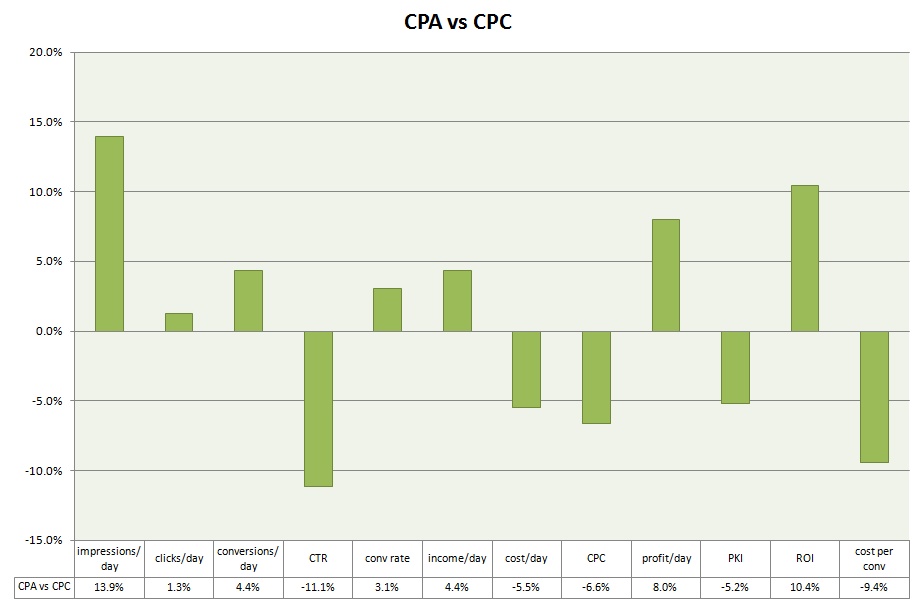
When Google dropped the minimum threshold for CPA to 30 conversions per campaign per month, one of my Perfect Table Plan search campaigns became eligible. So I did an experiment. I ran a campaign for 4 weeks using CPC, then 9 weeks using CPA, then another 4 weeks using CPC. I set the CPA bid to roughly the average cost per conversion I got for CPC. I was curious to see if Google would find sweet spots that I had been missing or whether they would bid as high as they could to take as much money off me as possible. Summary: CPC outperformed CPA on all key metrics, including: 4.4% higher conversions, 9.4% lower cost per conversions and 8.0% higher profit.

The detailed results are as follows:

metric CPC  (vs CPA)
impressions/day +13.9%
clicks/day +1.3%
conversions/day +4.4%
CTR -11.1%
conv rate +3.1%
income/day +4.4%
cost/day -5.5%
CPC -6.6%
profit/day +8.0%
PKI -5.2%
ROI +10.4%
cost per conversion -9.4%

In graphical form (click to enlarge):

CPA vs CPC graph 50pc

Notes:

  • The values given are taken by computing (CPC metric – CPA metric)/(CPA metric). E.g. ROI of +10.4% means that CPC had a 10.4% higher ROI than CPA.
  • Only a single (geographically based) search campaign was measured. The total number of conversions during the time period of the test was in 3 figures.
  • I only measured sale conversions. This gives me less data than measuring downloads, but I think it is unsafe to assume the number of downloads correlates closely to the number of sales.
  • The PerfectTablePlan sale price is £19.95/$29.95. To calculate profit I only counted 75% of the price of a sale (the other 25% was assumed to cover the cost of support, ecommerce fees and other overheads associated with the sale).
  • Each of the time periods was a multiple of 7 days to avoid any issues with different results on different days of the week.
  • I ran CPC for an equal amount of time either side of the CPA test to try to balance out any seasonal factors.
  • Google conversion tracking uses Cookies and is therefore not 100% accurate.
  • PKI is Profit Per Thousand Impressions.
  • ROI is Return On Investment.

It wouldn’t be wise to draw any sweeping conclusions from one test with a limited amount of data. However I believe the results show:

  • A CPA campaign running for 9 weeks wasn’t able to outperform a mature CPC campaign. The CPC campaign had been running for over 4 years, but one would have thought CPA would have been able to use that pre-existing  data. CPA might have performed better if given longer. It would probably also have done better against a less mature CPC campaign.
  • Google didn’t rob me blind using CPA bidding. The CPA cost per day was only 5.5% higher.
  • The results weren’t hugely different. On the basis of the above results one might still conclude that CPA is superior to CPC as it requires less time to manage.

The truth about conversion ratios for downloadable software

conversion funnel?Overview

An anonymous survey of software vendors shows that the average sale to visit ratio is very close to the much quoted “industry average” of 1%. However the data shows large variations between products and across different sectors (e.g. Windows vs Mac OS X).

The data

The data set comprises 92 valid survey responses to an 8 question survey in April 2009. The survey was advertised through a request on this blog, posts on  BOS, ASP, MACSB, OISV and BOSnetwork forums and emails to the author’s contacts. The results are inevitably biased towards small software vendors, due to the places where the survey was advertised. As the survey was anonymous it is impossible to verify the accuracy of the data. However it is unlikely that many vendors would have completed a survey that wasn’t anonymous.

The survey consisted of 3 compulsory questions (unique visits, downloads and sales over a given timeframe) and 5 optional questions (the time frame of the data, primary market, primary OS, licence price and trial type). One record had 0 visits (an iPod app), another had 0 downloads (presumably a web app) and a few had numbers that I didn’t consider statistically valid for some purposes (e.g. <500 visits per month or <3 sales transactions per month).  I did the best I could with the data available, ignoring obvious outliers in some cases.

The data set comprises a total of:

  • 8.1 million unique website visits
  • 2.2 million downloads
  • 110 thousand sales transactions

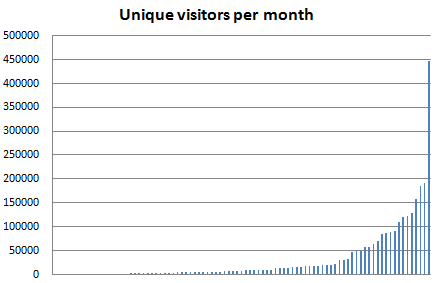
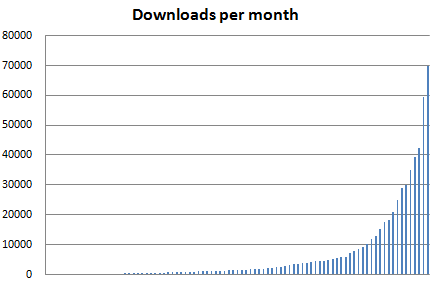
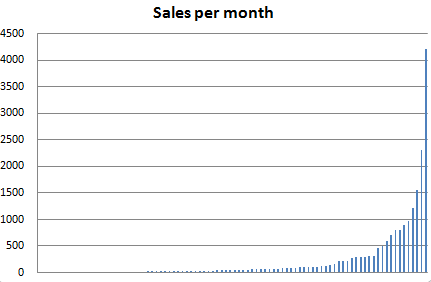
Where a time frame for the results was given it is possible to work out the range of visitors, downloads and sales per month.

metrics_all_visitors

metrics_all_downloads

metrics_all_sales

Interestingly the distribution of monthly visits, downloads and sales across the different products all follow the Pareto 80:20 power law quite closely:

  • 22% of the products account for 80% of the visits
  • 21% of the products account for 80% of the downloads
  • 19% of the products account for 80% of the sales

This gives me some faith that the data is reasonably accurate and representative of the industry as a whole.

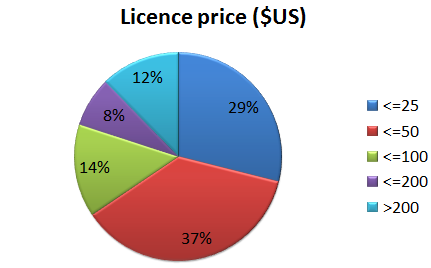
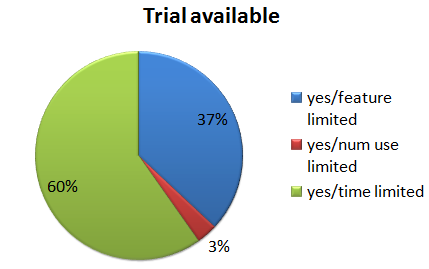
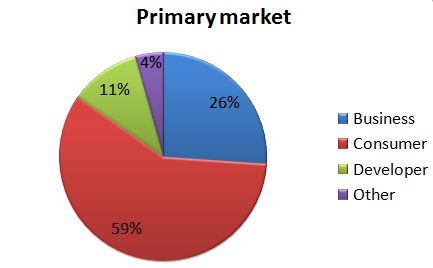
The data is broken down by OS, market, price and trial type as follows:

metrics_all_os

metrics_all_market

metrics_all_price1

metrics_all_trial

Analysis

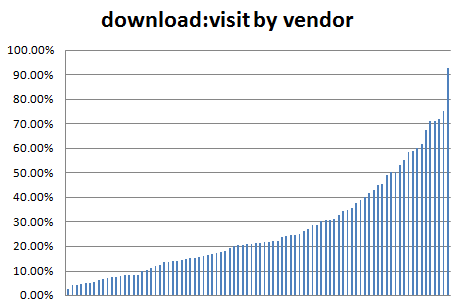
The average (mean) ratio of downloads:visits across all products is 28%. 50% of products are in the range 12.1% to 35.3%.

metrics_download_visit_ratio

I am surprised at how high the average ratio is. This could partly be due to products that receive a high percentage of downloads from download sites, without the downloader ever visiting the product site. Conversely sites where visitors make frequent returns after purchase (e.g. to read forums) will have a lower downloads:visits ratio.

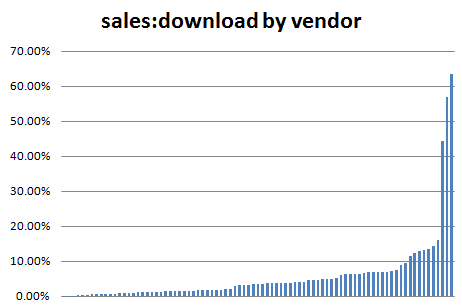
The average ratio of sales:downloads across all products is 4.5%. 50% of products are in the range 1.3% to 6.4%.

metrics_sale_download_ratio

The average sales:downloads ratio is noticeably lower than the average downloads:visits ratio. The sales:downloads ratio is noticeably skewed on the right of the graph – a sales:downloads ratio >20% seems very high.

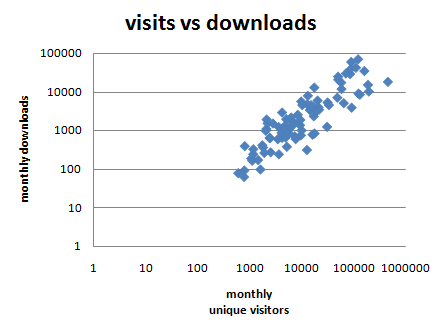
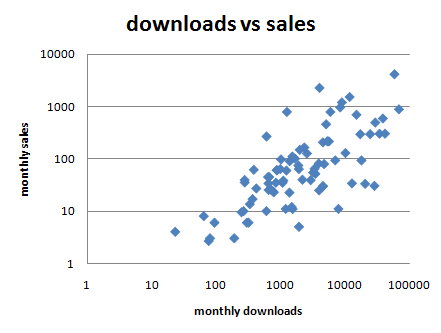
The (logarithmic) scatter plots below show that the downloads:sales ratio varies a lot more than visits:downloads ratio.

metrics_visits_vs_downloads

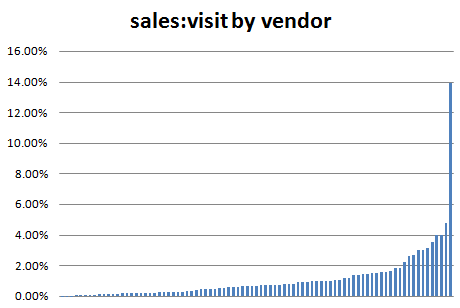
metrics_downloads_vs_salesThe average (mean) sales:visits ratio of all products is 1.16%[1]. However one of the product ratios is an obvious outlier at 13.94% (see below). With this outlier removed the average sales:visits conversion ratio across all the products is 0.99%. 50% of products are in the range 0.28% to 1.39%.

metrics_sale_visit_ratio

0.99% is suspiciously close to the mythical ‘industry average’ of 1%. But I haven’t (consciously) massaged the results to get this figure.

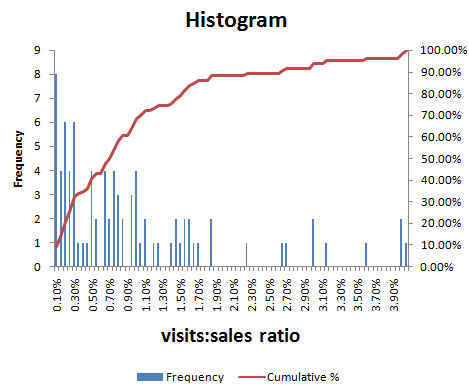
You can work out how you compare to this data set using the red (cumulative) graph in the histogram below. For example, if your product sales:visits ratio is 1.5%, then it is higher than approximately 80% of the products in the data set.

conversion-ratio-distribution2

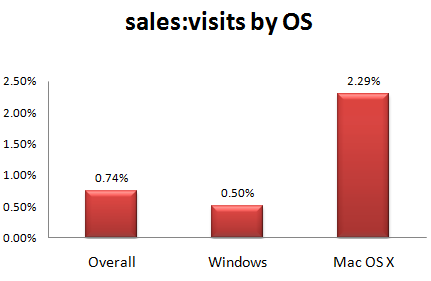
We can also look at how the ratios vary across sectors. Surprisingly the average Mac product conversion ratio is more than 4 times the Windows product conversion ratio.

metrics_sale_visit_ratio_by_os1Even if we try to compare like for like, and only compare consumer products selling for <= $50, the ratios are still 2.27% for Mac and 0.51% for Windows. Possible reasons for this large disparity include:

  • Mac owners more ready to spend money.
  • There is less competition in the Mac software market.
  • Mac vendors have a higher percentage of purchasers  who never visit their site due to higher quality of Mac download sites.
  • It is a statistical blip (there are a lot less Mac products in the survey).

My own experience with selling a cross-platform product (Perfect Table Plan) on Windows and Mac OS X is that the Mac sales:visits ratio is approximately double that for Windows.

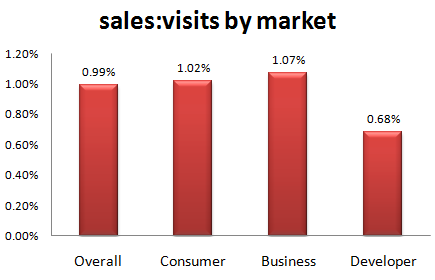
The sales:visits ratio is similar for business and consumer products, with developer products lagging behind. However there are too few developer products in the data set to draw any real conclusions.

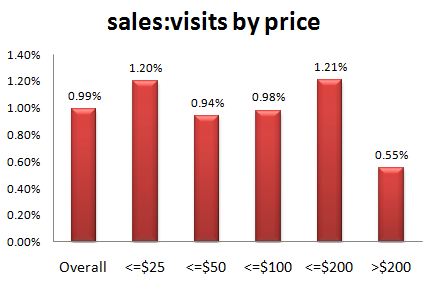
metrics_sale_visit_ratio_by_market1The sales:visits ratio does vary across the price range. However there are too few products with price >$50 in the data set to draw any real conclusions.

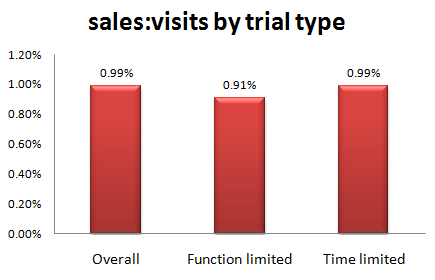
metrics_sale_visit_ratio_by_price2The sales:visits ratio does not seem to vary significantly by trial type. There were insufficient ‘number of use’ trial products to include them.

metrics_sale_visit_ratio_by_trial1

Conclusion

One has to be careful about drawing conclusions from a relatively small and unverifiable data set. However the results certainly seem to support the much-quoted “industry standard” sales:visits conversion ratio of 1%. But there are huge variations between products.

The fact that the sales:downloads ratio is both lower on average and more variable than the downloads:visitors ratio implies that getting people to download is the easy bit and converting the download to a sale is a tougher challenge.

The average sales:visits conversion ratio is noticeably higher for Mac OS X products than Windows products. This is supported by anecdotal evidence and the author’s own experience with a cross-platform product. However the number of Mac respondents to the survey is too small for the result to be stated with any great confidence. Also remember that the Mac market is still a lot smaller than the Windows market before you rush off to start learning Cocoa and Objective-C.

These ratios can be useful for a number of purposes, including: identifying a bottleneck in your conversion funnel (is your downloads:visitors ratio low compared to other products?); estimating how much traffic you might need for a viable business; or estimating how much you can afford to bid on Google Adwords. And it is useful to track how these ratios change over time (I track mine on a monthly basis). But make sure you compare like with like if you are comparing your ratios with other products. For example, a 10% sales:downloads ratio might be achievable for a niche business product, but unrealistic for a casual game. And remember that these ratios are only one part of a bigger picture. There are other, more important, metrics. Profitability for a start.

The data set is available here:

Raw data (some invalid records deleted), CSV format

Processed data, Excel XLSX format

Feel free to publish your own analysis. Thank you to everyone that took part in the survey.

[1] Calculating the mean of all the ratios probably isn’t the way a proper statistician would do it. But anything more seems overkill given the limited size and unverifiable nature of the data set.

Tips on travelling with a laptop

airbus a380I recently returned from a month’s holiday in New Zealand. As a one-man software company I still have to check my email every day, even on holiday. Here are a few tips from my experiences of running my business from a laptop whilst travelling.

Laptop

In theory you can run your business from a Blackberry or a mobile phone that supports email. But it is impossible to answer some support emails if you can’t run your own software. So I took a Toshiba laptop PC with a 13 inch screen with me. I find a 13 inch screen is a good compromise between portability and ease of use. Much bigger and it would have been too bulky. Much smaller and I would have struggled with the screen and keyboard.

The laptop contained my licence key generator and customer database. I owe it to my business and my customers to keep these secure and the Windows password is no protection at all if someone gains physical access to  your machine. So anything sensitive was encrypted using the free Truecrypt software. Whenever I brought the laptop out of hibernation or restarted it I just had to type the password to mount the Truecrypt volume as a virtual drive[1][2].

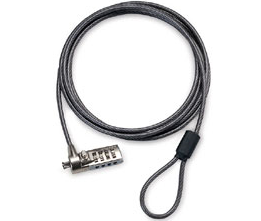
laptop lockI took a combination laptop lock, but I rarely used it. The problem with laptop locks is that the only things strong enough to secure your laptop to are usually in plain view, and a laptop left in plain view is a bit of an invitation. Locked or not. I am also not convinced how strong the laptop security slot is. I suspect an attempted theft would wreck the laptop, even if it wasn’t successful. So I generally prefer to keep the laptop with me or hide it somewhere a crook wouldn’t think to look. I have since found out that laptop locks aren’t even very secure (see here and here). There are still occasions when a laptop lock is better than nothing though. Incidentally, don’t rely on that padlock on your hold baggage either.

The laptop was also invaluable for playing Thomas the Tank Engine DVDs (using Windows Media Player) to keep my little one occupied for part of the very long flights and for backing up photos from the digital camera. I also took a universal power adapter.

Laptop bag

I have a traditional Targus laptop bag with a shoulder strap. But I have found this uncomfortable for carrying a laptop any distance due to the uneven distribution of weight. It also makes it extremely obvious that you have a laptop. A fact I would rather not advertise.

wenger-swissgear-hudson-1wenger swissgear hudson laptop rucksack bagFor this trip I purchased a Swissgear Hudson laptop rucksack from Swiss Army knife manufacturer Wenger. It was much more comfortable to wear with the weight distributed across both shoulders and left both hands free for dealing with passports, boarding passes and a bored two year old. It was small enough to take on to an aircraft as hand luggage, but surprisingly spacious. It also had some useful extras, including: a carry handle, a breathable back and a compartment for an MP3 player. I was impressed with the quality of the construction and finish. My only quibble is that there wasn’t as much padding around the top and bottom of the laptop as I might have liked. So I wrapped my laptop in bubblewrap for additional protection. But on the whole I would recommend this bag highly for travelling.

Back-ups

As well a backup on DVD I also took a 2 Gig USB memory stick that contained everything I would need should my laptop malfunction or be stolen. This included copies of my licence key generator, customer database and various passwords. All the sensitive files were encrypted using the free Axxcrypt software, except my passwords which were encrypted using the free Keepass software. The memory stick also stored various third party software installers (including Axxcrypt and Keepass). I kept the memory stick on a lanyard around my neck when I wasn’t sleeping.

I also stored an additional encrypted back-up on a secure server.

Internet access

Trying to find holiday accommodation that was the right size and budget, in the right location and free at the right time was problematic. Insisting on broadband Internet as well was a step too far. I also wasn’t keen on relying on broadband at accommodation. What if it didn’t work? Relying on Internet cafes seemed an even worse idea. What if I couldn’t find one? And the security issues of using Internet cafes are very real. So I needed my own mobile Internet access.

The roaming charges for using my UK three networks mobile Internet in New Zealand are an outrageous £6/MB. Vodaphone has more sensible roaming charges for some plans, but I couldn’t justify the high monthly price for the occasional trip abroad. So I tried to find a company that would rent me mobile data access in New Zealand for a month, without success. In the end my brother-in-law very kindly sorted me out with a USB mobile modem and a 1GB/mo data plan with Telecom New Zealand. He picked the modem up cheap second-hand on trademe.co.nz and the data plan was of the order of $70NZD/mo, with no minimum term. So, rather than paying >£1000, I ended up paying about £50 (thanks Derek!). There is definitely a business opportunity for someone there.

I am glad I didn’t rely on broadband at the accommodation. It turns out that most of the New Zealand ISPs have restricted SMTP access to prevent spam. So I could receive email via IMAP when plugged in to an xtra.co.nz broadband cable, but I couldn’t connect to their SMTP server to send email. Thankfully I didn’t have this problem with the mobile broadband or I would have been stuck with webmail for a month (the horror!).

Mobile coverage is patchy outside the bigger cities in the South Island of New Zealand, due to the low population density (sheep can’t afford broadband). But I was able to get some sort of signal everywhere we stayed. This might have been helped by the aerial attached to the mobile modem. During the month a I used approximately 40% of the 1GB allowance. I could have used quite a lot less, if necessary.

Stopping over in Singapore I just purchased wifi access from the hotel. It was quite expensive, but I didn’t need it for long. Wifi and hardwired Internet access are available for free in Singapore airport (I couldn’t get the wifi to work, so I just plugged in a network cable).

Conclusion

Running an Internet-based business while travelling isn’t that difficult, with a bit of planning. I doubt my customers even realised I was on holiday. What are you waiting for?

PS/ New Zealand is lovely.

[1] Truecrypt can also encrypt the whole OS, but that seemed excessive for my requirements and I wasn’t sure what impact it would have on performance.

[2] If Truecrypt is so easy to set-up and use, why is it apparently beyond the capabilites of the UK government to encrypt sensitive data?

Photo of Airbus A380 by Claire Brice

The two types of reseller

resellersIn theory, the Internet allows customers to find products without the need for middlemen (unless you count Google). In reality, the age of full disintermediation has not yet arrived, and perhaps never will. Middlemen are still important. One of the more important types of middlemen for a software vendor is the reseller. However it is important to realise that there are two completely different types of reseller. One can be very useful to you as a software vendor, the other is generally a pain in the backside. They should be treated accordingly.

Value added resellers

A value added reseller buys your product and then resells it to their customers. Usually they will buy from you at a discount and resell to their customer at full price, pocketing the difference. Typically a reseller will expect between 25-50% discount depending on a range of factors including what services they provide (e.g. localisation and support), the price of the product  and volumes sold. Often the discounts are on a sliding scale, with the discount increasing with sales volume. This type of reseller can add value for you and the cusomer in various ways. They may:

  • have expertise in markets that you don’t
  • be able to reach markets that you can’t, due to barriers of language, culture or geography
  • localise your product and marketing materials
  • provide first level support.
  • sell your software as part of a package including other services, software and/or hardware.

However there are a few things you have to look out for:

  • You don’t want to end up competing directly against your own resellers in existing markets.
  • Resellers may undercut you on price.
  • Beware of offering any sort of exclusivity.
  • Customers may sign up as resellers just to get a discount for a single purchase.

You can try to avoid direct competition with resellers by only picking resellers in different markets. You may also be able to specify certain terms and conditions, for example that they can’t bid against you on certain phrases in Google Adwords. But, depending on the law where you live, you can’t tell a reseller what to charge the customer. For example, under UK law, this is considered  ‘price fixing’ and is illegal. So make sure you charge a reseller a percentage of your recommended price, not a percentage of their sale price, to make price cutting less attractive. For example, if your product retails for $50, charge the retailer X% of $50. Not X% of what they sell for. Otherwise they could undercut you by selling for $30, and still make a profit, or even give your software away for free.

Resellers will often ask for exclusivity. Exclusivity can provide extra motivation to the reseller (a reseller won’t want to put a lot of effort into marketing your software if you can pull the plug at any time for no reason), but what if the reseller loses interest in your product?  It happens. You could be left in a very bad position unless you can terminate the agreement. So you should agree some sort of minimum volume of sales for a reseller to retain exclusivity.

Offering a sliding scale discount with no discount for the first purchase will discourage customers from trying to take advantage of reseller discounts.

Value subtracted resellers

The other type of middleman that call themself a reseller are really just acting as outsourced purchasing for your customer. They buy your software on the customer’s behalf so that the poor darlings in the customer’s accounts department only get a single invoice for software sales per month, instead of one per vendor. They don’t add any value at all as far the vendor is concerned.  In fact they just make the vendor’s life more difficult by getting between the vendor and the real customer. I had one reseller of this type who, after some twenty emails exchanged, failed to workout how to buy my software from my website. How dim can you be that you can’t click a ‘buy now’ button and fill in a few details when that is what you do for a living? Hence I call them ‘value subtracted resellers’.

This type of reseller will often ask for a discount. Don’t give it to them. The real customer has probably already instructed them to buy your product, so a discount won’t help to close the sale. Also the reseller might pocket the discount instead of passing it on to the customer. If anything, charge them more.

Marketing your software through affiliates

affiliate marketingThe idea of paying someone for sending you business has been around for a long time. Affiliate marketing is just a new, Internet-based, take on it. An affiliate sends traffic to your website and is paid a commission on each sale.  For software this commission will typically be in the range 20-50% of the sale price (although commissions of 75% or more aren’t unheard of). Commission is usually calculated by using cookies to track the number of successful sales (‘conversions’) due to each affiliate.

In theory you can set up your own affiliate commission tracking system, but affiliates would have to trust that your system is honest. It would also involve quite a bit of wheel reinventing. Consequently most vendors use affiliate marketing systems administered by third parties such as shareasale, clickbank or commission junction. Payment processors, such as Avangate and e-junkie, also have their own affiliate marketing systems.

It sounds great. The affiliates are doing marketing for you and you only pay them when you make a sale. How can you possibly lose? In fact there are quite a few potential downsides:

  • You may end up paying commission on sales through affiliates that would otherwise have come to you direct.
  • Affiliates won’t be happy if there is any way to purchase where they don’t get their commission (‘leaks’). This might mean you may not be able to offer some forms of payment, such as cheque or credit card over the phone.
  • You will be competing against your affiliates for search engine ranking.
  • Somebody who wants to buy several copies of your software could sign up as an affiliate to get the commission on their own purchase. You then have to pay commission, but get no additional sales.
  • Affiliates may compete against you in PPC ads, driving up the cost of your ads.
  • Even though you make less on the sale, you still have the full cost of supporting the customer.
  • Some affiliates operate at the shadier end of the market and may resort to various dodgy, or even criminal, practises to get their commission, including:
    • Spam.
    • Annoying pop-up ads.
    • Cookie stuffing.
    • Misrepresenting your product.
    • Adware.
    • Buying your product with a stolen credit card.

You maybe be able to prevent some of the above abuses with appropriate terms and conditions. ( I should also point out, in the interest of fairness, that there are various ways that the affiliate might lose out on commission that is rightfully theirs. For example customers who block cookies and even fraud by vendors.)

Drawing up agreements, recruiting affiliates, providing them with marketing materials, doing the accounts and paying your affiliates all takes time. You can automate quite a lot of it, but it still takes time to set-up the system, answer questions, keep everything running smoothly and check that affiliates are behaving themselves. Time that you could be spending doing other more lucrative and interesting things. As always, there is no such thing as a free lunch.

Joel Spolsky has been an outspoken critic of affiliate marketing:

We did an affiliate program, and found it to be a big waste of time. It generated only a trickle of sales; most of the people in the affiliate program would have linked to us anyway; probably 80% of the affiliates just became affiliates to get a kickback on the one item they bought for themselves or their job.

Affiliate links only works well for mega retail sites like Amazon, where an affiliate has a chance of making a reasonable amount of money.

Our affiliate program was one of those cases where we learned that time spent improving our product pays off many times as much as time spent dinking around with so-called clever marketing schemes.

Don’t waste your time. Move on. Do something to make your product better and Just Say No.

Joel Spolsky on the Business of Software Forum

I am inclined to agree with Joel. Hard data isn’t easy to come by. But, from reading around and talking to other vendors, it seems that very few of them are getting more than 5% of their sales through affiliates. I did have a home-rolled affiliate program for Perfect Table Plan, but I shut it down because the number of sales just wasn’t worth the administration overhead. Some of the affiliates never sold a single licence. I might be more successful if I used a more automated affiliate marketing system and put more effort into recruiting higher calibre affiliates, but I still don’t think it would be the best use of my time.

I have heard that there are ‘super affiliates’ with mythical powers to drive serious sales. But these people, if they really exist, get to pick and choose amongst thousands of products to market. They are going to pick mass-market products with a proven track record and they are going to want a big commission percentage. And how do you tell who is a super affiliate and who is a wannabe? They all talk a good game.

Affiliate marketing is big business, with estimated sales of over £2 billion in the UK alone in 2006. But I suspect a lot of it is from selling ‘get rich quick’ schemes, gambling and porn – not software. Particularly not software from small companies and microISVs. Obviously a lot depends on your product and market. Perhaps if you are selling mass market software (e.g. back-up utilites or virus scanners) and you have dedicated marketing staff, it might be worth your while to run an affiliate program. But make sure you automate as much of the system as possible and be realistic about the results.

Running a microISV

microISVConsumers and businesses are being more careful with their money now, but they are still buying software if it will save them time and/or money. If you have been laid off in the current recession, perhaps now is a good time to start that microISV you have been thinking about. But starting your own business can be a bit daunting if you haven’t done it before. What is actually involved in the day to day running of a small software business?

Disclaimer: The information below is based on my my experience of running a microISV as a UK-based limited company for 4 years. It is far from comprehensive and is merely intended to give you some pointers. I am not an accountant. I am not a lawyer. Some of the information will not be relevant to businesses based outside the UK.  Seek appropriate professional advice.

Accountants

Probably the first thing you should do when you decide to go into business is to get an accountant. An accountant will be able to advise you on bookkeeping, tax, VAT, company rules and regulations and any number of other topics. As you aren’t a large or publicly listed company they don’t have to be a chartered accountant. Changing accountant later may be painful, so try to get it right first time. Ideally try to find your accountant by personal recommendation and someone you think you will get on with. Everything can be done by phone and email, so they don’t have to be in the same town.

Setting up a company

You don’t have to have a company. But it does have some advantages:

  • It makes it easier to separate your personal and business finances, which can only be a good thing.
  • It gives you some legal protection. If someone decides to sue due to a bug in your software, they will have to sue your company, rather than you personally. So you have less chance of losing your house.
  • It has some tax advantages.
  • You can impress members of the opposite sex by putting ‘Director’ on your business card.

Having a company also has certain obligations, such as filing annual returns and company accounts. Much of it can now be done online. The company annual return is pretty straightforward. You just need to list who the company officers and shareholders are. The tax return is more complicated and something I wouldn’t want to do without the help of an accountant.

Setting up a limited company in the UK is fairly easy, simple and cheap. In theory you could read all the necessary documents and do all the paperwork yourself. But surely there are better uses of your time when you can get an accountant to do it for you for as little as £90.

Banking

When you choose a bank you need to consider:

  • Charges – per month and per transaction.
  • Services – e.g. foreign currency accounts.
  • Customer service – how long will you have to wait on the phone to speak to someone?
  • Convenience – you don’t want to have to drive to the next town to pay in a cheque.
  • Interest – are their rates competitive?
  • Guarantees – is the money guaranteed if the bank goes bust?

It may also be a good idea to choose a separate bank from your personal bank, to keep your business and personal finances separate. This could also be important if you ever got into a dispute with your bank.

Having had very good experiences with HSBC through FirstDirect, I chose HSBC for my business banking. However I was unimpressed by the service I received. This included queuing 40 minutes to pay in a cheque and calls to the branch 2 miles away being routed via India (I got fed up of spelling out H-i-g-h W-y-c-o-m-b-e). I was also irked by the service charges. £0.60 to pay in a cheque! When I told them what I thought of their service they made an appointment for someone to come and see me. They never turned up. No apology, nothing.

I have since switched my banking to Alliance and Leicester business bank. I have been happy with the service and there are no charges as long as you pay in at least £1,000 per month. I can also pay in cheques at any Post Office (if the UK government doesn’t close them all).

Invoices

If you are selling to other companies, rather than just consumers, you will have to deal with invoices. Invoices are a subject of mystery to many developers, but really they are just a note to someone that they owe you money. In theory the sequence is:

  1. Customer asks for a quote.
  2. You send a quote (include an expiry date).
  3. Customer sends a signed purchase order.
  4. You send the software licence key with an invoice.
  5. Customer pays the invoice within the time specified by the invoice.

Yeah, right. In reality many companies pay months late. This helps to improve their cash flow at your expense. But, according to Hanlon’s razor, one should ‘Never attribute to malice that which is adequately explained by stupidity’ and I am sure that the apathy and incompetence of accounting staff is also a large factor.

The invoice itself is nothing special. It should include:

  • The word ‘INVOICE’ in large letters.
  • Your company details (including your VAT details, if registered).
  • A unique invoice number.
  • The date.
  • Customer details, including their purchase order number.
  • A description of the product sold and the price (including the currency).
  • Details of how to pay, e.g. your SWIFT/IBAN code and/or who to make the cheque payable to.
  • The payment terms (typically 30 days).

You might want to number your first invoice 0100, rather 0001, if you don’t want early customers to know you are a newbie.

Dealing with the late payment of invoices is a whole topic on it’s own. Personally I don’t invoice for payments of <£100 or $200 – it just isn’t worth the hassle. And I always pay my bills on time. It is the right thing to do.

Bookkeeping

Don’t fight the system, you can’t win. Computing is <70 years old. Accounting is as old as recorded history. Suck it up and learn the appropriate terminology. Consider doing a class on basic bookkeeping.

An accountant is not a bookkeeper. They may agree to do your bookkeeping, but it is likely to be expensive. Personally, I do my own bookkeeping. It is a bit tedious, but it means I know exactly where every penny goes and I can listen to a podcast at the same time to alleviate the boredom.

I started off using Excel for my bookkeeping. In retrospect this was a mistake.

  • You are on your own when it comes to generating reports, such as profit and loss.
  • Mistakes are easy to make and hard to find in large Excel spreadsheets.
  • Excel doesn’t scale very well to hundreds or thousands of transactions.
  • Your custom Excel spreadsheet is much more difficult (=expensive) for your accountant to work with than the package he normally uses.

Sales receipts, advertising, salary, dividends, ISPs, postage, stationery, professional fees etc.  can add up to a lot of transactions. Even with sales batched up into weekly blocks, a one man business such as mine can easily generate over 600 transactions a year. You really don’t want to be trying to track all this in Excel. Much better to use a purpose-built accounting package.

The market leading package for small businesses worldwide appears to be Intuit Quickbooks. Others are Sage (popular in the UK) and MYOB. I recommend you chose whatever package your accountant is happiest to work with. Get your accountant to set it up for you. Trying to use a personal finance package, such as Microsoft money, to run a business is almost certainly a bad idea.

I switched from Excel to Intuit QuickBooks. Initially I hated it. But once I accepted that it was written for bookkeepers, not software developers, we reached a grudging acceptance of each other. Now I just spend an hour or so updating Quickbooks every 1-2 weeks and making sure it tallies with my bank statements. I then send my accountant a copy of the database at the end of each financial year. He then uses this data to create the company annual accounts and tax return.

Don’t leave the bookkeeping until the end of the tax year. You will end up with hundred of scraps of paper to match up with hundreds of transactions. This is an N^2 problem. As with any polynomial problem, you should try to keep N small. Also, your accountant has lots of other clients and won’t thank you for asking him to create your annual report by midnight to meet the filing deadline.

Try to get a receipt for everything. I number receipts sequentially, write that number on the receipt and include it in the Quickbooks transaction memo. I then file the paper receipt in a folder partitioned by month. This should mean that I can easily find the appropriate receipt if (when?) I get audited by the tax man.

In my experience it is common to be invoiced for the wrong amount or twice for the same things. Some companies will even try it on by invoicing you for things you didn’t agree to buy. So check every incoming invoice. Companies don’t appear to put their best, brightest and most cooperative in the accounts department.  Get used to it.

Managing cash flow is a huge issue for businesses. Any number of healthy and profitable businesses have gone to the wall due to cash flow problems. This shouldn’t be an issue for most microISVs as we don’t have to spend a large proportion of our income on equipment or maintain expensive inventories. Hooray for software.

Currencies

I accept payment in various currencies through PayPal. PayPal charge a 2% fee for converting these payments to pounds sterling on top of their other fees. I have previously looked into opening a US dollar account, but it didn’t seem worth the hassle or expense. The Alliance and Leicester Bank charge a £10 fee to cash a cheque in US dollars.

Tax

MicroISVs, like other one-man limited companies, typically pay themselves a minimal salary (around 5k per year) and the rest as dividends. This means that no income tax is payable on your salary. Instead you pay corporation tax on the dividends. As corporation tax is typically lower than basic rate income tax, this is more tax efficient. However you still have to pay higher rate income tax if your income exceeds the higher rate income tax threshold.

Whenever I pay a dividend I transfer the amount of corporation tax that will be due on the profit to my business reserve account. At the end of the tax year I then know I have enough in this account to pay my corporation tax.

If you sell more than £67k per year (currently) of goods inside the EU you must register for VAT. If you sell less than this, registering for VAT is optional.

Advantages of registering for VAT:

  • You can claim back VAT on all purchases.
  • Not having a VAT number may make you seem ‘not a real business’ to other businesses.

Disadvantages of registering for VAT:

  • You have to charge VAT on all sales inside the EU. Businesses can claim this back, but consumers can’t.
  • More paperwork.

Consequently a B2C software vendor with large profit margins probably shouldn’t register until they have to. But VAT registration might be much more attractive to a B2B software vendor with lots of expenses. Apparently you can claim back some of your VAT payments retrospectively when you register.

Some other points on tax:

  • You can give your spouse shares in the company and pay them that proportion of the dividends. This is tax efficient if they earn less then you. But will only add to your woes if they ever run off with the milkman/milkwoman.
  • When you are applying for a mortgage some banks will only count your salary, not your dividends. A £5k salary doesn’t go far, even in the current housing market.
  • If you work at home you can charge a percentage of your heating, electricity, council tax etc or rent part of the house to your company. But you may then be liable to pay capital gains tax on any increase in value of the house.
  • In the UK you can claim £55 per week tax-free in childcare vouchers. The childcare provider must be registered with OFSTED. You don’t need a physical paper voucher – just pay the childcare provider direct from your company and keep all the appropriate records (including their OFSTED number).
  • The UK government pays a reasonable rate of interest on early payments of corporation tax. You might get more interest paying your corporation tax early than leaving it in a savings account. Also you don’t have to worry about the bank going under with your savings. Of course you will still have to pay tax on the interest next year.
  • I have also written an article on the basics of VAT for software vendors.

Additional resources

  • UK Business Link. Business link is a free business advice and support service, available online and through local advisers. Useful for generic business advice – don’t expect them to know anything about the software business.
  • UK Companies house. Where you go to set up your company and make annual returns.
  • UK HM Revenue and Customs. They have always been very helpful when I rang them with a query.
  • Andrew Wells. The accountant I use. Good service at a reasonable price. UK based.

100 ways to increase your software sales

Increase targeted traffic to your website:

  1. SEO your website.
  2. Write a blog or newsletter of interest to the sort of people who might buy your software.
  3. Get more links to your website.
  4. Try Google Adwords Pay Per Click (PPC) ads.
  5. Write a guest post on someone else’s blog.
  6. Try CNet Pay Per Download ads.
  7. Promote your software through download sites using the ASP PAD repository, a paid submission tool or free submission tool.
  8. Promote your software through platform sites e.g. Apple downloads or Office online.
  9. Start an affiliate program.
  10. Try Microsoft Adcentre PPC ads.
  11. Bid higher for your PPC phrases.
  12. Advertise on stumbleupon.
  13. Write additional content for your site.
  14. Give away a ‘lite’ version of your software.
  15. Offer discount coupons.
  16. Add a forum to your website.
  17. Offer free review copies of your software to bloggers.
  18. Do a press release.
  19. Run a competition.
  20. Write better ads for your PPC campaign.
  21. Direct (snail) mail.
  22. Run ads in print magazines.
  23. Include your URL when posting on relevant forums.
  24. Try Yahoo Search Marketing PPC ads.
  25. Buy banner ads on targeted blogs, forums and other websites.
  26. Add extra keywords to your PPC campaigns.
  27. Talk about your software on a podcast.
  28. Add a viral element to your software.
  29. Do a publicity stunt.
  30. Get word of mouth recommendations by giving great support.
  31. Get listed in online directories such as DMOZ.
  32. Post a screencast on YouTube.

Increase your visitor->download rate:

  1. Have an online demo movie.
  2. Offer a free trial.
  3. Offer a money back guarantee.
  4. Port your software to additional platforms e.g. iPhone.
  5. Have a clean and professional website.
  6. Add case studies to your website.
  7. Make sure your website functions with all the major browsers.
  8. Get someone else to proof read the copy on your website.
  9. Talk to visitors in a language they understand i.e. not technical jargon, unless they are techies.
  10. Reduce the number of barriers to downloading the trial (don’t require an email address).
  11. Add a product FAQ to your website.
  12. Show your price prominently.
  13. Improve the usability of your website.
  14. Include your contact details on the website.
  15. Make sure the people can understand what your software does within 2 seconds of arriving at your site.
  16. Make the ‘download’ button more prominent on your website.
  17. Fix any errors in your website.
  18. Include screenshots on your home page.
  19. Add a list of famous customers to your website.
  20. Use a digital certificate for your installer and executable.
  21. Add (genuine!) testimonials to your website.
  22. Create better landing pages for your PPC campaigns.
  23. Add a privacy policy to your website.
  24. Add live online support to your website.
  25. Check your web logs/analytics to find out why/where visitors are leaving your website.

Increase your download->sale rate:

  1. Offer more than one payment processor.
  2. Improve the usability of your software.
  3. Accept purchase orders.
  4. Offer Trialpay as an alternative payment method.
  5. Offer sensible prices in additional currencies.
  6. Require an email address to download your software and follow-up with marketing emails.
  7. Increase or reduce the price of your software.
  8. Fix bugs in your software.
  9. Lengthen or shorten the trial period.
  10. Offer bulk purchase discounts.
  11. Improve your installer.
  12. Make the ‘buy’ button more prominent on your website.
  13. Make your software more beautiful.
  14. Allow users to buy your product easily from within the software itself.
  15. Localize your software into another language.
  16. Offer organizational licences.
  17. Try limiting your trial by features instead of time (or vice versa).
  18. Improve the speed/memory performance of your software.
  19. Improve your product documentation.
  20. Offer alternative payment models (e.g. an annual subscription instead of a one-off fee).
  21. Offer alternative licensing models (e.g. per site instead of per user).
  22. Write an introductory tutorial.
  23. Reduce the number of clicks and key presses required to make a sale.
  24. Add that new feature that people keep asking for.

Increase the value of each sale:

  1. Increase the price of your software.
  2. Charge extra for optional modules.
  3. Upsell additional products and services of your own or as an affiliate.
  4. Charge for major upgrades.
  5. Offer multiple versions at different price points e.g. standard/business/enterprise.
  6. Offer an optional CD.
  7. Charge an annual maintenance fee.
  8. Charge for support.
  9. Offer a premium support plan.

Explore alternative sales channels:

  1. Sell through resellers.
  2. Exhibit at tradeshows.
  3. Cold call prospects.
  4. Allow other companies to sell white label versions of your software.
  5. Include your software on cover-mounted magazine CDs.
  6. Sell through retail stores.
  7. Sell on Ebay.
  8. Sell on Amazon.
  9. Promote your software on one day sale sites, such as BitsDuJour or GiveAwayOfTheDay.
  10. Create a new product.

Notes:

  • Items are in no particular order in each category.
  • Some of the items are mutually exclusive.
  • I have tried about 80% of the above. Some worked, some didn’t. In fact, many of them were a total waste of time and money. But the ones that didn’t work for me might work great in a different market (and vice versa). I discuss my experiences with some of them in more detail here: Promoting your software part1, part2, part3, part4, part5, part6.
  • This is by no means an exhaustive list. Feel free to suggest more in the comments.
  • Don’t know where to start? Perhaps you need a fresh pair of eyes.

Thanks to Stuart Prestedge of Softalk for suggesting some of the above.

Programming with your feet

footI started feeling a mild burning sensation in my left wrist a few weeks ago. This is a classic early sign of Repetitive Strain Injury.  Uh-oh. I had an email exchange not long ago with someone who now has to use voice activation because typing is too painful. I can’t imagine how frustrating that must be. I decided to ignore Jane Fonda’s advice to “feel the burn” and looked for a way to alleviate the problem.

One approach is to reduce the amount of typing I do. But that is tough when you are running a microISV and writing a blog. I already use the text expander capabilities of the excellent Direct Access software to save a lot of typing (it tells me that it has saved me 51 hours of typing so far). I decided to try an ergonomic keyboard.

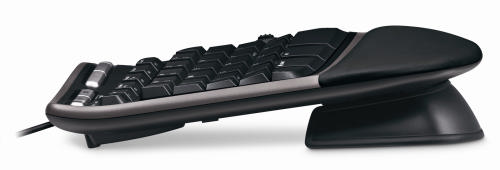
I bought myself a Microsoft 4000 Ergonomic keyboard. This is shaped to allow more natural positioning of the forearms and elbows.

microsoft_natural_keyboard_4000

Microsoft Natural Ergonomic Keyboard 4000

For more comfortable wrist positioning it also has a built-in wrist rest and the front of the keyboard is higher than the back.

microsoft_natural_keyboard_4000

Note the front of the keyboard (right) is higher than the back (left)

I was quite surprised how physically large it was when it turned up. The shape of the keyboard felt very strange to start with and it took me a few days of slow typing to get used it. The feel of the keys is nothing special and I haven’t yet used the extra gizmos, such as the integral zoom button. But I feel it is an improvement in comfort over the conventional keyboard I had before.

An unexpected advantage of the new keyboard is that it has improved my typing. If you watch a good touch typist, their hands hardly move. I (unfortunately) never learnt to touch type, I just didn’t have the patience. The clearer separation between keys for the left hand and keys for the right hand on the new keyboard made me realise that I was moving both hands left and right, more like a concert pianist than a touch typist. I am now moving my hands less and I think my typing speed has improved as a consequence.

I didn’t feel the new keyboard on it’s own was going to solve my impending RSI problems though. The major problem seems to be the continual Ctrl-C, Ctrl-V, Ctrl-A, Windows-D, Windows-E and Alt-Tab key combinations I do with my left hand, hundreds of times a day. Using the right hand Ctrl key instead of the left one helped a bit. But it occurred to me – why are my hands doing all the work? My legs are doing so little that I often feel stiff when I stand up from a long programming session. Why not put them to use?

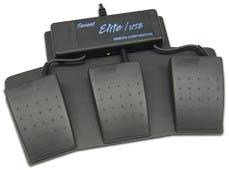
I Googled for foot pedals for computers. After wading through lots of hits for music and dictation foot pedals I finally found the Savant Elite Triple Foot Switch. This is a programmable 3-pedal foot-switch that plugs into a USB port.

savant_elite_foot_switch

Savant Elite Triple Foot Switch

At £86.00+VAT it isn’t cheap. But what price do you put on your health? I ordered one.

When it arrived I wanted to program the pedals to map to the Ctrl, Shift and Windows keys. But I couldn’t install the device driver to program the pedals. After a call to the retailer it turns out the device driver doesn’t work on Vista, despite assurance on the website that the pedals could be used with “virtually any computer”[1]. Grrrrr. How long has Vista been out? I finally managed to program the pedals using my wife’s laptop – my last remaining XP box.

So now I can type using my feet for most of the modifier keys. I am using the pedals as I type this. I am still getting used to them, but the burning in my left wrist has definitely reduced. I think I can also type a little faster, but I am too lazy to do the speed tests with and without the pedals to verify this.  On the negative side:

  • Working out where to put your feet when you aren’t typing can be a little awkward.
  • The pedals tend to move around the carpet, despite being metal and quite heavy. Some small spikes might have helped.
  • Although the travel on the pedals is small, they are surprisingly stiff.

When I told a friend about the pedals he asked – why stop there? I could also be using my elbows, knees and head like a one-man-band. I could be working-out and typing at the same time. It is an intriguing prospect.

I just hope I don’t end up with burning ankles.

[1] System requirements have since been added to the website.

7 Ways to be a healthier programmer

Developing software is an indoor job with no heavy lifting. How dangerous can it be? Actually, the long term dangers to your health are all too real. Humans have bodies evolved for running around the African savanna, not sitting motionless in front of a computer for hours at a time. I have heard several stories of developer careers cut short by RSI. Imagine if you couldn’t type any more, because it was too painful? Yes, it could happen to you. I started to write an article about ergonomics for developers. Then I realised I knew someone who was a lot more knowledgeable about it than me. Derek kindly agreed to write it instead.

It may seem hard to believe that working at your desk can cause you long term harm, but unfortunately the real toll of sitting in the same location and doing the same operations over and over again may not be felt until it is too late.  Here are some simple precautions you can take.

1. Setup your work environment to be ergonomic

Make sure that your whole working environment is set up correctly. This includes your monitor, keyboard, mouse, your desk height, your chair, and possibly a foot rest. Adjusting your seating position relative to your workstation layout encourages good posture. Do this on a regular basis, not just when the ergonomic assessment forms come around once a year. Setting up your chair correctly is probably the most important step and is covered in detail at healthycomputing.com.

2. Try using an ergonomic mouse and keyboard

There are a wide range of ergonomic mice available nowadays, and while some of them may look a little strange, you may be surprised how comfortable they are compared to conventional mice. The Evoluent VerticalMouse is ergonomic, easy to use and available in left and right hand variants. If you find an ergonomic keyboard inconvenient for programming, consider looking into one with a small key travel distance, like the keyboards on laptops where the keys only need to be depressed a small amount, as this reduces the finger movements and effort required.

3. Remember to look up from your monitor

Staring at your computer screen for long periods will lead to eye strain, tiredness, headaches and dry eyes. Every few minutes, look up from your monitor and focus on objects in the distance, either by looking out of the window or at the most distant end of the room. You can do this by using ScreenRest set to remind you at fixed time intervals. It is also worth adjusting your monitor screen to eliminate reflections from light sources behind and above you.

4. Sit up and stop slouching

Leaning forward, sinking down in your chair or resting you elbows on the desk places unnecessary pressure on your back. Poor posture, maintained over a period of time, leads to back pain and more serious back conditions. Make sure that you regularly correct your posture, sitting slightly reclined and supported in your chair with your shoulders relaxed.

5. Keep yourself hydrated

Don’t forget to keep up your fluid levels throughout the day. Even mild dehydration can leave you feeling lightheaded or bring on a headache. Often when you feel hungry it is actually that you’re thirsty, so don’t reach for the biscuits, get a glass of water first. Staying hydrated will help keep you clearheaded, more alert and help counter the dry environment around computers.

6. Take regular rest breaks

Get up and walk around regularly, taking a few minutes to relax. Try to avoid the temptation of carrying on with that feature that is “nearly finished”, or doggedly tracking down that bug that you’ve “almost fixed”. Taking a break will refresh you both physically and mentally. Also, use the break as a reminder to change the type of task you’re performing. If you use the keyboard and mouse extensively, you may want to use ScreenRest set to remind you based on the amount of usage. It can be surprising how much you use a computer continuously without realizing.

7. Look after yourself before it is too late

As a programmer your livelihood depends on you being able to use a computer. Pay attention to any discomfort, tension or pain you may feel while using the computer. Don’t think that computer-related conditions won’t happen to you and ignore those nagging pains until they become something more serious.

Do not underestimate how severe and uncomfortable repetitive strain injury pains can become and how long they will persist throughout the day and even into the night and will eventually impact leisure activities you enjoy doing. Once the damage has been done even the simplest of movements, not just using the computer, can be enough to trigger pain.  There are tools available, such as speech recognition software, to help with basic computer tasks such as emails and browsing basic websites, but it is of no use when controlling complex development IDEs.  Speech recognition can frustrating to control at the best of times and is impractical in an open plan office environment, due to the background noise.

Derek Pollard

Derek Pollard is the developer of ergonomics software ScreenRest, for the prevention and relief of eye strain and the management of RSI while using your computer.

<p style=”text-align:left;” class=”getsocial”><img style=”border:0;margin:0;padding:0;” src=”http://getsocialserver.files.wordpress.com/2009/08/gs1003.png&#8221; /><a title=”Add to Facebook” href=”http://www.facebook.com/sharer.php?u=https://successfulsoftware.net/2008/10/26/7-ways-to-be-a-healthier-programmer&#8221; rel=”nofollow” target=”_blank”><img style=”border:0;margin:0;padding:0;” src=”http://getsocialserver.files.wordpress.com/2009/08/gs1013.png&#8221; alt=”Add to Facebook” /></a><a title=”Add to Digg” href=”http://digg.com/submit?phase=2&amp;url=http%3A%2F%2Fsuccessfulsoftware.net%2F2008%2F10%2F26%2F7-ways-to-be-a-healthier-programmer&amp;title=7%20Ways%20to%20be%20a%20healthier%20programmer&#8221; rel=”nofollow” target=”_blank”><img style=”border:0;margin:0;padding:0;” src=”http://getsocialserver.files.wordpress.com/2009/08/gs1023.png&#8221; alt=”Add to Digg” /></a><a title=”Add to Del.icio.us” href=”http://del.icio.us/post?url=http%3A%2F%2Fsuccessfulsoftware.net%2F2008%2F10%2F26%2F7-ways-to-be-a-healthier-programmer&amp;title=7%20Ways%20to%20be%20a%20healthier%20programmer&#8221; rel=”nofollow” target=”_blank”><img style=”border:0;margin:0;padding:0;” src=”http://getsocialserver.files.wordpress.com/2009/08/gs1033.png&#8221; alt=”Add to Del.icio.us” /></a><a title=”Add to Stumbleupon” href=”http://www.stumbleupon.com/submit?url=http%3A%2F%2Fsuccessfulsoftware.net%2F2008%2F10%2F26%2F7-ways-to-be-a-healthier-programmer&amp;title=7%20Ways%20to%20be%20a%20healthier%20programmer&#8221; rel=”nofollow” target=”_blank”><img style=”border:0;margin:0;padding:0;” src=”http://getsocialserver.files.wordpress.com/2009/08/gs1043.png&#8221; alt=”Add to Stumbleupon” /></a><a title=”Add to Reddit” href=”http://reddit.com/submit?url=http%3A%2F%2Fsuccessfulsoftware.net%2F2008%2F10%2F26%2F7-ways-to-be-a-healthier-programmer&amp;title=7%20Ways%20to%20be%20a%20healthier%20programmer&#8221; rel=”nofollow” target=”_blank”><img style=”border:0;margin:0;padding:0;” src=”http://getsocialserver.files.wordpress.com/2009/08/gs1053.png&#8221; alt=”Add to Reddit” /></a><a title=”Add to Blinklist” href=”http://www.blinklist.com/index.php?Action=Blink/addblink.php&amp;Description=&amp;Url=http%3A%2F%2Fsuccessfulsoftware.net%2F2008%2F10%2F26%2F7-ways-to-be-a-healthier-programmer&amp;Title=7%20Ways%20to%20be%20a%20healthier%20programmer&#8221; rel=”nofollow” target=”_blank”><img style=”border:0;margin:0;padding:0;” src=”http://getsocialserver.files.wordpress.com/2009/08/gs1063.png&#8221; alt=”Add to Blinklist” /></a><a title=”Add to Twitter” href=”http://twitter.com/home/?status=7%20Ways%20to%20be%20a%20healthier%20programmer+%40+http%3A%2F%2Fsuccessfulsoftware.net%2F2008%2F10%2F26%2F7-ways-to-be-a-healthier-programmer&#8221; rel=”nofollow” target=”_blank”><img style=”border:0;margin:0;padding:0;” src=”http://getsocialserver.files.wordpress.com/2009/08/gs1073.png&#8221; alt=”Add to Twitter” /></a><a title=”Add to Technorati” href=”http://www.technorati.com/faves?add=https://successfulsoftware.net/2008/10/26/7-ways-to-be-a-healthier-programmer&#8221; rel=”nofollow” target=”_blank”><img style=”border:0;margin:0;padding:0;” src=”http://getsocialserver.files.wordpress.com/2009/08/gs1083.png&#8221; alt=”Add to Technorati” /></a><a title=”Add to Yahoo Buzz” href=”http://buzz.yahoo.com/buzz?targetUrl=http%3A%2F%2Fsuccessfulsoftware.net%2F2008%2F10%2F26%2F7-ways-to-be-a-healthier-programmer&amp;headline=7%20Ways%20to%20be%20a%20healthier%20programmer&#8221; rel=”nofollow” target=”_blank”><img style=”border:0;margin:0;padding:0;” src=”http://getsocialserver.files.wordpress.com/2009/08/gs1093.png&#8221; alt=”Add to Yahoo Buzz” /></a><a title=”Add to Newsvine” href=”http://www.newsvine.com/_wine/save?u=http%3A%2F%2Fsuccessfulsoftware.net%2F2008%2F10%2F26%2F7-ways-to-be-a-healthier-programmer&amp;h=7%20Ways%20to%20be%20a%20healthier%20programmer&#8221; rel=”nofollow” target=”_blank”><img style=”border:0;margin:0;padding:0;” src=”http://getsocialserver.files.wordpress.com/2009/08/gs1103.png&#8221; alt=”Add to Newsvine” /></a><img style=”border:0;margin:0;padding:0;” src=”http://getsocialserver.files.wordpress.com/2009/08/gs1113.png&#8221; /></p>

Should I give free upgrades for life?

There are any number of different licensing models. For commercial software the main ones are:

  1. subscription
  2. outright purchase, with annual maintenance
  3. outright purchase, with free minor upgrades and paid major upgrades
  4. outright purchase, with free major and minor upgrades for life

Subscription payments and purchase + maintenance are nice, if you can get them. They give a more predictable cash flow for a business and you can generally charge a higher lifetime price than you can with a single payment. But this isn’t appropriate for all types of software. For example, it doesn’t make much sense for lower priced desktop software. Assuming subscription or purchase+maintenance isn’t an option, the question boils down to – should we charge for major upgrades?

Let’s look at the numbers for a simple (contrived) example. AcmeSoft sells 1000 licences of v1 of their product in year 1, 2000 licences of v2 of their product in year 2, 3000 licences of v3 of their product in year 3 etc. Each year 50% of the customers who bought the previous version (new or as an upgrade) pay to upgrade to the latest version. The upgrade costs them 50% of the initial purchase. How much is the upgrade revenue worth? We can create a simple model in Excel:

Income new licences (blue) vs income from upgrades (red). Click to enlarge.

Percentage of annual income from upgrades. Click to enlarge.

In year 8 the upgrade income is actually worth more the new licence income. By year 10 upgrades are worth some 60% of yearly income for the product. If the product has a 10 year lifespan, nearly 50% of the total income from the product will be from upgrades. So it only makes commercial sense to give free upgrades for life if this will at least double the conversion ratio[1]. This seems highly unlikely. You can always try changing your upgrade policy and measure what effect it has on your conversion rate. Not much, I would guess (if anyone has tried it, I would be interested to know the results).

Even in a more pessimistic model where only 30% of customers upgrade and they only pay 30% of the new licence fee, upgrades still account for nearly 25% of total income over 10 years. You can download the spreadsheet and play with the parameters yourself.

Upgrade income becomes particularly important when:

  • A product has a long life span.
  • Customers are very likely to upgrade to a new version.
  • There is little growth in new sales.

In the worst case you could end up with a product with a huge customer base built up over a long period, but which makes very few new sales as it has saturated the market. Free major upgrades would mean that each major release is then going to result in large expense (developent and support) but very little income. Microsoft must be very happy they didn’t offer free upgrades for life on Windows or Office!

I don’t see anything unreasonable about charging for major upgrades. The vendor has to do additional work to add the new features and existing customers can choose whether the new features are worth the upgrade fee. However customers have certain (not unreasonable) expectations for paid upgrades:

  • The fact that the customer is expected to pay for major upgrades needs to be made clear before purchase.
  • Any major bugs in version n should be fixed before releasing version n+1.
  • A major upgrade should have significant new features.
  • Major upgrades should not be released more than once every 12 months.
  • The upgrade fee should be reasonable. Around 40% of the cost of a new licence seems typical.
  • There should be a grace period for free upgrades. E.g. If I buy v1 of a product on 01-Jan I don’t expect to have to pay an upgrade fee for v2 released on 02-Jan. Typically this grace period is 3-6 months.

If you are offering free upgrades for life currently, you can change your policy to paid major upgrades. But, obviously, you will need to honour free upgrades for everyone who purchases before the change of policy.

There are some, apparently successful, companies that offer free upgrades for life (Axialis for example). But I have heard many tales of small software vendors regretting their initial decision to give free upgrades for life. The easiest customer to sell to is the one you already have. If you don’t charge for major upgrades, are you leaving large amounts of money on the table?
[1]Ignoring inflation, interest etc.