Category Archives: Google

Microsoft adCenter over reporting conversions

I have long suspected that Microsoft adCenter is over reporting conversions. Here is the confirmation from my adCenter reporting:

I am guessing that the purchaser visited the ‘thank you for your purchase’ page (which contains the conversion tracking script) 5 times, for whatever reason. I can’t think of any other way this situation could occur – the conversion tracking isn’t set up to take account of multiple purchases in one transaction. How difficult would it be to only count the first visit? Google can do it.

Being cynical, perhaps the over reporting suits Microsoft? But it makes it much more difficult for me to assess the real effectiveness of keywords and ads. Another good reason to concentrate my efforts on Google Adwords instead.

Google Adwords: improving your ads

google adwordsOne of the keys to success in Google Adwords (and other pay per click services) is to write good ad copy. This isn’t easy as the ads have a very restrictive format, reminiscent of a haiku:

  • 25 character title
  • 2×35 character description lines
  • 35 character display url

Whats more, there are all sorts of rules about punctuation, capitalisation, trademarks etc. You will soon find out about these when you write ads. Most transgressions are flagged immediately by Google algorithms, others are picked up within a few days by Google staff (what a fun job that must be).

Google determines the order in which ads appear in their results using a secret algorithm based on how much you bid, how frequently people click your ads and possibly other factors, such as how long people spend on your site after clicking. Nobody really knows apart from Google, and they aren’t saying. The higher your click frequency, generally the higher your ad will appear. The higher your ad appears in the results, generally the more clicks you will get. So writing relevant ads is very important. This means that each adgroup should have a tightly clustered group of keywords and the ads should be closely targeted to those keywords.

There is no point paying for clicks from people who aren’t interested in your product, so you need to clearly describe what you are offering in the few words available. For example you might want to have a title “anti-virus software” instead of “anti-virus products” to ensure you aren’t paying for useless clicks from people looking for anti-viral drugs (setting “drugs” as a negative keyword would also help here).

I have separate campaigns for separate geographic areas. Each campaign contains the same keywords in the same adgroups, but with potentially different bid prices and ads. This allows me to customise the bid prices and ads for the different geographic areas. For example I can quote the £ price in a UK ad and the $ price in a US ad. Having separate campaigns for separate geographic areas is a hassle, but it is manageable, especially using Google Adwords editor.

Writing landing pages specific to each adgroup can also help to increase your conversion rate. It is worth noting that the ad destination url doesn’t have to match the display url. For example you could have a destination url of “http://www.myapp.com/html/landingpage1.html?ad_id=123” and a display url of “www.myapp.com/freetrial”.

Obviously what makes for good ad copy varies hugely with your market. Here are some things to try:

  • a call to action (e.g. “try it now!”)
  • adding/removing the price
  • different capitalisation and punctuation
  • keyword insertion (much beloved of EBay)
  • changing the destination url

But, as always, the only way to find out what really works is testing. Google have made this pretty easy with support for conversion tracking and detailed reporting. I run at least 2 ads in each adgroup and usually more. Over time I continually kill-off under-performing ads and try new ones. Often the new ads will be created by slight variations on successful ads (e.g. changing punctuation or a word) or splicing two successful ads together (e.g. the title from one and the body from another). This evolutionary approach (familiar to anyone that has written a genetic algorithm) gradually increases the ‘fitness’ of the ads. But you need to decide how to measure this fitness. Often it is obvious that one ad is performing better than another. But sometimes it can be harder to make a judgment. If you have an ad with a 5% click-through rate (CTR) and 0.5% conversion rate is this better than an ad with a 1% click-through rate and a 2% conversion rate? One might think so ( 5*0.5 > 1*2 ) but this is not necessarily the case. I think the key measure of how good an ad is comes from how much it earns you for each impression your keywords get.

I measure the fitness by a simple metric ‘profit per thousand impressions’ (PPKI) where, for a given time period:

PPKI = ( ( V * N ) – C ) / ( I / 1000 )

V = value of a conversion (e.g. product sale price)

N = number of conversions (e.g. product sales) from the ad

C = total cost of clicks for the ad

I = impressions for the ad

Say your product sells for $30. Over a given period you have 2 ads in the same adgroup that each get 40k impressions and clicks cost  an average of $0.10 per click.

  • ad1 has a CTR of 5%, a conversion rate of 0.5% and gets 10 conversions, which gives PPKI=$2.5 per thousand impressions
  • ad2 has a CTR of 1%, a conversion ratio of 2% and gets 8 conversions, which gives PPKI=$5 per thousand impressions

So ad2 made, on average, twice the profit per impression despite the lower number of conversions. Given this data I would replace ad1 with a new ad. Either a completely new ad or a variant of ad2.

PPKI has the advantage of being quantitative and simple to calculate. You can just export your Google Adwords ‘Ad Performance’ reports to Excel and add a PPKI column. Some points to bear in mind:

  • Selling software isn’t free. You may want to subtract the cost of support, CD printing & postage, ecommerce fees, VAT etc from the sale price to give a more accurate figure for the conversion value.
  • PPKI doesn’t take account of the mysterious subtleties of Google’s ‘quality score’. For example an ad with low CTR and high conversion rate might conceivably have a good PPKI but a poor quality score. This could result in further decreases in CTR over time (as the average position of the ad drops) and rises in minimum bid prices for keywords.
  • PPKI is a simple metric I have dreamt up, I have no idea if anyone else uses it. But I believe it is a better metric than cost per conversion, or any of the other standard Google metrics.

To ensure that all your ads get shown evenly select ‘Rotate: Show ads more evenly’ in your Adwords campaign settings. If you leave it at the default ‘ Optimize: Show better-performing ads more often’ Google will choose which ads show most often. Given a choice between showing the ads that make you most money and the ads which make Google most money, which do you think Google will choose?

Text ads aren’t the only type of ads. Google also offer other types of ads, including image and video ads. I experimented with image ads a few years ago, but they got very few impressions and didn’t seem worth the effort at the time. I may experiment with video ads in the future.

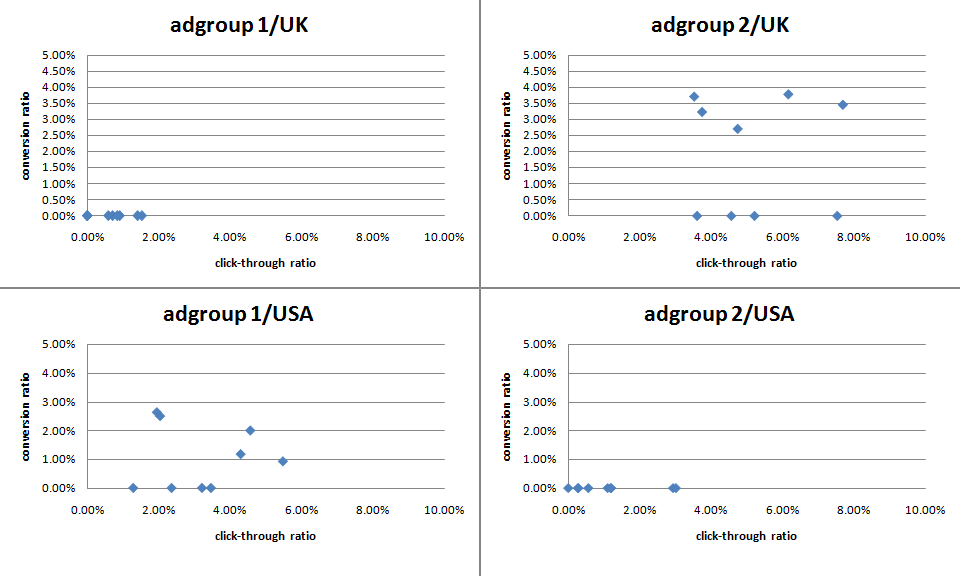
The effectiveness of ads can vary greatly. Back in mid-December I challenged some Business Of Software forum regulars to ‘pimp my adwords’ with a friendly competition to see who could write the best new ads for my own Google Adwords marketing. The intention was to inject some fresh ‘genes’ into my ad population while providing the participants with some useful feedback on what worked best. Although it is early days, the results have already proved interesting (click the image for an enlargement):

adwords ad results

The graph above shows the CTR v conversion ratio of 2 adgroups, each running in both USA and UK campaigns. Each blue point is an ad. The ads, keywords and bid prices for each ad group are very similar in each country (any prices in the ads reflect the local currency for the campaign). Points to note:

  • There were enough clicks for the CTR to be statistically significant, but not for the conversion rate (yet).
  • The CTRs vary considerably within the same campaign+adgroup. Often by factor of more than 3.
  • Adgroup 1 performs much better in the USA than in the UK. The opposite is true for adgroup 2.
  • Adgroup 1 for the USA shows an inverse correlation between CTR and conversion rate. I often find this is the case – more specific ads mean lower CTR but higher conversion rates and higher profits.

‘Pimp my adwords’ will continue for a few more months before I declare a winner. I will be reporting back on the results in more detail and announcing the winner in a future post. Stay tuned.

Brand recognition: PayPal beats Google

I offer both PayPal and GoogleCheckout as payment option on my pounds sterling payment page (GoogleCheckout only allows me to price in pounds sterling, unfortunately). As GoogleCheckout is effectively free to me at present[1] I put the GoogleCheckout button on the left in the hope of getting more payments through Google. But 70.5% of purchasers clicked on the PayPal button.

I have since then become a bit disgruntled with GoogleCheckout for their slow processing times, chargeback fees, lack of multi-currency support and use of anonymised email addresses[2]. So I swapped the button order in the hope of increasing the number of purchasers using PayPal. 69.3% of purchasers now click on the PayPal button.

paypal-vs-googlecheckout.gif

From this I conclude that GoogleCheckout still has a long way to go to beat PayPal in brand recognition, positioning on the left may not be more prominent (although 1.2% may be statistical noise) and button order is less important than I thought. Or perhaps the PayPal icon is just more compelling. I wonder if GoogleCheckout have tested their icon against the PayPal icon?

[1] Google currently process £10 of payments free for each £1 I spend on Adwords.

[2] The user can opt to have their email anonymised at time of purchase. The vendor then recieves an email address like Miss-abc123xyz@checkout.l.google.com. Google forwards email from this address to the purchaser, until they choose not to receive further emails. In theory this protects the purchaser from vendor spam, but in reality it makes support more difficult. For example, the purchaser can’t retrieve their key from your online key retrieval system unless they remember to use the anonymised address (they never do).

First charge-back from GoogleCheckout

google_checkout2.gifI have just had my first charge-back through GoogleCheckout. I shouldn’t moan at one charge-back in 8 months use as my secondary payment processor – except:

  • the credit card address was in the UK, the IP address was in the Netherlands and the email address was .ru (Russian Federation)
  • the payment failed authorisation twice, before succeeding a third time

Despite the above, Google apparently just processed the payment automatically, without referring it for further checks. How many Google Phds does it take to write a scoring system that can figure out that this was a suspect transaction? To rub a bit more salt in the wound Google have debited a £7.00 charge-back fee on top of refunding the payment.

I guess Google must need the money.

GoogleCheckout takes 22 hours 28 minutes to clear a payment

GoogleCheckout

I am a big believer in having more than one payment processor. I use PayPal as my main processor with GoogleCheckout and 2Checkout as alternatives (GoogleCheckout for pounds sterling and 2Checkout for dollars). But I haven’t been overwhelmed by GoogleCheckout so far. This is how long the last 10 payments for PerfectTablePlan through GoogleCheckout took to clear:

  • 4 hours 5 minutes
  • 5 minutes
  • <1 minute
  • <1 minute
  • 22 hours 28 minutes
  • <1 minute
  • <1 minute
  • <1 minute
  • 1 minute
  • <1 minute

That is quite some variation. I assume it is due to some orders being flagged for manual fraud checking. This is response I got from Google when I complained:

…for your protection, Google may review certain orders before passing them to you for processing. Some reviews may take slightly longer as Google performs more comprehensive analysis of the order to minimise your exposure to fraud risk.

Our specialists are working hard to address all orders in a ‘Reviewing’ state as quickly as possible. These reviews may take up to 24 hours…

So 22.5 hours appears to be acceptable as far as Google is concerned. But they managed to reply to my support email within a few minutes.

GoogleCheckout may be cheap (effectively free to Google Adwords customers at present) but keeping my customers waiting up to 24 hours for their licence isn’t acceptable to me. It makes me look bad. Go and hire some more people Google – you can afford it. Otherwise PayPal are going to wipe the floor with you as soon as you start charging comparable fees.

Despite the leisurely time they take over fraud checks they still managed to pass a payment with a postal address in Scotland, an IP address in the Netherlands and a Romanian email address. I am still waiting to see if I am going to be charged a £7.50 fee by Google for the privilege.

Cost effective software registration with ejunkie

ejunkieMost small software vendors don’t want all the hassle of taking payments direct from customers, so they use a third party registration service. Registration services provide payment processing plus additional services, including handling of:

  • licence key emails
  • coupon codes
  • affiliate payments
  • taxes
  • invoice sales

But these services don’t come cheap. According to this calculator some registration services charge as much as 15% commission on every £20/$40 sale. 15%! I find that quite staggering. 10% is more typical, but personally I don’t intend to give 10+% of my hard earned income to anyone, except my wife and the government. To add insult to injury some of these services also try to upsell questionable ‘offers’ to your customers. For example KAGI upsell a licence look-up service for which the software vendor gets a, frankly insulting, $1. I understand from reading the macsb forum that the upsell will be added automatically to the shopping carts of all software vendors selling downloads and will be checked by default. You then have to opt out if you don’t want it. Personally I think every software vendor should offer licence retrieval for free. And don’t even get me started on Digital River/SWREG and their Reservation Rewards ‘offer’.

PayPal and GoogleCheckout are much cheaper, with rates of approximately 3.4%[1] and 2.25%[2] respectively on a £20/$40 sale. But PayPal and GoogleCheckout are just payment processors and don’t provide all the additional services most software vendors need. They provide extensive APIs so you can ‘roll your own’ service, but this sounds like a lot of work reinventing the same old wheels.

Alternatively you can use a third party to provide additional services on top of PayPal and/or GoogleCheckout. I use ejunkie which provides most of the services you would expect from a fully-fledged registration service from just $5 per month[3]. The savings can be considerable, for example (all figures approximate):

number of $40 licences sold per year

yearly costs
10% commission registration service PayPal +e-junkie[4] GoogleCheckout +e-junkie[5]
1,000 $4,000 $1,420 $1,060
5,000 $20,000 $6,820 $5,060
10,000 $40,000 $13,660 $10,060

If you can offset your GoogleCheckout processing fees against your Google adwords spend your monthly costs could be as little as just the $5 ejunkie fee.

On the whole I have been very happy with the service I have received from e-junkie, once I got it all working. It has been very reliable and the support has been very responsive. ejunkie does seem to be more geared to selling downloads (e.g. e-books and MP3s) than licence keys and the documentation is thin in places. Consequently I had a few issues trying to bend it to my particular requirements. I will try to find time to cover these issues in another article.

You can find out more about ejunkie and try their 1 week free trial here.

Other possible third party integration solutions are PayLoadz and Linklok. For those of you who prefer a more traditional registration services, I have heard some good reports about Plimus and Avangate on various forums. Neither of these companies has been bought out by SWREG owner Digital River (yet). I haven’t used any of these services myself.

It remains to be seen whether pressure from PayPal and Google forces registration companies to reduce their fees, add more services or just puts them out of business.

Thanks to Patrick for first alerting me to ejunkie.

Full disclosure: The above ejunkie links are affiliates links. If you follow these links and sign up with ejunkie I will get a commission. It is not a lot, but I won’t need many people to sign up to cover my ejunkie fees completely.

[1] PayPal rates vary according to volume. Currency conversions cost an extra 2.5%.

[2] Google have sweetened the deal by offsetting processing fees against adwords fees until the end of 2007. This means the rate is effectively 0% if you have a moderate spend on Google adwords each month.

[3] The monthly fee depends on number of products. $5 per month covers 10 products and 50MB of storage.

[4] Based on 3.4% PayPal fee + $5 per month ejunkie fee.

[5] Based on 2.25% GoogleCheckout fee + $5 per month ejunkie fee.

Google Adwords ‘placement performance’ report

Google Adwords placement reportYou can now find out what sites your Google content ads are appearing on, using the new ‘placement performance’ report. This will alllow you to spot under-performing sites in a content campaign. To exclude a site from your campaign click the ‘excluded site(s)’ link at the top of the appropriate campaign page.

My placement report for June shows that PerfectTablePlan has had 25,309 impressions and 0 clickthroughs from myspace.com. Does that make it officially the least cool software ever? ;0)

Google playing fast and loose with broad match?

do_no_evil.gifIf you use Google Adwords you will want to read this article by Dave Collins. If correct (and I have no reason to believe otherwise) it is pretty outrageous. Not content to force up the price of bids artificially by invalidating keywords they are now apparently showing your ads for broad matches you didn’t bid on, i.e. extremely broad matches. This could in turn lead to a lower CTR and more invalid keywords.
Better start examining those logs and polishing those negative keywords…

Google Adwords Editor

google adwords editorGoogle has a free desktop tool for managing Adwords accounts. Obviously downloading all your data on to your desktop offers the potential to remove some of the latency inevitable in managing large amounts of data online. However the Google Adwords web app was sufficiently good and the desktop app sufficiently bad that it wasn’t really an improvement. It was buggy (if you tried to add a phrase as broadmatch when you already had it as exact match you got a blank wizard window), lacking in basic GUI etiquette (simple things like Ctrl+click and Shift+click selection didn’t work) and slow. I can’t have been the only developer to delight in that fact that the gods of Mountain View had feet of clay when it came to desktop apps.

Anyway they seem to have fixed some of the issues and the latest version (3.5.0) is reasonably useable. Some of the things that I prefer it for over the web interface include:

  • adding new keywords to multiple campaigns
  • looking for inactive keywords across multiple campaigns
  • looking for keywords with low CTR or high conversion costs across multiple campaigns

I just wish they would add lifetime stats, as well as stats for the last 30 days, 7 days and yesterday.

Microsoft AdCenter vs Google AdWords

microsoft adcenter.gifI have been using Google Adwords since I launched PerfectTablePlan over 2 years ago. I started using Yahoo Overture (as it was then called) at about the same time, but gave up on it due to the lousy user interface and the poor return on investment. Always on the lookout for new ways to promote my product I recently decided to investigate the new-kid-on-the-block: Microsoft AdCenter.

My first impression is that Microsoft have copied Google Adwords. Badly. All the standard Adwords stuff is there: campaigns, adgroups, exact/phrase/broad match, negative keywords etc, they haven’t even bothered to change the terminology in most cases, but it feels clunky compared to Adwords. Wherever they have made a departure from the Adwords model it appears to be a change for the worse.

  • Negative keywords appear to be associated with phrases, not adgroups or campaigns. I might have 100 negative keywords and I don’t want to record them separately for every phrase!
  • You have to choose a single language for a campaign and you can’t change it. English-UK and English-US are counted as separate languages, so I have set up a UK+English-UK language campaign and a USA+English-US language campaign. Presumably people in the UK with their computer set to English-US won’t see my ads at all, but I can’t be bothered to set up another whole campaign just for them.
  • It confusingly mixes together campaign and adgroup properties in the interface.
  • The user interface is quite monochrome and poorly laid out compared to Adwords.
  • Everything has to be approved before it goes live. It took over 12 hours in my case (with Adwords it would be live in minutes).
  • It is set up so that you can’t store the password in the browser (in FireFox anyway) and times out quickly. Continually re-typing the password gets old quickly.
  • I tried opening AdCenter in 2 browsers so I could compare campaigns. It didn’t handle this well.
  • The minimum bid is £0.05. This automatically makes a whole swathe of keywords uneconomic for me.

But it gets worse. They rejected some of my phrases due to ‘Landing page content not relevant‘. One of the phrases was “seating plan” with a landing page The easiest way to create seating plans. How much more relevant can I make it? This sort of arbitrary interference was one of the things that made Overture so frustrating.

The number of impressions are much lower than Google, but there are also fewer advertisers, so my ads rank higher. Overall AdCenter clicks are currently running at about 10% of what I get through AdWords[1]. It is too early to say how conversion rates compare. But if the profit is only 10% of what I get through Adwords it might not be worth the effort to maintain.

It would be great to have a real contender to Adwords to keep Google on their toes. I’m not a Microsoft-hater and I really wanted to like AdCenter, but my first experiences are not favourable. To be fair, it is early days for AdCenter and I am still learning the ropes. I’ll let it run for a while before I make any decision about pulling the plug.

Microsoft have a reputation for bringing out a lousy version 1.0 and then continually improving it until it crushes all opposition, so it would be unwise to write them off this early in the game. But I think they have got a long way to go before they catch up with where Adwords is now.

[1] I have a lot less phrases in AdCentre than Adwords, but I do have all the most important phrases.