
I was a guest on episode 21 of Bootstrapped.fm, the podcast of Andrey Butov and Ian Landsman. The discussion was very wide-ranging, touching on SAAS vs web, the Qt development environment, the royal wedding, A/B testing, capoeira, Adwords, the history of shareware, my new training course and lots more besides. I really enjoyed it. Boostrapped.fm also has a thriving discussion forum at discuss.bootstrapped.fm.
Category Archives: microISV
The brutal truth about marketing your software product
 We tend to hear a lot about software industry success stories. But most of us mere mortals have to fail a few times before we learn enough to succeed. In this guest post William Echlin talks about the hard lessons he has learned about creating and selling software products.
Probably, like you, I started developing my own software application a few years back. I had this dream of working for myself and becoming financially independent. The money side was a nice goal to have but ultimately I was looking for the fulfilment of working for myself. Sound familiar? Well, if it does, you may have learnt many of the lessons I’ve learnt. I don’t mind admitting now that I got carried away. I got carried away with building a test management application to the extent that I forget about many of the key things you need in place to build a successful business.
After a few years work I’d created the leading open source test management application (a product called QaTraq that’s still available on Source Forge but a little dormant). It had cost me time, money and effort. I’d achieved some success with building and marketing a free product. Next stop taking it commercial. This is where it gets brutal.
About a year into leaving a full time job I’m taking the last £1,000 out of the joint bank account. I’m making some sales but it’s damn tough. A few months later and I’m in the supermarket £15,000 in debt wondering if my credit card is about to be rejected for the families weekly shop. You read about this sort of thing in biographies on successful entrepreneurs. These guys take it to the limit and then succeed and make millions. Sounds so glamorous. When your wife, 3 year old son and 1 year old daughter depend on that credit card being accepted believe me it’s NOT glamorous.
Building a business has always been about balancing design, development, sales, marketing, support, testing, etc. When you’re a one man band that’s not easy. You try to do everything. You’re bloody brilliant at building the product. The trouble is, once you want to make a living out of it, that “building” is almost the least important bit. After I’d spent 5 years building my product I stumbled upon one very useful piece of advice. It was a little late for me but maybe it’ll help you….
“Learn how to market and sell before you build your product. Learn these crafts by picking a product that’s already been built and act as a reseller”.
That’s worth reading again (it’s counter intuitive). What’s being said here is that if you can’t market and sell a product (ANY product) then the odds of succeeding with your own product are slim. If you can’t “market and sell” what on earth is the point in wasting all that time, effort and money building your own product? If you’re never going to be able to market it, and sell it, why build it?
So find a product in a slightly different sector and sign up as a reseller. Save yourself the time and effort of building a product and practice marketing and sales with someone else’s product first. Create a web site, develop an ad words campaign and start promoting with social media. Sell the product! If you can’t get the hang of this why bother building your own? If you can get the hang of building your own marketing machine it won’t be wasted effort. If you’re clever and pick the right product / sector you just need to switch the product on your site a year or so down the road. Once you’ve built the marketing and sales engine switch it to sell the product you’re building.
I’m not saying that this is the only way to go about it. I’m just saying that if you don’t have the determination to learn, understand and be successful with marketing and sales early on, then it’s unlikely you’ll succeed with your own product. So why waste time building it. It’s a tough lesson to learn. One I learnt the hard way.
And the specific lessons I learnt the hard way? Well I’d do these things first if I was ever to do this again:
1. Create at least one lead generation channel as an affiliate for another product. That lead generation channel will probably be a web site and as part of that you’ll need to master things like:
- Google Adwords
- Social media
- Email marketing
- Blogging
- Link building
All these things take a lot of time. Do you have the determination to learn and execute on all of this?
2. Spend some time in a sales related role. Initially I was working in a full time job whilst building my own product in my spare time. The best thing I did was offer to help the sales team with product demos. I learnt lots from working closely with sales people (I didn’t like them very much, but that’s a different matter) and clients. If you can’t do product demos to clients, or you can’t talk to clients confidently then you don’t stand a chance of selling anything. People buy from people and a product demo is THE place to show case YOU (and the product)
3. Spend time learning about re-marketing. A lot of money goes into getting that initial lead. Don’t waste it! Understand Google’s re-marketing campaigns. These allow you to follow the people that came to your site and continue serving them banner ads on other sites. Understand email marketing once you’ve captured an email address. Yes I hate most of this when I’m on the receiving end. The reality is that it works though. That’s why companies do it (and why Google make so much money). I’ll tell you now that your business won’t survive if you don’t master some of these techniques. And if your business doesn’t survive then every ounce of effort you’ve put into building that application is wasted!
4. Spend time learning about cross selling. A significant amount of revenue can come from cross selling other products. When was the last time you went to a restaurant and they didn’t try to sell you a bread roll? When was the last time you flew somewhere and they didn’t try to sell you priority boarding? For you this might be in the guise of selling your leads to other companies that have complementary products. It might be providing different editions of your application. There are many other ways to add additional revenue streams to your prime product sale. These streams are absolutely critical to the success of your business.
5. Don’t try to become a sales person. You don’t have to be a sales man/woman to sell. Some of the best sales people I’ve worked with are those that just go out of their way to HELP the customer. They understand their niche inside out and have the gift, not to sell, but to HELP. People that are looking to buy something want help. They want an itch scratched or a problem solved. If you can help them with a solution then you’re most of the way towards making the sale. Forget all this rubbish about psychology and techniques to influence people. The best thing you can do is enter the mind set of helping! Go out of your way to help.
I don’t have all of this right by any stretch. I know one thing though. Products don’t sell themselves. And if you’re not prepared to start learning about sales and marketing you won’t sell your product.
It was all a bit ironic for me though. I spent years building my own test management product to help software testers. It even started out as the leading open source solution in it’s market for many years. I mastered SEO and created a great lead generation process (the oxygen of any business). I created a version which I put a price on and sold to companies. I even sold to a number of significant companies. But I just couldn’t do all of it. I couldn’t balance the design, development, testing, marketing, sales, support, etc. It’s brutally painful when this dawns on you.
In the end what I’d really mastered was lead generation. I ended up with a web site that attracted my target audience but failed to sell much. When you realise that, you realise that it’s the product. Nothing wrong with the marketing and sales. It’s the product. There were better products out there. Kind of tough to swallow but as soon as I did, I moved on. These leads, or rather people (because leads are actually real people), were looking for help. I just needed to provide them with the right product and services. So I started reselling other products and providing consultancy around those products on my test management website.
In the end I had one of the toughest bits right. If you get the lead generation right you’ve built a marketing foundation that you can build any type of business around. For me I just wished I figured the marketing piece out before I’d built my product. Now I just work on my marketing. Oh, and I help companies with their software testing and test management. For me at least, it’s much easier this way.
William Echlin has spent 20 years in testing, working on everything from air traffic control systems to anti-virus engines. He had a bad experience in his early childhood trying to effectively manage test cases with vi (he’s still a huge fan of vi but recognises that text files make a lousy repository for test cases). In an attempt to deal with these childhood demons he became a consultant on all things related to test management.
The 1% fallacy
Here is how to make a fortune writing software:
- Pick a large and established software market e.g. back-up, anti-virus or customer relationship management (CRM) software.
- Write a new product for that market.
- Get 1% of the market.
- Retire to your own island.
These markets are massive. The CRM market alone is estimated at around $18 billion per year. 1% of that is $180 million. How hard can it be to get one measly percent of a market? Ka-ching!
Except of course, it doesn’t work, unless you have massive amounts of funding or a brilliant idea that can completely disrupt the existing the market. Even then, you probably still need a fair amount of luck.
The competition in a large market, such as CRM software, is very tough. The top companies have huge budgets and armies of developers and marketing people. Your chance of getting on the first few pages of Google results for a search term such as “CRM software” are as near to zero as makes no difference. And there are all sorts of network effects working in the favour of the established companies. For example, the biggest vendors will have an ecosystem of consultants, resellers, training courses, books, user forums and third party products that no new product can hope to match.
Then there are power laws which mean that you have to rank surprisingly high to get 1% of a market. The most famous power law is the Pareto 80/20 distribution. This is named after Italian economist Vilfredo Pareto, who observed that 80% of the land in Italy was owned by 20% of the population. Pareto distributions appear in all sorts of places. I have looked at various data for my own product and I have found the 80/20 distribution appears in my own data. For example:
- 77% of searches result from 20% of search phrases
- 75% of sales come from 20% of email domains
If I could be bothered to crunch the numbers I expect I would find that approximately 80% of support emails come from 20% of my customers and 80% of hits are on 20% of web pages. There is evidence that companies sizes are also distributed according to a Pareto type power law. Assuming a Pareto-type distribution, we can calculate what percentage of the market each company has according to their ranking using Zipf’s law :
| Number of companies | 1% rank |
| 100 | 19 |
| 1,000 | 13 |
| 10,000 | 10 |
| 100,000 | 8 |
This table shows the rank you need in a market of given size to get 1% of the revenue of that market. For example, if there are a 1,000 companies in your market, you need to be ranked 13th to get 1% of the total sales.
How many companies are selling CRM solutions? I have no idea. Even in my little niche of seating plan software I have at least 10 direct competitors and well over 100 competitors with substantially overlapping functionality. I dread to think how many CRM products there are. At least a thousand I would have thought. What are your chances of coming from nothing to being the 13th biggest selling CRM solution? Also the conversion rates of customer visits to sales are typically around 1%. That means if you want to sell to 1% of a market and your main sales channel is your website, you need to get pretty much everyone in that market to at least visit your website. Good luck with that. Your best chance of getting a chunk of a big market is to create that market and grow with the market. But creating new markets is notoriously expensive and risky.
If you are a small software company, you have got a much better chance of getting a decent sized chunk of a small market, than 1% of a huge market. As a general rule of thumb, I would say pick a market for which you have got a decent chance of getting in the top ten Google results for important search terms (power laws again). You can even do this by going after a small segment of a big market. e.g. a CRM solution aimed at companies that trade on EBay. Or perhaps a CRM solution aimed at companies that trade on EBay in the Spanish-speaking market. You can always broaden your focus if you are successful in a small market.
Whatever you do, don’t stand in front of investors and pitch them the 1% fallacy. It makes you look an idiot. I should know, because I’ve done it.
How I increased sales 50% by adding extra price points
 How much should you charge a customer for a product? From a pure economics point of view – as much as the customer is willing to pay. The airlines are masters of this. The people on a typical commercial flight pay a wide range of prices depending on factors such as: which class they are travelling, whether they are returning before the weekend and how far ahead they booked. The smug businessman in first class (who booked a week before and is returning the same day) might be paying more than 10 times as much for a seat as a someone in economy (who is going on holiday for 2 weeks and booked 6 months in advance). The businessman probably isn’t spending his own money, so he doesn’t care that much what the price is. Does the business traveller cost the airline 10 times as much? Of course not. The airline is simply maximizing its profits by charging more for the people who are prepared to pay more.
Supermarkets also use multiple price points by offering value, standard and gourmet versions of common products. The gourmet version has pictures of smiling farmers and tells you how it was lovingly hand-picked from a sun drenched hillside in an exotic country. The value version looks like UN emergency rations. The supermarket hopes the less price sensitive customers will buy the gourmet version, but they still want something they can sell to the more price sensitive customers. Is there much difference between the 3 products part from the packaging? Probably not.
When you start to look around you can see there are lots of different strategies businesses use to charge according to how much the customer is prepared to pay. Does a hardback book cost significantly more to produce than a softback book? No. But if you really want to read the book you will pay the extra for the hardback, rather than wait 6 months for the paperback. The gaming industry doesn’t even bother to change the product. Hardcore gaming fans will pay £40 for a new blockbuster game. A year later you can get the same game (probably with bug fixes and add-ons) for £15. Two years after that it will be in the bargain bin for £5. Discount coupons are another common method you can use to charge price sensitive customers less.
I decided to try multiple price points for my table planner software. The graph below shows the 12 monthly cumulative sales[1] of my product for a year before and a year after moving from 1 to 3 price points. The red arrow points to the month I made the change. The revenue for the 12 months after the change were almost exactly 50% higher than the 12 months before.

Before September 2009 there was only 1 edition of PerfectTablePlan and it cost £19.95. Initially PerfectTablePlan was aimed at people planning their own wedding, bar mitzvah, Quinceañera etc. Typically they would only use the software once, so £19.95 was a sensible price. But as the product matured and improved it was increasingly being used by professional planners. It seemed crazy to be charging professional planners such a low price for software they might be using every week. So I decided to add additional price points at £49.95 and £199.95. The higher price points having additional features aimed at frequent and professional users.
I choose 3 price points because this seems a natural fit for the different types of people using my software (one-off users, frequent users on a budget and professional users spending someone else’s money). This turned out to be a big win for me. Not only did my average order value shoot up, suddenly I had more credibility with professional event planners, who might not have taken a £19.95 product seriously, no matter how good it was. Price is a signal of quality, after all.
Having 3 editions of the product with different feature sets also allows me to offer an increasingly sophisticated product to ‘power’ users without overwhelming more ‘casual’ users. This is a big bonus for all my customers and it reduces my support burden considerably.
There are various ways I could have set the price points. For example I could have set the price points based on the maximum number of guests at an event or on the duration of a licence. Charging according to the number of features seemed to fit best with my market and existing licensing.
I thought carefully about how to introduce the extra price points part way through the life of the product so as not to confuse or alienate existing users. I decided it would be too complicated to add the new price points at the same time as doing a major (paid) upgrade from v4 to v5. Instead I released the new editions at the same time as the v4.1 upgrade. I announced ahead of time that v4 would become v4 Home edition and that 2 new products were being released: v4 Advanced edition and v4 Professional edition. I was careful to ensure that I added plenty of new features and didn’t remove any existing features between v4.0 and v4.1 Home edition, so users who didn’t want to upgrade didn’t feel cheated. They were few complaints. I encouraged existing customers to pay the difference to upgrade edition and many did.
All 3 editions of the product are contained in a single executable and customers can switch between the editions dynamically at runtime. This was more work initially than using #defines to create 3 separate executables, but I think it was worth it as it allows the customer to easily trial or upgrade to a different edition without reinstalling or re-starting PerfectTablePlan.
A lot of software products have 2 or 3 editions, with the most expensive edition costing 1.5 or 2 times the cheapest edition. This seems far too narrow a range to me. I’m confident that a professional event planner can get at least 10 times the value from the product compared to someone planning their own (hopefully) once-in-a-lifetime wedding event. So I decided to go for a 10:1 difference between the cheapest and most expensive edition. If the airlines can do it, why can’t I? In retrospect I think this was a good call.
Having multiple price points is not without its downsides. It makes the sale more complex and it is an extra decisions for the customers to make. People are demotivated by having too many choices and I think having multiple price points has reduced my visit:sale conversion rate slightly. So don’t add too many price points. 3 is probably plenty in most cases (the supermarkets should know). But the slight drop in conversion rate has been made up many times over in a significant increase in average value per order. Also I should point out that the increase in sales wasn’t ‘free money’. I had to do a lot of work to add the extra features to sufficiently differentiate the 3 editions of the software, overhaul the licensing, tweak the website etc. But it was definitely worth the effort for the increase in sales. I think it also been beneficial to my customers as they now have a choice of which edition of the product best fits their budget and requirements.
[1] Each point is the total sales for that month and the previous 11 months.
VAT basics for software vendors
 The dreaded VAT. Ugh. Value Added Tax (VAT) is the European equivalent of sales tax and it is a Royal Pain In The Arse. However, if you are running a business that makes sales in Europe you need to understand VAT. In particular it has important implications for your choice of payment processor, even if you are based outside the EU or below VAT registration thresholds. I have put together a few pointers here in the hope that it will help someone grappling with the complexities of VAT. But please note:
- I am not an accountant. If you need proper advice, talk to a proper accountant.
- The VAT rules are complex and may be interpreted differently by different people.
- The rules may be different in different countries.
- The rules change over time.
Only VAT registered businesses have to charge VAT. You have to register for VAT once your sales reach a certain threshold. At the time of writing, UK-based businesses have to register for VAT if their EU sales exceed £77k in a 12 month period (technically it is UK sales, but the ‘place of supply’ for EU consumers is classified as the country of the seller). You can also choose to register for VAT before you reach the threshold. But it usually isn’t worth it, unless perhaps you think having a VAT number is essential for your credibility. Personally I waited until I couldn’t avoid it any longer.
Even if your business is not based in the EU, the EU still expect you to pay VAT on any sales inside the EU once you reach a threshold. This is controversial and it isn’t clear to me exactly what the EU can do to enforce this if you are based outside the EU. Talk to your accountant.
The VAT rate varies between countries. At the time of writing it is 20% in the UK and 19% in the Netherlands. It also varies over time, it used to be 17.5% in the UK.
The UK also has a simplified flat rate VAT scheme with a lower VAT rate. But you can’t claim back VAT on purchases. Worse still, it appears that you will effectively be paying VAT on sales outside the EU. So that doesn’t seem at all attractive.
The VAT rules are complex and depend on:
- where you are based
- where your customer is based
- whether your customer is a business or a consumer
- whether you are selling goods or services
Technically you do not have to charge VAT to an EU business, even if they aren’t registered for VAT. Apparently they are then responsible for “self-charging” the VAT. However the burden of proof is on you to show that the customer is a business. So most vendors require a VAT number as proof of business status.
There also seem to be disagreements over whether software is goods or services. What if you ship a CD?
Here is a simplified summary in pseudo-code of whether a seller needs to charge VAT on software as I understand it:
paysVAT()
{
if ( seller registered for VAT)
if ( customer in EU )
if ( customer is a business )
if ( customer in same country as you )
return TRUE;
else
return FALSE;
else
return TRUE;
else
return FALSE;
else
return FALSE;
}
Except that people in Norway and Switzerland (which aren’t in the EU) pay VAT in some circumstances. Don’t ask me why. Also you don’t pay VAT on some items, e.g. postage. And outside the scope of VAT (O), not rated for VAT (N) and zero rated for VAT (Z) are all different VAT codes meaning no VAT is payable. As I said, it’s complicated. Not complicated and interesting like quantum mechanics or the love lives of celebrities. Just complicated.
The only upside of being registered for VAT is that you can claim back the VAT you pay on any purchases you have made (make sure you get a VAT receipt). Or, if you are buying from another EU country, you can tell them your VAT ID and they shouldn’t charge VAT (see above). So any equipment you buy in the EU is now 20% cheaper. This is small recompense for the giving 20% of your sales in the EU to the VAT man. Try not to think about that. Instead give yourself a pat on the back for having reached the VAT threshold. A lot of businesses never do.
Note that when you register for VAT you may be able to claim back the VAT of products purchased before you registered. When I registered I could claim back VAT paid on goods purchased within the last 3 years and services purchases within the last 6 months. So keep your VAT receipts.
Congratulations on making it this far. Here is the important bit. How you process payments has important implications for VAT. When someone pays you via a payment processor, such as PayPal, legally they are buying from you and the payment processor is just handling the payment on your behalf (like a bank cashing a cheque). So you are responsible for collecting what VAT is due and paying it to the appropriate government. This can be a major headache if you are selling hundreds or thousands of licences per month.
When you use a reseller, such as Avangate or Fastspring, legally you are selling your licence to the reseller and the reseller is then reselling it to the customer. The reseller is then responsible for deciding what VAT is due, collecting the VAT and doing the paperwork. They then pay you net of the VAT and their commission. Leaving you to sort out the VAT for their one payment to you per month.
Using a reseller is a big win if you are registered for VAT. I am registered for VAT and use Avangate as my payment processor. They do the heavy lifting in terms of calculating, collecting and paying the VAT on my sales. But if you aren’t registered for VAT be wary of using a VAT registered reseller – approximately 20% of your sales will be disappearing in VAT (which the VAT registered reseller has to charge) which you could be keeping if the customer bought from you direct. So if you aren’t registered for VAT, a reseller such as Avangate or Fastspring may not be the best solution for you. Check out e-junkie.
VAT admin is fairly straightforward. To keep the VAT man happy I have to file:
- an EC sales list every month
- a VAT return every quarter
My Quickbooks accounting package generates the numbers for these. It only takes a few minutes to file reports online once all the transactions and VAT codes are entered correctly into QuickBooks. The VAT man then debits (or credits) the appropriate amount from my business account each quarter. It is not too bad, as long as I don’t think about the wheelbarrow loads of cash Avangate keeps to pay the VAT man. Maybe they roll around naked in it on the last day of every quarter. I probably would.
When I first registered for VAT I tried adding the VAT onto my existing prices. But I found that sales dropped more than 20%. So I ended up keeping the gross price (including VAT) the same, whether the customer pays VAT or not (Avangate gives you this option). Whatever you do, make sure it is clear whether any prices you quote include VAT. EU consumer expect to be quoted prices inclusive of VAT and won’t appreciate it if you try to sneak on an extra 20% at the end of the purchase process. You may be legally required to quote the price including VAT in some countries.
A final note of warning. The VAT man has a lot of powers. I understand the UK VAT man can kick your door in and seize your equipment without needing even a warrant. He might not be impressed to find out that the computer you reclaimed the VAT for is an XBox. Do not mess with the VAT man.
If I have made any mistakes, missed anything out or if the rules are substantially different in your country, please add a comment.
** Please note that this article was written in 2012. It doesn’t cover changes since then, notably ‘VAT MOSS’. **
Thanks to Marcus Tettmar of Macro Scheduler automation software for checking this through and advising me on some of the finer points.
Buying a lean, mean, compiling machine
 Nearly two years ago I wrote an article about speccing my ultimate development PC. Somehow there was always something more pressing to do. But I finally took delivery of my shiny new PC this week, partly spurred on by the fact that I wanted tried and trusted Windows 7 for the OS. Also my current development PC is getting increasingly crufty after 5 years of continual use.
I emailed my requirements to the top 3 custom PC companies in the UK as rated by PC Pro magazine : Chillblast, Cyberpower and CCL:
Hi,
I’m looking for a PC for developing software. Prime requirements in order of decreasing importance:
1. reliability
2. cpu + disk speed
3. quiet
4. value for moneyHere is my wishlist of components:
-i5-3570K CPU
-an SSD (at least 128 GB) + 2 fast and reliable HDDs (7200 rpm, at least 1 TB each)
-ASUS, Gigabyte or EVGA motherboard supporting USB 3.0 and SATA/600.
-16 GB of fast RAM
-Windows 7 64 bit professional
-quiet is good, open to suggestions on sound insulation, fans and/or passive cooling
-AMD Radeon HD 6850 graphics card
-at least 2 USB ports on the front and 2 USB ports on the back (ideally more, ideally including USB 3.0)
-DVD drive
-Gigabit ethernet
-full size case
-kensington security slot, so I can lock it to the ground
-I don’t need a monitor, keyboard, mouse etc
-I don’t need WiFi
-It has to be *super reliable* – I want reliable SSD + HDDs, good quality motherboard, good quality branded power supply etc.
-target price, not more than 1,500 inc VAT, less is better obviouslyCan you build something to meet this spec or get close? Please send me the spec and your price (including UK delivery).
Both Chillblast and Cyberpower sent me quotes for a system fairly close to what I wanted within 1 working day. I then spoke to their sales people and went online to tweak their suggested systems using their web based system ‘configurators’. In the end I chose Chillblast over Cyberpower due to:
- higher rating from PC Pro readers
- cheaper for a comparable system
- better warranty
- better online configurator (I found the number of choices on the Cyberpower online configurator a bit overwhelming)
However there really wasn’t a lot in it. CCL took nearly 2 whole working days to respond to my initial email, so I discounted them as insufficiently responsive.
Following some suggestions made by the sales people I spoke to, this is the spec I ended up with:
- Chillblast Fusion Longbow
- Windows 7 Professional 64 bit
- Onboard High Definition Audio
- Corsair CX 750W 80 PLUS Bronze Certified PSU
- Sony 24x DVD-RW Drive
- Seagate Barrcuda 2TB 7200RPM Hard Disk
- AMD Radeon HD 6850 1024MB Graphics Card
- Intel 120GB 520 Series Solid State Drive
- 16GB Corsair PC3-12800 1600MHz DDR3 Memory
- Asus P8Z77-V LX Motherboard
- Akasa Venom Voodoo Ultra Quiet CPU Cooler
- Intel Core i5 3570K Processor 3.40 GHz (No Overclocking)
- Fractal Design Define R3 Low Noise Case – Black Pearl – USB 3.0 Edition
- Total price: £1089.80 + VAT (inc MSOffice Home Edition)
I take security fairly seriously. I have a motorbike style ground anchor in my office and I want my shiny new box physically locked to it. But I was told that almost no PC tower cases have a Kensington lock slot. This seems crazy to me. My current Dell tower has one and the cost of one tiny little extra slot in the chassis must be pennies. So I had to buy a lock adaptor kit. It’s not the most elegant solution, but it works fine.
I ordered the system on 02-Oct and it arrived on 22-Oct. Here are a couple of photos of the new system with the side panels off.
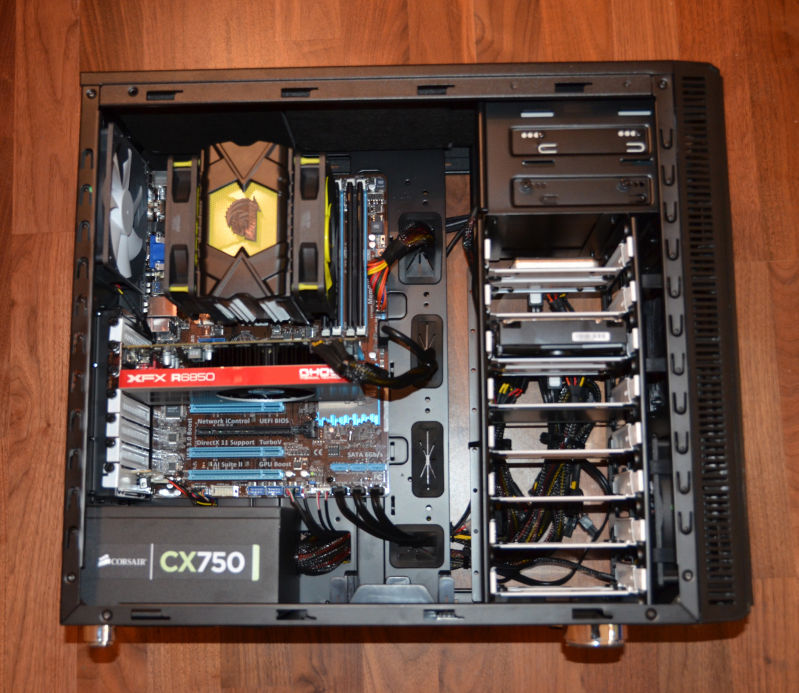

The PC took a few days longer than the originally advertised time to arrive. This wasn’t a big issue in my case. But I only found out it was going to be late when I emailed them after the expected completion date. It would have been a lot better if they had been more pro-active and emailed me first. Other than that I am fairly satisified with the service from Chillblast so far.
There are a few issues with the case, which aren’t really Chillblast’s fault. It looks rather lovely in its big, black, minimalist sort of way, a bit like an obelisk from ‘2001 a space Odyssey’. But the case scratches rather easily if you lay it down to change a component on my laminate floor. The side panels are also a bit fiddly to get on and off (my old Dell PC is better in this regard). Worst of all, it has rubber grommets (is that the right word?) that fall out into the case (and potentially into the fan or heat sink) if you even look at them funny. This means lying the case down to retrieve them, struggling with the side panels and more scratches. I have had to do this at least 4 times so far. It seems that they have made them of rubber that is far too soft for the job. Grrr.

How fast is the new PC? It certainly feels very snappy. I benchmarked it against my old Dell development PC (Dual Core 2.13 Ghz, 4GB RAM) building my event table planner software from scratch. This is 83k executable lines of C++ according to SourceMonitor:
| Build time | Old PC | New PC |
| Debug build | 6 minutes 56 seconds | 1 minute 32 seconds |
| Release build | 6 minutes 23 seconds | 1 minute 28 seconds |
So it is more than 4 times faster than the old PC at its key task – building software. Admittedly it isn’t a ‘fair’ comparison of the hardware. The older machine has a different version of Visual Studio, a different OS and probably some unnecessary services running in the background. But it is the best I can do in the circumstances and I doubt a ‘fair’ test would be much different. Despite the fact that I only went for a mid-range graphics card, the new PC can also handle playing Half-Life 2 on full 1920 x 1200 resolution without any noticeable issues. Hopefully the faster build times will give a significant boost to my productivity (as long as I don’t play too much Half-Life 2).
The new PC is also eerily quiet. I would guess more than 4 times quieter than my old PC. Even when it is doing a build, all you can hear is the faint whir of a fan.
Only time will tell how reliable it is.
33 tips for giving great technical support at a small software company without being swamped
 To have the best chance of success you need a great product, great marketing and great support. Many companies with great products and marketing fall down on the support.
Good support is essential to a good user experience. Any non-trivial piece of software is going to result in questions that need to be answered and issues that need to be resolved. But supporting customers is often seen as an onerous chore. An overhead. Something to be done by those not talented enough to be developers. This is a very unfortunate attitude. But it also an opportunity, as software companies that provide great support can really stand out from their competitors. The lower they set the bar, the more opportunity you have to shine.
The fact that the support staff and the developers are often the same people in a small company is a real strength. Because the developer knows the product better than anyone else, they can give better answers. Also, the direct feedback developers get from customers can be very helpful in further improving the product. This means that a small company can often provide much better support than a large company that has multiple layers of support between the customer and the developer. The downside is that the more time developers spend on support, the less time they can spend doing development. Eventually you may reach a level of sales where you are spending nearly all your time doing support, with very little left for the development and marketing required to grow the business. The challenge is to provide great support without being swamped by support work.
I have been supporting my own wedding table plan software since it was first released in 2005. I have managed to grow my sales for 7 consecutive years without being overwhelmed by support. In fact technical support emails have stayed at roughly 40 per week for the last few years despite increasing sales. Before that I had never really done much technical support, so it has been a learning experience. Here are some of the things I have learnt along the way.
Manage customer expectations
Make the level of support clear to the customer:
- Is it free or does it have to be paid for?
- Is it email only or is telephone support also available?
- What sort of response time can they expect?
- What languages do you provide support in – just English?
I don’t provide technical support by telephone or instant messaging, because it is too disruptive to me as a one-man-band.
Manage your own expectations
Your software is a means to an end for the customer. Very few customers will read the documentation you spent all those hours writing if they can possibly avoid it. Some of them won’t even read to the end of a 1 sentence error message (really). Some of your customers will be ‘technically’ challenged (often without even realizing). Sometimes the problem exists between keyboard and chair. Get used to it, because human nature isn’t going to change any time soon.
Make it easy for the customer to contact you
Don’t hide your support email address. Allow the customer to email you from the software itself. This also gives you the opportunity to add some useful information to the email (the software version, their OS, whether they have a licence etc).
Be responsive
Generally speaking, the faster you respond, the better. When I send an email to support I expect to get a response by the same time on the next working day and hopefully within a few hours. I try to answer my support emails at least twice a day, 364 days a year. I do this because I want to give a great service, but it also means I don’t come in to a massive pile of support emails every Monday morning. It means taking a laptop with me whenever I am away for a night. But I find it isn’t a huge chore to spend an hour a day answering support emails on holiday. Especially when I remember that the business is paying for the holiday!
But not too responsive
The downside of being very responsive is that it makes some customers lazy. If they know they will get a response within a few hours they may email you about things they could easily look up themselves. The best response to this is ‘throttling’ (NB/ I don’t mean strangling) – when you notice that a customer is being lazy, take longer and longer to respond to each email. Eventually they will take the hint.
If you are trying to look like a bigger company than you are, then you probably don’t want to answer support emails outside of normal work hours.
Respond as clearly as possible
- Quote the customers email in your reply where appropriate for context.
- Number step-by-step instructions.
- Use quotes to refer to elements in your software, e.g. select ‘Help’>’About’ from the main menu.
- Write in short paragraphs, not big chunks of text.
- Avoid technical jargon unless you are sure that your customer will understand. For example, say “window” rather than “modal dialog”.
- Use proper grammar and check the spelling.
- Avoid long email signatures.
Use images and videos
It is often helpful to include an annotated image with your response. For example you can do a screenshot, highlight important items in the screenshot and then email this as an attachment, along with some text. I find the screen capture tool SnagIt is excellent for doing this (available for both Windows and Mac). In some cases it may also be worth doing a short screencast, uploading it and then sending the customer a link (SnagIt can also do this).
Restate unclear questions
Support questions can be very vague. I have even had people email me just “It doesn’t work” – it wasn’t even clear whether they were referring to the website, the installer or the software. It often takes a few emails to understand what the problem is. If you aren’t 100% sure what they mean, make your best guess at what they are trying to say and restate it in your own words followed by “Did I understand correctly?”. Ask them if there are any error messages. Ask them to send you a screenshot (include a link to instructions on how to do this).
Finish an email exchange
If the customer started the exchange, you should generally finish it (i.e. send the last email). But it is probably not worth responding to an email that is just a 1-line thank you.
Pick up the phone when required
Even if you don’t officially offer telephone support, it sometimes can sometimes save a lot of time and aggravation on both sides if you pick up the phone and talk to the customer.
Put your documentation online
If you have your documentation online you can easily include links to relevant pages in your documentation in your email. This might also encourage the customer to look in the documentation first next time. But don’t just send a link. Answer their question in the email and then include the link as supplemental information.
Help the customers to help themselves
The beauty of a software product business is scalability. In theory, you only need to create your product once and then you can sell it to as many people as you can convince to buy it with negligible marginal cost. In theory. In reality, while a software product business is inherently much more scalable than a consulting business, the marginal cost per sale is not negligible. Far from it. Customers need support. Here are some of the way you can reduce the support cost per customer:
- improve the user interface and documentation, based on customer feedback
- add an FAQ
- allow customers to retrieve their licence key direct from your website (emailed to the registered email address, for obvious reasons)
- encourage customers to look at documentation, FAQs, forums etc before emailing you (below is the window I show when customers select Help>Technical support in PerfectTablePlan).
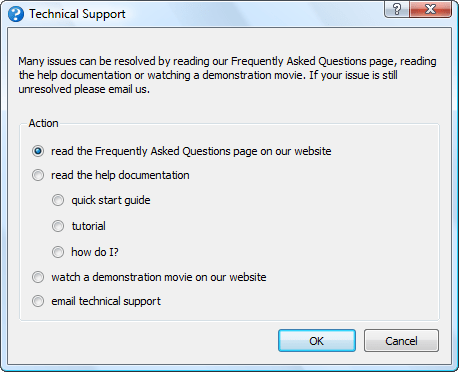
Note that it has been shown experimentally that the more text you show someone, the lower the percentage of it they read. So it is generally more productive to concentrate on simplifying the user interface, rather than writing more documentation.
Of course, you can also reduce support requests by making it difficult for the customer to contact you (the Amazon model). But this leads to less feedback and a worse user experience, so I wouldn’t recommend it.
Allow customers to help each other
If you have a sizeable user base you can set-up a forum to encourage users to help each other. This can have various benefits:
- customers may be able to get answers straight-away by searching existing content on the forum
- customers may answer some questions for you
- customers may respond faster than you can
- it increases your SEO footprint
But it also has its drawbacks:
- nothing looks sadder than a deserted forum
- a forum has to be actively moderated or it will end up reflecting badly on your company
- spam can be a problem
Automatically report crashes
It is often possible to detect that the software is going to crash or has crashed and send yourself some diagnostic information. This allows you to monitor how stable the software is and gives you some clues for debugging. For example, on Windows you can use the Win32 API method SetUnhandledExceptionFilter() to detect when things have gone horribly wrong. Don’t send it without their permission though. Give them the option to see the information you are going to send and then allow them to send it with a single button click.
Remember that every computer is different
There is a rumour that there are 2 identically configured PCs somewhere in Nebraska. But I don’t believe it. The customer may have configured their OS with all sorts of strange options you have never heard of. Anti-virus software, malware, DLL hell and hardware issues can cause problems. A cosmic ray might have even passed through their RAM! So I generally don’t spend too much time on a bug report unless either I can replicate it myself or 2 separate people have reported it.
Be proactive
I actively seek feedback from my customers. It increases the support burden somewhat, but I think this is more than compensated for by increased customer satisfaction and improved feedback.
Make use of feedback
I think all developers should spend at least some time supporting the products they developed. A few days every now and then in the support trenches answering customer emails and phone calls would give developers a better appreciation of how customers think and of the real costs of that cool feature shoe-horned into the release a week before the ship date.
Look at every support request as a possible way to improve your product. The first time you get a support request you answer it. The second time you get the same request you need to start thinking about how you can improve the product so that question doesn’t get asked a third time. By continually improving your product in this way you can greatly reduce the average amount of support time required per customer over time. Obviously you need to make it easy for customers to contact you to make this work.
Don’t take things personally
No matter how hard you try some people are not going to like your software. I once got so angry with Microsoft Project that I nearly threw a monitor out of a window. An angry customer might send you an angry email. Try not to take the criticism personally (link note: funny, but sweary). Maybe the customer is having a bad day. Perhaps they just don’t have any manners. As long as they remain a small minority, try not to lose any sleep over it. On the plus side – at least they cared! And it is often possible to turn a passionately angry customer into a passionate advocate for the product. Indifference is much harder to convert into a sale.
Don’t shoot the messenger
If someone reports what they think is a bug, you should thank them, rather than taking it as an insult to your programming skills. Experience shows me that most people who encounter a bug won’t bother to report it. If you have ever tried reporting a problem to a big company like Microsoft, you will understand why. An unreported bug can result in a lot of unhappy customers and lost sales. Customers who report bugs are a precious resource and should be treated accordingly.
Tell a customer when you have fixed their bug
Whenever a customer reports a bug I record their email address along with the bug report. When it is fixed I then email them. This encourages them to report other bugs they find in future. Similarly for feature requests.
Give credit where credit is due
When I list bugs fixed in a release I also give the names of the customers who reported the bugs (first name + initial of last name). If a customer has been particularly helpful, e.g. putting significant effort into helping me find a bug, I may also list them in the software ‘credits’ window. It doesn’t cost me anything and it encourages these customers to feel more ownership of the product and report more bugs.
Google translate is your friend
I only officially provide support in English. But if someone emails me in another language I will use Google translate to read their email and reply in English, including a translation of my reply from Google translate. The quality of the translation may not be great, but it is probably good enough.
Use the right tone
Being professional doesn’t have to mean cold and impersonal. Try to sound like a real person, rather than a robot. Include your name in your signature. I address people by their first name (where known) and I’m not above including a smiley, where I think it is appropriate. Different markets and cultures may demand different levels of formality. Usually you can take your cue from how formal the customer is. Above all, try not to blame your customer or make them feel stupid.
Only support your own product
It isn’t your job to teach your customer how to use a computer. Try to steer clear of providing support that isn’t directly related to your own product. Otherwise you might find you end up as their general IT helpdesk.
Get the price right
If you are swamped in support emails, consider raising your price. Depending on the price elasticity of your product, you may be able to generate the same or more revenue with less customers and therefore (hopefully) less support emails.
Firing a customer is the final resort
Sometimes a customer will buy your product when they really shouldn’t have, either because it is the wrong tool for the job or because they don’t have the skills required to use it. They will then bombard you with email after email. In such cases it may be best to refund them. Allow them to keep using the software, but tell them that you won’t be able to provide any further support. Something along the lines of “It appears that our software is not a good fit for your requirements. We have therefore refunded your purchase in full. Please feel free to keep using the software, but please note that we won’t be able to provide further technical support.”. This is the nuclear option. I have only had to resort to it a handful of times in 7 years.
Don’t tolerate abusive customers
The customer is not always right. Buying your product does not give them a right to be abusive, no matter how much they paid. Politely and professionally fire them if they can’t behave like a decent human being.
Never send an email in anger
People can sometimes be unreasonable, even downright rude, especially when they are safely at the other end of an Internet connection. But never, under any circumstances, respond with a rude or sarcastic email. Your email might be posted onto forums for all the world to see, forever more, devoid of its original context. Not good. Also, sending a rude response is only going to pour petrol on the fire. Always keep your emails polite and professional. If you find yourself getting angry, go and do something else for a while, until you can send a calm reply. If you can’t reply professionally, don’t reply at all.
Use the right tools
You don’t need a lot of tools to provide good support. I mainly use:
- an email client (Thunderbird)
- a bug/feature request tracking database (OnTime)
- a screen capture tool (SnagIt)
- a phrase expander for quickly typing common phrases (PhraseExpander)
- a database of licence keys (home rolled)
- VM software for emulating different operating systems (WMWare Workstation)
As I am the only one doing support I find that it is sufficient for me to use my Thunderbird email client to check previous correspondence (search by email address), track status (using different coloured tags for: awaiting their response, follow-up later etc) and enforce a simple workflow (move to different folders). If you have multiple people doing support you may also need helpdesk software (such as Helpspot) and/or a ticketing system.
You can use remote access software such as CoPilot to remotely log in to a customers computer. But I try to avoid this where possible, as it is time consuming and also the customer might blame me for any problem they have with their computer afterwards (e.g. a virus infection).
Think twice before outsourcing support
It is cheap to outsource your support to e-workers in developing countries. But they won’t know or care about your product as much as you do. And moving yourself further away from the customer reduces that all important feedback that you need to keep improving the product.
Time new releases carefully
You are going to get the most support emails after you put out a new release. So try to avoid putting out a new release just before you go on holiday.
Have the right attitude
While it can be frustrating to provide support to someone less technically minded than yourself, remember that not everyone is a computer geek and these people are paying your salary.
Remember the golden rule
The basic rule of technical support is to treat your customers how you would wish to be treated. If you bear that in mind, you shouldn’t go far wrong.
Further reading:
If You Want to Write Useful Software, You Have to Do Tech Support (Nick Bradbury)
Did I miss anything? What have been your experiences supporting your software? What surprised you?
Monetization: Ads vs Toolbars vs Charging
I believe that the best way for most small software vendors to make money off their software is to charge for it. So I was interested to spot a post on BOS by someone who had tried ads, toolbars and charging to monetize the same piece of software. He kindly agreed to share his experience anonymously. Obviously it is only one data point, but the results are pretty unequivocal.
I developed a freeware program six or seven years ago. A piece of utility software, for either home or business use, in an extremely crowded and competitive niche. The downloads grew organically and settled into what they are now, around 30,000-40,000 per month. I’ve never used any paid advertising, but have always had a forum and been responsive to user queries. That, coupled with regular updates, built the software a fairly loyal user base.
My original idea was to make money by attracting visitors to the website and using Google Ads. This isn’t generally done on software sites, but it kind of worked for me (I still had a day job though). Eventually it was making one or two thousand dollars per month. I experimented with toolbar installer offers – Bing for the US and UK, Ask for the rest of the world. The revenue wasn’t too bad, but the ads made more.
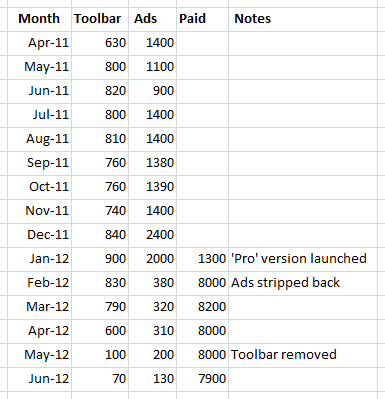
Eventually I decided to try selling a ‘Pro’ version of the software, with even more features. I planned to keep the free version as a ‘gateway’. Note the free version still has more features than non-free competitors. It took about 6 months to write (evenings and weekends), and was finally released (with no marketing, apart from the website) in Jan 2012.
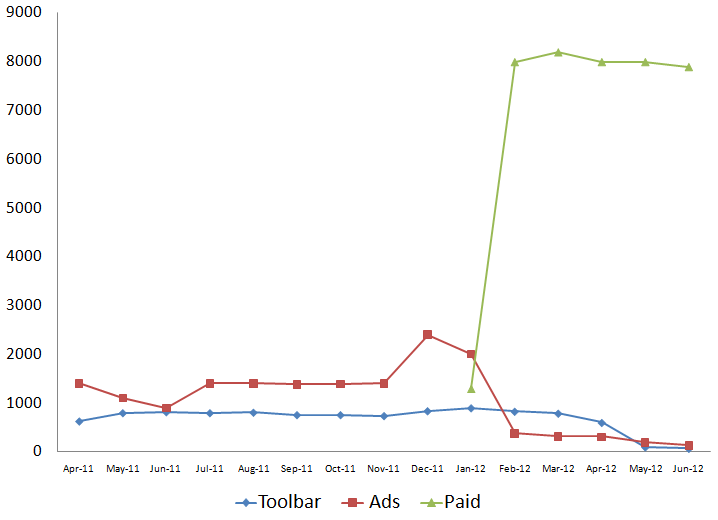
As you can see, from the first full month the sales revenue brought in ten times what the toolbar did. I wound down the site ads, and eventually removed the toolbar (you can see the revenue tail off in the chart).
I quit the day job!
See also:
An experiment with Pinterest
 Pinterest is the latest darling on the social media scene. Pinterest reportedly hit ten million monthly unique visitors faster than any other website. It is currently claimed to have some 15 million users. Basically it allows you assemble (‘pin’) images from anywhere on the web into themed folders (‘pinboards’). You can download browser plug-ins that allow you to pin an image from a website to one of your pinboards in a few clicks. The social element comes from ‘following’ other Pinterest users and commenting on and re-pinning their images. It is a simple idea slickly executed. The emphasis on images makes it rather different to Facebook, Twitter and other social media brands.
83% of US users of Pinterest are women and typical pinboard themes include: fashion, funny images of cats, interior design, places to visit, food and wedding ideas. Check the Pinterest home page to see a sample of images currently being pinned. The interest in weddings is particularly relevant to me as I sell wedding seating planner software. So I started to create some wedding reception themed pinboards as an experiment. I quickly decided that scouring the web for pictures of pretty seating charts, place cards and wedding cakes wasn’t a) a good use of my time b) the right thing for a 46 year old heterosexual man to be doing (GRRR!). So, using outsourcing site odesk.com, I found a nice lady in the Philippines to do it for me for a very reasonable hourly rate. She also (unsurprisingly) proved to have much better taste than me. I think she also really quite enjoyed herself! The resulting Pinterest pinboard is at http://pinterest.com/tableplan/.
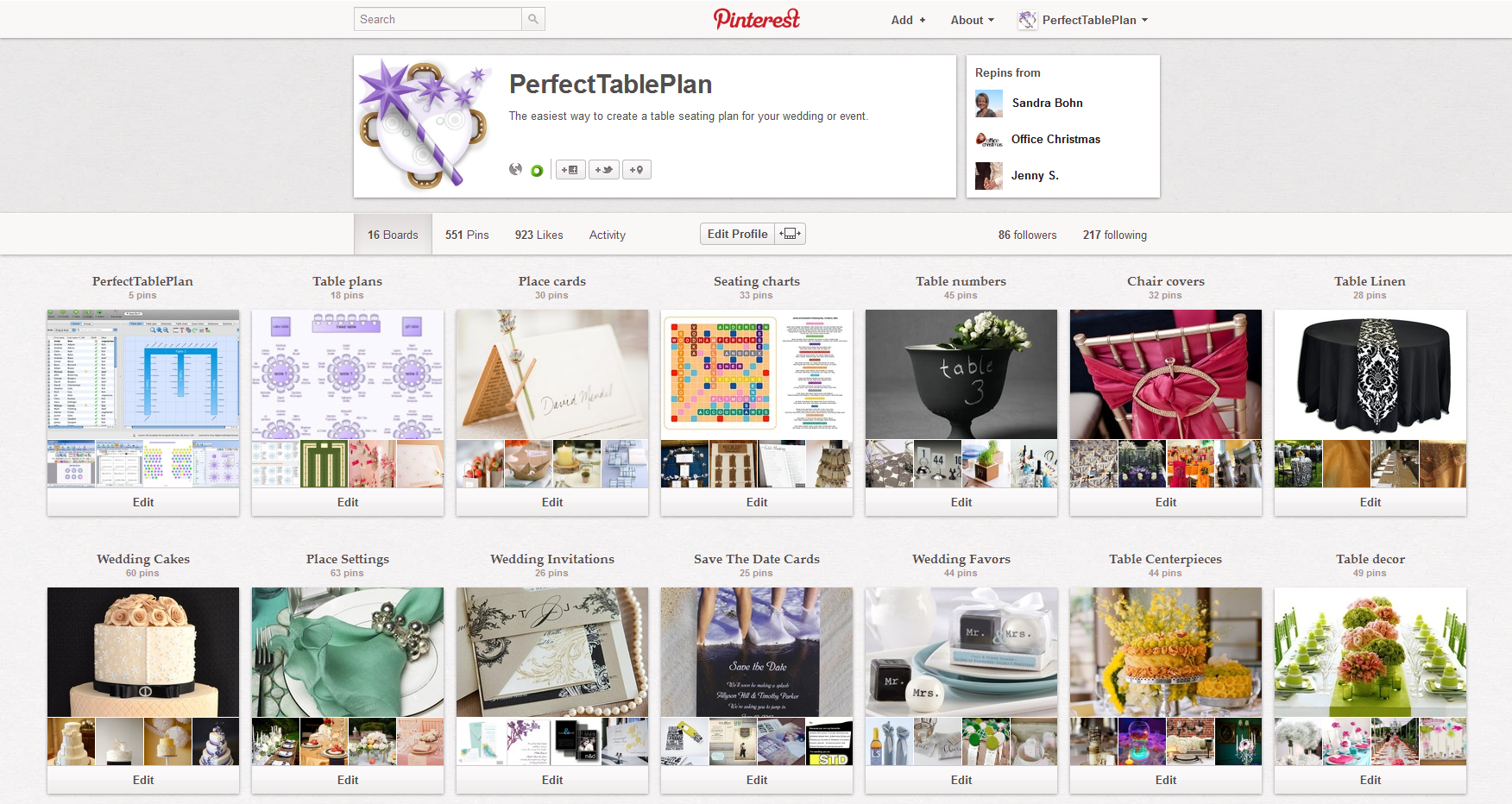
Here is some data from my little experiment:
| Cost: | approx $50, plus a few hours of my time |
| Total ‘pins’ to date: | 551 |
| Clickthroughs to http://www.perfecttableplan.com/: | 154 |
| Avg time on site: | 0:42 |
| Bounce rate: | 75% |
| Traceable sales (from analytics and cookie tracking): | 0 |
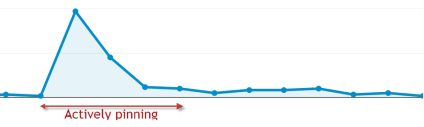
So that works out >$0.30 per click for not very targeted traffic (as shown by the bounce rate and avg time on site) and not a single sale. Not very encouraging. What’s worse, it only generated traffic while new pins were being added. As soon as new pins were no longer being added the clickthroughs fell off a cliff:
I may get some SEO benefit. But Pinterest isn’t looking a like a win for me. Also there are issues with Pinterest terms and general IP issues. Pinterest’s terms originally claimed that they could sell anything you pinned. They have since amended that to something more sensible. But pinning images you don’t own the copyright to is still problematic. I think most sites will be happy for people to pin their images, as long as they are correctly attributed – it is free advertising for them. And it is obvious that most Pinterest users are happily pinning images without any thought about copyright. But it could conceivably get you into trouble for copyright infringement.
If you are a big name company with a big marketing budget, it may be worth putting some effort into Pinterest. Especially if you already have a big catalogue of images you own. But, based on my experiences, I think most small software companies can find better ways to spend their time.
The microISV test
Ok, so you’ve set yourself up as a one man software company and you’ve made some sales. But are you a real microISV/micropreneur/indie/startup? Take the test below and find out.
- You checked the number of sales you made overnight before you had your breakfast this morning.
- You measure the price of desirable objects (cars, houses, Xboxes) in terms of the number of licences you need to sell.
- You’ve outsourced some work to someone with no idea what they look like and only a vague idea where they live.
- When booking a hotel you are more interested in how good the Internet connection is than how good the restaurant is.
- Your product has at least 20 five star awards from download sites.
- You know what CTR, CPC and CPM mean.
- You have begged all your friends and family to ‘like’ your product’s Facebook page.
- You set up your computer or phone so it makes a special noise each time you get a sale.
- Your software has been cracked at least once.
- You have suggested to a particularly problematic customer that one of your competitors might have a more suitable product.
- You’ve done technical support while wearing a dressing gown/bathrobe (or less).
- You have Google alerts and Twitter searches set up for your product name.
- You start to get anxious after not checking your email for more than half a day.
- The last time you set an alarm clock it was because you were going on holiday and didn’t want to miss the flight.
- Your relatives think you don’t have a ‘real job’.
- You own at least 10 domain names.
- You have had to fix problems with your software or website while on holiday.
- You have had a least one chargeback.
- Your software has been flagged as malware by at least one anti-virus package.
- You use at least 3 different email addresses in the course of a day.
- You have explained what you do to someone and they said “And you make a living from that???”.
- You have used Google translate to answer a support email in a language you don’t understand.
- You use “we” when talking about your company, even though its really only you.
- Someone told you a half-baked idea they had in the shower that morning and said they would be willing to give you 50% of the profit if you did 100% of the work to implement it.
- The last time you wore a suit and tie was to a wedding or a funeral.
I scored 25/25, of course (it’s my test). How did you do? Are there any other questions I should have added? Let me know in the comments.
Thanks to fellow microISVs Steph, Oliver, Terrell, Clay and Ian for suggesting some of the above.
 Successful Software