Category Archives: software

A small experiment with LinkedIn ads

LinkedIn.com (the B2B equivalent of Facebook) supports Google style pay per click ads. So I decided to run some ads for my seating planner software as an experiment. Here is a brief summary of my (very brief) experiences.

The good news

LinkedIn ads can be laser targeted. You can specify who you want to see your ad based on their job function, company, gender, age group, country and (best of all) the LinkedIn groups they belong to. I targeted 10,102 LinkedIn members who live in wealthy English speaking countries, belong to various LinkedIn groups related to event planning and have appropriate job titles. The campaign was quite painless to set up. It probably took me less than 10 minutes in total and I started getting impressions within an hour or so.

The bad news

The minimum allowed CPC (cost per click) was $2. Ouch. I know from extensive experience with Google Adwords that there is no way I can get a return on that.

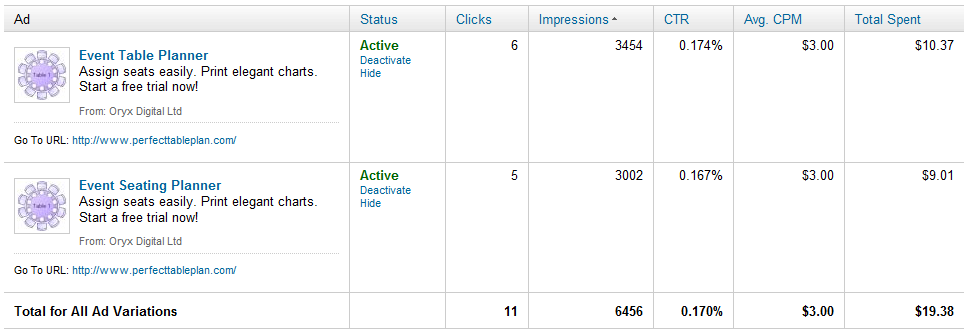
The minimum allow CPM (cost per thousand impressions) was $3. If the CTR (click through rate) is around 1% (about what you might expect from Google search ads) this is $0.30 per click. Possibly profitable. If the CTR is around 0.1% (about what you might expect from Facebook ads) this is $3 per click. No better than the CPC bidding. Given that LinkedIn is more similar to Facebook than Google search, I expected the latter. I decided to spend a few dollars to find out. The results are below (click to enlarge):

So, with an average 0.17% CTR, I ended up spending $1.76 per click. Given my average transaction value and a realistic conversion rate I know that I can’t make any return on this. Also the CTR is likely to drop the more often people see the ad. So I stopped the experiment after less than 24 hours, before I wasted any more time or money. As far as I can tell (based on my own cookie tracking – LinkedIn ads don’t have their own conversion tracking) I didn’t make any sales. But that is hardly surprising given the small number of clicks.

Summary

Obviously $19.38 is a tiny amount to spend, but I think it told me what I needed to know about LinkedIn ads. Unless they reduce their CPC or CPM bid prices by an order of magnitude there is no way I can make a return. Of course, if you are selling a product where the average lifetime value of a customer is hundreds or thousands of dollars, the numbers might work out quite differently for you.

Related posts:

Advertising your software on Facebook (=Fail)

Does the world *really* need yet another Twitter client, RSS reader, ToDo list or backup application?

My heart sinks every time I hear a would-be-entrepreneur announcing they have written yet another Twitter client, RSS reader, ToDo list or backup application. Haven’t we got enough of those already? There are more than 1,900 Twitter apps already (possibly a lot more). Somebody probably released another one while I was writing this post. We have passed the Twitter app event horizon, where it is probably quicker to write your own custom app than it is to try and work out if any of the existing apps fulfils your requirements.

Even if you have done something radically new, interesting and different in one of these markets, how are you ever going to get noticed amongst thousands of more established competitors? Wouldn’t it be better to find a market that is currently under-served by software? It may be less fashionable than writing software for other techies, but it will probably contribute more to the sum of human happiness and be a lot more profitable.

There must be thousands of niches where there is a real need for software, but limited competition. You just need to open your eyes to the bigger world around you. It may mean having to learn about an unfamiliar domain. But it is generally much easier for a software developer to learn some domain knowledge about, say, butterfly collecting, than it is for the average butterfly collector to learn to create a software product. Next time you are talking to a non-techie about their job or hobbies, just ask them “Do you use software for that?” and “Is it any good?”. The ideal answers you are looking for are “Yes” (if there are existing software packages, there is probably a market) and “No” (maybe you can do better).

How to remove software cracks and keygens from file hosting sites

Software piracy is a real issue for every software company, large and small, and it isn’t going away any time soon. So when I heard that fellow microISV owner Nikos Bozinis had created a tool to help software vendors fight  piracy, I asked him to write a guest post. He kindly agreed to write this post about software piracy, the Digital Millennium Copyright Act and his CrackTracker product.

Why buy something when you can download it ‘for free’? Billions of dollars are lost every year from illegal downloads of music, movies and software. People around the world seem to have very lax morals when it comes to abusing digital content. Downloading the latest movie or windows software from rapidshare.com somehow doesn’t strike them as theft — it’s not like stealing a loaf of bread! The traditional music industry is already down on its knees as a result, and software may be the next to follow.

Software authors and music enterprises are fighting back by tightening the DRM (Digital Rights Management) of their products in a futile effort to stop online piracy. But usually crackers have no problem circumventing any protection system that we can dream up. To add insult to injury legitimate customers are usually hurt by such reinforced software protection and activation systems. A little bit like the war on terror, isn’t it?

A different line of defense for ailing copyright owners is the Digital Millennium Copyright Act (DMCA), a US law with global reach for copyright protection (the european EUCD equivalent is not as broadly known). This law is very broad, and not without controversy, but it works – closing down websites that distribute illegal content and removing copyright infringing downloads from file-hosting websites with summary procedures, among other things. So if you discover your software illegally distributed in some warez website, you can send a so called “DMCA section 512 takedown notice” to the website host and they are expected to remove that particular file from circulation — or risk the wrath of the law.

Software Piracy

I have been a microISV for over 10 years so lets forget about the entertainment industry and concentrate on my field, software. There are over 200,000 programs listed on download.com and that’s just for Windows. Many are created by very small to medium sized companies — many even run by a single programmer/webmaster/marketer/entrepreneur. I bet that all these programs are cracked in one way or another — at least those popular enough for crackers to care about them. If you search for warez or torrents you will find the software you want for free, either the latest or an older working version.

Piracy statistics from Business Software Alliance report 2009 (click image to enlarge).

I sell a file manager called xplorer². I track how many people install the program every day and also I have a good guesstimate for the number of people using cracked versions of xplorer². I estimate over 70% of the regular users use one of the known keygens. Imagine if this 70% didn’t exist or it was converted to regular paying customers!

How is it done?

Downloadable software falls into 2 categories: those that run in trial mode until you buy a key to unlock the full functionality; and those that are special downloads for customers that pay the registration fee. In all cases some sort of unlocking takes place using a plain key, or a license file, or online activation, or some combination thereof. Many ISVs write their own licensing code, while others rely on off-the-shelf protection and licensing products (Armadillo, WinLicense etc).

Imagine you shipped your source code along with your program, then it would be trivial for even amateur crackers to bypass your protection and run the program without paying. Very few vendors supply source code, but people in the know can read off your licensing logic like an open book using specialized reverse engineering tools (softICE, IDA and other debuggers and disassemblers). Then they can create a ‘patch’ or modification to your executable that bypasses the protection.

An even worse type of compromise is a keygen. When the cracker uncovers the logic of your unlock keys, he can create a program to generate such keys which look and behave exactly like the legitimate ones you sell to your customers. Then he doesn’t need to patch your program, he just supplies this keygen to the warez community and everyone can help themselves to your program. You can guard yourself against such attacks using asymmetric encryption algorithms for your keys.

Is there a perfect protection system?

In short, no. If you consider that your program is presenting its logic to anyone with moderate experience in machine language, then sooner or later any protection can be circumvented. Professional protection schemes utilize encryption to protect sensitive parts of your code, but even they won’t withstand the cracker test. And remember the harder your DRM the more likely your program will be mistaken for malware (!) as many viruses and trojans use encryption tricks.

Even if there was a perfect system, your sales would still be at risk. All that’s required is some of your customers to post their unlock key in a warez site, and the game is lost. You would then blacklist that serial, until another one was leaked and so on.

The warez scene

There are people who don’t spend any time in Facebook or YouTube. They surf the internet for free stuff. Cracked versions of commercial software (aka warez) circulate in some shady forums that bring together the crackers with the downloaders e.g. http://www.warez-bb.org.  Browse a warez site and you will find any software, movie or music you fancy, with an assortment of popups and dodgy advertisements of the usual internet 3P products (Pills, Poker and Girls [sic]). For your convenience there are even specialized search engines that search a number of such forums simultaneously, e.g. http://www.warez.com.

These forums do not host the actual files. They refer the traffic to specialized file hosting services like rapidshare.com. To make the most of warez you need to buy a subscription to access such file hosting sites (e.g. unlimited downloads from $9/month). Incurable cheapskates could get away without paying anything though, as you can download for free after a forced (nag) waiting of a minute or two.

A bit more up-market are download sites where to gain access you need to purchase a subscription, e.g. http://www.nowdownloadall.com. I have never paid to enter such a site, but they promise access to any download you can imagine. So you pay a monthly fee to download as much as you like. Note that this is different from paid-for hosting mentioned above. I suppose that you need a file hosting subscription on top to get the actual files downloaded. With so much stuff available for free I don’t know if this approach makes economic sense.

Finally there are traditional peer-to-peer file sharing networks, where people share their software music and video through torrents. After the demise of Napster torrents are still strong, with completely decentralized databases immune to legal intervention. The downside of torrents is their inherent unreliability, so people in a hurry will prefer the immediate gratification of a full download from rapidshare.com and the like.

Why do they do it?

It is easy to understand why someone will prefer ‘free’ software instead of paying up. But what about the crackers, the people who circumvent the DRM and distribute these warez. Why do they do it? Here are a few plausible motives:

  • For kicks. The traditional hacker stereotype is a geeky person whose pastime is breaking into computer networks. Cracking into a software’s protection and stripping it clean must be a pleasure in itself, a ritual destruction of the evil Death Star.
  • For glory. Marxist theory claims that private property is theft. This concept has struggled with real tangible property, but digital property is the ideal trophy. Many groups feel that software and music should be free (!) so taking down the big media and software corporations is a noble cause for them. But many small ISVs fall victims too, and the real motives are far less revolutionary…
  • For profit. Marx is dead; long live Das Kapital. Warez downloads are big business in a number of ways:
    • Direct subscriptions charges to access the downloads
    • Selling password unlockers (e.g. you download something in a ZIP archive which is locked and you need to buy some software to unlock it)
    • Distributing malware. Many downloads are packed with malware (sample report for a keygen), from straightforward scams and ransomware to trojans that turn your computer to a zombie, waiting for instructions to launch a DDoS attack or send spam.

You *can* remove illegal downloads

If your software is available to download from warez sites, either compromised (patched or keygened) or simply accompanied by a simple serial number to unlock it, you will definitely lose sales. The good news is that, using DMCA provisions, you can have these unauthorized downloads removed. Without these downloads prospective users will have no choice but to buy your software — or move on to your competitor’s cracked software.

Here is how to remove illegal downloads:

  1. Find your download links. All illegal downloads end up in a host like rapidshare.com or megaupload.com (I know of more than 100, but there are 10-20 big player websites). A standard Google search for your software name plus ‘crack’, ‘keygen’ or ‘rapidshare’ will find some hits, especially if you search in groups or blogs. Even better use specialized warez search engines like http://www.filestube.com with just your software name as a keyword — the results will be just downloads.
  2. Validate download URLs. Some of the download links you discover may be dead (e.g. very old). Click on each one to see if they are valid or 404.
  3. Send DCMA notices. Group the download links by provider (rapidshare, hotfile, etc), and send a DMCA notice to the abuse email address of each website. Usually this is abuse@website.com (e.g. abuse@rapidshare.com). Each website lists the steps for filing DMCA notices for file removal.

This sounds like a lot of hard work, and it can be, but it works. File sharing websites like rapidshare.com run a legitimate business — they are not responsible for cracks — so if you send them a polite DMCA takedown notice they will remove the copyright infringing downloads.

The DCMA takedown notice

Strictly speaking when you send a DMCA notice you are making allegations of copyright infringement, which is a serious crime. You would imagine that a formal complaint should be launched under the guidance of a solicitor/lawyer. Given the amount of copyright infringement that goes on, the red tape would bring everything to a standstill. The beauty of the DMCA law is that it simplifies the procedure. Sometimes a plain English email explaining the situation to the download site, along with a list of your download locations is all that’s required to have the links removed.

A few websites require a more formal DMCA email including details such as your company address, contact telephone numbers, and some boilerplate statements like “I swear, under penalty of perjury, that the information in the notification is accurate…”. You can find many sample DMCA notices online so I won’t repeat them here. The general idea is that you present yourself as the copyright owner and declare the download URLs as unauthorized, and therefore infringing your copyright.

Torrents slip by

DMCA is very good for removing illegal downloads hosted in popular file sharing websites, but it is powerless against torrents. There is no single source for the download, as the files are kept in many computers. You would have to contact each and every person who shares illegal copies of your software in the peer-to-peer network. This would be hopeless and a waste of effort. Thankfully for the ISV, torrent use is on the decline. People prefer direct downloads of the full package instead of slower peer-to-peer downloads.

The sales pitch

Anyone can search and remove illegal downloads manually. I was doing it the hard way for quite some time, each time I released a new version of my software tool (there’s a lot of cracker activity for each release as they need to update their patches and keygens). However this is very tedious, as you must:

  • enter shady warez forums to search for your keyword, facing annoying popups and adverts you wouldn’t want your wife to see
  • search many locations to ensure you get as many download URLs as possible
  • validate each download URL to see if it is still alive or dead
  • organize download URLs and write DMCA takedown emails for each file hosting website

Even if one wipes all the illegal downloads, new ones will appear over time. So the locate-report-remove cycle must be repeated regularly. This was the motivation for writing Crack Tracker, a tool that simplifies the removal of illegal downloads.

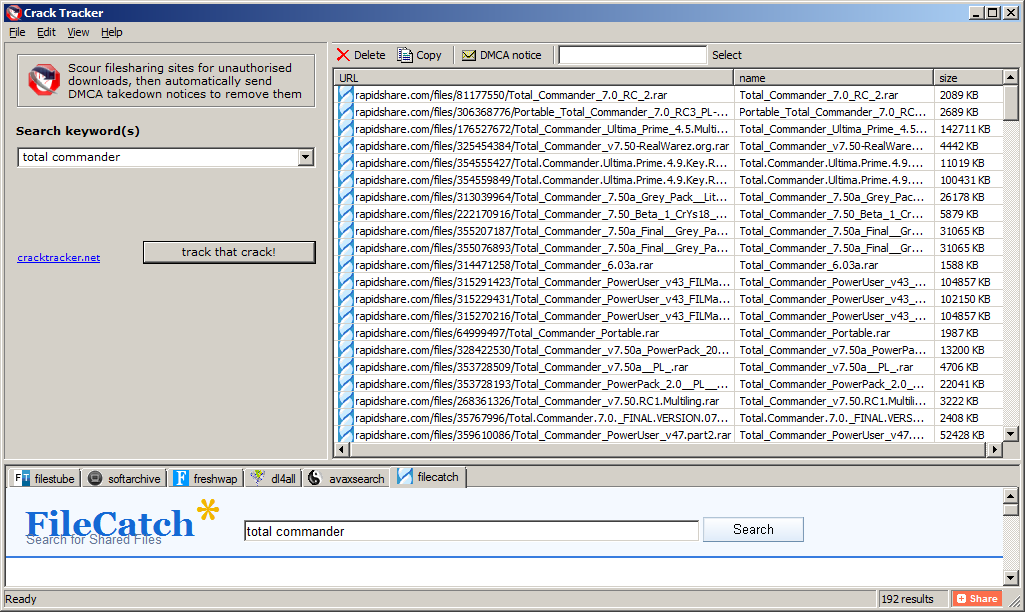
Crack Tracker is a desktop tool, with a meta search engine that securely scans warez databases for your downloads. You supply the search keyword (e.g. your software title or company name) then crack tracker will do an exhaustive search, collect a list of suspect download locations and verify the links with robotic efficiency. After you examine the results you just hit a button and the relevant DMCA emails are sent automatically. It doesn’t get any easier than that.

Crack Tracker doesn’t have a fancy user interface but it is very easy to use. It knows of more than 120 file hosting websites and works with 6 major warez search engines (the list is expanding). It is free to try as a search engine; to send the actual DMCA emails you need a registration, but I believe the price is very reasonable, especially if you consider the money you lose in pirated versions of your software.

Why don’t you try it for free and see how many cracks of your software it finds?

Download CrackTracker for Windows (318KB)

Nikos Bozinis ditched his Process Systems Engineering PhD to run his own microISV ZABKAT since 1999. He also writes a weekly blog focusing on file management and occasionally on programming, debugging and running a software business.

Reminder – microISV pub meetup in Wiltshire

In case you missed the previous post, I am organizing a get together for microISVs in Swindon on Thursday 27th January. More details here.

An interview with Terrell Miller of CattleMax

Software developers are usually so busy writing software for other techies, that they often forget there is a bigger world out there. Terrell Miller has a successful herd management software product for cattle ranchers. He generously agreed to share his experiences on what it has been like building a software business in a non-techie niche market.

Can you tell us a bit about CattleMax?

CattleMax is herd management software designed specifically for beef (meat) cattle, and helps ranchers keep track of their cattle records including births, purchases, sales, breeding history, measurements, lineage, and more. Having the records in one location enables producers to stay organized and helps them make better decisions – which in turn helps them be more efficient and profitable in their operation.

What was your background before CattleMax?

My wife Penny and I met at Texas A&M University while we were both in Undergraduate programs. My degree in Information Systems in the College of Business and family member’s involvement in cattle, along with Penny’s degree in Agricultural Leadership and years of showing cattle, proved to be a great compliment for us to start a business where we could work together.

How long have you been working on CattleMax?

I started working on the first version of CattleMax, which started out as a custom application for a local ranch, in July 1999 right after I graduated and have worked for Cattlesoft ever since. Penny worked at the local university on a full and then part time basis for 18 months before joining the business on a full-time basis.

What technologies and languages do you use to develop CattleMax?

CattleMax is developed in Microsoft Access 2007. Access has been a key ingredient to our desktop software’s success. A lot of developers don’t give Access the credit it deserves as a powerful and rapid development tool. We have done extensive customizations to our interface to differentiate from the Access default templates and many customers don’t realize we are even using Access.

If you were starting CattleMax from scratch today would you go for a web based solution? Or would you stick with a desktop solution?

That’s a hard choice to make right now in January 2011 because I think we are in a transitionary period.  Developers want to embrace the latest technology because it’s clearly the future. However, you don’t want to create a product that cannot be utilized by all of your customers (Internet in rural areas can still be spotty).  Though we are in the process of developing a web-based version of our CattleMax, I expect the desktop version to continue selling well for years to come.
While a desktop software offers a larger revenue up front to cover customer acquisition costs, a web app can potentially offer more revenue in the long run assuming you have good customer retention.  I think it’s easier to get started with a desktop app because you can use the up-front revenue to reinvest in marketing.
Why did you choose this market? How confident were you that it was a commercially viable market?

You could say the market chose us. Initially, we wanted to create a side project that involved both of our interests. Being students at Texas A&M helped open doors to talk with professors and experts about our product and ideas. Through these talks, we were introduced to a nearby ranch who needed an easy-to-use cattle record keeping system. They became our first customer and continue to use our software today.

How long did it take you you to get CattleMax to v1.0?

It took about 9 months to get CattleMax marketable and stable. Our first public release date was at a local trade show where we received great response. Being a student, we didn’t really have any income to replace – it was the ideal time for us to have started Cattlesoft and the software. We had little to lose and the rest of our life to recover from any business or financial mistakes made.

How technically proficient are your customers? Can you reach them with online marketing?

Our average customer is in the 45 – 65 age range. Over the years, cattle ranchers have become much more knowledgeable with technology. Our marketing is primarily online (PPC, SEO, direct website advertising) along with some print advertising.

The CattleMax user interface looks very slick and intuitive. Do you do any usability testing? Did you find the switch to a ribbon bar difficult for you or your customers?

In the beginning, I would go to a customer’s ranch and watch them use the software. By listening and watching how they interacted with the software, I was able to identify areas of confusion and see ways that we could make processes and areas easier to work with.

The ribbon was mandatory when we switched to Access 2007. While I was initially apprehensive about the change, I now see that the ribbon has made CattleMax easier to use, since it allows priority of certain menu items/common areas by giving them larger icons and visibility.

I see you have a Facebook widget on your home page. Have you found Facebook to be a useful marketing tool?

We use Facebook to post upcoming events, interesting articles and ask our customers for their feedback, plus it’s another way for customers to ask us questions. While advertising on Facebook allows for laser targeting based on interests, our in-house email list is larger than the number of ranchers on Facebook according to their PPC platform. Therefore most of our communications efforts are through our email newsletter and Cattle Management blog.

How did you choose the price of the product?

In the beginning, we chose prices that were comparable to other cattle software programs. We have two editions of our software, one for the commercial/beef producer and another for the purebred/seedstock producer. Each of these editions is available in a Small Herd (50 cow limit) and Standard (no record limit). We chose two editions so that it would be easy for a rancher to confidently choose the edition right for their herd. The two herd size options are so we can offer a solution to small herd producers while providing additional value for larger herds that may require additional support. See Camels and Rubber Duckies.

You have a generous 60-day money back guarantee. Do you have to give many refunds?

We may have one customer, at most, per year return the software because of dissatisfaction. We may have 5 returns a year from people who bought without downloading our trial and wanted a refund – a few of those reasons are receiving it as a gift and not wanting it, software not working on their computer (Windows 95 anyone?), or lacking a key feature. I highly recommend a satisfaction guarantee as it does help customers buy with confidence, knowing that you will stand by your product. No software company wants a dissatisfied customer who feels you “took their money.”

Do you charge for upgrades? Is this a significant source of income?

Our upgrades have been on about a 2-3 year schedule, and current customers can purchase them at half the price of the full version. While upgrade purchases are a double-digit percent of our business, we focus more on new sales. One of the challenges of making a good product is it takes an even better product for customers to understand the value in upgrading.

Do you outsource much work?

We work frequently with independent contractors and freelancers. While we’ve had 6 or more full and part-time employees over the years, I find employee management and “keeping people busy” to be too distracting from working on the big picture. Having people working from their own locations gives us more flexibility, plus we are not limited to just our physical location/city for finding experienced workers.

Do you have any products besides CattleMax?

We adapted CattleMax into LonghornMax, a software for Texas Longhorn cattle that enables breeders to record horn measurements in addition. LonghornMax primarily arose from our connections with the Texas Longhorn Breeders Association where we were previously their official software program. We also raise Texas Longhorn cattle on our ranch near College Station, which is about 90 miles west of Houston. Another spinoff is EquineMax, a software program for horse owners to keep track of their horse records.

Stepping beyond software in 2010, we launched CattleTags.com which is a website for purchasing cattle ear tags. In 2011 we launched LivestockSupplies.com which includes additional equipment and supplies for the ranch. Selling livestock supplies has proven to be a nice complement to our software as it helps us offer additional services and value to customers by offering them convenience and variety of selections, without them even needing to leave the ranch!

Would you recommend others to start a business straight out of college? Or should they work for other people first to gain experience?

The younger you are and the less commitments you have, the easier it is to get started, because your opportunity cost on your time is lower than it will ever be.  Also if your business fails, you have the rest of your life to recover.  I think entrepreneurs can have the best of both: starting their own business while gaining experience.  I’ve learned a lot through in-person networking as well as online communities like Business of Software, Hacker News, SEOBook.

Given that you started the business straight out of college, how did you learn all the business and marketing skills you needed? Did you make a lot of mistakes?

I learned much of my business & marketing skills through three sources: formal academic learning, informal discussions with other entrepreneurs and mentors, and of course personal experience.  Several years out of college, I realized that my business skills and not technology skills were holding me back, so I decided to return to school and pursue my Masters of Business Administration (MBA).
As far as mistakes, I asked one of my mentors about his biggest mistake and he replied “I’ve not made any mistakes, but I’ve bought a lot of expensive learning lessons”.  Many of my learning lessons have been as a result of losing focus and could have been avoided by asking myself “is this the highest priority and best use of my time?”.

Any advice you would like to give to aspiring software entrepreneurs?

I’ve visited with many software entrepreneurs over the years and frequently find an imbalance of priorities.  As programmers we tend to gravitate towards technology and automation.  However, once you’ve built a great product, often times the best return on your time and money is in marketing (blogs, PPC, SEO, print advertising, talking with customers).
Another bit of advice would be to embrace the lifestyle aspect of your business.  Owning your own business helps you be in control of when you work, where you work, how you work, and what you work on.  I consider it a good day when I can wake up in my house, walk down the hall to my office, work for a while, and then spend time outside on our ranch with my family.

Terrell and “Dude”, an 80 inch (200cm) tip-to-tip 2,000 pound (900kg) Texas Longhorn steer.

microISV pub meetup in Wiltshire

I am organizing an informal pub meetup in Swindon for anyone interested in talking about the business of software in general, and microISVs in particular.

Date: Thursday 27th January

Time: From 7:30 pm.

Location: The Sun Inn, Swindon, Wiltshire, England. The pub is not far off the M4, Jn 15 and has plenty of parking. The food is usually quite good. Post code: SN3 6AA (note it isn’t the only pub along this road, it is the one opposite the petrol station). Map .

If you are intending to come I suggest you email me, just in case of any last minute changes of plan.

Start Small, Stay Small: A Developer’s Guide To Launching a Startup

I recently read ‘Start small, stay small: A developer’s guide to launching a startup’ by Rob Walling. The preface states:

“This book is aimed at developers who want to launch their startup with no outside funding. It’s for companies started by real developers solving real pain points using desktop, web and mobile applications.”

Many of you are probably already familiar with Rob’s work, including: a blog, a podcast and the micropreneur academy. Rob’s approach has been to develop a portfolio of niche websites as a solo founder (for example ApprenticeLinemanJobs.com), funding it with his own capital and outsourcing work where appropriate. The intention being to have a business that produces a decent income, but allows the founder a flexible lifestyle. He uses the portmanteau ‘micropreneur’ to refer to this approach. It is not a term I care for, with its awkward shunting together of Greek and French. But I guess it is no worse than ‘microISV’. He develops on these themes in the book, with a particular emphasis on the early phases (as implied by the title).

The chapter headings are:

  1. The chasm between developer and entrepreneur
  2. Why niches are the name of the game
  3. Your product
  4. Bulding a killer sales website
  5. Startup marketing
  6. Virtual assistants and outsourcing
  7. Grow it or start over

As with Rob’s blog and podcast, there is plenty of insight and actionable information based on real experience. Some of the writing is taken straight from the blog, but I believe most of it is new. There are links to useful online tools, some of which I hadn’t come across before. It even includes some of that rarest of commodities – real data. He also dispells a few myths – for example: that creating a software product is a quick and easy way to riches and that Facebook and Twitter are all the marketing you need.

The book is particularly strong on market research – a subject I haven’t seen covered much in the context of small software companies. He includes a step-by-step methodology for measuring market size. It also covers other useful subjects such as: pricing, choosing web vs desktop vs mobile vs plug-in, website design, SEO, mailing lists and buying and selling websites. The paper version of the book is 202 pages long. There isn’t a lot of unecessary waffling or padding, so you are getting a fair amount of information for your money. An index might have been useful. Perhaps for the next edition?

While the book will have most benefit for those first starting out, I think even experienced software entrepreneurs will probably find some of it useful. The book is available in paper, electronic and audio formats from $19 at www.startupbook.net. Given its niche market, I think this is good value.

Full disclosure: I recieved a free (paper) copy of the book from the author.

Ka-ching!

I have my email client set up so that it makes a cash register ‘ka-ching!’ noise every time I make a sale. I found this a real morale booster in the early days of Perfect Table Plan. Even now, several years later and with considerably higher sales volumes, I still haven’t grown tired of it. I particularly enjoy hearing ‘ka-ching!’s coming from my laptop while I am not working – it is wonderful to be able to earn money while drinking a glass of wine in front of the television.

If you are running Mozilla Thunderbird you can set this up quite easily with a message filter and the Mailbox Alert add-on:

  1. Install the Mailbox Alert add-on.
  2. Create a Thunderbird message filter to send emails denoting incoming sales to a specific folder (‘Tools’>’Message filters…’).
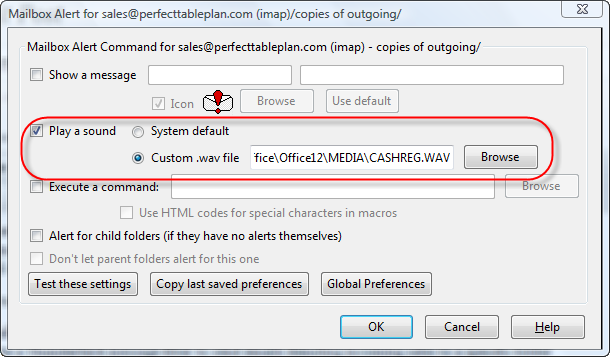
  3. Set the Mailbox Alert add-on to play an appropriate sound whenever a new email arrives in this folder (select this folder, then select ‘Tools’>’Mailbox Alert Preferences’).

You shouldn’t have too much problem finding an appropriate .wav file to play. I use C:\Program Files\Microsoft Office\Office12\MEDIA\CASHREG.WAV.You can also find some online here.

Thank you to whoever wrote Mailbox Alert and to Nick Hebb of FlowBreeze Flowchart software for pointing me at it originally.

Eventcountdown.com

I have just launched at new website at eventcountdown.com.  This website contains free countdown clocks,  for both Windows and web, to allow you to count down the days, hours, minutes and seconds to any event. It can be a wedding, a birthday or a major cultural or sporting event. Are your children wondering how many days, hours, minutes and seconds it is to Christmas ? Wonder no more! You can also use it to count up from an event e.g. giving up smoking or Perl.

web countdown clockweb countdown clock for Mac, iPad, iPhone and Android

windows countdown clockWindows countdown clock

The hope is that a significant number of people interested in planning events will go to evencountdown.com for a free clock and a small percentage will click through to PerfectTablePlan.com and buy my software. I have no idea how successful this will be. I certainly don’t expect a quick payback on the investment. But hopefully it will pay for itself in a few years, and then anything after that is pure profit.

This project has also been a small scale experiment in outsourcing that might lead on to greater things.

  • The web design and CSS/HTML coding was done by Sergey Pozhilov of μISVStyle.
  • The Windows countdown clock was done by Milan Marusinec of VectorGraphica.
  • The Javascript for the web countdown clock was done by Paul Kossowski of Dolphin Futures.

They all did a great job and the total cost was less than I would have paid for a couple of ads in event industry newsletters (which I tried recently, with fairly miserable results).

I have quite a few ideas about how I can improve eventcountdown.com, but I wanted to get something out there ASAP. After all if you aren’t embarassed by v1.0 you didn’t release it early enough. I would be interested to hear any feedback. Backlinks to eventcountdown.com would also be very welcome. ;0)

milan@crossgl.com

Speccing my dream development PC

My main development machine is a 4 year old Dell desktop, PC running 32 bit Windows Vista. Time for a new PC. I have been doing a bit of research, mostly by looking through back copies of PC Pro magazine (which I recommend,  by the way). I am speccing it out here on my blog in the hope that I, and anyone else thinking about a new PC, can benefit from my research and (more importantly, given my limited knowledge of hardware) the assembled wisdom and experience of readers of this blog.

A system failure could lose me several days work and a lot of mental energy to sort out, so reliability is my number one requirement. After that I am interested in performance, particularly speeding up compilation and linking, as this has a significant effect on my productivity (my table planner software is now well over 100k lines of C++ code). Getting a fast machine also means it will last longer before it becomes obselete.

Form factor

Tower desktop. I don’t like using laptops for extended periods and there is plenty of space under the desk for a tower case. Having a bigger chassis means more options for upgrading and hopefully less chance of overheating. I like to have my PC physically locked to a ground anchor to reduce the possibility of theft. So the case needs to have a Kensington-compatible security slot I can attach a security cable to. Some LED bling wouldn’t hurt.

OS

Windows 7 64 bit Professional (or Ultimate is if I decide to use bitlocker drive encryption). Windows 7 is increasingly what my customers are using. 64 bit will allow me to address >4GB RAM.

As I develop for both Windows and Mac, I could use a Mac for my main development machine. But I am more familiar with Windows and its associated apps, you get more bang for your buck with a PC and I’m not keen on Apple’s authoritarian attitude to developers. So I prefer to use Windows for my main development machine and use a Mac Mini for porting.

RAM

8GB of DDR3 RAM. Maybe more, depending on cost. But I am not sure whether having more than 8GB of RAM will make much of a difference to real world performance. DDR3 memory seems to be fairly standard on high end PCs. I can’t imagine the clock speed of the memory (e.g. 1,333 MHz vs 1,600 MHz) affects development related performance much. I haven’t seen any data on this.

Storage

Possibly a 128GB Crucial RealSSD C300 SSD for storing \Windows and \Program files and a 600 GB 10,000 RPM WD Velociraptor HDD for storing everything else. SSDs seem to be increasingly the way to go for storage that is predominantly read-only and the prices are coming down. 128 GB should be ample for Windows and lots of applications. But there have been issues over the reliability and performance of some SSDs, notably those with Indilinx controllers. anandtech.com, Jeff Atwood and PC Pro all rate Crucial SSDs well. The WD Velociraptor is one of the fastest HDDs around and 600 GB is currently the biggest one you can buy. It is pricey though at around £0.30 per GB, with 7,200 RPM drives around £0.05 per GB. Especially if I buy an extra one to keep as a hot spare.

I am still making up my mind on this though. Having two separate drives means an extra possible point of failure. Also some people say that, while benchmark results are impressive, the difference in performance between SSD and fast HDDs isn’t that great in real world scenarios. I also wonder whether a 10,000 RPM HDD is going to be as reliable as a 7,200 RPM HDD, such as the Samsung Spinpoint F3. I don’t know of any independent data on HDD reliability between different makes and models. In the absense of such data I guess the next best bet is to look at how long the manufacturer warranties are. You need to be fairly confident on reliability to give a 5 year warrantly.

I am also considering encrypting the drives for extra security. This will keep my data secure in case of theft and it also means I can return a defective drive under warranty without worrying about the security of the data on it. The main alternatives are Truecrypt and Windows 7 Bitlocker. Tests show Truecrypt AES encryption adding a 5-12% performance penalty. Anecdotal reports seem to show that the difference is hardly noticeable in real world use, especially with a fast CPU. A comparison of Truecrypt and Bitlocker from April gives Bitlocker a small advantage for speed, but favours Truecrypt for its flexibility. Also Truecrypt is free, whereas Bitlocker is only available if you buy Windows 7 Ultimate.

My current PC has 2 disk HDDs in RAID1 (mirrored) configuration. This was intended to decrease the chance of data loss, but it has been a huge headache. I have had to replace one or other of the RAID1 HDDs 4 or 5 times while I have had this PC. I can only assume that RAID was responsible for this catastrophic failure rate, so I certainly won’t be going for RAID again.

Media

Any reputable make of DVD drive that can write dual layer DVDs should be fine. The 8.5 GB capacity of dual layer DVDs is useful for backups. I don’t see any need to pay a premium to get Bluray.

Motherboard

A Gigabyte or Asus motherboard with support for USB 3.0 and SATA/600. I have just bought a USB 3.0 external HDD for backup so I would like to make the most of the additional USB 3.0 performance and a fast SATA connection is necessary to get the most from a fast HDD. Gigabtye and Asus motherboards seem to do well in the PC Pro magazine tests.

Power supply

Any respectable make should be fine. If a power supply fails the power surge can wreck the whole machine, so it definitely isn’t worth risking a cheap and nasty power supply to save a few pounds.

USB ports

Lots, including some USB 3.0 ports.

Graphics card

AMD Radeon 6850. I don’t play a lot of computer games, but I want a graphics card fast enough to give me the option. I would also like to have the option of multiple monitors, so it needs to have at least 2 DVI outputs. PC Pro magazine are recommending the AMD Radeon 6850 as exellent value if you don’t need the fastest possible card.

CPU

Intel Core i5-750 (4 cores). Raw processor speed is obviously important, but you pay quite a premium to get the very fastest chip. The i5-750 seems like a good balance between price and performance. Multiple cores are useful for running VMs and compiling (apparently Visual Studio 2005 requires a tweak to use multiple cores for compilation). Quiet fans would be nice. I’m not interested in overclocking as I worry about the effect this could have on reliability.

Networking

Gigabit Ethernet.

VDU, keyboard and mouse

I will re-use my existing monitor, keyboard and mouse.

Software

The less crapware pre-installed with the OS the better.

Warranty

The longer and more comprehensive the better.

Manufacturer

I have neither the time, the inclination nor the aptitude to build a PC myself. So I will be looking for a UK company that can build a PC close to the above spec. I had a terrible experience trying to buy a media PC from gamingpc-guys.co.uk earlier this year (I had to do a chargeback to get my money back when neither PC or refund had appeared after a month), so I certainly won’t be approaching them. Thankfully they seem to have gone out of business anyway. Given the problems I have had with the current Dell and the ludicrous cost of Dell replacement parts, I won’t be going for Dell again either. UK PC manufacturers that regularly do well in PC Pro tests include:

So I will be investigating how close a system they can provide me to the above spec and for what price. Interestingly all these custom PC companies seem to have products aimed very much at gamers, not developers. Given that there are a lot of developers in the UK that seems surprising. I guess most developers get their PC bought for them by IT departments and don’t have the luxury of a custom built PC. I think these companies are missing a trick by not having a PC aimed at developers amongst their base specs.

If you had roughly £1000/$1700 to spend on a development machine, what would you choose differently from the above and why?