Category Archives: software

Google 2001

To celebrate their 10th anniversary Google have put up their search index from January 2001 (their oldest surviving index). These were the good ‘ol days when Google indexed a mere billion or so web pages, iPod meant Image Proof of Deposit Document Processing System and the iPhone was produced by a company called InfoGear. Try Googling your product name and see what comes up.

While I don’t regard myself as a Google fan-boy I am continually amazed by the speed and accuracy of their search engine. It must be one of the most impressive and successful pieces of software ever written. It is indexing billions of pages while fighting a never ending war against those trying to game the system. Yet I can get pretty good answers to many questions in a fraction of a second, and Google sends traffic to my blog posts within hours of posting. I’m not even sure niche products such as my own would be financially viable without Google. Some of their other tools, such as Google maps, are also pretty impressive. Happy tenth birthday Google!

via a post on BOS by Gerry Smith

Business Of Software network

business of software network

Neil Davidson of Red Gate Software , Business of Software blog and Business of Software conference has created network.businessofsoftware.org, a social network “For anybody interested in building long term, sustainable, profitable software businesses” (as opposed to burning millions of VC money to ‘buy eyeballs’ and then flipping to Google/Yahoo/Microsoft). It is free to join. They have a Pizza and beer evening in London on 12-Nov-08.

Does 2Checkout have the ugliest payment page?

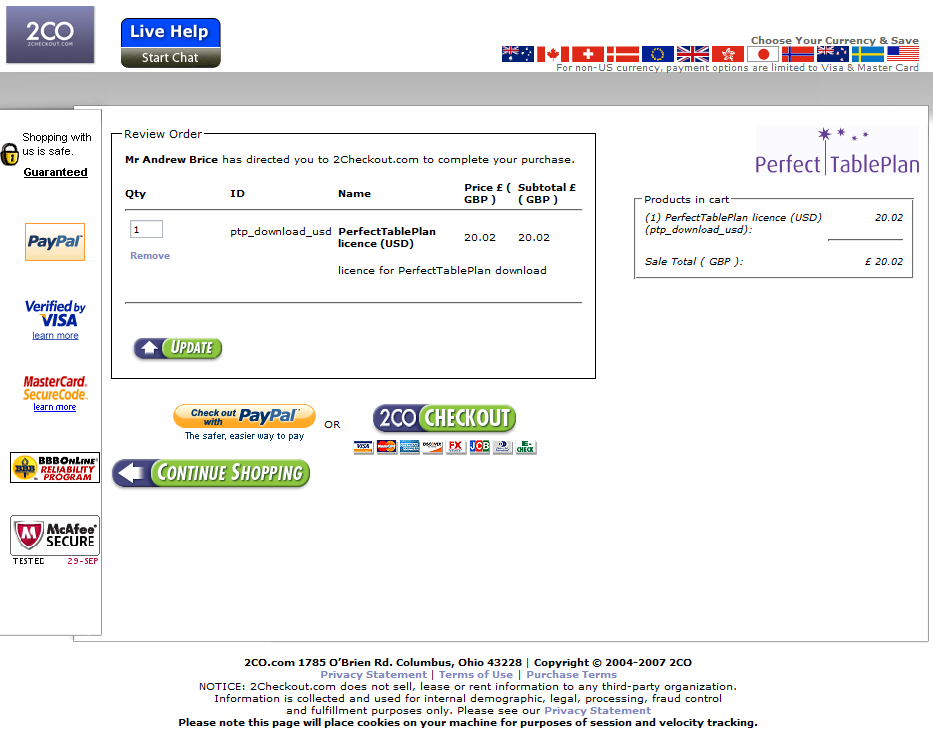
Over on the BOS forum Rensy commented on how ugly the 2Checkout payment page is. They appear to have beaten it with an ugly stick in a recent ‘makeover’. Below is the Perfect Table Plan 2Checkout payment page, click on the image to see it in it’s full glory:

2Checkout page 1

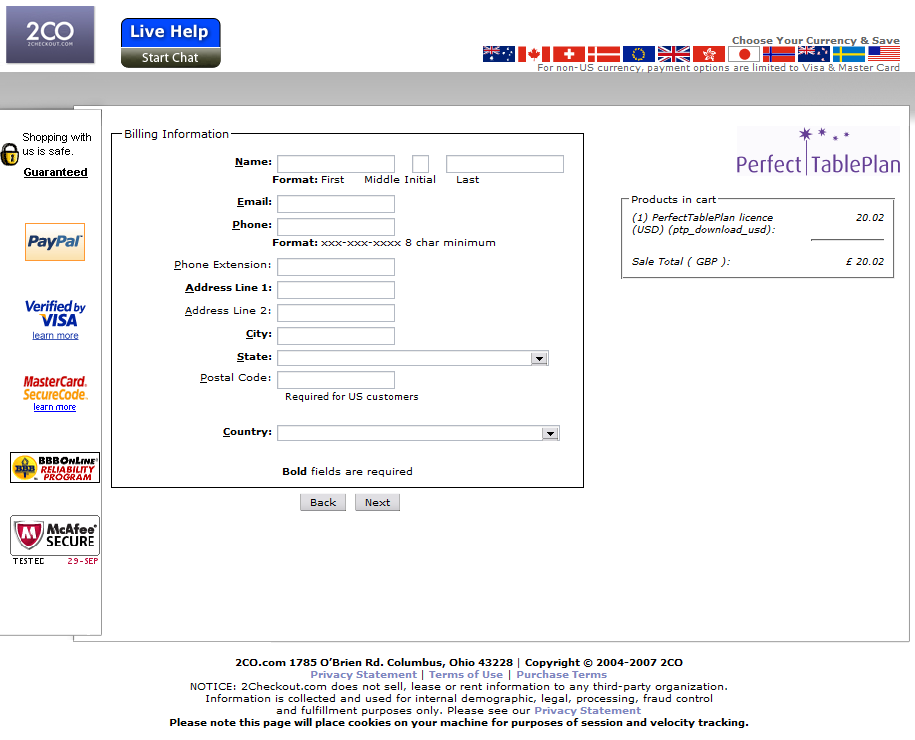
When (if) you finally work out where to click you are confronted with another equally ugly page:

2Checkout page 2

Presumably the icons down the left side are supposed to reassure me that the site is trustworthy. But all they do is distract and confuse me. When you emphasize everything, you emphasize nothing. The overlapping boxes, the choice of fonts and white space also look amateurish.

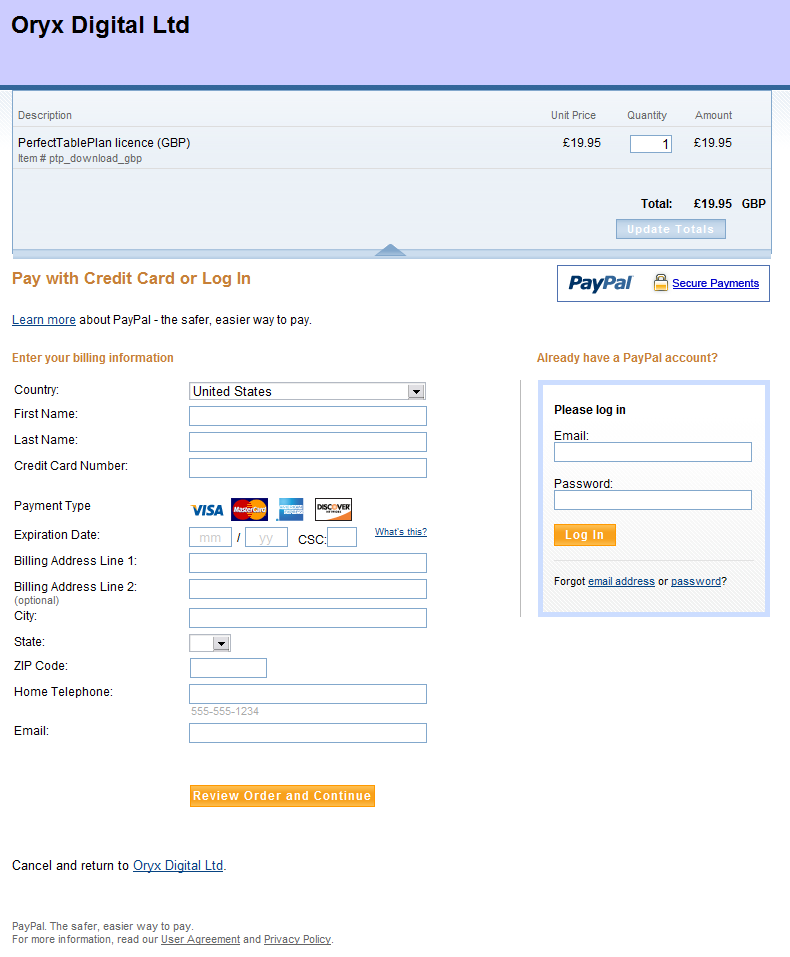
The PayPal and GoogleCheckout pages are models of taste and minimalism by comparison (apart from the huge and inexplicable white space at the bottom of the GoogleCheckout page):

PayPal

PayPal

GoogleCheckout

PayPal and GoogleCheckout also use a single page where 2Checkout uses two. This means one less click for your customer and, critically, one less chance to change their mind. I’m glad I only use 2Checkout as a back-up for customers who don’t want to use PayPal.

Does 2Checkout have the ugliest payment pages? Please add a comment below if you have seen worse (ideally with a link to a screenshot).

The realities of software book publishing

Publishers of technical software books and magazines seem to struggling against the relentless onslaught of the Internet, crushed between the twin rocks of rapidly changing technology and free online content. In a recent .NET Rocks! podcast, accomplished technical author Charles Petzold (of Programming Windows fame) discusses the grim commercial realities of writing technical software books in the 21st century. It doesn’t sound good. His recent 3D programming for Windows book took 8 months to write and has sold less than 4,000 copies worldwide. As he gets royalties of around $3 per copy sold (less when sold outside the US), this equates to less than $12,000 for 8 months work. He could have made around $9,000 flipping burgers for minimum wage over the same period[1]. Ouch.

[1] Assuming 40 hours per week.

stackoverflow.com goes public

Jeff Atwood and Joel Spolsky’s programmer’s Q&A site stackoverflow.com has now gone from private beta to public beta today.

I have been one of the private beta testers. I find the badges a bit patronising (I’m a 42 year old professional, not a boy scout), but otherwise I have been very impressed with the site. I think it is going to be a great resource for developers – assuming they can control the group dynamics of a large number of developers (the ‘herding cats problem’) while keeping the spammers at bay. A lot of thought has gone into the reputation system, voting, badges etc so it will be interesting to see what behaviour emerges.

Go and take it for a spin. It has been designed to be ‘low friction’ – you don’t even need a login to get started.

Should I give free upgrades for life?

There are any number of different licensing models. For commercial software the main ones are:

  1. subscription
  2. outright purchase, with annual maintenance
  3. outright purchase, with free minor upgrades and paid major upgrades
  4. outright purchase, with free major and minor upgrades for life

Subscription payments and purchase + maintenance are nice, if you can get them. They give a more predictable cash flow for a business and you can generally charge a higher lifetime price than you can with a single payment. But this isn’t appropriate for all types of software. For example, it doesn’t make much sense for lower priced desktop software. Assuming subscription or purchase+maintenance isn’t an option, the question boils down to – should we charge for major upgrades?

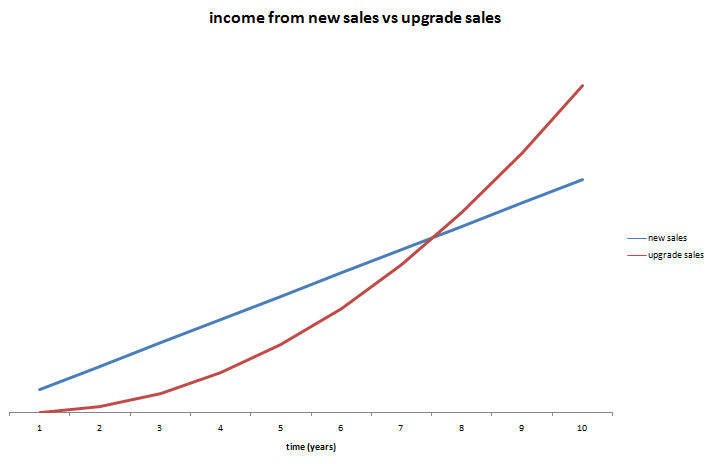
Let’s look at the numbers for a simple (contrived) example. AcmeSoft sells 1000 licences of v1 of their product in year 1, 2000 licences of v2 of their product in year 2, 3000 licences of v3 of their product in year 3 etc. Each year 50% of the customers who bought the previous version (new or as an upgrade) pay to upgrade to the latest version. The upgrade costs them 50% of the initial purchase. How much is the upgrade revenue worth? We can create a simple model in Excel:
Income new licences (blue) vs income from upgrades (red). Click to enlarge.

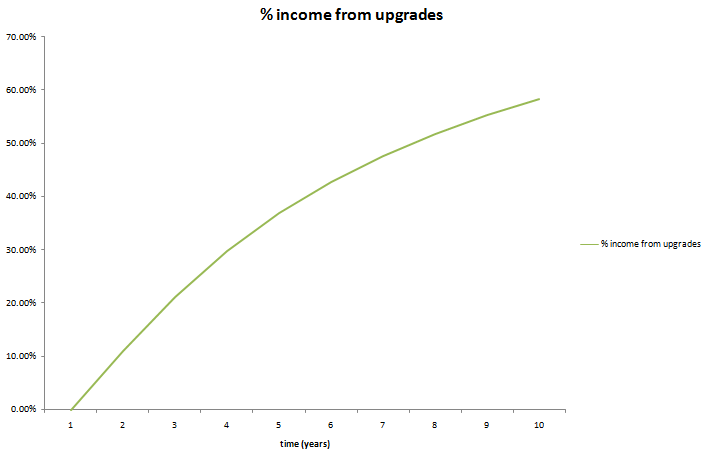
Percentage of annual income from upgrades. Click to enlarge.

In year 8 the upgrade income is actually worth more the new licence income. By year 10 upgrades are worth some 60% of yearly income for the product. If the product has a 10 year lifespan, nearly 50% of the total income from the product will be from upgrades. So it only makes commercial sense to give free upgrades for life if this will at least double the conversion ratio[1]. This seems highly unlikely. You can always try changing your upgrade policy and measure what effect it has on your conversion rate. Not much, I would guess (if anyone has tried it, I would be interested to know the results).

Even in a more pessimistic model where only 30% of customers upgrade and they only pay 30% of the new licence fee, upgrades still account for nearly 25% of total income over 10 years. You can download the spreadsheet and play with the parameters yourself.

Upgrade income becomes particularly important when:

  • A product has a long life span.
  • Customers are very likely to upgrade to a new version.
  • There is little growth in new sales.

In the worst case you could end up with a product with a huge customer base built up over a long period, but which makes very few new sales as it has saturated the market. Free major upgrades would mean that each major release is then going to result in large expense (developent and support) but very little income. Microsoft must be very happy they didn’t offer free upgrades for life on Windows or Office!

I don’t see anything unreasonable about charging for major upgrades. The vendor has to do additional work to add the new features and existing customers can choose whether the new features are worth the upgrade fee. However customers have certain (not unreasonable) expectations for paid upgrades:

  • The fact that the customer is expected to pay for major upgrades needs to be made clear before purchase.
  • Any major bugs in version n should be fixed before releasing version n+1.
  • A major upgrade should have significant new features.
  • Major upgrades should not be released more than once every 12 months.
  • The upgrade fee should be reasonable. Around 40% of the cost of a new licence seems typical.
  • There should be a grace period for free upgrades. E.g. If I buy v1 of a product on 01-Jan I don’t expect to have to pay an upgrade fee for v2 released on 02-Jan. Typically this grace period is 3-6 months.

If you are offering free upgrades for life currently, you can change your policy to paid major upgrades. But, obviously, you will need to honour free upgrades for everyone who purchases before the change of policy.

There are some, apparently successful, companies that offer free upgrades for life (Axialis for example). But I have heard many tales of small software vendors regretting their initial decision to give free upgrades for life. The easiest customer to sell to is the one you already have. If you don’t charge for major upgrades, are you leaving large amounts of money on the table?

[1]Ignoring inflation, interest etc.

Google Chrome

Google continue on their path to world dominance by releasing their own browser today. It is open source and builds on elements of Apple Webkit and Mozilla Firefox. Currently the beta is only available for Windows. Whether this is going to help web app developers by adding more capabilities and setting new de facto standards, or hurt them by further fragmenting the market and creating more compatibility issues, remains to be seen. For more details see the Google Chrome blog post or the Google Chrome ‘comic book’.

Consulting testimonial: Schemax Calendar

Simon Shutter of Schemax Calendar was kind enough to send me this testimonial after I did a day of consulting for him:

I recently hired Andy Brice to review Schemax Calendar. To make the most of his time (and my money) I gave Andy a summary document of the product covering everything from technical architecture to marketing. We had two highly productive discussions via Skype and Andy provided an excellent report replete with helpful advice and insight. Throughout the experience, and despite an eight hour time difference, Andy was extremely professional. He was a great listener, constructive in his feedback, generous with his wisdom and clear with his recommendations.

Simon Shutter, Schemax Design

If you are part of a team that uses Microsoft Outlook I recommend you look at the schedule visualisation capabilities of Schemax Calendar.

Could your business use an independent and experienced perspective?

A mathematical digression (revisited)

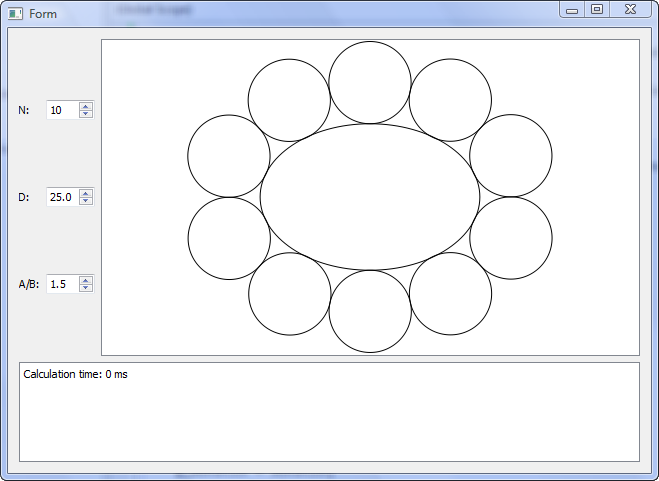
I received two working programs that attempted to solve my ellipse problem. Both were creditable attempts, but neither of them were quite accurate enough for my requirements. One had small (but visible) gaps between the first and last circle and the other didn’t work well for small or large n. However they made me think that a heuristic approach might be workable.

I made a couple of attempts to work out the quartic equations I would have to solve to find the solution analytically. But my brain started to bleed.

After much thinking about it I coded a heuristic approach myself in a day (till 3am!). It works from n=1 to n=100 for variable a/b without noticeable gaps or overlaps for n>7. There is some slight overlapping at n=7 and a/b=1.5. But I can fudge that by changing a/b to 1.6!

The approach is:

  1. use Ramunajan’s formula to work back to a reasonable starting value for b (semi-minor axis)
  2. lay out the n circles
  3. work out the gap/overlap between the first and last circle
  4. if gap/overlap error acceptable, stop, otherwise go to 2

There is also a bit of extra fudging for small n.

I used the secant method to interpolate the values for steps 1,2 and 4. As the functions were all smooth and well-behaved this converged on accurate answers very rapidly (typically 5 or 6 iterations per calculation).

Despite the fact that it is doing 2 levels of iterative calculation, it is surprisingly fast. Even going for high accuracy it takes <1ms for n=50 and <2ms for n=100 on my Windows box. About double that on my old Mac mini. And I can easily cache results in memory for more speed.

You can download and play with the test harness binaries here, if you are so inclined:

Windows binaries (Windows XP or Vista)

Mac binaries (MacOSX 10.3.9 or later)

Both Windows and Mac versions are created from a single set of C++ using the Qt cross-platform toolkit. Note that the timer resolution is 1ms, so times <1ms show as 0ms.

So the next version of my table planner software will have oval tables. As always, there was something I hadn’t though of. I had to do a bit of extra work to calculate the normal to the ellipse circumference (which isn’t the same as the line that joins the ellipse centre and the circumference – as I had initially assumed).

Without calculating normals.

With calculated normals

The commercial value of this feature probably isn’t worth the time I have spent on it. But it will make some of my customers very happy and it was an interesting problem. Part of the reason I set up as a microISV was to do things that I find interesting.

Many thanks to everyone that contributed code or suggestions to the original post.

“Think you can’t get a virus by visiting a web page? Think again!”

Are you just one click away from disaster? The following post on ASP forums woke me out of my complacency (reproduced with the author’s kind permission):

It happened to me today with FireFox 3.

While searching Google for some information on a movie I watched recently (wasting time, more or less), I clicked on a link that I thought was to IMDB. I only glanced at it in the Google search results before I clicked on it. As soon as the page loaded the browser closed, my desktop background was changed and some sort of fake scanner window showed up. Then I saw desktop icons appear. Then a BSOD, or so I thought.

It turns out it was a pretty common piece of malware called Smitfraud combined with a fake AV malware software called “AntiVirus XP 2008”. They kept asking me to register the software in order to clean the 2700+ virus that it found during its “scan”. The BSOD was a cleverly designed screen saver, I assume designed to make a user reboot without trying any real scanner software.

Luckily I use Acronis TrueImage to do incremental backups every night so restoring to what I had at 4AM this morning only took about an hour but it really woke me up. I had disabled the Avast resident scanner a few days ago thinking that I didn’t need it – I mean, I don’t download random EXE files from the net, I don’t visit “bad” sites and I don’t use any p2p file sharing network so I’m safe – right? WRONG! Talk about a humbling experience. Here I am, an uber nerd, and I just had my entire system hosed in about 4 seconds by visiting a website. If I weren’t obsessed with backups and redundancy I could have lost the source code to all of my software or worse, allowed some cracker kid to install a rootkit and gain access to my desktop on demand. Talk about a nightmare!

I can only assume I ran into a site exploiting some new QuickTime or Flash vulnerability. I definitely didn’t download and run anything from the website – I only clicked the link from Google.

If I could remember the site I would try to return to it in a VM with an anti-virus software enabled to see if it could catch it before bad things happened. I can only hope that my huge mistake of not turning my AV software’s resident scanner was the main thing that allowed the software to be installed.

I’ve since started using OpenDNS.org, set Acronis to do incremental updates twice a day, enabled Avast’s resident scanner and installed the Teatimer program from Spybot Search & Destroy. Oh, and I uninstalled Flash and QuickTime just in case (though I checked and I had the most recent versions of both!).

Mitchell Vincent, www.ksoftware.net

The responses included several suggestions to use the ‘Noscript’ add-on for FireFox. I have been trying it for a few days. It is slightly annoying to keep on having to OK scripts on trusted sites. But that seems a price worth paying. And don’t forget to do your back-ups.