“However beautiful the strategy, you should occasionally look at the results.” Winston Churchill

“However beautiful the strategy, you should occasionally look at the results.” Winston Churchill
 Many thanks to all the bloggers who linked to my programmer T-shirts for charity project. Patrick McKenzie has very generously donated his time[1] and some space on his server to set-up a dedicated website at programmer-tshirts.com. If any of you feel like promoting the new website you could put a small ad on the side of your blog (see right) or display the flash panel shown on the new website (wordpress.com apparently doesn’t allow embedded flash).
The HTML for the ad is:
<table style="text-align:left;width:200px;"
       border="1" cellpadding="2" cellspacing="0">
  <tbody>
    <tr>
      <td>
      <table style="text-align:left;width:200px;"
             border="0" cellpadding="2" cellspacing="2">
        <tbody>
          <tr align="center">
            <td>
              <big><a href="http://www.programmer-tshirts.com/">
              T-shirts for programmers</a></big>
            </td>
          </tr>
          <tr align="center">
            <td>
                 <a href="http://www.programmer-tshirts.com/">
                 <img style="border:0 solid;width:172px;height:175px;"
                 alt="programmer t-shirts"
                 src="https://successfulsoftware.net/wp-content/uploads/2008/11/programmer-tshirt.png"></a>
            </td>
          </tr>
          <tr align="center">
            <td>All proceeds to charity</td>
          </tr>
        </tbody>
      </table>
      </td>
    </tr>
  </tbody>
</table>
In WordPress you can just add it as a text widget (Dashboard>Appearance>Widgets).
The source for the flash panel is:
<embed wmode="transparent"
   src="http://www.zazzle.com/utl/getpanel?zp=117873325148652352"
   FlashVars="feedId=117873325148652352&path=http://www.zazzle.com/assets/swf/zp/skins"
   width="450" height="300" TYPE="application/x-shockwave-flash">
</embed>
Even if you just run it for a week or two before Xmas that would be great.
[1]A resource in short supply for a salaryman in Japan. Especially one that commutes in from a rice field and runs his own microISV.
 I started feeling a mild burning sensation in my left wrist a few weeks ago. This is a classic early sign of Repetitive Strain Injury. Uh-oh. I had an email exchange not long ago with someone who now has to use voice activation because typing is too painful. I can’t imagine how frustrating that must be. I decided to ignore Jane Fonda’s advice to “feel the burn” and looked for a way to alleviate the problem.
One approach is to reduce the amount of typing I do. But that is tough when you are running a microISV and writing a blog. I already use the text expander capabilities of the excellent Direct Access software to save a lot of typing (it tells me that it has saved me 51 hours of typing so far). I decided to try an ergonomic keyboard.
I bought myself a Microsoft 4000 Ergonomic keyboard. This is shaped to allow more natural positioning of the forearms and elbows.

Microsoft Natural Ergonomic Keyboard 4000
For more comfortable wrist positioning it also has a built-in wrist rest and the front of the keyboard is higher than the back.
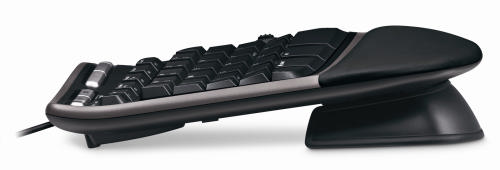
Note the front of the keyboard (right) is higher than the back (left)
I was quite surprised how physically large it was when it turned up. The shape of the keyboard felt very strange to start with and it took me a few days of slow typing to get used it. The feel of the keys is nothing special and I haven’t yet used the extra gizmos, such as the integral zoom button. But I feel it is an improvement in comfort over the conventional keyboard I had before.
An unexpected advantage of the new keyboard is that it has improved my typing. If you watch a good touch typist, their hands hardly move. I (unfortunately) never learnt to touch type, I just didn’t have the patience. The clearer separation between keys for the left hand and keys for the right hand on the new keyboard made me realise that I was moving both hands left and right, more like a concert pianist than a touch typist. I am now moving my hands less and I think my typing speed has improved as a consequence.
I didn’t feel the new keyboard on it’s own was going to solve my impending RSI problems though. The major problem seems to be the continual Ctrl-C, Ctrl-V, Ctrl-A, Windows-D, Windows-E and Alt-Tab key combinations I do with my left hand, hundreds of times a day. Using the right hand Ctrl key instead of the left one helped a bit. But it occurred to me – why are my hands doing all the work? My legs are doing so little that I often feel stiff when I stand up from a long programming session. Why not put them to use?
I Googled for foot pedals for computers. After wading through lots of hits for music and dictation foot pedals I finally found the Savant Elite Triple Foot Switch. This is a programmable 3-pedal foot-switch that plugs into a USB port.
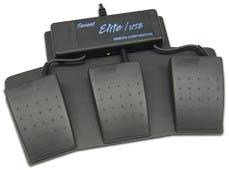
Savant Elite Triple Foot Switch
At £86.00+VAT it isn’t cheap. But what price do you put on your health? I ordered one.
When it arrived I wanted to program the pedals to map to the Ctrl, Shift and Windows keys. But I couldn’t install the device driver to program the pedals. After a call to the retailer it turns out the device driver doesn’t work on Vista, despite assurance on the website that the pedals could be used with “virtually any computer”[1]. Grrrrr. How long has Vista been out? I finally managed to program the pedals using my wife’s laptop – my last remaining XP box.
So now I can type using my feet for most of the modifier keys. I am using the pedals as I type this. I am still getting used to them, but the burning in my left wrist has definitely reduced. I think I can also type a little faster, but I am too lazy to do the speed tests with and without the pedals to verify this. On the negative side:
When I told a friend about the pedals he asked – why stop there? I could also be using my elbows, knees and head like a one-man-band. I could be working-out and typing at the same time. It is an intriguing prospect.
I just hope I don’t end up with burning ankles.
[1] System requirements have since been added to the website.
** update **
There was a link to a few minutes of the Simpsons making fun of Apple. The video has now been removed due to a “breach of terms of use”. I wonder whose lawyers got to it first, Apple or Fox?
 Getting good feedback from customers and prospective customers is essential to any business. I think I already do quite a good job of getting feedback from paying customers. But what about visitors who click around my site for a few minutes and then leave, never to return? I would love to know why they didn’t buy. This sort of feedback is much harder to come by, so I was interested to read about Kampyle in the article 14 free tools that reveal why people abandon your website.
Kampyle adds a clickable image to a designated corner of your webpage. If a user clicks on this image they are shown a simple (and customisable) feedback form. Any feedback is collected by Kampyle and presented through a dashboard on their website. All you have to do is register, customise your feedback form and add some javascript inside the <head> and <body> tags of each page. Best of all, the service is free. You can see it in action on Kampyle’s own website.
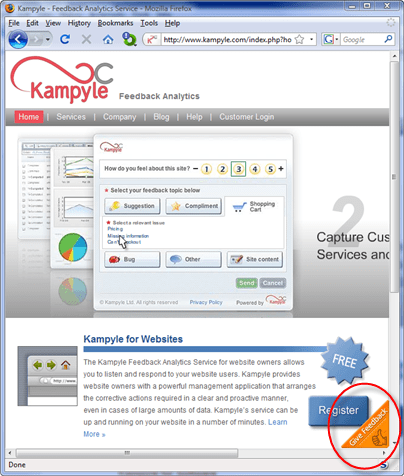
Click the floating image in the bottom-right corner to show the feeback form
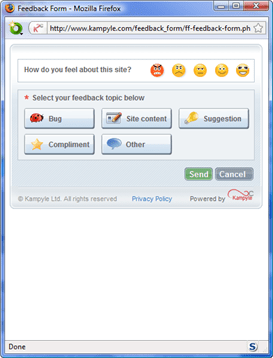
Leave feedback
You can also have Kampyle pop-up a survey question for a given percentage of users as they leave your site. I find such surveys annoying and never fill them in, so I haven’t felt inclined to try this yet.
Kampyle sounds great. Users have a simple way to supply feedback which doesn’t distract them from my key goal (buying my software). Sadly, very few visitors actually supplied feedback through Kampyle. I ran it for a month on some of the highest traffic pages on my Perfect Table Plan site and got a grand total of 4 comments from 3 visitors. Only two of these comments had any really useful feedback and both were from a single paying customer who probably would have emailed support anyway. I don’t feel the feedback justified the ‘cost’, in terms of the potential distraction of visitors and another potential failure mode for my website. Consequently I am now only running Kampyle on a couple of peripheral pages. Maybe the results would be better for different types of site. It only takes 10 minutes of so to set up, so it might be worth a try.
Easy, a T-shirt. Programmers love T-shirts.
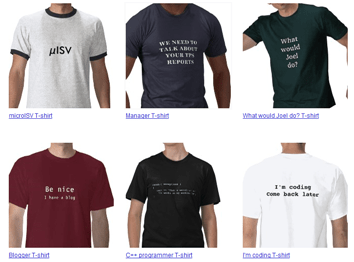
It juuuuust so happens that I have created some T-shirt designs for software developers. Even better, all the commission will be split equally between two very worthy charities: jaipurfoot.org and sightsavers.org.
 Sightsavers works to alleviate sight problems around the world. Last year Sightsavers and their partners treated more than 23 million people for potentially blinding conditions and restored sight to over 244,000 people. Sightsavers is charity particularly close to my own heart, as I have suffered from eye problems myself. My vision without specs is very poor (-8 dioptres). A few years ago I suffered a detached retina due to a martial arts injury and ended up having emergency cryosurgery on both eyes. The possibilty of losing vision in one eye, let alone both eyes, was a frightening prospect. And yet it only costs:
 I first heard of this charity while watching a TV program Paul Merton in India. This organization pioneered the “Jaipur foot” (also known as the “Jaipur leg”) – an effective and easy-to-fit prosthetic lower limb that can be produced for a little as $30 and is provided for free by the charity. The prosthetic was first developed in the 1960s by an orthopedic surgeon and a sculptor. Since then the charity has provided over 300,000 limbs in 22 countries. In the television program a young boy arrived at the clinic hopping on one leg and left running on two, beaming. It was moving to watch. You can read more in this Time magazine article.
In these gloomy economic times it is easy to forget that there are people much worse off than ourselves. A little money goes a long way with either of these charities. So, how can you help?
Buy a T-shirt for yourself, your geeky friends, your work colleagues or your employees. Currently there are nine designs available. I have set up separate shops for North America (zazzle.com) and Europe (spreadshirt.net) to cut down on postage costs and shipping times.
North American shop: www.zazzle.com/successfulsoftware (the 12.5% commission included in each T-shirt sale will go to charity)
European shop: successfulsoftware.spreadshirt.net (the £1.50 commission included in each T-shirt sale will go to charity)
Got an idea for a design? Add it in a comment below or email it to me. I will do what I can to turn some of the better ideas into T-shirts. You can supply graphics and/or text. I don’t have the artistic skills to turn your idea into graphics, but someone else might have. All commission from your design will go to charity. But your design must be original – no copyright violations please.
If you have a software-related blog or frequent a software-related forum, please link to this post and/or the online shops.
My “It works on my machine” machine design predates Jospeh Cooney’s and Jeff Atwood’s by more than 4 years, as proved by this link to the (now sadly defunct) ntk.net ezine. The profits from those T-shirts went to the Jhai foundation – pioneers of bicycle powered Linux. Ironically I can’t sell this design in the European shop due to a bug in the Spreadshirt.net code.
** Update **
These T-shirts are no longer available. Sorry.
Getting your iPhone app listed in the iPhone App Store is a notoriously arcane, difficult and lengthy process. I think I have found out why.
|
|
|
| The App Store icon | The symbol of Freemasonry (from Flickr) |

I have just finished reading “Blog Blazers, 40 top bloggers share their secrets to creating a high-profile, high-traffic and high-profit blog” the new book by the indefatigable Stephane Grenier of followsteph.com.
The bloggers interviewed are a diverse group, blogging on everything from personal finance to fashion. It also includes interviews with a number of software-related bloggers: Jeff Atwood, Ian Landsman, Patrick McKenzie, Dharmesh Shah[sic], Eric Sink, Rob Walling, Bob Walsh and yours truly. Stephane also interviews himself, which must have been a strange experience.
Each of the interviewees was asked a standard list of questions. Some of the questions are more interesting than others. For example the question “What makes a blog successful according to you” resulted in 40 minor variations on “It depends”. But there is a wealth of useful information for bloggers, beginner or veteran. It will take me a long time to work my way through the many links and digest it all. I might even end up buying The elements of style by Strunk and White, which is recommended several times.
Stephane has done a great job of pulling together interviews from such a wide range of bloggers, including A-list blogging celebrities such as Seth Godin. I was very flattered to be included. At $16.95 I would certainly recommend this book to anyone who writes a blog, or is thinking of writing a blog. You can buy the book and/or ebook online from blogblazers.com. The book is also available from amazon.com.
As an interviewee I received some free copies and I am giving away two of them. If you would like one, please add your email address in a comment below. I suggest you obfuscate it to avoid spam-bot harvesting e.g. me [at] domain.com . I will pick two at random on Friday 21st Nov.
This video shows all commercial air traffic in the world during a 24-hour period. Although the technique used is very simple in principal, it conveys a huge amount of information in a short space of time.
I use various simple visualisation techniques in my table planning software, for example males can be shown in blue and females in pink. This allows the host to check at a glance whether they have a good distribution of genders.
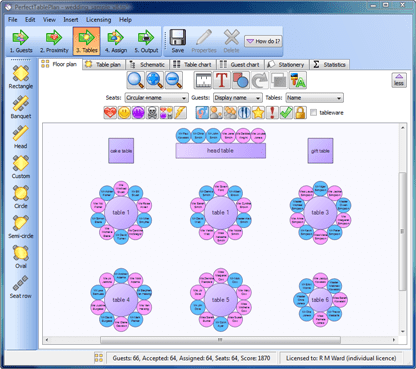
Could you use colour, shape, size, positioning, motion or other visual cues to better convey information to your users?
 I am thinking about a trip to New Zealand with the family (my wife is a Kiwi). As a microISV I need Internet access to keep the business running. I might be able to rent accommodation with broadband or find Internet cafes, but I would like to have mobile Internet access as a back-up. Unfortunately it looks as if my UK mobile Internet provider doesn’t even support roaming in NZ. Even if I swap to another UK provider, roaming costs would probably be prohibitive.
Ideally I would like to just rent a data card in NZ for a month. But a search on Google turned up nothing, apart from one service apparently only available to Australians. My only other thought is to ask one of my wife’s relatives to sign up with vodaphone.co.nz for their ‘no term’ mobile broadband plan, then cancel at the end of the trip. I will probably have to buy a new data card as well, as I doubt my Three Networks Huawei USB modem and SIM would work with Vodaphone NZ.
Any Kiwis reading this? Suggestions would be welcome.


