 When I first released PerfectTablePlan I considered 50-200 guests as a typical event size, with 500+ guests a large event. But my customers have been using the software for ever larger events, with some as large as 3000 guests. While the software could cope with this number of guests, it wasn’t very responsive. In particular the genetic algorithm I use to optimise seating arrangements (which seats people together or apart, depending on their preferences) required running for at least an hour for the largest plans. This is hardly surprising when you consider that seating assignment is a combinatorial problem in the same NP-hard class as the notorious travelling salesman problem. The number of seating combinations for 1000 guests in 1000 seats is 1000!, which is a number with 2,658 digits. Even the number of seating combinations for just 60 guests is more than the number of atoms in the known universe. But customers really don’t care about how mathematically intractable a problem is. They just want it solved. Now. Or at least by the time they get back from their coffee. So I made a serious effort to optimise the performance in the latest release, particularly for the automatic seat assignment. Here are the results:
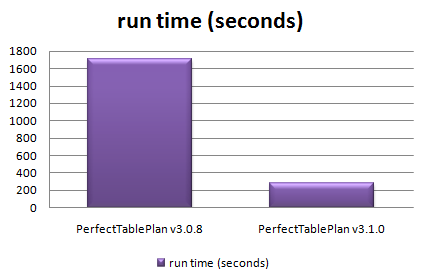
Total time taken to automatically assign seats in 128 sample table plans varying in size from 0 to 1500 guests
The chart shows that the new version automatically assigns seats more than 5 times faster over a wide range of table plans. The median improvement in speed is 66%, but the largest plans were solved over ten times faster. How did I do it? Mostly by straightening out a few kinks.
Some years ago I purchased my first dishwasher. I was really excited about being freed from the unspeakable tyranny of having to wash dishes by hand (bear with me). I installed it myself – how hard could it be? It took 10 hours to do a wash cycle. Convinced that the dishwasher was faulty I called the manufacturer. They sent out an engineer who quickly spotted that I had kinked the water inlet pipe as I had pushed the dishwasher into place. It was taking at least 9 hours to get enough water to start the cycle. Oops. As soon as the kink was straightened it worked perfectly, completing a cycle in less than an hour. Speeding up software is rather similar – you just need to straighten out the kinks. The trick is knowing where the kinks are. Experience has taught me that it is pretty much impossible to guess where the performance bottlenecks are in any non-trivial piece of software. You have to measure it using a profiler.
Unfortunately Visual Studio 2005 Standard doesn’t seem to include profiling tools. You have to pay for one of the more expensive versions of Visual Studio to get a profiler. This seems rather mean. But then again I was given a copy of VS2005 Standard for free by some nice Microsofties – after I had spent 10 minutes berating them on the awfulness of their “works with vista” program (shudder). So I used an evaluation version of LTProf. LTProf samples your running application a number of times per second, works out which line and function is being executed and uses this to build up a picture of where the program is spending most time.
After a bit of digging through the results I was able to identify a few kinks. Embarrassingly one of them was that the automatic seat assignment was reading a value from the Windows registry in a tight inner loop. Reading from the registry is very slow compared to reading from memory. Because the registry access was buried a few levels deep in function calls it wasn’t obvious that this was occurring. It was trivial to fix once identified. Another problem was that some intermediate values were being continually recalculated, even though none of the input values had changed. Again this was fairly trivial to fix. I also found that one part of the seat assignment genetic algorithm took time proportional to the square of the number of guests ( O(n^2) ). After quite a bit of work I was able to reduce this to a time linearly proportional to the number of guests (O(n) ). This led to big speed improvements for larger table plans. I didn’t attempt any further optimisation as I felt was getting into diminishing returns. I also straightened out some kinks in reading and writing files, redrawing seating charts and exporting data. The end result is that the new version of PerfectTablePlan is now much more usable for plans with 1000+ guests.
I was favourably impressed with LTProf and will probably buy a copy next time I need to do some optimisation. At $49.95 it is very cheap compared to many other profilers (Intel VTune is $699). LTProf was relatively simple to use and interpret, but it did have quirks. In particular, it showed some impossible call trees (showing X called by Y, where this wasn’t possible). This may have been an artefect of the sampling approach taken. I will probably also have a look at the free MacOSX Shark profiler at some point.
I also tried tweaking compiler settings to see how much difference this made. Results are shown below. You can see that there is a marked difference with and without compiler optimisation, and a noticeable difference between the -O1 and -O2 optimisations (the smaller the bar, the better, obviously):

Effect of VS2005 compiler optimisation on automatic seating assignment run time
Obviously the results might be quite different for your own application, depending on the types of calculations you are doing. My genetic algorithm is requires large amounts of integer arithmetic and list traversal and manipulation.
The difference in executable sizes due to optimisation is small:

I tried the two other optimisation flags in addition to -O2.
- /OPT:NOWIN98 – section alignment does not have to be optimal for Windows 98.
- /GL – turns on global optimisation (e.g. across source files, instead of just within source files).
Neither made much noticeable difference:

However it should be noted that most of the genetic algorithm is compiled in a single file already, so perhaps /GL couldn’t be expected to add much. I compared VC++6 and VS2005 version of the same program and found that VS2005 was significantly faster[1]:

I also compared GCC compiler optimisation for the MacOSX version. Compared with VS2005 GCC has a more noticeable difference between optimised and unoptimised, but a smaller difference between the different optimisations:

Surprisingly -O3 was slower than -O2. Again the effect of optimisation on executable size is small.

I also tested the relative speeds of my 3 main development machines[2]:
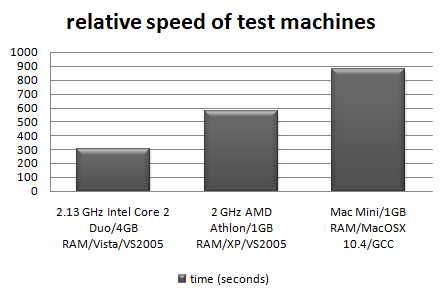
It is interesting to note that the XP box runs the seat assignment at near 100% CPU utilisation, but the Vista box never goes above 50% CPU utilisation. This is because the Vista box is a dual core, but my the seat assignment is currently only single threaded. I will probably add multi-threading in a future version to improve the CPU utilisation on multi-core machines.
In conclusion:
- Don’t assume, measure. Use a profiler to find out where your application is spending all its time. It almost certainly won’t be where you expected.
- Get the algorithm right. This can make orders of magnitude difference to the runtime.
- Compiler optimisation is worth doing, perhaps giving a 2-4 times speed improvement over an application built without compiler optimisation. It probably isn’t worth spending too much time tweaking compiler settings though.
- Don’t let a software engineer fit your dishwasher.
Further reading:
“Programming pearls” by Jon Bentley a classic book on programming and algorithms
“Everything is fast for small n” by Jeff Atwood on the Coding Horror blog
[1] Not strictly like-for-like as the VC++6 version used dynamic Qt libraries, while the VS2005 version used static Qt libraries.
[2] I am assuming that VS2005 and GCC produce comparably fast executables when both set to -O2.

 My PerfectTablePlan website and all the associated websites (such as http://www.weddingtableplan.com) have gone down three times this week. Sigh. The first time they went down for 5 hours, the second time for 3.5 hours and the third time for 6 hours. Perhaps they have been overdoing the festivities at my ISP, 1and1.co.uk . I am not impressed. Somebody needs a good kick up the arse.
 Some years back my wife bought a PC and got a ‘free’ inkjet printer with it. It was a really lousy printer, but hey, it was free. When it ran out of ink we tried to get a new inkjet cartridge, but the cheapest set of cartridges we could find was £80. That was 4 times the price of other comparable cartridges at the time. Some further research showed that you could buy the printer for £20 – with cartridges! Their ugly sales tactics didn’t work. We threw it in the dustbin and bought an Epson inkjet, which gave years of sterling service using third party sets of cartridges costing less than £10.
 I have been using the
  I don’t remember when or where I first saw an editor with syntax highlighting. But I do remember that I was ‘blown away’ by it. It was immediately obvious that it was going to make code easier to understand and syntax errors easier to spot. I would now hate to have to program without it. So I was interested to try version 1.1of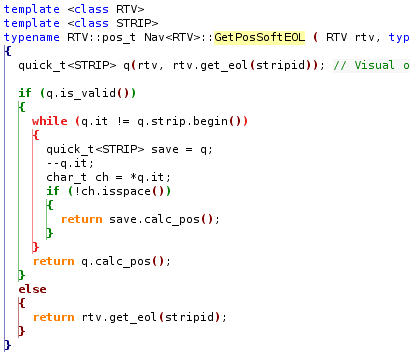
 Successful Software