Archive for the 'reviews' Category

DarkMarket

darkmarketThis book is an interesting and disturbing glimpse into the world of cyber-crime, particularly online credit card fraud (‘carding’). It also touches on related areas, such as cyber-warfare. It is written by a journalist, so don’t expect much in the way of technical details. But, if you can get past the tacky cover artwork and dubious sub-title (‘how hackers became the new Mafia’), it is a fascinating read.

The story mainly centres around the eponymous ‘DarkMarket’, a forum in which cyber-criminals conducted their murky business. For example buying and selling stolen credit card numbers. The story of DarkMarket is known in some detail, as it was infiltrated by various government agencies and some of its key players brought to trial.

There are lots of different characters mentioned in the book, many of whom have non-English names and online aliases. This makes the story quite hard to follow. Perhaps that is inevitable given that it is a story about deception and duplicity involving many people. Nevertheless, it still provides lots of interesting insights into this dark underbelly of the Net.

Online fraud is a cooperative effort. For example, some people specialize in stealing credit card numbers, others in selling credit card skimming devices and still others in employing armies of ‘mules’ to make withdrawals from ATMs (the riskiest part of the operation). But criminals are hardly likely to trust other criminals they have never met. Especially given that some criminals (‘rippers’) specialize in ripping-off other criminals. This is where forums such as DarkMarket come in. They act as a trusted third party, providing escrow and other services to cyber-criminals. The backgrounds and motivations of the cyber-criminals seems to vary considerably. Some start off as curious hackers withot any criminal intent, but turn to the ‘dark side’, often in small increments. Often such people seem to be motivated by status and reputation more than money. Others are simply in it for the easy money.

There are many ways in which your credit card details can be stolen. For example, you hand your card to a petrol station employee. The employee quickly swipes your card through a hidden credit card skimmer before swiping it through the legitimate device (they might pretend they have dropped something behind the counter to disguise this). A small camera hidden in the ceiling records you typing your pin. The criminal has a copy of your credit card and your pin number. These can now be sold on, perhaps through a forum such as DarkMarket, to other criminals who specialize in extracting the money. They will then clone your card and instruct their ‘mules’ to extract the money from an ATM and pay it into another account, keeping a percentage for their trouble. Some of the ‘work from home’ and ‘I made £2000 in a week’ ads you see in spam emails and attached to lampposts may be from cyber-criminals trying to recruit ‘mules’ for this purpose. Sometimes the criminals will withdraw small amounts over a long period as this is less likely to be noticed than one big withdrawal.

Cyber-crime is difficult to prosecute. It is hard to establish the real identity of the criminals and the they are often based in a different legal jurisdiction to the victim. The security services have infiltrated many cyber-criminal forums. The DarkMarket server was eventually being run by an under-cover FBI agent. However even security services from the same country (e.g. the FBI and Secret Service in the US) don’t seem to be able to play nicely together and end up investigating each others agents and informants and generally tripping over each other. The author believes that the Russian security services has infiltrated many of the Russian-speaking cyber-crime forums, but have no interest in shutting them down as long as they are careful never to steal from other Russians. The banks also aren’t keen to cooperate in investigations. You and I are ultimately paying for the fraud through our credit card fees. As long as the banks are making lots of money they don’t want to upset the apple cart by revealing the scale of the fraud. It might affect their bonuses.

So don’t expect cyber-crime to go away any time soon. But do stay away from dodgy websites, keep your credit card in sight at all times, cover the keypad with one hand while you type in your PIN with the other and check your statements!

DarkMarket on amazon.com (affiliate link)

DarkMarket on amazon.co.uk (affiliate link)

First impressions of the Retina 13″ Macbook Pro

macbook pro retinaMy table planner software runs on Windows and Mac. Previously I took a Windows laptop with me when I was out of the office or on holiday, so that I could provide technical support to my customers. But it isn’t (legally) possible to run Mac OS X on Windows, so this made it hard to give Mac customers the best possible technical support. For example I couldn’t send them Mac screenshots or replicate Mac-only bugs from a Windows laptop. However it is legally possible to run both Mac OS X and Windows on a Mac. So I decided to buy a 13″ Retina Macbook Pro for my new laptop, so that I could have access to both OSs when out of the office. I was also attracted by the screen and design of the new Retina Macbook Pro. I choose the 13″ model, rather than than the 15″ model, simply because it is more portable (e.g. more likely to fit in a hotel safe). I also paid to upgrade the SSD from 128GB to 256GB to have room for both Mac OS X and Windows setups. I have now had my Macbook Pro for a few weeks, so I thought I would share my initial impressions.

The good points:

  • The 2560 x 1600 Retina screen is gorgeous, both in terms of sharpness and colour. It makes the display on my old Toshiba Windows laptop look very tired.
  • With a 2.5 GHz Core i5 processor, 8 GB of RAM and an SSD it is very responsive.
  • The aluminium chassis is beautifully designed. Despite being only 19mm thick and 1.6Kgs, it feels very sturdy. The power brick is quite small and light as well.
  • The keyboard is nice. Automatically backlighting the keys in low light is a nice touch.
  • The power cable attaches magnetically. This means it is easy to attach. But, more importantly, accidentally kicking the cable just pops the cable out, rather than the whole machine crashing onto the floor.
  • Gestures work very nicely on the touch pad. For example you can drag two fingers up and down to scroll or tap with 2 fingers to simulate right click.
  • I have Windows and Mac OS X  stored on separate partitions. I can access Window either by booting into Windows or from inside Mac OS X using Parallels (cost approx $80). Being able to access Windows from Mac OS X without a reboot is very useful.
  • The speakers are surprisingly good.

The not so good points:

  • The Macbook Pro is expensive compared to Windows ultrabooks with similar specs.
  • There are a limited number of ports:  2 USB, 2 Thunderbolt, 1 headphone, 1 HDMI and 1 unidentified (SD memory card?).
  • There is no Ethernet port. So if there is no Wifi, you are out of luck.
  • There is no Kensington slot, so you can’t physically lock it down. This is especially annoying given the price.
  • As someone who mainly uses Windows I’m still struggling to get used to the Mac keyboard. For example there is a Backspace key, but no Delete key. Also there is no Home or End key. Worst of all the cursor sometimes  jumps to a different line while I am typing. I have no idea why.
  • Parallels and Windows don’t do a brilliant job of handling the very high resolution of the Retina display. Fonts are sometimes shown very small or very large in Windows. Some applications, such as Keepass v1, looks very fuzzy. Hopefully this will improve with new versions of Parallels and Windows as Retina-like displays become  more common.
  • Not all applications support gestures. For example Firefox on Mac OS X doesn’t support pinch zoom. But I expect this will improve as new versions of applications are released.
  • Not having a built-in DVD drive is a pain. I was able to install Windows 7 by ripping a DVD to a USB stick using Infrarecorder (free). But this didn’t work for Photoshop Elements 11, so I had to download it from the app store, despite having it on DVD.
  • I couldn’t get Windows 8 to work. I installed it into a Bootcamp partition, but when I booted into Windows I just got a mouse pointer and  blue bar down the side of the screen. Apparently Windows 8 is not yet supported by Bootcamp.
  • I am told the graphics performance isn’t great. But I’m not intending to use it for games, so that doesn’t bother me much.

Overall it is an impressive machine and I’m pretty happy with it so far. In particular it is great to able to support Windows and Mac OS X on a single machine. But it does have some annoyances and I wouldn’t have purchased it to just to run Windows. No doubt PC ultrabook manufacturers will have copied its more innovative features fairly soon.

A couple of tips:

  • If you are  in the UK, consider purchasing from John Lewis. They will price match other ‘bricks and mortar’ vendors that have stock. But (at the time I purchased) they were offering 2 years additional warranty. I got them to price match PC World’s £100 off deal. I got £100 refunded and 2 years extra warranty. The service at John Lewis is usually also very good.
  • You probably want to get some form of case or sleeve to protect your lovely and expensive new Macbook. Beware that many of the existing cases are designed for the old Macbook Pros. Consequently they might not be a good fit for the thinner Retina models. I bought this Cool Bananas case. It is a good fit and quite well made. I just wish it had a bit more padding. No doubt more cases and sleeves will become available to fit the new models.

Buying a lean, mean, compiling machine

Nearly two years ago I wrote an article about speccing my ultimate development PC. Somehow there was always something more pressing to do. But I finally took delivery of my shiny new PC this week, partly spurred on by the fact that I wanted tried and trusted Windows 7 for the OS. Also my current development PC is getting increasingly crufty after 5 years of continual use.

I emailed my requirements to the top 3 custom PC companies in the UK as rated by PC Pro magazine : Chillblast, Cyberpower and CCL:

Hi,

I’m looking for a PC for developing software. Prime requirements in order of decreasing importance:

1. reliability
2. cpu + disk speed
3. quiet
4. value for money

Here is my wishlist of components:

-i5-3570K CPU
-an SSD (at least 128 GB) + 2 fast and reliable HDDs (7200 rpm, at least 1 TB each)
-ASUS, Gigabyte or EVGA motherboard supporting USB 3.0 and SATA/600.
-16 GB of fast RAM
-Windows 7 64 bit professional
-quiet is good, open to suggestions on sound insulation, fans and/or passive cooling
-AMD Radeon HD 6850 graphics card
-at least 2 USB ports on the front and 2 USB ports on the back (ideally more, ideally including USB 3.0)
-DVD drive
-Gigabit ethernet
-full size case
-kensington security slot, so I can lock it to the ground
-I don’t need a monitor, keyboard, mouse etc
-I don’t need WiFi
-It has to be *super reliable* – I want reliable SSD + HDDs, good quality motherboard, good quality branded power supply etc.
-target price, not more than 1,500 inc VAT, less is better obviously

Can you build something to meet this spec or get close? Please send me the spec and your price (including UK delivery).

Both Chillblast and Cyberpower sent me quotes for a system fairly close to what I wanted within 1 working day. I then spoke to their sales people and went online to tweak their suggested systems using their web based system ‘configurators’. In the end I chose Chillblast over Cyberpower due to:

  • higher rating from PC Pro readers
  • cheaper for a comparable system
  • better warranty
  • better online configurator (I found the number of choices on the Cyberpower online configurator a bit overwhelming)

However there really wasn’t a lot in it. CCL took nearly 2 whole working days to respond to my initial email,  so I discounted them as insufficiently responsive.

Following some suggestions made by the sales people I spoke to, this is the spec I ended up with:

  • Chillblast Fusion Longbow
  • Windows 7 Professional 64 bit
  • Onboard High Definition Audio
  • Corsair CX 750W 80 PLUS Bronze Certified PSU
  • Sony 24x DVD-RW Drive
  • Seagate Barrcuda 2TB 7200RPM Hard Disk
  • AMD Radeon HD 6850 1024MB Graphics Card
  • Intel 120GB 520 Series Solid State Drive
  • 16GB Corsair PC3-12800 1600MHz DDR3 Memory
  • Asus P8Z77-V LX Motherboard
  • Akasa Venom Voodoo Ultra Quiet CPU Cooler
  • Intel Core i5 3570K Processor 3.40 GHz (No Overclocking)
  • Fractal Design Define R3 Low Noise Case – Black Pearl – USB 3.0 Edition
  • Total price: £1089.80 + VAT (inc MSOffice Home Edition)

I take security fairly seriously. I have a motorbike style ground anchor in my office and I want my shiny new box physically locked to it. But I was told that almost no PC tower cases have a Kensington lock slot. This seems crazy to me. My current Dell tower has one and the cost of one tiny little extra slot in the chassis must be pennies. So I had to buy a lock adaptor kit. It’s not the most elegant solution, but it works fine.

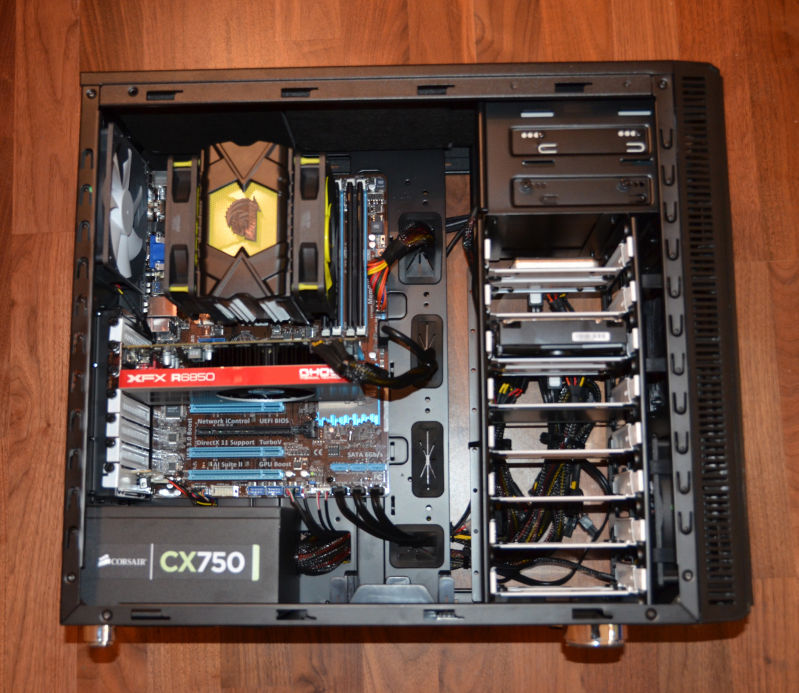
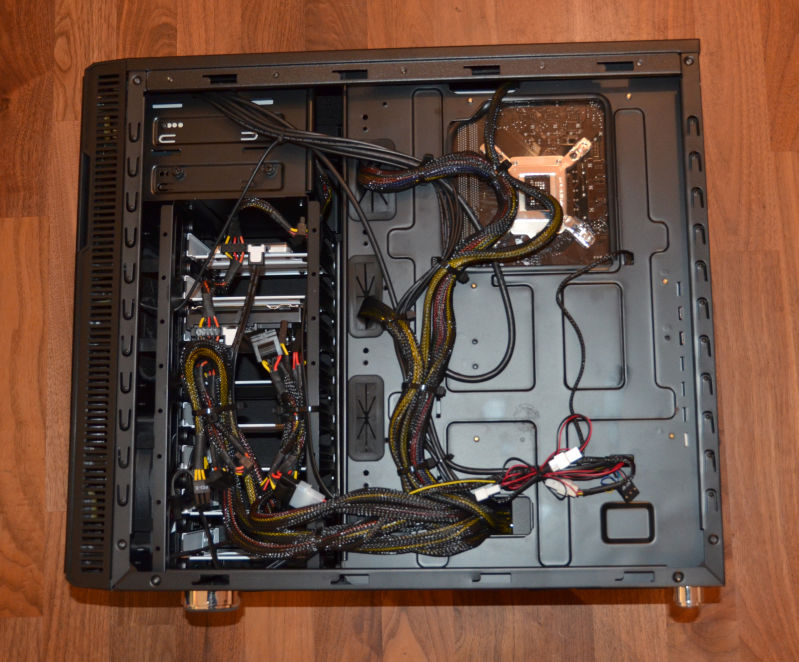
I ordered the system on 02-Oct and it arrived on 22-Oct. Here are a couple of photos of the new system with the side panels off.

The PC took a few days longer than the originally advertised time to arrive. This wasn’t a big issue in my case. But I only found out it was going to be late when I emailed them after the expected completion date. It would have been a lot better if they had been more pro-active and emailed me first. Other than that I am fairly satisified with the service from Chillblast so far.

There are a few issues with the case, which aren’t really Chillblast’s fault. It looks rather lovely in its big, black, minimalist sort of way, a bit like an obelisk from ’2001 a space Odyssey’. But the case scratches rather easily if you lay it down to change a component on my laminate floor. The side panels are also a bit fiddly to get on and off (my old Dell PC is better in this regard). Worst of all, it has rubber grommets (is that the right word?) that fall out into the case (and potentially into the fan or heat sink) if you even look at them funny. This means lying the case down to retrieve them, struggling with the side panels and more scratches. I have had to do this at least 4 times so far. It seems that they have made them of rubber that is far too soft for the job. Grrr.

How fast is the new PC? It certainly feels very snappy. I benchmarked it against my old Dell development PC (Dual Core 2.13 Ghz, 4GB RAM) building my event table planner software from scratch. This is 83k executable lines of C++ according to SourceMonitor:

Build time Old PC New PC
Debug build 6 minutes 56 seconds 1 minute 32 seconds
Release build 6 minutes 23 seconds 1 minute 28 seconds

So it is more than 4 times faster than the old PC at its key task – building software. Admittedly it isn’t a ‘fair’ comparison of the hardware. The older machine has a different version of Visual Studio, a different OS and probably some unnecessary services running in the background. But it is the best I can do in the circumstances and I doubt a ‘fair’ test would be much different. Despite the fact that I only went for a mid-range graphics card, the new PC can also handle playing Half-Life 2 on full 1920 x 1200 resolution without any noticeable issues. Hopefully the faster build times will give a significant boost to my productivity (as long as I don’t play too much Half-Life 2).

The new PC is also eerily quiet. I would guess more than 4 times quieter than my old PC. Even when it is doing a build, all you can hear is the faint whir of a fan.

Only time will tell how reliable it is.

Cppcheck – A free static analyser for C and C++

I got a tip from Anna-Jayne Metcalfe of C++ and QA specialists Riverblade to check out Cppcheck, a free static analyser for C and C++. I ran >100 kLOC of PerfectTablePlan C++ through it and it picked up a few issues, including:

  • variables uninitialised in constructors
  • classes passed by value, rather than as a const reference
  • variables whose scopes could be reduced
  • methods that could be made const

It only took me a few minutes from downloading to getting results. And the results are a lot less noisy than lint. I’m impressed. PerfectTablePlan is heavily tested and I don’t think any of the issues found are the cause of bugs in PerfectTablePlan, but it shows the potential of the tool.

The documentation is here. But, on Windows, you just need to start the Cppcheck GUI (in C:\Program files\Cppcheck, they appear to be too modest to add a shortcut to your desktop), select Check>Directory… and browse to the source directory you want to check. Any issues found will then be displayed.

You can also set an editor to integrate with, in Edit>Preferences>Applications. Double clicking on an issue will then display the appropriate line in your editor of choice.

Cppdepend is available with a GUI on Windows and as a command line tool on a range of platforms. There is also an Eclipse plugin. See the sourceforge page for details on platforms and IDEs supported. You can even write your own Cppcheck rules.

Cppcheck could be a very valuable additional layer in my defence in depth approach to QA. I have added it to my checklist of things to do before each new release.

A small experiment with LinkedIn ads

LinkedIn.com (the B2B equivalent of Facebook) supports Google style pay per click ads. So I decided to run some ads for my seating planner software as an experiment. Here is a brief summary of my (very brief) experiences.
The good news

LinkedIn ads can be laser targeted. You can specify who you want to see your ad based on their job function, company, gender, age group, country and (best of all) the LinkedIn groups they belong to. I targeted 10,102 LinkedIn members who live in wealthy English speaking countries, belong to various LinkedIn groups related to event planning and have appropriate job titles. The campaign was quite painless to set up. It probably took me less than 10 minutes in total and I started getting impressions within an hour or so.

The bad news

The minimum allowed CPC (cost per click) was $2. Ouch. I know from extensive experience with Google Adwords that there is no way I can get a return on that.

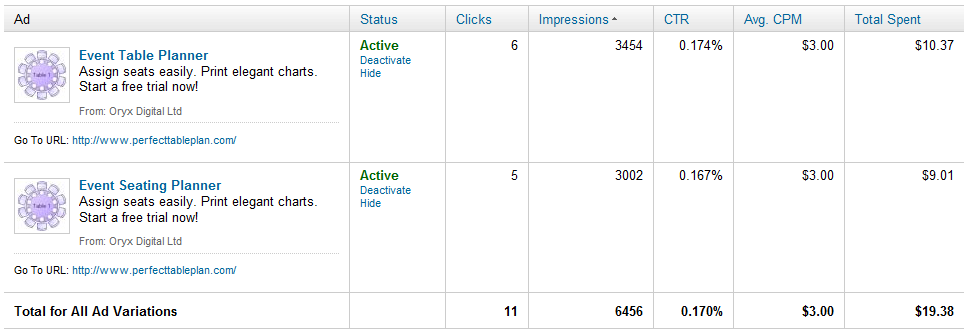
The minimum allow CPM (cost per thousand impressions) was $3. If the CTR (click through rate) is around 1% (about what you might expect from Google search ads) this is $0.30 per click. Possibly profitable. If the CTR is around 0.1% (about what you might expect from Facebook ads) this is $3 per click. No better than the CPC bidding. Given that LinkedIn is more similar to Facebook than Google search, I expected the latter. I decided to spend a few dollars to find out. The results are below (click to enlarge):

So, with an average 0.17% CTR, I ended up spending $1.76 per click. Given my average transaction value and a realistic conversion rate I know that I can’t make any return on this. Also the CTR is likely to drop the more often people see the ad. So I stopped the experiment after less than 24 hours, before I wasted any more time or money. As far as I can tell (based on my own cookie tracking - LinkedIn ads don’t have their own conversion tracking) I didn’t make any sales. But that is hardly surprising given the small number of clicks.

Summary

Obviously $19.38 is a tiny amount to spend, but I think it told me what I needed to know about LinkedIn ads. Unless they reduce their CPC or CPM bid prices by an order of magnitude there is no way I can make a return. Of course, if you are selling a product where the average lifetime value of a customer is hundreds or thousands of dollars, the numbers might work out quite differently for you.

Related posts:

Advertising your software on Facebook (=Fail)

Start Small, Stay Small: A Developer’s Guide To Launching a Startup

I recently read ‘Start small, stay small: A developer’s guide to launching a startup’ by Rob Walling. The preface states:

“This book is aimed at developers who want to launch their startup with no outside funding. It’s for companies started by real developers solving real pain points using desktop, web and mobile applications.”

Many of you are probably already familiar with Rob’s work, including: a blog, a podcast and the micropreneur academy. Rob’s approach has been to develop a portfolio of niche websites as a solo founder (for example ApprenticeLinemanJobs.com), funding it with his own capital and outsourcing work where appropriate. The intention being to have a business that produces a decent income, but allows the founder a flexible lifestyle. He uses the portmanteau ‘micropreneur’ to refer to this approach. It is not a term I care for, with its awkward shunting together of Greek and French. But I guess it is no worse than ‘microISV’. He develops on these themes in the book, with a particular emphasis on the early phases (as implied by the title).

The chapter headings are:

  1. The chasm between developer and entrepreneur
  2. Why niches are the name of the game
  3. Your product
  4. Bulding a killer sales website
  5. Startup marketing
  6. Virtual assistants and outsourcing
  7. Grow it or start over

As with Rob’s blog and podcast, there is plenty of insight and actionable information based on real experience. Some of the writing is taken straight from the blog, but I believe most of it is new. There are links to useful online tools, some of which I hadn’t come across before. It even includes some of that rarest of commodities – real data. He also dispells a few myths – for example: that creating a software product is a quick and easy way to riches and that Facebook and Twitter are all the marketing you need.

The book is particularly strong on market research – a subject I haven’t seen covered much in the context of small software companies. He includes a step-by-step methodology for measuring market size. It also covers other useful subjects such as: pricing, choosing web vs desktop vs mobile vs plug-in, website design, SEO, mailing lists and buying and selling websites. The paper version of the book is 202 pages long. There isn’t a lot of unecessary waffling or padding, so you are getting a fair amount of information for your money. An index might have been useful. Perhaps for the next edition?

While the book will have most benefit for those first starting out, I think even experienced software entrepreneurs will probably find some of it useful. The book is available in paper, electronic and audio formats from $19 at www.startupbook.net. Given its niche market, I think this is good value.

Full disclosure: I recieved a free (paper) copy of the book from the author.

microISV reading list

I have added a microISV reading list page to this blog. Please feel free to add your own comments to the page on the books listed or any other books you feel are relevant.

The Web Startup Success Guide

startup_success_guideBob Walsh has followed up his excellent MicroISV: From Vision to Reality book with The Web Startup Success Guide. While the first book is aimed squarely at at developers of desktop software, the second is aimed more at web-based start-ups. I have to confess, I haven’t had time to read my review copy of the accompanying e-book yet (I’m moving house, moving office and putting out a major new software release). But I see from the contents it includes chapters on:

  • the idea
  • choosing a platforms
  • tools
  • fund raising
  • social media
  • getting the message across

And interviews with

  • Dharmesh Shah
  • Eric Sink
  • Joel Spolsky
  • Pamela Slim
  • Guy Kawasaki
  • …and others

If it is anything like as good as Bob’s MicroISV book, it will be worth a read by anyone doing (or thinking of doing) a web-based start-up. It is currently $19.79 on Amazon.com. You can also buy the e-book from Apress. Here are some reviews from people that have actually read it:

Neil Davidson

Willie Faler

A test of Cost Per Action (CPA) vs Cost Per Click (CPC) in Google Adwords

CPA vs CPCThe traditional approach to Google Adwords is to set a bid price for each keyword. This is known as Cost Per Click (CPC). Google then then uses the bid prices in conjunction with a secret formula (the quality score) to decide how high to rank your ad in the Adwords results. If you bid more, your ad will appear higher and typically get more clicks, but your cost per click will increase. So setting an optimal bid price is important. Bid too little and you won’t rank high enough to get a decent number of clickthroughs. Bid too much and you will potentially end paying more to Google than you recoup in sales.

An alternative approach is to tell Google Adwords how much you are prepared to pay for a particular action, e.g. a sign-up, download or sale. This is known as Cost Per Action (CPA) or Conversion Optimizer. Google will then automatically calculate your bid prices and attempt not to exceed the CPA you set (although this isn’t guaranteed).

CPA sounds great. I can stay in bed a bit longer while the mighty Google brain does the bid tweaking for me. Unfortunately I wasn’t able to use CPA. I  count sales as conversions (not downloads) and I have my adwords account split into a number of campaigns by geographic region and by type (e.g. search vs content). Having my campaigns structured like this, rather than one monolithic campaign, makes for more flexibility (e.g. different ads, phrases and bid prices for different geographical areas) and more useful reports (e.g. separate reports for search and content). But it also meant none of my Adwords campaigns made the minimum threshold for conversions per month.

When Google dropped the minimum threshold for CPA to 30 conversions per campaign per month, one of my Perfect Table Plan search campaigns became eligible. So I did an experiment. I ran a campaign for 4 weeks using CPC, then 9 weeks using CPA, then another 4 weeks using CPC. I set the CPA bid to roughly the average cost per conversion I got for CPC. I was curious to see if Google would find sweet spots that I had been missing or whether they would bid as high as they could to take as much money off me as possible. Summary: CPC outperformed CPA on all key metrics, including: 4.4% higher conversions, 9.4% lower cost per conversions and 8.0% higher profit.

The detailed results are as follows:

metric CPC  (vs CPA)
impressions/day +13.9%
clicks/day +1.3%
conversions/day +4.4%
CTR -11.1%
conv rate +3.1%
income/day +4.4%
cost/day -5.5%
CPC -6.6%
profit/day +8.0%
PKI -5.2%
ROI +10.4%
cost per conversion -9.4%

In graphical form (click to enlarge):

CPA vs CPC graph 50pc

Notes:

  • The values given are taken by computing (CPC metric – CPA metric)/(CPA metric). E.g. ROI of +10.4% means that CPC had a 10.4% higher ROI than CPA.
  • Only a single (geographically based) search campaign was measured. The total number of conversions during the time period of the test was in 3 figures.
  • I only measured sale conversions. This gives me less data than measuring downloads, but I think it is unsafe to assume the number of downloads correlates closely to the number of sales.
  • The PerfectTablePlan sale price is £19.95/$29.95. To calculate profit I only counted 75% of the price of a sale (the other 25% was assumed to cover the cost of support, ecommerce fees and other overheads associated with the sale).
  • Each of the time periods was a multiple of 7 days to avoid any issues with different results on different days of the week.
  • I ran CPC for an equal amount of time either side of the CPA test to try to balance out any seasonal factors.
  • Google conversion tracking uses Cookies and is therefore not 100% accurate.
  • PKI is Profit Per Thousand Impressions.
  • ROI is Return On Investment.

It wouldn’t be wise to draw any sweeping conclusions from one test with a limited amount of data. However I believe the results show:

  • A CPA campaign running for 9 weeks wasn’t able to outperform a mature CPC campaign. The CPC campaign had been running for over 4 years, but one would have thought CPA would have been able to use that pre-existing  data. CPA might have performed better if given longer. It would probably also have done better against a less mature CPC campaign.
  • Google didn’t rob me blind using CPA bidding. The CPA cost per day was only 5.5% higher.
  • The results weren’t hugely different. On the basis of the above results one might still conclude that CPA is superior to CPC as it requires less time to manage.

Using a Mac mini for development

mac miniI have been using a Mac mini to port my C++/Qt based code to Mac OS X for the last 3.5 years. This is one of the early PowerPC based Mac minis, upgraded to 1GB of RAM. Being Apple hardware, it is expensive for what you get. But it has served me well. The small form factor (approx 17 x 17 x 5 cm) has also been useful in my cramped office, where I have it attached to the same monitor, mouse and keyboard as my Windows box through a KVM switch. But it is struggling to keep up with PerfectTablePlan’s ever increasing code base. A clean build of the PerfectTablePlan source into a Universal (fat) binary now takes an eye-watering 36 minutes to compile and link on the Mac mini. Building a PowerPC-only debug version still takes nearly half that time. That is painful, even just for occasional porting work.

As my main development environment is Windows, I can’t really justify the cost (or office space requirements) of a Mac Pro. So I decided to buy a new Mac mini, with an Intel Core 2 Duo processor. I did look around to see if I could find one at a discount. However, this being Apple hardware, no-one dares sell  at anything significantly less than Apple’s RRP. I bought the smaller (120GB) disk variant and had the dealer upgrade it to 2GB RAM, which tests on my old Mac mini indicated should be plenty for compiling and linking. I didn’t want to do the memory upgrade myself as I know, from experience with my first Mac mini, that removing the case involves putty knives and some very worrying cracking noises.

I had all sorts of problems trying to get the right cables. Firstly I wanted a Firewire cable so I could copy the set-up across from the old machine to the new machine using Apple’s Migration Assistant software. But it turns out that the old Mac Mini has a Firewire 400 6-pin socket, whereas the new Mac Mini has a Firewire 800 9-pin socket. I ordered a 6-pin to 9-pin Firewire cable cable. Then I discovered that there is more than one type of DVI cable. The old Mac mini was attached to my KVM switch with a DVI-I cable. The new Mac mini only accepts mini-DVI or (via a supplied adaptor) DVI-D. So I ordered a dual link DVI-D to DVI-D cable as well.

Once I had the right cables things went relatively smoothly. The Migration Assistant software copied almost all the apps and data across from the old machine to the new one. It even preserved settings for the apps, e.g. the email accounts in my Thunderbird email client. I just had to re-install XCode (which wasn’t copied across) and rebuild my Qt libraries (to avoid copious warnings due to the fact they had been built with an earlier version of XCode/gcc).

To use the migration assistant you simply:

  1. connect the 2 machines with a Firewire cable
  2. start-up the old machine with the ‘T’ key depresses to put it in ‘Target’ mode
  3. start-up the new machine
  4. follow the on-screen instructions

Nice. If only it was was that easy to set-up a new Windows machine.

A quick test shows that the new Mac mini is nearly 6 times faster at compiling and linking a Universal binary of PerfectTablePlan from scratch[1]:

mac mini performance

The time the new Mac mini takes to compile and link an Intel-only debug release of PerfectTablePlan also compares favourably with a similar build on my Windows 2.13 GHz Intel Core 2 Duo box with 4GB of RAM[2].

mac mini performance 2

This isn’t a fair hardware comparison, as the two machines are using completely different compilers and linkers and the Windows box was running various background services. But it certainly shows that Intel-based Mac minis are worth considering for use as development machines.

[1] The newer machine is using a newer version of XCode/gcc.

[2] The Windows box is using Visual Studio 2005.


Enter your email address to follow this blog and receive notifications of new posts by email.

Join 750 other followers

Blog Stats

  • 1,706,067 hits
When you are developing a software product it can be hard to
"see the forest for the trees"
see the forest for the trees
Do you need some affordable, independent advice on where to go next with your product?

Categories

Creative Commons License
This work is licenced under a Creative Commons Licence.

Follow

Get every new post delivered to your Inbox.

Join 750 other followers

%d bloggers like this: