Category Archives: article

Setting an optimal bid price for Google CPA bids

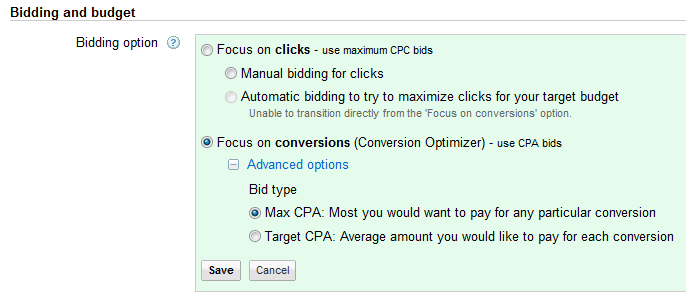
A couple of years ago I wrote up the results of an experiment comparing Cost Per Action vs Cost Per Click bidding in Google Adwords. At the end of the experiment I decided that I did trust Google CPA bidding, but the results from CPA bidding weren’t compelling enough for me to switch. So I stayed with my mature CPC campaign. Subsequently I spoke at length with Adwords guru David Rothwell and Adwords master practitioner Alwin Hoogerdijk. They convinced me that:

  • I hadn’t really given Google CPA enough learning time – the more data Google has the better it should be able to do. The mighty Google brain might even be able to spot and exploit patterns I would find very difficult to emulate (e.g. based on season, country, day or week or time of day).
  • I should switch from paying per sale to paying per download, as this would give Google an order of magnitude more data to work with.
  • CPA bidding would require a lot less of my precious time to manage.

So I switched back to CPA. This time measuring a conversion as a successful download and install (my table planner shows a help page in a browser on first run, this contains the Google conversion tracking script).

So now, instead of having to choose thousands of bid prices (one for each keyword and match type in each campaign), I had to choose a single bid price – what I am prepared to pay Google for a download. If I pay too little for a download: Google won’t show my ads much, I won’t make many sales and my profit will be low. If I pay too much for a download: Google will show my ads a lot, but the amount I pay for each conversion will be high and my profit will be low. In between their should be a ‘sweet spot’ that gives me optimal profit. But how to find that sweet spot?

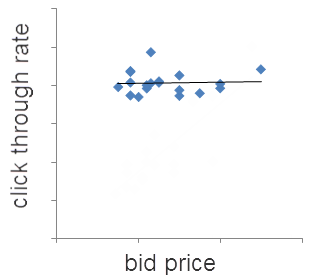
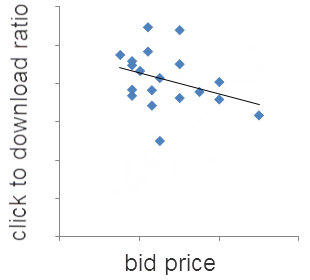
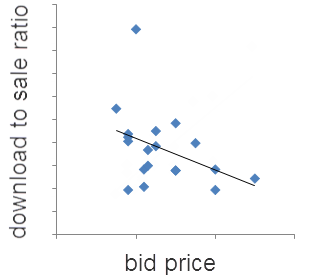
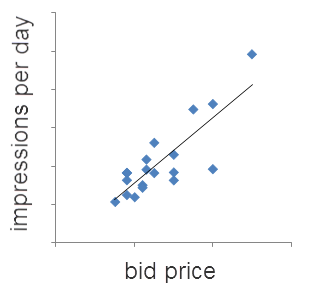
Looking at analytics data I have a good idea at what rate Adwords traffic converts to sales. I chose a CPA bid based on this and then I randomly varied the bid up or down every 7 days (some days of the week perform consistently better than others for my product). The graphs below show the results. Each data point is 7 days of data. The black lines are linear trend lines. I deliberately haven’t put values on the axes, but the x and y axes are all linear, starting at 0.

The trends are pretty clear. Increasing CPA bid price:

  • increases the number of times your ads are shown
  • makes little difference to the click through rates
  • decreases the click to download and download to sale ratios

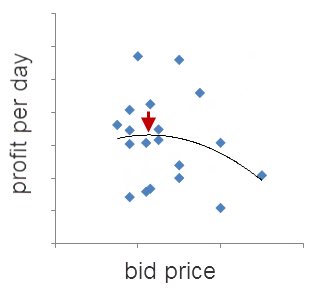
So higher bids means more sales, but also a higher cost per sale. But, of course, the really important metric is profit. So I worked out the average daily profit from Adwords traffic, which is the net sales income (gross sales minus sales costs, including payment processor fees and support costs) minus Adwords costs. Again each point is 7 days of data. The black line is a 2nd order polynomial trend line.

The data is quite noisy. But some data is a lot better than none and there does appear to be sweet spot about where the red arrow is. The curve is fairly flat meaning that I don’t have to be too precise in my bid price to get a near to optimal return. But if I bid twice the optimal price my profit will drop by about 35%.

In an ideal world I would have run all these different bid prices concurrently, instead of one after the other. But that just isn’t possible with Adwords at present (you can use Google Adwords experiments to split test bid prices, but only 2 at a time). Also I could have gathered a lot more data, used longer time intervals (7 days probably isn’t long enough for Google CPA to get into its stride) and bid a lot higher and lower, to make the trends clearer. But I wasn’t prepared to spend the extra time and money required.

If you are using CPA bidding you should be able to carry out a similar analysis on your own Adwords account to find your own CPA bidding sweet spot. If you are still using CPC, perhaps you should consider switching to CPA and let Google do some of the heavy lifting for you. You can switch any campaign that has 15 or more conversions per month to CPA bidding in the ‘Settings’ tab.

You can always switch back to CPC later. If you aren’t using Google conversion tracking, well you really should be.

A word of warning. Not all downloads are equal. You might think that download to sale rates would vary a lot less than impression to click and click to download rates (I did). But download to sale ratios can vary a lot between different campaigns, even for the same product. For example, my analytics data shows that downloads from Adwords display (=contents/adsense) traffic only convert to sales at around a quarter of the rate of Adwords search traffic. So display campaign downloads are worth a lot less to me than search campaign downloads and I set my CPA bids accordingly.

I showed a draft version of this post to Alwin Hoogerdijk of Collectorz.com collection database software, who first persuaded me to switch back to CPA and knows a lot more about CPA than I do. He had the following to add:

When using CPA bidding you should give Google more room to experiment. On search, this means using more broad match terms, or at least modified broad match. And less negative keywords (I removed a lot of my negatives lately). The idea is that Google will automatically find out what works and what doesn’t (again, this may take a lot of time).

On the Content Network it means being less trigger-happy with the site exclusions. Without CPA bidding, I would be more likely to exclude generic sites like Facebook, about.com, etc… But with CPA bidding, I tend to allow the optimizer to display on those sites and the find the right pages within those sites to show my ads on.

In my experience, the optimal CPA bid can vary (wildly) between products, campaigns, etc. . Content Network CPA’s in general tend to be much lower, for the same products. Strangely enough, content network visitor sign up (or downloads) are worth less than search traffic sign ups. Which wasn’t what I was expecting. Of course, content network traffic is less targeted in general so one would expect a lower sign up rate. But even if those visitors sign up, they convert less well to actual sales too. Tricky.

3 Low-Competition Niches In Retail Software

This is a guest post by Joannes Vermorel, founder of the Lokad Forecasting Service.

Software developers seem to be herd animals. They like to stay very close to each other. As a result, the marketplace ends up riddled with hundreds of ToDo lists while other segments are deserted, despite high financial stakes. During my routine browsing of software business forums, I have noticed that the most common answer to Why the heck are you producing yet another ToDo list? is the desperately annoying Because I can’t find a better idea.

This is desperately annoying because the world is full (saturated even) with problems so painful that people or companies would be very willing to pay to relieve the pain, even if only a little. A tiny fraction of these problems are addressed by the software industry (such as the need for ToDo lists), but most are just lacking any decent solution.

Hence, I detail below 3 low-competition software niches in retail. Indeed, after half a decade of running sales forecasting software company Lokad, I believe, despite the potential survivor bias, that I have acquired insights on a few B2B markets close to my own. Firstly I will address a few inevitable questions:

Q: If you have uncovered such profitable niches, why don’t you take over them yourself?
A: Mostly because running a growing business already takes about 100% of my management bandwidth.

Q: If these niches have little competition, entry barriers must be high?
A: Herding problems aside, I believe not.

Q: Now these niches have been disclosed, they will be swarmed over by competitors, right?
A: Odds are extremely low on that one. The herd instinct is just too strong.

Q. Do I have to pay you if I use one of your ideas?
A. No, I am releasing this into the public domain. I expect no payment if you get rich (unless you want to!) and accept no liability if you fail miserably. Execution is everything.  And don’t trust a random stranger on the Internet – do your own market research.

Before digging into the specifics of those niches, here are a couple of signs that I have noticed to be indicators of desperate lack of competition:

  • No one bothers about doing even basic SEO.
  • No prices on display.
  • No one offers self-signup – you have to go through a sales rep.
  • Little in the way of online documentation or screenshots are available.

However, lack of competition does not mean lack of competitors. It’s just not the sort of competition that keeps you up at night. Through private one-to-one discussions with clients of those solutions, here is the typical feedback I get:

  • Licenses are hideously expensive.
  • Setup takes months.
  • Upgrade takes months (and is hideously expensive).
  • Every single feature feels half-baked.

By way of anecdotal evidence – during a manufacturer integration with our forecasting technology a few months ago at Lokad, we discovered that the client had been charged $2,000 by its primary software provider in order to activate Remote Desktop on the Windows Server where the software was installed. Apparently, this was well within the norm of their usual fees for the inventory management system in place.

Granted, just being cheaper is usually not a good place to be in the market. Yet, when a competitor’s software is designed in such a way that it takes a small army of consultants to get it up and running, they can’t just lower their license fees to match yours – assuming that your design is not half-baked too. The competition would have to redesign their solution from scratch, and give up on their consultingware revenues. So you are in a great position to drive competition crazy.

With a market managing over two-thirds of the US gross domestic product, one would expected retail be saturated by fantastic software products. It turns out this is not the case. Not by a long shot – except eCommerce (e.g. online shopping carts) which attracts a zillion developers for no good reason.

Some salient aspects of the retail software market:

  1. Most retailers are already equipped in basic stuff such as point-of-sale, inventory management and order management systems. So you don’t have to deliver that yourself. On the contrary, you should rely on the assumption that such software is already in place.
  2. As far the Lokad experience goes with its online sales forecasting service, retailers are not unwilling to disclose their data to a 3rd party over the Internet. It takes trust and trust takes time. Interestingly enough, at Lokad we do sign NDAs, but rather infrequently. We are not unwilling, but most retailers (even top 100 worldwide ones) simply don’t even bother.
  3. Retailers have a LOT of data, and yet unlike banks, they have little talented manpower to deal with it. Many retail businesses are highly profitable though and could afford to pay for this kind of manpower, but as far I can tell, it’s just not part of the usual Western retail culture. Talents go to management, not to the trenches.

Niche 1: EOQ (Economic Order Quantity) calculator

Retailers know they need to keep their stocks as low as possible, while preserving their service levels (aka rate of non stock-outs), see this safety stock tutorial for more details. If the marginal ordering cost for replenishment was zero, then retailers would produce myriads of incremental replenishment orders, precisely matching their own sales. This is not the case. One century ago, F. W. Harris introduced the economic order quantity (EOQ) which represents the optimal quantity to be ordered at once by the retailer, when friction factors such as the shipping cost are taken into account. Obviously, the Wilson Formula (see Wikipedia for details) is an extremely early attempt at addressing the question. It’s not too hard to see that many factors are not accounted for, such as non-flat shipping costs, volume discounts, obsolescence risks …etc.

Picking the right quantity to order is obviously a fundamental question for each retailer performing an inventory replenishment operation. Yet, AFAIK, there is no satisfying solution available on the market. ERP systems just graciously let the retailer manually enter the EOQ along with other product settings. Naturally, this process is extremely tedious, firstly because of the sheer number of products, secondly because whenever a supply parameter is changing, the retailer has to go through all the relevant products all over again.

The EOQ calculator would typically come as multi-tenant web app. Main features being:

  • Product and supplier data import from any remotely reachable SQL database[1].
  • Web UI for entering / editing EOQ settings.
  • EOQ calculation engine.
  • Optional EOQ export back to the ERP.

Pricing guestimate: Charge by the number of products rather than by the number of users. I would suggest to start around $50/month for small shops and go up to $10k/month for large retail networks.

Gut feeling: EOQ seemingly involves a lot of expert knowledge (my take: acquiring this knowledge is a matter of months, not years). So there is an opportunity to position yourself as an expert here, which is a good place to be as it facilitates inbound marketing and PR with specialized press. Also, EOQ can be narrowed down to sub-verticals in retail (e.g. textiles) in case competition grows stronger.

Niche 2: Supplier scorecard manager

For a retailer, there are about 3 qualities that define a good supplier: lowest prices, shortest shipment delays, best availability levels (aka no items out-of-stock delaying the shipments). Better, sometime exclusive, suppliers give a strong competitive edge to a retailer. Setting aside payment terms and complicated discounts, comparing supplier prices is simple, yet, this is only the tip of the iceberg. If the cheapest supplier doesn’t deliver half of the time, “savings” will turn into very expensive lost sales. As far I can observe, beyond pricing, assessing quality of the suppliers is hard, and most retailers suffer an ongoing struggle with this issue.

An idea that frequently comes to the mind of retailers is to establish contracts with suppliers that involve financial penalties if delays or availability levels are not enforced. In practice, the idea is often impractical. Firstly, you need to be Walmart-strong to inflict any punitive damage on your suppliers without simply losing them. Secondly, shipping delays and availabilities needs to be accurately monitored, which is typically not the case.

A much better alternative, yet infrequently implemented outside the large retail networks, consists of establishing a supplier scorecard based on the precise measuring of both lead times (i.e. the duration between the initial order and the final delivery) and of the item availability. The scorecard is a synthetic, typically 1-page, document refreshed every week or every month that provides the overall performance of each supplier. The scorecard includes a synthetic score like A (10% best performing suppliers), B and C (10% worst performing suppliers). Scorecards are shared with the suppliers themselves.

Instead of punishing bad suppliers, the scorecard helps them in realizing there is a problem in the first place. Then, if the situation doesn’t improve after a couple of months, it helps the retailer itself to realize the need for switching to another supplier…

The scorecard manager web app would feature:

  • Import of both purchase orders and delivery receipts (this might be 2 distinct systems). [2]
  • Consolidation of per-supplier lead time and availability statistics.
  • One-page scorecard reports with 3rd party access offered to the suppliers.

Pricing guestimate: Charge based on the number of suppliers and the numbers of orders to be processed. Again, the number of users having access to the system might not be a reliable indicator. Starting at $50/month for small shops up to $10k/month for large retail networks.

Gut feeling: By positioning your company as intermediate between retailers and their suppliers, you benefit from a built-in viral marketing effect, which is rather unusual in B2B. On the other hand, there isn’t that much expert knowledge (real or assumed) in the software itself.

Niche 3: Dead simple sales analytics

Retail is a fast-paced business, and a retailer needs to keep a really close eye on its sales figures in order to stay clear of bankruptcy. Globally, the software market is swarming with hundreds of sales analytics tools, most of them being distant competitors of Business Objects acquired by SAP years ago. However, the business model of most retailers is extremely simple and straightforward, making all those Business Intelligence tools vast overkill for small and medium retail networks.

Concepts that matter in retail are: sales per product, product categories and points of sale. That’s about it. Hence, all it should take to have a powerful sales visualization tool setup for a retailer should be access to the 2 or 3 SQL tables of the ERP defining products and transactions; and the rest being hard-coded defaults.

Google Analytics would be an inspiring model. Indeed, Google does not offer to webmasters any flexibility whatsoever in the way the web traffic is reported; but in exchange, setting-up Google Analytics requires no more than merely cutting-and-pasting a block of JavaScript into your web page footer.

Naturally it would be a web app, with the main features being:

  • Product and sales data import from any remotely reachable SQL database.[2]
  • Aggregate sales per day/week/month.
  • Aggregate per product/product category/point-of-sales.
  • A Web UI ala Google Analytics, with a single time-series graph per page.

Pricing guestimate: Regular per-usage fee, a la Salesforce.com. Starting at $5/user/month basic features to $100/user/month for more fancy stuff.

Gut feeling: probably the weakest of the 3 niches, precisely because it has too much potential and is therefore doomed to attract significant attention later on. Also, achieving a wow effect on first contact with the product will probably be critical to turn prospects into clients.

Market entry points

Worldwide, there are plenty of competitors already for these niches. Yet, again, this does not mean much. Firstly because retail is so huge, secondly because it’s a heavily fragmented market anyway. First, there are big guys like SAP, JDA or RedPrairie, typically way too expensive for anything but large retail networks. Second, there are hundreds of mid-market ERPs, typically with a strong national (or even regional) focus. However, those ERPs don’t delve into fine-grained specifics of retail, as they are too busy already dealing with a myriad of feature requests for their +20 modules (accounting, billing, HR, payments, shipping … etc). Hence, there is a lot of space for razor-sharp web apps that focus on one, and only one, aspect of the retail business. Basically single-minded, uncompromising obsession with one thing, leaving aside all other stuff to either ERPs or other web apps.

In order to enter the market, the good news is that mid-size retailers are pretty much everywhere. So you can just use a tiny bit of networking to get in touch with a couple of neighbouring businesses, even if you don’t have that much of a network in the first place. Then, being razor-sharp in a market where very little online content is available, offers you a cheap opportunity at doing some basic SEO based on the very specific questions your software is addressing.

Q: I am interested, I have questions, can I ask you those questions?
A: Naturally, my rate is 200€/h (no just kidding). Yes, email me.

[1] Don’t even bother about providing a super-complicated setup wizard. Just offer a $2k to $5k setup package that includes the ad-hoc handful of SQL lines to match the existing data of the retailer. We are already using this approach at Lokad with Salescast. Alternatively, we also offer an intermediate SQL schema, if the retailer is willing to deal with the data formatting on its own.

[2] Again, I suggest an approach similar to the one of Salescast by Lokad: don’t even try to robotize data import, just design the software in such a way that adding a custom adapter is cheap.

Joannes Vermorel is the founder of Lokad, company motto “You send data, we return forecasts”. Lokad won the first Windows Azure award from Microsoft in 2010, out of 3000 companies applying worldwide. He has a personal blog that mostly deals with cloud computing matters.

15 criteria for evaluating software product ideas

Choosing the right product to develop is crucial. Great execution is also very important. But if you develop a product that no-one wants or no-one is prepared to pay for, then you are going to fail, no matter how well you execute it. You can often tweak a product or its marketing to make it more successful based on market feedback (‘pivot’) .  But the less pivoting you have to do, the better. Below I list some of the criteria I think are important for evaluating the potential of new commercial software products.

1. Are you solving a real problem?

Has your customer got a ‘bleeding neck’? Is your software solving a problem compelling enough that someone is going to download it, install it, evaluate it, buy it and then learn to use it, with the accompanying risks of credit card fraud and malware? It is hard to change people’s habits. They are going to keep doing what they are doing now (e.g. pen and paper or Excel) unless you can convince them your software offers them very significant advantages.

2. How much will people pay for this product?

This is a complex question and depends on many factors. You should be able to get a rough idea by looking at your closest potential competitors. But there are some types of software that people don’t expect to pay for, no matter how difficult or expensive it is to develop – for example web browsers and media players. There are some users who can’t pay – for example children and people in some developing countries. And there are some people who won’t pay – for example many Linux users. So good luck selling a media player aimed at teenage Linux users in China.

3. Is the market big enough?

Is the market big enough for you to make a living? How many people are looking for solutions to this sort of problem? This is less of a problem than most people think. Given the huge number of people with Internet access and credit cards it is possible for a small company to make a decent living from a market that appears very narrow. Narrowing your market also allows you to be much more focussed in your marketing.

4. Can you promote it cost effectively?

How are you going to reach customers: Adwords, SEO, partners, magazine ads, direct mail, social media, affiliates, resellers or other methods? Can you do it cost effectively? How much is each sale from Adwords going to cost you assuming a 1% conversion rate? If it costs you $31 in advertising for each sale of a $30 product, you aren’t going to be in business long. But if you can cross-sell it to customers you already have a relationship with, that is a huge plus.

5. How much competition is there?

If there are lots of established competitors, you may have a hard time getting noticed. Personally I wouldn’t want to go into any market where I didn’t have a reasonable shot of getting to the first page on Google for at least some of the important search terms. For example, I think it would be incredibly tough to succeed with yet another Twitter, RSS, todo list or backup application. Conversely, if there are no competitors, that means that there may be no market. Creating a new market is tough, especially for a small company. Ideally you want a market where there are competitors making a decent living, but you think you can do a better job than them, or at least be different to them in some important way.

6. How is your product different?

Many vendors try very hard to reach feature parity with their competitors. But successful marketing means being different to your competitors. How is your product going to be different? What is your positioning? Note that just being cheaper than your competitors is not enough.

7. How high is the barrier to entry?

How long will it take you to create a minimum sellable product? If the barrier to entry is too high, you may never have the time, cashflow and energy to reach v1.0. As a self-funded microISV I wouldn’t want to work on any product where I couldn’t deliver something sellable (a minimum viable product) within 6 months. Conversely if the barrier to entry is too low, then it will be easy for others to copy your idea if it is successful.

8. Can you reach critical mass?

Some types of applications need a certain number of users before they can take off (network effect). For example, a massively multi-player game, dating site or auction site isn’t going to be very interesting until the number of users reaches a certain threshold. Do you have the contacts and financial resources to reach this threshold?

9. Do you have the technical skills and domain knowledge to create this product?

If not, how long will it take to learn them? Different technologies suit different types of problems. Using an inappropriate technology, just because it is one you have experience in, is unlikely to end well.

10. Are you scratching your own itch?

If you can be your own customer, then this can be very helpful in coming up with a good solution. But be wary about assuming that your needs are the same as everyone elses.

11. What is the lifetime of the product?

Is the technology going to be obsolete, or will the market disappear within a couple of years?  Are customers likely to buy upgrades to new versions? The longer you can sell a product for, the more profitable it is likely to be.

12. Is a good domain available?

Can you get a good domain for your product? Domains that contain keywords that people are likely to search on will help with SEO.

13. What are the risk factors?

Every dependency is a risk factor. If the platform your products runs on dies, then your product dies.  If you are writing an add-on for another product, then you can be put out of business pretty much overnight if the core product dies or if the functionality of your add-on is incorporated into the core product. Can you get source code for third party libraries?

14. Is the passion there?

Good software takes a lot of time and effort. Don’t believe the hype about 4 hour work weeks. Is it going to be interesting and fun? Do you have the passion and commitment to still be working on this product in 10 years time?

15. Will it make the world a better place?

Software products can be an enormous force for good in the world, increasing productivity and allowing people to do things they couldn’t do otherwise. You don’t have to be the next Google to be doing something worthwhile. But creating a “me too” clone of an existing software package or a product that encourages anti-social behaviour (e.g. spamming) isn’t going to make the world a better place.

Making a decision

You need to look at all these criteria before you make a decision. For example, a short lifespan or a small market might be compensated for by a high ticket price. If you are evaluating several products, create a simple table with a row for each criteria and a column for each product and compare them side by side.

A small experiment with LinkedIn ads

LinkedIn.com (the B2B equivalent of Facebook) supports Google style pay per click ads. So I decided to run some ads for my seating planner software as an experiment. Here is a brief summary of my (very brief) experiences.
The good news

LinkedIn ads can be laser targeted. You can specify who you want to see your ad based on their job function, company, gender, age group, country and (best of all) the LinkedIn groups they belong to. I targeted 10,102 LinkedIn members who live in wealthy English speaking countries, belong to various LinkedIn groups related to event planning and have appropriate job titles. The campaign was quite painless to set up. It probably took me less than 10 minutes in total and I started getting impressions within an hour or so.

The bad news

The minimum allowed CPC (cost per click) was $2. Ouch. I know from extensive experience with Google Adwords that there is no way I can get a return on that.

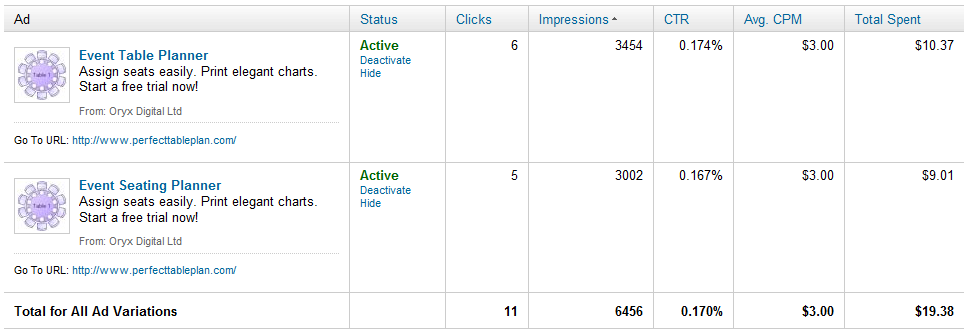
The minimum allow CPM (cost per thousand impressions) was $3. If the CTR (click through rate) is around 1% (about what you might expect from Google search ads) this is $0.30 per click. Possibly profitable. If the CTR is around 0.1% (about what you might expect from Facebook ads) this is $3 per click. No better than the CPC bidding. Given that LinkedIn is more similar to Facebook than Google search, I expected the latter. I decided to spend a few dollars to find out. The results are below (click to enlarge):

So, with an average 0.17% CTR, I ended up spending $1.76 per click. Given my average transaction value and a realistic conversion rate I know that I can’t make any return on this. Also the CTR is likely to drop the more often people see the ad. So I stopped the experiment after less than 24 hours, before I wasted any more time or money. As far as I can tell (based on my own cookie tracking – LinkedIn ads don’t have their own conversion tracking) I didn’t make any sales. But that is hardly surprising given the small number of clicks.

Summary

Obviously $19.38 is a tiny amount to spend, but I think it told me what I needed to know about LinkedIn ads. Unless they reduce their CPC or CPM bid prices by an order of magnitude there is no way I can make a return. Of course, if you are selling a product where the average lifetime value of a customer is hundreds or thousands of dollars, the numbers might work out quite differently for you.

Related posts:

Advertising your software on Facebook (=Fail)

Does the world *really* need yet another Twitter client, RSS reader, ToDo list or backup application?

My heart sinks every time I hear a would-be-entrepreneur announcing they have written yet another Twitter client, RSS reader, ToDo list or backup application. Haven’t we got enough of those already? There are more than 1,900 Twitter apps already (possibly a lot more). Somebody probably released another one while I was writing this post. We have passed the Twitter app event horizon, where it is probably quicker to write your own custom app than it is to try and work out if any of the existing apps fulfils your requirements.

Even if you have done something radically new, interesting and different in one of these markets, how are you ever going to get noticed amongst thousands of more established competitors? Wouldn’t it be better to find a market that is currently under-served by software? It may be less fashionable than writing software for other techies, but it will probably contribute more to the sum of human happiness and be a lot more profitable.

There must be thousands of niches where there is a real need for software, but limited competition. You just need to open your eyes to the bigger world around you. It may mean having to learn about an unfamiliar domain. But it is generally much easier for a software developer to learn some domain knowledge about, say, butterfly collecting, than it is for the average butterfly collector to learn to create a software product. Next time you are talking to a non-techie about their job or hobbies, just ask them “Do you use software for that?” and “Is it any good?”. The ideal answers you are looking for are “Yes” (if there are existing software packages, there is probably a market) and “No” (maybe you can do better).

How to remove software cracks and keygens from file hosting sites

Software piracy is a real issue for every software company, large and small, and it isn’t going away any time soon. So when I heard that fellow microISV owner Nikos Bozinis had created a tool to help software vendors fight  piracy, I asked him to write a guest post. He kindly agreed to write this post about software piracy, the Digital Millennium Copyright Act and his CrackTracker product.

Why buy something when you can download it ‘for free’? Billions of dollars are lost every year from illegal downloads of music, movies and software. People around the world seem to have very lax morals when it comes to abusing digital content. Downloading the latest movie or windows software from rapidshare.com somehow doesn’t strike them as theft — it’s not like stealing a loaf of bread! The traditional music industry is already down on its knees as a result, and software may be the next to follow.

Software authors and music enterprises are fighting back by tightening the DRM (Digital Rights Management) of their products in a futile effort to stop online piracy. But usually crackers have no problem circumventing any protection system that we can dream up. To add insult to injury legitimate customers are usually hurt by such reinforced software protection and activation systems. A little bit like the war on terror, isn’t it?

A different line of defense for ailing copyright owners is the Digital Millennium Copyright Act (DMCA), a US law with global reach for copyright protection (the european EUCD equivalent is not as broadly known). This law is very broad, and not without controversy, but it works – closing down websites that distribute illegal content and removing copyright infringing downloads from file-hosting websites with summary procedures, among other things. So if you discover your software illegally distributed in some warez website, you can send a so called “DMCA section 512 takedown notice” to the website host and they are expected to remove that particular file from circulation — or risk the wrath of the law.

Software Piracy

I have been a microISV for over 10 years so lets forget about the entertainment industry and concentrate on my field, software. There are over 200,000 programs listed on download.com and that’s just for Windows. Many are created by very small to medium sized companies — many even run by a single programmer/webmaster/marketer/entrepreneur. I bet that all these programs are cracked in one way or another — at least those popular enough for crackers to care about them. If you search for warez or torrents you will find the software you want for free, either the latest or an older working version.

Piracy statistics from Business Software Alliance report 2009 (click image to enlarge).

I sell a file manager called xplorer². I track how many people install the program every day and also I have a good guesstimate for the number of people using cracked versions of xplorer². I estimate over 70% of the regular users use one of the known keygens. Imagine if this 70% didn’t exist or it was converted to regular paying customers!

How is it done?

Downloadable software falls into 2 categories: those that run in trial mode until you buy a key to unlock the full functionality; and those that are special downloads for customers that pay the registration fee. In all cases some sort of unlocking takes place using a plain key, or a license file, or online activation, or some combination thereof. Many ISVs write their own licensing code, while others rely on off-the-shelf protection and licensing products (Armadillo, WinLicense etc).

Imagine you shipped your source code along with your program, then it would be trivial for even amateur crackers to bypass your protection and run the program without paying. Very few vendors supply source code, but people in the know can read off your licensing logic like an open book using specialized reverse engineering tools (softICE, IDA and other debuggers and disassemblers). Then they can create a ‘patch’ or modification to your executable that bypasses the protection.

An even worse type of compromise is a keygen. When the cracker uncovers the logic of your unlock keys, he can create a program to generate such keys which look and behave exactly like the legitimate ones you sell to your customers. Then he doesn’t need to patch your program, he just supplies this keygen to the warez community and everyone can help themselves to your program. You can guard yourself against such attacks using asymmetric encryption algorithms for your keys.

Is there a perfect protection system?

In short, no. If you consider that your program is presenting its logic to anyone with moderate experience in machine language, then sooner or later any protection can be circumvented. Professional protection schemes utilize encryption to protect sensitive parts of your code, but even they won’t withstand the cracker test. And remember the harder your DRM the more likely your program will be mistaken for malware (!) as many viruses and trojans use encryption tricks.

Even if there was a perfect system, your sales would still be at risk. All that’s required is some of your customers to post their unlock key in a warez site, and the game is lost. You would then blacklist that serial, until another one was leaked and so on.

The warez scene

There are people who don’t spend any time in Facebook or YouTube. They surf the internet for free stuff. Cracked versions of commercial software (aka warez) circulate in some shady forums that bring together the crackers with the downloaders e.g. http://www.warez-bb.org.  Browse a warez site and you will find any software, movie or music you fancy, with an assortment of popups and dodgy advertisements of the usual internet 3P products (Pills, Poker and Girls [sic]). For your convenience there are even specialized search engines that search a number of such forums simultaneously, e.g. http://www.warez.com.

These forums do not host the actual files. They refer the traffic to specialized file hosting services like rapidshare.com. To make the most of warez you need to buy a subscription to access such file hosting sites (e.g. unlimited downloads from $9/month). Incurable cheapskates could get away without paying anything though, as you can download for free after a forced (nag) waiting of a minute or two.

A bit more up-market are download sites where to gain access you need to purchase a subscription, e.g. http://www.nowdownloadall.com. I have never paid to enter such a site, but they promise access to any download you can imagine. So you pay a monthly fee to download as much as you like. Note that this is different from paid-for hosting mentioned above. I suppose that you need a file hosting subscription on top to get the actual files downloaded. With so much stuff available for free I don’t know if this approach makes economic sense.

Finally there are traditional peer-to-peer file sharing networks, where people share their software music and video through torrents. After the demise of Napster torrents are still strong, with completely decentralized databases immune to legal intervention. The downside of torrents is their inherent unreliability, so people in a hurry will prefer the immediate gratification of a full download from rapidshare.com and the like.

Why do they do it?

It is easy to understand why someone will prefer ‘free’ software instead of paying up. But what about the crackers, the people who circumvent the DRM and distribute these warez. Why do they do it? Here are a few plausible motives:

  • For kicks. The traditional hacker stereotype is a geeky person whose pastime is breaking into computer networks. Cracking into a software’s protection and stripping it clean must be a pleasure in itself, a ritual destruction of the evil Death Star.
  • For glory. Marxist theory claims that private property is theft. This concept has struggled with real tangible property, but digital property is the ideal trophy. Many groups feel that software and music should be free (!) so taking down the big media and software corporations is a noble cause for them. But many small ISVs fall victims too, and the real motives are far less revolutionary…
  • For profit. Marx is dead; long live Das Kapital. Warez downloads are big business in a number of ways:
    • Direct subscriptions charges to access the downloads
    • Selling password unlockers (e.g. you download something in a ZIP archive which is locked and you need to buy some software to unlock it)
    • Distributing malware. Many downloads are packed with malware (sample report for a keygen), from straightforward scams and ransomware to trojans that turn your computer to a zombie, waiting for instructions to launch a DDoS attack or send spam.

You *can* remove illegal downloads

If your software is available to download from warez sites, either compromised (patched or keygened) or simply accompanied by a simple serial number to unlock it, you will definitely lose sales. The good news is that, using DMCA provisions, you can have these unauthorized downloads removed. Without these downloads prospective users will have no choice but to buy your software — or move on to your competitor’s cracked software.

Here is how to remove illegal downloads:

  1. Find your download links. All illegal downloads end up in a host like rapidshare.com or megaupload.com (I know of more than 100, but there are 10-20 big player websites). A standard Google search for your software name plus ‘crack’, ‘keygen’ or ‘rapidshare’ will find some hits, especially if you search in groups or blogs. Even better use specialized warez search engines like http://www.filestube.com with just your software name as a keyword — the results will be just downloads.
  2. Validate download URLs. Some of the download links you discover may be dead (e.g. very old). Click on each one to see if they are valid or 404.
  3. Send DCMA notices. Group the download links by provider (rapidshare, hotfile, etc), and send a DMCA notice to the abuse email address of each website. Usually this is abuse@website.com (e.g. abuse@rapidshare.com). Each website lists the steps for filing DMCA notices for file removal.

This sounds like a lot of hard work, and it can be, but it works. File sharing websites like rapidshare.com run a legitimate business — they are not responsible for cracks — so if you send them a polite DMCA takedown notice they will remove the copyright infringing downloads.

The DCMA takedown notice

Strictly speaking when you send a DMCA notice you are making allegations of copyright infringement, which is a serious crime. You would imagine that a formal complaint should be launched under the guidance of a solicitor/lawyer. Given the amount of copyright infringement that goes on, the red tape would bring everything to a standstill. The beauty of the DMCA law is that it simplifies the procedure. Sometimes a plain English email explaining the situation to the download site, along with a list of your download locations is all that’s required to have the links removed.

A few websites require a more formal DMCA email including details such as your company address, contact telephone numbers, and some boilerplate statements like “I swear, under penalty of perjury, that the information in the notification is accurate…”. You can find many sample DMCA notices online so I won’t repeat them here. The general idea is that you present yourself as the copyright owner and declare the download URLs as unauthorized, and therefore infringing your copyright.

Torrents slip by

DMCA is very good for removing illegal downloads hosted in popular file sharing websites, but it is powerless against torrents. There is no single source for the download, as the files are kept in many computers. You would have to contact each and every person who shares illegal copies of your software in the peer-to-peer network. This would be hopeless and a waste of effort. Thankfully for the ISV, torrent use is on the decline. People prefer direct downloads of the full package instead of slower peer-to-peer downloads.

The sales pitch

Anyone can search and remove illegal downloads manually. I was doing it the hard way for quite some time, each time I released a new version of my software tool (there’s a lot of cracker activity for each release as they need to update their patches and keygens). However this is very tedious, as you must:

  • enter shady warez forums to search for your keyword, facing annoying popups and adverts you wouldn’t want your wife to see
  • search many locations to ensure you get as many download URLs as possible
  • validate each download URL to see if it is still alive or dead
  • organize download URLs and write DMCA takedown emails for each file hosting website

Even if one wipes all the illegal downloads, new ones will appear over time. So the locate-report-remove cycle must be repeated regularly. This was the motivation for writing Crack Tracker, a tool that simplifies the removal of illegal downloads.

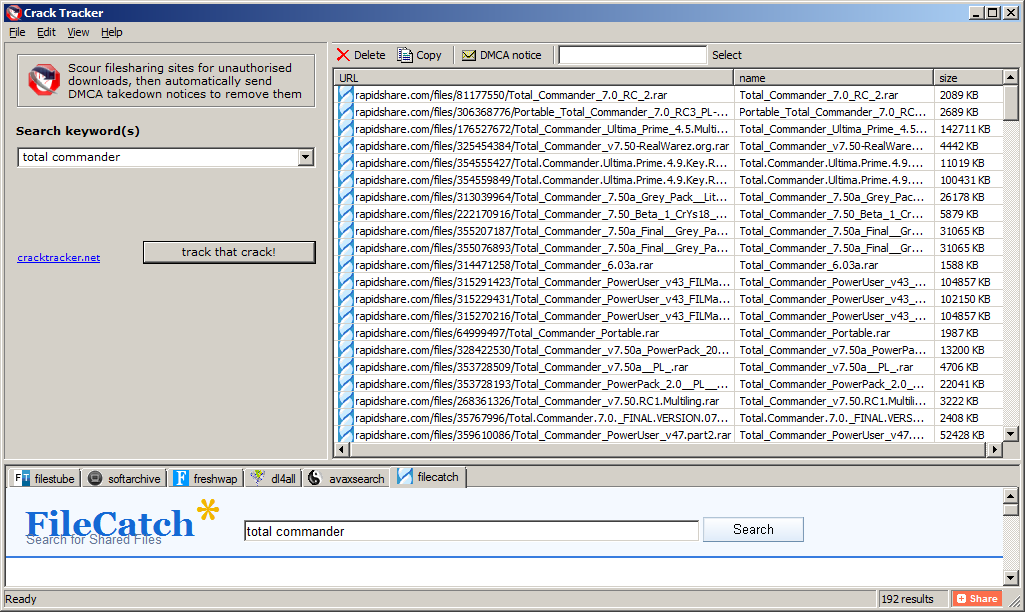
Crack Tracker is a desktop tool, with a meta search engine that securely scans warez databases for your downloads. You supply the search keyword (e.g. your software title or company name) then crack tracker will do an exhaustive search, collect a list of suspect download locations and verify the links with robotic efficiency. After you examine the results you just hit a button and the relevant DMCA emails are sent automatically. It doesn’t get any easier than that.

Crack Tracker doesn’t have a fancy user interface but it is very easy to use. It knows of more than 120 file hosting websites and works with 6 major warez search engines (the list is expanding). It is free to try as a search engine; to send the actual DMCA emails you need a registration, but I believe the price is very reasonable, especially if you consider the money you lose in pirated versions of your software.

Why don’t you try it for free and see how many cracks of your software it finds?

Download CrackTracker for Windows (318KB)

Nikos Bozinis ditched his Process Systems Engineering PhD to run his own microISV ZABKAT since 1999. He also writes a weekly blog focusing on file management and occasionally on programming, debugging and running a software business.

Speccing my dream development PC

My main development machine is a 4 year old Dell desktop, PC running 32 bit Windows Vista. Time for a new PC. I have been doing a bit of research, mostly by looking through back copies of PC Pro magazine (which I recommend,  by the way). I am speccing it out here on my blog in the hope that I, and anyone else thinking about a new PC, can benefit from my research and (more importantly, given my limited knowledge of hardware) the assembled wisdom and experience of readers of this blog.

A system failure could lose me several days work and a lot of mental energy to sort out, so reliability is my number one requirement. After that I am interested in performance, particularly speeding up compilation and linking, as this has a significant effect on my productivity (my table planner software is now well over 100k lines of C++ code). Getting a fast machine also means it will last longer before it becomes obselete.

Form factor

Tower desktop. I don’t like using laptops for extended periods and there is plenty of space under the desk for a tower case. Having a bigger chassis means more options for upgrading and hopefully less chance of overheating. I like to have my PC physically locked to a ground anchor to reduce the possibility of theft. So the case needs to have a Kensington-compatible security slot I can attach a security cable to. Some LED bling wouldn’t hurt.

OS

Windows 7 64 bit Professional (or Ultimate is if I decide to use bitlocker drive encryption). Windows 7 is increasingly what my customers are using. 64 bit will allow me to address >4GB RAM.

As I develop for both Windows and Mac, I could use a Mac for my main development machine. But I am more familiar with Windows and its associated apps, you get more bang for your buck with a PC and I’m not keen on Apple’s authoritarian attitude to developers. So I prefer to use Windows for my main development machine and use a Mac Mini for porting.

RAM

8GB of DDR3 RAM. Maybe more, depending on cost. But I am not sure whether having more than 8GB of RAM will make much of a difference to real world performance. DDR3 memory seems to be fairly standard on high end PCs. I can’t imagine the clock speed of the memory (e.g. 1,333 MHz vs 1,600 MHz) affects development related performance much. I haven’t seen any data on this.

Storage

Possibly a 128GB Crucial RealSSD C300 SSD for storing \Windows and \Program files and a 600 GB 10,000 RPM WD Velociraptor HDD for storing everything else. SSDs seem to be increasingly the way to go for storage that is predominantly read-only and the prices are coming down. 128 GB should be ample for Windows and lots of applications. But there have been issues over the reliability and performance of some SSDs, notably those with Indilinx controllers. anandtech.com, Jeff Atwood and PC Pro all rate Crucial SSDs well. The WD Velociraptor is one of the fastest HDDs around and 600 GB is currently the biggest one you can buy. It is pricey though at around £0.30 per GB, with 7,200 RPM drives around £0.05 per GB. Especially if I buy an extra one to keep as a hot spare.

I am still making up my mind on this though. Having two separate drives means an extra possible point of failure. Also some people say that, while benchmark results are impressive, the difference in performance between SSD and fast HDDs isn’t that great in real world scenarios. I also wonder whether a 10,000 RPM HDD is going to be as reliable as a 7,200 RPM HDD, such as the Samsung Spinpoint F3. I don’t know of any independent data on HDD reliability between different makes and models. In the absense of such data I guess the next best bet is to look at how long the manufacturer warranties are. You need to be fairly confident on reliability to give a 5 year warrantly.

I am also considering encrypting the drives for extra security. This will keep my data secure in case of theft and it also means I can return a defective drive under warranty without worrying about the security of the data on it. The main alternatives are Truecrypt and Windows 7 Bitlocker. Tests show Truecrypt AES encryption adding a 5-12% performance penalty. Anecdotal reports seem to show that the difference is hardly noticeable in real world use, especially with a fast CPU. A comparison of Truecrypt and Bitlocker from April gives Bitlocker a small advantage for speed, but favours Truecrypt for its flexibility. Also Truecrypt is free, whereas Bitlocker is only available if you buy Windows 7 Ultimate.

My current PC has 2 disk HDDs in RAID1 (mirrored) configuration. This was intended to decrease the chance of data loss, but it has been a huge headache. I have had to replace one or other of the RAID1 HDDs 4 or 5 times while I have had this PC. I can only assume that RAID was responsible for this catastrophic failure rate, so I certainly won’t be going for RAID again.

Media

Any reputable make of DVD drive that can write dual layer DVDs should be fine. The 8.5 GB capacity of dual layer DVDs is useful for backups. I don’t see any need to pay a premium to get Bluray.

Motherboard

A Gigabyte or Asus motherboard with support for USB 3.0 and SATA/600. I have just bought a USB 3.0 external HDD for backup so I would like to make the most of the additional USB 3.0 performance and a fast SATA connection is necessary to get the most from a fast HDD. Gigabtye and Asus motherboards seem to do well in the PC Pro magazine tests.

Power supply

Any respectable make should be fine. If a power supply fails the power surge can wreck the whole machine, so it definitely isn’t worth risking a cheap and nasty power supply to save a few pounds.

USB ports

Lots, including some USB 3.0 ports.

Graphics card

AMD Radeon 6850. I don’t play a lot of computer games, but I want a graphics card fast enough to give me the option. I would also like to have the option of multiple monitors, so it needs to have at least 2 DVI outputs. PC Pro magazine are recommending the AMD Radeon 6850 as exellent value if you don’t need the fastest possible card.

CPU

Intel Core i5-750 (4 cores). Raw processor speed is obviously important, but you pay quite a premium to get the very fastest chip. The i5-750 seems like a good balance between price and performance. Multiple cores are useful for running VMs and compiling (apparently Visual Studio 2005 requires a tweak to use multiple cores for compilation). Quiet fans would be nice. I’m not interested in overclocking as I worry about the effect this could have on reliability.

Networking

Gigabit Ethernet.

VDU, keyboard and mouse

I will re-use my existing monitor, keyboard and mouse.

Software

The less crapware pre-installed with the OS the better.

Warranty

The longer and more comprehensive the better.

Manufacturer

I have neither the time, the inclination nor the aptitude to build a PC myself. So I will be looking for a UK company that can build a PC close to the above spec. I had a terrible experience trying to buy a media PC from gamingpc-guys.co.uk earlier this year (I had to do a chargeback to get my money back when neither PC or refund had appeared after a month), so I certainly won’t be approaching them. Thankfully they seem to have gone out of business anyway. Given the problems I have had with the current Dell and the ludicrous cost of Dell replacement parts, I won’t be going for Dell again either. UK PC manufacturers that regularly do well in PC Pro tests include:

So I will be investigating how close a system they can provide me to the above spec and for what price. Interestingly all these custom PC companies seem to have products aimed very much at gamers, not developers. Given that there are a lot of developers in the UK that seems surprising. I guess most developers get their PC bought for them by IT departments and don’t have the luxury of a custom built PC. I think these companies are missing a trick by not having a PC aimed at developers amongst their base specs.

If you had roughly £1000/$1700 to spend on a development machine, what would you choose differently from the above and why?

Problem exists between keyboard and chair

I like my customers. As well paying my salary, many of them have been incredibly helpful in tracking down bugs, suggesting improvements, giving me testimonials and recommending my event seating planner to other people. But every so often somebody buys my software and I really wish they hadn’t. They just don’t have the skills or attitude that is going to result in a happy relationship between me, my product and them.

It isn’t just me. Everyone who does software support has a few ‘war stories’ about crazy things their customers have said or done. I have collected a few of them here for your enjoyment. I hope they will also be educational to those considering selling software or (horror of horrors) working full-time in support. If nothing else, they might make you feel a bit more sympathetic to the person at the other end of the phone next time you have to email or phone someone in support. They come from the ASP forums and various microISVs of my acquaintance and are reprinted with permission. For obvious reasons the authors are anonymous.

Of course, we shouldn’t  feel too superior. Many (if not most) user errors could be avoid by better design and we’ve probably all done stupid things in areas outside our fields of expertise. But sometime the problem really does exist between keyboard and chair.

The litigious

A couple of weeks ago, we had one guy who threatened to sue us because he received a “second hand” CD from us. Turned out he installed our software from the CD and assumed that our included demo database was data from a previous customer.

The quart in a pint pot

Many years ago, back in the days before Hard Drives I spent some time on the phone with a chap who couldn’t get our software loaded. Eventually he issued the words “I had problems getting the disk into the machine in the first place, could that have something to do with it?” I tried to expand on this a little. He eventually said “The disk was too big, so I had to fold it in half”. He’d bought the 5.25″ floppy version and tried to fit it in a 3.5″ slot!!!

The dabbler

My favourite was the user who emailed me saying he’d tried every setting in the options dialog and the software wouldn’t work. I gave him instructions on how to set the options back to the defaults at which he mailed back saying it was now working.

The literalist

I told a customer to right-click on the desktop. I hear scribbling, then he says “I wrote it. Now what?”.

The shiftless

I spent time trying to figure out why someone couldn’t load our software. It was a CP/M based machine. I can’t remember the exact command now, but the instructions showed that to start the software you had to put the disk in the machine and type run “appname” then press enter. The customer on the phone kept getting some error saying file not found or something similar. I couldn’t figure out what was wrong. I’d got her to do a dir and the file was listed as on the disk. We’d scanned the disk for errors, no errors. Finally I had her read back to me what was on the screen. She said “run 2 appname 2”. Finally it clicked that she had no idea that she needed to press the shift key to get the quote character and she was just pressing the “2” key (UK keyboard). To be fair the application she was trying to run was a typing tutor.

The vague

Your program doesn’t work. Where do I have to click?

The misdirected

Someone calls for tech support. They tell me what they are tying to do. I tell them how to do it. They tell me either the steps I give them don’t exist or don’t work. Turns out, they arent using my software, they bought a different product.

The hasty

A customer told me that he had spent 8 hours on a task. What he had done was pretty bizarre, completely missing the entire point of the software. I gently point out that he could have done it in 10 minutes if he had spent 10 minutes reading the tutorial. He told me “I didn’t have the time to read the tutorial”.

The beyond help

My favorite of all time is a user who insisted that my app’s Options screen didn’t work.  He said he kept clicking on check-boxes and buttons but that nothing happened.  I had him reboot just to make sure there wasn’t a problem with Windows at the moment and he did so with the same complaint. Finally, while on the phone, I discovered he was clicking on the screen shot in the help file.  When I explained that images in help files aren’t the same as the application screens themselves he insisted that this was confusing and that I needed to put a large, bold notice below the picture in the help file explaining that the picture above was just a picture.

The blonde

I know im BLONDE trust me!! How the hell do I “DOWNLOAD & INSTALL XXXX”??? All I would truely would is my statement, Is that to hard to ask HELP? Im not the computer buffin. Got any suggestions to help blondie? I would be grateful.
XXXX

The irrelevant

Subject:
for father mobil problam
Message:
sir my father name is XXXX XXXX XXXX  live in india State is Rajasthan my Distt. is bharatpur and address is XXXX XXXX XXXX my father Mobil numbir is not work please help me.

The paranoid

tHIS IS THE  R EAL XXXX. WE HAVE REAL PROBLEMS…. iHAVE IDENITY THEIF GOIN ON AND YOUR FREE DOWNLOAD IS GETTIN SOMEONE INTO MY FILES AND COMPUTER AND THEY ARE SEEING ALL MY INFORMATION… tHIS HAS TO STOP. tHANKS XXXX LET ME KNOW I HAVE PEOPLE WORKING ON THIS ALREADY.

The clueless

There was this lady who had bought a license but could not enter it in the program. I politely responded and tried to guide her to the dialog where to enter it. Btw. this was all in the early days, I didn’t have canned responses yet, I didn’t have ready made screenshots yet, I think there wasn’t even a help file yet. Every day, for 10 days, she responded that she could not find it. I tried everything possible to politely explain it to her, also with screenshots. Her tone was getting nastier with the day, pointing out writing mistakes (UK “s” vs “USA “z”) etc. and claiming she “knew” computers as she had entered data for 40 years. Every day I digged deeper trying to figure this one out. The 10th day she explained that she had entered it in Windows Word, NotePad, Windows Run, and whatever else she could type the code in … yet *nothing had happened* that would rescue her CD data.

Turned out that she had not even installed the software yet. She fell from the sky when I told her to download and install the software first, THEN try to enter the code in the program.

The super signature

Subject:
the software did not work

Body:
Eschew cruelty. It is not only unkind, but unwise to start the spiraling decent that will lead to all parties falling to a lower level!.

Pray, for Obama, Psalm 109:8  “LET HIS DAYS BE FEW; AND LET ANOTHER TAKE HIS PLACE OF LEADERSHIP.”

What does the Lord require of you? To act justly, to love mercy, And to walk humbly with your God. (Micah 6:8)
[URL removed]
or e-smoke supplies at  [URL removed]
Never be arrogant.

[URL removed]

Whiskey makes you think you’re smarter than you are.

Always, always make sure you know who has the power.

Don’t mess with old men, they didn’t get old by being stupid.

The rambling

yes i’ve got to question the true & honest nature which encompasses your company as well as your free downloadeable software. it’s always been my personal experience when something “seems to good to be true”, more often than not it generally is. being a victim of a scam or two on & offline i’d be a complete idiot,  more honestly in laymans terms, that’s just “stupid”. i question everything, good, bad, or indifferent. point!, blank!, period!. so my bottom line question for whomever receives this msg. & responds is this; how do i know this isn’t another one of the 1,000s of  con/scam artists online waiting to take advantage of ignorant, naive people with the mind set of ” sure, why not? as long as it’s free,” type attitude to come along & with one click of a button fall prey just like i did years ago?  i learned real fast if i was going to continue surfing the net as such, i had alot of work/learning to do. as a result, i  became a vessel for stockpiling any/all information. i still look for the catch behind all FREE DOWNLOAD”, “JUST CLICK HERE & IT WILL TAKE CARE OF ANYTHING ELSE”, due to my lack of knowledge surrounding the internet & all the evil, dishonest, “i’m too lazy to get a real job & make an honest living”, “why work for someone else when i can be my own boss & constantly take advantage of all these stupid people?”. damn this is the life. inflate the truth a bit here & there;& wait,wait,& wait. hell, this is just like fishing. i’ve got my bait, my line,pole,&all the time it takes for someone to take hold of my hook, i so easily cast out there,. hell the hard parts over”_ now the easy part, slowly yet carefully reel them in,hence mission accomplished. ironically, they never added illegal activity & a jail /prison sentence into their day of fishing., but i digress &please respond as soon as possible. if nothing else, you’ve definitly sparked my curiousty. be advised in the event your response is filled with big $.50 words dressed in a blanket of bullshit you will be eventually facing several fraudulent type charges, a long time behind bars, not to mention a victiim of your own circumstance.

never again,

XXXX

If that isn’t enough check out Nico Westerdale growing increasingly exasperated by people confusing his magnifying glass application with the built in one on Windows (I’m not sure how many of the comments are other developers having a bit fun at Nico’s expense).

Thank you to everyone that contributed. Please feel free to add your own stories in the comments. If you are worried about the comments not being anonymous enough you can email them to me and I will post them for you.

10 things non-technical users don’t understand about your software

If you are writing consumer software you have to understand that you and your average user have a very different level of understanding of computers. When you first start doing support it can be a shock to realize just how vast this gulf is. It doesn’t mean that your users are stupid, just that they haven’t spent the thousands of hours in front of a computer that you have. Below I have summarized a few of the things I have come to understand about non-techies through answering thousands of support requests relating to my own table planning software.

1. Copy and paste

It is very clear from many support emails I have received that users will often re-type a licence key emailed to them because they don’t know how to (or even that they can) copy and paste text. Yes, really. You can mitigate this to some extent by including instructions on how to copy and paste where relevant and making licence keys easy to type (short and without ambiguous characters, e.g. ‘0’ and ‘o’).

2. The difference between web and native applications

Many users are used to web applications and don’t understand that they need to download and install new versions of desktop software to get access to the features in a new version. You can avoid this by automating the update process, but this can be pretty catastrophic if you get it wrong.

3. Data storage

Many users don’t understand how or where data is stored or even that it is separate from the application. They don’t understand that some data is stored on their local harddisk and some is stored ‘in the cloud’. And they don’t understand the difference between storage in a file, a database or the Windows registry. Consequently, when they install a desktop app on a new machine they are often surprised that it can’t automatically access the documents they created on a previous machine. So it is worth having something in your FAQ about moving from one machine to another.

Given that users don’t understand the basics of data storage it should come as no surprise that they also don’t understand the concept of file formats either. For example when told to ‘save a .xlsx file as a .csv file’ some users will simply change the file extension from .xlsx to .csv and be surprised when the resultant .csv file is gibberish when they open it in Excel. You can try to avoid this by providing clear step-by-step instructions on how to save a .xlsx file as a .csv file.

4. The jargon you use

Using terms that your users don’t understand can be very off-putting. For example, non-techies have no idea what a “dialog” is, let alone a “modal dialog”. Just call it a “window”.

5. Right click

Some users have not discovered (or will not think to try) clicking the right mouse button. You should therefore never put something only in a right click menu or anywhere else that it can’t easily be discovered.

6. Concurrency

Some applications can handle concurrent access (e.g. client-server and web-based apps) others can’t (e.g. most desktop apps). But many users assume that all software can be safely used by multiple concurrent users. If your software can’t it might be worth spelling this out in your marketing so as not to raise false expectations.

7. What changes can be reversed

Techies are happy to play with software to see what it does. They aren’t usually too worried about trying things because they can rely on some combination to undo, version control and backups to reverse most changes and they can usually judge when a change won’t be reversible. Non-technical users aren’t so confident and won’t try things in the same way. In fact some of them seem to think that a wrong move could cause the computer to burst into flames. So try to stick to conventions they will understand (e.g. on Windows those used by MS Office and Outlook) and offer step-by-step guidance for complex tasks.

8. The need for backups

Every few days I get an email from someone who has lost all their data because they had a major hardware problem and no backups on a separate device. Sometimes this is because they don’t even realize the data is stored on their computer. You can mention the need for back-ups in your documentation and/or in the software, but it is unlikely to make much difference. History shows that this is a lesson most people have to learn the hard way (techies included). Mentioning it doesn’t hurt though and it might help to defuse an angry users if you point it out to them after the event.

9. That they should read the documentation

People are using your software because they have things to do. Like it or not, your beloved software is just a means to that end. Although some users will read documentation, most consider it a waste of their precious time. In fact, support emails I receive provide incontrovertible evidence that some users won’t even read a single sentence of text in an error message explaining what the problem is. This means you need to write clear and concise documentation, but you also should develop your software under the assumption that most users won’t read it. That is where usability testing comes in.

10. Problem exists between keyboard and chair

Unskilled users often don’t realize how unskilled they are. Consequently they may blame your software for problems that are of their own making. One just has to be as polite as possible in such cases. Making your customer feel stupid is never great for business. If it is clear that the customer doesn’t have a sufficient level of skill to use your software, you should politely suggest that it “obviously isn’t ideal for their requirements” and offer to refund them. However, if several people have the same problem then you need to change your product to be a better fit for your users (changing your users to be a better fit to your software unfortunately not being an option for most of us).

Have you been caught out by assuming technical knowlege that your users don’t have? If so, please leave a comment below.

Selling your software in China

how to sell software in chinaI think a lot of people in the software business are wondering whether China will soon become a significant market for software and/or a source of competition in existing markets. So I was very interested to read a forum post about the realities of selling software in China from Felipe Albertao, an ex-Silicon Valley software engineer currently living in China. He kindly agreed to expand his forum post into an article for this blog.

Disclaimer: Although I live in China, I absolutely do not claim to be a China expert. I accepted Andy’s kind invitation because I have not seen anything at all written about the business of software in China for microISVs, and I humbly hope it will positively contribute to the discussion. This article is mainly based on my observations, and not on proven techniques. Use them at your own risk, and please report back your own findings!

Getting Paid

The first thing I need to say, right off the bat: Chinese users will not buy your software. Period. That does not mean that there is no money to be made, it simply means that they will not pay for your software license. The reasons are many, but for the sake of conciseness let’s suspend our “piracy is bad” mindset, and simply accept this fact as a reality. Think of the positive side: no payment processors or merchant accounts to worry about!

Chinese users will not buy your software, but Chinese companies might. Actually, let me clarify that: They will not buy the software license alone, but they are willing to pay for the license if it is part of a package that includes services (customization, installation, support, training, etc…). So, to get paid in China, you must offer services connected to your software. Of course, it would be very hard for westerners who do not speak the language nor have contacts in China to provide such services, but there are opportunities to partner with local independent professionals or small businesses in your target industry. More on that later.

Education is a huge business in China, especially for skills that give them a professional lead, like English language or IT. So, if you can somehow “plug-in” your software to an education-related service, that would also be another way to make money. For example, if you offer a component for ASP.NET, why not offer training on ASP.NET itself using your software? I am sure they will not pay for a self-paced course, but there is a good chance they will pay if you offer a hands-on remote live course. That is, a service rendered by a human, as there is no value perceived in the standalone immaterial software itself. Of course there is huge local competition, but one thing we have going for us is the fact that westerners enjoy a high degree of trust among Chinese people.

I suspect SAAS may be another way that Chinese users will pay for software (with a big question mark here). For example, today they do pay for services like site hosting, advertising and e-commerce presence, so we can assume there is at least a perceived value in subscription-based intangible products, though only the ones provided by well-known established companies, and not independent vendors. However, as the marketplace gets more fragmented and niche-oriented, I believe there will be opportunities for small players as well.

Web Site and Software Translation

Young Chinese people normally have a good grasp of written English, so I don’t think translation of the software itself is essential, although it always helps. IT professionals tend to be more English-proficient, as well as undergrad-level students. However, I do believe that the documentation must be translated, especially with IT-related software. Differently than western users, Chinese people actually have enough attention-span to thoroughly read a manual, and I have seen English-proficient programmers choosing frameworks and components based not only on the quality of the software itself, but whether the manual is in Mandarin Chinese or not (it’s always easier for them to read Chinese). So, translation here is not really a necessity, but a promotional strategy.

The “larger attention-span” assessment is also valid for the web site. We are used to the Web-2.0-ish recipe of a catchy one-liner plus 3 benefits and the big “Buy” orange button, and in China that probably works too, but users expect much more than that. I have observed that paid services almost always include some kind of workflow with arrows and circles and boxes explaining how the service works. Long explanations (not just a FAQ) are also quite common, and people actually read them! The fact is that here in China there is no such thing as “money back guarantee”, so people and companies normally think a lot before putting their hard-earned money into something. And forget the big “Buy” orange button: Instead, the call-to-action should be “Free Download” or “Free Sign Up”.

Sales

You are now probably asking yourself “Then where does the big ‘Buy’ orange button go?”, and the answer is: nowhere on your site! One fact you should be aware of is that here in China nothing happens without an established relationship (Google the keyword “guanxi” for more information). It is very unlikely that you will get any paid conversions originating from an ad or email. The goal of your conversion funnel should not be “sales” but instead “relationships”. Then, from the established relationship, the user can recommend your software to their boss, or whoever is the actual buyer. Of course the sales cycle is longer and it requires much more effort, but the rewards may be bigger too as you will be selling a package, and not only the license. Also, since guanxi is such an important part of making business, Chinese people are quite receptive when approached with a business proposition, differently than in the west where sales are normally met with resistance.

However, note that I have not suggested that you should be the one personally cultivating those relationships. Maybe it is possible to do it remotely and in English, but it would be more effective if you partner with locals and funnel the leads to them. They do not need to be sales professionals per se, but they need to know your software and be able to help prospects. They could be software students for example. Of course, at some point you must get involved, but your partner can help you to filter the good leads as they cultivate the relationship. The reward for them could be payment per hour or a percentage of the sale. Students might also be eager to help a foreign company, so they can add that experience to their resumes.

A word about consumer-oriented microISVs: I am extremely skeptical about independent microISV B2C sales in China, because I honestly cannot imagine an individual paying for independent software. That does not mean that microISV B2C cannot succeed in China. My point is that B2C sales are in fact B2B, because businesses who deal with consumers are more likely to pay. And B2B requires guanxi.

Approaching bloggers

As in the west, approaching bloggers is probably the most effective way to let users know about your product. You can use Google Translate to find sites and bloggers that you would like to contact: Google Translate does a good job in translating keywords (that you can use on searches on Baidu) as well as entire pages (so you can read the blog posts). For IT-related blogs, cnblogs.com (Microsoft-focused) and javaeye.com (you guessed correctly) are the most popular ones.

You can contact the bloggers directly in English, as most young Chinese people have a good grasp of written English. Foreigners in China are well-respected, especially in the IT industry, so this is a point in our favor.

Dealing with piracy

Actually “Dealing with piracy” is a misleading title, because in reality there is no way to deal with piracy. People will crack, copy and use your software as they wish, and they will not even feel guilty about it. Again, let’s not judge, but accept the fact that piracy is simply part of the culture (for some it is piracy, for others it is just sharing)

Instead of talking about code scramblers and licensing keys, let me offer here a contrarian (perhaps even controversial) point of view, in the wisdom of “if you can’t fight them, join them”. You should consider yourself lucky if your software gets pirated, because that means that it got traction. For every pirated software there is always a happy user behind it (after all, they chose to pirate your software, and not your competitor’s), and if this user convinces their employer to use your software, then there is a good chance that these companies will be your future clients.

SEM / SEO

By no means am I an SEO expert, let alone a China SEO expert. However, I can tell a little about the users’ search behaviors: Non-technical users very rarely use Google. In fact, my observation is that while Google is a somewhat known brand, people first turn to Baidu hands-down. Baidu has the best search results in Mandarin Chinese, and they have a service similar to AdWords (though you might need help to set-up an account, as the interface has not been translated to English)

Technical users have a different behavior: These are IT professionals and students, and because English is so pervasive in IT, they normally do have a good grasp of the language. So, for technical searches they might use both Mandarin and English keywords, but still Baidu is their first choice. However, interestingly enough, Gmail is also quite popular among Chinese techies. So, if you are selling IT-related software, your SEM/SEO strategy should include keywords in both Mandarin and English, and include both Baidu and Google (or more specifically, AdWords targeting Gmail).

Face

I cannot finish this article without mentioning such important part of the culture: Face. There is not enough space here to explain the concept (Google “mianzi” for more information), but it’s suffice to say that it’s basically the same as in the west (face as in reputation), except that in China face is much more important.

When it comes to software, always keep in mind that most (if not all) decisions are made based on face: Users will use your software to be more efficient in a certain job, and thus look better to the boss; or to show that they have knowledge that other colleagues don’t have; or to show to their clients what cool software they have, and not their competitor. The contrary (that is avoiding face lost) is also true: To finish a job quickly so they can deliver the project on time, and thus avoid getting the boss mad; or to learn a new skill that their colleagues already have; or to show their clients that they also have the same cool software their competitors use. In the west we also make decisions based on face, but in China it is so much more prevalent. Keep that in mind when creating your promotional material.

Conclusion

I have no doubts that China will become a major technology consumer in the very near future, not only because of the sheer size of its Internet user base (which today surpasses the size of the entire US population), but also due to the number of high-quality IT professionals graduating at their universities.

The key message I want to communicate is that your China strategy should be a long-term one. It takes time and effort, but the rewards are worthwhile. Even if you conclude that there are no opportunities to be pursued, at the very least you should have a strategy to protect your marketshare against competitors that decide to go to China.

You don’t necessarily need to be so enthusiastic like me and move to China (although I guarantee you would have an experience of a lifetime!), but at the same time you cannot simply ignore it. Chinese users will certainly knock on your door, and you can even ignore them, but your competitors won’t.

Felipe Albertao is a software engineer with more than 15 years of experience, and has been living in China since June 2009. He is a native from São Paulo, Brazil, and lived in Silicon Valley, USA for 8 years. Felipe blogs about software and China at shanzhaier.com.