Category Archives: article

Lessons learned from 13 failed software products

“No physician is really good before he has killed one or two patients.” – Proverb

Software entrepreneur culture is full of stories of the products that succeeded. But what about the products that failed? We rarely hear much about them. This can lead to a very skewed perspective on what works and what doesn’t (survivor bias). But I believe that failure can teach us as much as success. So I asked other software entrepreneurs to share their stories of failure in the hope that we might save others from making the same mistakes. To my surprise I got 12 excellent responses, which I include below along with one of my own. It is a small sample and biased by self selection, but I think it contains a lot of useful insights. It is an unashamedly a long post, as I didn’t want to lose any of these insights by editing it down.

Case #1: DRAMA

Contributor

Andy Brice.

The product

DRAMA (Design RAtionale MAnagement) was a commercialization of a University prototype for recording the decision-making process during the design of complex and long-lived artefacts, for example nuclear reactors and chemical plants. By recording it in a structured database this information would still be available long after the original engineers had forgotten it, retired or been run over by buses. This information was believed to be incredibly valuable to later maintainers of the system, engineers creating similar designs and industry regulators. The development was part funded by 4 big process engineering companies.

Why it was judged a commercial failure

Everyone told us what a great idea it was, but no-one bought it. despite some early funding from some big process engineering companies, none of them put it into use properly and we never sold any licences to anyone else.

What went wrong

  • Lack of support from the people who would actually have to use it. There are lots of social factors that work against engineers wanting to record their design rationale, including:
    • The person taking the time to record the rationale probably isn’t the person getting the benefit from it.
    • Extra work for people who are already under a lot of time pressure.
    • It might make it easier for others to question decisions and hold companies and engineers accountable for mistakes.
    • Engineers may see giving away this knowledge as undermining their job security.
  • Problems integrating with the other software tools that engineers spend most of their time in (e.g. CAD packages). This would probably be easier with modern web-based technology.
  • It is difficult to capture the subtleties of the design process in a structured form.
  • A bad hire. If you hire the wrong person, you should face up to it and get rid of them. Rather than keep moving them around in a vain attempt to find something they are good at.
  • We took a phased approach, starting with a single-user proof of concept and then creating a client-server version. In hindsight it should have been obvious that not enough people were actively using the single-user system and we should have killed it then.

Time/money invested

At least 3 man years of work went into this product, with me doing most of it. Thankfully I was a salaried employee. But the lack of success of this product contributed to the demise of the part of the company I was in.

Current product status

The product is long dead.

Any regrets?

It was a fairly painful experience. I would rather have spent all that money, time and energy on something that someone actually used. But at least I learnt some expensive lessons without using my own money.

Lessons learned

  • Creating a new market is difficult and risky.
  • Changing people’s working habits is hard.
  • Social factors can make or break a product. The end-users didn’t see anything in it for them.
  • If the end-users don’t like a product, they will find a way not to use it, even if their bosses appear to be enthusiastic about it.
  • Talk is cheap. Lots of people telling you how great your product is doesn’t mean much. You only really find out if your product is commercially viable when you start asking people to buy it.

Case #2: CleanChief

Contributor

Sam Howley.

The product

CleanChief was to be ‘The easy management solution for cleaning organisations’. Managing assets, employee schedules, ordering supplies, you name it CleanChief handled it. Essentially it was light weight accounting software for cleaning companies.

Why it was judged a commercial failure

A small number of copies were sold. No one is actively using it at present. Once I realised that it wasn’t a complete product and that additional development was required I moved on to other product ideas. I had basically run out of enthusiasm for the product.

What went wrong

  • I am not an accountant.
  • I have never run a cleaning company.
  • I developed it for more than two years without getting feedback from real cleaning companies. I was arrogant enough to think that I knew what they wanted (or could work it out on my own). Or maybe it was that I was just where I was most happy and comfortable – writing software. Talking to real users was new and to be honest a bit scary for me.
  • A successful cleaning company operator, a friend of a friend, offered to become involved for a 30% share. This was a gift from the heavens, exactly what I needed. I refused.
  • In a way, even though I spent so long on the product, I gave in too soon, I was just getting feedback from real users, just getting my first batch of sales when I decided to move on.
  • I developed the application in VB6 even though I knew it was outdated technology when I started the project.This meant there was no ‘cool factor’ when discussing it with other developers, I told myself it didn’t bother me, but it probably did.

Time/money invested

I worked on it at night and weekends for about 2 1/2 years. I paid for graphic design work, purchased stock icons and images. I probably spent a couple of thousand Australian dollars in total and an awful lot of time.

Current product status

I moved on to other products that have gone much better. My newer products were released in months rather than years and I looked for real feedback from real users from day one. they are:

I do occasionally ponder returning to CleanChief and trying to raise it from the ashes.

Any regrets?

No. Looking back I learned a few lessons from a huge amount of time and work, it was a very inefficient way to learn those lessons. But when you are new to something like starting a business or creating useful software being inefficient at learning lessons is the best you can do, it’s a thousand times better than not learning lessons at all.

I learned so much more in my two and a half years of trying to develop CleanChief than I did in the two and a half years prior to that, during which time I really wanted to start a software business but didn’t take any action.

Lessons learned

Hearing or reading some piece of advice is totally different to living it. Here are some of the ideas that I always agreed were true but didn’t fully understand the implications of until I had lived them out:

  • Force yourself to get out and talk to people. Ask their advice. Almost everyone will help if you ask them for feedback.
  • Force yourself to cold call a few businesses in your target market.
  • Create a plan of how to market your product.
  • Try and use your product as much as possible as you build it.
  • Get out of your comfort zone from day one
  • Do not have the mind set that the day you release version 1.0 is the finish line, it’s the starting line, so hurry up and get there.

Case #3: Chimsoft

Contributor

Phil Anderson.

The product

ChimSoft – Software for Chimney Sweeps.

Why it was judged a commercial failure

I believe this failed for two reasons:

  • Focusing on too small of a niche
  • Me not being able to work full time on it.

I don’t consider it a complete failure because I sold two copies when it retailed for $2k, and maybe 10-15 more copies when I lowered the price to $200. Those sales proved that I wasn’t completely off base in thinking there was a market for the software, but the cost of customer acquisition and the size of the market were too small. Customers wanted to have a bunch of phone calls, face-to-face etc… the type of stuff you only see with much more expensive software. The problem was that for a niche this small we had to charge a lot of money to make it worthwhile for us, but the customers were small businesses where this is a major investment, so the fit was never right. The other issue was the people that did buy it were not super tech savvy, so there was a high cost of support that made even a $200 product not worth it.

What went wrong

  • Having all partners who were not full-time, and had equal equity.  I ended up doing most of the work and this is the main reason I didn’t force success is I felt I was in it alone.
  • Focusing on too narrow of a niche.  The plan all along was to expand for all service industries, but it was much harder to make that move than we expected.
  • Not researching pricing more, we knew small businesses made major purchases for things that really helped their business, but I think it would have been better to have a cheaper product with wider appeal than an expensive product with narrow appeal.

Time/money invested

I invested maybe a year of time and $3k into the company. I did not take any huge risks on it, so there were no big negative outcomes.

Current product status

The company folded in 2007, I refocused my efforts on my existing companies (AUsedCar.com and BudgetSimple.com) and both have been doing well enough that I quit my day job.

Any regrets?

I don’t regret it entirely, I think I learned several valuable lessons about working with other people, small business sales, trade-shows and software development.

Lessons learned

  • Pick partners wisely. Don’t try to be even-steven with equity. Use restricted stock to ensure everyone does their part.
  • Know what your customers expect (24/7 phone support?) to determine if you can do this while working a day job.

Case #4: PC Desktop Cleaner

Contributor

Javier Rojas Goñi.

The product

PC Desktop Cleaner. Simple software that cleans your desktop and archives your files.

Why it was judged a commercial failure

My goal was to sell 10 units per month. I’ve sold less than 1 unit per month.

What went wrong

  • I think that the product concept is not useful enough. It’s not a thing that people would pay for.
  • The market exists (some people buy) but it’s too little or difficult to reach.
  • I didn’t do any market research. I just got in love with the idea and did it. Later, I’ve learnt to use “lazy instantiation marketing” and have trashed a lot of embryo projects. :-)

Time/money invested

I think I wasted near $500 in development tools and some freelancers. Not too much.

Current product status

I’m still selling it. I’ve thought about others products, but not really decided yet.

Any regrets?

No, it was a lot of fun and I learnt lot of things. In my “day job” I own a small firm that sells software for production scheduling. I’ve learn a lot of SEO and AdWords in the DesktopCleaner project that now I’m using with great results.

Lessons learned

Go for it, maybe you win, maybe you fail, but you will grow and get tons of useful knowledge on the way.

Case #5: Smart Diary Suite

Contributor

Dennis Volodomanov.

The product

Smart Diary Suite.

Why it was judged a commercial failure

It sells and the profits cover current investments in the product, but there is little left over on top of that.

What went wrong

If I had a chance to do anything differently:

  • Take it seriously from day one.
  • Never stop developing and supporting.
  • Invest as much as possible in marketing early on.
  • Don’t stop believing in your creation.

Time/money invested

Up to this point, I have spent 13 years on Smart Diary Suite and a lot of money went into buying hardware, software, hosting, marketing, etc… All of that money came from my day job, but at this point SDS has recovered all of that back and is now making a small profit. The actual amount is hard to calculate (over the 13 year span), but we would be talking in tens of thousands of US dollars.

Current product status

For a while it may have seemed like SDS is not going to be successful, but that’s probably my fault – I stopped believing for a little while. Now I am back, starting again and this time I’ll make sure it doesn’t fail.

Any regrets?

I do not regret doing it. I regret allowing myself to stop working on it, basically bailing out on it for a while – that is my biggest mistake.

Lessons learned

If you want a successful product – believe in it and let others know that you believe in it.

Case #6: Highlighter

Contributor

Mike Sutton.

The product

Highlighter. A utility to print neatly formatted, syntax highlighted source code listings.

Why it was judged a commercial failure

I earnt a grand total of £442.52 (about $700 in todays money) in just over two years, so I guess it paid for itself if you exclude my time.

What went wrong

Since it was my first product and I was very green about both marketing and product development. I would suggest the following would have made things better:

  • Get feedback from potential users about the product (eg from the ASP forums). Some parts of the program where probably too option heavy and geeky.
  • Diversify. If people didn’t want to print fancy listings, maybe they would have wanted them formatted in HTML.
  • Better marketing. I’m not sure this would have saved it, but all I knew in those days was uploading to shareware sites. I never even sent a press release.

I figure it failed simply because it was a product nobody wanted. Actually, more importantly than that,, it was a product *I* didn’t want to use, but it developed from a larger product I was working on, on the assumption I could earn some money on the side from part of the code.  Since then I’ve stuck to products which I’ve actually wanted to use myself. There’s a lot to be said for dogfooding, not just for debugging, but for knowing where the pain points are and what extra features could be added.

Time/money invested

I would guess a couple of months of evening/weekend development time. Financially there was little spent, except that I offered the option of a printed manual and CD for an extra charge. One customer took me up on the offer, so I had to get 100 manuals printed and 99 of them went in the bin.

Current product status

I moved on to another product which has sold over £50,000 and a third which has earnt even more than that. Not enough to retire on but considering I only do this part time it must work out at a great hourly rate. There’s a lot to be said for not giving up…

Any regrets?

Nope. I figure every failure in life teaches you valuable lessons. Of course if I’d made a large financial investment I may feel differently, but that’s one of the big advantages of software over physical product sales.

Lessons learned

Just to reiterate – develop something which you find useful, instead of second guessing others.

Case #7: R10Clean

Contributor

Steve Cholerton.

The product

R10Clean. A data cleaning and manipulation tool.

Why it was judged a commercial failure

In the 18 months or so it’s been on the market I have sold 6. It has been £199, £99 and £19 – with no effect on sales !

What went wrong

Not sure what I did wrong ?  The product is maybe too techie ?

Time/money invested

No effect financially as at the time I was in a strong financial position.

Current product status

I still have it for sale but do not market it at all. I have other products.

Any regrets?

I don’t regret it as it saved me a ton of time when I was working with legacy databases a lot, as a commercial product it has been raved about (once!) and received a good review from the Kleper report, but has failed totally.

Lessons learned

Advice to others ?  Just because you need it personally, don’t assume the rest of the world does too. :-)

Case #8: nBinder

Contributor

Boghiu Andrei.

The product

nBinder, packs multiple files into a stand alone executable with over 50 advanced output and file unpack options, conditional run and commands.

Why it was judged a commercial failure

It was the first product I began selling. It sold to 300+ customers in 4 years. But for about a year the sales began to go down and have finally stopped completely.

What went wrong

  • The biggest problem was that because it was a packer intended for people that wanted to pack their products (software or games) into a single package (compressed and encrypted) many have used it for creating malware by binding malware files to legit files and then distributing the output so it isn’t detected by antivrus software (although it would be detected at runtime). Because of this I had lots of problems with antivirus companies that flagged files create with nBinder as malware. This was of course affecting legit users as their files would be falsely marked as malware. I used virustotal.com to see which antivirus detected it and contacted the antivirus manufacturer as soon as I detected the problem. In most cases they would remove it from their definitions. But it was an uphill battle because it would appear again in a matter of weeks. Some small AV companies didn’t event bother to reply to my emails to fix the problem. Others were using heuristics to flag files create with my applications and AV developers were reluctant to whitelist files created with nBinder. You can imagine it that it was enough for an AV such as Kaspersky or Norton to pick my files as malware for a day and customers would be affected and not use my product any more, especially that it took about 3 days for AVs to remove the false positive.
  • Infrequent updates. Due to lack of time I only updated the product once or twice a year and this affected the product a lot.
  • No marketing. I decided that I didn’t want to invest money in marketing so, except for a short AdWords campaign, I invested no money in marketing.
  • My decision to develop 3 products instead of concentrating on one or two affected development time and quality. I have worked on 3 products simultaneously instead of concentrating on making a single good one. The reason I worked on 3 is because I enjoyed developing different software in different categories. I didn’t start this for money but for the fun of development.

Time/money invested

I invested almost no money (except for hosting costs). Time invested I can’t really say exactly, but not too much as I only worked on nBinder in short bursts like 6 hours a day for a week or so before releases.

Current product status

Still for sale. My other products are:

Any regrets?

It’s not a total failure as I did make some money out of it with no investment, so I don’t regret starting it, but it could have been much better.

Lessons learned

Words of advice for others trying to make money from software development:

  • Study the market and the current trends very well.
  • Before deciding to take on large competition make sure you have something better (at least from one point of view) than the competition ( for example you might not have the same features but you have a better GUI and general presentation).
  • Do not get scared of an overly populated market segment. For example with nBinder I picked a segment with very little competition but also few possible users and the results were not so great (I didn’t have many users). With nCleaner I went head-to-head with lots of already established products but also the market is very big. Although nCleaner is free it has had the most success because there are so many potential users (anyone with a PC actually), so it had over 2 millions downloads and I still receive lots of mails regarding it, even if the last update was in 2007. So it is possible to have success in a market with lots of competition with no investment but it’s hard to reach the level of more established products.

Case #9: Net-Herald

Contributor

Torsten Uhlmann.

The product

Net-Herald – a monitoring application for water supply companies. It was a complex client server application that would receive monitoring data from specialized hardware and store that data inside a SQL database.  The client displays that data in different graphs, provides printable reports or sends alarm messages via SMS if a monitored value is not within its specified limits.

I developed Net-Herald as a perfect fit for that specialized hardware that is provided by a local manufacturer. That way, so I hoped, I could profit from their sales leads and would find a smoother way into these water supply companies. The downside of course, was that my software would only work with their hardware.

Why it was judged a commercial failure

I sold a first license fairly soon after I had a sellable product, although it took the customer nearly a year until they finally bought. But since then I sold only one more license within the last 4 years or so.

What went wrong

  • I didn’t do my own marketing and the hardware guys weren’t really concerned with selling my software.
  • Water management companies have a terribly long sales cycle. Other vendors monitoring applications usually cost tens of thousands and are geared toward large suppliers. Whenever a supplier buys into such a product he is unlikely to change within the next decade or more. I tried to position my software towards small suppliers but even then most of them were already locked into another vendor’s solution.
  • My software only worked with a specific hardware. That narrowed the marked down substantially.
  • In the end the software became too complex for one poor mortal to maintain. Because the software didn’t produce any substantial income I had to stop adding new features which would make it attractive for more prospective clients.
  • This kind of software is not sold over the Internet. Rather it needs very active sales people that nurture clients over a rather long period of time.
  • All these facts indicate that software like this should not be developed by a one man show.

Time/money invested

The development time for the first sellable version was maybe about 9 months. I didn’t have a job income at that time, but got funding due to government support for small start-up businesses. So I didn’t drain our family’s personal finances. But I did of course invest a great deal of time and sweat.

Current product status

Now, I have drawn a line and stopped active development of Net-Herald. I still do some custom extensions for my first clients. But I no longer market the software. I have instead focused on my consulting services. I also try to learn developing and selling software with my cross-platform drag and drop product Simidude.

Any regrets?

I didn’t succeed yet selling my own software (which is still my goal) but I do not regret doing it. I developed Net-Herald using (Java) technologies that now give me leverage at my consulting gigs. All in all it was a heavy ride. But it was fun and I would do it again.

Lessons learned

  • My biggest mistake was the lack of market analysis. I trusted the word of the hardware manufacturer without verification.
  • I have written more about the above and some other failures on my blog.

Case #10: HabitShaper

Contributor

Adriano Ferrari.

The product

HabitShaper – set and track daily targets for your goals (weight loss, quit smoking, jogging, writing, etc…).

Why it was judged a commercial failure

I sold a few copies, but not enough to make back the time I invested in it and my conversion numbers and traffic are below average.

What went wrong

  • Did not do enough pre-production research (talking to customers, etc).
  • Did not do a large enough beta to make up for lack of initial research.
  • Ignored gut-feeling that my product is better suited to being web-based and multi-platform (incl. mobile).
  • Did EVERYTHING myself (logo, web design, video, software, AdWords, etc).

Time/money invested

I worked on it two years, part-time, while doing Masters/PhD in Physics. It had no impact on my finances (very little money invested) or circumstances.

Current product status

I am relaunching as a web-based product this summer.

Any regrets?

Not in the least! I learned about as much from making HabitShaper as I have from my MSc thesis and PhD work.

Lessons learned

  • Most important: PAPER prototypes, minimum viable product, and iterate.
  • Don’t be afraid to launch early.
  • Launch a little bigger than you’d expect (it’s harder to find those initial customers than you think).
  • Don’t be afraid to change directions, especially early on.
  • Doing things yourself is a great learning experience, but if you want to get your product out to customers as fast as possible, don’t be afraid to invest money and outsource your weaknesses.

Case #11: BPL

Contributor

Jim Lawless.

The product

BPL – Batch Programming Language Interpreter.

Why it was judged a commercial failure

I sold about 10 copies.

What went wrong

  • I didn’t really do enough research to find out if the target market was in existence. I was hoping that network admins and support staff members would find it easier to use than batch files and less complicated than any of the free scripting language options available. So, I just rushed to get the MVP (Minimum Viable Product) out the door.
  • I never did provide a compiler that would build a stand-alone EXE. I think that might have met with more success.
  • I didn’t do much as far as advertising the existence of the product.

Time/money invested

I only spent a few weeks coding and documenting it in my spare time. Support issues sometimes took a whole evening, but nothing major. It did not have any impact on my finances as I had invested nothing but my time.

Current product status

I will still address support issues with this product for registered users, but I don’t actively sell it. I’ve open-sourced the program and it still really isn’t seeing heavy use.

I was more successful with other products. I have a few retired products that saw some good bulk-purchase deals ( command-line DUN HangUp, command-line scheduler ) and I still sell the following (for Windows):

All of the above still bring in a modest passive income.

Any regrets?

Not at all. “Nothing ventured,…”.

Lessons learned

Had I not attempted to bring the BPL product to life, I might still be sitting here wondering “what if?” I think it was very beneficial for me to invest the time to try out this idea.

Case #12: Anonymous

Contributor

Anonymous.

The product

A time tracker.

Why it was judged a commercial failure

Because it is not my primary income. I have about 150 customers in one year.

What went wrong

  • No marketing.
  • No real thought into features.
  • I don’t spend any time on it.

In my defense, the reason I do not spend much time on it is that the market became saturated with ‘me toos’ right after I released, which was quite expected. In fact, as I was looking for users, I got an email from a competitor suggesting that I don’t enter the market because they are working on the same thing! I don’t know what I would do differently. Maybe spend more time on it? I think the law of diminishing returns applies quite early in this space so I am not sure.

Time/money invested

Since inception (Nov 2008), I’ve spent close to 250 hours total. Total cash outlay was something like $500.

Current product status

I never tried to make it succeed, to be honest. It was only a learning experience for me. What I probably need now is to go all in. Quite frankly, if I double the sales for this product, I can quit all consulting work. But I really do not think it is a good idea to work on this app full time as it is too simple.

Any regrets?

Definitely not.

Lessons learned

  • Do it!
  • Solve a problem people know they have.
  • Don’t invest too much time and money at the beginning.
  • Don’t be wedded to a particular idea.
  • Don’t only listen to your customers. Listen to yourself. After all, you created the idea which attracted the customers.
  • Never promise a feature for a sale. I’ve never done it but the pressure is really great. My stock response is always: “While such a feature may be available in the future, I recommend that you only use current features when deciding on your purchase.”
  • Do use Google to your advantage.

Case #13: ScreenRest

Contributor

Derek Pollard.

The product

ScreenRest – a consumer software product that reminds users to take regular rest breaks while using their computer.

Why it was judged a commercial failure

ScreenRest failed commercially because we built a product without having a clearly defined market.  This was compounded by it offering prevention, not a solution. ScreenRest continues to regularly sell a small number of licences but not in sufficient quantity to justify further enhancements.  The conversion rates are good, but there are simply not enough visitors to the website.

What went wrong

  • Not doing market research first.
  • Creating a prevention rather than solution product – people generally wait until they have a problem and then look for a solution.
  • Creating a product with medical associations – the SEO and PPC competition for related keywords is prohibitive for a product with a low purchase price.

Time/money invested

At least £2000 was spent on the project, including software licences and additional hardware.  The product and website were created over roughly 12 months by myself and my wife Lindsay, some during spare time, then part-time and finally full-time so it is difficult to determine the total number of hours.  Working part-time and then full-time on ScreenRest caused a significant impact on our finances.  Although right from the beginning we saw this as in investment for building a business.

Current product status

Once the product was complete and we started learning SEO it became all too apparent that organic search traffic for related keywords was going to be insufficient.  Research into PPC then revealed that the price point was too low to support purchasing medical terms. Planned features for ScreenRest have been put on hold and no further marketing is planned.  We continue to support new and existing ScreenRest customers and plan to do so for the foreseeable future. Rather than create another software product we chose to use what we had learned about marketing, copywriting and SEO to create a series of websites targeting a range of topics (often known as niche sites).  The most successful of these sites we are expanding in value and functionality to fill gaps not serviced by the competition.

Any regrets?

No.  ScreenRest succeeded in every way intended, other than commercially.  Creating it was a rewarding learning exercise that started us down a path to finding the intersection of our skills, experience and market opportunities.

Lessons learned

  • Start with market research – creating a high-quality product you believe in is not enough on its own.
  • Make sure you can identify a specific target market, that you can reach that market and that it is large enough to support your financial goals.

Conclusion

Analysing the above (admittedly small and self-selected sample) it is clear that by far the commonest cause of failure were:

  • lack of market research
  • lack of marketing

With the benefitof 20/20 hindsight it seems blindingly obvious that we should:

  • spend a few days researching if a product is commercially viable before we spend months or years creating it
  • put considerable effort into letting people know about the products we create

Yet, by my count, a whopping 6 out of 13 of us admitted to failing to do each of these adequately. Probably we were too busy obsessing over the features and technical issues so beloved of developers, which actually contributed to far fewer failures.

It is also noticeable that, despite the failure of these products, there are few regrets. Important lessons were learned and no-one lost their house. Many of us have gone on to develop successful products and the others will be in a much stronger position if they do decide to try again.

A big thank you to everyone who ate a large slice of humble pie and submitted the above. I hope we can prevent other budding software entrepreneurs making the same mistakes. Even if you don’t succeed, you will learn a lot.

Feel free to add your own hard-won lessons from failure in the comments below.

“No physician is really good before he has killed one or two patients.” – Hindu proverb

Social factors can make or break a product.

Unskilled and unaware of it

Unskilled and unaware of itHave you ever noticed that you rarely (if ever) meet someone who admits to having below average driving skills? My Grandfather started driving a car before UK driving tests became compulsory in 1935. So he never had to take a driving test. This was lucky for him, because he was a terrible driver. He would get distracted and cross the line into oncoming traffic, veering back at the last second when his passenger started shouting. He claimed he had never been in accident, but I expect he would have seen quite a few if he had ever thought to look in his mirrors. Few people would accept a lift from him a second time. Even as a young boy, I realised that I was in mortal danger getting into his car. I would make an excuse and make my own way by bicycle. And yet, he considered himself a good driver. After having read the excellent book Bad science by Doctor, journalist and blogger Ben Goldacre, I think I know why.

The book contains this startling graph from the paper ‘Unskilled and Unaware of It: How Difficulties in Recognizing One’s Own Incompetence Lead to Inflated Self-Assessments’ by Kruger and Dunning :

Dunning-KrugerGraphics courtesy of explorativeapproach.com (click to enlarge)

The graph shows how good subjects were at logical reasoning as measured by a test (blue), how good they thought they were  (green) and how well they thought they did at the test (red). Apart from the top quartile, there was actually an inverse relationship between how skilled people thought they were and how skilled they actually were. The study also showed that the least competent individuals were also the least capable at recognizing the skill levels of others. This is the abstract from the paper:

People tend to hold overly favorable views of their abilities in many social and intellectual domains. The authors suggest that this overestimation occurs, in part, because people who are unskilled in these domains suffer a dual burden: Not only do these people reach erroneous conclusions and make unfortunate choices, but their incompetence robs them of the metacognitive ability to realize it. Across 4 studies, the authors found that participants scoring in the bottom quartile on tests of humor, grammar, and logic grossly overestimated their test performance and ability. Although their test scores put them in the 12th percentile, they estimated themselves to be in the 62nd. Several analyses linked this miscalibration to deficits in metacognitive skill, or the capacity to distinguish accuracy from error. Paradoxically, improving the skills of participants, and thus increasing their metacognitive competence, helped them recognize the limitations of their abilities.

Or, more succinctly:

Ignorance more frequently begets confidence than does knowledge. Charles Darwin

The findings fit in with the concept of ‘unconsciously incompetent’ in Maslow’s four stages of learning:

  1. Unconscious Incompetence:  The individual neither understands nor knows how to do something, nor recognizes the deficit, nor has a desire to address it.
  2. Conscious Incompetence:  Though the individual does not understand or know how to do something, he or she does recognize the deficit, without yet addressing it.
  3. Conscious Competence: The individual understands or knows how to do something. However, demonstrating the skill or knowledge requires a great deal of consciousness or concentration.
  4. Unconscious Competence: The individual has had so much practice with a skill that it becomes “second nature” and can be performed easily (often without concentrating too deeply). He or she may or may not be able to teach it to others, depending upon how and when it was learned.

The Dunning-Kruger effect might explain why every crank and barstool scientist appears to think they understand global warming better than the world’s top climate scientists. I am also reminded of my own experiences learning ju-jitsu. After a year or two of training, having reached the exalted rank of green belt, I thought I was pretty good. It was only some years later, as a black belt, that I realised how much I still had to learn.

What has this got to do with software? Well, it might explain some of the very poor website design, GUI design, graphics and copywriting I see from time to time. The perpetrators may be sufficiently unskilled, that they don’t even realise how unskilled they really are. It is a thorny problem. Firstly you don’t realise you have the problem. Secondly, even if someone convinces you to delegate or outsource that type of work, you are unable to accurately assess the work of others. It is particularly worrying for one man software companies (such as myself) who have to perform or oversee a very wide range of  skills including: website design, user interface design, programming, testing, copyrighting, marketing, PR, documentation, support and systems admin.

By the same token,  many customers with poor IT skills might not have any insight into the extent of their deficit. Below are the results of a survey I did with some of my own customers a couple of years ago:

skill survey

Note how skewed the results are and bear in mind that relatively few of my customers are IT professionals. Similarly skewed results were reported recently by Patrick McKenzie in his blog:

Surprisingly many of my customers self-evaluate as comfortable with computers.  50% were “very comfortable”, and 30% were “mostly comfortable”.  These numbers are, candidly speaking, not what I would have assigned on the basis of reading support requests for three years.

I don’t have any easy solutions for this problem. All you can do is:

  • accept that you might not be the best judge of your own competence in all areas
  • actively solicit feedback from your customers and your peers and listen carefully
  • be a bit more tolerant of newb@aol.com when they blame your software for problems arising from their lack of basic IT knowledge
  • console yourself that, whatever your IT shortcomings, at least you are a good driver

5 great ways to waste money in Google Adwords

google adwordsI have looked at quite a few Google Adwords accounts as part of a  1-day consulting package I do for other microISVs and small software vendors. I have also talked to a lot of people at conferences and on forums about Adwords. It clear that a lot of people are wasting a lot of money on Google Adwords, sometimes with really basic mistakes.
For example:

  • paying $1.50 per click to advertise a $20 utility
  • paying $1 per click for an expensive, English language only development tool in some of the poorest, non-English speaking countries in the world.

Ouch.

Below I list 5 great ways to waste money in Adwords. I have seen them far too often. I have considerable admiration for what Google has achieved. But I think Larry and Sergey are probably rich enough already. I would like to see a lot less people throwing money at them and getting nothing useful in return.

1. Don’t use conversion tracking

conversion tracking adwords

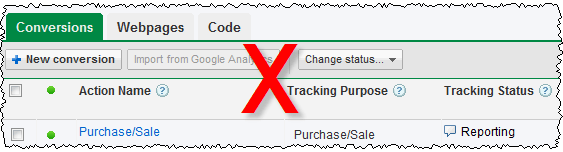
With conversion tracking you decide a goal to track (typically a customer buys your software) and put a small script provided by Google on the appropriate page (e.g. the ‘thank you for buying’ page). Google will then use cookie tracking to calculate the cost per conversion for your ads and keywords. It is that simple and you can set it up in a few minutes. I can’t understand why anyone wouldn’t use conversion tracking. With conversion tracking you will soon notice that some ads and keywords convert consistently better than others, often much better. Armed with this information you can optimise Adwords by changing bid prices and deleting under performing ads. Without conversion tracking it is pure guess work.

Conversion tracking isn’t perfect:

  • Adwords cookies time out after 30 days. If someone buys 31 days after they click your ad it won’t be tracked. And the cookie may be pushed out of the cache before 30 days.
  • If someone clicks your ad on one computer and then buys it on another computer (or even using a different browser on the same computer) the conversion won’t be tracked.
  • Some customers may have cookies disabled.

But imperfect data has to be better than no data. Obviously the 30 day limit on cookies is problematic if you are selling software with a sales cycle that is typically 30 days or longer (e.g. software with a 30 day trial). In that case you are probably better off tracking downloads, rather than sales. The fact that someone takes time to download your software, rather than bouncing straight out of your site, at least shows some interest. If you have stats which show your typical download to sale ratio (and you should) you can use this to work out what a download is worth, and set your bid price accordingly.

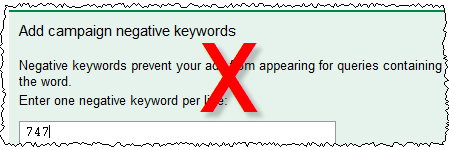
2. Don’t use negative keywords

adwords negative keywords

My own experiences with Adwords quickly showed me that people will click an ad, even if it isn’t at all relevant to what they are searching for. For example people searching for “747 seating plan” will click on an ad with the title “wedding seating plan”. It is the nature of the web that people are surfing rather than reading, and clicking on an irrelevant ad doesn’t cost them anything. You can avoid a lot of wasted clicks with carefully set-up negative keywords. For example, you can be sure that I have “747” set up as a negative keyword.

Ways to find negative keywords include:

  • Generating ‘Search Query Performance’ reports from Google Adwords reporting
  • looking through your web logs/analytics for the sort of terms people are typing into search engines to find your site
  • using Google’s keyword suggestion tool
  • using Google suggest

There is also a useful list of negative keyword suggestions on Alwin Hoogerdijk’s blog.

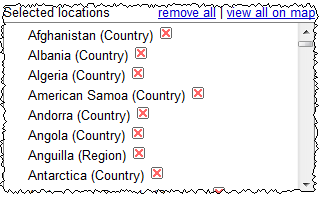
3. Advertise in developing countries

adwords country selection
Over a billion people have access to the Internet. Many of them are in developing countries and aren’t realistically going to buy your software due to a combination of: cost (even $20 is a lot of money to people in many developing countries), payment issues (they may not have access to credit cards), language issues (your software isn’t localised for them) and cultural issues (there just isn’t much respect for intellectual property and copyright in many parts of the developing world). But that certainly won’t stop them clicking on your ads and you still have to pay for the clicks.

Start with wealthy countries where plenty of people speak a language your software has been localised into. If you really think you might be able to make a return in developing countries, then test it by creating a separate campaign that only runs in these countries and set your bids much lower (it is very easy to duplicate a campaign with Adwords Editor).

4. Bid too much

adwords bids

Lets use an example:

  • Your software sells for $30, of which you get $20 after subtracting ecommerce fees and average support costs.
  • Your typical visit to sale conversion ratio is about 1%.

That means you will only break even if you pay $0.20 per click through Adwords. Personally I find it hard to justify paying more than 50% of my profit to Google. So I wouldn’t bid more than $0.10 per click. If I couldn”t get any impressions at $0.10 per click I would try to either improve my quality score (e.g. improve my ads or delete keywords with low clickthrough rates) or find cheaper ‘long tail’ keywords to bid on. Paying $0.20 or more just to ‘get on the first page’ of Google is crazy (unless perhaps, it is a loss leader for market research purposes). You can’t make up on volume what you lose on each sale!

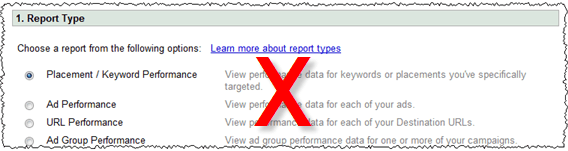
5. Don’t monitor your results

adwords reporting

Leaving your adwords campaign running for months on ‘auto pilot’ is ill-advised. Adwords is a constantly changing landscape. Google is continually changing the system and your competitors are coming and going and changing their Adwords campaigns and their products. So you need to continuously monitor how you are doing.  Google makes this very easy. For example, you can just set up Adwords reporting to email you a weekly summary of the number of conversions and the cost per conversion for each adgroup. A quick glance through this will let you know if things are going awry.

Conclusion

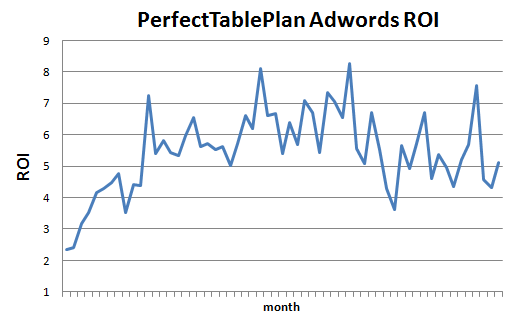
Adwords can be a very responsive, cost effective and well targeted form of advertising, if you take the time to learn the ropes and experiment. Below is a graph of my return on investment from Adwords for my table planning software over 5 years (almost certainly an underestimate due to the short-comings of conversion tracking, as discussed above). You can see that, after a few months finding my way, I was able to get a consistent ROI of around 4 or 5 to 1 and maintain this in the face of increasing competition.

adwords ROI graph

ROI = number of dollars in sales for each dollar spent on Adwords (1=break even).

Adwords is a complex system and the defaults are weighted in the house’s favour. In this article I have only touched on a few of the biggest mistakes I see. Google will give you plenty of rope to hang yourself and there are lots of other, less obvious ways to lose money. You really need to take the time to learn the system and experiment if you are going to have any chance of getting a decent return.

When I started with Adwords 5 years ago I read the Perry Marshall e-book on Adwords (beware – long copy!). I found it quite helpful. I assume they have kept it up to date. If nothing else, you will learn what it is like to be relentlessly marketed and upsold to. Google also has lots of free Adwords documentation and videos. If you go to conferences such as SIC or ESWC it well worth listening to Adwords specialists such as Dave Collins of softwarepromotions.com (formerly sharewarepromotions.com) talk about Adwords. There is also lots of useful information in the blogosphere. Start with a small daily budget and gradually increase it as you learn what works for you.

If you haven’t got the time or inclination to learn the system and experiment, pay someone who knows what they are doing to do it for you or stay well away from Adwords. Also bear in mind that Adwords works better for some products than others. If I was selling a $20 Mac-only product in a market with lots of more expensive competitors, I probably wouldn’t even bother trying Adwords.

** Update **

I used a deliberately provocative headline for this post, because I wanted to emphasize the fact that a lot of people are wasting a lot of money on Adwords. It seems to have worked in terms of traffic. But, judging by comments here and on Hacker News it has also confused some people. Sorry about that. To clarify, the sections heading are telling you how to waste money. To maximize your ROI you should do the opposite:

  • use conversion tracking
  • use negative keywords
  • only advertise in richer countries
  • not bid too much
  • monitor your results

Should you offer a money back guarantee?

money back guaranteeA few weeks ago I was going to buy a digitizer tablet for my PC. Then I noticed in the vendor’s terms and conditions that they wouldn’t accept a return once I had opened the packaging. But I couldn’t know if the tablet works until I open the packaging. Duh. I didn’t buy it. Similarly I look for a sensible money-back guarantee whenever I buy software. I don’t remember ever invoking such a guarantee for software, but it is nice to know that I could if I wanted to. Also, I see the lack of such a guarantee as a warning signal that the vendor isn’t confident about the quality of their product.


I offer a 14-day money back guarantee on my own Perfect Table Plan software. The only provisos are:

  • They have to tell me what they didn’t like about my software. This is very useful feedback for me.
  • They have to email me that they have uninstalled the software and won’t use it again. I have no way of checking this, but I want them to be clear in their own mind that they are a liar and a cheat if they carry on using it (if you have read Ariely’s excellent ‘Predictably irrational’ you will know that many people are prepared to be a little dishonest, but few will lie and cheat outright).
  • They have to return the CD, if they purchased one.
  • The guarantee is only valid for 14 days.

But I am fairly relaxed about about all of these. If it is clear that someone thinks they haven’t got their money’s worth out of my software, I will pretty much always give them their money back.

Note that is isn’t a ‘no questions asked’ money back guarantee. I haven’t been quite brave enough to try that yet and really want feedback on why they didn’t like my software. Also the 14 day guarantee is shorter than most. The reason is that a lot of people buy my software for a single use (e.g. their wedding reception) and I don’t want to make it too easy for them to use the software and claim a refund after they have finished with it. However I have heard vendors say that their refund rate actually dropped when they extended the length of their money back guarantee (due to increased procrastination, perhaps). I may test switching to a ‘no questions asked’ and/or longer guarantee period at some point.

The advantages of a money back guarantee to the vendor are:

  • More sales. If they customer is confident they can get their money back they are more likely to buy. I don’t have any numbers to back this up, as I have always had a money back guarantee. But I know I am considerably more likely to buy if there is a money back guarantee. Aren’t you?
  • Less chargebacks. If a customer buys with a credit card they can get their money back anyway. They just have to ring their credit card company and do a chargeback. Your payment processor will then take the payment back and, to add insult to injury, slap a chargeback fee on top. Too many chargebacks and they might even close your account. Better to refund and avoid the chargeback fee.
  • Less bad vibes. No matter how great your software is, some people aren’t going to like it. Maybe your software isn’t a good fit for what they want to do. Maybe they are just having a bad day. Better to give them their money back than to have them bad mouth your product on every forum they can find.
  • Less bad customers. Some customers (thankfully very few, in my experience) cost more in time and mental energy than their licence fee is worth. It is better for you to cheerfully refund them and focus your efforts on more financially and psychologically rewarding customers.
  • Staying legal. You may be legally obliged to give a refund in some circumstances.
  • Good karma. If you aren’t happy, I really don’t want your money.

Generally it costs you nothing to refund a software purchase, apart from a few seconds of your time (depending on your payment processor, some may not refund the processing fee). The only disadvantage of a money back guarantee is that it makes it easier for a customer to cheat you. A lot of vendors worry about this, but in my experience (and of others I have spoken to) this isn’t much of an issue in reality. My refund rate has been consistently around 0.5% (I am not including cases where I refunded because people bought the wrong type of licence, bought 2 licences instead of one etc.). I would be very surprised if dropping my prominent money back guarantee didn’t also drop my sales by a lot more than 0.5%. So, even if all the refunds are fraudulent (which I very much doubt) I am confident that the refund policy increases my profits overall. Sufficiently confident that I don’t intend to run an A/B test any time soon.

Interestingly, my refund rate is 10 times lower amongst customers who have purchased a CD. This could be because these customers are less price sensitive and so don’t see the refund as worth their precious time. Or it could be because of the extra hassle of having to send the CD back (I know a wily B2B vendor who includes a CD with every purchase for exactly this reason). Probably it is a combination of both.

Some vendors think that they don’t need a refund policy if they have a free trial. I don’t agree. When I buy software I want a free trial AND a money back guarantee in case I only discover a problem after purchasing. Also I know (from a survey) that some 25% of my customers don’t even try the free trial of my software before they buy. I expect I would lose a lot of these sales without a money back guarantee.

I think the case for a money back guarantee is even stronger for B2B software. Customers buying B2B software typically aren’t spending their own money, so they are probably less likely to ask for a refund. Especially as this would mean admitting to their boss and peers that they made a mistake buying your software in the first place. Certainly I have a lower refund rate to businesses than to consumers.

From a business point of view, I think the only case where you can justify a no refund policy is when you have a high cost of sale, e.g. enterprise software that requires a lot of configuration. In that case you could include a non-refundable set-up fee that covers your costs, but still have a money back guarantee on the remainder of the purchase.

No doubt refund rates vary according to product type, price range, customer demographics, geographic market and a range of other factors. But , reading forums and talking to other vendors, the typical refund rate seems to be in the range 0.1% to 1%. If your rate is much above 1%, perhaps there is a problem with your product you need to address? If your rate is much less than 0.1%, perhaps you aren’t marketing your product aggressively enough?

In the early days I found it hard not to see refund requests as an insult to my product. But now it really doesn’t bother me and I cheerfully make the refund. I just add the key to a ‘blacklist’ in the software so it won’t work in any future releases.  I don’t attempt to disable it in the current release. I don’t see implementing a ‘phone home’ strategy to make this work as being a profitable use of my time.

In summary, by not giving a money back guarantee you might avoid a small number of customers cheating you. But I think you are very likely to be losing a lot more in chargebacks, missed sales, ill will and missed feedback than you save in fraudulent refunds. Try it. You can always revert back in the unlikely event that your refunds go up significantly more than your sales. And if you have a money back guarantee you should shout about it on your website. Having a money back guarantee and not advertising it prominently seems like the worst of all worlds to me.

Outsourcing software testing

Every time I write a post for this blog I carefully check it for typos. I then get my wife to proof-read it. She always finds at least one typo. Often there will be whole words missing that my brain must have interpolated when I checked it. I read what I thought I had written. She is unencumbered by such preconceptions.

Similarly, it isn’t sufficient to do all your own testing on software you wrote, no matter how hard you try. You will tend to see what you intended to program, not what you actually programmed. Furthermore your users have different experiences, assumptions, and patterns of usage to you. Even in the unlikely event that you manage 100% code coverage in your testing, those pesky users won’t execute those lines of code in the same order you did. I have spent hours testing a program without finding a bug, only to see someone else break it within minutes or even seconds.

So it is essential to involve people other than the original programmer in testing, in addition to (but not instead of) the testing programmers do on their own code. This poses something of a challenge to one-man-bands such as my own. I don’t have other programmers, let alone QA staff, to call on. I can, and do, use volunteer customers for beta testing. But, in my experience, beta testing is not an effective substitute for professional testing:

  • It is haphazard. I never hear from ~90% of my beta testers.
  • You can’t control beta testers sufficiently, for example you can’t set them tight deadlines, make them concentrate on a particular feature or do their testing on a particular operating system
  • The quality of bug reports from customers is often poor. Customers often don’t understand (or don’t have the patience) to describe a bug in enough detail for you to reproduce it.
  • Professional testers know how to break software.
  • The new release should be as polished as possible before any customers see it. Your beta testers will be some of your most enthusiastic customers. You don’t want to use up that goodwill by sending them buggy software.

Consequently I like to pay third party testers to test my own PerfectTablePlan product after I have finished my own testing and before I do any beta testing. Previously I have used softwareexaminer.com, but they are no longer in business. So I decided to try a couple of other offshore testing companies I had heard about:

testlab2.com
qsgsoft.com

The problem with paying a testing company is that it is hard to assess the quality of their work until it is too late. If they report few bugs it could because there are few bugs or because they didn’t do a very good job of testing. By using 2 companies to test the same software release I was also testing the testers (I didn’t tell them this).

I paid each company to do approximately 3 days testing on the Windows and Mac versions of PerfectTablePlan. I was very pleased with the results. Both companies found a useful number of bugs in the software. They were also able to test on platforms that I didn’t have access to at the time (64 bit Windows 7 and Mac OS X 10.6). I didn’t keep an exact score, but I would say that QSG found more bugs, while TestLab2 was more responsive.

QSG found some quite obscure bugs. They were even able to tell me how to reproduce a very rare and obscure bug that I had been trying to track down for months without success. Communications were sometimes a little slow (at least partly due to us being in different time zones) but it wasn’t a huge issue. My only real grumble is their billing. Despite several reminder emails from me I am still waiting to be invoiced for the work several months later. I like to pay my bills promptly and then forget about them.

TestLab2 didn’t find quite as many bugs, but I was impressed with their responsiveness. They installed Mac OS X 10.6 within a few days of it being released, so they could test PerfectTablePlan on it. When I emailed them on  a Saturday about a last minute bug fix for Mac OS X 10.6 they tested the fix the same day. That is great service.

TestLab2 and QSG are based in Ukraine and India, respectively. At around $15/hour they are about a third the price of equivalent US/European companies I contacted (who might also outsource the work to Eastern Europe and India, for all I know). Some people believe outsourcing work to countries with lower costs of living is evil. I’m not one of them. I sell my software worldwide and I am also happy to buy my services worldwide, especially if I can get significantly better value for money by doing so. While there are rational arguments to be made about problems caused by differences in culture, language and time zone caused by outsourcing to other countries, I didn’t find any of these to be a major issue in this case. Most of the other arguments I have heard boil down to the simple ugly fact that some westerners feel they are entitled to a disproportionate share of the global pie. But I don’t see any reason why someone in Europe or North America is any more deserving of a job than someone in Ukraine or India.

With the help of these two companies I was able to put out a really solid PerfectTablePlan v4.1.0 release, despite the large number of new features. In fact, I am only just putting out a v4.1.1 with some bugs fixes several months later. I plan to use both companies again. I hope readers of this blog will give them some additional work to ensure they stay in business. But not so much that they don’t have time to do my next round of testing!

A survey of ecommerce providers for software vendors

Overview

The choice of ecommerce provider is probably one of the more important ones you make as a software vendor. It isn’t too hard to compare providers by feature set or price. But what about other vital attributes, such as support, reliability, ease of set-up and how they treat your customers? It isn’t realistic to try every provider, so this major decision is often made on the basis of haphazard anecdotal evidence from forums. I created a survey in an attempt to gather some systematic data on the ecommerce providers most commonly used by small software vendors. I present the results below without fear or favour. Skip ahead to ‘Overall ranking’ if you are in a hurry.

Methodology

I posted a request for survey responses on this blog and on a few forums frequented by microISVs and small software companies. Any vendor of software (desktop or web based) not directly affiliated with an ecommerce provider was eligible to take part. Software vendors were invited to fill out a survey form on wufoo.com for each ecommerce provider they had used in the last 2 years. They had to supply their product URL and an email address from the same domain so that I could verify their identity. They also had to check a box proclaiming:

I am a software vendor and I have used this Ecommerce provider in the last 2 years. I have no commercial interest beyond being a customer. (If you have affiliate links to the Ecommerce provider, that isn’t a problem.)

They then had to reply to an automated email from wufoo to the email supplied confirming it was them that had completed the form. If they didn’t reply to the automated email I followed up with a few more emails. Although tedious for me, I felt this was an important safeguard to avoid any possibility of fraudulent entries. I also checked for duplicate entries, duplicate IP addresses and other suspicious patterns. The survey was open from the 5th to the 8th October. Any responses not validated by 10th October were removed from the data.

The data

202 survey responses were received from 166 different software vendors. 9 responses were rejected as I could not verify their identity (they didn’t respond to several emails). 1 response was rejected due to a possible conflict of interest raised by the software vendor (they had done paid work for one of the providers). This left 192 valid responses. I saw no evidence of any attempt to rig the results.

You can download the raw data. It has been stripped of any personal identifying information. Feel free to do your own analysis or check my results.

Providers

The survey listed 14 of the major ecommerce providers, plus an ‘other’ box for providers not listed. Valid responses were received for 25 different ecommerce providers, as shown below:

responses

Note that ‘e-junkie+PayPal/GoogleCheckout/2Checkout’ has been shortened to ‘e-junkie’ for brevity.

Questions

Below I show the average (mean) score per ecommerce provider by survey question. The providers are sorted by score. Providers with less than 3 responses weren’t considered statistically valid and are not shown here (see the raw data for all responses).

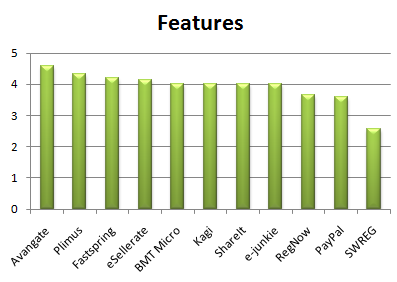
Features

“How do you rate the range of features offered, e.g. coupons, support for multiple currencies, CD shipping, affiliate tracking, handling of tax etc.”

5=”Excellent”, 4=”Good”, 3=”Satisfactory”, 2= “Unsatisfactory”, 1=”Dismal”

features

Ease of use

“How easy is their system to set-up, manage and modify?”

5=”Excellent”, 4=”Good”, 3=”Satisfactory”, 2= “Unsatisfactory”, 1=”Dismal”

ease_of_use

Reliability

“How reliable is their service? Does their server ever go down?”

5=”Excellent”, 4=”Good”, 3=”Satisfactory”, 2= “Unsatisfactory”, 1=”Dismal”

reliability

Support

“How good is their support? Do they respond in a timely manner? Are their staff helpful and knowledgeable?”

5=”Excellent”, 4=”Good”, 3=”Satisfactory”, 2= “Unsatisfactory”, 1=”Dismal”

support

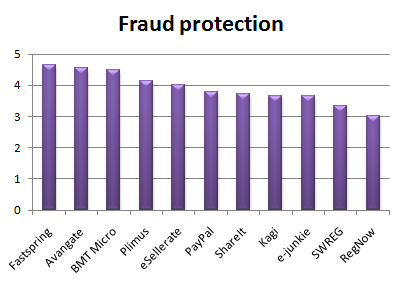
Fraud protection

“How well do they protect you from chargebacks and false positives (i.e. valid cards declined)?”

5=”Excellent”, 4=”Good”, 3=”Satisfactory”, 2= “Unsatisfactory”, 1=”Dismal”

fraud_protection

Ethics

“Does this service disrespect you (e.g. by paying you late) or your customer (e.g. by spamming them, adding unwanted items into their cart or making hidden charges)?”

5=”Excellent”, 4=”Good”, 3=”Satisfactory”, 2= “Unsatisfactory”, 1=”Dismal”

ethics

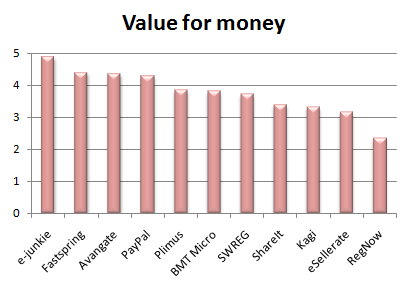
Value for money

“How do you rate their service compared to the cost?”

5=”Excellent”, 4=”Good”, 3=”Satisfactory”, 2= “Unsatisfactory”, 1=”Dismal”

value_for_money

Future

“What is the probability you will still be using this service in 12 months time?”

5= “>95%”, 4= “>75%”, 3= “>50%”, 2= “>25%”, 1= “<25%”

futureThe average score and standard deviation for each question across all providers is shown below:

question_analysis

From the averages software vendors are most happy with reliability and least happy with ease of use. From the standard deviation the least variation is in fraud protection and the greatest variation is in support.

The correlation (R squared) between the likelihood of staying with a provider and the answers to the other 6 questions is shown below:

correlation

Perhaps providers should be concentrating more on ease of use and support to differentiate themselves from the competition.

Providers

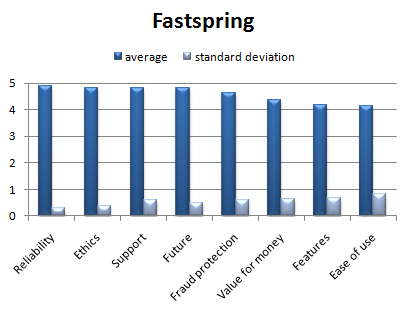
Below I show the average (mean) score per question by ecommerce provider. The providers are shown in alphabetical order. The standard deviation is also shown to give an idea of how consistent the responses were (the larger the standard deviation the more variation there was in responses). Providers with less than 3 responses weren’t considered statistically valid and are not shown here (see the raw data for all responses).

avangate

bmt_micro

e-junkie

esellerate

fastspring

kagi

paypal

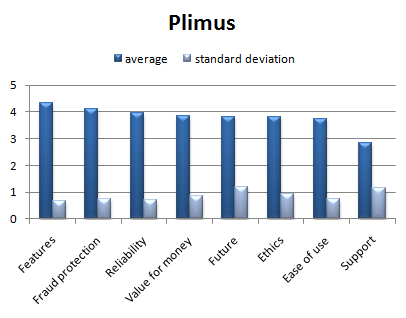
plimus

regnow

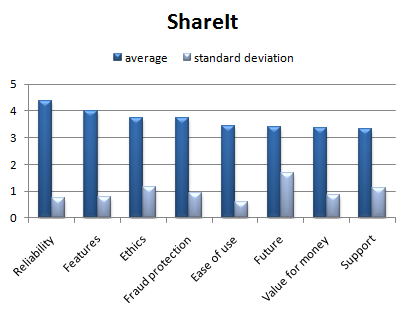
shareit

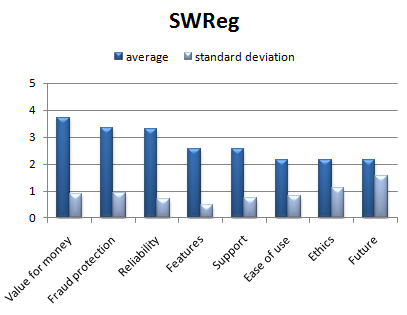
swreg

Overall ranking

The average (mean) score and overall ranking for providers with at least 3 responses is shown below.

overall

The chart below shows the score broken down by question (click to enlarge):

overall_detailed

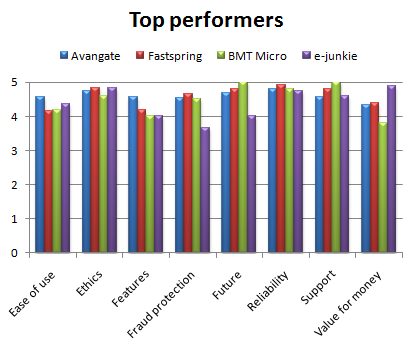
The chart below compares the 4 top performers by question:

top_performers

Avangate, Fastspring, BMT Micro and e-junkie all did well. The difference between the Avangate and Fastspring score (approx 0.3%) is probably too small to be statistically significant, but the survey shows significant differences between the best and worst providers. SWREG trails in last place by quite a margin, managing to place last or second to last in an impressive 7 out of 8 questions. It is also noticeable that the providers owned by industry heavyweight Digital River fill 4 out of the bottom 5 places in the ranking. This rather begs the question of how they got to be the industry heavyweight in the first place.

Note that the ranking does not show who the ‘best’ ecommerce provider is, for the following reasons:

  • ‘Best’ depends on your requirements. All the questions have been equally weighted here. If you decide (for example) that good support should be weighted higher than ease of use you might come up with a quite different ranking.
  • The assignment of numerical values to responses (e.g. Excellent=5, Good=4 etc) was done for easier analysis, but is entirely arbitrary. Different values might have resulted in a different ranking.
  • We aren’t comparing like with like. Software vendors using ‘lightweight’ e-commerce providers such as PayPal or e-junkie might have lower expectations than software vendors using ‘fully featured’ e-commerce providers .
  • e-junkie, SWREG, BMT Micro and RegNow had respectively only 8, 7, 5 and 3 responses. They are therefore vulnerable to statistical fluctuations.

That said, the ranking does correlate fairly well with the many comments I see about ecommerce providers on various forums. I don’t think I would want to use any of the providers in the bottom half of the ranking.

Conclusion

While one shouldn’t take the overall ranking too seriously, it is clear that there are major differences in the performance of ecommerce providers in important areas other than pricing and features. I hope these results will allow software vendors (myself included) to make a better informed choice of ecommerce provider. Hopefully this will, in turn, improve ecommerce services overall by rewarding the good companies at the expense of the poorer performers. It would be interesting to run this survey in another year or two and find out what has changed. Thank you to everyone that took part.

Disclosure: I use e-junkie+PayPal/GoogleCheckout/2Checkout as my payment provider for my Perfect Table Plan software. I have an affiliate link to them in another article on this blog which brings me a few dollars a month. I have no other commercial relationship with any of the other ecommerce providers.

BMT Micro
e-junkie
eSellerate
Fastspring
Kagi
PayPal
Plimus
RegNow
ShareIt
SWREG

The art, science and ethics of software box shots

Perfect Table planI have recently revamped the PerfectTablePlan payment pages. I asked Andrew Gibson of 3d-box-shot.com to create an image of the PerfectTablePlan packaging, using the existing artwork. I was very impressed with the result. The image is much cleaner and more aesthetically pleasing than I could have achieved by photographing the physical packaging. But I am much less keen on the practice of using box shots of software where is no box (i.e. download only). It seems disingenuous, at best.  Andrew kindly agreed to write a guest article for this blog with an insider’s view on the art, science and ethics of software box shots.

Almost every time the subject of box shots is raised in any sort of software marketing forum, opinion seems to split diametrically in two opposing camps. The first group don’t see any ethical problem with displaying a box shot for a “download only” product. The typical argument used in favour of box shots is that it makes a product appear more tangible to consumers. They can see what you’re selling without having to read about it. It removes any doubt that the site they are looking at has software to sell and, when used effectively, can add an air of professionalism to a site. Finally, there’s a widely held belief that because of this, displaying a box shot can improve conversion rates.

In contrast, the opposing group believe that displaying a box shot for a “download only” product is ethically wrong and fundamentally dishonest. They maintain that customers would complain about not receiving a physical package in the post that’s identical in every respect to the “bogus” box shot displayed on the website. I run my own Micro ISV, selling amongst other applications, a product called 3D Box Shot. As a result, you might be inclined to think that I fall into the first camp. However, I’m actually quite ambivalent about the issue. I use box shots on some of my sites and have never received a single complaint from a customer about them not receiving a physical product in the mail. However, consumers in different markets don’t all behave the same way, which is why advice that works for some ISV’s can be commercial suicide for others. I’m entirely willing to accept that in some markets, some customers may indeed complain about not receiving a physical product. I just haven’t experienced this first-hand.

It’s worth noting that existing users of your product can often be persuaded to purchase additional copies to give as gifts. They may not even make this connection themselves, so why not put the thought in their heads? Send a festive email offering to ship additional physical copies of your products (gift wrapped) to friends and relatives. Add something like the following to your site to make the point visually:
selling-software-as-a-gift

click for a larger image

It’s often stated that adding a box shot to your site can dramatically improve conversion rates for your products. It may come as a surprise to learn that I’m not convinced that this is true in all cases. Generally speaking a box shot isn’t some sort of magic bullet that will transform your sales overnight. However, if it is an integrated part of your marketing strategy then it can make a real difference.
So how do you go about integrating a box shot into your marketing strategy? From a design perspective you can integrate a box design by keeping everything visually consistent. Use your company and product logo on the box and clearly display your website URL as well. This will help to increase the marketing potential of your box shot.

One less obvious method is to add you box shot to the image for your PAD Screenshot. Most download sites are worse than useless when it comes to driving traffic to your site. So instead of thinking of the screenshot referenced in your PAD file as just a screenshot, think of it as a blank advertising canvass that thousand of download sites are happy to display for you free of charge…

PAD-Screenshot-replacement

click for a larger image

Using this method, you can attract visitors to your site even from low quality download sites that don’t even supply a link back to your website.

So how do you get a box shot designed? As a designer I have a fairly unique approach to software box design. I treat a design as a conceptual puzzle than needs to be solved in order to create an effective cover. The criteria I use are simple. Someone needs to be able to look at the box shot and immediately understand what the product is and does. If a box doesn’t meet this challenge, then it isn’t doing it’s job. It’s normally possible to create an effective visual metaphor for a product that explains visually what it’s all about. Here are some examples of the sort of designs I’m talking about:

Example-Designs

click for a larger image

Trends in box design can change. Not so long ago lots of people were asking for Windows Vista Style boxes, but as it became more apparent that Windows Vista was destined to be seen in the same light as Windows ME, this requirement has tailed off. Nowadays the vast majority of design jobs that I do are for DVD cases, both virtual box shots and full print insert designs.

If you’re artistically talented and have access to a good quality image editing tool like Adobe Photoshop and have an easy means of transforming your 2D designs into a 3D Box, then you may well be able to create an effective looking box shot yourself.  However, once you consider the time this takes, hiring a designer seems a lot more reasonable. Since I design boxes commercially, I’ve acquired a lot of design resources including hundreds of royalty free vector images and a library of stock photography. I can draw on these resources when I’m creating a box design. This lets me develop designs quickly through the draft stage through towards the final design. However, as an experience box designer, I still find it challenging and rewarding work. But it is very time consuming.

If you’re determined to “do it yourself” then bear the following points in mind:

  1. The box shot needs to visually show what your product is and does. Show your design to someone that’s never seen your product and ask them to tell you what your product does. If they can’t do this, then your design isn’t up to the job.
  2. Make sure your website address is clearly visible on the box shot. If you ship a physical package you’ll have no way of controlling where it ends up. The box itself can drive traffic to your website. You don’t have to slap it on the front of the box, just make sure it’s there and can be seen.
  3. Try to design a cover that fits with the look and feel of your website. Use the same (or at least, non conflicting) colour scheme as your site and try to use the same fonts. This will prevent your box shot from standing out on your site like a sore thumb.
  4. Never use more than three different fonts in your design. Unless you are selling a font management application, this is sure way to spoil any design.
  5. Design so that text is still visible when the box is reduced to a 250 x 250 thumbnail. If the text is legible at this size on your design, then unless the design carries the message all by itself, the box won’t work very well as a marketing tool.
Perfect-Tableplan white background

click for a larger image

The image above was created in a rendering application at very high resolution. It took around 6 hours to complete on a dual core system. The resulting image is big enough to be used in print ads, or can easily be resized for use on the web.

Andrew Gibson is the head developer and lead designer for www.3d-box-shot.com, provider of box shots, packaging design, e-book covers and more. Box shot images from scratch start at $100. Box shots images from existing artwork can be created for as little as $25. All the images in this article were created by them. The original PerfectTablePlan packaging was designed by Nicola and Adrian Metcalfe.

Where I program

whereiwrite.org is a photographic project showing science fiction writers and their offices. I started wondering what the offices of other microISVs and small software companies look like. Were they Zen temples of minimalism, with just a desk, a chair and a laptop? Or were they mad scientist labs, piled to the ceiling with obsolete equipment and empty pizza boxes? I rather hoped it was the latter, so I wouldn’t feel so bad about my own cluttered little office. I asked for photos of offices on some forums frequented by independent developers. I got a great response. Click the images to see larger versions.

oryxThis is my own cluttered office. The image comprises 6 photos stitched together using Autostitch to simulate an ultra wide angle lens. This makes it look bigger than it is. My unexciting view of suburban Britain is enlivened by regular sightings of Red Kites. I resisted the temptation to tidy up, beyond emptying the overflowing wastepaper bin. The garage is full of envelopes and CDs and there are lots of programming book’s in my son’s room. We are in the process of selling the house, partly so we can buy a house with a bigger office. I like the idea of a treehouse office – one where I pull up the ladder when I need some peace and quiet.

divider

whereiprogram-steve

“In my office, I kind of try to separate the digital and analog worlds.  Some days I’ll be coloring with my kids at the oval, English partners-desk in the center and helping with homework, but most days I’m doing software development to the right.  I love it here in the Pacific Northwest; if I’m awake early enough I can catch a beautiful sunrise over the lake right outside my office, and even go for a swim by afternoon in the summertime if it gets too hot.”

Steve Murch, www.bigoven.com

divider

rv-office“This is my temporary office while on the road. I use the TV as a monitor for the second computer (Windows 7). The normal monitor can be switched between either computer. I sometimes miss the third monitor, lazerjet printer and other stuff but not often.”

A roving microISV, who doesn’t want his customer to know he (temporarily) has no fixed abode

divider

DSC_6544“Living in Hong Kong, where residential and office space is so scarce and expensive, I work in a small corner of my small apartment. However, I have everything I need: my trusty two years old MacBook Pro, a not too comfortable chair, and a couch where I can take as many naps as I want. Oh, and a nice view of the mountains outside!”

Cesar Tardaguila, www.bambooapps.com

divider

alwin-at-work

collectorz-programmers-at-work“This is me at my desk at the Collectorz.com HQ. As you can see, I am a Nintendo gamer, vodka drinker and Porsche fan. Now I must say that this not a real ‘where I program’ pic, because I don’t do a lot of programming any more. Check the 2nd pic for my developer team.”

Alwin Hoogerdijk, www.collectorz.com

divider

iPhone June 23 2009 132“I *hate* having clutter on my desk. You’ll notice that I didn’t show the rest of the office. It’s pretty messy! I started with two monitors several years ago and then moved straight to 4. I can’t live without at least 3 and the 4th makes a nice place to stash IM windows while I’m working. My music computer is on the left side (yes, it’s a Mac!), and I’m not sure that it isn’t the most important computer I own since I could never work without music playing.”

Mitchell Vincent, www.ksoftware.net

divider

myroom“As you can see the office is as crammed as possible, and the distractions are pretty obvious — the wine is waiting for its place in the cellar, and there is a bottle of whiskey on the shelf.  Oh, and there are two Commodores C-128 behind the desk (invisible on the photo, they worked the last time I checked) along with 1081 monitor and a Playstation or two. And yes, there is a guitar behind the chair. The bad news is that the plans for the new house are ready and the next office will be four times as big! Regarding the workplace as such — I have two 19′ monitors and a computer box under the desk. I spent a lot of time making it silent, which really improves work comfort, especially during quiet night shifts.”

Piotr Kuzora, www.powerkaraoke.com

divider

ofi-shots-117

ofi-shots-150“This is my home office, in the city center of Vitoria-Gasteiz. Nowadays I spend as much time, if not more, at the J1CK office, my other entrepreneurial project, but this office is great for ViEmu and Codekana work: a lot of light, and the irreplaceable Dell 2408WFP in vertical position. The chair and the table are from Ikea, nothing fancy there.”

Jon Beltran de Heredia, www.viemu.com and www.codekana.com

(who can apparently control his own opacity)

divider

MJT_Marcus_Office_small“This is in my office looking out on the larger office area.  Our office is in a modern, purpose built office complex just outside the beautiful historic Saxon hilltop town of Shaftesbury in rural Dorset.”

Marcus Tettmar, www.mjtnet.com

(under monitors – where obsolete technical references go to die)

divider

home_office_tekblues_small“My home office is a large basement, it has windows and good light, but it’s very cold. I am a very messy person, it’s full of books, boxes, old computers and even toys my kids left there. Luckily, it doesn’t show in the photo but my dog left some bones under my desk in the morning!!”

Javier Rojas Goñi, www.tekblues.com

divider

GreentramDesk“Melbourne city skyscrapers in the background – I’m 26 floors up. I should have done this yesterday when the sun was shining.”

Tony Bryer, www.greentram.com

divider

IMG_6740_small“There is one thing that is missing in the photo. That is my two year old daughter. She likes to sit on the table and pull out the books from the rack. Unsurprisingly, her favorite is ‘MicroISV From Vision to Reality’ by Bob Walsh. Somehow she enjoys tearing papers off from the book while her father is busy coding.”

Prasanth, www.simfatic.com

divider

20090624dayoffice

20090625nightoffice“I recently cleaned up my office so I took these photos… but my office is slowly returning to the big mess that it usually is. I need to do a tidy-up before things get out of hand again. I really like my Vornado 542B that’s clipped to a bookcase and set to blow air on me! Really cools me off. I have it on a remote control so I can easily turn it on and off from my desk. I am near Dallas, Texas.

Albert Wiersch, www.htmlvalidator.com

divider

gurock_office“This is one of the offices at Gurock Software here at the Technology Park in Paderborn, Germany (that’s Tobias in the picture). When we originally looked for office space, we wanted bright rooms with enough space to accommodate large desks and small reading corners. Getting our new office space (and 3×24″ monitors ) was easily the best investment we’ve made productivity-wise.”

Dennis & Tobias Gurock, www.gurock.com

divider

Dokix2_smallTim Haughton, www.homedocumentmanager.com

divider

antair_office_1

antair_office_2“This space suits us perfectly. It fits everyone very comfortably. It’s very, very bright, with lots of natural sunlight. The outdoor patio is perfect for morning group breakfasts and afternoon lunches when it’s warm. And … there’s a great pub downstairs to celebrate the days when we ship a new software product or a major update release.”

Andrey Butov, www.antair.com

divider

office“My office is a mess because I’m a very passionate person.  I love my work and when I’m not doing that, I’m out doing something else I really love.  I have no love of cleaning and organizing though.  In fact, 99.9% of the time I prefer chaos.  The other .1%, I purge my mess and the cycle starts again.  I know this isn’t a good system, but for now it works.”

Ian Drake, www.notifywire.com

divider

ian_1 “My office is never really very messy… sorry.”

Ian Landsman, www.helpspot.com

divider

officedog2“Here’s where a real code monkey works.”

Dan Hite, www.spellquizzer.com

divider

office2

view“I work with specialized hardware for my software and there’s a school bell and a siren/strobe light flashing on the desk.  On the far right side of the desk, I have a couple of IP phones and an IP speaker. I want some additional monitors.  The two I have are a 23″ and a 24″, both at 1920×1200.  I also use a second room as an office in my house and have another PC and a Mac. Below is the view from the window. The trail behind the house connects into a 300 acre park and there are usually mountain bikers and hikers on the trail on the weekends.”

Danny Weidig, www.acrovista.com

divider

DN_office1_small“Mine’s a bit messy. I stare out the window to distract me from it.”

Doug, who doesn’t want his blue chip clients to know he works from a messy home office

divider

SAIG+Office3_small

SAIG+Echidna+outside+Office_small“The 16th fairway of the golf course is just through the trees. The group of 3 trees on the left is actually one tree and it is a magnificently old (opinions vary from 100 to 600 years) Moonah Tree. Below is an Echnida which waddled past on Monday.

Neville Franks, www.surfulater.com

divider

Not had enough yet?:

Mitch Haile’s home office

Scott Hanselmann’s home office

Home office snapshots

divider

I am not sure which is more diverse, the offices or the software that gets written in them. Thank you to everyone that contributed.

Have you got a bigger, smaller, untidier or more stylish office than any of the above? Do you have a better view out of the window? Add a link to your photo in the comments.

A test of Cost Per Action (CPA) vs Cost Per Click (CPC) in Google Adwords

CPA vs CPCThe traditional approach to Google Adwords is to set a bid price for each keyword. This is known as Cost Per Click (CPC). Google then then uses the bid prices in conjunction with a secret formula (the quality score) to decide how high to rank your ad in the Adwords results. If you bid more, your ad will appear higher and typically get more clicks, but your cost per click will increase. So setting an optimal bid price is important. Bid too little and you won’t rank high enough to get a decent number of clickthroughs. Bid too much and you will potentially end paying more to Google than you recoup in sales.

An alternative approach is to tell Google Adwords how much you are prepared to pay for a particular action, e.g. a sign-up, download or sale. This is known as Cost Per Action (CPA) or Conversion Optimizer. Google will then automatically calculate your bid prices and attempt not to exceed the CPA you set (although this isn’t guaranteed).

CPA sounds great. I can stay in bed a bit longer while the mighty Google brain does the bid tweaking for me. Unfortunately I wasn’t able to use CPA. I  count sales as conversions (not downloads) and I have my adwords account split into a number of campaigns by geographic region and by type (e.g. search vs content). Having my campaigns structured like this, rather than one monolithic campaign, makes for more flexibility (e.g. different ads, phrases and bid prices for different geographical areas) and more useful reports (e.g. separate reports for search and content). But it also meant none of my Adwords campaigns made the minimum threshold for conversions per month.

When Google dropped the minimum threshold for CPA to 30 conversions per campaign per month, one of my Perfect Table Plan search campaigns became eligible. So I did an experiment. I ran a campaign for 4 weeks using CPC, then 9 weeks using CPA, then another 4 weeks using CPC. I set the CPA bid to roughly the average cost per conversion I got for CPC. I was curious to see if Google would find sweet spots that I had been missing or whether they would bid as high as they could to take as much money off me as possible. Summary: CPC outperformed CPA on all key metrics, including: 4.4% higher conversions, 9.4% lower cost per conversions and 8.0% higher profit.

The detailed results are as follows:

metric CPC  (vs CPA)
impressions/day +13.9%
clicks/day +1.3%
conversions/day +4.4%
CTR -11.1%
conv rate +3.1%
income/day +4.4%
cost/day -5.5%
CPC -6.6%
profit/day +8.0%
PKI -5.2%
ROI +10.4%
cost per conversion -9.4%

In graphical form (click to enlarge):

CPA vs CPC graph 50pc

Notes:

  • The values given are taken by computing (CPC metric – CPA metric)/(CPA metric). E.g. ROI of +10.4% means that CPC had a 10.4% higher ROI than CPA.
  • Only a single (geographically based) search campaign was measured. The total number of conversions during the time period of the test was in 3 figures.
  • I only measured sale conversions. This gives me less data than measuring downloads, but I think it is unsafe to assume the number of downloads correlates closely to the number of sales.
  • The PerfectTablePlan sale price is £19.95/$29.95. To calculate profit I only counted 75% of the price of a sale (the other 25% was assumed to cover the cost of support, ecommerce fees and other overheads associated with the sale).
  • Each of the time periods was a multiple of 7 days to avoid any issues with different results on different days of the week.
  • I ran CPC for an equal amount of time either side of the CPA test to try to balance out any seasonal factors.
  • Google conversion tracking uses Cookies and is therefore not 100% accurate.
  • PKI is Profit Per Thousand Impressions.
  • ROI is Return On Investment.

It wouldn’t be wise to draw any sweeping conclusions from one test with a limited amount of data. However I believe the results show:

  • A CPA campaign running for 9 weeks wasn’t able to outperform a mature CPC campaign. The CPC campaign had been running for over 4 years, but one would have thought CPA would have been able to use that pre-existing  data. CPA might have performed better if given longer. It would probably also have done better against a less mature CPC campaign.
  • Google didn’t rob me blind using CPA bidding. The CPA cost per day was only 5.5% higher.
  • The results weren’t hugely different. On the basis of the above results one might still conclude that CPA is superior to CPC as it requires less time to manage.

The truth about conversion ratios for downloadable software

conversion funnel?Overview

An anonymous survey of software vendors shows that the average sale to visit ratio is very close to the much quoted “industry average” of 1%. However the data shows large variations between products and across different sectors (e.g. Windows vs Mac OS X).

The data

The data set comprises 92 valid survey responses to an 8 question survey in April 2009. The survey was advertised through a request on this blog, posts on  BOS, ASP, MACSB, OISV and BOSnetwork forums and emails to the author’s contacts. The results are inevitably biased towards small software vendors, due to the places where the survey was advertised. As the survey was anonymous it is impossible to verify the accuracy of the data. However it is unlikely that many vendors would have completed a survey that wasn’t anonymous.

The survey consisted of 3 compulsory questions (unique visits, downloads and sales over a given timeframe) and 5 optional questions (the time frame of the data, primary market, primary OS, licence price and trial type). One record had 0 visits (an iPod app), another had 0 downloads (presumably a web app) and a few had numbers that I didn’t consider statistically valid for some purposes (e.g. <500 visits per month or <3 sales transactions per month).  I did the best I could with the data available, ignoring obvious outliers in some cases.

The data set comprises a total of:

  • 8.1 million unique website visits
  • 2.2 million downloads
  • 110 thousand sales transactions

Where a time frame for the results was given it is possible to work out the range of visitors, downloads and sales per month.

metrics_all_visitors

metrics_all_downloads

metrics_all_sales

Interestingly the distribution of monthly visits, downloads and sales across the different products all follow the Pareto 80:20 power law quite closely:

  • 22% of the products account for 80% of the visits
  • 21% of the products account for 80% of the downloads
  • 19% of the products account for 80% of the sales

This gives me some faith that the data is reasonably accurate and representative of the industry as a whole.

The data is broken down by OS, market, price and trial type as follows:

metrics_all_os

metrics_all_market

metrics_all_price1

metrics_all_trial

Analysis

The average (mean) ratio of downloads:visits across all products is 28%. 50% of products are in the range 12.1% to 35.3%.

metrics_download_visit_ratio

I am surprised at how high the average ratio is. This could partly be due to products that receive a high percentage of downloads from download sites, without the downloader ever visiting the product site. Conversely sites where visitors make frequent returns after purchase (e.g. to read forums) will have a lower downloads:visits ratio.

The average ratio of sales:downloads across all products is 4.5%. 50% of products are in the range 1.3% to 6.4%.

metrics_sale_download_ratio

The average sales:downloads ratio is noticeably lower than the average downloads:visits ratio. The sales:downloads ratio is noticeably skewed on the right of the graph – a sales:downloads ratio >20% seems very high.

The (logarithmic) scatter plots below show that the downloads:sales ratio varies a lot more than visits:downloads ratio.

metrics_visits_vs_downloads

metrics_downloads_vs_salesThe average (mean) sales:visits ratio of all products is 1.16%[1]. However one of the product ratios is an obvious outlier at 13.94% (see below). With this outlier removed the average sales:visits conversion ratio across all the products is 0.99%. 50% of products are in the range 0.28% to 1.39%.

metrics_sale_visit_ratio

0.99% is suspiciously close to the mythical ‘industry average’ of 1%. But I haven’t (consciously) massaged the results to get this figure.

You can work out how you compare to this data set using the red (cumulative) graph in the histogram below. For example, if your product sales:visits ratio is 1.5%, then it is higher than approximately 80% of the products in the data set.

conversion-ratio-distribution2

We can also look at how the ratios vary across sectors. Surprisingly the average Mac product conversion ratio is more than 4 times the Windows product conversion ratio.

metrics_sale_visit_ratio_by_os1Even if we try to compare like for like, and only compare consumer products selling for <= $50, the ratios are still 2.27% for Mac and 0.51% for Windows. Possible reasons for this large disparity include:

  • Mac owners more ready to spend money.
  • There is less competition in the Mac software market.
  • Mac vendors have a higher percentage of purchasers  who never visit their site due to higher quality of Mac download sites.
  • It is a statistical blip (there are a lot less Mac products in the survey).

My own experience with selling a cross-platform product (Perfect Table Plan) on Windows and Mac OS X is that the Mac sales:visits ratio is approximately double that for Windows.

The sales:visits ratio is similar for business and consumer products, with developer products lagging behind. However there are too few developer products in the data set to draw any real conclusions.

metrics_sale_visit_ratio_by_market1The sales:visits ratio does vary across the price range. However there are too few products with price >$50 in the data set to draw any real conclusions.

metrics_sale_visit_ratio_by_price2The sales:visits ratio does not seem to vary significantly by trial type. There were insufficient ‘number of use’ trial products to include them.

metrics_sale_visit_ratio_by_trial1

Conclusion

One has to be careful about drawing conclusions from a relatively small and unverifiable data set. However the results certainly seem to support the much-quoted “industry standard” sales:visits conversion ratio of 1%. But there are huge variations between products.

The fact that the sales:downloads ratio is both lower on average and more variable than the downloads:visitors ratio implies that getting people to download is the easy bit and converting the download to a sale is a tougher challenge.

The average sales:visits conversion ratio is noticeably higher for Mac OS X products than Windows products. This is supported by anecdotal evidence and the author’s own experience with a cross-platform product. However the number of Mac respondents to the survey is too small for the result to be stated with any great confidence. Also remember that the Mac market is still a lot smaller than the Windows market before you rush off to start learning Cocoa and Objective-C.

These ratios can be useful for a number of purposes, including: identifying a bottleneck in your conversion funnel (is your downloads:visitors ratio low compared to other products?); estimating how much traffic you might need for a viable business; or estimating how much you can afford to bid on Google Adwords. And it is useful to track how these ratios change over time (I track mine on a monthly basis). But make sure you compare like with like if you are comparing your ratios with other products. For example, a 10% sales:downloads ratio might be achievable for a niche business product, but unrealistic for a casual game. And remember that these ratios are only one part of a bigger picture. There are other, more important, metrics. Profitability for a start.

The data set is available here:

Raw data (some invalid records deleted), CSV format

Processed data, Excel XLSX format

Feel free to publish your own analysis. Thank you to everyone that took part in the survey.

[1] Calculating the mean of all the ratios probably isn’t the way a proper statistician would do it. But anything more seems overkill given the limited size and unverifiable nature of the data set.