Category Archives: software

Unlock new customers?

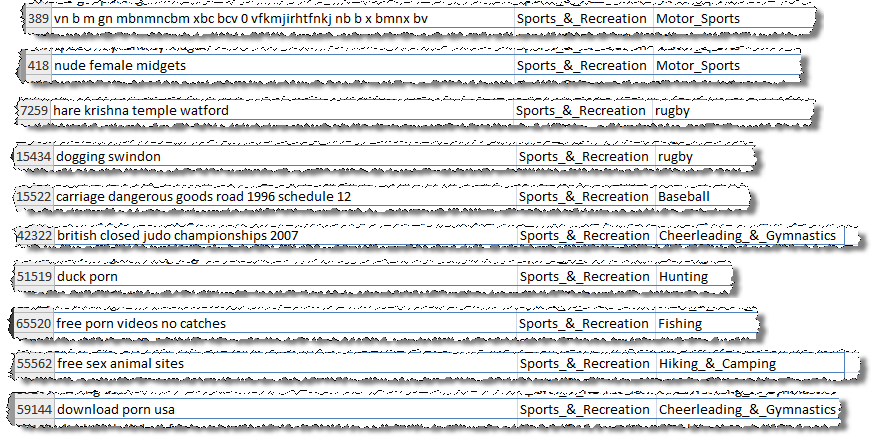
Microsoft Adcenter helpfully sent me a link to lists of low cost keywords I could advertise on, categorised by sector, to “unlock new customers”. I had a quick look through the ‘sport and rec’ list. Here is a small sample (click to enlarge):

There are lots more where they came from. Microsoft say:

These keywords are actual terms recently used by your customers on Live and MSN Search Engines and are available at a low cost while very few other advertisers are bidding on them.

No kidding.

Did they do any QA on this list[1]? Exactly how many people are searching on “vn b m gn mbnmncbm xbc bcv 0 vfkmjirhtfnkj nb b x bmnx bv”? What has dogging (not work safe) or Hare Krishna got to do with rugby? Is it any wonder nobody is bidding on “duck porn”? Are there really that many people interested in pictures of nude female bodybuilders (apparently)?

Thanks Microsoft, but I’m really not sure they are the sort of new customers I want to unlock.

[1]There are some pretty unpleasant ones I didn’t include.

Cookie tracking for profit and pleasure

It is great to make sales. But you really need to know where these sales are coming from to optimise your marketing. A simple and effective way to do this is through cookie tracking. The basic process is:

  • A visitor arrives at a web page on your site.
  • A script on your web page stores a small file (cookie) on their computer with some tracking details, e.g. the web page they came from, the date they arrived and the page they arrived at.
  • As they navigate to other pages the Javascript on these pages recognises that the cookie already exists and doesn’t modify it.
  • When (if) the visitor makes a purchase, the contents of the cookie are sent through to your payment provider.
  • Your payment provider sends back the cookie data with all the other information about the sale.

From the referrer you can find out what your customer typed into a search engine to find you. For example if the referrer is:

http://www.google.com/search?hl=en&q=backup software

You can infer that the purchaser found you by typing “backup software” into Google. This is incredibly useful information. Once you have amassed enough of it you can find out which keywords are most effective at selling your product. For example, whether “back-up software” makes more sales than “backup software” or “back-up programs”. This can be very helpful for fine-tuning your marketing message, SEO and PPC campaigns. You can also find out which websites purchasers are being referred from, and even how long purchasers take to make a sale after first arriving at your site.

You can get a lot of this information from Google Adwords conversion tracking. But you will only get data on sales through Adwords. I want data on all my sales. You can also get some of this information through Google Analytics. But you can only get the information in the form that Analytics wants you to have it and the price is allowing Google to see all this data as well. So I think it is well worth doing your own tracking, even if you are using Adwords conversion tracking and Analytics.

If you do use tracking cookies you will find that there is no cookie data for many transactions or the cookie data is unreliable. Reasons for this include:

  1. The cookie has expired before the customer made the purchase.
  2. The cookie has been pushed out of the cache by other cookies. Browsers only have a limited cookie cache, and your cookie might be pushed out of the cache by others long before any expiration date you set.
  3. A different person is buying the software to the person who first arrived at your site.
  4. A different computer or browser is used to buy the software to the one use to find the site.
  5. The customer clicked a button in your desktop software (not a browser) to go to your site, so there is no referrer information.
  6. A firewall or other software is blocking cookies.
  7. The customer has disabled JavaScript in their browser.

So cookie tracking data is never going to be particularly reliable. My own data shows that about 30% of sales don’t return cookie data. But it is likely to be considerably worse for B2B sales due to the longer sales cycles and the increased likelihood of the buyer not be being the person who first found the product.

With these caveats in mind, I think it is worth the time to set up cookie tracking. It is pretty quick and easy to do. You can even use the free JavaScript published at www.webmarketingplus.co.uk. Note the conditions of use. Note also what an ugly language JavaScript is[1]. I recommend placing the JavaScript in a single file which you include in each page, so you only have a single place to make modifications, for example:

<script language=“JavaScript” type=“text/javascript” src=“refercookie.js”> </script>

Sending the contents of the cookie to your payment provider is also quite straightforward. For example, for e-junkie I just use some JavaScript to extract the cookie contents and append:

&custom=<cookie contents>

to the end of the ‘Buy now’ button URL e-junkie gives you. The cookie data then comes back to me in the ‘custom:’ field of the e-junkie sale confirmation email (I believe all the major e-commerce providers support something similar). I then store the cookie data along with all the other sales data. I can use this data to generate various graphs and reports, including top-selling keywords and a graph of the time-taken to purchase. Unlike much of the data you get from Analytics this is data you can really use, e.g. for the top selling keywords:

  • Make sure they are in your Adwords campaign.
  • Write additional content pages based around these keywords to attract targeted traffic.
  • Consider including these keywords in the strapline on your home page.

The use of cookies does have privacy implications, but these are often overstated. In theory all the information in a cookie could be retrieved from server log files, cookies are just a more convenient way or doing it. Users can also disable cookies in their browser settings or using other software. I think it is fine to use cookies as long as you make this clear to your visitors. You should still have a clearly stated privacy policy for your website and this should contain a brief description of what information you are storing in cookies.

Knowing a bit about cookies can also help you as a consumer. A while back I was interested in buying a large VDU from Dell. I browsed around their site and found a good deal. I went back some time later to buy the monitor after I had bought a new PC, but the price had gone up considerably. On a hunch I deleted Dell’s cookie and refreshed the page. The price dropped back to the original price. I believe that Dell knew from a cookie that:

  1. I had logged in as a business user; and
  2. Had just purchased a new PC from Dell.

Consequently they expected me to be less price sensitive than a consumer shopping for just a VDU and upped the price. I can’t prove this. It is also possible (but unlikely) that they just happened to drop the price in the few seconds before I did a refresh. Anyway, try it next time you want to buy something expensive online. Note that it might be easier to use another browser (e.g. Opera or Safari) than to delete cookies. Let me know if you get a similar result.

[1] It has been said that JavaScript bears as much resemblance to Java as the Taj Mahal Indian restaurant bears to the Taj Mahal. And Java is hardly a ‘looker’.

Virus Total

Virus Total is a free service that gives you aggregate results from 36 different malware scanners. Just browse to the file you want to check on your PC and click ‘Send file’. It will quickly return the results of all the scans, hash sizes and a list of Windows system calls that the software makes.

This is a great resource for checking software you are about to install doesn’t contain malware. It is also useful for checking that your own download files haven’t been tampered with and don’t trigger false positives. Note that some software protection systems have been known to trigger false positives from malware scanners.

Thanks to a poster on this BOS thread for bringing it to my attention.

Early registration for ESWC2008 closing

David Boventer has just reminded me that early bird registration for ESWC 2008 ends July 31st. I probably won’t make it this year due to other committments. But I have been the last two years and highly recommend it to any microISVs that can make it to Berlin for 8/9 November. Hurry up – you haven’t got much time to get the early bird rate!

Early home of computing falling into disrepair

image from wikipedia

Bletchley Park is a location of huge significance in the history of both the UK and the IT industry worldwide. It was at Bletchley that British codebreakers[1], including early computer science genius Alan Turing, broke the ‘unbreakable’ Nazi Enigma code during WWII. As part of this work they designed and built Colossus, arguably the first programmable electronic computer.

The breaking of the Enigma code had a huge impact on the war. Many historians believe it shortened the war significantly and saved many lives (on the winning side, at least). But the codebreaker’s huge achievements were kept secret for many years after the war, receiving no public recognition. Turing himself committed suicide after shameful treatment at the hands of the British government.

Now, to compound the neglect, Bletchley has been left to fall into increasing state of disrepair due to a lack of funding. The site was only just saved from property developers in 1991. Things have now got sufficiently bad that 97 prominent IT experts and computer scientists have written a letter to the Times this month condemning the state of repair. The Bletchley Park Trust are doing the best they can, but receive no public funding.

We are just about surviving. Money—or lack of it—is our big problem here. I think we have two to three more years of survival, but we need this time to find a solution to this.” Simon Greenish, director Bletchley Park Trust

It would be a tragedy if such a historic site was not saved. So what can you do? If you are a UK citizen you can:

and anyone can:

I hope the government will wake up to the fact that we are losing a site of national and international historical importance. Lets hope they don’t leave it too late to act.

** Interesting trivia **

The ability to solve The Daily Telegraph crossword in under 12 minutes was used as a recruitment test for codebreakers. The newspaper was asked to organise a crossword competition, after which each of the successful participants was contacted and asked if they would be prepared to undertake “a particular type of work as a contribution to the war effort”. (from Wikipedia)

[1] Building on important earlier work by Polish codebreakers.

A mathematical digression

I need some help with a mathematical problem. A geometry problem to be specific.

Congratulations on reading this far. One of the features of Perfect Table Plan is the drawing of tables and seats on scale floor plans. The user can optionally specify how many seats and let the software calculate a sensible table size so that all the seats touch the table and their neighbouring seats. This saves the user time and produces tidy looking floor plans. Calculating the table size is trivial for square or rectangular tables. It is a bit more complicated for circular tables. But, after a bit of head scratching, I managed to work it out. Placing the seats around the circle is then trivial.

But my customers keep asking for oval (elliptical) tables, with that callous disregard customers have for how difficult a problem might be [1]. Here is the problem.

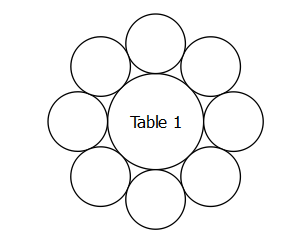
We have an ellipse E with axes A and B surrounded by N identical circles of diameter D. Each circle touches the ellipse and each of its 2 neighbours at one point, as shown above. Given N, D and the ratio A/B what is A? Given A, what is the angle THETA subtended by the centre of each circle to the centre of E?

I doubt there is an exact analytic solution to this problem. I have some vague ideas about how to tackle it. I can work out the approximate circumference C’ of an ellipse E’ that passes through the centre of all the seats (axes A+D and B+D) using the formula derived by Indian mathematical prodigy Ramunajan.

From this we should be able to work back to A. As N becomes large C’ will tend to N*D. For smaller N, C’ will diverge from N*D so we might have to use an iterative method[2] to calculate A, but we can use the approach above to get a starting value for A and then iterate numerically from there.

I am less sure about how to work out the angle THETA for each circle. But if we pre-compute the angles of, say, 100 equally spaced points around E we could use these to interpolate the position of N circles where N is <= 100. It might be OK to place the first circle at THETA=0 for all values of N>0, I’m not sure.

Several hours on Google didn’t turn up a solution. Surely I am not the only person to have tackled this problem in human history? Can anyone point me at a workable solution? Preferably with code.

Alternatively can somebody write me the code to solve the problem? Maybe there is someone out there with a mathematical background that would relish the challenge? I am prepared to pay for working code that I can use in PerfectTablePlan (a few hundred dollars, negotiable).

  1. To simplify things we can assume a fixed value of A/B, say 1.5 .
  2. It needs to work for N from 1 to 99.
  3. The solution doesn’t need to be exact, but it has to look OK to the human eye. No overlaps and no big gaps.
  4. Low values of N might need to set up as special cases. E.g. it isn’t possible to get all the circles to touch if N <=6 (and possibly higher values of N depending on A/B).
  5. The solution must be returned in a reasonable time, ideally under 0.001 seconds and definitely less than 0.01 seconds. It can store pre-computed values, e.g. in an array. But it mustn’t require excessive memory.
  6. The code needs to be in a form I can easily convert to C++. C, Java, BASIC or Python should be fine. Haskell not so much.
  7. Ideally it should come with a simple GUI that allows me to set the value of N and D and see the result visually.

If you want to be paid I need to be able to buy all rights to the code and it mustn’t be released into the public domain (i.e. don’t post the code on this blog). In the unlikely event I get more than one set of working code, I will pay for the best solution according to the above criteria. Contact me for more details.

[1] I love them all really.

[2] For example Newton-Rhapson.

**** UPDATE ****

See https://successfulsoftware.net/2008/08/25/a-mathematical-digression-revisited/ .

PayPal vs GoogleCheckout revisited

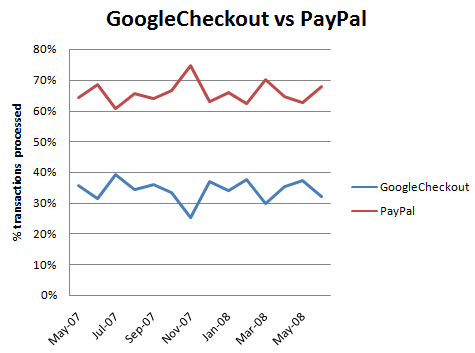
I wrote back into December 2007 that 70% of my customers prefer PayPal over GoogleCheckout, given the choice. I re-checked the figures today to see if GoogleCheckout was gaining traction with my customers. It isn’t.

% of UK customers[1] choosing PayPal vs GoogleCheckout by month

I’m glad. Despite PayPal’s recent flakiness (since improved) and higher transaction fees[2], I still prefer them as a payment processor due to Google’s confidential email option (which a pain in the butt for support), lack of multi-currency support, chargeback fees and slow processing of many orders. It is useful to have an alternative to PayPal though.

[1] GoogleCheckout only lets me accept payment in pounds sterling, so I only offer it to UK customers.

[2] For a £19.95 transaction PayPal charges me £0.68 and GoogleCheckout charges me £0.45. But Google currently refunds transaction fees for 10x my adwords spend, meaning I don’t pay any transaction fees at all to Google in a typical month.

Consulting testimonial: Tudumo

After I did some consulting for Richard Watson of Tudumo.com he was kind enough to send me this testimonial:

Once I’d finished with the major part of Tudumo development, I got to a point where I needed to take stock of the situation. Rather than making every mistake myself, I thought it would be much better to hire Andy to take a look at my application and essentially ask him “if this was yours, what would you do now?”

It turns out that’s exactly what his approach to your business is. We had a couple of phone discussions after which he scoured my approach and website, applying his experience to my situation.

I was left with a six-page action list, which serves me in a number of ways:
1) It validates what I was doing right
2) Points me in some new directions
3) Gives me an actionable set of tasks which serve as a periodic reminder of which tasks will give me most benefit.
4) A few Andy-only tricks that I hope my competitors don’t get!

In fact, forget it – big waste of time. ;0)

If you are looking for a simple and slick TODO list application I recommend you take a look at Tudumo.

Could your business use an independent and experienced perspective?

Using defence in depth to produce high quality software

‘Defence in depth’ is a military strategy where the attacker is allowed to penetrate the defender’s lines, but is then gradually worn down by successive layers of defences. This strategy was famously used by the Soviet Army to halt the German blitzkrieg at the battle of Kursk, using a vast defensive network including trenches, minefields and gun emplacements. Defence in depth also has parallels in non-military applications. I use a defence in depth approach to detect bugs in my code. A bug has to pass through multiple layers of defences undetected before it can cause problems for my customers.

Layer 1: Compiler warnings

Compiler warnings can help to spot many potential bugs. Crank your compiler warnings up to maximum sensitivity to get the most benefit.

Layer 2: Static analysis

Static analysis takes over where compiler warnings leave off, examining code in great detail looking for potential errors. An example static analyser is Gimpel PC-Lint for C and C++. PC-Lint performs hundreds of checks for known issues in C/C++ code. The flip side of it’s thoroughness is that it can be difficult to spot real issues amongst the vast numbers of warnings and it can take some time to fine-tune the checking to a useful level.

Layer 3: Code review

A fresh set of eyes looking at your code will often spot problems that you didn’t see. There are various ways to go about this, including formal Fagan inspections, Extreme Programming style pair programming and informal reviews. There is quite a lot of documented evidence to suggest that this is one of the most effective ways to find bugs. It is also an excellent way to mentor less experienced programmers. But it is time consuming and can be hard on the ego of the person being reviewed. Also it isn’t really an option for solo developers

Layer 4: Self-checking

Of the vast space of states that a program can occupy, usually only a minority will be valid. E.g. it might makes no sense to set a zero or negative radius for a circle. We can check for invalid states in C/C++ with an assert() macro:

class Circle
{
    public:
        void setRadius( double radius );
    private:
        double m_radius;
}

void Circle::setRadius( double radius )
{
    assert( radius > 0.0 );
    m_radius = radius;
}

The program will now halt with a warning message if the radius is set inappropriately. This can be very helpful for finding bugs during testing. Assertions can also be useful for setting pre-conditions and post-conditions:

    void List::remove( Item* i )
    {
        assert( contains( i ) );
        ...
        assert( !contains( i ) );
    }

Or detecting when an unexpected branch is executed:

    switch ( shape )
    {
        case Shape::Square:
            ...
        break;

        case Shape::Rectangle:
            ...
        break;

        case Shape::Circle:
            ...
        break;

        case Shape::Ellipse:
            ...
        break;

        default:
            assert( false ); // shouldn't get here
        break;
    }

Assertions are not compiled into release versions of the software, which means they don’t incur any overhead in production code. But this also means:

  • Assertions are not a substitute for proper error handling. They should only be used to check for states that should never occur, regardless of the program input.
  • Calls to an assert() must not change the program state, or the debug and release versions will behave differently.

Different languages have different approaches, for example pre and post conditions are built into the Eiffel language.

Layer 5: Dynamic analysis

Dynamic checking usually involves automatically instrumenting the code in some way so that it’s runtime behaviour can be checked for potential problems such as: array bound violations, reading memory that hasn’t be written to and memory leaks. An example dynamic analyser is the excellent and free Valgrind for Linux. There are a few dynamic analysers for Windows, but they tend to be expensive. The only one I have tried in the last few years was Purify and it was flaky (do IBM/Rational actually use their own tools?).

Layer 6: Unit testing

Unit testing requires the creation of a test harness to execute various tests on a small unit of code (typically a class or function) and flag any errors. Ideally the unit tests should then be executed every time you make a change to the code. You can write your own test harnesses from scratch, but it probably makes more sense to use one of the existing frameworks, such as: NUnit (.NET), JUnit (Java), QUnit (Qt) etc.

According to the Test Driven Development approach you should write your unit tests before you write the code. This makes a lot of sense, but requires discipline.

Layer 7: Integration testing

Integration testing involves testing that different modules of the system work correctly together, particularly the interfaces between your code and hardware or third party libraries.

Layer 8: System testing

System testing is testing the system in it’s entirety, as delivered to the end-user. System testing can be done manually or automatically, using a test scripting tool.

Unit, integration and system testing should ideally be done using a coverage tool such as Coverage Validator to check that the testing is sufficiently thorough.

Layer 9: Regression testing

Regression testing involves running a series of tests and comparing the results to the same input data run on the previous release of the system. Any differences may be the result of bugs introduced since the last release. Regression testing works particularly well on systems that take a single input file and produce a single output file – the output file can just be diff’ed against the previous output.

Layer 10: Third party testing

Different users have different patterns of usage. You might prefer drag and drop, someone else might use right-click a lot and yet another person might prefer keyboard accelerators. So it would be unwise to release a system that has only ever been tested by the developer. Furthermore, the developer inevitably makes all sorts of assumptions about how the software will be used. Some of those assumptions will almost certainly be wrong.

There are a number of companies that can be paid by the day to do third party testing. I have used softwareexaminer.com in the past with some success.

Layer 11: Beta testing

End-user systems can vary in processor speed, memory, screen resolution, video card, font size, language choice, operating system version/update level and installed software. So it is necessary to test your software on a representative range of supported hardware + operating system + installed software. Typically this is done by recruiting users who are keen to try out new features, for example through a newsletter. Unfortunately it isn’t always easy to get good feedback from beta testers.

Layer 12: Crash reporting

If each of the above 11 layers of defence catches 50% of the bugs missed by the previous layer, we would expect only 1 bug in 2,048 to make it into production code undetected. Assuming your coding isn’t spectacularly sloppy in the first place, you should end up with very few bugs in your production code. But, inevitably, some will still slip through. You can catch the ones that crash your software with built-in crash reporting. This is less than ideal for the person whose software crashed. But it allows you to get detailed feedback on crashes and consequently get fixes out much faster.

I rolled my own crash reporting for Windows and MacOSX. On Windows the magic function call is SetUnhandledExceptionFilter. You can also sign up to the Windows Winqual program to receive crash reports via Windows’ own crash reporting. But, after my deeply demoralising encounter with Winqual as part of getting the “works with Vista” logo, I would rather take dance lessons from Steve Ballmer.

Test what you ship, ship what you test

A change of a single byte in your binaries could be the difference between a solid release and a release with a showstopper bug. Consequently you should only ship the binaries you have tested. Don’t ship the release version after only having tested the debug version and don’t ship your software after a bug fix without re-doing the QA, no matter how ‘trivial’ the fix. Sometimes it is better to ship with minor (but known) bugs than to try to fix these bugs and risk introducing new (and potentially much worse) bugs.

Cross-platform development

I find that shipping my software on Windows and MacOSX from a single code base has advantages for QA.

  • different tools with different strengths are available on each platform
  • the Gnu C++ compiler may warn about issues that the Visual Studio C++ compiler doesn’t (and vice versa)
  • a memory error that is intermittent and hard to track down on Windows might be much easier to find on MacOSX (and vice versa)

Conclusion

For the best results you need your layers of checks to be part of your day-to-day development, not something you do just before a release. This is best done by automating them as much as possible, e.g.:

  • setting the compiler to treat warnings as errors
  • performing static analysis and unit tests on code check-in
  • running regression tests on the latest version of the code every night

Also you should design your software in such a way that it is easy to test. E.g. building in log file output can make it much easier to perform regression tests.

Defence in depth can find a high percentage of bugs. But obviously the more bugs you start with the more bugs that will end up in your code. So it doesn’t remove the need for good coding practices. Quality can’t be ‘tested in’ to code afterwards.

I have used all 12 layers of defence above at some point in my career. Currently I am not using static analysis (I must update that PC-Lint licence), code review (I am a solo developer) and dynamic analysis (I don’t currently have a dynamic analyser for Windows or MacOSX). I could also do better on unit testing. But according to my crash reporting, the latest version of PerfectTablePlan has crashed just three times in the last 5000+ downloads (the same bug each time, somewhere deep down in the Qt print engine). Not all customer click the ‘Submit’ button to send the crash reports and crashes aren’t the only type of bug, but I think this is indicative of a good level of quality. It is probably a lot better than most of the other consumer software my customers use[1]. Assuming the crash reporting isn’t buggy, of course…

[1]Windows Explorer and Microsoft Office crash on a daily basis on my current machine.

Microsoft adCenter over reporting conversions

I have long suspected that Microsoft adCenter is over reporting conversions. Here is the confirmation from my adCenter reporting:

I am guessing that the purchaser visited the ‘thank you for your purchase’ page (which contains the conversion tracking script) 5 times, for whatever reason. I can’t think of any other way this situation could occur – the conversion tracking isn’t set up to take account of multiple purchases in one transaction. How difficult would it be to only count the first visit? Google can do it.

Being cynical, perhaps the over reporting suits Microsoft? But it makes it much more difficult for me to assess the real effectiveness of keywords and ads. Another good reason to concentrate my efforts on Google Adwords instead.