 While researching my talk on usability for ESWC2007 I came across this article I wrote some years ago. It has quite a lot of material I would have liked to have included, but there is only so much you can fit into a 60 minute talk. I am putting it here as a supplement to the talk and as a tribute to the late lamented EXE magazine which first published the article in June 1998. EXE went under in 2000 and I can’t find anyone to ask permission to republish it. I think they wouldn’t have minded. It is quite a long article and may be truncated by feed readers. Click through to the site to read the whole article.
It has been said that if users were meant to understand computers they would have been given brains. But, in fairness to users, the problem is often that interfaces are not designed to take account of their strengths and weaknesses. I have struggled with my fair share of dire user interfaces, and I’m supposed to be an expert user.
An interface is, by definition, a boundary between two systems. On one side of a user interface is the computer hardware and software. On the other side is the user with (hopefully) a brain and associated sensory systems. To design a good interface it is necessary to have some understanding of both of these systems. Programmers are familiar with the computer side (it is their job after all) but what about the other side? The brain is a remarkable organ, but to own one is not necessarily to understand how it works. Cognitive psychologists have managed to uncover a fair amount about thought processes, memory and perception. As computer models have played quite a large role in understanding the brain, it seems only fair to take something back. With apologies to psychologists everywhere, I will try to summarise some of the most important theory in the hope that this will lead to a better understanding of what makes a good user interface. Also, I think it is interesting to look at the remarkable design of a computer produced by millions of years of evolution, and possibly the most sophisticated structure in the universe (or at least in our little cosmic neighbourhood).
The human brain is approximately 1.3kg in weight and contains approximately 10,000,000,000 neurons. Processing is basically digital, with ‘firing’ neurons triggering other neurons to fire. A single neuron is rather unimpressive compared with a modern CPU. It can only fire a sluggish maximum of 1000 times a second, and impulses travel down it a painfully slow maximum of 100 meters per second. However, the brain’s architecture is staggeringly parallel, with every neuron having a potential 25,000 interconnections with neighbouring neurons. That’s up to 2.5 x 10^14 interconnections. This parallel construction means that it has massive amounts of store, fantastic pattern recognition abilities and a high degree of fault tolerance. But the poor performance of the individual neurons means that the brain performs badly at tasks that cannot be easily parallelised, for example arithmetic. Also the brain carries out its processing and storage using a complex combination of electrical, chemical, hormonal and structural processes. Consequently the results of processing are probabilistic, rather than deterministic and the ability to store information reliably and unchanged for long periods is not quite what one might hope for.
Perhaps unsurprisingly, the brain has a similar multi-level storage approach to a modern computer. Where a computer has cache, RAM and hard-disk memory (in increasing order of capacity and decreasing order of access speed) the brain has sensory memory, short-term memory and long-term memory. Sensory memory has a large capacity, but a very short retention period. Short-term memory has a very small capacity but can store and retrieve quickly. Long-term memory has a much larger capacity, but storage and retrieval is more difficult. New information from sensory memory and knowledge from long-term memory are integrated with information in short-term memory to produce solutions.

A simple model of memory and problem solving[1].
Sensory memory acts like a huge register, retaining large amounts of sensory data very briefly so that it can be processed into a meaningful form, e.g. to recognise a face, which is transferred to short-term memory. The sensory data is then quickly replaced with new incoming data.
Short-term memory acts like a very small queue with a limited retention period. It can hold only 7±2 items of information, with new items added into short-term memory displacing older ones once this limit has been reached. Items disappear after approximately 30 seconds if not rehearsed. The items of information in short-term memory act as ‘pointers’ to arbitrarily large and complex pieces of information stored in long-term memory. For example the seventh of January is one chunk for me (its my birthday), 2 chunks to you (one for each familiar word) and 14 chunks for a non-English speaker familiar with our alphabet (one for each character). The number 7±2 may seem rather arbitrary, but experimentation shows it is remarkably consistent across a wide range of individuals and cultures. Short-term memory acts as a workspace for problem solving. The more items that are held in short-term memory the longer it takes to process them.
It is important not to overload short-term memory. The limited size of short-term memory is a critical bottleneck in problem solving and one of the main constraints to consider for any user interface (designed for human users at least). Don’t force the user to try to hold lots of items in short-term memory. If they have to think about more than 7±2 items then new items will displace old ones. Also the more items that are in short-term memory the slower their response time will be. Having lots of ‘open’ tasks puts a big burden on short-term memory, so tasks should be grouped into well-defined ‘transactions’. Complex tasks can almost always be broken down into simpler sub-tasks.
Long-term memory acts like a huge network database. It has a complex structure and massive capacity, but storing and retrieving information is slow and not always reliable. Items of information are apparently interconnected and accessed by some form of pointer. Some psychologists believe that long-term memory may be permanent, and only the ability to retrieve it may be lost (a bad case of ‘dangling pointers’ perhaps?). Dreaming may be a side-effect of routine re-structuring of long-term memory (garbage collection?) while we are asleep. Transferring information to long-term memory seems to be a process of encoding the memory and creating pointers to access it. The more often an item of information is accessed the easier it becomes to access in future. Each item of information may be accessible by many different routes. Consequently the context in which information is presented can be important factor in remembering. The more context cues that are available the easier it is to retrieve an item from long-term memory. For example, experiments show that students perform better in exams held in the classroom where they learnt the information than elsewhere. So if an item was presented in a particular font, colour and size, it will be easier to remember its meaning if the same font, colour and size are used.
There is some evidence that image and verbal memories are stored in different parts of the brain. We can often remember the faces of people we have met better than their names. Experiments show that it is easier to remember an image than a concrete word, for example it is easier to remember ‘car’ when shown an image of a car than when shown the word ‘car’. It is also easier to remember a concrete word than an abstract word, for example it is easier to remember the word ‘car’, than the word ‘transport’. This implies that the iconic representation of commands on toolbars has value beyond just looking nice. Also keywords used in a command line interface should where possible be concrete, rather than abstract.
The different types of memory are stored using different physical mechanisms, probably electrical, chemical and structural. As proof of this you can train an animal to run a maze, cool it down to the point where all brain activity ceases and then warm it up again. It will have forgotten how to run the maze, but remember things it learnt days before (I don’t recommend you try this with users). Also some diseases have been observed affect short-term memory without affecting long-term memory. Transfer information from short-term to long-term memory and retrieving it again is not very reliable. It is better to allow the user to select from alternatives rather than force them to commit items to long-term memory and then retrieve them. At work, the interface of our old accountancy package had many short-comings. Projects had to be identified as 5 digit numerical codes, even though alphabetic codes would have been easier to remember. Users also had to enter project numbers from memory, no facility for selecting from available projects was provided. It wouldn’t have taken much effort to produce a better interface design, just a little thought. For example the Microsoft Word print dialog cues the user as to the permitted format for specifying pages to be printed.

A useful aid to memory.
The brain gets its input from the outside world through the senses. Of the senses vision is the most important, with some 70% of all sensory receptors in the eyes. The importance of vision is also reflected in the design of modern computers. Other than the odd beep the computer communicates with the user almost entirely through the VDU. Consequently I will confine the scope of the discussion on the senses to vision alone.
The eye is an impressive sensing device by any standards. Tests show that its is possible for a human eye to detect a candle flame at a range of 30 miles on a dark, still night. This corresponds to detecting a signal as low as a few photons entering the eye. Incoming light is focused onto the retina at the back of the eye, which contains the light receptors. The retina is actually an extension of the brain. Observation of growing embryos shows that the tissue that forms the retina extends from the brain, it is not formed from the tissue that turns into the rest of the eye. The retina contains some 5 million ‘cone’ receptors and 100 million ‘rod’ receptors. The cones are sensitive to colour, while the rods are sensitive to brightness. Some cones are sensitive to red, some to green and some to blue, depending on the pigment they contain. The cones are much more liberally supplied with nerve cells and are able to discern detail, but they don’t function in low light levels. The cones are densest in the centre of the retina, and virtually absent at the outer edge. The fovea centralis, a spot 1 millimetre across at the centre of the retina, contains some 200,000 cones and no rods. The rods only detect light at the blue end of the spectrum, but they are extremely sensitive and can detect a single photon of light. The uneven distribution of rods and cones is easy to test. Look slightly away from this page and try to read it ‘out of the corner of your eye’ – its not possible. Only the fovea has sufficient acuity to discern this level of detail. You may also notice that it is easiest to see poorly illuminated objects out of the corner of your eye. A very dim star, visible out of the corner of your eye, disappears when looked straight at.
Because the fovea is so small we are only able to distinguish detail over a range of approximately 2 degrees. This equates to about 2.5cm at the normal distance from user to VDU. To build up a detailed picture of what is on the screen we have to scan it. It therefore makes sense to have single items on the interface not bigger than 2.5cm, so they can be recognised without have to scan them. Games and simulators that perform real-time rendering are wasting a lot of processing power by rendering the whole picture at the same level of detail. What they should ideally be doing is performing very detailed rendering at the point where the user’s fovea is pointing and progressively less detailed rendering further away from this. This would allow a much more efficient use of available processing power. It is possible to detect where the user is looking by bouncing an infrared beam off their retina. If this technology becomes widely available it could be used to perform differential rendering, with the result appearing much more detailed without any increase in processing power.
The receptors in the retina, in common with other sense receptors, are only sensitive to change. Using special optical equipment it is possible to project a ‘stabilised’ image onto the retina that does not change, regardless of eye movements. A stabilised image fades to a formless grey and is no longer discernible after only 2-3 seconds. It turns out that the constant movement of the eye, originally thought to be an imperfection of the optical system, is essential for sensing unchanging images. Perversely, light has to pass through 9 layers of nerves cells and blood vessels in the retina before it reaches the light receptors (I guess evolution isn’t perfect). Because the network of nerves and bloods vessels is unchanging, we don’t normally perceive it[2]. The practical consequence is that any form of movement, animation, change in intensity or flashing on a user interface is extremely noticeable. Flashing should be used sparingly as it can be distracting and fatiguing to users. Quickly changing text is also difficult to read, this is why, in our digital age, car speedometers remain as analogue dials rather than numerical LEDs. It may be better to put a flashing symbol next to steady text, this draws attention to the text without reducing its legibility. Mosier and Smith[3] recommend a flash rate between 2-5 Hz, with a minimum ‘on’ time of at least 50 percent. Large flashing areas of colour are believed to aggravate epilepsy (particularly at certain frequencies) and should not be used.
While sensation happens in the eye, perception happens in the brain. The receptors in the retina convert the light to electrical signals which they pass to the brain through the optic nerve, a bundle of approximately 1,000,000 neurons. The information is processed in the visual cortex, the surface of the brain at the back of the head. Our perception is incredibly sophisticated, as artificial intelligence researchers have found to their cost. Experiments on the cortex shows that it has evolved with built-in ‘feature detectors’. A feature detector is a neuron that fires for a very particular stimulus. For example, one neuron in the visual cortex may fire if there is a horizontal line at the top-left of the visual field. Next to it will be a neuron that fires for a slightly different orientation, length or position. Additional processing is then carried out to integrate all the information from the different feature detectors.
As you are reading this page your eye is making rapid movements, with your brain recognising the shape of 2-3 words at a time before moving on to the next group of words (the maximum number of words recognised at a time presumably being limited by the size of the fovea). This is apparently being done by information from different feature detectors being integrated very quickly. For example the word ‘FIX’ can be broken down into six straight lines at different positions in the visual field. We are able to recognise this work in about a third of a second, even though the size and font may vary. Shape recognition is therefore incredibly efficient and seems to be one of the best developed features of our visual system. Tests show that objects can be recognised just as well from line drawings as from colour photographs. A cup is recognisable as a cup because of its shape, not because of its colour, orientation etc. Textual representations are not always the best way to convey information. A map, chart, diagram or other form of image will often convey the same information quicker.

The use of icons in Windows Explorer makes it easier to browse document types than would be possible by reading the file extensions.
Tests show that our ability to pick out simple features such as length, orientation, curvature and brightness are carried at a very low level, in parallel. Consequently we can pick out items based on these features in a constant time, regardless of the number of other items in the image. Careful use of these abilities allow a great deal of information to be filtered very rapidly by the user.

The anomalous shape is detected as quickly in b) as in a), even though there are three times as many targets.
But the brain is not so good at integrating (‘conjoining’) different types of feature, for example shape and brightness. It is easy to pick out a black icon or a circular icon, but picking out a black circular icon is more difficult and time consuming.

Time taken to pick out the black circle increases at the number of targets increases.
It follows from this that you should try to distinguish features of the interface by shape or brightness or orientation, but not a combination of these factors.

a) the horizontal and vertical lines are the same length. b) the vertical lines are the same length.
The visual cortex carries out a great deal of processing that we are unaware of, not least of which is turning the image of the world the right way up. Even though we can understand the nature of illusions, our visual system is still fooled. This is because it is not just sensing the world, but trying to interpret it, making use of all sorts of cues and in-built knowlege, and this is happening at a lower level than we can consciously control. You may not have even noticed that there was a deliberate spelling mistake in the last sentence because your perceptual system made a sensible guess.
Although the image projected onto our retina is two dimensional we have very well developed depth perception, our ancestors wouldn’t have been able to swing through the trees without it. Partly this is because having two eyes allows stereoscopic vision, but also because our brain processes lots of other visual cues that produce a sensation of depth, even where it doesn’t exist (for example in a photograph). The main cues are:
- More distant objects are smaller
- More distant objects appear closer to the ‘vanishing point’ created by converging parallels
- More distant objects move across the visual field more slowly
- Superposition, if A overlaps B then A must be closer
- Shadows and highlights
- Chromostereopsis, long wavelength colours (e.g. red) appear closer than shorter wavelength colours (e.g. blue) because shorter wavelength light is refracted more strongly by the lens of the eye (but this is rather weak compared to the other effects)

Use of depth cues make the one shape appear closer than the other.
Using these cues can give a very effective illusion of depth, without specialised equipment such as stereoscopic googles. This built-in depth perception is currently taken advantage of only in a very limited way in most GUI environments, for example the use of highlights and shadows to infer a three dimensional element for controls. Many applications would benefit from a three dimensional representation. For example the structure of a complex web site could be better presented in three dimensions than two. The availability of VRML and other technologies is likely to make three dimensional interfaces increasingly common.

An illusion of depth.
Interestingly it is purely a matter of convention and practise that makes us imagine the light source as at the top-left and see the top button as sticking out and the bottom button as sticking in[4]. If you can also see them the other way around if you try.
Layout is an important feature of an interface. Western users will tend to scan an screen as if they were reading a page, starting from the top-left. Scanning can be made easier by aligning controls in rows. Complex displays can be made easier to scan by adding additional cues, for example a timesheet could have a thicker line denoting the end of each week.
Both layout and similarity can be used to group items on an interface.
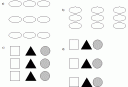
In a) the shapes are perceived as 3 rows, while in b) they are perceived as 3 columns, due to proximity. In c) the shapes are perceived as 3 columns, due to similarity. d) gives a mixed message.
A colour is perceived according to how strongly it activates the red, green and blue cone receptors in our eyes. From this we perceive its intensity (how bright it is), its hue (the dominant wavelength) and saturation (how wide a range of wavelengths make it up). Within the 400-700 nanometer visible range we can distinguish wavelengths 2 nanometers apart. Combined with differing levels of hue and saturation the estimated numbers of colours we can discriminate is 7,000,000. According to the US National Bureau of Standards there are some 7,500 colours with names. But colour should be used sparingly in interfaces. I once worked on an application where a very extrovert student with dubious taste (as evidenced by his choice of ties) had designed the user interface. Each major type of window had a different lurid background colour. This was presumably to make it easy to tell them apart, but the overall effect was highly distracting.
Colour perception, like everything else to do with perception, is complex. Experiments show that how we perceive a colour depends on the other colours surrounding it. If you look through a pinhole at a sheet of green or red paper it doesn’t appear to have a very strong colour. But if you put the sheets next to each other and look at them both through the pinhole the colours appear much stronger. So if you want to make a colour highly visible, put it next to a complementary colour, for example yellow is perceived by red and green cone cells, so to make it more visible put it next to an area of saturated blue.
Colour can be used with text and symbols to add information without making them less legible, as long as a careful choice of colours is used. Some combinations of colours work better than others. Saturated blue appears dimmer to the human eye than other saturated colours and is more difficult to focus on. Blue symbols and text are therefore probably best avoided. However, for the same reasons, blue can make a background that is easy on the eye. Saturated yellow appears brighter than all the other colours for the same intensity.
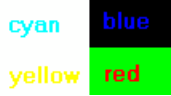
Ill-advised colour combinations.

Better colour combinations.
Designers should remember that a significant proportion of the population has deficient colour vision (some 6% of males and 0.4% of females, the difference being due to the way the defective gene is inherited). This is caused by problems with pigmentation in one or more of the red, green and blue cone cells in the eye. While there are a range of different types of colour deficiency the most common is the inability to distinguish between red and green. This raises some questions about the design of traffic lights (some colour-deficient drivers have to rely on the position, rather than the colour, of the lights). Some individuals may not be able to distinguish one or more primary colours from grey, it is therefore unwise to put a primary colour on a dark background. Allowing users to customise colours goes some way to alleviating this problem.
Other forms of vision defect are also common, as evidenced by the number of people wearing glasses. Something that is easily visible on the programmer’s 17 inch screen may be almost impossible to read on a user’s LCD laptop screen. This problem is further compounded by the fact that eyesight deteriorates with age and programmers tend to younger on average than users. There also seems to be a tendency to use ever smaller fonts even though screen sizes are increasing. Perhaps this is based on the assumption that large fonts make things look childish and unsophisticated, so small fonts must look professional. Ideally the user should be able to customise screen resolution and font sizes.
Meaning can sometimes be conveyed with colour, for example a temperature scale may be graded from blue (cold) to red (hot) as this has obvious physical parallels. But the meaning of colour can be very culturally dependent. For example, red is often used to imply danger in the west, but this does not necessarily carry over into other cultures. The relative commonness of defective colour vision and the limited ability of users to attach meaning to colour means that it should be used as an additional cue, and should not be relied on as the primary means of conveying information. Furthermore colour won’t be visible on a monochrome display (now relatively rare) or a monochrome printer (still very common).
Humans are good at recognising patterns, making creative decisions and filtering huge amounts of information. Humans are not so good at arithmetic, juggling lots of things at once and committing them to long-term memory. Computers are the opposite. A good interface design should reflect the respective strengths and weaknesses of human and computer. Just as a well crafted graphical user interface will minimise the amount of machine resources required to run it, it should also minimise the amount of brain resources required to use it, leaving as much brain capacity as possible for the user to solve their actual problem.
[1] After “Psychology”, 2nd Ed, C.Wade and C.Tavris.
[2] However it can be seen under certain conditions. Close one eye and look through a pinhole in a piece of card at a well illuminated sheet of white paper. If you waggle the card from side to side you start to see the network of blood vessel.
[3] “Guidelines for Designing User Interface Software” by Smith and Mosier (1986). Several hundred pages of guidelines for user interface design. They betray their 80’s US Air Force sponsored origins in places, but are still excellent. For the dedicated.
[4] I have since found out that this may not be true. Our brains appeared to be hardwired to assume that the lighting comes from above. For more details see: “Mind Hacks” T.Stafford & M.Webb (2005).


 I have just had my first charge-back through GoogleCheckout. I shouldn’t moan at one charge-back in 8 months use as my secondary payment processor – except:
 Some years back my wife bought a PC and got a ‘free’ inkjet printer with it. It was a really lousy printer, but hey, it was free. When it ran out of ink we tried to get a new inkjet cartridge, but the cheapest set of cartridges we could find was £80. That was 4 times the price of other comparable cartridges at the time. Some further research showed that you could buy the printer for £20 – with cartridges! Their ugly sales tactics didn’t work. We threw it in the dustbin and bought an Epson inkjet, which gave years of sterling service using third party sets of cartridges costing less than £10.


 I have been using the


 The Internet is a cornucopia of useful resources for software developers and marketers. As well as all the documentation, forums, blogs and wikis there are some great audio and video resources. Here are some of my favourites:
 The Business of Software blog has published the results of a survey of 96


