Category Archives: software

Google Adwords: improving your ads

google adwordsOne of the keys to success in Google Adwords (and other pay per click services) is to write good ad copy. This isn’t easy as the ads have a very restrictive format, reminiscent of a haiku:
  • 25 character title
  • 2×35 character description lines
  • 35 character display url

Whats more, there are all sorts of rules about punctuation, capitalisation, trademarks etc. You will soon find out about these when you write ads. Most transgressions are flagged immediately by Google algorithms, others are picked up within a few days by Google staff (what a fun job that must be).

Google determines the order in which ads appear in their results using a secret algorithm based on how much you bid, how frequently people click your ads and possibly other factors, such as how long people spend on your site after clicking. Nobody really knows apart from Google, and they aren’t saying. The higher your click frequency, generally the higher your ad will appear. The higher your ad appears in the results, generally the more clicks you will get. So writing relevant ads is very important. This means that each adgroup should have a tightly clustered group of keywords and the ads should be closely targeted to those keywords.

There is no point paying for clicks from people who aren’t interested in your product, so you need to clearly describe what you are offering in the few words available. For example you might want to have a title “anti-virus software” instead of “anti-virus products” to ensure you aren’t paying for useless clicks from people looking for anti-viral drugs (setting “drugs” as a negative keyword would also help here).

I have separate campaigns for separate geographic areas. Each campaign contains the same keywords in the same adgroups, but with potentially different bid prices and ads. This allows me to customise the bid prices and ads for the different geographic areas. For example I can quote the £ price in a UK ad and the $ price in a US ad. Having separate campaigns for separate geographic areas is a hassle, but it is manageable, especially using Google Adwords editor.

Writing landing pages specific to each adgroup can also help to increase your conversion rate. It is worth noting that the ad destination url doesn’t have to match the display url. For example you could have a destination url of “http://www.myapp.com/html/landingpage1.html?ad_id=123” and a display url of “www.myapp.com/freetrial”.

Obviously what makes for good ad copy varies hugely with your market. Here are some things to try:

  • a call to action (e.g. “try it now!”)
  • adding/removing the price
  • different capitalisation and punctuation
  • keyword insertion (much beloved of EBay)
  • changing the destination url

But, as always, the only way to find out what really works is testing. Google have made this pretty easy with support for conversion tracking and detailed reporting. I run at least 2 ads in each adgroup and usually more. Over time I continually kill-off under-performing ads and try new ones. Often the new ads will be created by slight variations on successful ads (e.g. changing punctuation or a word) or splicing two successful ads together (e.g. the title from one and the body from another). This evolutionary approach (familiar to anyone that has written a genetic algorithm) gradually increases the ‘fitness’ of the ads. But you need to decide how to measure this fitness. Often it is obvious that one ad is performing better than another. But sometimes it can be harder to make a judgment. If you have an ad with a 5% click-through rate (CTR) and 0.5% conversion rate is this better than an ad with a 1% click-through rate and a 2% conversion rate? One might think so ( 5*0.5 > 1*2 ) but this is not necessarily the case. I think the key measure of how good an ad is comes from how much it earns you for each impression your keywords get.

I measure the fitness by a simple metric ‘profit per thousand impressions’ (PPKI) where, for a given time period:

PPKI = ( ( V * N ) – C ) / ( I / 1000 )

V = value of a conversion (e.g. product sale price)

N = number of conversions (e.g. product sales) from the ad

C = total cost of clicks for the ad

I = impressions for the ad

Say your product sells for $30. Over a given period you have 2 ads in the same adgroup that each get 40k impressions and clicks cost  an average of $0.10 per click.

  • ad1 has a CTR of 5%, a conversion rate of 0.5% and gets 10 conversions, which gives PPKI=$2.5 per thousand impressions
  • ad2 has a CTR of 1%, a conversion ratio of 2% and gets 8 conversions, which gives PPKI=$5 per thousand impressions

So ad2 made, on average, twice the profit per impression despite the lower number of conversions. Given this data I would replace ad1 with a new ad. Either a completely new ad or a variant of ad2.

PPKI has the advantage of being quantitative and simple to calculate. You can just export your Google Adwords ‘Ad Performance’ reports to Excel and add a PPKI column. Some points to bear in mind:

  • Selling software isn’t free. You may want to subtract the cost of support, CD printing & postage, ecommerce fees, VAT etc from the sale price to give a more accurate figure for the conversion value.
  • PPKI doesn’t take account of the mysterious subtleties of Google’s ‘quality score’. For example an ad with low CTR and high conversion rate might conceivably have a good PPKI but a poor quality score. This could result in further decreases in CTR over time (as the average position of the ad drops) and rises in minimum bid prices for keywords.
  • PPKI is a simple metric I have dreamt up, I have no idea if anyone else uses it. But I believe it is a better metric than cost per conversion, or any of the other standard Google metrics.

To ensure that all your ads get shown evenly select ‘Rotate: Show ads more evenly’ in your Adwords campaign settings. If you leave it at the default ‘ Optimize: Show better-performing ads more often’ Google will choose which ads show most often. Given a choice between showing the ads that make you most money and the ads which make Google most money, which do you think Google will choose?

Text ads aren’t the only type of ads. Google also offer other types of ads, including image and video ads. I experimented with image ads a few years ago, but they got very few impressions and didn’t seem worth the effort at the time. I may experiment with video ads in the future.

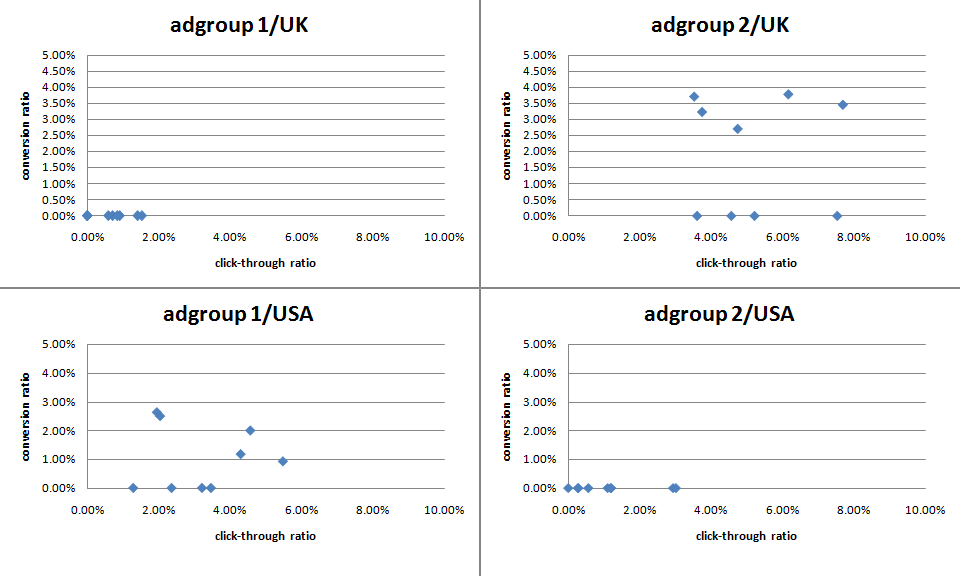
The effectiveness of ads can vary greatly. Back in mid-December I challenged some Business Of Software forum regulars to ‘pimp my adwords’ with a friendly competition to see who could write the best new ads for my own Google Adwords marketing. The intention was to inject some fresh ‘genes’ into my ad population while providing the participants with some useful feedback on what worked best. Although it is early days, the results have already proved interesting (click the image for an enlargement):

adwords ad results

The graph above shows the CTR v conversion ratio of 2 adgroups, each running in both USA and UK campaigns. Each blue point is an ad. The ads, keywords and bid prices for each ad group are very similar in each country (any prices in the ads reflect the local currency for the campaign). Points to note:

  • There were enough clicks for the CTR to be statistically significant, but not for the conversion rate (yet).
  • The CTRs vary considerably within the same campaign+adgroup. Often by factor of more than 3.
  • Adgroup 1 performs much better in the USA than in the UK. The opposite is true for adgroup 2.
  • Adgroup 1 for the USA shows an inverse correlation between CTR and conversion rate. I often find this is the case – more specific ads mean lower CTR but higher conversion rates and higher profits.

‘Pimp my adwords’ will continue for a few more months before I declare a winner. I will be reporting back on the results in more detail and announcing the winner in a future post. Stay tuned.

Oryx Digital is diversifying

BBC microI first became interested in programming in about 1978, at the age of 12. I can recall the exact moment. I was in a classroom at The Royal Hospital School watching a very basic demo (written in BASIC) of a ball bouncing around a screen on an RM-380Z. Actually it wasn’t a ball, it was a single pixel. But the screen resolution was so low it was easy enough to see from the back of the classroom. Computers with floppy drives were rather expensive for schools in 1978, but some pupils from the school had won it in a competition. I was intrigued – how did it work? The teacher giving the demonstration (Mr Albert) encouraged my early interest and a few years later my grandmother was generous enough to buy our family an Acorn BBC B computer. My future path was set.

30 years later, including 22 years as a professional software developer, I am still fascinated by software. Experience showed me programming skills were necessary, but far from sufficient, to produce successful commercial software. So my interests have grown from programming to include the whole nascent discipline of software engineering. I have also become increasingly interested in the effective marketing of software. Many developers recoil with horror from marketing, but I want my software to make money and be used by lots of people. This requires good marketing as well as a good product. In my experience talented software marketers are even harder to find than talented software developers, so I have learned as much as I can about marketing software. It is actually quite a challenging and creative field.

3 years ago I set up my own one-man company, Oryx Digital, to create software products and offer consulting services to other software companies. Since then I have been extremely busy developing and marketing my product, PerfectTablePlan, which has gone from strength to strength. I released PerfectTablePlan v3.1.1 for Windows and Mac OS X a few days ago. I am very pleased with this new version, which has over 50 improvements and new features. The response from customers has been very favourable and the software appears to be very stable – no automatic crash reports (yet). It has grown far beyond my original ideas and now weighs in at around 100K lines of C++ and 200 pages of user documentation. In my (biased) opinion it is way ahead of any of it’s competitors.

Although PerfectTablePlan remains my main focus, I feel now is a good time to diversify a little. So I am now making myself available a few days a month for consultancy to other software companies, large and small. Do you need a new perspective on your product development and marketing? Perhaps I can help?

Meanwhile I have already started thinking about PerfectTablePlan v4. No rest for the wicked…

Site uptime monitoring

siteuptimeMy PerfectTablePlan website and all the associated websites (such as http://www.weddingtableplan.com) have gone down three times this week. Sigh. The first time they went down for 5 hours, the second time for 3.5 hours and the third time for 6 hours. Perhaps they have been overdoing the festivities at my ISP, 1and1.co.uk . I am not impressed. Somebody needs a good kick up the arse.

To rub salt into the wound they even had the cheek to put up parking pages with ads in place of my sites. Some of these ads were for my own sites, which also displayed parking pages  – with more ads. So 1and1 were potentially taking money off me through adwords at the same time! I have a feeling 1and1 and I may be parting company in the not too distant future.

I am now setting up a copy of my site with a different ISP. If (when?) the site goes down again I should be able to point the DNS to the backup ISP.

At least I found out about it quickly due to site monitoring service www.siteuptime.com . I use their free service, which is adequate for my needs at present. Are you monitoring your site(s)? Do you have a back-up plan?

Be nice Microsoft

This is what you see when you try to log on to the Microsoft Partners website using my preferred browser, FireFox:

techsmithwor1047.gif

Despite their charm offensive and attempts to be more open, old habits die hard.

Installing MacOSX 10.5 (Leopard) on an external harddisk

install macosx 10.5 leopardI need to support both MacOSX 10.4 (Tiger) and 10.5 (Leopard) for the latest release of PerfectTablePlan. I could have created a new partition on the current harddisk for 10.5, but apparently you can’t do that without erasing the whole disk. I really didn’t want to mess with my existing 10.4 setup, so I purchased a 320GB WD MyBook USB/Firewire external harddisk to install 10.5 on to. 320GB for £75, bargain! But I had quite a bit of trouble installing Leopard on to it. After about the tenth time looking at a “Mac OS X could not be installed on your computer. The installer cannot prepare the volume for installation.” message I finally got it working. In case anyone else gets stuck, here are some hints:

  • When you set up the new harddisk partitions using Disk Utility make sure you choose Apple Partition Map using the Options button (it may be set to Master Boot Record if the disk is shipped set-up for Windows).
  • Disconnect the harddisk USB cable. Just use the Firewire cable.

I hope this saves someone else a few hours. Thanks to Jeff B for a hint that got me moving in the right direction.

Optimising your application

When I first released PerfectTablePlan I considered 50-200 guests as a typical event size, with 500+ guests a large event. But my customers have been using the software for ever larger events, with some as large as 3000 guests. While the software could cope with this number of guests, it wasn’t very responsive. In particular the genetic algorithm I use to optimise seating arrangements (which seats people together or apart, depending on their preferences) required running for at least an hour for the largest plans. This is hardly surprising when you consider that seating assignment is a combinatorial problem in the same NP-hard class as the notorious travelling salesman problem. The number of seating combinations for 1000 guests in 1000 seats is 1000!, which is a number with 2,658 digits. Even the number of seating combinations for just 60 guests is more than the number of atoms in the known universe. But customers really don’t care about how mathematically intractable a problem is. They just want it solved. Now. Or at least by the time they get back from their coffee. So I made a serious effort to optimise the performance in the latest release, particularly for the automatic seat assignment. Here are the results:

ptp308_vs_ptp_310.png

Total time taken to automatically assign seats in 128 sample table plans varying in size from 0 to 1500 guests

The chart shows that the new version automatically assigns seats more than 5 times faster over a wide range of table plans. The median improvement in speed is 66%, but the largest plans were solved over ten times faster. How did I do it? Mostly by straightening out a few kinks.

Some years ago I purchased my first dishwasher. I was really excited about being freed from the unspeakable tyranny of having to wash dishes by hand (bear with me). I installed it myself – how hard could it be? It took 10 hours to do a wash cycle. Convinced that the dishwasher was faulty I called the manufacturer. They sent out an engineer who quickly spotted that I had kinked the water inlet pipe as I had pushed the dishwasher into place. It was taking at least 9 hours to get enough water to start the cycle. Oops. As soon as the kink was straightened it worked perfectly, completing a cycle in less than an hour. Speeding up software is rather similar – you just need to straighten out the kinks. The trick is knowing where the kinks are. Experience has taught me that it is pretty much impossible to guess where the performance bottlenecks are in any non-trivial piece of software. You have to measure it using a profiler.

Unfortunately Visual Studio 2005 Standard doesn’t seem to include profiling tools. You have to pay for one of the more expensive versions of Visual Studio to get a profiler. This seems rather mean. But then again I was given a copy of VS2005 Standard for free by some nice Microsofties – after I had spent 10 minutes berating them on the awfulness of their “works with vista” program (shudder). So I used an evaluation version of LTProf. LTProf samples your running application a number of times per second, works out which line and function is being executed and uses this to build up a picture of where the program is spending most time.

After a bit of digging through the results I was able to identify a few kinks. Embarrassingly one of them was that the automatic seat assignment was reading a value from the Windows registry in a tight inner loop. Reading from the registry is very slow compared to reading from memory. Because the registry access was buried a few levels deep in function calls it wasn’t obvious that this was occurring. It was trivial to fix once identified. Another problem was that some intermediate values were being continually recalculated, even though none of the input values had changed. Again this was fairly trivial to fix. I also found that one part of the seat assignment genetic algorithm took time proportional to the square of the number of guests ( O(n^2) ). After quite a bit of work I was able to reduce this to a time linearly proportional to the number of guests (O(n) ). This led to big speed improvements for larger table plans. I didn’t attempt any further optimisation as I felt was getting into diminishing returns. I also straightened out some kinks in reading and writing files, redrawing seating charts and exporting data. The end result is that the new version of PerfectTablePlan is now much more usable for plans with 1000+ guests.

I was favourably impressed with LTProf and will probably buy a copy next time I need to do some optimisation. At $49.95 it is very cheap compared to many other profilers (Intel VTune is $699). LTProf was relatively simple to use and interpret, but it did have quirks. In particular, it showed some impossible call trees (showing X called by Y, where this wasn’t possible). This may have been an artefect of the sampling approach taken. I will probably also have a look at the free MacOSX Shark profiler at some point.

I also tried tweaking compiler settings to see how much difference this made. Results are shown below. You can see that there is a marked difference with and without compiler optimisation, and a noticeable difference between the -O1 and -O2 optimisations (the smaller the bar, the better, obviously):

vs2005_optimisation_speed.png

Effect of VS2005 compiler optimisation on automatic seating assignment run time

Obviously the results might be quite different for your own application, depending on the types of calculations you are doing. My genetic algorithm is requires large amounts of integer arithmetic and list traversal and manipulation.

The difference in executable sizes due to optimisation is small:

vs2005_optimisation_size.png

I tried the two other optimisation flags in addition to -O2.

  • /OPT:NOWIN98 – section alignment does not have to be optimal for Windows 98.
  • /GL – turns on global optimisation (e.g. across source files, instead of just within source files).

Neither made much noticeable difference:

vs2005_additional_opt.png

However it should be noted that most of the genetic algorithm is compiled in a single file already, so perhaps /GL couldn’t be expected to add much. I compared VC++6 and VS2005 version of the same program and found that VS2005 was significantly faster[1]:

vc6_vs_vs2005_optimisation_speed1.png

I also compared GCC compiler optimisation for the MacOSX version. Compared with VS2005 GCC has a more noticeable difference between optimised and unoptimised, but a smaller difference between the different optimisations:

gcc_optimisation_speed.png

Surprisingly -O3 was slower than -O2. Again the effect of optimisation on executable size is small.

gcc_optimisation_size2.png

I also tested the relative speeds of my 3 main development machines[2]:

relative-machine-speed.png

It is interesting to note that the XP box runs the seat assignment at near 100% CPU utilisation, but the Vista box never goes above 50% CPU utilisation. This is because the Vista box is a dual core, but my the seat assignment is currently only single threaded. I will probably add multi-threading in a future version to improve the CPU utilisation on multi-core machines.

In conclusion:

  • Don’t assume, measure. Use a profiler to find out where your application is spending all its time. It almost certainly won’t be where you expected.
  • Get the algorithm right. This can make orders of magnitude difference to the runtime.
  • Compiler optimisation is worth doing, perhaps giving a 2-4 times speed improvement over an application built without compiler optimisation. It probably isn’t worth spending too much time tweaking compiler settings though.
  • Don’t let a software engineer fit your dishwasher.

Further reading:

“Programming pearls” by Jon Bentley a classic book on programming and algorithms

“Everything is fast for small n” by Jeff Atwood on the Coding Horror blog

[1] Not strictly like-for-like as the VC++6 version used dynamic Qt libraries, while the VS2005 version used static Qt libraries.

[2] I am assuming that VS2005 and GCC produce comparably fast executables when both set to -O2.

The software awards scam (update)

This is an update on my The software awards scam post in August.  Below is an updated list of the download site awards I ‘won’ for software that didn’t even run. 23 in total, and that is only the ones I am aware of.

awardmestars awards

The article got a surprising amount of interest, including front page mentions on reddit, digg, slashdot and wordpress and a mention in the Guardian newspaper (they were too mean to give the URL of the article). There were also some entertaining reviews posted on download sites. The page has so far had over 150,000 hits, 263 comments and has a Google page rank of 6. I hope this exposure will make a small contribution to ending this sordid little practice.

It has been quite instructive to be on the receiving end of the news, albeit in a small way. Much of the commentary was inaccurate. One ‘journalist’ from ZDNET Belgium/Holland even managed to get both my first name and last name wrong, which is quite a feat considering we had exchanged several emails. I don’t know how many other mistakes he made, because the rest of the article was in Dutch or Flemish. I wonder if the mainstream media is much better. Definitely don’t believe everything you read.

First charge-back from GoogleCheckout

google_checkout2.gifI have just had my first charge-back through GoogleCheckout. I shouldn’t moan at one charge-back in 8 months use as my secondary payment processor – except:

  • the credit card address was in the UK, the IP address was in the Netherlands and the email address was .ru (Russian Federation)
  • the payment failed authorisation twice, before succeeding a third time

Despite the above, Google apparently just processed the payment automatically, without referring it for further checks. How many Google Phds does it take to write a scoring system that can figure out that this was a suspect transaction? To rub a bit more salt in the wound Google have debited a £7.00 charge-back fee on top of refunding the payment.

I guess Google must need the money.

Beware upgradeware

fungi.jpgSome years back my wife bought a PC and got a ‘free’ inkjet printer with it. It was a really lousy printer, but hey, it was free. When it ran out of ink we tried to get a new inkjet cartridge, but the cheapest set of cartridges we could find was £80. That was 4 times the price of other comparable cartridges at the time. Some further research showed that you could buy the printer for £20 – with cartridges! Their ugly sales tactics didn’t work. We threw it in the dustbin and bought an Epson inkjet, which gave years of sterling service using third party sets of cartridges costing less than £10.

When I started my company I had a thousand decisions to make. One of them was which software to use to create and maintain my new product website. It just so happened that my new ISP (1and1.co.uk) was offering a bundle of ‘free software worth £x’ when you signed up (I forget the amount). It included a web design package (NetObjects Fusion 8 ) and an FTP package (WISE-FTP). Hoorah, free (as in beer) software and 2 less decisions to make. I was weak. Instead of spending time checking out reviews and evaluating competitors, I just installed and starting using them. It didn’t occur to me that they might be using the same sales tactics as the manufacturer of the lousy printer. In this imperfect world, if something appears too good to be true, it usually is. And so it was in this case. I grew to hate both these pieces of software.

WISE-FTP was just flaky. It kept crashing and displaying German error messages, despite the fact that I had installed the English version. No problem, I just uninstalled and installed FileZilla which is free (as in beer and speech), stable and does everything I need and more.

NetObjects Fusion was flaky and hard to use. By saving after every edit I could minimise the effects of the regular crashes and I assumed that I would learn how to work around other problems in time. But I never did. By the time I decided that the problems were more due to the shortcomings of NetObjects Fusion as a software package, rather than my (many) shortcomings as a web designer, it was a little late. I had already created an entire website, which was now stored in NetObjects Fusion’s proprietary database. Some of the bugs in NetObjects Fusion are so major that one wonders how much testing the developers did. My ‘favourite’ is the one where clicking a row in a table causes the editor to scroll to the top the table. This is infuriating when you are editing a large table (my HTML skills haven’t yet reached the 21st century).

In despair I eventually paid good money to upgrade to NetObjects Fusion 10. Surely it would be more stable and less buggy after two major version releases? Bzzzzt, wrong. The table scrolling bug is still there and it crashed 3 times this morning in 10 minutes. Also, every time I start it up the screen flashes and I get the ominous Vista warning message “The color scheme has been changed to Windows Vista Basic. A running program isn’t compatible with certain visual elements of Windows”. Even just trying to buy the software upgrade off their website was a confusing nightmare. The trouble is that it is always easier in the short-term to put up with NetObject Fusion’s many shortcomings than to create the whole site anew in another package.

For want of a better term I call this sort of software ‘upgradeware’ – commercial software that is given away free in the hope that you will buy upgrades. This is quite distinct from the ‘try before you buy’ model, where the the free version is crippled or time-limited, or freeware, for which there is no charge ever. Upgradeware is the software equivalent of giving away a printer in the hope that you will buy overpriced cartridges. Only it is less risky, as the cost of giving away the software is effectively zero. It seems to be a favoured approach for selling inferior products and it is particularly successful when there is some sort of lock-in. It certainly worked for NetObjects in my case.

Norton Anti-virus are the masters of upgradeware. Norton Anti-virus frequently comes pre-installed on new PCs with a free 1-year subscription. The path of least resistance is to pay for upgrades when your free subscription runs out. By doing these deals with PC vendors, Symantec sell vast amounts of subscriptions, despite the fact that Norton Anti-virus has been shown in test after test to be more bloated and less effective than many of its competitors. And if you think Norton Anti-virus doesn’t have any lock-in, just try uninstalling it and installing something else. It is almost impossible to get rid of fully. Last time I tried I ended up in a situation where it said I couldn’t uninstall it, because it wasn’t installed, and I couldn’t re-install, because it was still installed.

I feel slightly better now that I have had a rant about some of my least favourite software. But there is also a more general point – ‘free’ commercial software can end up being very expensive. Time is money and I hate to think how much time I have wasted struggling with upgradeware. So be very wary of upgradeware, especially if there is any sort of lock-in. When I purchased a new Vista PC, the first thing I did was to reinstall Vista to get rid of all the upgradeware that Dell had installed (Dell wouldn’t supply it to me without it). You could also draw the alternative conclusion that upgradeware might be a good approach for making money from lousy software. But hang your head in shame if you are even thinking about it. It would be better for everyone if you just created a product that was good for customers to pay for it up-front.

Ps/ If you fancy the job of converting www.perfecttableplan.com to beautiful sparkly clean XHTML/CSS and your rates are reasonable – feel free to contact me with a quote.