stackoverflow.com goes public

Jeff Atwood and Joel Spolsky’s programmer’s Q&A site stackoverflow.com has now gone from private beta to public beta today.

I have been one of the private beta testers. I find the badges a bit patronising (I’m a 42 year old professional, not a boy scout), but otherwise I have been very impressed with the site. I think it is going to be a great resource for developers – assuming they can control the group dynamics of a large number of developers (the ‘herding cats problem’) while keeping the spammers at bay. A lot of thought has gone into the reputation system, voting, badges etc so it will be interesting to see what behaviour emerges.

Go and take it for a spin. It has been designed to be ‘low friction’ – you don’t even need a login to get started.

Should I give free upgrades for life?

There are any number of different licensing models. For commercial software the main ones are:

  1. subscription
  2. outright purchase, with annual maintenance
  3. outright purchase, with free minor upgrades and paid major upgrades
  4. outright purchase, with free major and minor upgrades for life

Subscription payments and purchase + maintenance are nice, if you can get them. They give a more predictable cash flow for a business and you can generally charge a higher lifetime price than you can with a single payment. But this isn’t appropriate for all types of software. For example, it doesn’t make much sense for lower priced desktop software. Assuming subscription or purchase+maintenance isn’t an option, the question boils down to – should we charge for major upgrades?

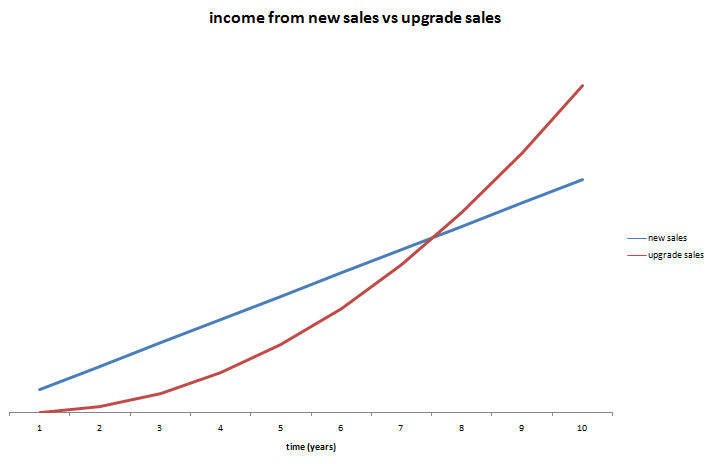
Let’s look at the numbers for a simple (contrived) example. AcmeSoft sells 1000 licences of v1 of their product in year 1, 2000 licences of v2 of their product in year 2, 3000 licences of v3 of their product in year 3 etc. Each year 50% of the customers who bought the previous version (new or as an upgrade) pay to upgrade to the latest version. The upgrade costs them 50% of the initial purchase. How much is the upgrade revenue worth? We can create a simple model in Excel:

Income new licences (blue) vs income from upgrades (red). Click to enlarge.

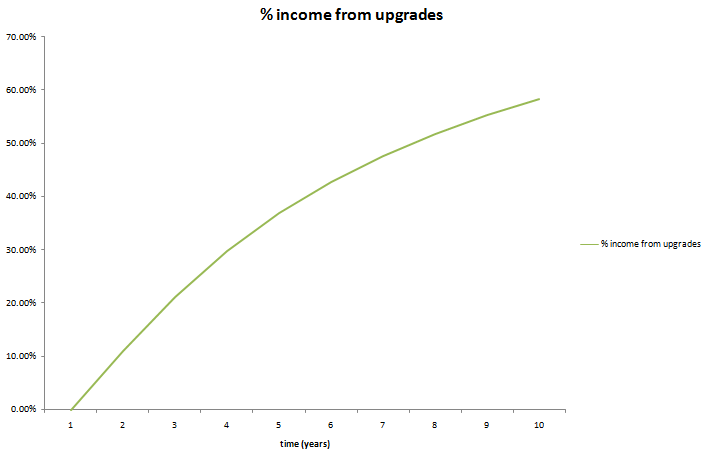
Percentage of annual income from upgrades. Click to enlarge.

In year 8 the upgrade income is actually worth more the new licence income. By year 10 upgrades are worth some 60% of yearly income for the product. If the product has a 10 year lifespan, nearly 50% of the total income from the product will be from upgrades. So it only makes commercial sense to give free upgrades for life if this will at least double the conversion ratio[1]. This seems highly unlikely. You can always try changing your upgrade policy and measure what effect it has on your conversion rate. Not much, I would guess (if anyone has tried it, I would be interested to know the results).

Even in a more pessimistic model where only 30% of customers upgrade and they only pay 30% of the new licence fee, upgrades still account for nearly 25% of total income over 10 years. You can download the spreadsheet and play with the parameters yourself.

Upgrade income becomes particularly important when:

  • A product has a long life span.
  • Customers are very likely to upgrade to a new version.
  • There is little growth in new sales.

In the worst case you could end up with a product with a huge customer base built up over a long period, but which makes very few new sales as it has saturated the market. Free major upgrades would mean that each major release is then going to result in large expense (developent and support) but very little income. Microsoft must be very happy they didn’t offer free upgrades for life on Windows or Office!

I don’t see anything unreasonable about charging for major upgrades. The vendor has to do additional work to add the new features and existing customers can choose whether the new features are worth the upgrade fee. However customers have certain (not unreasonable) expectations for paid upgrades:

  • The fact that the customer is expected to pay for major upgrades needs to be made clear before purchase.
  • Any major bugs in version n should be fixed before releasing version n+1.
  • A major upgrade should have significant new features.
  • Major upgrades should not be released more than once every 12 months.
  • The upgrade fee should be reasonable. Around 40% of the cost of a new licence seems typical.
  • There should be a grace period for free upgrades. E.g. If I buy v1 of a product on 01-Jan I don’t expect to have to pay an upgrade fee for v2 released on 02-Jan. Typically this grace period is 3-6 months.

If you are offering free upgrades for life currently, you can change your policy to paid major upgrades. But, obviously, you will need to honour free upgrades for everyone who purchases before the change of policy.

There are some, apparently successful, companies that offer free upgrades for life (Axialis for example). But I have heard many tales of small software vendors regretting their initial decision to give free upgrades for life. The easiest customer to sell to is the one you already have. If you don’t charge for major upgrades, are you leaving large amounts of money on the table?

[1]Ignoring inflation, interest etc.

Google Chrome

Google continue on their path to world dominance by releasing their own browser today. It is open source and builds on elements of Apple Webkit and Mozilla Firefox. Currently the beta is only available for Windows. Whether this is going to help web app developers by adding more capabilities and setting new de facto standards, or hurt them by further fragmenting the market and creating more compatibility issues, remains to be seen. For more details see the Google Chrome blog post or the Google Chrome ‘comic book’.

Consulting testimonial: Schemax Calendar

Simon Shutter of Schemax Calendar was kind enough to send me this testimonial after I did a day of consulting for him:

I recently hired Andy Brice to review Schemax Calendar. To make the most of his time (and my money) I gave Andy a summary document of the product covering everything from technical architecture to marketing. We had two highly productive discussions via Skype and Andy provided an excellent report replete with helpful advice and insight. Throughout the experience, and despite an eight hour time difference, Andy was extremely professional. He was a great listener, constructive in his feedback, generous with his wisdom and clear with his recommendations.

Simon Shutter, Schemax Design

If you are part of a team that uses Microsoft Outlook I recommend you look at the schedule visualisation capabilities of Schemax Calendar.

Could your business use an independent and experienced perspective?

A mathematical digression (revisited)

I received two working programs that attempted to solve my ellipse problem. Both were creditable attempts, but neither of them were quite accurate enough for my requirements. One had small (but visible) gaps between the first and last circle and the other didn’t work well for small or large n. However they made me think that a heuristic approach might be workable.

I made a couple of attempts to work out the quartic equations I would have to solve to find the solution analytically. But my brain started to bleed.

After much thinking about it I coded a heuristic approach myself in a day (till 3am!). It works from n=1 to n=100 for variable a/b without noticeable gaps or overlaps for n>7. There is some slight overlapping at n=7 and a/b=1.5. But I can fudge that by changing a/b to 1.6!

The approach is:

  1. use Ramunajan’s formula to work back to a reasonable starting value for b (semi-minor axis)
  2. lay out the n circles
  3. work out the gap/overlap between the first and last circle
  4. if gap/overlap error acceptable, stop, otherwise go to 2

There is also a bit of extra fudging for small n.

I used the secant method to interpolate the values for steps 1,2 and 4. As the functions were all smooth and well-behaved this converged on accurate answers very rapidly (typically 5 or 6 iterations per calculation).

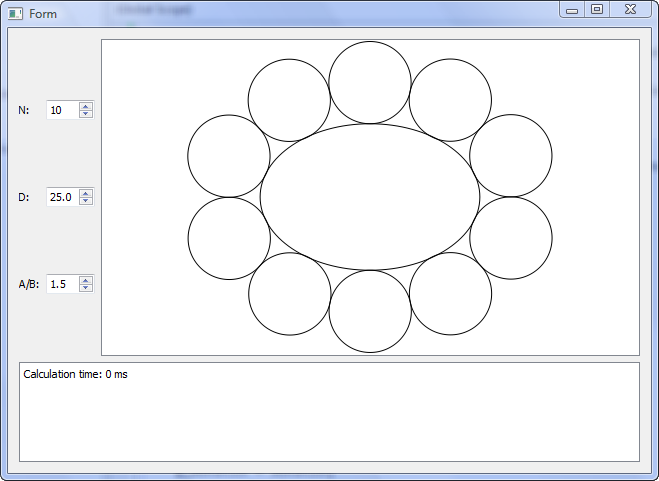
Despite the fact that it is doing 2 levels of iterative calculation, it is surprisingly fast. Even going for high accuracy it takes <1ms for n=50 and <2ms for n=100 on my Windows box. About double that on my old Mac mini. And I can easily cache results in memory for more speed.

You can download and play with the test harness binaries here, if you are so inclined:

Windows binaries (Windows XP or Vista)

Mac binaries (MacOSX 10.3.9 or later)

Both Windows and Mac versions are created from a single set of C++ using the Qt cross-platform toolkit. Note that the timer resolution is 1ms, so times <1ms show as 0ms.

So the next version of my table planner software will have oval tables. As always, there was something I hadn’t though of. I had to do a bit of extra work to calculate the normal to the ellipse circumference (which isn’t the same as the line that joins the ellipse centre and the circumference – as I had initially assumed).

Without calculating normals.

With calculated normals

The commercial value of this feature probably isn’t worth the time I have spent on it. But it will make some of my customers very happy and it was an interesting problem. Part of the reason I set up as a microISV was to do things that I find interesting.

Many thanks to everyone that contributed code or suggestions to the original post.

“Think you can’t get a virus by visiting a web page? Think again!”

Are you just one click away from disaster? The following post on ASP forums woke me out of my complacency (reproduced with the author’s kind permission):

It happened to me today with FireFox 3.

While searching Google for some information on a movie I watched recently (wasting time, more or less), I clicked on a link that I thought was to IMDB. I only glanced at it in the Google search results before I clicked on it. As soon as the page loaded the browser closed, my desktop background was changed and some sort of fake scanner window showed up. Then I saw desktop icons appear. Then a BSOD, or so I thought.

It turns out it was a pretty common piece of malware called Smitfraud combined with a fake AV malware software called “AntiVirus XP 2008”. They kept asking me to register the software in order to clean the 2700+ virus that it found during its “scan”. The BSOD was a cleverly designed screen saver, I assume designed to make a user reboot without trying any real scanner software.

Luckily I use Acronis TrueImage to do incremental backups every night so restoring to what I had at 4AM this morning only took about an hour but it really woke me up. I had disabled the Avast resident scanner a few days ago thinking that I didn’t need it – I mean, I don’t download random EXE files from the net, I don’t visit “bad” sites and I don’t use any p2p file sharing network so I’m safe – right? WRONG! Talk about a humbling experience. Here I am, an uber nerd, and I just had my entire system hosed in about 4 seconds by visiting a website. If I weren’t obsessed with backups and redundancy I could have lost the source code to all of my software or worse, allowed some cracker kid to install a rootkit and gain access to my desktop on demand. Talk about a nightmare!

I can only assume I ran into a site exploiting some new QuickTime or Flash vulnerability. I definitely didn’t download and run anything from the website – I only clicked the link from Google.

If I could remember the site I would try to return to it in a VM with an anti-virus software enabled to see if it could catch it before bad things happened. I can only hope that my huge mistake of not turning my AV software’s resident scanner was the main thing that allowed the software to be installed.

I’ve since started using OpenDNS.org, set Acronis to do incremental updates twice a day, enabled Avast’s resident scanner and installed the Teatimer program from Spybot Search & Destroy. Oh, and I uninstalled Flash and QuickTime just in case (though I checked and I had the most recent versions of both!).

Mitchell Vincent, www.ksoftware.net

The responses included several suggestions to use the ‘Noscript’ add-on for FireFox. I have been trying it for a few days. It is slightly annoying to keep on having to OK scripts on trusted sites. But that seems a price worth paying. And don’t forget to do your back-ups.

Unlock new customers?

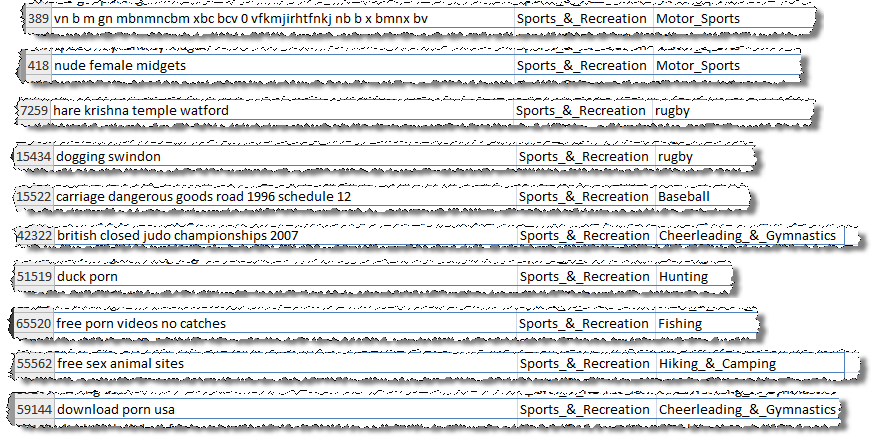
Microsoft Adcenter helpfully sent me a link to lists of low cost keywords I could advertise on, categorised by sector, to “unlock new customers”. I had a quick look through the ‘sport and rec’ list. Here is a small sample (click to enlarge):

There are lots more where they came from. Microsoft say:

These keywords are actual terms recently used by your customers on Live and MSN Search Engines and are available at a low cost while very few other advertisers are bidding on them.

No kidding.

Did they do any QA on this list[1]? Exactly how many people are searching on “vn b m gn mbnmncbm xbc bcv 0 vfkmjirhtfnkj nb b x bmnx bv”? What has dogging (not work safe) or Hare Krishna got to do with rugby? Is it any wonder nobody is bidding on “duck porn”? Are there really that many people interested in pictures of nude female bodybuilders (apparently)?

Thanks Microsoft, but I’m really not sure they are the sort of new customers I want to unlock.

[1]There are some pretty unpleasant ones I didn’t include.

Cookie tracking for profit and pleasure

It is great to make sales. But you really need to know where these sales are coming from to optimise your marketing. A simple and effective way to do this is through cookie tracking. The basic process is:

  • A visitor arrives at a web page on your site.
  • A script on your web page stores a small file (cookie) on their computer with some tracking details, e.g. the web page they came from, the date they arrived and the page they arrived at.
  • As they navigate to other pages the Javascript on these pages recognises that the cookie already exists and doesn’t modify it.
  • When (if) the visitor makes a purchase, the contents of the cookie are sent through to your payment provider.
  • Your payment provider sends back the cookie data with all the other information about the sale.

From the referrer you can find out what your customer typed into a search engine to find you. For example if the referrer is:

http://www.google.com/search?hl=en&q=backup software

You can infer that the purchaser found you by typing “backup software” into Google. This is incredibly useful information. Once you have amassed enough of it you can find out which keywords are most effective at selling your product. For example, whether “back-up software” makes more sales than “backup software” or “back-up programs”. This can be very helpful for fine-tuning your marketing message, SEO and PPC campaigns. You can also find out which websites purchasers are being referred from, and even how long purchasers take to make a sale after first arriving at your site.

You can get a lot of this information from Google Adwords conversion tracking. But you will only get data on sales through Adwords. I want data on all my sales. You can also get some of this information through Google Analytics. But you can only get the information in the form that Analytics wants you to have it and the price is allowing Google to see all this data as well. So I think it is well worth doing your own tracking, even if you are using Adwords conversion tracking and Analytics.

If you do use tracking cookies you will find that there is no cookie data for many transactions or the cookie data is unreliable. Reasons for this include:

  1. The cookie has expired before the customer made the purchase.
  2. The cookie has been pushed out of the cache by other cookies. Browsers only have a limited cookie cache, and your cookie might be pushed out of the cache by others long before any expiration date you set.
  3. A different person is buying the software to the person who first arrived at your site.
  4. A different computer or browser is used to buy the software to the one use to find the site.
  5. The customer clicked a button in your desktop software (not a browser) to go to your site, so there is no referrer information.
  6. A firewall or other software is blocking cookies.
  7. The customer has disabled JavaScript in their browser.

So cookie tracking data is never going to be particularly reliable. My own data shows that about 30% of sales don’t return cookie data. But it is likely to be considerably worse for B2B sales due to the longer sales cycles and the increased likelihood of the buyer not be being the person who first found the product.

With these caveats in mind, I think it is worth the time to set up cookie tracking. It is pretty quick and easy to do. You can even use the free JavaScript published at www.webmarketingplus.co.uk. Note the conditions of use. Note also what an ugly language JavaScript is[1]. I recommend placing the JavaScript in a single file which you include in each page, so you only have a single place to make modifications, for example:

<script language=“JavaScript” type=“text/javascript” src=“refercookie.js”> </script>

Sending the contents of the cookie to your payment provider is also quite straightforward. For example, for e-junkie I just use some JavaScript to extract the cookie contents and append:

&custom=<cookie contents>

to the end of the ‘Buy now’ button URL e-junkie gives you. The cookie data then comes back to me in the ‘custom:’ field of the e-junkie sale confirmation email (I believe all the major e-commerce providers support something similar). I then store the cookie data along with all the other sales data. I can use this data to generate various graphs and reports, including top-selling keywords and a graph of the time-taken to purchase. Unlike much of the data you get from Analytics this is data you can really use, e.g. for the top selling keywords:

  • Make sure they are in your Adwords campaign.
  • Write additional content pages based around these keywords to attract targeted traffic.
  • Consider including these keywords in the strapline on your home page.

The use of cookies does have privacy implications, but these are often overstated. In theory all the information in a cookie could be retrieved from server log files, cookies are just a more convenient way or doing it. Users can also disable cookies in their browser settings or using other software. I think it is fine to use cookies as long as you make this clear to your visitors. You should still have a clearly stated privacy policy for your website and this should contain a brief description of what information you are storing in cookies.

Knowing a bit about cookies can also help you as a consumer. A while back I was interested in buying a large VDU from Dell. I browsed around their site and found a good deal. I went back some time later to buy the monitor after I had bought a new PC, but the price had gone up considerably. On a hunch I deleted Dell’s cookie and refreshed the page. The price dropped back to the original price. I believe that Dell knew from a cookie that:

  1. I had logged in as a business user; and
  2. Had just purchased a new PC from Dell.

Consequently they expected me to be less price sensitive than a consumer shopping for just a VDU and upped the price. I can’t prove this. It is also possible (but unlikely) that they just happened to drop the price in the few seconds before I did a refresh. Anyway, try it next time you want to buy something expensive online. Note that it might be easier to use another browser (e.g. Opera or Safari) than to delete cookies. Let me know if you get a similar result.

[1] It has been said that JavaScript bears as much resemblance to Java as the Taj Mahal Indian restaurant bears to the Taj Mahal. And Java is hardly a ‘looker’.


Virus Total

Virus Total is a free service that gives you aggregate results from 36 different malware scanners. Just browse to the file you want to check on your PC and click ‘Send file’. It will quickly return the results of all the scans, hash sizes and a list of Windows system calls that the software makes.

This is a great resource for checking software you are about to install doesn’t contain malware. It is also useful for checking that your own download files haven’t been tampered with and don’t trigger false positives. Note that some software protection systems have been known to trigger false positives from malware scanners.

Thanks to a poster on this BOS thread for bringing it to my attention.

Amazon payments

Amazon have launched their Amazon payments ecommerce service. From a quick browse it looks quite similar to PayPal and GoogleCheckout in scope and pricing. It doesn’t say in the FAQ which currencies and countries are supported, so it may only be US dollars/USA at present. I already offer payment by PayPal, GoogleCheckout, 2Checkout and cheque, so I don’t feel any need to be an early adopter of Amazon. I will be keeping an eye on it though and a bit of extra competition for PayPal and Google is welcome.