
 I have been using the POP3 protocol to collect all my emails from my ISP for the last few years. POP3 stores emails locally once they have been read from the server. This works great if you have a single PC, but it is a bit of a disaster if you check your email from multiple PCs. For example, trying to synchronise the emails on my ‘master’ desktop PC after using the laptop for a week on holiday was a royal pain. I would set the laptop not to remove messages from the POP3 server when read (unless deleted) and then re-do all the marking as read, tagging and sorting into sub-folders when I got home. Groan.
I chose POP3 because I was familiar with it and because I was using some auto-responder software that only worked with POP3. Now that I use e-junkie for sending out licence keys I don’t really need the auto-responder. So I decided to try IMAP, an alternative protocol that stores emails on a central server. So far I am very pleased with the move.
I use Mozilla Thunderbird on all my computers and my email is hosted by 1and1.co.uk. Both Thunderbird and 1and1 support POP3 and IMAP, so this made the transition very easy. I just set-up new IMAP accounts for each email account on each machine in Thunderbird. The POP3 accounts are still there so I can search them, but they no longer retrieve new emails.
Now, when I mark an email read or move it to a sub-folder, the change is immediately visible across all my email clients. Hoorah. I realise the same could be said for webmail. But I then would have to use webmail. Ugh. Lets not go there.
I was a bit worried about network latency issues with IMAP, but it haven’t noticed any problems so far and searching IMAP emails on the 1and1 server seems similar in performance to searching POP3 emails locally.
I haven’t quite worked what to do about backing-up my email yet. With POP3 it was easy, as the data was stored as files on my local machine. I am not sure what the best way to achieve this is with IMAP. In theory my ISP should be taking care of backing-up my IMAP data, but I am a bit paranoid after the recent disappearance of this blog. It is something I need to investigate further.
I am fairly conservative when it comes to adopting new technologies. Most of you reading this probably moved to IMAP ages ago. But if you didn’t, you might want to give IMAP a try. Even if you are currently a one-person company with a single PC/Mac (unlikely) it is going to make life easier if you later grow to multiple machines and/or people.


 The Internet is a cornucopia of useful resources for software developers and marketers. As well as all the documentation, forums, blogs and wikis there are some great audio and video resources. Here are some of my favourites:
 Although developers have traditionally avoided anything to do with marketing (aka ‘the dark side’) both development and marketing require originality, creativity and hard work to do well. Don’t believe me? Lets say you have to market a top of the range blender – how would you do it?
 The Business of Software blog has published the results of a survey of 96

 You’ve got this great idea for a software product. You are pretty confident that you can crank out version 1.0 working full-time on your own from the spare room, and you are fairly confident that people will buy it. But you’ve also got a well paid full-time job ‘working for the man’. It’s cosy and familiar in that cubicle. Is it worth risking your career and savings to set out into uncharted waters on your own? Do you take the red pill or the blue pill?




 I don’t remember when or where I first saw an editor with syntax highlighting. But I do remember that I was ‘blown away’ by it. It was immediately obvious that it was going to make code easier to understand and syntax errors easier to spot. I would now hate to have to program without it. So I was interested to try version 1.1of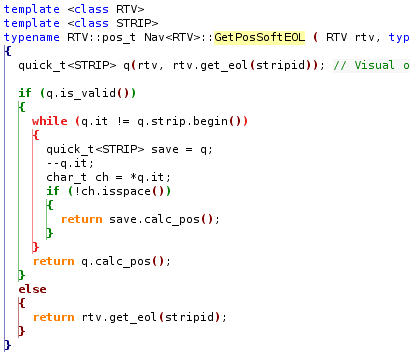
 Software cracks are a real problem for software vendors large and small. I have
  Successful Software
