Tag Archives: data wrangling

Eurovision 2025 Jury vs Public Vote Discrepancies

I rather enjoy the glorious spectacle of high camp that is Eurovision. Eurovision voting has always been rather suspect, with strong regional voting patterns. But the 2025 voting patterns seemed particularly odd, with jury scores seeming to have very little relation to the public scores. It was particularly noticeable that (IMHO, rather mediocre) Israel entry got only 60 jury votes, but a massive 297 public votes. Despite the widely condemned actions of the Netanyahu government in Gaza. Also, that the Swiss entry got 215 jury votes, but 0 public votes. I had a quick dig into the data using my data wrangling software, Easy Data Transform, to see what I could find.

I copied and pasted the results table from https://eurovisionworld.com/eurovision/2025 into Easy Data Transform. I had to do a bit of simple data wrangling to massage the data into the correct columns so I could calculate the Pearson correlation of the jury and public scores.

I repeated this for competitions back to 2016. Here are the correlation scores:

YearPearson correlation, jury vs public scores
20250.160
20240.627
20230.490
20220.467
20210.618
2020No competition, due to COVID-19
20190.441
20180.255
20170.656
20160.447

It is noticeable that the correlation is significantly lower in 2025 than previous years (where 1.0 = perfect correlation, 0.0 = no correlation). The only other year getting anywhere close being 2018, where Sweden got 253 jury votes, but only 21 public votes.

Here are the 2025 results as an Excel scatter plot, with a regression line:

And here are the 2017 results, for comparison:

Of course, this doesn’t prove anything. But it does make wonder why there was such a big discrepancy this year.

Easy Data Transform v2

I released Easy Data Transform v2 today. After no fewer than 80 (!) v1 production releases since 2019, this is the first paid upgrade.

Major improvements include:

  • Schema versioning, so you can automatically handle changes to the column structure of an input (e.g. additional or missing columns).
  • A new Verify transform so you can check a dataset has the expected values.

Currently there are 48 different verification checks you can make:

  • At least 1 non-empty value
  • Contains
  • Don’t allow listed values
  • Ends with
  • Integer except listed special value(s)
  • Is local file
  • Is local folder
  • Is lower case
  • Is sentence case
  • Is title case
  • Is upper case
  • Is valid EAN13
  • Is valid email
  • Is valid telephone number
  • Is valid UPC-A
  • Match column name
  • Matches regular expression
  • Maximum characters
  • Maximum number of columns
  • Maximum number of rows
  • Maximum value
  • Minimum characters
  • Minimum number of columns
  • Minimum number of rows
  • Minimum value
  • No blank values
  • No carriage returns
  • No currency
  • No digits
  • No double spaces
  • No duplicate column names
  • No duplicate values
  • No empty rows
  • No empty values
  • No gaps in values
  • No leading or trailing whitespace
  • No line feeds
  • No non-ASCII
  • No non-printable
  • No punctuation
  • No symbols
  • No Tab characters
  • No whitespace
  • Numeric except listed special value(s)
  • Only allow listed values
  • Require listed values
  • Starts with
  • Valid date in format

You can see any fails visually, with colour coding by severity:

  • Side-by-side comparison of dataset headers:
  • Side-by-side comparison of dataset data values:
  • Lots of extra matching options for the Lookup transform:

Allowing you to do exotic lookups such as:

Plus lots of other changes.

In v1 there were issues related to how column-related changes cascaded through the system. This was the hardest thing to get right, and it took a fairly big redesign to fix all the issues. As a bonus, you can now disconnect and reconnect nodes, and it remembers all the column-based options (within certain limits). These changes make Easy Data Transform feel much more robust to use, as you can now make lots of changes without worrying too much about breaking things further downstream.

Easy Data Transform now supports:

  • 9 input formats (including various CSV variants, Excel, XML and JSON)
  • 66 different data transforms (such as Join, Filter, Pivot, Sample and Lookup)
  • 11 output formats (including various CSV variants, Excel, XML and JSON)
  • 56 text encodings

This allows you to snap together a sequence of nodes like Lego, to very quickly transform or analyse your data. Unlike a code-based approach (such as R or Python) or a command line tool, it is extremely visual, with pretty-much instant feedback every time you make a change. Plus, no pesky syntax to remember.

data wrangling

Eating my own dogfood, using Easy Data Transform to create an email marketing campaign from various disparate data sources (mailing lists, licence key databases etc).

Easy Data Transform is all written in C++ with memory compression and reference counting, so it is fast and memory efficient and can handle multi-million row datasets with no problem.

While many of my competitors are transitioning to the web, Easy Data Transform remains a local tool for Windows and Mac. This has several major advantages:

  • Your sensitive data stays on your computer.
  • Less latency.
  • I don’t have to pay your compute and bandwidth costs, which means I can charge an affordable one-time fee for a perpetual licence.

I think privacy is only going to become ever more of a concern as rampaging AIs try to scrape every single piece of data they can find.

Usage-based fees for online data tools are no small matter. For a range of usage fee horror stories, such as enabling debug logging in a large production ETL pipeline resulting in $100k of extra costs in a week, see this Reddit post. Some of my customers have processed more than a billion rows in Easy Data Transform. Not bad for $99!

It has been a lot of hard work, but I am please with how far Easy Data Transform has come. I think Easy Data Transform is now a comprehensive, fast and robust tool for file-based data wrangling. If you have some data to wrangle, give it a try! It is only $99+tax ($40+tax if you are upgrading from v1) and there is a fully functional, 7 day free trial here:

Download Easy Data Transform v2

I am very grateful to my customers, who have been a big help in providing feedback. This has improved the product no end. Many heads are better than one!

The next big step is going to be adding the ability to talk directly to databases, REST APIs and other data sources. I also hope at some point to add the ability to visualize data using graphs and charts. Watch this space!

Easy Data Transform progress

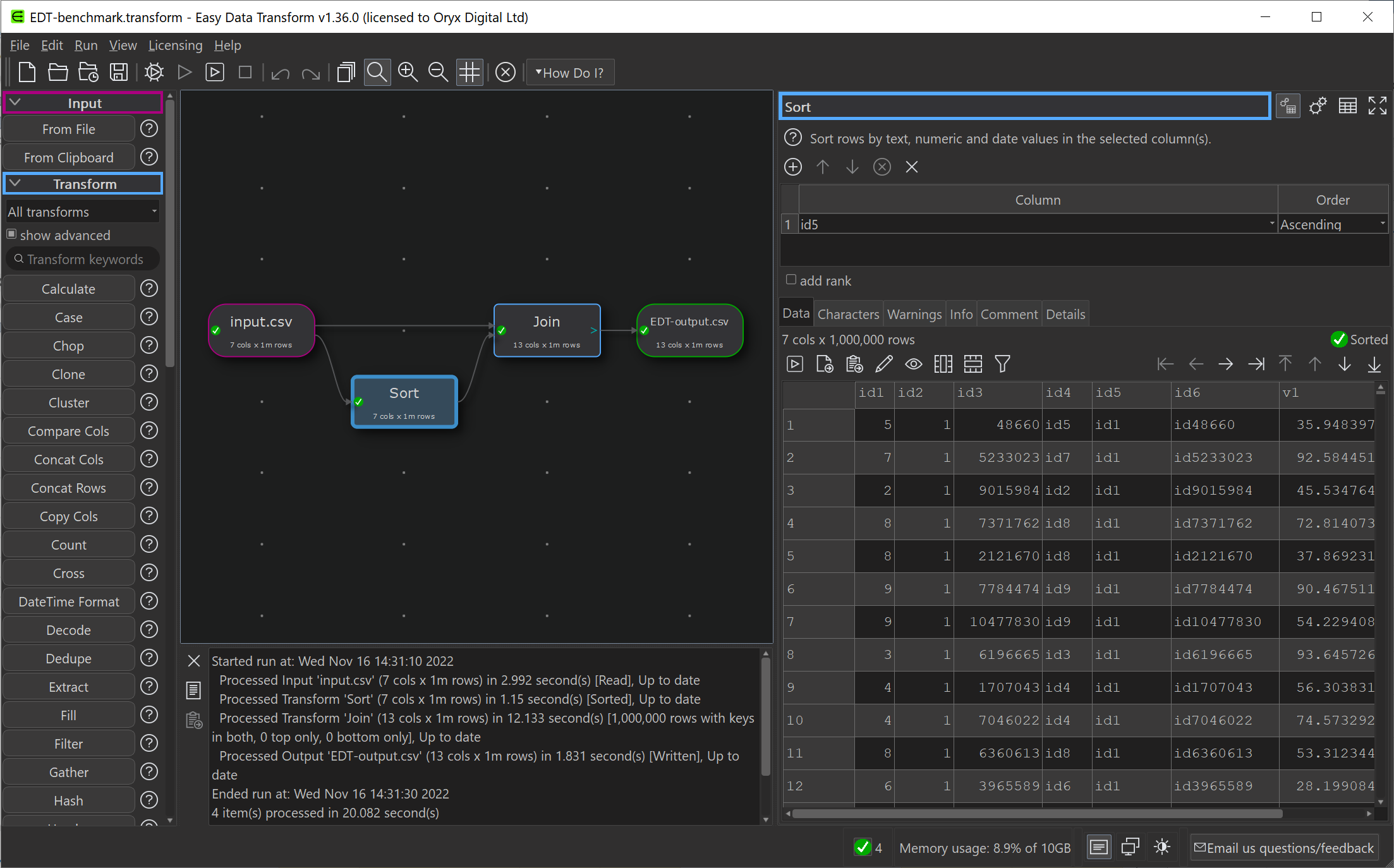
I have been gradually improving my data wrangling tool, Easy Data Transform, putting out 70 public releases since 2019. While the product’s emphasis is on ease of use, rather than pure performance, I have been trying to make it fast as well, so it can cope with the multi-million row datasets customers like to throw at it. To see how I was doing, I did a simple benchmark of the most recent version of Easy Data Transform (v1.37.0) against several other desktop data wrangling tools. The benchmark did a read, sort, join and write of a 1 million row CSV file. I did the benchmarking on my Windows development PC and my Mac M1 laptop.

Easy Data Transform screenshot

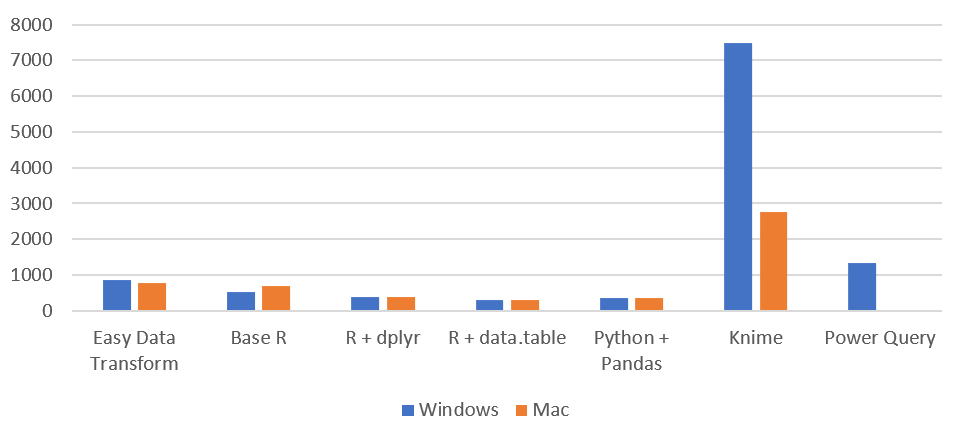
Here is an overview of the results:

Time by task (seconds), on Windows without Power Query (smaller is better):

data wrangling/ETL benchmark Windows

I have left Excel Power Query off this graph, as it is so slow you can hardly see the other bars when it is included!

Time by task (seconds) on Mac (smaller is better):

data wrangling/ETL benchmark M1 Mac

Memory usage (MB), Windows vs Mac (smaller is better):

data wrangling/ETL benchmark memory Windows vs Mac

So Easy Data Transform is nearly as fast as it’s nearest competitor, Knime, on Windows and a fair bit faster on an M1 Mac. It is also uses a lot less memory than Knime. However we have got some way to go to catch up with the Pandas library for Python and the data.table package for R, when it comes to raw performance. Hopefully I can get nearer to their performance in time. I was forbidden from including benchmarks for Tableau Prep and Alteryx by their licensing terms, which seems unnecessarily restrictive.

Looking at just the Easy Data Transform results, it is interesting to notice that a newish Macbook Air M1 laptop is significantly faster than a desktop AMD Ryzen 7 desktop PC from a few years ago.

Windows vs Mac M1 benchmark

See the full comparison:

Comparison of data wrangling/ETL tools : R, Pandas, Knime, Power Query, Tableau Prep, Alteryx and Easy Data Transform, with benchmarks

Got some data to clean, merge, reshape or analyze? Why not download a free trial of Easy Data Transform ? No sign up required.

Analyzing COVID19 data with Easy Data Transform

I have continued to make lots of improvements to Easy Data Transform, including:

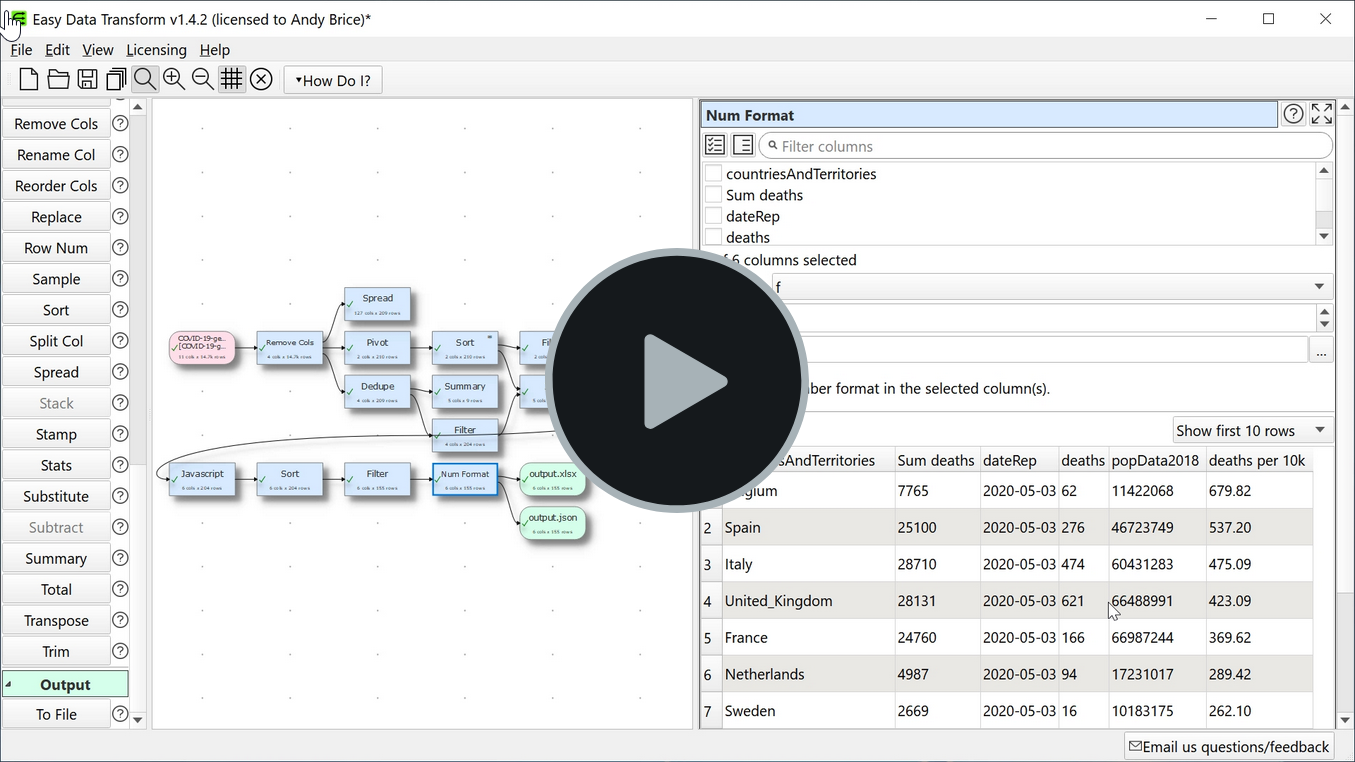
Here is a video of me using Easy Data Transform to analyze the data.europa.eu COVID19 dataset. Hopefully it gives an idea of what the software is capable of.

covid19-data-wrangling


Easy Data Transform v1.1.0

I released v1.1.0 of Easy Data Transform this week. It is a big upgrade, with some major new features.

easy-data-transform-v110

There is a new Javascript transform. This allows you to create custom transforms for anything that is too specialist to do with the other 37 built-in transforms. I’m not a fan of Javascript, with its horrible scoping and typing, and I would have preferred Python or Lua. But there is a Javascript engine built into Qt, so this was the easiest way to add scripting. Now if you want to multiply two columns of your data together in Easy Data Transform, you can just do this:

javascript-data-transform-v110

You can also access Javascript maths, date and string functions. So you can do some pretty complicated stuff. Hopefully the built-in transforms are enough to cover 95% of data transformations. But the new Javascript transform adds some serious flexibility for the remainder. The Qt Javascript engine is also pretty fast. In testing I was able to multiply values from 2 columns together across 10,000 rows in less than 0.03 seconds.

There is a new Lookup transform. This allows you to lookup values for one dataset in another dataset. For example, if you have a dataset with a column for country code and another dataset with columns for the country code and tax rate, you can look up the tax rate by country code.

Previously you could only output your data in Excel and delimited text formats (including CSV and TSV). The new release also adds output to JSON, HTML, Markdown, vCard, YAML and XML formats.

I have improved the speed of the Join transform significantly using hashing. This makes a big difference with large datasets.

To save time, Easy Data Transform guesses the likely columns you want to use as keys when you Join, Intersect, Lookup or Subtract two datasets. For example if 2 datasets both have colummns called ‘ID’ with lots of unique values that are common to both columns, it will choose those two columns as the default key columns. I have improved the heuristic used to set the default columns.

You can now add comments to input, transform and output nodes as a note to a colleague or your future self.

You can now snap your input, transform and output nodes to a grid, so you can keep your layout all lovely and neat.

I have also made some bug fixes and minor improvements.

Haven’t tried Easy Data Transform yet? Got some table or list data that you need to wrangle into a more useful form? Take the free trial for a spin.


Eating my own dogfood

Eating your own dogfood There is a story that a president of a pet food company ate some of his own dog food, to show how good it was. I’m not sure how tasty dog food really needs to be, given that dogs are happy to lick their own backsides. But his commitment is admirable. The least we can do as software developers is to use our own software as much as possible. After all, if you don’t use it, how can you expect anyone else to?
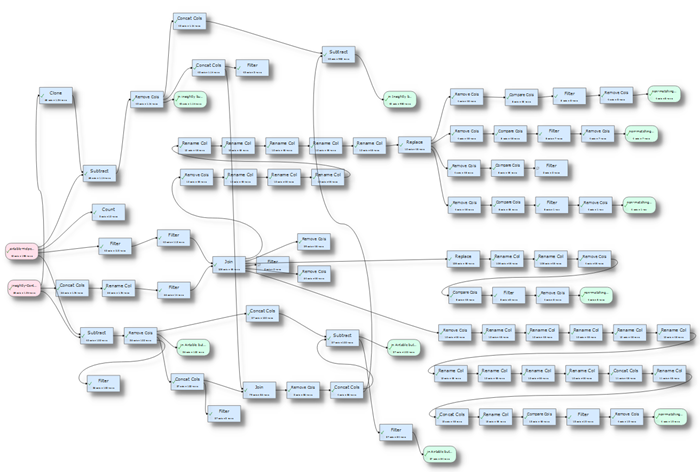
In that spirit I have been using my new Easy Data Transform product as much as possible. The biggest project so far has been merging two databases, for a charity that I volunteer at. I created an Airtable database for the charity. But volunteer information was already in a separate CRM. I imported relevant CRM data into Airtable, but the CRM system remained in use for emailing volunteers for a couple of years while I concentrated on Airtable and other tasks. In that time the Airtable database has become a roaring success for the charity. So we eventually decided to retire the CRM system and also use Airtable as our CRM.

Consequently I had to merge the latest CRM data into Airtable. I exported the relevant data from each as a CSV and then proceeded to merge the mailing list tags from the CRM into a new column in Airtable. I also created tables of discrepancies for the charity staff to work through. For example, where the telephone numbers or emails had been added or updated in one database, but not the other.

When I had initially imported the CRM data into Airtable, I had imported the CRM ID record. So those records were easy to match between Airtable and the CRM using a simple join on the ID. However any records added subsequently to Airtable or the CRM did not have matching IDs. So I had to match those by first name + last name or email address. The data was quite ‘dirty’, as is invariably the case with real world data. A phone number may be “0123 456 789” on one system and “01 23456789” on another. A volunteer might be “Chris” in one database and “Christopher” in another. Also some contacts had multiple entries in the CRM system. So this was not a trivial problem.

dogfood.png

You can get an idea of what was involved from the screenshot above. The two pink input nodes are the 2 databases exported as CSV files, the blue nodes are various transforms (joining, filtering, removing spaces etc) and the green nodes are the outputs (e.g. lists of telephone and email differences, lists of people in one database, but not the other etc). Quite a lot of the transforms are just column renames (in future I should probably support renaming multiple columns in one transform).

I think this would have been a horrific task using Excel, SQL, Beyond Compare or any of the other tools I had to hand, amazing tools as they may be for other tasks. But Easy Data Transform performed brilliantly, even if I do say so myself. It was particularly helpful that you could see the whole process step-by-step and backtrack or branch at any point without losing previous changes.

While eating my own dogfood, I found one bug (related to carriage returns inside CSV records) and quite a few minor annoyances. These have now been fixed in the latest release. I also added  a new ‘Compare Columns’ transform, which was really useful for this sort of work. So it was a very useful experience and I really recommend ‘eating your own dogfood’ as much as you can, along with usability testing.

Have you got some data that needs cleaning, merging, de-duping or filtering? Analytics, log files, emailing lists, databases? Of course you do! Why not give Easy Data Transform a try. It is free while it is in beta. Let me know how you get on.