The history of marketing, by Scholz & Friends (via the quirky, eclectic and always interesting DarkRoastedBlend.com ). Sound optional.

The history of marketing, by Scholz & Friends (via the quirky, eclectic and always interesting DarkRoastedBlend.com ). Sound optional.

I am a fan of file and folder comparison utility Beyond Compare from Scooter Software. It is a very polished and powerful piece of software with a big following. But I was intrigued by some of the unusual decisions they had taken: competing in a market with lots of free alternatives; going 6 years between major upgrades; re-writing from scratch; releasing a Linux version; and having an extremely generous trial policy. How had they succeeded despite ignoring much of the conventional wisdom? Craig Peterson of Scooter Software kindly agreed to answer my questions.
Can you tell me a bit about your background before working on Beyond Compare.
I started at Scooter Software straight out of college. I did a lot of programming for fun before then, but this was my first professional job and my first introduction to Delphi.
How long have you been working on Beyond Compare and what is your role?
I’m the lead developer and I started here in late 2000, a few months before significant development on v2 started. Most of my time is spent working on the directory comparison and the virtual filesystem layer (ftp, zips, version control), but there are very few places in the program that I haven’t worked on. My non-development tasks include managing the build process, interfacing with our component vendors, keeping track of any interns, and tech support, when there’s difficult questions or when the dedicated staff don’t have time.
How many other people work on Beyond Compare on the business side and on the development side?
There’s one other full-time developer, one part time developer, two in tech support, two in sales, and our president, who handles everything else.
There are lots of different file comparison tools. How do you manage to run a successful business with so many competitors, many of them free?
Competing with the free tools hasn’t been as hard as I expected. The big advantage we have here is that people are paying us for the software, so we have strong incentive to provide good tech support and to provide the features they want. We work 8 hours a day on it, which gives us more time to develop new features than someone doing it as a hobby, and we can afford commercial libraries that someone providing a free utility can’t.
As for the commercial competitors, it’s mostly a matter of providing something that they don’t. In our case BC’s directory comparison is much more powerful than the alternatives, and we have viewers for other file types like images, binary files, and data files. That allowed us to keep competing even when we were lagging in other areas.
What are the main methods you use to promote Beyond Compare?
We rely almost entirely on word of mouth. We’ve had lots of customers tell us that they brought BC with them when they switched jobs and ended up getting their companies to spring for larger licenses. We do spend some money on Google AdWords, and we hired a company to periodically submit our site to search engines and download sites, but we’ve never run a print or banner ad.
scootersoftware.com has an enviable Google page rank of 6 and ranks second for “file comparison software”. Have you spent a lot of effort on SEO?
We had a company help with SEO for a lot of the 2.x lifetime, and they’d suggest tweaks to improve things. For v3 we took a different approach and redesigned the site to make it more accessible to potential customers. I’m sure some of those changes helped, since we ended up adding more descriptions and using more synonyms, but it was primarily a case of asking how we could make it easier to find the information someone would want and expanding on that. We still have a fairly wordy page title though, and I think that’s entirely for the search engines’ benefit.
Are most of your customers programmers, or does the software appeal to a wider audience?
I’d say more than 50% are programmers, but there’s definitely a wider audience. System administrators use it for migrating servers, web developers use it instead of a traditional FTP client, and non-techs use it for backups or synching their laptops and desktops.
How long do you allow people to use the trial version?
The trial is for 30 days, but it only counts days you actually run it, so if you use it infrequently you could easily go six months or more before it times out.
I used Beyond Compare for ages before I bought a licence. I would have bought it sooner if you had been less generous with the trial. Why did you go for such a long trial period?
That goes back to competing with all the other products out there. If someone installs two programs to evaluate, and then doesn’t have a chance to really try them out until a month later, the one that works is more likely to get the sale. It also makes it more likely that potential customers will learn the application and start relying on it, so when it does come time to pay they’re less likely to throw out that investment and switch to another tool.
I understand Beyond Compare v3 is a complete re-write. Why did you feel a complete re-write was necessary? Was it a good business decision in hindsight?
There were two reasons why we felt a re-write was justified: (1) we had a lot of features we wanted to implement that wouldn’t work in the current framework, and (2) we over-estimated the speed that we could re-write it.
In the text compare we wanted inline editing with dynamic re-comparisons and 3-way merge, neither of which would have been easy to integrate into the v2 codebase. The directory compare had similarly major changes, though a lot of that is internal and in preparation for other features, so it isn’t as visible. There was also all the work we did to get a Linux release out. It wasn’t a complete re-write though. Anything that didn’t need significant changes, like our reporting engine, was brought over mostly as is.
I think it was a good business decision in that it allowed us to rethink and rework a lot of things without the old baggage, but it was bad in that it significantly limited what we could release in the meantime. We ended up going 6 years between major versions and even though we were always busy adding new features, we couldn’t release them until we got back to feature parity with v2.
Beyond Compare is written is Delphi. What would you say are the advantages and disadvantages of Delphi compared to other development ‘stacks’?
I think Delphi is still the best tool for developing a native Windows application quickly. It’s very easy to mock up interfaces and then fill them in with code. The resulting exes don’t have any external dependencies, which makes redistributing them easy. The VCL (UI framework) ships with source code, and that has permeated the community, so the vast majority of third-party components also include source.
On the flip side, it still can’t produce 64-bit executables and isn’t cross platform. It doesn’t have a garbage collector or as large of a class library as Java or C#. The community isn’t as large either, so there’s usually only a couple of choices when you’re looking for specific components, and if that vendor stops developing it, there aren’t as many people to pick up the slack.
If you had to do it all again, starting now, would you still choose Delphi?
Probably, but I would seriously consider C# or Qt. In our case we have a lot of experience with Delphi and we know the libraries, so starting from scratch in another language would be a significant barrier.
Beyond Compare has a very slick user interface. Did you do any usability testing?
Not as such. Our primary usability improvements come from using our own product. We use BC every day, for every comparison we do, so anything that sticks out tends to get squashed quickly. We also get alpha/beta versions into customers’ hands as soon as possible, and keep iterating until they’re happy. V2 and v3 both had private beta tests that lasted over a year and a half, and some of the features changed dramatically in response to that feedback.
Beyond Compare has a nice integration with Windows Explorer. Was that difficult to do? Were you able to do it in Delphi?
The first version of it was submitted by a user, so it wasn’t difficult at all. It has taken a lot of refinement to get perfect though, and we were changing it all the way through to the final 3.0 release. It is written in Delphi, though I did rewrite it in C++ in order to get a 64-bit version working. FreePascal has since started producing 64-bit binaries, so we’re back to the single Delphi version again.
You have Windows and Linux versions. What did you use to write the Linux version?
We’re using a heavily customized version of Borland’s now-dead Kylix product, which was Delphi for Linux. It does allow us to compile both versions from the same source code, but it’s showing its age and I wouldn’t recommend it to anyone else. Our driving goal is to have the best Windows version we can, which means sticking with Delphi and using what’s available to produce the Linux version. If OS X and Linux support outweighed that we would use a cross-platform option like Qt or Java, but we believe the Windows version would suffer in that case.
Do you sell many licences for Linux?
We sell enough to fund its development, so it’s a successful product. It does introduce new challenges though, both in development and tech support, so if we were a smaller developer it probably wouldn’t be worth the overhead.
Do you think there will there ever be a web version of Beyond Compare?
I can see it as a possibility, and it would be interesting to explore, but it’s not something we’re looking into right now. I think it would have a different audience than the current product, and would probably never be as powerful as what we can do locally.
How did you choose the price?
Our $30 standard edition is about the same price as our commercial competitors, and seems to be the standard shareware utility price. The pro edition was priced based on our competitors, what our customers were telling us they’d pay, and what we felt the downward pressure of the freeware/opensource alternatives introduced. We keep the price low in order to make our profits on larger quantities sold, instead of a larger margin per-unit. We have increased our multi-user pricing considerably over the years though; the discounts were very steep in v1 and v2, and the feedback we got was that it was just too cheap for what it provided.
I see some translator credits on the website. Is v3 available in languages other than English?
Not officially, but we have just released beta versions of a couple of languages. The current credits are for the v2 translators, who are generally the same people working on v3 translations.
How important are resellers to your sales?
We get a lot of sales through resellers, but it’s generally from people who would buy it either way. Foreign resellers are a help to the customers though, because they allow them to order in their own language using the local currency.
Does Scooter Software have any other products besides Beyond Compare?
No, BC keeps us plenty busy.
Thank you Craig.
You can download a free trial of Beyond Compare from the Scooter Software website. I have no affiliation with Scooter Software beyond being a paying customer.
 The idea of paying someone for sending you business has been around for a long time. Affiliate marketing is just a new, Internet-based, take on it. An affiliate sends traffic to your website and is paid a commission on each sale. For software this commission will typically be in the range 20-50% of the sale price (although commissions of 75% or more aren’t unheard of). Commission is usually calculated by using cookies to track the number of successful sales (‘conversions’) due to each affiliate.
In theory you can set up your own affiliate commission tracking system, but affiliates would have to trust that your system is honest. It would also involve quite a bit of wheel reinventing. Consequently most vendors use affiliate marketing systems administered by third parties such as shareasale, clickbank or commission junction. Payment processors, such as Avangate and e-junkie, also have their own affiliate marketing systems.
It sounds great. The affiliates are doing marketing for you and you only pay them when you make a sale. How can you possibly lose? In fact there are quite a few potential downsides:
You maybe be able to prevent some of the above abuses with appropriate terms and conditions. ( I should also point out, in the interest of fairness, that there are various ways that the affiliate might lose out on commission that is rightfully theirs. For example customers who block cookies and even fraud by vendors.)
Drawing up agreements, recruiting affiliates, providing them with marketing materials, doing the accounts and paying your affiliates all takes time. You can automate quite a lot of it, but it still takes time to set-up the system, answer questions, keep everything running smoothly and check that affiliates are behaving themselves. Time that you could be spending doing other more lucrative and interesting things. As always, there is no such thing as a free lunch.
Joel Spolsky has been an outspoken critic of affiliate marketing:
We did an affiliate program, and found it to be a big waste of time. It generated only a trickle of sales; most of the people in the affiliate program would have linked to us anyway; probably 80% of the affiliates just became affiliates to get a kickback on the one item they bought for themselves or their job.
Affiliate links only works well for mega retail sites like Amazon, where an affiliate has a chance of making a reasonable amount of money.
Our affiliate program was one of those cases where we learned that time spent improving our product pays off many times as much as time spent dinking around with so-called clever marketing schemes.
Don’t waste your time. Move on. Do something to make your product better and Just Say No.
I am inclined to agree with Joel. Hard data isn’t easy to come by. But, from reading around and talking to other vendors, it seems that very few of them are getting more than 5% of their sales through affiliates. I did have a home-rolled affiliate program for Perfect Table Plan, but I shut it down because the number of sales just wasn’t worth the administration overhead. Some of the affiliates never sold a single licence. I might be more successful if I used a more automated affiliate marketing system and put more effort into recruiting higher calibre affiliates, but I still don’t think it would be the best use of my time.
I have heard that there are ‘super affiliates’ with mythical powers to drive serious sales. But these people, if they really exist, get to pick and choose amongst thousands of products to market. They are going to pick mass-market products with a proven track record and they are going to want a big commission percentage. And how do you tell who is a super affiliate and who is a wannabe? They all talk a good game.
Affiliate marketing is big business, with estimated sales of over £2 billion in the UK alone in 2006. But I suspect a lot of it is from selling ‘get rich quick’ schemes, gambling and porn – not software. Particularly not software from small companies and microISVs. Obviously a lot depends on your product and market. Perhaps if you are selling mass market software (e.g. back-up utilites or virus scanners) and you have dedicated marketing staff, it might be worth your while to run an affiliate program. But make sure you automate as much of the system as possible and be realistic about the results.
I tried Yahoo pay-per-click a few years ago, but gave up due to low traffic, high minimum bid prices and a horrible user interface. I am glad I did. Apparently Yahoo Search Marketing have given themselves permission to:
for US advertisers, without asking their permission first. One can only wonder what ‘optimize’ means – double your bid price? You can revert their changes, but you are still liable for any costs their changes incur. Isn’t this a bit like the phone company deciding you aren’t making enough calls and phoning people on your behalf? There doesn’t even appear to be an opt-out. Yahoo must be getting pretty desperate. Let’s hope they are better at picking new keywords than Microsoft Advertising.
More details here:
If you have a Yahoo PPC campaign you might want to think about cancelling it. Or at least keep a very close eye on it. If you have actually experienced Yahoo making changes to your campaigns please post details in the comments.
(via Adriana Iordan of Avanagate)
Increase targeted traffic to your website:
Increase your visitor->download rate:
Increase your download->sale rate:
Increase the value of each sale:
Explore alternative sales channels:
Notes:
Thanks to Stuart Prestedge of Softalk for suggesting some of the above.
 Getting good feedback from customers and prospective customers is essential to any business. I think I already do quite a good job of getting feedback from paying customers. But what about visitors who click around my site for a few minutes and then leave, never to return? I would love to know why they didn’t buy. This sort of feedback is much harder to come by, so I was interested to read about Kampyle in the article 14 free tools that reveal why people abandon your website.
Kampyle adds a clickable image to a designated corner of your webpage. If a user clicks on this image they are shown a simple (and customisable) feedback form. Any feedback is collected by Kampyle and presented through a dashboard on their website. All you have to do is register, customise your feedback form and add some javascript inside the <head> and <body> tags of each page. Best of all, the service is free. You can see it in action on Kampyle’s own website.
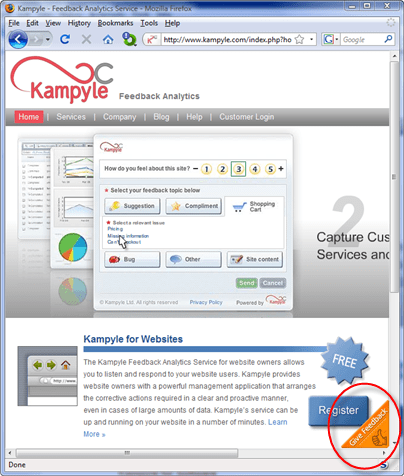
Click the floating image in the bottom-right corner to show the feeback form
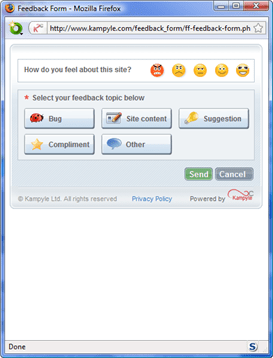
Leave feedback
You can also have Kampyle pop-up a survey question for a given percentage of users as they leave your site. I find such surveys annoying and never fill them in, so I haven’t felt inclined to try this yet.
Kampyle sounds great. Users have a simple way to supply feedback which doesn’t distract them from my key goal (buying my software). Sadly, very few visitors actually supplied feedback through Kampyle. I ran it for a month on some of the highest traffic pages on my Perfect Table Plan site and got a grand total of 4 comments from 3 visitors. Only two of these comments had any really useful feedback and both were from a single paying customer who probably would have emailed support anyway. I don’t feel the feedback justified the ‘cost’, in terms of the potential distraction of visitors and another potential failure mode for my website. Consequently I am now only running Kampyle on a couple of peripheral pages. Maybe the results would be better for different types of site. It only takes 10 minutes of so to set up, so it might be worth a try.
I came across a link on the Mac small business mailing list to a video of a talk called “hacking the press”. In it Mac journalist and author Adam C. Engst talks about the dos and don’ts of using the press to promote your software. While the talk has a Mac slant, I think 90% of it is also relevant to those developing commercial software for other platforms. It is particularly interesting to hear how things work from a journalist’s point of view.
 There are any number of different licensing models. For commercial software the main ones are:
Subscription payments and purchase + maintenance are nice, if you can get them. They give a more predictable cash flow for a business and you can generally charge a higher lifetime price than you can with a single payment. But this isn’t appropriate for all types of software. For example, it doesn’t make much sense for lower priced desktop software. Assuming subscription or purchase+maintenance isn’t an option, the question boils down to – should we charge for major upgrades?
Let’s look at the numbers for a simple (contrived) example. AcmeSoft sells 1000 licences of v1 of their product in year 1, 2000 licences of v2 of their product in year 2, 3000 licences of v3 of their product in year 3 etc. Each year 50% of the customers who bought the previous version (new or as an upgrade) pay to upgrade to the latest version. The upgrade costs them 50% of the initial purchase. How much is the upgrade revenue worth? We can create a simple model in Excel:
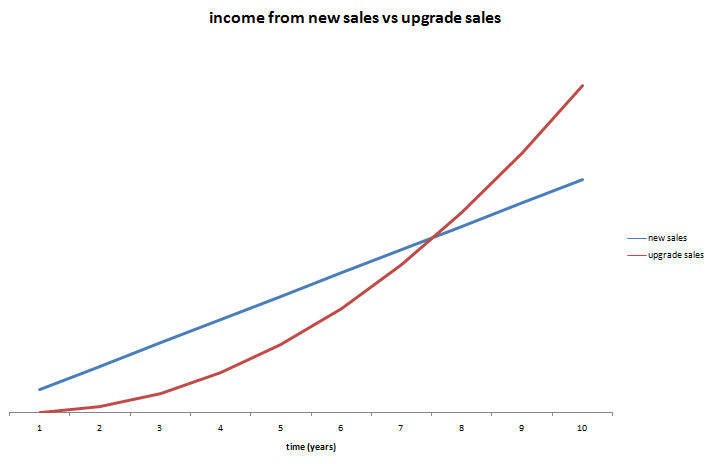
Income new licences (blue) vs income from upgrades (red). Click to enlarge.
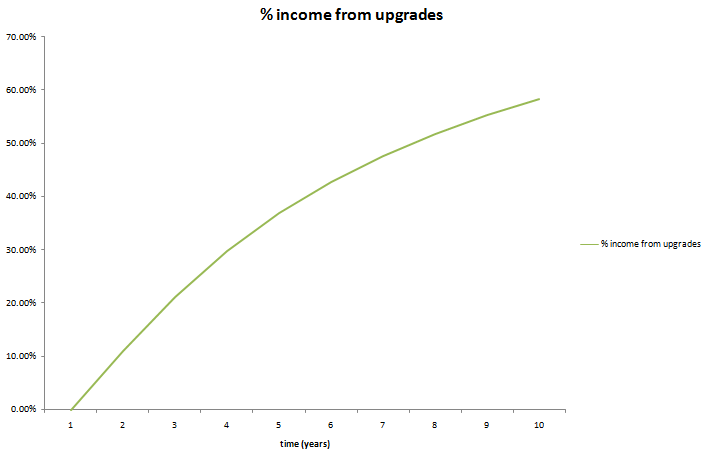
Percentage of annual income from upgrades. Click to enlarge.
In year 8 the upgrade income is actually worth more the new licence income. By year 10 upgrades are worth some 60% of yearly income for the product. If the product has a 10 year lifespan, nearly 50% of the total income from the product will be from upgrades. So it only makes commercial sense to give free upgrades for life if this will at least double the conversion ratio[1]. This seems highly unlikely. You can always try changing your upgrade policy and measure what effect it has on your conversion rate. Not much, I would guess (if anyone has tried it, I would be interested to know the results).
Even in a more pessimistic model where only 30% of customers upgrade and they only pay 30% of the new licence fee, upgrades still account for nearly 25% of total income over 10 years. You can download the spreadsheet and play with the parameters yourself.
Upgrade income becomes particularly important when:
In the worst case you could end up with a product with a huge customer base built up over a long period, but which makes very few new sales as it has saturated the market. Free major upgrades would mean that each major release is then going to result in large expense (developent and support) but very little income. Microsoft must be very happy they didn’t offer free upgrades for life on Windows or Office!
I don’t see anything unreasonable about charging for major upgrades. The vendor has to do additional work to add the new features and existing customers can choose whether the new features are worth the upgrade fee. However customers have certain (not unreasonable) expectations for paid upgrades:
If you are offering free upgrades for life currently, you can change your policy to paid major upgrades. But, obviously, you will need to honour free upgrades for everyone who purchases before the change of policy.
There are some, apparently successful, companies that offer free upgrades for life (Axialis for example). But I have heard many tales of small software vendors regretting their initial decision to give free upgrades for life. The easiest customer to sell to is the one you already have. If you don’t charge for major upgrades, are you leaving large amounts of money on the table?
[1]Ignoring inflation, interest etc.
Microsoft Adcenter helpfully sent me a link to lists of low cost keywords I could advertise on, categorised by sector, to “unlock new customers”. I had a quick look through the ‘sport and rec’ list. Here is a small sample (click to enlarge):
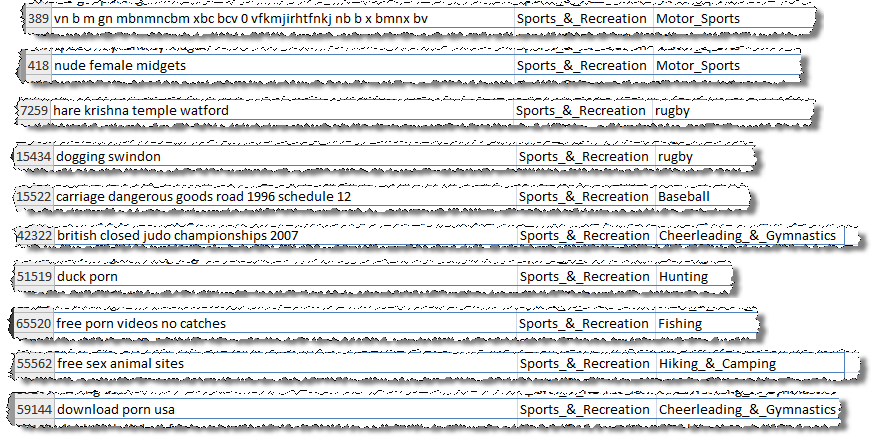
There are lots more where they came from. Microsoft say:
These keywords are actual terms recently used by your customers on Live and MSN Search Engines and are available at a low cost while very few other advertisers are bidding on them.
No kidding.
Did they do any QA on this list[1]? Exactly how many people are searching on “vn b m gn mbnmncbm xbc bcv 0 vfkmjirhtfnkj nb b x bmnx bv”? What has dogging (not work safe) or Hare Krishna got to do with rugby? Is it any wonder nobody is bidding on “duck porn”? Are there really that many people interested in pictures of nude female bodybuilders (apparently)?
Thanks Microsoft, but I’m really not sure they are the sort of new customers I want to unlock.
[1]There are some pretty unpleasant ones I didn’t include.
 It is great to make sales. But you really need to know where these sales are coming from to optimise your marketing. A simple and effective way to do this is through cookie tracking. The basic process is:
From the referrer you can find out what your customer typed into a search engine to find you. For example if the referrer is:
http://www.google.com/search?hl=en&q=backup softwareYou can infer that the purchaser found you by typing “backup software” into Google. This is incredibly useful information. Once you have amassed enough of it you can find out which keywords are most effective at selling your product. For example, whether “back-up software” makes more sales than “backup software” or “back-up programs”. This can be very helpful for fine-tuning your marketing message, SEO and PPC campaigns. You can also find out which websites purchasers are being referred from, and even how long purchasers take to make a sale after first arriving at your site.
You can get a lot of this information from Google Adwords conversion tracking. But you will only get data on sales through Adwords. I want data on all my sales. You can also get some of this information through Google Analytics. But you can only get the information in the form that Analytics wants you to have it and the price is allowing Google to see all this data as well. So I think it is well worth doing your own tracking, even if you are using Adwords conversion tracking and Analytics.
If you do use tracking cookies you will find that there is no cookie data for many transactions or the cookie data is unreliable. Reasons for this include:
So cookie tracking data is never going to be particularly reliable. My own data shows that about 30% of sales don’t return cookie data. But it is likely to be considerably worse for B2B sales due to the longer sales cycles and the increased likelihood of the buyer not be being the person who first found the product.
With these caveats in mind, I think it is worth the time to set up cookie tracking. It is pretty quick and easy to do. You can even use the free JavaScript published at www.webmarketingplus.co.uk. Note the conditions of use. Note also what an ugly language JavaScript is[1]. I recommend placing the JavaScript in a single file which you include in each page, so you only have a single place to make modifications, for example:
<script language=“JavaScript” type=“text/javascript” src=“refercookie.js”> </script>Sending the contents of the cookie to your payment provider is also quite straightforward. For example, for e-junkie I just use some JavaScript to extract the cookie contents and append:
&custom=<cookie contents>to the end of the ‘Buy now’ button URL e-junkie gives you. The cookie data then comes back to me in the ‘custom:’ field of the e-junkie sale confirmation email (I believe all the major e-commerce providers support something similar). I then store the cookie data along with all the other sales data. I can use this data to generate various graphs and reports, including top-selling keywords and a graph of the time-taken to purchase. Unlike much of the data you get from Analytics this is data you can really use, e.g. for the top selling keywords:
The use of cookies does have privacy implications, but these are often overstated. In theory all the information in a cookie could be retrieved from server log files, cookies are just a more convenient way or doing it. Users can also disable cookies in their browser settings or using other software. I think it is fine to use cookies as long as you make this clear to your visitors. You should still have a clearly stated privacy policy for your website and this should contain a brief description of what information you are storing in cookies.
Knowing a bit about cookies can also help you as a consumer. A while back I was interested in buying a large VDU from Dell. I browsed around their site and found a good deal. I went back some time later to buy the monitor after I had bought a new PC, but the price had gone up considerably. On a hunch I deleted Dell’s cookie and refreshed the page. The price dropped back to the original price. I believe that Dell knew from a cookie that:
Consequently they expected me to be less price sensitive than a consumer shopping for just a VDU and upped the price. I can’t prove this. It is also possible (but unlikely) that they just happened to drop the price in the few seconds before I did a refresh. Anyway, try it next time you want to buy something expensive online. Note that it might be easier to use another browser (e.g. Opera or Safari) than to delete cookies. Let me know if you get a similar result.
[1] It has been said that JavaScript bears as much resemblance to Java as the Taj Mahal Indian restaurant bears to the Taj Mahal. And Java is hardly a ‘looker’.
 Successful Software