Category Archives: marketing

ESWC 2011

No proper post this week. I’m too busy finishing off my talk ‘Promoting your software’ for ESWC 2011 in London next weekend (19-20 Nov). I am going to talk about my experiences attempting to try every form of promotion known to man including: SEO, Google Adwords, magazine ads, affiliates, Facebook ads and hanging out in wedding forums using a female pseudonym. With audience participation! Plus real data!

There are also some other interesting looking talks. Chatting to other people in the business over coffee or beer is also invaluable. If you haven’t booked a ticket, it isn’t too late. Don’t worry if it is your first time – people are very friendly. Do come and say hello.

On the subject of conferences, the ASP is putting on ISVCon in Reno, Nevada, USA in July 2012. Being UK based it is probably further than I am prepared to fly for a conference. But I hope it is a huge success.

What type of free trial should I offer for my software?

Once upon a time, the idea that you would allow people to try your software before they bought it was revolutionary. But now, thanks to the shareware movement and the ease with which software can be downloaded from the Internet, free trials are the norm for most types of off-the-shelf software. Prospective customers no longer have to rely on reviews of questionable independence or reading the packaging in a shop. They can try the software for themselves before making any commitment. This has been overwhelmingly a good thing for software users. It has also been a boon for vendors of good software.

When I surveyed 92 small software product vendors in 2009, 100% of them offered a free trial.

Eric Sink says:

Every small ISV today should give its customers an opportunity to try before they buy. It is officially now absurd to do otherwise. Customers will come to your Web site and expect to find a demo download.

And that was in 2004.

So, for most software products, the question isn’t – should I have a free trial? The questions is – what sort of free trial should I have? As with everything related to marketing, it depends. There are many different approaches. Below I describe some of the more common ones.

Time-limited

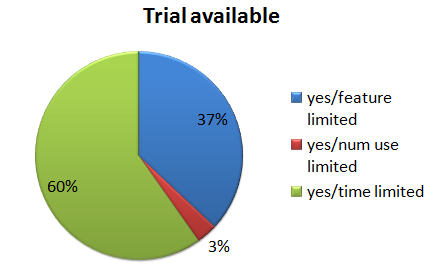
Typically this takes the form of a fixed number of contiguous days of free and unrestricted use. The software then stops working  and you need to buy a licence to continue using it. The time period is often 30 days. As you can see in the pie chart above, this was the most common type of trial in my survey.

The advantage of this approach is that it allows the user to try the full functionality of the software. But it does have a number of issues:

  • The trial might expire before they have finished their evaluation.
  • It isn’t suitable for software that might only be needed for a limited time. For example, a 30 day time-limited trial wouldn’t be a good idea for my wedding seating arrangement software as a wedding is a one-off event (we hope), and people could just start the trial 30 days before their wedding.
  • You have to find some way to hide the data about the date the trial starts.
  • It is relatively easy to circumvent. Even if you hide the install date well and check for changes to the system clock a potential customer can just keep reinstalling the software inside a new virtual machine each time the trial expires.
  • Cookie expiration is an problem. For example, Google Adwords conversion tracking cookies only last a maximum of 30 days. So Adwords conversion tracking won’t count a sale on day 31, which is probably where most of your sales will happen with a 30 day trial.
  • As most sales will only happen after your trial expires, you will have to wait longer to get your money.

I have sometimes downloaded software, started to evaluate it, got distracted and then returned only to find the trial has timed out. Very frustrating and unlikely to result in a sale. So I am generally not a fan of fixed duration trials. There are a couple of ways you can try to work around this issue:

  • Only limit the amount of time they are actually actively using the software. For example, allow them 8 hours of total active usage. This shouldn’t be too hard to program. For example, stop the timer if there hasn’t been a key press or mouse click event in 2 minutes.
  • Allow them to request an extension. Then at least you have got their email address and can follow them up.

Usage-limited

In this approach you limit the number of times a certain action can be performed. For example the number of pages they can print or the number of times they can start the software. This avoids the issue of a time-limited trial which expires before the user has finished their evaluation.

Feature-limited

In this approach the trial disables an important function of the software, for example printing or saving.  The problem is that a user won’t know if this feature works properly until they buy the full version. This may put some people off.

It has the advantage that you can ship a separate trial version with features missing completely from the executable, which makes life a little harder for crackers (note that they can still get hold of the non-trial version to crack if they want to, e.g. with a stolen credit card number). But it also makes life harder for customers, as they have to install the software a second time after purchase. Personally I care more about making life easy for my paying customers.

Capacity-limited

A capacity-limited trial restricts the amount of data that can be entered. For example, a password manager might only allow you to enter 50 passwords into the trial version. This approach can be problematic when performance is important. For example, if you limit a database trial to one thousand records, how can the user test whether the search performance is adequate for a database with a million records?

Output-limited

Many products exist purely to produce some form of physical or electronic output, for example image editors and label printers. Adding a watermark, or altering the output in some other way, can be an effective way to limit a trial. But you need to make sure that the modification to the output can’t easily be removed or worked around (e.g. using screen capture). You also need to be sure the user doesn’t think the modifications in the output are due to a bug in the software.

Nagware

Nagware allows you to use the software without restrictions, but ‘nags’ you periodically to pay for it. Usually this takes the form of a window that pops up when you start or exit the software. But I once used some software that also nagged you in audio. A woman’s voice with a heavy Scottish accent no less. It got uninstalled very quickly! Nagware isn’t very effective in my experience. I never did buy WinZip. Did you? After a while you just click the ‘continue’ button without thinking about it. Little tricks, like moving the ‘continue’ button or greying out for a few seconds are just annoying. And annoying people doesn’t seem like a great start to a business relationship.

No trial

Some software has no trial, just a money back guarantee. If your software is an enterprise system that takes significant effort to configure, then this is entirely understandable. But if it is off-the-shelf, downloadable software, what are you trying to hide? On the plus side it avoids the issue of people downloading software and then never getting around to trying it. My own stats show that only some 40% of people who start a download of my software actually install and run it. Also many people won’t ask for their money back even if they don’t like your product. So you might get sales to people who wouldn’t have purchased with a trial. But do you really want these people as customers? Personally I am unlikely to buy a software with no trial, unless there is no real alternative. I assume you won’t let me try your software because it isn’t very good. I’m sure many other people feel the same way.

Hybrid trial

Hybrids of the above approaches are also possible. For example, the trial of my wedding seating arrangement software doesn’t allow you to save, print or export plans with more than 30 guests – a hybrid of the capacity-limited and feature-limited approaches. I figure that 30 guests is enough to show what the product does, but not enough to be useful for most events. Also no-one is likely to pay for event planning software for an event with 30 or fewer guests.

Conclusion

A good trial is a balancing act. You need to give prospective customers enough to show them your software could solve their problem, but not enough to actually solve their problem. But if you are too restrictive they might go to a competitor with a more relaxed trial policy. It can be tough to get the balance right or to know whether a different approach would get better results.

Obviously, the best type of trial depends very much on your product. If it is a product that is likely to be used a lot and  is going to increase in value as it is used, then you might be best offering a generous time-limited or usage-limited trial. But if it is a product that is only needed for a one-off task or a limited period of time, then a feature-limited, capacity-limited or output-limited trial probably makes more sense.

For example, most consumers will (unless they are very unlucky) only want to use disk recovery software once. So it wouldn’t make sense to offer a 30 day free trial. It would probably make more sense to offer a feature-limited trial that allows them to see what data could be recovered, but not actually allow them to do the recovery until they pay up. But if you are selling to professional disk recoverers, then a time or usage-limited trial might be appropriate.

I asked  Craig Peterson of the Beyond Compare file comparison tool about their very generous trial policy (30 non-contiguous days of use) in an interview and he said:

That goes back to competing with all the other products out there.  If someone installs two programs to evaluate, and then doesn’t have a chance to really try them out until a month later, the one that works is more likely to get the sale.  It also makes it more likely that potential customers will learn the application and start relying on it, so when it does come time to pay they’re less likely to throw out that investment and switch to another tool.

Data comparing different types of trial is hard to come by:

  • My 2009 survey didn’t show any clear difference in mean conversion rate between time and feature-limited trials (there wasn’t enough data for usage-limited trials to be worth counting):

The nagware vs feature-limited result is fairly conclusive. But, apart from that, there doesn’t seem to be much hard data to go on. Even if there was more data, it wouldn’t necessarily apply for different products in different markets. So, unless you want to program multiple types of trial and run lots of split tests (trial and error?),  you are going to have to ‘go with your gut’. It is tempting to pick the same trial model as your competitors. But remember that part of successful marketing is being different.

So there are no easy answers. But don’t just choose a 30 day time-limited trial because that is what everyone else is doing. Have a think about what fits best with your product, market and customers. Be creative.

Selling software vs selling eyeballs

Lets say I’ve written some downloadable software and I want to make some money from it (‘monetize it’  in the ghastly common parlance). Should I charge people for using the software or should I give them the software for free and make my money from ads?

Lets look at some numbers.

The typical conversion rate for downloadable software is around 1%. That means that about 1% of the people that visit your site will typically buy your software. So, for each $1 of your sale price you will make around $0.01 per unique visit. Downloadable software is often priced around $30, so lets say $0.30 per unique visitor. Some software sells for less than $30, and some for a lot more. Also I haven’t taken account of the lifetime value of a customer (e.g. upgrades) – which will increase the value per customer; or payment processing and advertising costs – which will reduce the value per customer. It is just a ball park figure.

How much money could I make from advertising if I give the software away instead? I have been doing some research for a while on this. Based on various data I have gleaned from the BOS forum and blogs, advertisers typically pay per $1-$2 per 1000 impressions (CPM). Some data points:

  • A well known ad network offered me a $2 CPM (-19% commission) to put ads on this blog.
  • Dating site plentyoffish.com reported making $10k/day from Adsense off 200 million pages per month in 2006, which is a CPM of $1.5
  • A sample of 8 Facebook app developers were averaging less than $1 CPM.
  • “If a site like Stack Overflow, which does almost a million pageviews a day, can’t make enough to cover even one person at half time using Google AdSense, how does anyone make a living with AdSense? Does it even work?” (Stackoverflow blog)
  • “Charging your end user isn’t the only way of pricing software. You can choose to give it away for free and then make money by, for example, charging for consulting, installation and training; or selling advertising. The latter, although a common model for web sites, is extremely hard to make work. CPM – the cost per thousand impressions – can be as low as a dollar. In other words, to generate one thousand dollars of revenue you might need to serve up as many as a million pages. To generate enough revenue to support a team of three or four people, that means having ten million page views per month. Most web applications simply aren’t going to attract that sort of traffic.” (p57 of “Don’t just roll the dice”)

So, taking a ballpark CPM of $1.5, I would be making $0.0015 per page impression.

Obviously I am comparing apples (unique visitors) and pears (impressions) here. How many impressions does 1 unique visitors equal? My own table planning software averages around 2 impressions per unique visitor (many visitors bounce out after reading 1 page, even those that buy might only visit the home, download and purchase pages). So, assuming this is typical, the product based site described above should be making around $0.15 per page impression. Based on these (admittedly rough) numbers an ad driven site needs approximately 100 times as many page impressions per day to make the same money as a product driven site. To make around $100k per year the product site would need about 900 visitors/1,800 impressions per day. To make the same amount the ad driven site would need around 90,000 visitors/180,000 impressions per day. But it is worse than that because the ad driven site is going to have significant hosting fees and potentially many more users to provide support for. I know which business model I prefer.

So why not get the best of both worlds – sell the software AND put ads on the site? Because then you are sending out all sorts of bad vibes (“this software isn’t good enough that they can make a living off it”) for a measly 1% extra income from the ads. I’m confident the presence of ads will lose you >1% in product sales.

An ad supported model is only viable when you have lots of traffic. Most downloadable software (or web apps) won’t be able to generate that sort of traffic, even if it is good and you give it away for free. If you really want to run an ad supported business, you are probably better off basing it around forums and user generated content than free software.

In the final analysis if you are creating software I think it makes more sense to create something of value, grow some balls and charge for it. Rather than giving it away and selling eyeballs in the hope that someone else will take their money and throw you some scraps. Think balls, not eyeballs.

Setting an optimal bid price for Google CPA bids

A couple of years ago I wrote up the results of an experiment comparing Cost Per Action vs Cost Per Click bidding in Google Adwords. At the end of the experiment I decided that I did trust Google CPA bidding, but the results from CPA bidding weren’t compelling enough for me to switch. So I stayed with my mature CPC campaign. Subsequently I spoke at length with Adwords guru David Rothwell and Adwords master practitioner Alwin Hoogerdijk. They convinced me that:

  • I hadn’t really given Google CPA enough learning time – the more data Google has the better it should be able to do. The mighty Google brain might even be able to spot and exploit patterns I would find very difficult to emulate (e.g. based on season, country, day or week or time of day).
  • I should switch from paying per sale to paying per download, as this would give Google an order of magnitude more data to work with.
  • CPA bidding would require a lot less of my precious time to manage.

So I switched back to CPA. This time measuring a conversion as a successful download and install (my table planner shows a help page in a browser on first run, this contains the Google conversion tracking script).

So now, instead of having to choose thousands of bid prices (one for each keyword and match type in each campaign), I had to choose a single bid price – what I am prepared to pay Google for a download. If I pay too little for a download: Google won’t show my ads much, I won’t make many sales and my profit will be low. If I pay too much for a download: Google will show my ads a lot, but the amount I pay for each conversion will be high and my profit will be low. In between their should be a ‘sweet spot’ that gives me optimal profit. But how to find that sweet spot?

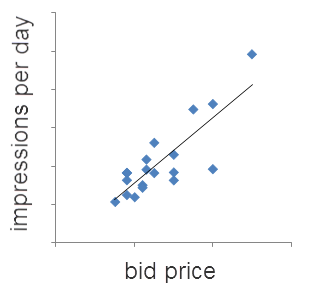
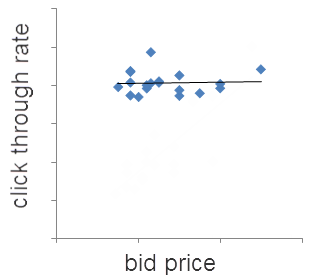
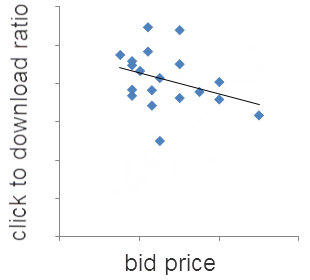
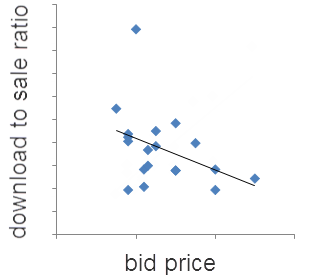
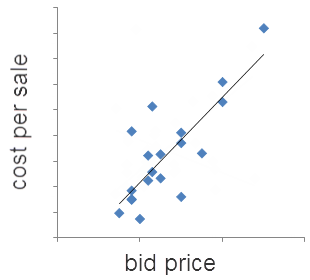
Looking at analytics data I have a good idea at what rate Adwords traffic converts to sales. I chose a CPA bid based on this and then I randomly varied the bid up or down every 7 days (some days of the week perform consistently better than others for my product). The graphs below show the results. Each data point is 7 days of data. The black lines are linear trend lines. I deliberately haven’t put values on the axes, but the x and y axes are all linear, starting at 0.

The trends are pretty clear. Increasing CPA bid price:

  • increases the number of times your ads are shown
  • makes little difference to the click through rates
  • decreases the click to download and download to sale ratios

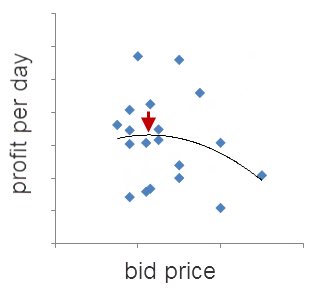
So higher bids means more sales, but also a higher cost per sale. But, of course, the really important metric is profit. So I worked out the average daily profit from Adwords traffic, which is the net sales income (gross sales minus sales costs, including payment processor fees and support costs) minus Adwords costs. Again each point is 7 days of data. The black line is a 2nd order polynomial trend line.

The data is quite noisy. But some data is a lot better than none and there does appear to be sweet spot about where the red arrow is. The curve is fairly flat meaning that I don’t have to be too precise in my bid price to get a near to optimal return. But if I bid twice the optimal price my profit will drop by about 35%.

In an ideal world I would have run all these different bid prices concurrently, instead of one after the other. But that just isn’t possible with Adwords at present (you can use Google Adwords experiments to split test bid prices, but only 2 at a time). Also I could have gathered a lot more data, used longer time intervals (7 days probably isn’t long enough for Google CPA to get into its stride) and bid a lot higher and lower, to make the trends clearer. But I wasn’t prepared to spend the extra time and money required.

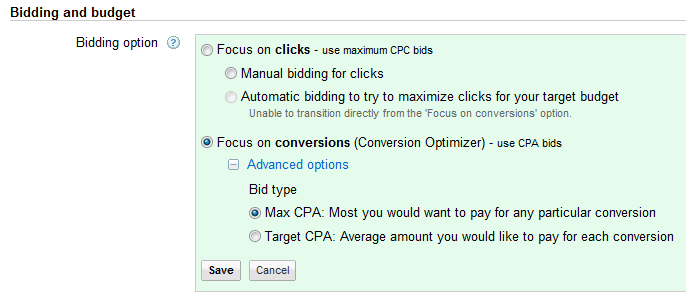
If you are using CPA bidding you should be able to carry out a similar analysis on your own Adwords account to find your own CPA bidding sweet spot. If you are still using CPC, perhaps you should consider switching to CPA and let Google do some of the heavy lifting for you. You can switch any campaign that has 15 or more conversions per month to CPA bidding in the ‘Settings’ tab.

You can always switch back to CPC later. If you aren’t using Google conversion tracking, well you really should be.

A word of warning. Not all downloads are equal. You might think that download to sale rates would vary a lot less than impression to click and click to download rates (I did). But download to sale ratios can vary a lot between different campaigns, even for the same product. For example, my analytics data shows that downloads from Adwords display (=contents/adsense) traffic only convert to sales at around a quarter of the rate of Adwords search traffic. So display campaign downloads are worth a lot less to me than search campaign downloads and I set my CPA bids accordingly.

I showed a draft version of this post to Alwin Hoogerdijk of Collectorz.com collection database software, who first persuaded me to switch back to CPA and knows a lot more about CPA than I do. He had the following to add:

When using CPA bidding you should give Google more room to experiment. On search, this means using more broad match terms, or at least modified broad match. And less negative keywords (I removed a lot of my negatives lately). The idea is that Google will automatically find out what works and what doesn’t (again, this may take a lot of time).

On the Content Network it means being less trigger-happy with the site exclusions. Without CPA bidding, I would be more likely to exclude generic sites like Facebook, about.com, etc… But with CPA bidding, I tend to allow the optimizer to display on those sites and the find the right pages within those sites to show my ads on.

In my experience, the optimal CPA bid can vary (wildly) between products, campaigns, etc. . Content Network CPA’s in general tend to be much lower, for the same products. Strangely enough, content network visitor sign up (or downloads) are worth less than search traffic sign ups. Which wasn’t what I was expecting. Of course, content network traffic is less targeted in general so one would expect a lower sign up rate. But even if those visitors sign up, they convert less well to actual sales too. Tricky.

A simple change that doubled sales

A while back I did a day of consulting for James Wang on his SQL Pretty Printer software. One of my many recommendations was that he displayed the name of the licensed user prominently in the software, to discourage casual license key sharing. He recently reported back to me that he had made this change and it had significantly increased the number of orders for multiple licenses. The average number of licenses per sale increased from 1.34 to 2.65 since he made the change in February 2011. That is a 98% increase in sales! And it only took a week to change the licensing system.

James commented:

Each time I have had an increase in sales, I found that it was mostly due to marketing related issues like changing the licensing system or paying for a link from a site which has a highly targeted audience for my software, not due to a new version release.

Of course it helps that James had a good product in the first place.

3 Low-Competition Niches In Retail Software

This is a guest post by Joannes Vermorel, founder of the Lokad Forecasting Service.

Software developers seem to be herd animals. They like to stay very close to each other. As a result, the marketplace ends up riddled with hundreds of ToDo lists while other segments are deserted, despite high financial stakes. During my routine browsing of software business forums, I have noticed that the most common answer to Why the heck are you producing yet another ToDo list? is the desperately annoying Because I can’t find a better idea.

This is desperately annoying because the world is full (saturated even) with problems so painful that people or companies would be very willing to pay to relieve the pain, even if only a little. A tiny fraction of these problems are addressed by the software industry (such as the need for ToDo lists), but most are just lacking any decent solution.

Hence, I detail below 3 low-competition software niches in retail. Indeed, after half a decade of running sales forecasting software company Lokad, I believe, despite the potential survivor bias, that I have acquired insights on a few B2B markets close to my own. Firstly I will address a few inevitable questions:

Q: If you have uncovered such profitable niches, why don’t you take over them yourself?
A: Mostly because running a growing business already takes about 100% of my management bandwidth.

Q: If these niches have little competition, entry barriers must be high?
A: Herding problems aside, I believe not.

Q: Now these niches have been disclosed, they will be swarmed over by competitors, right?
A: Odds are extremely low on that one. The herd instinct is just too strong.

Q. Do I have to pay you if I use one of your ideas?
A. No, I am releasing this into the public domain. I expect no payment if you get rich (unless you want to!) and accept no liability if you fail miserably. Execution is everything.  And don’t trust a random stranger on the Internet – do your own market research.

Before digging into the specifics of those niches, here are a couple of signs that I have noticed to be indicators of desperate lack of competition:

  • No one bothers about doing even basic SEO.
  • No prices on display.
  • No one offers self-signup – you have to go through a sales rep.
  • Little in the way of online documentation or screenshots are available.

However, lack of competition does not mean lack of competitors. It’s just not the sort of competition that keeps you up at night. Through private one-to-one discussions with clients of those solutions, here is the typical feedback I get:

  • Licenses are hideously expensive.
  • Setup takes months.
  • Upgrade takes months (and is hideously expensive).
  • Every single feature feels half-baked.

By way of anecdotal evidence – during a manufacturer integration with our forecasting technology a few months ago at Lokad, we discovered that the client had been charged $2,000 by its primary software provider in order to activate Remote Desktop on the Windows Server where the software was installed. Apparently, this was well within the norm of their usual fees for the inventory management system in place.

Granted, just being cheaper is usually not a good place to be in the market. Yet, when a competitor’s software is designed in such a way that it takes a small army of consultants to get it up and running, they can’t just lower their license fees to match yours – assuming that your design is not half-baked too. The competition would have to redesign their solution from scratch, and give up on their consultingware revenues. So you are in a great position to drive competition crazy.

With a market managing over two-thirds of the US gross domestic product, one would expected retail be saturated by fantastic software products. It turns out this is not the case. Not by a long shot – except eCommerce (e.g. online shopping carts) which attracts a zillion developers for no good reason.

Some salient aspects of the retail software market:

  1. Most retailers are already equipped in basic stuff such as point-of-sale, inventory management and order management systems. So you don’t have to deliver that yourself. On the contrary, you should rely on the assumption that such software is already in place.
  2. As far the Lokad experience goes with its online sales forecasting service, retailers are not unwilling to disclose their data to a 3rd party over the Internet. It takes trust and trust takes time. Interestingly enough, at Lokad we do sign NDAs, but rather infrequently. We are not unwilling, but most retailers (even top 100 worldwide ones) simply don’t even bother.
  3. Retailers have a LOT of data, and yet unlike banks, they have little talented manpower to deal with it. Many retail businesses are highly profitable though and could afford to pay for this kind of manpower, but as far I can tell, it’s just not part of the usual Western retail culture. Talents go to management, not to the trenches.

Niche 1: EOQ (Economic Order Quantity) calculator

Retailers know they need to keep their stocks as low as possible, while preserving their service levels (aka rate of non stock-outs), see this safety stock tutorial for more details. If the marginal ordering cost for replenishment was zero, then retailers would produce myriads of incremental replenishment orders, precisely matching their own sales. This is not the case. One century ago, F. W. Harris introduced the economic order quantity (EOQ) which represents the optimal quantity to be ordered at once by the retailer, when friction factors such as the shipping cost are taken into account. Obviously, the Wilson Formula (see Wikipedia for details) is an extremely early attempt at addressing the question. It’s not too hard to see that many factors are not accounted for, such as non-flat shipping costs, volume discounts, obsolescence risks …etc.

Picking the right quantity to order is obviously a fundamental question for each retailer performing an inventory replenishment operation. Yet, AFAIK, there is no satisfying solution available on the market. ERP systems just graciously let the retailer manually enter the EOQ along with other product settings. Naturally, this process is extremely tedious, firstly because of the sheer number of products, secondly because whenever a supply parameter is changing, the retailer has to go through all the relevant products all over again.

The EOQ calculator would typically come as multi-tenant web app. Main features being:

  • Product and supplier data import from any remotely reachable SQL database[1].
  • Web UI for entering / editing EOQ settings.
  • EOQ calculation engine.
  • Optional EOQ export back to the ERP.

Pricing guestimate: Charge by the number of products rather than by the number of users. I would suggest to start around $50/month for small shops and go up to $10k/month for large retail networks.

Gut feeling: EOQ seemingly involves a lot of expert knowledge (my take: acquiring this knowledge is a matter of months, not years). So there is an opportunity to position yourself as an expert here, which is a good place to be as it facilitates inbound marketing and PR with specialized press. Also, EOQ can be narrowed down to sub-verticals in retail (e.g. textiles) in case competition grows stronger.

Niche 2: Supplier scorecard manager

For a retailer, there are about 3 qualities that define a good supplier: lowest prices, shortest shipment delays, best availability levels (aka no items out-of-stock delaying the shipments). Better, sometime exclusive, suppliers give a strong competitive edge to a retailer. Setting aside payment terms and complicated discounts, comparing supplier prices is simple, yet, this is only the tip of the iceberg. If the cheapest supplier doesn’t deliver half of the time, “savings” will turn into very expensive lost sales. As far I can observe, beyond pricing, assessing quality of the suppliers is hard, and most retailers suffer an ongoing struggle with this issue.

An idea that frequently comes to the mind of retailers is to establish contracts with suppliers that involve financial penalties if delays or availability levels are not enforced. In practice, the idea is often impractical. Firstly, you need to be Walmart-strong to inflict any punitive damage on your suppliers without simply losing them. Secondly, shipping delays and availabilities needs to be accurately monitored, which is typically not the case.

A much better alternative, yet infrequently implemented outside the large retail networks, consists of establishing a supplier scorecard based on the precise measuring of both lead times (i.e. the duration between the initial order and the final delivery) and of the item availability. The scorecard is a synthetic, typically 1-page, document refreshed every week or every month that provides the overall performance of each supplier. The scorecard includes a synthetic score like A (10% best performing suppliers), B and C (10% worst performing suppliers). Scorecards are shared with the suppliers themselves.

Instead of punishing bad suppliers, the scorecard helps them in realizing there is a problem in the first place. Then, if the situation doesn’t improve after a couple of months, it helps the retailer itself to realize the need for switching to another supplier…

The scorecard manager web app would feature:

  • Import of both purchase orders and delivery receipts (this might be 2 distinct systems). [2]
  • Consolidation of per-supplier lead time and availability statistics.
  • One-page scorecard reports with 3rd party access offered to the suppliers.

Pricing guestimate: Charge based on the number of suppliers and the numbers of orders to be processed. Again, the number of users having access to the system might not be a reliable indicator. Starting at $50/month for small shops up to $10k/month for large retail networks.

Gut feeling: By positioning your company as intermediate between retailers and their suppliers, you benefit from a built-in viral marketing effect, which is rather unusual in B2B. On the other hand, there isn’t that much expert knowledge (real or assumed) in the software itself.

Niche 3: Dead simple sales analytics

Retail is a fast-paced business, and a retailer needs to keep a really close eye on its sales figures in order to stay clear of bankruptcy. Globally, the software market is swarming with hundreds of sales analytics tools, most of them being distant competitors of Business Objects acquired by SAP years ago. However, the business model of most retailers is extremely simple and straightforward, making all those Business Intelligence tools vast overkill for small and medium retail networks.

Concepts that matter in retail are: sales per product, product categories and points of sale. That’s about it. Hence, all it should take to have a powerful sales visualization tool setup for a retailer should be access to the 2 or 3 SQL tables of the ERP defining products and transactions; and the rest being hard-coded defaults.

Google Analytics would be an inspiring model. Indeed, Google does not offer to webmasters any flexibility whatsoever in the way the web traffic is reported; but in exchange, setting-up Google Analytics requires no more than merely cutting-and-pasting a block of JavaScript into your web page footer.

Naturally it would be a web app, with the main features being:

  • Product and sales data import from any remotely reachable SQL database.[2]
  • Aggregate sales per day/week/month.
  • Aggregate per product/product category/point-of-sales.
  • A Web UI ala Google Analytics, with a single time-series graph per page.

Pricing guestimate: Regular per-usage fee, a la Salesforce.com. Starting at $5/user/month basic features to $100/user/month for more fancy stuff.

Gut feeling: probably the weakest of the 3 niches, precisely because it has too much potential and is therefore doomed to attract significant attention later on. Also, achieving a wow effect on first contact with the product will probably be critical to turn prospects into clients.

Market entry points

Worldwide, there are plenty of competitors already for these niches. Yet, again, this does not mean much. Firstly because retail is so huge, secondly because it’s a heavily fragmented market anyway. First, there are big guys like SAP, JDA or RedPrairie, typically way too expensive for anything but large retail networks. Second, there are hundreds of mid-market ERPs, typically with a strong national (or even regional) focus. However, those ERPs don’t delve into fine-grained specifics of retail, as they are too busy already dealing with a myriad of feature requests for their +20 modules (accounting, billing, HR, payments, shipping … etc). Hence, there is a lot of space for razor-sharp web apps that focus on one, and only one, aspect of the retail business. Basically single-minded, uncompromising obsession with one thing, leaving aside all other stuff to either ERPs or other web apps.

In order to enter the market, the good news is that mid-size retailers are pretty much everywhere. So you can just use a tiny bit of networking to get in touch with a couple of neighbouring businesses, even if you don’t have that much of a network in the first place. Then, being razor-sharp in a market where very little online content is available, offers you a cheap opportunity at doing some basic SEO based on the very specific questions your software is addressing.

Q: I am interested, I have questions, can I ask you those questions?
A: Naturally, my rate is 200€/h (no just kidding). Yes, email me.

[1] Don’t even bother about providing a super-complicated setup wizard. Just offer a $2k to $5k setup package that includes the ad-hoc handful of SQL lines to match the existing data of the retailer. We are already using this approach at Lokad with Salescast. Alternatively, we also offer an intermediate SQL schema, if the retailer is willing to deal with the data formatting on its own.

[2] Again, I suggest an approach similar to the one of Salescast by Lokad: don’t even try to robotize data import, just design the software in such a way that adding a custom adapter is cheap.

Joannes Vermorel is the founder of Lokad, company motto “You send data, we return forecasts”. Lokad won the first Windows Azure award from Microsoft in 2010, out of 3000 companies applying worldwide. He has a personal blog that mostly deals with cloud computing matters.


15 criteria for evaluating software product ideas

Choosing the right product to develop is crucial. Great execution is also very important. But if you develop a product that no-one wants or no-one is prepared to pay for, then you are going to fail, no matter how well you execute it. You can often tweak a product or its marketing to make it more successful based on market feedback (‘pivot’) .  But the less pivoting you have to do, the better. Below I list some of the criteria I think are important for evaluating the potential of new commercial software products.

1. Are you solving a real problem?

Has your customer got a ‘bleeding neck’? Is your software solving a problem compelling enough that someone is going to download it, install it, evaluate it, buy it and then learn to use it, with the accompanying risks of credit card fraud and malware? It is hard to change people’s habits. They are going to keep doing what they are doing now (e.g. pen and paper or Excel) unless you can convince them your software offers them very significant advantages.

2. How much will people pay for this product?

This is a complex question and depends on many factors. You should be able to get a rough idea by looking at your closest potential competitors. But there are some types of software that people don’t expect to pay for, no matter how difficult or expensive it is to develop – for example web browsers and media players. There are some users who can’t pay – for example children and people in some developing countries. And there are some people who won’t pay – for example many Linux users. So good luck selling a media player aimed at teenage Linux users in China.

3. Is the market big enough?

Is the market big enough for you to make a living? How many people are looking for solutions to this sort of problem? This is less of a problem than most people think. Given the huge number of people with Internet access and credit cards it is possible for a small company to make a decent living from a market that appears very narrow. Narrowing your market also allows you to be much more focussed in your marketing.

4. Can you promote it cost effectively?

How are you going to reach customers: Adwords, SEO, partners, magazine ads, direct mail, social media, affiliates, resellers or other methods? Can you do it cost effectively? How much is each sale from Adwords going to cost you assuming a 1% conversion rate? If it costs you $31 in advertising for each sale of a $30 product, you aren’t going to be in business long. But if you can cross-sell it to customers you already have a relationship with, that is a huge plus.

5. How much competition is there?

If there are lots of established competitors, you may have a hard time getting noticed. Personally I wouldn’t want to go into any market where I didn’t have a reasonable shot of getting to the first page on Google for at least some of the important search terms. For example, I think it would be incredibly tough to succeed with yet another Twitter, RSS, todo list or backup application. Conversely, if there are no competitors, that means that there may be no market. Creating a new market is tough, especially for a small company. Ideally you want a market where there are competitors making a decent living, but you think you can do a better job than them, or at least be different to them in some important way.

6. How is your product different?

Many vendors try very hard to reach feature parity with their competitors. But successful marketing means being different to your competitors. How is your product going to be different? What is your positioning? Note that just being cheaper than your competitors is not enough.

7. How high is the barrier to entry?

How long will it take you to create a minimum sellable product? If the barrier to entry is too high, you may never have the time, cashflow and energy to reach v1.0. As a self-funded microISV I wouldn’t want to work on any product where I couldn’t deliver something sellable (a minimum viable product) within 6 months. Conversely if the barrier to entry is too low, then it will be easy for others to copy your idea if it is successful.

8. Can you reach critical mass?

Some types of applications need a certain number of users before they can take off (network effect). For example, a massively multi-player game, dating site or auction site isn’t going to be very interesting until the number of users reaches a certain threshold. Do you have the contacts and financial resources to reach this threshold?

9. Do you have the technical skills and domain knowledge to create this product?

If not, how long will it take to learn them? Different technologies suit different types of problems. Using an inappropriate technology, just because it is one you have experience in, is unlikely to end well.

10. Are you scratching your own itch?

If you can be your own customer, then this can be very helpful in coming up with a good solution. But be wary about assuming that your needs are the same as everyone elses.

11. What is the lifetime of the product?

Is the technology going to be obsolete, or will the market disappear within a couple of years?  Are customers likely to buy upgrades to new versions? The longer you can sell a product for, the more profitable it is likely to be.

12. Is a good domain available?

Can you get a good domain for your product? Domains that contain keywords that people are likely to search on will help with SEO.

13. What are the risk factors?

Every dependency is a risk factor. If the platform your products runs on dies, then your product dies.  If you are writing an add-on for another product, then you can be put out of business pretty much overnight if the core product dies or if the functionality of your add-on is incorporated into the core product. Can you get source code for third party libraries?

14. Is the passion there?

Good software takes a lot of time and effort. Don’t believe the hype about 4 hour work weeks. Is it going to be interesting and fun? Do you have the passion and commitment to still be working on this product in 10 years time?

15. Will it make the world a better place?

Software products can be an enormous force for good in the world, increasing productivity and allowing people to do things they couldn’t do otherwise. You don’t have to be the next Google to be doing something worthwhile. But creating a “me too” clone of an existing software package or a product that encourages anti-social behaviour (e.g. spamming) isn’t going to make the world a better place.

Making a decision

You need to look at all these criteria before you make a decision. For example, a short lifespan or a small market might be compensated for by a high ticket price. If you are evaluating several products, create a simple table with a row for each criteria and a column for each product and compare them side by side.

Al Harberg’s Software Marketing Glossary

Al Harberg (best known for his press release service for software vendors) has created a useful glossary of software marketing terms. Al knows a lot about marketing software. His glossary is 107 pages/53k words long and includes quotes, book review and feature articles. I particularly enjoyed some of the more tongue in cheek definitions e.g. “System requirements: A poorly cobbled statement of techie talk that software developers use to lose sales” and “Idiot customers: Clients who don’t understand every aspect of your software immediately”. If you don’t know what active voiceAIDA, astroturfing, cloaking, CPM, fast follower or purchase order mean, now is your chance to find out.

Is it worth advertising Mac software on Google Adwords?

I learnt a long time ago that people will happily click on totally irrelevant pay per click ads. For example, if you bid on “seating plan” I can assure you that a significant percentage of people searching for “boeing 747 seating plan” will happily click on your ad titled “wedding seating plan”. They won’t buy anything, as they aren’t interested in wedding seating plans, but you still have to pay for each click. You can stop your ad showing to these searchers by adding “boeing” and “747” as negative keywords. Problem solved.

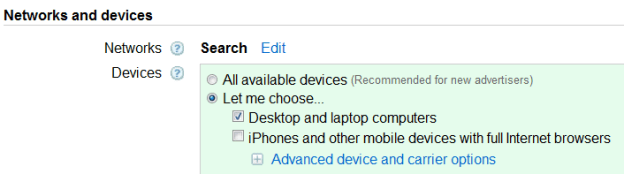
But what do you do if you are selling software that only runs on Mac OS X? The vast majority of searchers are running Windows. Indiscriminate clicks by them could quickly turn your Adwords ROI negative. In your Adwords campaign settings you can choose to only show ads on desktop computers and laptops. But you can’t choose the operating system.

As discussed above, putting “Mac” in the title is unlikely to be enough. You can’t use negative keywords, because the vast majority of Windows users searching for, say, backup software will type “backup software” not “Windows backup software”. You can just bid on searches containing keywords “Mac”, “Apple” or “OS X”, but will this be enough? My general advice to Mac only software vendors was to avoid Adwords, unless the ticket price of their software was in the hundreds of dollars. But, as my software runs on both Windows and Mac, I didn’t have any data to back this up.

Recently I got some data on Adwords clickthrough rates for a Mac only app (www.puzzlemakermac.com) by Hokua Software. They have kindly allowed me to share the data.

Initially they bid on generic keywords, such as “crossword maker” and ran ads such as the following with “Mac” displayed prominently in the title:

The results from analytics: 60% of the people clicking on the ads were on Windows and 40% on Mac.

Then Google banned them from the word “Mac” in their ads (it is possible to get this reversed with the express permission of Apple, but I don’t know how likely they are to grant this). So they switched to “OS X” in the ad, which hasn’t been blocked (yet).

The results from analytics: 73% of the people clicking on the ads were on Windows and 27% on Mac.

Then they restricted their bids to Mac targeted keywords such as “mac crossword maker”.

The results from analytics: 23% of the people clicking on the ads were on Windows and 73% on Mac. But there was a big drop in the number of impressions.

I think it is going to be almost impossible for anyone to get a return from Adwords when the majority of their clicks have no chance of generating a sale. So only bidding on Mac specific keywords seems to be the way to go. But there will still be a significant number of wasted clicks from Windows users. Also any Mac users who don’t use the appropriate keywords won’t see your ad. Consequently the return on time and money invested is likely to be a lot lower than Windows, cross-platform and web developers can expect. If you have a Mac only product with: a high ticket price product, well-defined keywords and limited competition, it might be worth trying Adwords. But otherwise it is probably better to wait and see if Google release OS targeting.

Of course, you could always use one of the free Adwords vouchers that Google are handing out like confetti (I get one every month in my PC Pro magazine) and try for yourself. This is how Hokua software got the results above. If you do, I would be interested to know how your results compare.

PerfectTablePlan Royal Wedding Special

PerfectTablePlanIt is the Royal Wedding tomorrow and everything has gone Royal Wedding crazy here in the UK. I did send the happy couple a complimentary copy of my Perfect Table Plan software a while ago. I haven’t heard anything back, but I will be checking my support emails tomorrow morning, just in case. ;0)

I am doing my bit to cash in honour the occasion by putting the Home Edition of Perfect Table Plan on one-day discount site BitsDuJour on the big day. 51% off for 29th April only.

After the discount, BitsDuJour’s commission and support costs, I won’t be making much per sale. But I figure it might be worth it for the exposure to a different audience. Also some of the purchasers might upgrade later. My product is rather different to most of the other products featured on BitsDuJour, so it will be interesting to see how it does.

Will you, or anyone you know, be planning a seated event  (wedding, charity gala, award ceremony etc) in the future? If so, you can get the 51% discount here.