
 David Trump of the ASP is offering free software licences to people who contribute to Haiti disaster relief. This seems like a great idea to me, so I am copying it for PerfectTablePlan. I am going to try it for 24 hours and see how it goes. I am blogging about it here in case other software vendors are inspired to try it.
Category Archives: software
Should you offer a money back guarantee?
 A few weeks ago I was going to buy a digitizer tablet for my PC. Then I noticed in the vendor’s terms and conditions that they wouldn’t accept a return once I had opened the packaging. But I couldn’t know if the tablet works until I open the packaging. Duh. I didn’t buy it. Similarly I look for a sensible money-back guarantee whenever I buy software. I don’t remember ever invoking such a guarantee for software, but it is nice to know that I could if I wanted to. Also, I see the lack of such a guarantee as a warning signal that the vendor isn’t confident about the quality of their product.
I offer a 14-day money back guarantee on my own Perfect Table Plan software. The only provisos are:
- They have to tell me what they didn’t like about my software. This is very useful feedback for me.
- They have to email me that they have uninstalled the software and won’t use it again. I have no way of checking this, but I want them to be clear in their own mind that they are a liar and a cheat if they carry on using it (if you have read Ariely’s excellent ‘Predictably irrational’ you will know that many people are prepared to be a little dishonest, but few will lie and cheat outright).
- They have to return the CD, if they purchased one.
- The guarantee is only valid for 14 days.
But I am fairly relaxed about about all of these. If it is clear that someone thinks they haven’t got their money’s worth out of my software, I will pretty much always give them their money back.
Note that is isn’t a ‘no questions asked’ money back guarantee. I haven’t been quite brave enough to try that yet and really want feedback on why they didn’t like my software. Also the 14 day guarantee is shorter than most. The reason is that a lot of people buy my software for a single use (e.g. their wedding reception) and I don’t want to make it too easy for them to use the software and claim a refund after they have finished with it. However I have heard vendors say that their refund rate actually dropped when they extended the length of their money back guarantee (due to increased procrastination, perhaps). I may test switching to a ‘no questions asked’ and/or longer guarantee period at some point.
The advantages of a money back guarantee to the vendor are:
- More sales. If they customer is confident they can get their money back they are more likely to buy. I don’t have any numbers to back this up, as I have always had a money back guarantee. But I know I am considerably more likely to buy if there is a money back guarantee. Aren’t you?
- Less chargebacks. If a customer buys with a credit card they can get their money back anyway. They just have to ring their credit card company and do a chargeback. Your payment processor will then take the payment back and, to add insult to injury, slap a chargeback fee on top. Too many chargebacks and they might even close your account. Better to refund and avoid the chargeback fee.
- Less bad vibes. No matter how great your software is, some people aren’t going to like it. Maybe your software isn’t a good fit for what they want to do. Maybe they are just having a bad day. Better to give them their money back than to have them bad mouth your product on every forum they can find.
- Less bad customers. Some customers (thankfully very few, in my experience) cost more in time and mental energy than their licence fee is worth. It is better for you to cheerfully refund them and focus your efforts on more financially and psychologically rewarding customers.
- Staying legal. You may be legally obliged to give a refund in some circumstances.
- Good karma. If you aren’t happy, I really don’t want your money.
Generally it costs you nothing to refund a software purchase, apart from a few seconds of your time (depending on your payment processor, some may not refund the processing fee). The only disadvantage of a money back guarantee is that it makes it easier for a customer to cheat you. A lot of vendors worry about this, but in my experience (and of others I have spoken to) this isn’t much of an issue in reality. My refund rate has been consistently around 0.5% (I am not including cases where I refunded because people bought the wrong type of licence, bought 2 licences instead of one etc.). I would be very surprised if dropping my prominent money back guarantee didn’t also drop my sales by a lot more than 0.5%. So, even if all the refunds are fraudulent (which I very much doubt) I am confident that the refund policy increases my profits overall. Sufficiently confident that I don’t intend to run an A/B test any time soon.
Interestingly, my refund rate is 10 times lower amongst customers who have purchased a CD. This could be because these customers are less price sensitive and so don’t see the refund as worth their precious time. Or it could be because of the extra hassle of having to send the CD back (I know a wily B2B vendor who includes a CD with every purchase for exactly this reason). Probably it is a combination of both.
Some vendors think that they don’t need a refund policy if they have a free trial. I don’t agree. When I buy software I want a free trial AND a money back guarantee in case I only discover a problem after purchasing. Also I know (from a survey) that some 25% of my customers don’t even try the free trial of my software before they buy. I expect I would lose a lot of these sales without a money back guarantee.
I think the case for a money back guarantee is even stronger for B2B software. Customers buying B2B software typically aren’t spending their own money, so they are probably less likely to ask for a refund. Especially as this would mean admitting to their boss and peers that they made a mistake buying your software in the first place. Certainly I have a lower refund rate to businesses than to consumers.
From a business point of view, I think the only case where you can justify a no refund policy is when you have a high cost of sale, e.g. enterprise software that requires a lot of configuration. In that case you could include a non-refundable set-up fee that covers your costs, but still have a money back guarantee on the remainder of the purchase.
No doubt refund rates vary according to product type, price range, customer demographics, geographic market and a range of other factors. But , reading forums and talking to other vendors, the typical refund rate seems to be in the range 0.1% to 1%. If your rate is much above 1%, perhaps there is a problem with your product you need to address? If your rate is much less than 0.1%, perhaps you aren’t marketing your product aggressively enough?
In the early days I found it hard not to see refund requests as an insult to my product. But now it really doesn’t bother me and I cheerfully make the refund. I just add the key to a ‘blacklist’ in the software so it won’t work in any future releases. I don’t attempt to disable it in the current release. I don’t see implementing a ‘phone home’ strategy to make this work as being a profitable use of my time.
In summary, by not giving a money back guarantee you might avoid a small number of customers cheating you. But I think you are very likely to be losing a lot more in chargebacks, missed sales, ill will and missed feedback than you save in fraudulent refunds. Try it. You can always revert back in the unlikely event that your refunds go up significantly more than your sales. And if you have a money back guarantee you should shout about it on your website. Having a money back guarantee and not advertising it prominently seems like the worst of all worlds to me.
Interview for Shareware Radio
Mike Dulin has just uploaded an MP3 of an interview we did at SIC 2009 for Sharewareradio.com. In the 15 minutes we discuss marketing, how I got started with PerfectTablePlan, ads, the wedding industry, newsletters, the ASP, this blog and more. There are some problems with the recording levels, but hopefully that doesn’t detract too much.
Free computer wallpaper
 I got bored of looking at the standard Windows and Mac desktop wallpaper, so I decided to re-purpose some of the photographs I have taken on my travels. I have created standard and widescreen versions. They should be high enough resolution even for most developers’ monitors. Happy Christmas.
Licensing
You can freely use these images as wallpaper on your computer. However they may not be modified, used for any other purpose or distributed (except via http://www.successfulsoftware.net) without my explicit written permission. I retain the copyright and all other rights to these images.
Instructions
Left click on a thumbnail of the appropriate size/aspect-ratio for your monitor.
Right click on the full-size image and select:
- FireFox: Set as desktop background
- Internet Explorer: Set as background
- Safari: Use image as desktop picture
1920 x 1200 wallpaper
These images are suitable for wide screen monitors (aspect ratio 8:5) including:
- 1920 x 1200
- 1680 x 1050
- 1440 x 900
- 1280 x 800
 Stirling Falls, New Zealand. |
 Window reflection. |
 Peak 43, Nepal. |
 Palm, Queensland, Australia. |
 Lenticular clouds near Mount Sefton, New Zealand. |
 Kalahari sand at sunset, Namibia. |
 Heron Island, Queensland, Australia. |
 Waves, Hawaii. |
 A MiG-29 Fulcrum performing the 'cobra' manoeuvre. |
 Dead Vlei, Namibia. |
 Dead Vlei, Namibia. |
 Boyd Falls, New Zealand. |
 Great Barrier Reef, Queensland, Australia. |
 Great Barrier Reef, Queensland, Australia. |
 Aquarium, Plymouth, UK. |
1600 x 1200 wallpaper
These images are suitable for standard monitors (aspect ratio 4:3) including:
- 1600 x 1200
- 1152 x 864
- 1024 x 768
- 800 x 600
 Stirling Falls, New Zealand. |
 Window reflection. |
 Peak 43, Nepal. |
 Palm, Queensland, Australia. |
 Lenticular clouds near Mount Sefton, New Zealand. |
 Kalahari sand at sunset, Namibia |
 An MiG-29 Fulcrum performing the 'cobra' manoeuvre. |
 Boyd Falls, New Zealand. |
 Great Barrier Reef, Queensland, Australia. |
 Aquarium, Plymouth, UK. |
Notes
Creating wallpaper wasn’t as easy as I thought (nothing ever is). You need images that are in landscape format, are not too saturated, contrasty or busy and are cropped and resized to exactly the right width and height. Thankfully I had some tools to help – I used PicCrop to do the cropping, BatchPhoto for batch creation of the thumbnail images, Xplorer2 for batch file renaming and Photoshop Elements for everything else. Some of the images are only available in wide screen format as they didn’t work as well in a 4:3 format.
All the photographs were taken by me with a Minolta Dynax 7D digital camera or scanned from slides taken by me with a Minolta Dynax 700si. Goodbye Minolta cameras, I miss you.
New links page
I have put together a page of categorised links to blog posts and articles that I think might be useful to developers and marketers of commercial software in general, and microISVs/indie developers in particular. I intend to add more links from time-to-time. My rules for inclusion are secret, arbitrary and capricious, so please don’t ask to have your link added.
Outsourcing software testing
 Every time I write a post for this blog I carefully check it for typos. I then get my wife to proof-read it. She always finds at least one typo. Often there will be whole words missing that my brain must have interpolated when I checked it. I read what I thought I had written. She is unencumbered by such preconceptions.
Similarly, it isn’t sufficient to do all your own testing on software you wrote, no matter how hard you try. You will tend to see what you intended to program, not what you actually programmed. Furthermore your users have different experiences, assumptions, and patterns of usage to you. Even in the unlikely event that you manage 100% code coverage in your testing, those pesky users won’t execute those lines of code in the same order you did. I have spent hours testing a program without finding a bug, only to see someone else break it within minutes or even seconds.
So it is essential to involve people other than the original programmer in testing, in addition to (but not instead of) the testing programmers do on their own code. This poses something of a challenge to one-man-bands such as my own. I don’t have other programmers, let alone QA staff, to call on. I can, and do, use volunteer customers for beta testing. But, in my experience, beta testing is not an effective substitute for professional testing:
- It is haphazard. I never hear from ~90% of my beta testers.
- You can’t control beta testers sufficiently, for example you can’t set them tight deadlines, make them concentrate on a particular feature or do their testing on a particular operating system
- The quality of bug reports from customers is often poor. Customers often don’t understand (or don’t have the patience) to describe a bug in enough detail for you to reproduce it.
- Professional testers know how to break software.
- The new release should be as polished as possible before any customers see it. Your beta testers will be some of your most enthusiastic customers. You don’t want to use up that goodwill by sending them buggy software.
Consequently I like to pay third party testers to test my own PerfectTablePlan product after I have finished my own testing and before I do any beta testing. Previously I have used softwareexaminer.com, but they are no longer in business. So I decided to try a couple of other offshore testing companies I had heard about:
 |
testlab2.com |
 |
qsgsoft.com |
The problem with paying a testing company is that it is hard to assess the quality of their work until it is too late. If they report few bugs it could because there are few bugs or because they didn’t do a very good job of testing. By using 2 companies to test the same software release I was also testing the testers (I didn’t tell them this).
I paid each company to do approximately 3 days testing on the Windows and Mac versions of PerfectTablePlan. I was very pleased with the results. Both companies found a useful number of bugs in the software. They were also able to test on platforms that I didn’t have access to at the time (64 bit Windows 7 and Mac OS X 10.6). I didn’t keep an exact score, but I would say that QSG found more bugs, while TestLab2 was more responsive.
QSG found some quite obscure bugs. They were even able to tell me how to reproduce a very rare and obscure bug that I had been trying to track down for months without success. Communications were sometimes a little slow (at least partly due to us being in different time zones) but it wasn’t a huge issue. My only real grumble is their billing. Despite several reminder emails from me I am still waiting to be invoiced for the work several months later. I like to pay my bills promptly and then forget about them.
TestLab2 didn’t find quite as many bugs, but I was impressed with their responsiveness. They installed Mac OS X 10.6 within a few days of it being released, so they could test PerfectTablePlan on it. When I emailed them on a Saturday about a last minute bug fix for Mac OS X 10.6 they tested the fix the same day. That is great service.
TestLab2 and QSG are based in Ukraine and India, respectively. At around $15/hour they are about a third the price of equivalent US/European companies I contacted (who might also outsource the work to Eastern Europe and India, for all I know). Some people believe outsourcing work to countries with lower costs of living is evil. I’m not one of them. I sell my software worldwide and I am also happy to buy my services worldwide, especially if I can get significantly better value for money by doing so. While there are rational arguments to be made about problems caused by differences in culture, language and time zone caused by outsourcing to other countries, I didn’t find any of these to be a major issue in this case. Most of the other arguments I have heard boil down to the simple ugly fact that some westerners feel they are entitled to a disproportionate share of the global pie. But I don’t see any reason why someone in Europe or North America is any more deserving of a job than someone in Ukraine or India.
With the help of these two companies I was able to put out a really solid PerfectTablePlan v4.1.0 release, despite the large number of new features. In fact, I am only just putting out a v4.1.1 with some bugs fixes several months later. I plan to use both companies again. I hope readers of this blog will give them some additional work to ensure they stay in business. But not so much that they don’t have time to do my next round of testing!
Easy screen sharing with Skype
The latest version of Skype allows you to share all or part of your screen with another Skype user in a couple of clicks.
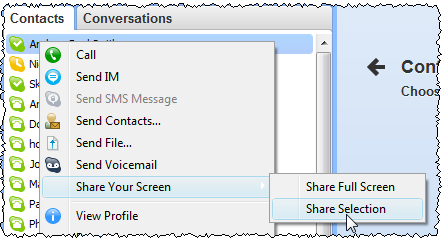
This can be incredibly useful. So far I have used it for:
- support – Sometimes email just doesn’t cut it. If your customer has Skype, you can use screen sharing to see exactly what your customer is doing while talking to them.
- remote usability testing – Usability testing is very important. But luring a stream of fresh victims to your office to take part is a logistical headache. If you use Skype screen sharing neither of you has to leave the comfort of your own computer. I have used it successully to do usability testing with people on the other side of the world.
Skype screen sharing has its limitation. The images are bit blurry, there is some latency and you can’t interact with the remote computer (as you can with services such as Copilot). But it is good enough for most purposes, and it’s free!
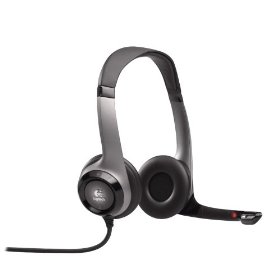
If you are going to be using Skype much, then I strongly recommend buying a USB headset. It is much more comfortable than holding a phone to your ear for extended periods and it keeps your hands free for typing. I use a Logitech headset and I have been quite happy with it. I sometimes get sweaty ears during a long call, but it seems a small price to pay.
Marketing for microISVS
Below are the video and slides of the “Marketing for microISVS – embracing the ‘dark side’?” talk I gave at ESWC 2009 in Berlin. This is a high-speed ramble through a vast subject. In the 45 minutes available I do my best to dispel some of the myths software developers have about marketing and discuss some marketing concepts, including: branding; positioning; pricing; and segmentation. Taking in Harley Davidsons, tinned tomatoes, Coca Cola and food blenders on the way. The first couple of minutes, where I dispel the myth that good software sells itself without marketing, are missing from the video due to a dead camera battery. But you knew that anyway, so I don’t think this detracts much overall.
Video:
Slides (which might not make much sense without the video):
NB/ When I said 47Signals, I meant 37Signals (brand inflation?). Thanks to Tarek for the correction.
Links to some of the things mentioned in the talk:
- Brief reviews of all the books mentioned (plus a few others)
- Bob Walsh’s ‘microISV sites that sell!’ e-book
- Neil Davidson’s ‘Don’t Just Roll The Dice – A Usefully Short Guide to Software Pricing’ e-book (PDF)
- Brandz ‘Top 100 brand ranking 2008’ (PDF)
- Will it blend?
- Headset hotties
- Alwin Hoogerdijk’s blog
- Eric Sink’s blog
A big thank you to Alwin and Sytske of collectorz.com for hot-footing it from Alwin’s talk to do the video (you can see Alwin’s excellent talk on web app pros and cons here). And also to David and Panagiota for all the hard work that goes on behind the scenes organizing ESWC.
If you found this talk useful you might also like 10 mistakes microISVS make.
Presents for programmers
It is coming up to that time of year again. You had better start dropping some hints on what you want for Christmas if you don’t want socks again. How about a software themed T-shirt? You can never have too many T-shirts and it means you can go an extra day before you have to do the laundry.
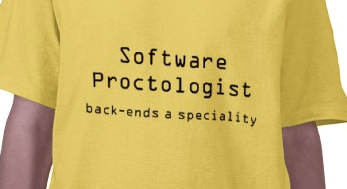
It just so happens that www.programmer-tshirts.com (set up by myself and Patrick McKenzie last year) carries a range of wittily(?) captioned T-shirts for software types of all stripes including: microISVS, C++ programmers, LISP programmers, Mac developers, software engineers, managers and bloggers. Following on from a conversation at ESWC 2009 (with someone who might prefer to remain anonymous) I have just added another design for server programmers:
I know the T-shirts aren’t cheap (print-on-demand is expensive), but I have ordered a couple myself from the European shop and the quality is very good. Also you can customise the t-shirts (e.g. choose a different colour). Best of all the commission on each T-shirt (12.5% for the US shop and £1.50 for the European shop) goes to two very worthy charities:
- Sightsavers International works to alleviate sight problems around the world. Every year Sightsavers and their partners treat millions of people for potentially blinding conditions. It costs as little as $0.10 to protect someone from river blindness for a year.
- Jaipur Foot have developed an effective and easy-to-fit prosthetic lower limb that can be produced for a little as $30. The charity has distributed over 300,000 limbs free of charge in 22 countries.
It won’t be a surprise to regular readers that I am going to finish this post with a less than subtle call-to-action.

(STOP PRESS: 15% off everything in the European shop until 29-Nov-2009, use voucher code: NOVEMBERSALE)
microISV reading list
I have added a microISV reading list page to this blog. Please feel free to add your own comments to the page on the books listed or any other books you feel are relevant.
 Successful Software