
Category Archives: software

Selling your software in retail stores (all that glitters is not gold)

Selling your software in retail storesDevelopers often ask in forums how they can get their software into retail. I think a more relevant question is – would you want to? Seeing your software for sale on the shelves of your local store must be a great ego boost. But the realities of selling your software through retail are very different to selling online. In the early days of Perfect Table Plan I talked to some department stores and a publisher about selling through retail. I was quite shocked by how low the margins were, especially compared with the huge margin for online sales. I didn’t think I was going to make enough money to even cover a decent level of support. So I walked away at an early stage of negotiations.

The more I have found out about retail since, the worse it sounds. Running a chain of shops is an expensive business and they are going to want take a very large slice of your cake. The various middlemen are also going to take big slices. Because they can. By the time they have all had their slices there won’t be much left of your original cake. That may be OK if the cake (sales volume) is large enough. But it is certainly not something to enter into lightly. Obviously some companies make very good money selling through retail, but I think these are mostly large companies with large budgets and high volume products. Retail is a lot less attractive for small independents and microISVs such as myself.

But software retail isn’t an area I claim to be knowledgeable about. I just know enough to know that it isn’t for me, at least not for the foreseeable future (never say never). So when I spotted a great post on the ASP forums about selling through retail, I asked the author, Al Harberg, if I could republish it here. I thought it was too useful to be hidden away on a private forum. He graciously agreed. If you decide to pursue retail I hope it will help you to go into it with your eyes open. Over to Al.

In the 24 years that I’ve been writing press releases and sending them to the editors, more than 90 percent of my customers have been offering software applications on a try-before-you-buy basis. In addition, quite a few of them have ventured into the traditional retail distribution channel, boxed their software, and offered it for sale in stores. This is a summary of their retail store experiences.

While the numbers vary greatly, a software arrangement would have revenues split roughly:

  • Retail store – 50 percent
  • Distributor – 10 percent
  • Publisher – 30 to 35 percent
  • Developer – 5 to 10 percent

Retail stores don’t buy software from developers or from publishers. They only buy from distributors.

The developer would be paid by the publisher. In the developer’s contract, the developer’s percentage would be stated as a percentage of the price that the publisher sells the software to the distributor, and not as a percentage of the retail store’s price.

The publishers take most of the risks. They pay the $30,000(US) or so that it currently takes to get a product into the channel. This includes the price of printing and boxing the product, and the price of launching an initial marketing campaign that would convince the other parties that you’re serious about selling your app.

If your software doesn’t sell, the retail stores ship the boxes back to the distributor. The distributor will try to move the boxes to other dealers or value-added resellers (VARs). But if they can’t sell the product, the distributors ship the cartons back to the publisher.

While stores and distributors place their time at risk, they never risk many of their dollars. They don’t pay the publisher a penny until the software is sold to consumers (and, depending upon the stores’ return policies, until the product is permanently sold to consumers – you don’t make any money on software that is returned to the store, even though the box has been opened, and is not in good enough condition to sell again).

The developer gets paid two or three months after the consumer makes the retail purchase. Sometimes longer. Sometimes never. If you’re dealing with a reputable publisher, and they’re dealing with a major distributor, you’ll probably be treated fairly. But most boilerplate contracts have “after expenses” clauses that protect the other guys. You need to hire an attorney to negotiate the contract, or you’re not going to be happy with the results. And your contract should include an up-front payment that covers the publisher’s projection of several months’ income, because this up-front payment might well be the only money that you’re going to ever see from this arrangement.

Retail stores’ greatest asset is their shelf space. They won’t stock a product unless there is demand for it. You can tell them the most convincing story in the world about how your software will set a new paradigm, and be a runaway bestseller. But if the store doesn’t have customers asking for the app, they’re not going to clutter their most precious asset with an unknown program.

It’s a tough market. It’s all about sales. And if there is no demand for your software, you’re not going to get either a distributor or a store interested in stocking your application. These folks are not interested in theoretical demand. They’re interested in the number of people who come into a retail store and ask for the product.

To convince these folks that you’re serious, the software publisher has to show a potential distributor that they have a significant advertising campaign in place that will attract prospects and create demand, and that they have a press release campaign planned that will generate buzz in the computer press.

Many small software developers have found that the retail experience didn’t work for them. They’re back to selling exclusively online. Some have contracted with publishers who sell software primarily or exclusively online. Despite all of the uncertainties of selling software online, wrestling with the retail channel has even more unknowns.

Al Harberg

Al Harberg has been helping software developers write press releases and send them to the editors since 1984. You can visit his website at www.dpdirectory.com.


Chinese domain scam

I got this email yesterday:

Dear Sir

We received a formal application from a company who is called Meiao Investment Co.,Ltd are applying to register “ oryxdigital” as their domain name and Internet keyword in China and also in Asia on Apr 17 2008. During our auditing procedure we find out that the alleged Meiao Investment Co.,Ltd has no trade mark, brand nor patent even similar to that word. As authorized anti-cybersquatting organization we hereby suspect the alleged Meiao Investment Co.,Ltd to be a domain grabber. Hence we need you confirmation for two things,

First of all, whether this alleged Meiao Investment Co.,Ltd is your business partner or distributor in China.

Secondly, whether you are interested in registering these domains. (The alleged Meiao Investment Co.,Ltd will be entitled to obtain a domain not needed by original trademark owner.)

If you are not in charge of this please transfer this email to appropriate dept.

This is a letter for confirmation. If the mentioned third party is your business partner or distributor in China please DO NOT reply. We will automatically confirm application from your business partner after this audit procedure.

Bst Rgs

chenllychen

Registration Commissioner

Beijing HA ZD Networks Science and Technology Co., Ltd

Tel: +86-10-82772601

Fax: +86-10-82773610

Email:chenlly.chen@ha-zd.com

http://www.ha-zd.com.cn

Needless to say, it’s yet another scam. The “Meiao Investment Co” (if they even exist) have no interest in my domain. I am guessing the scammer just wants me to pay good money for a worthless .cn domain. Sigh. More details here.

Hopefully somebody Googling “Meiao Investment Co” or “ha-zd.com” will find this post and save themselves a few dollars.

Update 28-Oct-13: Christopher Hofman Laursen contacted me to say he has published a list of 200 Chinese domain name scammers at: scam.europeandomaincentre.com .

Stackoverflow.com

Über bloggers Jeff Atwood and Joel Spolsky are joining forces to launch stackoverflow.com .

According to Jeff Atwood:

Stackoverflow is sort of like the anti-experts-exchange (minus the nausea-inducing sleaze and quasi-legal search engine gaming) meets wikipedia meets programming reddit. It is by programmers, for programmers, with the ultimate intent of collectively increasing the sum total of good programming knowledge in the world. No matter what programming language you use, or what operating system you call home. Better programming is our goal.

According to Joel Spolsky:

We’re starting to build a programming Q&A site that’s free. Free to ask questions, free to answer questions, free to read, free to index, built with plain old HTML, no fake rot13 text on the home page, no scammy google-cloaking tactics, no salespeople, no JavaScript windows dropping down in front of the answer asking for $12.95 to go away. You can register if you want to collect karma and win valuable flair that will appear next to your name, but otherwise, it’s just free.

There is nothing there yet, apart from a podcast. But, with their combined talents and high profiles, it could be a great resource for software developers. I will be watching with interest.

Functional programming – coming to a compiler near you soon?

We can classify programming languages into a simple taxonomy:

Commercial programmers have overwhelmingly developed software using imperative languages, with a strong shift from procedural languages to object oriented languages over time. While declarative style programming has had some successes (most notably SQL), functional programming (FP) has been traditionally seen as a play-thing for academics.

FP is defined in Wikipedia as:

A programming paradigm that treats computation as the evaluation of mathematical functions and avoids state and mutable data.

Whereas an imperative language allows you to specify a sequence of actions (‘do this, do that’), a functional language is written in terms of functions that transform data from one form to another. There is no explicit flow of control in a functional language.

In an imperative language variables generally refer to an address in memory, the contents of which can change (i.e. is ‘mutable’). For example the rather unmathematical looking “x=x+1” is a valid expression. In FP there are no mutable variables and no state.

In an imperative language a function can return different values for the same input, either because of stored state (e.g. global or static variables) or because it is interfacing with an external device (e.g. a file, database, network or system clock). But a pure functional language always returns the same value from a function given the same input. This ‘referential integrity’ means an FP function call has no ‘side-effects’ and consequently can’t interface with external devices. In other words it can’t actually do anything useful – it can’t even display the result of a computation to your VDU. The standard joke is that you only know a pure functional program is running because your CPU gets warmer.

The functional language Haskell works around the side-effects issue by allowing some functions to access external devices in a controlled way through ‘monads’. These ‘impure’ functions can call ‘pure’ functions, but can never be called by them. This clearly separates out the pure parts of the program (without side-effects) from the impure ones (with side-effects). This means that it is possible to get many of the advantages of FP and still perform useful tasks.

FP is much closer to mathematics than imperative programming. This means that some types of problems (particularly algorithmic ones) can be expressed much more elegantly and easily as functional programs. The fact that a function has no side effects also means that it’s structure is much easier to analyse automatically. Consequently there is greater potential for a computer to optimise a functional program than an imperative program. For example in FP:

y = f(x) + f(x);

Can always be rewritten as:

z = f(x);

y = 2 * z;

Saving a function call. This is more difficult to do in an imperative language, because you need to show that second call to f(x) won’t return a different value to the first.

Functional programs are also inherently much easier to parallelise, due to the lack of side-effects. We can let the FP interpreter/compiler take care of parallelism. No need to worry about threads, locks, critical sections, mutexes and deadlocks. This could be very useful as processors get ever more cores. However imperative languages, with their flow of control and mutable variables, map more easily than functional languages onto the machine instruction of current (von Neumann architecture) computer. Consequently writing efficient FP interpreters and compilers is hard and still a work in progress.

Elements of FP are steadily making their way into mainstream commercial software:

  • Erlang is being used in commercial systems, including telecoms switching systems.
  • Microsoft Research has implemented F#, a .Net language that includes FP elements based on ML.
  • Work is underway to add elements of FP to version 2.0 of the D programming language.
  • Google’s MapReduce is based on ideas from FP.
  • The Mathematica programming language has support for FP.
  • The K programming language is used in financial applications.
  • The Perl 6 compiler is being written in Haskell. <insert your own sarcastic comment here>.

I recently attended ACCU 2008 which had a whole stream of talks on FP. All the FP talks I attended were packed out. That is quite something given that the audience is primarily hardcore C++ programmers. There seemed to be quite a consensus in these talks that:

  • FP is starting to move out of academia and into commercial use.
  • FP is more suitable than imperative style programming for some classes of problem.
  • FP is not going to replace imperative programming. The bulk of commercial development will still be done in an imperative style, but with FP mixed in where appropriate.
  • Hybrid languages that mix OO and FP will become more common.

I don’t see Haskell replacing C++ any time soon. But I can definitely see the benefits of using FP to tackle some types of problems.

Further reading:

The Functional programming reference in Wikipedia

This article is based loosely on notes I made at ACCU 2008 from attending the following talks:

  • “Caging the Effects Monster: the next decade’s big challenge”, Simon Peyton-Jones
  • “Functional Programming Matters”, Russel Winder
  • “Grafting Functional Support on Top of an Imperative Language”, Andrei Alexandrescu

Any mistakes are almost certainly mine.

Choosing a development ‘stack’ for Windows desktop applications

beauty_parade.jpgI have have heard plenty of people saying that desktop software is dead and that all future development will be done for the web. From my perspective, as both a buyer and seller of software, I think they are wrong. In fact, of the thousands of pounds I have spent on software in the last three years, I would guess that well over 90% of it was spent on software that runs outside the browser. The capabilities of web based applications have improved a lot in recent years, but they still have a long way to go to match a custom built native application once you move beyond CRUD applications. I don’t expect to be running Visual Studio, PhotoShop or VMWare (amongst others) inside the browser any time soon. The only way I see web apps approaching the flexibility and performance of desktop apps is for the browser to become as complicated as an OS, negating the key reason for having a browser in the first place. To me it seems more likely that desktop apps will embed a browser and use more and more web protocols, resulting in hybrid native+web apps that offer the best of both worlds.

So, if Windows desktop apps aren’t going away any time soon, what language/libraries/tools should we use to develop them? It is clear that Microsoft would like us to use a .Net development environment, such as C#. But I question the wisdom of anyone selling downloadable off-the-shelf software based on .Net [1]. The penetration of .Net is less than impressive, especially for the more recent versions. From stats published by SteG on a recent BOS post (only IE users counted):

No .Net: 28.12%
>= .Net 1.0: 71.88%
>= .Net 1.1: 69.29%
>= .Net 2.0: 46.07%
>= .Net 3.0: 18.66%
>= .Net 3.5: 0.99%

Consequently deploying your app may require a framework update. The new .Net 3.5 framework comes with a 2.7 MB installer, but this is only a stub that downloads the frameworks required. The full set of frameworks weighs in at eye watering 197 MB. To find out how much the stub really downloads Giorgio installed .Net 3.5 onto a Windows 2003 VM with only .Net 1.0 & 1.1. The result: 67 MB. That is still a large download for most people, especially if your .Net 3.5 software is only a small utility. It is out of the question if you don’t have broadband. Microsoft no doubt justify this by saying that the majority of PCs will have .Net 3.5 pre-installed by the year X. Unfortunately by the year X Microsoft will probably be pushing .Net 5.5 and I dread to think how big that will be.

I have heard a lot of people touting the productivity benefits of C# and .Net, but the huge framework downloads can only be a major hurdle for customers, especially for B2C apps. You also have issues protecting your byte code from prying eyes, and you can pretty much forget cross-platform development. So I think I will stick to writing native apps in C++ for Windows for the foreseeable future.

There is no clear leader amongst the development ‘stacks’ (languages+libraries+tools) for native Win32 development at present. Those that spring to mind include:

  • Delphi – Lots of devoted fans, but will CodeGear even be here tomorrow?
  • VB6 – Abandoned and unloved by Microsoft.
  • Java – You have to have a Java Run Time installed, and questions still remain about the native look and feel of Java GUIs.
  • C++/MFC – Ugly ugly ugly. There is also the worry that it will be ‘deprecated’ by Microsoft.
  • C++/Qt – My personal favourite, but expensive and C++ is hardly an easy-to-use language. The future of Qt is also less certain after the Nokia acquisition.

Plus some others I know even less about, including: RealBasic and C++/WxWidgets. They all have their down sides. It is a tough choice. Perhaps that is why some Windows developers are defecting to Mac, where there is really only one game in town (Objective-C/Cocoa).

I don’t even claim that the opinions I express here are accurate or up-to-date. How could they be? If I kept up-to-date on all the leading Win32 development stacks I wouldn’t have any time left to write software. Of the stacks listed I have only used C++/MFC and C++/Qt in anger and my MFC experience (shudder) was quite a few years ago.

Given that one person can’t realistically hope to evaluate all the alternatives in any depth, we have to rely on our particular requirements (do we need to support cross platform?), hearsay, prejudice and which language we are most familiar with to narrow it down to a realistic number to evaluate. Two perhaps. And once we have chosen a stack and become familiar with it we are going to be loathe to start anew with another stack. Certainly it would take a lot for me to move away from C++/Qt, in which I have a huge amount of time invested, to a completely new stack.

Which Windows development stack are you using? Why? Have I maligned it unfairly above?

[1] Bespoke software is a different story. If you have limited deployment of the software and can dictate the end-user environment then the big download is much less of an issue.

Consulting offer ends 31st March

graph.pngI am offering £100 off my daily consulting fee until the end of March. Could you use an experienced and objective review of your strategy, marketing and product? When you have been eating, sleeping and breathing your business it can be difficult to ‘see the wood for the trees’ and a fresh perspective can be a huge help. More details here.
Animated GIFs

The human brain and visual system is highly optimised to detect movement. If you don’t believe me, watch what happens to people’s attention when you turn on a TV in a room. Even if the sound is off, the program is dull and the conversation is interesting, people will find it very hard not to stare at the TV. You can exploit this by using animation on your website to grab the user’s attention. Animation is also a useful way of packing a lot of content into a limited space on your web page.

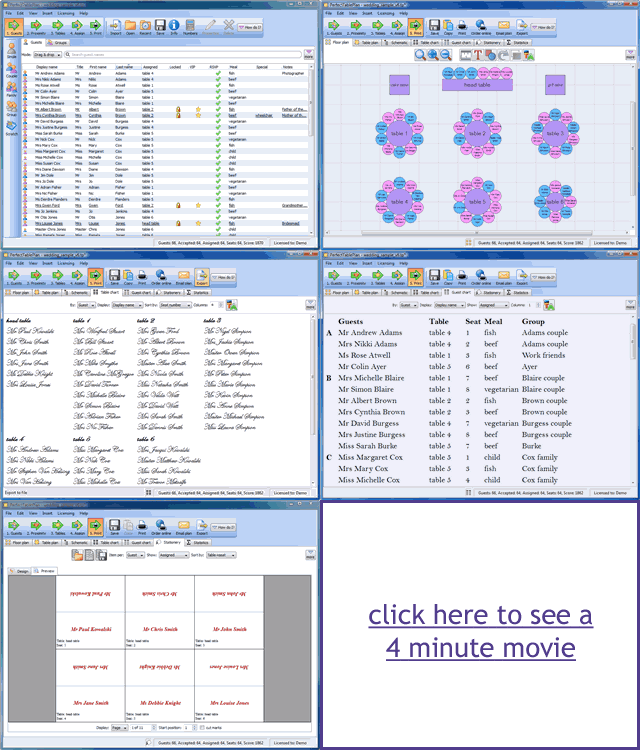
Animated GIFs are a useful low-tech way of adding animation to a website. They work in pretty much any browser, without requiring visitors to download a plug-in or even click a ‘play’ button. I use them on the PerfectTablePlan home page to show rotating testimonials and on adwords landing pages to give a brief visual overview of what PerfectTablePlan can do.

animated gifs

Animated GIFs are quite easy to create. Here is how I created the image above (on Windows):

  1. I used Sizer (freeware) to size the PerfectTablePlan main window to 960×750.
  2. I used SnagIt (commercial) to capture various screenshots, resize them to 320×250 and save them as separate 7-bit GIFs.
  3. I dragged the GIFs onto UnFreez (donationware) and created an animated GIF. (You can also use Adobe Photoshop, if you have it).
  4. I dragged the animated GIF onto SuperGIF (commercial with trial) to reduce the file size (by about 5% in this case).

The final result isn’t a work of art, but it is hopefully enough to grab the visitors attention and whet their appetite for more information.

Animated GIFs can get very large if you aren’t careful. But it rather defeats the object if your website visitor clicks ‘back’ before the image has loaded. I used 7-bit GIFs, small image dimensions, a limited number of frames and GIF optimisation to keep the file above to 72kb.

A word of warning – use animation sparingly or the effect can be quite overwhelming (don’t click this link if have epilepsy or a refined sense of taste).

Coverage Validator

coverage_validator.pngThe sink is full of washing, I am wearing odd socks and I haven’t been out of the house in days. It must be time to put out that new release. But how can I be sure my testing hasn’t missed a hideously embarrassing bug? Maybe I introduced a major bug when I made that ‘cosmetic’ change at 2am?

In an ideal world I would just run a comprehensive automated regression test suite. Unfortunately it is difficult to automate graphical user interface (GUI) testing and the majority of lines of code in most applications are GUI. I estimate that the code for my own table planner software is at least 75% GUI code (not including generated code, which would push it even higher).

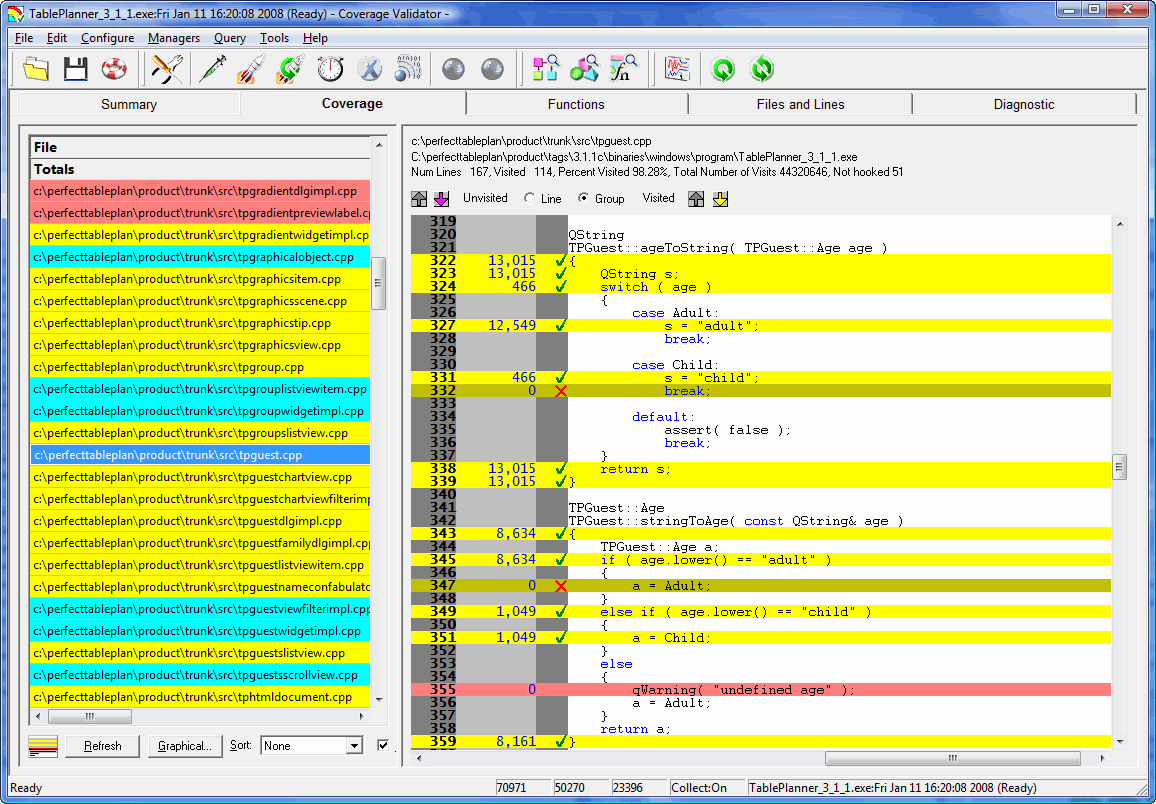
So I try to manually execute every line of my application before I release it. If I have to make any changes to the code, I start over again. This is very dull, but at least I have a tool to help me: Coverage Validator. Coverage Validator instruments code and shows, in real time, which lines have been executed. Click a few buttons on your application and watch the executed lines of code change colour from pink to yellow. Execute every line in the file and all the lines change colour to cyan. No recompilation or relinking is required and it doesn’t slow down the tested application too much. This real-time feedback is incredibly powerful for testing.

code_coverage_small.gif

Unfortunately it also has a lot of shortcomings:

  • The usability isn’t great. There is a confusing plethora of options for instrumenting your code that I would rather not have to know about.
  • It isn’t able to ‘hook’ (instrument) all the lines of code. Whole blocks get missed out for reasons I don’t fully understand. Single line branches are particularly likely to be missed.
  • The GUI isn’t great. For example, the display flashes horribly if you resize it.
  • The automatic results merging is just plain weird. At the end of a session it can merge your coverage results into a previous session. This information isn’t much use to me at the end of a session. I want to merge previous results at the start of a session so I know which lines I haven’t tested.
  • The GUI is quite ugly. They really need to update those tired old icons.

However being able to see line coverage information in real time is just so incredibly useful that I am prepared to put up with the many shortcomings. I just run my application alongside Coverage Validator and, file-by-file and function-by-function, I try to turn the lines of code yellow (or, better still, cyan). Every time I have used Coverage Validator I have found at least one potentially embarrassing bug that I hadn’t discovered by any other means. The support has also been responsive. It is just a pity about the flaws, without them this would be a ‘killer app’ for testing.

Coverage Validator works with C++, Delphi and VB on Windows NT4, 2000, 2003 and XP[1]. A single licence costs $199. A free 30-day evaluation licence is available.

[1]I am using it on Vista currently, and it seems to work fine.

RegSoft customers beware

It looks like Digital River have added ‘Reservation rewards’ to at least some of their RegSoft customers’ shopping baskets, as they did earlier with SWREG. If you take the bait and sign up for Reservation Rewards, you will be billed $9 per month forever, and get nothing useful in return. It is an absolute disgrace. If you are with RegSoft (or any other Digital River company) I suggest you check your shopping backet ASAP and seriously consider moving to an non-Digital River alternative.

Calculating volume discounts for software

discount.jpgIf people buy your software in bulk they expect to get a discount. But how much of a discount should you give them? A simple formula I have seen used is:

discounted price = unit price * n^f

Where n is the total number of units purchased and f is a scaling factor between 0 and 1. So, for example, if my unit price is 24.95 (pounds, dollars etc) and f is 0.8, the discounted price for 10 units is = 24.95 * 10^0.8 = 157.42, which you can then round to a more aesthetically appealing number.

This is a little over-simplistic, as it doesn’t take account of the cost to you of each unit (for example the duplication and postage cost of CDs and the cost of payment processing). We can get around this by breaking the price into a fixed cost and a margin and only applying the discount to the margin. Below is a link to a simple Excel spreadsheet that does this for you. You can change any of the values in the orange fields. f seems to give sensible results in the range 0.75 to 0.9.

discount_spreadsheet1.png

discount spreadsheet (29kb, Excel 97-2003 format)

This spreadsheet can be useful to give you a starting point, but you also need to consider what the customer is prepared to pay. You maximise your profit by giving the buyer the minimum discount that is required to make the sale. For example, a reseller is out to make a profit and will probably expect a bigger discount on the same number of units than a large company buying in bulk for their end users. When in doubt, reduce the discount. You can always increase it a bit later if they don’t buy.