Category Archives: software

MicroISV Sites that Sell!

47hats.pngI have belatedly got around to reading Bob Walsh’s new e-book: “MicroISV Sites that Sell! Creating and Marketing Your Unique Selling Proposition”. This is the first in a series of e-books for microISVs that allows Bob to go into selected subjects in more depth than was possible in his book “Micro-ISV: From Vision to Reality“.

The e-book is aimed very specifically at microISVs looking to create a website to sell their software effectively. It has a lot of detailed advice that I think will be invaluable to anyone creating their first microISV website. I have lost count of the number of microISV sites that make some of the mistakes Bob identifies, including:

  • it isn’t immediately clear what the product does
  • selling on features instead of benefits
  • too much text
  • inappropriate use of technical jargon

The content will inevitably be less useful for established microISVs, but you only need to find one useful idea to justify the cost of the e-book. My only real gripe is the comparison between programming patterns and marketing. I didn’t find this a helpful comparison. Marketing is a very different beast to programming and the sooner we face up to it, the better.

You can get a copy for $19 here.

Full disclosure: I got a free review copy of this e-book.

The great digital certificate ripoff?

digital certificateRipoff: A ripoff (or rip-off) is a bad deal. Usually it refers to an incident in which a person pays too much for something. A ripoff is distinguished from a scam in that a scam involves wrongdoing such as fraud. From Wikipedia.

Digitally signing your software allows you to show that you are the author of the software and that the application hasn’t been tampered with. If your software isn’t signed, Windows displays scary looking warnings when customers download it. So it makes a lot of sense to digitally sign your software if you are distributing it on Windows. So far so good.

Anyone can create their own digital signature, but Windows only ‘trusts’ signatures that have been created by certain third parties. While there are quite a few Microsoft root certificate program members, I am only aware of 3 that sell code signing (‘authenticode’) certificates. This is where it starts to get ugly. Here are their published prices per year:

Verisign: $499.00

Thawte: $299.00

Comodo: $119.95

That seems an awful lot considering that all they appear to do is check a document (e.g. a scan of your certificate of incorporation), check your whois record, multiply a couple of large prime numbers and then send you a certificate file. Much of this process is (or should be) automated. No wonder the founder of Thawte could afford to be one of the first space tourists.

Given that authenticode certificates from these three companies are functionally identical[1], as far as I can tell, why the price difference? It seems even more bizarre when you consider that Verisign now own Thawte. If you had the misfortune to sign up for the Microsoft ‘works with Vista’ program you could get a 1-year Verisign code signing certificate for $99. I doubt they were doing this at a loss, so how can they justify selling the exact same certificate for $499? I would guess that at least 99% of customers will never check who issued a certificate, so it can hardly be due to the power of the brand.

So why doesn’t someone just set up their own certificating authority, get approved by Microsoft, and undercut these 3 companies? Because their root certificate wouldn’t be installed on all the millions of PCs currently out there. It would be worthless until the vast majority of PCs had the new root certificate. What a fantastic lock-in!

The good news is that you can buy Comodo certificates for much more reasonable prices from these resellers:

Tucows: $75 [2]

KSoftware: $85 ($75 for ASP members)

Which rather begs the question – if resellers can make a profit at $75, why are Comodo charging $119? Because they can, I suppose. I emailed Verisign, Thawte and Comodo to ask about the disparities in price. I only received a reply from Comodo:

This [difference between their price and the reseller price] is simply due to Retail Vs Wholesale solutions we offer. Our Resellers commit to a specific program which enables discounted prices allowing them to make margins on the product as they see fit. Whether that be reduced prices, or make a cash profit from the sale.

All 3 companies have had major price hikes in the last few years. With so little competition, why wouldn’t they? So what is Microsoft’s role is in all of this? One would have thought that they would want to keep certificate prices low to encourage their wider adoption. I emailed Microsoft’s PR people to ask about pricing and whether they had any financial interest in Verisign. Here is the response:

1) Why does Microsoft “insist” on VeriSign certificates?

Microsoft Windows Quality Labs only recognizes files that are signed with a Verisign Class 3 Certificate of Authority (COA). Windows Quality Labs is evaluating recognizing other COA’s. There is a USD $399 offer for Class 3 COAs for those partners (IHVs, OEMS, ISVs) – who plan to submit solutions for Microsoft certification. More details are available at http://www.verisign.com/code-signing/msft-organizational-certificates/.

2) Does Microsoft have any comment to make on the disparity in price?

VeriSign also offers a USD $99 Organizational ID certificate. This provides authentication for organizations to Microsoft Windows Quality Labs, providing access to various services, such as creating submission IDs for products to undergo Microsoft testing. This certificate is not valid for signing drivers or executable files.

Information pertaining to Microsoft Investments can be located at the MSFT Investor Relations site, under Investments/Acquisitions: http://www.microsoft.com/msft/default.mspx.

Steve Bell, Senior Product Manager – Server Certification Programs, Windows Server

After a bit of surfing I found this page which says that Microsoft invested in Verisign in 1996. I don’t know how much they invested, but it certainly puts things in a rather different light. So Windows authenticode certificates are effectively controlled by just 2 companies, at least one of whom is part-owned by Microsoft[3]. Companies are in business to make profits, but it seems to me that these companies are using their effective monopoly to take advantage of the situation. I only see the situation getting worse as Windows displays ever more scary warnings for unsigned software. Perhaps this is something government regulators should be investigating. Let’s hope that Verisign don’t buy Comodo as well.

[1] Only Verisign certificates are recognised for some of the Microsoft certification programs, for example x64 Vista driver signing.

[2] You need to register with Tucows to login.

[3] Assuming they haven’t sold their Verisign stock. I am not aware that Microsoft owns any Comodo stock. I haven’t been able to find any further details by Googling.

Credit card fraud

mount seftonFraud can be a very big problem for online software vendors. Fraudsters can easily use throwaway email addresses that can’t be traced back to them (e.g. Hotmail) and IP addresses aren’t difficult to hide. Not only does the vendor lose the payment when the fraud is reported, they also often get hit with a chargeback fee. This is pretty outrageous when you think about it – the credit card companies are charging vendors for the fraudulent transactions that they themselves have failed to detect.

Thankfully I have had relatively few fraudulent transactions in the last 3 years of running my own business. However some more mainstream B2C businesses aren’t as lucky. Below are the experiences of one software vendor I have corresponded with [1]. It makes for scary reading. The vendor wishes to remain anonymous for understandable reasons.

I tracked one of our recent chargeback emails to a forum were they had been openly selling stolen credit card information for $2 each. If you do have a popular product that may be prone to chargebacks then it is a small nightmare unless you have a fraud system in place as there are 1000s of credit card info out there with full contact details. There is not a day goes by that we don’t get at least 3 stolen credit card purchase attempts.

We use WorldPay and they have a quick check on cv2 code and if the country, postal address and postcode match. But almost all of these purchases pass the simple fraud checks. You cannot even rely on IP checking as the fraudsters are pretty smart and use proxies, or even hijack PCs to make purchases from the same country the credit card is issued. PayPal is not quite as serious, but we do still receive quite a few hijacked account purchases also.

WorldPay fraud checking is next to useless. Even the ones they warn on are usually legitimate. They have recently released a new backend, but they have made the problem worse as they seem to warn if the IP address isn’t from the same country. The problem with that is we get a lot of sales that don’t match, from military based in different countries. Our whitelist used to let them go through automatically, but now we have to manually capture the payment.

The number of fraudulent purchases changes depending if you make a new release etc or if your software is hard to find an easy crack. It can be from 1% to 15% depending, as you may have a single user trying to hit you on certain days.

We were forced to make our own fraud checking system. At least we had all the information at hand as we make users sign up to our site before making a purchase and we log all activity from a user, but to get that information we had to lose many thousands of pounds in fees. Since implementing our own fraud check (as fraudsters do tend to use amazingly similar criteria each time) we have reduced it to on average 1-2 a week, which are almost impossible to catch.

I think the level of fraud has to do with the type of users we sell software to. They are the sort of people that know exactly where to find cracks/keygens. Our software does have pretty good protection and online activation, so it is not so easy to get an easy “working” crack/keygen for it. We also have large volume sales over the past few years, so we have more information than most developers would see.

The credit card companies can’t really lose, especially with “no card holder signature” sales. Chargebacks cost on average 15 Euros. I have even contacted the likes of PayPal telling them that sales are fraudulent, and quite a lot of times they do not care.

We get to see all our sales, I would hate to think what is happening at these merchant services like Regsoft etc. How many sales are being refused that may be legitimate? I tried paying a programmer once who accepted payments using Regnow from my PayPal account and they refused it. My account was verified and had been in good standing for many years. It wouldn’t have been so bad but the person I was paying did not have a clue it was refused.

So, if you have a successful consumer product that fraudsters might be interested in, be prepared to expend a significant amount of money and effort dealing with online fraud. And don’t expect the payment processors and credit card companies to give you much help. I guess the credit card companies don’t have much incentive to reduce fraud. As long as they can keep pushing the cost of fraud onto the vendors and the fraudsters don’t bring the whole system down, the credit card companies seem quite happy. Why wouldn’t they be?

[1] I have spliced together the contents of several emails and edited it for continuity and brevity.

Windows Vista service pack 1

vista.gifMicrosoft have announced that service pack 1 for Windows Vista has been released to manufacturing. Microsoft claim “great progress in performance, reliability and compatibility”. SP1 will be rolled out through Windows update from mid-March.

My own stats show that Vista has been slowly increasing market share at 1% per month. At this rate it will take it another 5 years to reach the 75% share currently held by XP. But perhaps a lot of people have been wisely waiting for SP1 before committing?

I have been using Vista on my main development machine for the last few months. It is OK once you turn the deeply annoying UAC off. But it is still hard to see any compelling reason to upgrade from XP.

Your harddrive *will* fail – it’s just a question of when

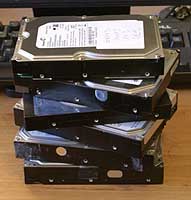
failed harddisksThere are a few certainties in life: death, taxes and harddisk failure. I have no less than 6 failed harddisks sitting here on my desk patiently awaiting their appointment with Mr Lump Hammer. 2 Seagates, 3 Maxtors and 1 Western Digital. This equates to roughly one disk failure per year. Perhaps this is not suprising given that I have about 9 working harddisks at the moment spread across various machines. Given the incredible tolerances to which harddisks are manfactured, perhaps it is a miracle harddisks work at all.

As an analogy, a magnetic head slider flying over a disk surface with a flying height of 25 nm with a relative speed of 20 meters/second is equivalent to an aircraft flying at a physical spacing of 0.2 µm at 900 kilometers/hour. This is what a disk drive experiences during its operation. –Magnetic Storage Systems Beyond 2000, George C. Hadjipanayis from Wikipedia

We all know we need to back-up our data. But it is a chore that often gets forgotten at the most critical periods. Here are my hints for preparing yourself for that inevitable ‘click of death’.

  • Buy an external USB/Firewire harddrive. 500GB drives are ridiculously cheap these days. Personally I don’t like back-up tapes due to experiences of them stretching and corrupting data.
  • Back-up images of the entire OS, not just the data. You can use Acronis TrueImage on Windows and SuperDuper on MacOSX. This can save you days restoring your entire development environment and applications from scratch.
  • Back-up individual files as well as entire OS images. You don’t want to have to restore a whole image to retrieve one critical file. Windows Vista and Mac OS X Leopard both have back-up applications built into the OS.
  • Use a separate machine to your development machine as source code server.
  • Use a RAID-1 (mirrored) disk on your main development machine[1]. It is worth noting that this actually doubles the likelihood of harddisk failure, but makes the likelihood of a catastrophic failure much lower. Keep an identical 3rd drive on hand to swap in when a drive fails.
  • Back-ups aren’t much use if they get incinerated along with your office in a fire, so store copies off-site. For example you can:
  • Make sure any off-site copies are securely encypted, for example using Axcrypt.
  • Automate your back-ups as far as possible. Computers are much better at the dull repetitive stuff.
  • Test restoring data once in a while. There is not much point backing up data only to find you can’t restore it when needed.

There are lots of applications for backing up individual files. So many in fact, that no-one has any hope of evaluating them all (marketing tip: don’t write another back-up application – really). I also worry that data stored in their various proprietary formats might not be accessible in future due to the vendor going out of business. I find the venerable DOS xcopy adequate for my needs. I run it in a scheduled Windows batch file to automatically synch file changes on to my usb harddrive (i:) every night. Here it is in all its glory:

XCOPY c:\data i:\data /d /i /s /v /f /y /g /EXCLUDE:exclude.txt

The exclude.txt file is used to exclude subversion folders and intermediate compiler files:

\.svn\
.obj
.ilk
.ncb
.pdb
.bak>

Which of the above do I do? Pretty much all of them actually. At least I try, I haven’t yet automated the offsite backup. This may seem rather excessive, but it paid dividends last month when gremlins went on the rampage here in the Oryx Digital office. I had 2 harddrive failures in 2 weeks. The power supply+harddisk+network card on my old XP development machine failed then, while I was in the process of moving everything to my new Vista development machine, one of the RAID-1 disks on the new machine failed.

Things didn’t go quite according to plan though. The new RAID-1 box wouldn’t boot from either harddisk. I have no idea why.

raid1Also the last couple of weekly Acronis image back-ups had failed and I hadn’t done anything about it. I had recent back-ups of all the important data, but I faced a day or more reinstalling all the apps I had installed since the last successful image. It took several hours on the phone to Dell technical support and much crawling around on the floor before I could I get the new RAID-1 box to boot off one harddisk. I was then able to rebuild RAID-1 using the spare harddisk I had on standby for such an eventuality. Nothing was lost, apart from my sense of humour.

Dell offered to replace the defective harddisk under warranty, but I declined on the grounds that there is far too much valuable information on this disk (source code, digital certificate keys, customer details etc) for me to entrust it to any third party. Especially given that Dell reserve the right to refurbish the harddisk and send it to someone else. What if they forgot to wipe it? My experiences with courier companies also haven’t given me great confidence that the disk would reach Dell. And I didn’t want to receive a reburbished disk as a replacement. It just isn’t worth relying on a refurb given how cheap new harddisks are. So the harddisk has joined the back of the growing queue to see Mr Lump Hammer.

The availability of cheap harddisks and cheap bandwidth means that it has never been easier to backup your systems. No more fiddling with mag tapes. Of course it is possible that your harddisk will work perfectly until it becomes obselete, but I think it would be very unwise to assume that this will be the case. Don’t say I didn’t warn you…

Further reading:

What’s your backup strategy? (the prolific and always worth reading Jeff Atwood beats me to the punch)

[1] RAID-1 is built in to some Intel motherboards and is available as a relatively inexpensive extra from Dell. You may have to ask for it though – it wasn’t listed as a standard configuration option when I purchased my Dell Dimension 9200.

[2] Since I wrote this article I installed the latest version of JungleDisk on my Vista box. On the 3 occasions I have tried to use it it hung Vista to the point where I had to I had to cut the power in order to reboot. I have now uninstalled it.

Seeing your software through your customers’ eyes

usabilityWe all like to think that our software is easy to use. But is it really? How do you know? Have you ever watched anyone use it? When I asked this questions to a room full of developers last year I was surprised at how many hadn’t.

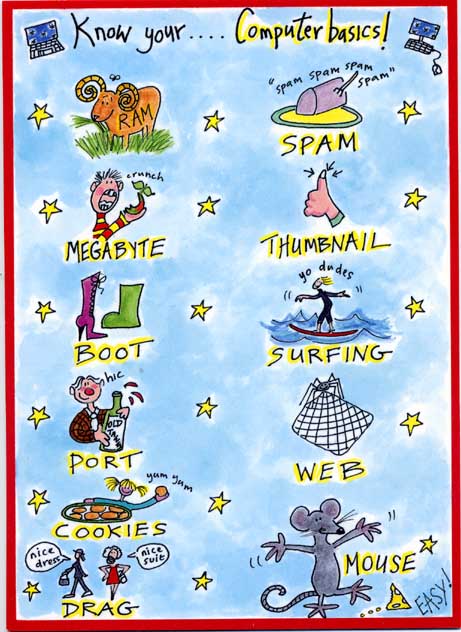
Other people don’t see the world the way you do. Their weltanschauung (view on the world) is influenced by their culture, education, expectations, age, gender and many other factors. Below is a copy of a card I received for my birthday a few weeks ago (click for a larger image) which I think illustrates the gulf between how developers and their customers see the world rather well.

birthday_card.jpg

If your customers are also developers the difference in backgrounds may not be so large. But the difference in how they see your software and how you see it is still huge. You have been working on your software for months or years. You know everything worth knowing about it down to the last checkbox and command line argument. But your potential customer is probably going to download it and play with it for just a few minutes, or a few hours if you are lucky, before they decide if it is the right tool for the job. If they aren’t convinced, your competitors are only a few clicks away. To maximise your chances of making a sale you need to see your software afresh through your customer’s eyes. You can get some useful feedback from support emails, but the best way to improve the ease of use of your software is to watch other people using it. This is usually known as usability testing.

The basic idea of usability testing is that you take someone with a similar background to your target audience, who hasn’t seen your software before and ask them to perform a typical series of tasks. Ideally they should try to speak out loud what they are thinking to give you more insight into their thought processes. You then watch what they do. Critically, you do not assist them, no matter how irresistible the urge. The results can be quite surprising and highly revealing. Usability testing can be very fancy with one way mirrors, video cameras etc, but that really isn’t necessary to get most of the benefits. There is a good description of how to carry out usability tests in Krug’s excellent book Don’t make me think: a common sense guide to web usability. Most of his advice is equally applicable to testing desktop applications.

The main problems with usability testing are logistical. You need to find the right test subjects and arrange the time and location for testing. You also need to decide how you are going to induce them to give up an hour of their time. Worst of all, once you have used someone they are ‘tainted’ and can’t be used again (except perhaps to test changes in the new versions). It’s a hassle. Or at least it was. Much of this hassle is now taken care of for you by new web-based service www.usertesting.com .

The idea behind usertesting.com is very simple. You buy a number of tests for your website and specify your website url, the tasks you want carried out and the demographics (e.g. preferred age, gender and expertise of testers). Testers are then selected for you and carry out the testing. Once tests have been completed a flash audio+video recording of the session and a brief written report is uploaded for you. Finally you rate the testers on a 5-star scale. Presumably testers who score well will get more work in future. Ideally you should re-run your usability testing after any changes to verify that they are an improvement. I don’t know if usertesting.com allows for the fact that you probably won’t want the same tester a second time for the same project.

I paid $57 for 3 tests on perfecttableplan.com. I was happy with the tests, which pointed out a number of areas I can improve on. There was a problem which meant one of the tests still hadn’t been completed 4 days later. I emailed support and they sorted this out in a timely fashion. It is a new service and they are still ironing out a few glitches. Given the low costs and the 30 day money back guarantee I think it is definitely worth a try. It won’t take many extra conversions to repay your investment. usertesting.com is probably more useful to those of us selling to the wider consumer market. If you are selling to specialised niches (e.g. developers, actuaries, llama breeders) they might have difficulty finding suitable testers.

Unfortunately usertesting.com is currently only available for website usability testing. When I emailed them to suggest they extend the service to desktop apps they told me that it this might be a possibility if there was sufficient interest. I will be first in-line if such a service becomes available. Until then I am left with the hassle of organising my own usability tests. It occurs to me that I could do this remotely using a service such as copilot.com (now free at weekends)+Skype. This might be a good workaround for the fact that my office isn’t really big enough for two people (especially if they don’t know me very well!). It would also allow me to do testing with customers outside the UK, e.g. professional wedding planners in the USA. If I do try this I will report back on how I get on.

Nokia to acquire Trolltech (makers of Qt)

trolltechTelecoms giant Nokia are to acquire Trolltech, the company behind leading cross-platform toolkit Qt. As a fan and long time user of Qt this makes me a little nervous. I hope it will lead to more investment in Qt and lower maintenance fees. The opposite could happen of course. It isn’t unknown for a large company to buy a good product and then ruin it (the purchase of Purify by Rational springs to mind). At least I have the full source code for Qt if it all goes to hell in a handbasket. I learnt long ago (the hard way) that you should never depend on a third party libraries if you don’t have the source.

Facebook don’t need no steenkin’ software ads

facebook.gifI don’t really ‘get’ Facebook. Maybe that is because I am 42 years old and I am not supposed to. But I do get the advertising potential. Facebook have cunningly extracted detailed demographic data from their customers and are using this to offer highly targeted advertising to businesses. For example, Facebook currently has 32,080 females, aged 25-40, with a college education, in the USA who are engaged. These are the sort of people I would love to advertise my seating planner software to. But Facebook doesn’t want my money. A quick read through the Facebook advertising guidelines reveals:

No ad is permitted to contain or link, whether directly or indirectly, to a site that contains software downloads, freeware, or shareware.

This might possibly be due to worries about malware, but that seems to be covered by other clauses. Maybe they just want to keep their customers on the Facebook site, so they can click more ads? But, aren’t most URLs going to indirectly link to sites containing software downloads if you keep following links?

Google Adwords: improving your ads

google adwordsOne of the keys to success in Google Adwords (and other pay per click services) is to write good ad copy. This isn’t easy as the ads have a very restrictive format, reminiscent of a haiku:

  • 25 character title
  • 2×35 character description lines
  • 35 character display url

Whats more, there are all sorts of rules about punctuation, capitalisation, trademarks etc. You will soon find out about these when you write ads. Most transgressions are flagged immediately by Google algorithms, others are picked up within a few days by Google staff (what a fun job that must be).

Google determines the order in which ads appear in their results using a secret algorithm based on how much you bid, how frequently people click your ads and possibly other factors, such as how long people spend on your site after clicking. Nobody really knows apart from Google, and they aren’t saying. The higher your click frequency, generally the higher your ad will appear. The higher your ad appears in the results, generally the more clicks you will get. So writing relevant ads is very important. This means that each adgroup should have a tightly clustered group of keywords and the ads should be closely targeted to those keywords.

There is no point paying for clicks from people who aren’t interested in your product, so you need to clearly describe what you are offering in the few words available. For example you might want to have a title “anti-virus software” instead of “anti-virus products” to ensure you aren’t paying for useless clicks from people looking for anti-viral drugs (setting “drugs” as a negative keyword would also help here).

I have separate campaigns for separate geographic areas. Each campaign contains the same keywords in the same adgroups, but with potentially different bid prices and ads. This allows me to customise the bid prices and ads for the different geographic areas. For example I can quote the £ price in a UK ad and the $ price in a US ad. Having separate campaigns for separate geographic areas is a hassle, but it is manageable, especially using Google Adwords editor.

Writing landing pages specific to each adgroup can also help to increase your conversion rate. It is worth noting that the ad destination url doesn’t have to match the display url. For example you could have a destination url of “http://www.myapp.com/html/landingpage1.html?ad_id=123” and a display url of “www.myapp.com/freetrial”.

Obviously what makes for good ad copy varies hugely with your market. Here are some things to try:

  • a call to action (e.g. “try it now!”)
  • adding/removing the price
  • different capitalisation and punctuation
  • keyword insertion (much beloved of EBay)
  • changing the destination url

But, as always, the only way to find out what really works is testing. Google have made this pretty easy with support for conversion tracking and detailed reporting. I run at least 2 ads in each adgroup and usually more. Over time I continually kill-off under-performing ads and try new ones. Often the new ads will be created by slight variations on successful ads (e.g. changing punctuation or a word) or splicing two successful ads together (e.g. the title from one and the body from another). This evolutionary approach (familiar to anyone that has written a genetic algorithm) gradually increases the ‘fitness’ of the ads. But you need to decide how to measure this fitness. Often it is obvious that one ad is performing better than another. But sometimes it can be harder to make a judgment. If you have an ad with a 5% click-through rate (CTR) and 0.5% conversion rate is this better than an ad with a 1% click-through rate and a 2% conversion rate? One might think so ( 5*0.5 > 1*2 ) but this is not necessarily the case. I think the key measure of how good an ad is comes from how much it earns you for each impression your keywords get.

I measure the fitness by a simple metric ‘profit per thousand impressions’ (PPKI) where, for a given time period:

PPKI = ( ( V * N ) – C ) / ( I / 1000 )

V = value of a conversion (e.g. product sale price)

N = number of conversions (e.g. product sales) from the ad

C = total cost of clicks for the ad

I = impressions for the ad

Say your product sells for $30. Over a given period you have 2 ads in the same adgroup that each get 40k impressions and clicks cost  an average of $0.10 per click.

  • ad1 has a CTR of 5%, a conversion rate of 0.5% and gets 10 conversions, which gives PPKI=$2.5 per thousand impressions
  • ad2 has a CTR of 1%, a conversion ratio of 2% and gets 8 conversions, which gives PPKI=$5 per thousand impressions

So ad2 made, on average, twice the profit per impression despite the lower number of conversions. Given this data I would replace ad1 with a new ad. Either a completely new ad or a variant of ad2.

PPKI has the advantage of being quantitative and simple to calculate. You can just export your Google Adwords ‘Ad Performance’ reports to Excel and add a PPKI column. Some points to bear in mind:

  • Selling software isn’t free. You may want to subtract the cost of support, CD printing & postage, ecommerce fees, VAT etc from the sale price to give a more accurate figure for the conversion value.
  • PPKI doesn’t take account of the mysterious subtleties of Google’s ‘quality score’. For example an ad with low CTR and high conversion rate might conceivably have a good PPKI but a poor quality score. This could result in further decreases in CTR over time (as the average position of the ad drops) and rises in minimum bid prices for keywords.
  • PPKI is a simple metric I have dreamt up, I have no idea if anyone else uses it. But I believe it is a better metric than cost per conversion, or any of the other standard Google metrics.

To ensure that all your ads get shown evenly select ‘Rotate: Show ads more evenly’ in your Adwords campaign settings. If you leave it at the default ‘ Optimize: Show better-performing ads more often’ Google will choose which ads show most often. Given a choice between showing the ads that make you most money and the ads which make Google most money, which do you think Google will choose?

Text ads aren’t the only type of ads. Google also offer other types of ads, including image and video ads. I experimented with image ads a few years ago, but they got very few impressions and didn’t seem worth the effort at the time. I may experiment with video ads in the future.

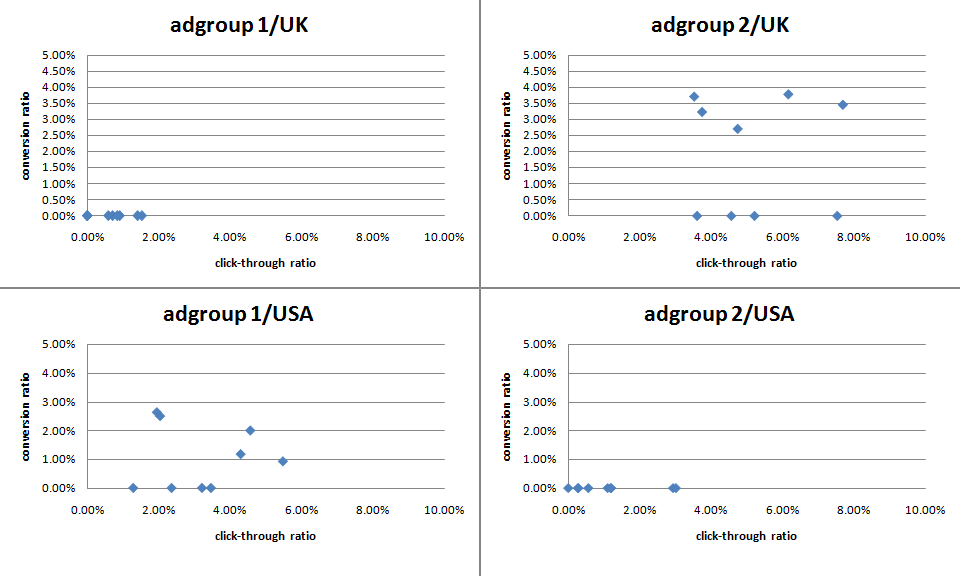
The effectiveness of ads can vary greatly. Back in mid-December I challenged some Business Of Software forum regulars to ‘pimp my adwords’ with a friendly competition to see who could write the best new ads for my own Google Adwords marketing. The intention was to inject some fresh ‘genes’ into my ad population while providing the participants with some useful feedback on what worked best. Although it is early days, the results have already proved interesting (click the image for an enlargement):

adwords ad results

The graph above shows the CTR v conversion ratio of 2 adgroups, each running in both USA and UK campaigns. Each blue point is an ad. The ads, keywords and bid prices for each ad group are very similar in each country (any prices in the ads reflect the local currency for the campaign). Points to note:

  • There were enough clicks for the CTR to be statistically significant, but not for the conversion rate (yet).
  • The CTRs vary considerably within the same campaign+adgroup. Often by factor of more than 3.
  • Adgroup 1 performs much better in the USA than in the UK. The opposite is true for adgroup 2.
  • Adgroup 1 for the USA shows an inverse correlation between CTR and conversion rate. I often find this is the case – more specific ads mean lower CTR but higher conversion rates and higher profits.

‘Pimp my adwords’ will continue for a few more months before I declare a winner. I will be reporting back on the results in more detail and announcing the winner in a future post. Stay tuned.

Oryx Digital is diversifying

BBC microI first became interested in programming in about 1978, at the age of 12. I can recall the exact moment. I was in a classroom at The Royal Hospital School watching a very basic demo (written in BASIC) of a ball bouncing around a screen on an RM-380Z. Actually it wasn’t a ball, it was a single pixel. But the screen resolution was so low it was easy enough to see from the back of the classroom. Computers with floppy drives were rather expensive for schools in 1978, but some pupils from the school had won it in a competition. I was intrigued – how did it work? The teacher giving the demonstration (Mr Albert) encouraged my early interest and a few years later my grandmother was generous enough to buy our family an Acorn BBC B computer. My future path was set.

30 years later, including 22 years as a professional software developer, I am still fascinated by software. Experience showed me programming skills were necessary, but far from sufficient, to produce successful commercial software. So my interests have grown from programming to include the whole nascent discipline of software engineering. I have also become increasingly interested in the effective marketing of software. Many developers recoil with horror from marketing, but I want my software to make money and be used by lots of people. This requires good marketing as well as a good product. In my experience talented software marketers are even harder to find than talented software developers, so I have learned as much as I can about marketing software. It is actually quite a challenging and creative field.

3 years ago I set up my own one-man company, Oryx Digital, to create software products and offer consulting services to other software companies. Since then I have been extremely busy developing and marketing my product, PerfectTablePlan, which has gone from strength to strength. I released PerfectTablePlan v3.1.1 for Windows and Mac OS X a few days ago. I am very pleased with this new version, which has over 50 improvements and new features. The response from customers has been very favourable and the software appears to be very stable – no automatic crash reports (yet). It has grown far beyond my original ideas and now weighs in at around 100K lines of C++ and 200 pages of user documentation. In my (biased) opinion it is way ahead of any of it’s competitors.

Although PerfectTablePlan remains my main focus, I feel now is a good time to diversify a little. So I am now making myself available a few days a month for consultancy to other software companies, large and small. Do you need a new perspective on your product development and marketing? Perhaps I can help?

Meanwhile I have already started thinking about PerfectTablePlan v4. No rest for the wicked…