Category Archives: tools

Virus Total

Virus Total is a free service that gives you aggregate results from 36 different malware scanners. Just browse to the file you want to check on your PC and click ‘Send file’. It will quickly return the results of all the scans, hash sizes and a list of Windows system calls that the software makes.

This is a great resource for checking software you are about to install doesn’t contain malware. It is also useful for checking that your own download files haven’t been tampered with and don’t trigger false positives. Note that some software protection systems have been known to trigger false positives from malware scanners.

Thanks to a poster on this BOS thread for bringing it to my attention.

Sometimes the best way to recover Windows data is Linux

knoppixMy Windows laptop refused to boot into Windows. The ominous error message was:

Windows could not start because the following file is missing or corrupt:

\windows\system32\config\system

A quick Google suggested that the registry had been corrupted. I tried various things to recover the OS, including using the XP recovery console to manually restore a backup of the registry. It didn’t work.

No problem. I have a fairly paranoid back-up regime. All the important information on my laptop is also stored on my subversion server. I could just reformat the laptop, reinstall the applications (including subversion) and check out all the files again. Except that I hadn’t thought to include my wife’s files on the laptop in my back-up plans. Oops. After hours of making no progress recovering the data. I tried Knoppix. I got access to the data in not much longer than it took to download Knoppix.

Knoppix is a Linux distribution that can run from a CD (i.e. it doesn’t require installation on your harddisk). It is also capable of understanding Windows file systems. To use it:

  1. Download the latest Knoppix CD .iso file (approx 700MB). Note – The DVD version is much larger.
  2. Burn the .iso to a CD, for example using the free Active ISO Burner.
  3. Boot the stricken machine from the Knoppix CD. You may need to change your system to BIOS to boot from the CD first. How you access the BIOS varies between machines. On my Toshiba laptop you press F2 as the system boots.
  4. Drag and drop data from the stricken machine to a USB harddisk or memory stick. Or copy to another machine using FTP from Knoppix. The Knoppix user interface is easy enough to use, even if you haven’t used Linux before.

Note that you don’t have to enter your Windows password to recover the files. This brings homw how easy it is to get data off a password protected Windows machine, if you have physical access to the machine. Another good reason to encrypt sensitive data on your laptop, for example using the free Truecrypt.

Thanks Knoppix! I’ve added you to my mental list of worthy software causes to make a small donation to one day. Obviously you need access to a functioning machine to do the above. So why not make a Knoppix CD now, while everything is fine? You never know when you might need it.

Further reading:

Life hacker: Rescue files with a boot CD

Functional programming – coming to a compiler near you soon?

We can classify programming languages into a simple taxonomy:

Commercial programmers have overwhelmingly developed software using imperative languages, with a strong shift from procedural languages to object oriented languages over time. While declarative style programming has had some successes (most notably SQL), functional programming (FP) has been traditionally seen as a play-thing for academics.

FP is defined in Wikipedia as:

A programming paradigm that treats computation as the evaluation of mathematical functions and avoids state and mutable data.

Whereas an imperative language allows you to specify a sequence of actions (‘do this, do that’), a functional language is written in terms of functions that transform data from one form to another. There is no explicit flow of control in a functional language.

In an imperative language variables generally refer to an address in memory, the contents of which can change (i.e. is ‘mutable’). For example the rather unmathematical looking “x=x+1” is a valid expression. In FP there are no mutable variables and no state.

In an imperative language a function can return different values for the same input, either because of stored state (e.g. global or static variables) or because it is interfacing with an external device (e.g. a file, database, network or system clock). But a pure functional language always returns the same value from a function given the same input. This ‘referential integrity’ means an FP function call has no ‘side-effects’ and consequently can’t interface with external devices. In other words it can’t actually do anything useful – it can’t even display the result of a computation to your VDU. The standard joke is that you only know a pure functional program is running because your CPU gets warmer.

The functional language Haskell works around the side-effects issue by allowing some functions to access external devices in a controlled way through ‘monads’. These ‘impure’ functions can call ‘pure’ functions, but can never be called by them. This clearly separates out the pure parts of the program (without side-effects) from the impure ones (with side-effects). This means that it is possible to get many of the advantages of FP and still perform useful tasks.

FP is much closer to mathematics than imperative programming. This means that some types of problems (particularly algorithmic ones) can be expressed much more elegantly and easily as functional programs. The fact that a function has no side effects also means that it’s structure is much easier to analyse automatically. Consequently there is greater potential for a computer to optimise a functional program than an imperative program. For example in FP:

y = f(x) + f(x);

Can always be rewritten as:

z = f(x);

y = 2 * z;

Saving a function call. This is more difficult to do in an imperative language, because you need to show that second call to f(x) won’t return a different value to the first.

Functional programs are also inherently much easier to parallelise, due to the lack of side-effects. We can let the FP interpreter/compiler take care of parallelism. No need to worry about threads, locks, critical sections, mutexes and deadlocks. This could be very useful as processors get ever more cores. However imperative languages, with their flow of control and mutable variables, map more easily than functional languages onto the machine instruction of current (von Neumann architecture) computer. Consequently writing efficient FP interpreters and compilers is hard and still a work in progress.

Elements of FP are steadily making their way into mainstream commercial software:

  • Erlang is being used in commercial systems, including telecoms switching systems.
  • Microsoft Research has implemented F#, a .Net language that includes FP elements based on ML.
  • Work is underway to add elements of FP to version 2.0 of the D programming language.
  • Google’s MapReduce is based on ideas from FP.
  • The Mathematica programming language has support for FP.
  • The K programming language is used in financial applications.
  • The Perl 6 compiler is being written in Haskell. <insert your own sarcastic comment here>.

I recently attended ACCU 2008 which had a whole stream of talks on FP. All the FP talks I attended were packed out. That is quite something given that the audience is primarily hardcore C++ programmers. There seemed to be quite a consensus in these talks that:

  • FP is starting to move out of academia and into commercial use.
  • FP is more suitable than imperative style programming for some classes of problem.
  • FP is not going to replace imperative programming. The bulk of commercial development will still be done in an imperative style, but with FP mixed in where appropriate.
  • Hybrid languages that mix OO and FP will become more common.

I don’t see Haskell replacing C++ any time soon. But I can definitely see the benefits of using FP to tackle some types of problems.

Further reading:

The Functional programming reference in Wikipedia

This article is based loosely on notes I made at ACCU 2008 from attending the following talks:

  • “Caging the Effects Monster: the next decade’s big challenge”, Simon Peyton-Jones
  • “Functional Programming Matters”, Russel Winder
  • “Grafting Functional Support on Top of an Imperative Language”, Andrei Alexandrescu

Any mistakes are almost certainly mine.

Choosing a development ‘stack’ for Windows desktop applications

beauty_parade.jpgI have have heard plenty of people saying that desktop software is dead and that all future development will be done for the web. From my perspective, as both a buyer and seller of software, I think they are wrong. In fact, of the thousands of pounds I have spent on software in the last three years, I would guess that well over 90% of it was spent on software that runs outside the browser. The capabilities of web based applications have improved a lot in recent years, but they still have a long way to go to match a custom built native application once you move beyond CRUD applications. I don’t expect to be running Visual Studio, PhotoShop or VMWare (amongst others) inside the browser any time soon. The only way I see web apps approaching the flexibility and performance of desktop apps is for the browser to become as complicated as an OS, negating the key reason for having a browser in the first place. To me it seems more likely that desktop apps will embed a browser and use more and more web protocols, resulting in hybrid native+web apps that offer the best of both worlds.
So, if Windows desktop apps aren’t going away any time soon, what language/libraries/tools should we use to develop them? It is clear that Microsoft would like us to use a .Net development environment, such as C#. But I question the wisdom of anyone selling downloadable off-the-shelf software based on .Net [1]. The penetration of .Net is less than impressive, especially for the more recent versions. From stats published by SteG on a recent BOS post (only IE users counted):

No .Net: 28.12%
>= .Net 1.0: 71.88%
>= .Net 1.1: 69.29%
>= .Net 2.0: 46.07%
>= .Net 3.0: 18.66%
>= .Net 3.5: 0.99%

Consequently deploying your app may require a framework update. The new .Net 3.5 framework comes with a 2.7 MB installer, but this is only a stub that downloads the frameworks required. The full set of frameworks weighs in at eye watering 197 MB. To find out how much the stub really downloads Giorgio installed .Net 3.5 onto a Windows 2003 VM with only .Net 1.0 & 1.1. The result: 67 MB. That is still a large download for most people, especially if your .Net 3.5 software is only a small utility. It is out of the question if you don’t have broadband. Microsoft no doubt justify this by saying that the majority of PCs will have .Net 3.5 pre-installed by the year X. Unfortunately by the year X Microsoft will probably be pushing .Net 5.5 and I dread to think how big that will be.

I have heard a lot of people touting the productivity benefits of C# and .Net, but the huge framework downloads can only be a major hurdle for customers, especially for B2C apps. You also have issues protecting your byte code from prying eyes, and you can pretty much forget cross-platform development. So I think I will stick to writing native apps in C++ for Windows for the foreseeable future.

There is no clear leader amongst the development ‘stacks’ (languages+libraries+tools) for native Win32 development at present. Those that spring to mind include:

  • Delphi – Lots of devoted fans, but will CodeGear even be here tomorrow?
  • VB6 – Abandoned and unloved by Microsoft.
  • Java – You have to have a Java Run Time installed, and questions still remain about the native look and feel of Java GUIs.
  • C++/MFC – Ugly ugly ugly. There is also the worry that it will be ‘deprecated’ by Microsoft.
  • C++/Qt – My personal favourite, but expensive and C++ is hardly an easy-to-use language. The future of Qt is also less certain after the Nokia acquisition.

Plus some others I know even less about, including: RealBasic and C++/WxWidgets. They all have their down sides. It is a tough choice. Perhaps that is why some Windows developers are defecting to Mac, where there is really only one game in town (Objective-C/Cocoa).

I don’t even claim that the opinions I express here are accurate or up-to-date. How could they be? If I kept up-to-date on all the leading Win32 development stacks I wouldn’t have any time left to write software. Of the stacks listed I have only used C++/MFC and C++/Qt in anger and my MFC experience (shudder) was quite a few years ago.

Given that one person can’t realistically hope to evaluate all the alternatives in any depth, we have to rely on our particular requirements (do we need to support cross platform?), hearsay, prejudice and which language we are most familiar with to narrow it down to a realistic number to evaluate. Two perhaps. And once we have chosen a stack and become familiar with it we are going to be loathe to start anew with another stack. Certainly it would take a lot for me to move away from C++/Qt, in which I have a huge amount of time invested, to a completely new stack.

Which Windows development stack are you using? Why? Have I maligned it unfairly above?

[1] Bespoke software is a different story. If you have limited deployment of the software and can dictate the end-user environment then the big download is much less of an issue.

Animated GIFs

The human brain and visual system is highly optimised to detect movement. If you don’t believe me, watch what happens to people’s attention when you turn on a TV in a room. Even if the sound is off, the program is dull and the conversation is interesting, people will find it very hard not to stare at the TV. You can exploit this by using animation on your website to grab the user’s attention. Animation is also a useful way of packing a lot of content into a limited space on your web page.

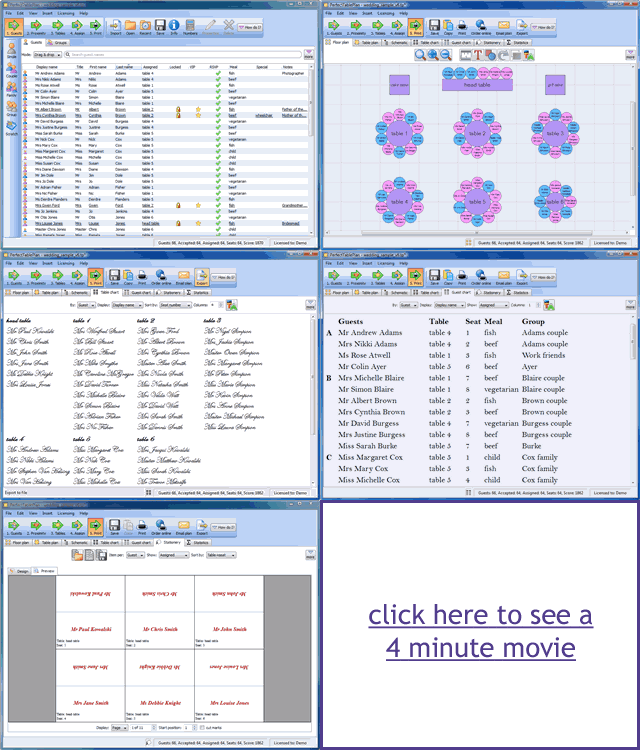
Animated GIFs are a useful low-tech way of adding animation to a website. They work in pretty much any browser, without requiring visitors to download a plug-in or even click a ‘play’ button. I use them on the PerfectTablePlan home page to show rotating testimonials and on adwords landing pages to give a brief visual overview of what PerfectTablePlan can do.

animated gifs

Animated GIFs are quite easy to create. Here is how I created the image above (on Windows):

  1. I used Sizer (freeware) to size the PerfectTablePlan main window to 960×750.
  2. I used SnagIt (commercial) to capture various screenshots, resize them to 320×250 and save them as separate 7-bit GIFs.
  3. I dragged the GIFs onto UnFreez (donationware) and created an animated GIF. (You can also use Adobe Photoshop, if you have it).
  4. I dragged the animated GIF onto SuperGIF (commercial with trial) to reduce the file size (by about 5% in this case).

The final result isn’t a work of art, but it is hopefully enough to grab the visitors attention and whet their appetite for more information.

Animated GIFs can get very large if you aren’t careful. But it rather defeats the object if your website visitor clicks ‘back’ before the image has loaded. I used 7-bit GIFs, small image dimensions, a limited number of frames and GIF optimisation to keep the file above to 72kb.

A word of warning – use animation sparingly or the effect can be quite overwhelming (don’t click this link if have epilepsy or a refined sense of taste).

Coverage Validator

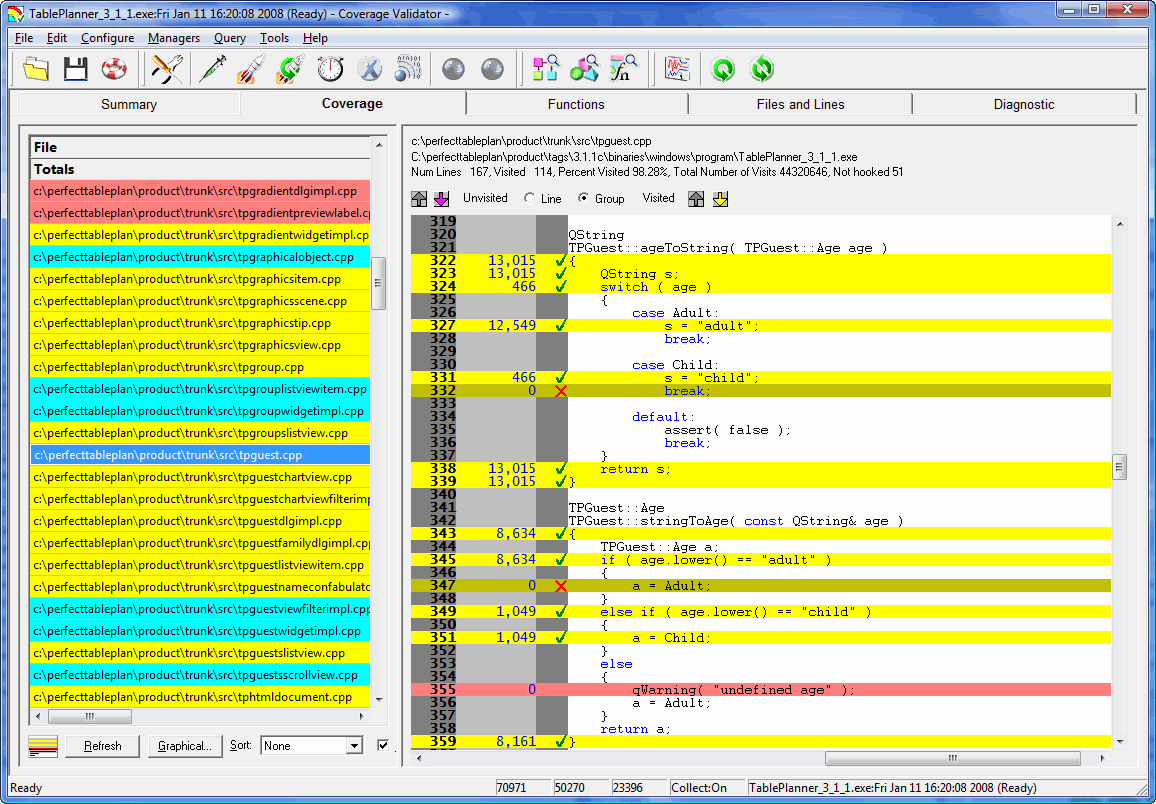
coverage_validator.pngThe sink is full of washing, I am wearing odd socks and I haven’t been out of the house in days. It must be time to put out that new release. But how can I be sure my testing hasn’t missed a hideously embarrassing bug? Maybe I introduced a major bug when I made that ‘cosmetic’ change at 2am?
In an ideal world I would just run a comprehensive automated regression test suite. Unfortunately it is difficult to automate graphical user interface (GUI) testing and the majority of lines of code in most applications are GUI. I estimate that the code for my own table planner software is at least 75% GUI code (not including generated code, which would push it even higher).

So I try to manually execute every line of my application before I release it. If I have to make any changes to the code, I start over again. This is very dull, but at least I have a tool to help me: Coverage Validator. Coverage Validator instruments code and shows, in real time, which lines have been executed. Click a few buttons on your application and watch the executed lines of code change colour from pink to yellow. Execute every line in the file and all the lines change colour to cyan. No recompilation or relinking is required and it doesn’t slow down the tested application too much. This real-time feedback is incredibly powerful for testing.

code_coverage_small.gif

Unfortunately it also has a lot of shortcomings:

  • The usability isn’t great. There is a confusing plethora of options for instrumenting your code that I would rather not have to know about.
  • It isn’t able to ‘hook’ (instrument) all the lines of code. Whole blocks get missed out for reasons I don’t fully understand. Single line branches are particularly likely to be missed.
  • The GUI isn’t great. For example, the display flashes horribly if you resize it.
  • The automatic results merging is just plain weird. At the end of a session it can merge your coverage results into a previous session. This information isn’t much use to me at the end of a session. I want to merge previous results at the start of a session so I know which lines I haven’t tested.
  • The GUI is quite ugly. They really need to update those tired old icons.

However being able to see line coverage information in real time is just so incredibly useful that I am prepared to put up with the many shortcomings. I just run my application alongside Coverage Validator and, file-by-file and function-by-function, I try to turn the lines of code yellow (or, better still, cyan). Every time I have used Coverage Validator I have found at least one potentially embarrassing bug that I hadn’t discovered by any other means. The support has also been responsive. It is just a pity about the flaws, without them this would be a ‘killer app’ for testing.

Coverage Validator works with C++, Delphi and VB on Windows NT4, 2000, 2003 and XP[1]. A single licence costs $199. A free 30-day evaluation licence is available.

[1]I am using it on Vista currently, and it seems to work fine.

Your harddrive *will* fail – it’s just a question of when

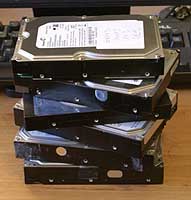
failed harddisksThere are a few certainties in life: death, taxes and harddisk failure. I have no less than 6 failed harddisks sitting here on my desk patiently awaiting their appointment with Mr Lump Hammer. 2 Seagates, 3 Maxtors and 1 Western Digital. This equates to roughly one disk failure per year. Perhaps this is not suprising given that I have about 9 working harddisks at the moment spread across various machines. Given the incredible tolerances to which harddisks are manfactured, perhaps it is a miracle harddisks work at all.

As an analogy, a magnetic head slider flying over a disk surface with a flying height of 25 nm with a relative speed of 20 meters/second is equivalent to an aircraft flying at a physical spacing of 0.2 µm at 900 kilometers/hour. This is what a disk drive experiences during its operation. –Magnetic Storage Systems Beyond 2000, George C. Hadjipanayis from Wikipedia

We all know we need to back-up our data. But it is a chore that often gets forgotten at the most critical periods. Here are my hints for preparing yourself for that inevitable ‘click of death’.

  • Buy an external USB/Firewire harddrive. 500GB drives are ridiculously cheap these days. Personally I don’t like back-up tapes due to experiences of them stretching and corrupting data.
  • Back-up images of the entire OS, not just the data. You can use Acronis TrueImage on Windows and SuperDuper on MacOSX. This can save you days restoring your entire development environment and applications from scratch.
  • Back-up individual files as well as entire OS images. You don’t want to have to restore a whole image to retrieve one critical file. Windows Vista and Mac OS X Leopard both have back-up applications built into the OS.
  • Use a separate machine to your development machine as source code server.
  • Use a RAID-1 (mirrored) disk on your main development machine[1]. It is worth noting that this actually doubles the likelihood of harddisk failure, but makes the likelihood of a catastrophic failure much lower. Keep an identical 3rd drive on hand to swap in when a drive fails.
  • Back-ups aren’t much use if they get incinerated along with your office in a fire, so store copies off-site. For example you can:
  • Make sure any off-site copies are securely encypted, for example using Axcrypt.
  • Automate your back-ups as far as possible. Computers are much better at the dull repetitive stuff.
  • Test restoring data once in a while. There is not much point backing up data only to find you can’t restore it when needed.

There are lots of applications for backing up individual files. So many in fact, that no-one has any hope of evaluating them all (marketing tip: don’t write another back-up application – really). I also worry that data stored in their various proprietary formats might not be accessible in future due to the vendor going out of business. I find the venerable DOS xcopy adequate for my needs. I run it in a scheduled Windows batch file to automatically synch file changes on to my usb harddrive (i:) every night. Here it is in all its glory:

XCOPY c:\data i:\data /d /i /s /v /f /y /g /EXCLUDE:exclude.txt

The exclude.txt file is used to exclude subversion folders and intermediate compiler files:

\.svn\
.obj
.ilk
.ncb
.pdb
.bak>

Which of the above do I do? Pretty much all of them actually. At least I try, I haven’t yet automated the offsite backup. This may seem rather excessive, but it paid dividends last month when gremlins went on the rampage here in the Oryx Digital office. I had 2 harddrive failures in 2 weeks. The power supply+harddisk+network card on my old XP development machine failed then, while I was in the process of moving everything to my new Vista development machine, one of the RAID-1 disks on the new machine failed.

Things didn’t go quite according to plan though. The new RAID-1 box wouldn’t boot from either harddisk. I have no idea why.

raid1Also the last couple of weekly Acronis image back-ups had failed and I hadn’t done anything about it. I had recent back-ups of all the important data, but I faced a day or more reinstalling all the apps I had installed since the last successful image. It took several hours on the phone to Dell technical support and much crawling around on the floor before I could I get the new RAID-1 box to boot off one harddisk. I was then able to rebuild RAID-1 using the spare harddisk I had on standby for such an eventuality. Nothing was lost, apart from my sense of humour.

Dell offered to replace the defective harddisk under warranty, but I declined on the grounds that there is far too much valuable information on this disk (source code, digital certificate keys, customer details etc) for me to entrust it to any third party. Especially given that Dell reserve the right to refurbish the harddisk and send it to someone else. What if they forgot to wipe it? My experiences with courier companies also haven’t given me great confidence that the disk would reach Dell. And I didn’t want to receive a reburbished disk as a replacement. It just isn’t worth relying on a refurb given how cheap new harddisks are. So the harddisk has joined the back of the growing queue to see Mr Lump Hammer.

The availability of cheap harddisks and cheap bandwidth means that it has never been easier to backup your systems. No more fiddling with mag tapes. Of course it is possible that your harddisk will work perfectly until it becomes obselete, but I think it would be very unwise to assume that this will be the case. Don’t say I didn’t warn you…

Further reading:

What’s your backup strategy? (the prolific and always worth reading Jeff Atwood beats me to the punch)

[1] RAID-1 is built in to some Intel motherboards and is available as a relatively inexpensive extra from Dell. You may have to ask for it though – it wasn’t listed as a standard configuration option when I purchased my Dell Dimension 9200.

[2] Since I wrote this article I installed the latest version of JungleDisk on my Vista box. On the 3 occasions I have tried to use it it hung Vista to the point where I had to I had to cut the power in order to reboot. I have now uninstalled it.

Seeing your software through your customers’ eyes

usabilityWe all like to think that our software is easy to use. But is it really? How do you know? Have you ever watched anyone use it? When I asked this questions to a room full of developers last year I was surprised at how many hadn’t.
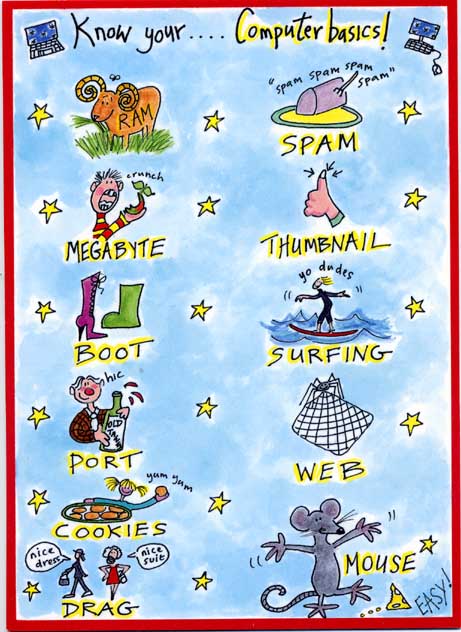
Other people don’t see the world the way you do. Their weltanschauung (view on the world) is influenced by their culture, education, expectations, age, gender and many other factors. Below is a copy of a card I received for my birthday a few weeks ago (click for a larger image) which I think illustrates the gulf between how developers and their customers see the world rather well.

birthday_card.jpg

If your customers are also developers the difference in backgrounds may not be so large. But the difference in how they see your software and how you see it is still huge. You have been working on your software for months or years. You know everything worth knowing about it down to the last checkbox and command line argument. But your potential customer is probably going to download it and play with it for just a few minutes, or a few hours if you are lucky, before they decide if it is the right tool for the job. If they aren’t convinced, your competitors are only a few clicks away. To maximise your chances of making a sale you need to see your software afresh through your customer’s eyes. You can get some useful feedback from support emails, but the best way to improve the ease of use of your software is to watch other people using it. This is usually known as usability testing.

The basic idea of usability testing is that you take someone with a similar background to your target audience, who hasn’t seen your software before and ask them to perform a typical series of tasks. Ideally they should try to speak out loud what they are thinking to give you more insight into their thought processes. You then watch what they do. Critically, you do not assist them, no matter how irresistible the urge. The results can be quite surprising and highly revealing. Usability testing can be very fancy with one way mirrors, video cameras etc, but that really isn’t necessary to get most of the benefits. There is a good description of how to carry out usability tests in Krug’s excellent book Don’t make me think: a common sense guide to web usability. Most of his advice is equally applicable to testing desktop applications.

The main problems with usability testing are logistical. You need to find the right test subjects and arrange the time and location for testing. You also need to decide how you are going to induce them to give up an hour of their time. Worst of all, once you have used someone they are ‘tainted’ and can’t be used again (except perhaps to test changes in the new versions). It’s a hassle. Or at least it was. Much of this hassle is now taken care of for you by new web-based service www.usertesting.com .

The idea behind usertesting.com is very simple. You buy a number of tests for your website and specify your website url, the tasks you want carried out and the demographics (e.g. preferred age, gender and expertise of testers). Testers are then selected for you and carry out the testing. Once tests have been completed a flash audio+video recording of the session and a brief written report is uploaded for you. Finally you rate the testers on a 5-star scale. Presumably testers who score well will get more work in future. Ideally you should re-run your usability testing after any changes to verify that they are an improvement. I don’t know if usertesting.com allows for the fact that you probably won’t want the same tester a second time for the same project.

I paid $57 for 3 tests on perfecttableplan.com. I was happy with the tests, which pointed out a number of areas I can improve on. There was a problem which meant one of the tests still hadn’t been completed 4 days later. I emailed support and they sorted this out in a timely fashion. It is a new service and they are still ironing out a few glitches. Given the low costs and the 30 day money back guarantee I think it is definitely worth a try. It won’t take many extra conversions to repay your investment. usertesting.com is probably more useful to those of us selling to the wider consumer market. If you are selling to specialised niches (e.g. developers, actuaries, llama breeders) they might have difficulty finding suitable testers.

Unfortunately usertesting.com is currently only available for website usability testing. When I emailed them to suggest they extend the service to desktop apps they told me that it this might be a possibility if there was sufficient interest. I will be first in-line if such a service becomes available. Until then I am left with the hassle of organising my own usability tests. It occurs to me that I could do this remotely using a service such as copilot.com (now free at weekends)+Skype. This might be a good workaround for the fact that my office isn’t really big enough for two people (especially if they don’t know me very well!). It would also allow me to do testing with customers outside the UK, e.g. professional wedding planners in the USA. If I do try this I will report back on how I get on.

Nokia to acquire Trolltech (makers of Qt)

trolltechTelecoms giant Nokia are to acquire Trolltech, the company behind leading cross-platform toolkit Qt. As a fan and long time user of Qt this makes me a little nervous. I hope it will lead to more investment in Qt and lower maintenance fees. The opposite could happen of course. It isn’t unknown for a large company to buy a good product and then ruin it (the purchase of Purify by Rational springs to mind). At least I have the full source code for Qt if it all goes to hell in a handbasket. I learnt long ago (the hard way) that you should never depend on a third party libraries if you don’t have the source.

Mobile Internet access

3-mobile-broadband.pngI try to check my sales and support emails at least twice a day, every day. I managed this 362 days in 2007 (I took a break for Christmas day and 2 days I was in Germany at a conference). But providing this level of service can prove to be a problem for a one-man software company when it comes to taking holidays. Last year I restricted holidays to places with broadband Internet access. But finding child-friendly accommodation with broadband access proved to be quite a headache.

I have considered getting a Blackberry, but I really need something that can run my application to do proper support.

After some dithering I have now finally got mobile Internet access for my laptop through 3 Networks at £10/month. This provides 1GB per month of free data in the UK. You can get a higher data allowance with a more expensive contract, or a pay-as-you-go contract. But 1GB/month will hopefully be sufficient for my needs. Data costs outside the UK are a frightening £6/MB, so I will probably have to look for alternative arrangements if I take a holiday abroad. Vodaphone offer contracts with more reasonable roaming rates, but the contracts are much more expensive (£25 – £99/month).

Installation of the USB mobile modem and software was very easy – it took me about 5 minutes from opening the packaging to being connected. Only time will tell how good the coverage and service are. Watch this space.

Having mobile Internet access could also be a useful back-up if I lose my landline broadband connection. This is quite reassuring after several website outages and a failed harddisk in the last couple of weeks.