 ISVtube was launched recently by Thomas Holz of easy2sync.com. The site aggregates videos of particular interest to microISVs and could be a very useful resource. To suggest additional videos email Thomas at:
The perils of localization
The sign below is supposed to say “No entry for heavy goods vehicles. Residential site only” in English and Welsh.

Unfortunately the Welsh version says “I am not in the office at the moment. Send any work to be translated”.
CoverageValidator v3
 The nice folk at Software Verification have done a major new release of Coverage Validator, and the new version fixes many of the issues I noted in a previous post. In particular:
- The instrumentation can use breakpoint functionality to get better line coverage on builds with debug information enabled.
- Previous sessions can be automatically merged into new sessions.
- The default colour scheme has been toned down.
- The flashing that happened when you resized the source window has gone.
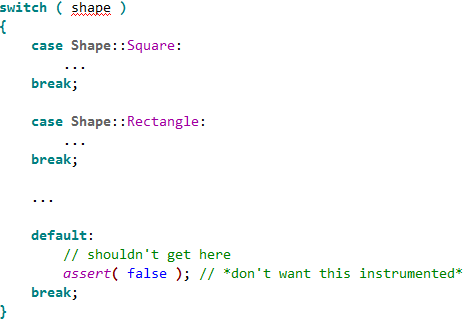
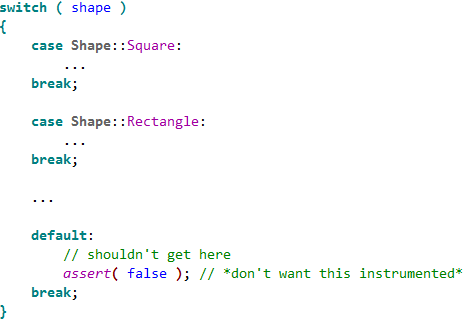
- It is now possible to mark sections of code not to be instrumented. I haven’t had time to try this yet, as it was only introduced in v3.0.4. But it should be very useful as currently I have a lot of defensive code that should never be reached (see below). Instrumenting this code skews the coverage stats and makes it harder to spot lines that should have been executed, but weren’t.
There are still a few issues:
- I had problems trying to instrument release versions of my code.
- It still fails to instrument some lines (but not many).
- I had a couple of crashes during testing that don’t seem to have been caused by my software (although I can’t prove that).
But the technical support has been very responsive and new versions are released fairly frequently. Overall version 3 is a major improvement to a very useful tool. Certainly it helped me find a few bugs during the testing of version 4 of Perfect Table Plan on Windows. I just wish there was something comparable for MacOSX.
7 Ways to be a healthier programmer
 Developing software is an indoor job with no heavy lifting. How dangerous can it be? Actually, the long term dangers to your health are all too real. Humans have bodies evolved for running around the African savanna, not sitting motionless in front of a computer for hours at a time. I have heard several stories of developer careers cut short by RSI. Imagine if you couldn’t type any more, because it was too painful? Yes, it could happen to you. I started to write an article about ergonomics for developers. Then I realised I knew someone who was a lot more knowledgeable about it than me. Derek kindly agreed to write it instead.
It may seem hard to believe that working at your desk can cause you long term harm, but unfortunately the real toll of sitting in the same location and doing the same operations over and over again may not be felt until it is too late. Here are some simple precautions you can take.
1. Setup your work environment to be ergonomic
Make sure that your whole working environment is set up correctly. This includes your monitor, keyboard, mouse, your desk height, your chair, and possibly a foot rest. Adjusting your seating position relative to your workstation layout encourages good posture. Do this on a regular basis, not just when the ergonomic assessment forms come around once a year. Setting up your chair correctly is probably the most important step and is covered in detail at healthycomputing.com.
2. Try using an ergonomic mouse and keyboard
There are a wide range of ergonomic mice available nowadays, and while some of them may look a little strange, you may be surprised how comfortable they are compared to conventional mice. The Evoluent VerticalMouse is ergonomic, easy to use and available in left and right hand variants. If you find an ergonomic keyboard inconvenient for programming, consider looking into one with a small key travel distance, like the keyboards on laptops where the keys only need to be depressed a small amount, as this reduces the finger movements and effort required.
3. Remember to look up from your monitor
Staring at your computer screen for long periods will lead to eye strain, tiredness, headaches and dry eyes. Every few minutes, look up from your monitor and focus on objects in the distance, either by looking out of the window or at the most distant end of the room. You can do this by using ScreenRest set to remind you at fixed time intervals. It is also worth adjusting your monitor screen to eliminate reflections from light sources behind and above you.
4. Sit up and stop slouching
Leaning forward, sinking down in your chair or resting you elbows on the desk places unnecessary pressure on your back. Poor posture, maintained over a period of time, leads to back pain and more serious back conditions. Make sure that you regularly correct your posture, sitting slightly reclined and supported in your chair with your shoulders relaxed.
5. Keep yourself hydrated
Don’t forget to keep up your fluid levels throughout the day. Even mild dehydration can leave you feeling lightheaded or bring on a headache. Often when you feel hungry it is actually that you’re thirsty, so don’t reach for the biscuits, get a glass of water first. Staying hydrated will help keep you clearheaded, more alert and help counter the dry environment around computers.
6. Take regular rest breaks
Get up and walk around regularly, taking a few minutes to relax. Try to avoid the temptation of carrying on with that feature that is “nearly finished”, or doggedly tracking down that bug that you’ve “almost fixed”. Taking a break will refresh you both physically and mentally. Also, use the break as a reminder to change the type of task you’re performing. If you use the keyboard and mouse extensively, you may want to use ScreenRest set to remind you based on the amount of usage. It can be surprising how much you use a computer continuously without realizing.
7. Look after yourself before it is too late
As a programmer your livelihood depends on you being able to use a computer. Pay attention to any discomfort, tension or pain you may feel while using the computer. Don’t think that computer-related conditions won’t happen to you and ignore those nagging pains until they become something more serious.
Do not underestimate how severe and uncomfortable repetitive strain injury pains can become and how long they will persist throughout the day and even into the night and will eventually impact leisure activities you enjoy doing. Once the damage has been done even the simplest of movements, not just using the computer, can be enough to trigger pain. There are tools available, such as speech recognition software, to help with basic computer tasks such as emails and browsing basic websites, but it is of no use when controlling complex development IDEs. Speech recognition can frustrating to control at the best of times and is impractical in an open plan office environment, due to the background noise.
Derek Pollard
Derek Pollard is the developer of ergonomics software ScreenRest, for the prevention and relief of eye strain and the management of RSI while using your computer.
<p style=”text-align:left;” class=”getsocial”><img style=”border:0;margin:0;padding:0;” src=”http://getsocialserver.files.wordpress.com/2009/08/gs1003.png” /><a title=”Add to Facebook” href=”http://www.facebook.com/sharer.php?u=https://successfulsoftware.net/2008/10/26/7-ways-to-be-a-healthier-programmer” rel=”nofollow” target=”_blank”><img style=”border:0;margin:0;padding:0;” src=”http://getsocialserver.files.wordpress.com/2009/08/gs1013.png” alt=”Add to Facebook” /></a><a title=”Add to Digg” href=”http://digg.com/submit?phase=2&url=http%3A%2F%2Fsuccessfulsoftware.net%2F2008%2F10%2F26%2F7-ways-to-be-a-healthier-programmer&title=7%20Ways%20to%20be%20a%20healthier%20programmer” rel=”nofollow” target=”_blank”><img style=”border:0;margin:0;padding:0;” src=”http://getsocialserver.files.wordpress.com/2009/08/gs1023.png” alt=”Add to Digg” /></a><a title=”Add to Del.icio.us” href=”http://del.icio.us/post?url=http%3A%2F%2Fsuccessfulsoftware.net%2F2008%2F10%2F26%2F7-ways-to-be-a-healthier-programmer&title=7%20Ways%20to%20be%20a%20healthier%20programmer” rel=”nofollow” target=”_blank”><img style=”border:0;margin:0;padding:0;” src=”http://getsocialserver.files.wordpress.com/2009/08/gs1033.png” alt=”Add to Del.icio.us” /></a><a title=”Add to Stumbleupon” href=”http://www.stumbleupon.com/submit?url=http%3A%2F%2Fsuccessfulsoftware.net%2F2008%2F10%2F26%2F7-ways-to-be-a-healthier-programmer&title=7%20Ways%20to%20be%20a%20healthier%20programmer” rel=”nofollow” target=”_blank”><img style=”border:0;margin:0;padding:0;” src=”http://getsocialserver.files.wordpress.com/2009/08/gs1043.png” alt=”Add to Stumbleupon” /></a><a title=”Add to Reddit” href=”http://reddit.com/submit?url=http%3A%2F%2Fsuccessfulsoftware.net%2F2008%2F10%2F26%2F7-ways-to-be-a-healthier-programmer&title=7%20Ways%20to%20be%20a%20healthier%20programmer” rel=”nofollow” target=”_blank”><img style=”border:0;margin:0;padding:0;” src=”http://getsocialserver.files.wordpress.com/2009/08/gs1053.png” alt=”Add to Reddit” /></a><a title=”Add to Blinklist” href=”http://www.blinklist.com/index.php?Action=Blink/addblink.php&Description=&Url=http%3A%2F%2Fsuccessfulsoftware.net%2F2008%2F10%2F26%2F7-ways-to-be-a-healthier-programmer&Title=7%20Ways%20to%20be%20a%20healthier%20programmer” rel=”nofollow” target=”_blank”><img style=”border:0;margin:0;padding:0;” src=”http://getsocialserver.files.wordpress.com/2009/08/gs1063.png” alt=”Add to Blinklist” /></a><a title=”Add to Twitter” href=”http://twitter.com/home/?status=7%20Ways%20to%20be%20a%20healthier%20programmer+%40+http%3A%2F%2Fsuccessfulsoftware.net%2F2008%2F10%2F26%2F7-ways-to-be-a-healthier-programmer” rel=”nofollow” target=”_blank”><img style=”border:0;margin:0;padding:0;” src=”http://getsocialserver.files.wordpress.com/2009/08/gs1073.png” alt=”Add to Twitter” /></a><a title=”Add to Technorati” href=”http://www.technorati.com/faves?add=https://successfulsoftware.net/2008/10/26/7-ways-to-be-a-healthier-programmer” rel=”nofollow” target=”_blank”><img style=”border:0;margin:0;padding:0;” src=”http://getsocialserver.files.wordpress.com/2009/08/gs1083.png” alt=”Add to Technorati” /></a><a title=”Add to Yahoo Buzz” href=”http://buzz.yahoo.com/buzz?targetUrl=http%3A%2F%2Fsuccessfulsoftware.net%2F2008%2F10%2F26%2F7-ways-to-be-a-healthier-programmer&headline=7%20Ways%20to%20be%20a%20healthier%20programmer” rel=”nofollow” target=”_blank”><img style=”border:0;margin:0;padding:0;” src=”http://getsocialserver.files.wordpress.com/2009/08/gs1093.png” alt=”Add to Yahoo Buzz” /></a><a title=”Add to Newsvine” href=”http://www.newsvine.com/_wine/save?u=http%3A%2F%2Fsuccessfulsoftware.net%2F2008%2F10%2F26%2F7-ways-to-be-a-healthier-programmer&h=7%20Ways%20to%20be%20a%20healthier%20programmer” rel=”nofollow” target=”_blank”><img style=”border:0;margin:0;padding:0;” src=”http://getsocialserver.files.wordpress.com/2009/08/gs1103.png” alt=”Add to Newsvine” /></a><img style=”border:0;margin:0;padding:0;” src=”http://getsocialserver.files.wordpress.com/2009/08/gs1113.png” /></p>
Hacking the press
I came across a link on the Mac small business mailing list to a video of a talk called “hacking the press”. In it Mac journalist and author Adam C. Engst talks about the dos and don’ts of using the press to promote your software. While the talk has a Mac slant, I think 90% of it is also relevant to those developing commercial software for other platforms. It is particularly interesting to hear how things work from a journalist’s point of view.
Google 2001
 To celebrate their 10th anniversary Google have put up their search index from January 2001 (their oldest surviving index). These were the good ‘ol days when Google indexed a mere billion or so web pages, iPod meant Image Proof of Deposit Document Processing System and the iPhone was produced by a company called InfoGear. Try Googling your product name and see what comes up.
While I don’t regard myself as a Google fan-boy I am continually amazed by the speed and accuracy of their search engine. It must be one of the most impressive and successful pieces of software ever written. It is indexing billions of pages while fighting a never ending war against those trying to game the system. Yet I can get pretty good answers to many questions in a fraction of a second, and Google sends traffic to my blog posts within hours of posting. I’m not even sure niche products such as my own would be financially viable without Google. Some of their other tools, such as Google maps, are also pretty impressive. Happy tenth birthday Google!
Business Of Software network

Neil Davidson of Red Gate Software , Business of Software blog and Business of Software conference has created network.businessofsoftware.org, a social network “For anybody interested in building long term, sustainable, profitable software businesses” (as opposed to burning millions of VC money to ‘buy eyeballs’ and then flipping to Google/Yahoo/Microsoft). It is free to join. They have a Pizza and beer evening in London on 12-Nov-08.
Does 2Checkout have the ugliest payment page?
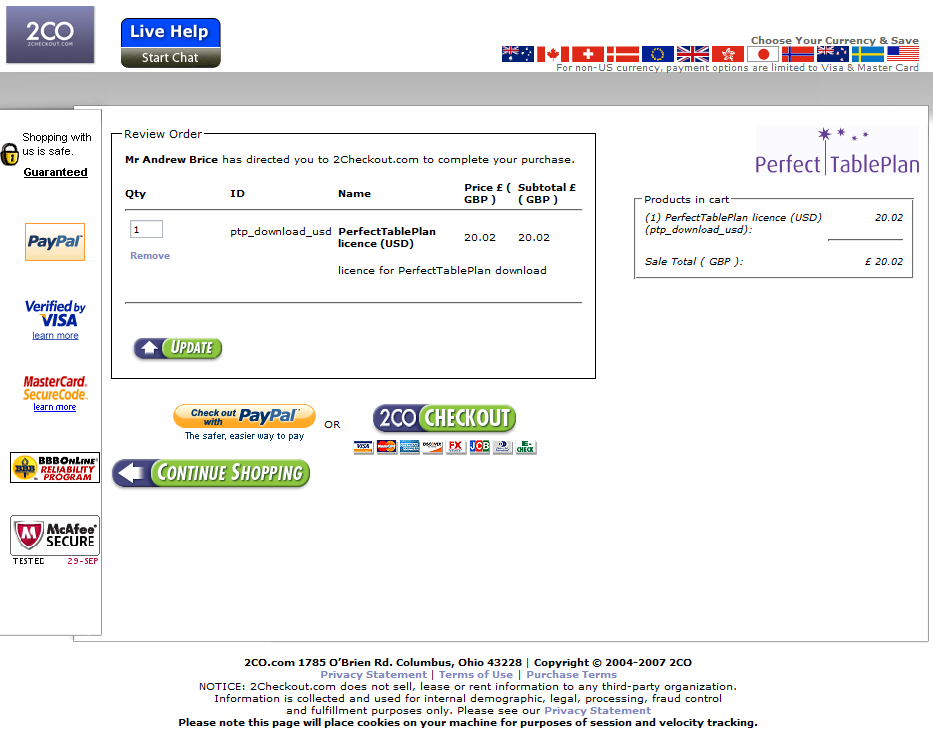
Over on the BOS forum Rensy commented on how ugly the 2Checkout payment page is. They appear to have beaten it with an ugly stick in a recent ‘makeover’. Below is the Perfect Table Plan 2Checkout payment page, click on the image to see it in it’s full glory:
2Checkout page 1
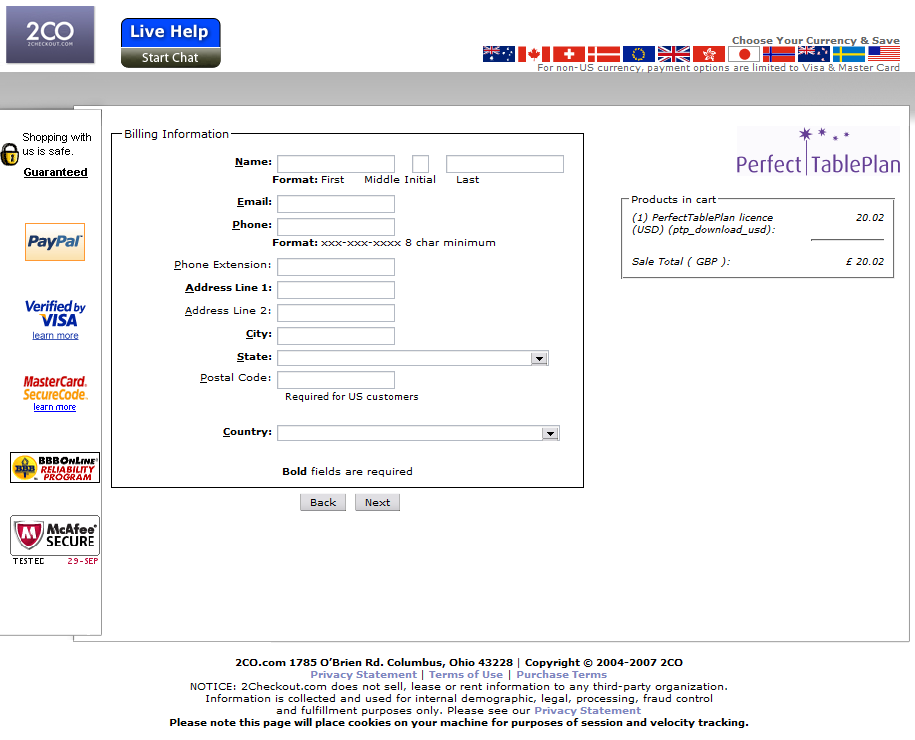
When (if) you finally work out where to click you are confronted with another equally ugly page:
2Checkout page 2
Presumably the icons down the left side are supposed to reassure me that the site is trustworthy. But all they do is distract and confuse me. When you emphasize everything, you emphasize nothing. The overlapping boxes, the choice of fonts and white space also look amateurish.

The PayPal and GoogleCheckout pages are models of taste and minimalism by comparison (apart from the huge and inexplicable white space at the bottom of the GoogleCheckout page):
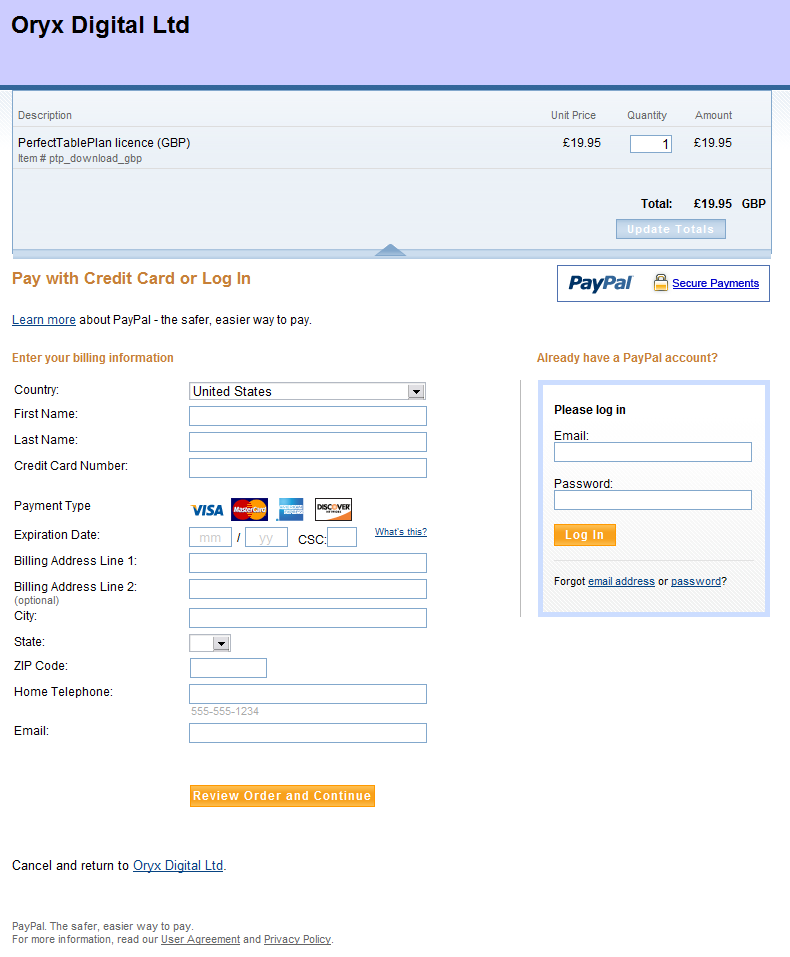
PayPal

GoogleCheckout
PayPal and GoogleCheckout also use a single page where 2Checkout uses two. This means one less click for your customer and, critically, one less chance to change their mind. I’m glad I only use 2Checkout as a back-up for customers who don’t want to use PayPal.
Does 2Checkout have the ugliest payment pages? Please add a comment below if you have seen worse (ideally with a link to a screenshot).
WordPress.com ‘no ads’ upgrade
 The good folk at WordPress (where this blog is hosted) are offering a $30/year ‘no ads’ upgrade. Before I rush out and pay my $30, I am wondering how many of you actually see ads on this blog. Please add a comment below to let me know if you see any ads on this page. A simple “yes” or “no” will suffice. If the answer is “yes” a screenshot of the page would also be appreciated ( email it to andy [at] oryxdigital.com ).
The realities of software book publishing
 Publishers of technical software books and magazines seem to struggling against the relentless onslaught of the Internet, crushed between the twin rocks of rapidly changing technology and free online content. In a recent .NET Rocks! podcast, accomplished technical author Charles Petzold (of Programming Windows fame) discusses the grim commercial realities of writing technical software books in the 21st century. It doesn’t sound good. His recent 3D programming for Windows book took 8 months to write and has sold less than 4,000 copies worldwide. As he gets royalties of around $3 per copy sold (less when sold outside the US), this equates to less than $12,000 for 8 months work. He could have made around $9,000 flipping burgers for minimum wage over the same period[1]. Ouch.
[1] Assuming 40 hours per week.
 Successful Software