Tag Archives: software

100 ways to increase your software sales

Increase targeted traffic to your website:

  1. SEO your website.
  2. Write a blog or newsletter of interest to the sort of people who might buy your software.
  3. Get more links to your website.
  4. Try Google Adwords Pay Per Click (PPC) ads.
  5. Write a guest post on someone else’s blog.
  6. Try CNet Pay Per Download ads.
  7. Promote your software through download sites using the ASP PAD repository, a paid submission tool or free submission tool.
  8. Promote your software through platform sites e.g. Apple downloads or Office online.
  9. Start an affiliate program.
  10. Try Microsoft Adcentre PPC ads.
  11. Bid higher for your PPC phrases.
  12. Advertise on stumbleupon.
  13. Write additional content for your site.
  14. Give away a ‘lite’ version of your software.
  15. Offer discount coupons.
  16. Add a forum to your website.
  17. Offer free review copies of your software to bloggers.
  18. Do a press release.
  19. Run a competition.
  20. Write better ads for your PPC campaign.
  21. Direct (snail) mail.
  22. Run ads in print magazines.
  23. Include your URL when posting on relevant forums.
  24. Try Yahoo Search Marketing PPC ads.
  25. Buy banner ads on targeted blogs, forums and other websites.
  26. Add extra keywords to your PPC campaigns.
  27. Talk about your software on a podcast.
  28. Add a viral element to your software.
  29. Do a publicity stunt.
  30. Get word of mouth recommendations by giving great support.
  31. Get listed in online directories such as DMOZ.
  32. Post a screencast on YouTube.

Increase your visitor->download rate:

  1. Have an online demo movie.
  2. Offer a free trial.
  3. Offer a money back guarantee.
  4. Port your software to additional platforms e.g. iPhone.
  5. Have a clean and professional website.
  6. Add case studies to your website.
  7. Make sure your website functions with all the major browsers.
  8. Get someone else to proof read the copy on your website.
  9. Talk to visitors in a language they understand i.e. not technical jargon, unless they are techies.
  10. Reduce the number of barriers to downloading the trial (don’t require an email address).
  11. Add a product FAQ to your website.
  12. Show your price prominently.
  13. Improve the usability of your website.
  14. Include your contact details on the website.
  15. Make sure the people can understand what your software does within 2 seconds of arriving at your site.
  16. Make the ‘download’ button more prominent on your website.
  17. Fix any errors in your website.
  18. Include screenshots on your home page.
  19. Add a list of famous customers to your website.
  20. Use a digital certificate for your installer and executable.
  21. Add (genuine!) testimonials to your website.
  22. Create better landing pages for your PPC campaigns.
  23. Add a privacy policy to your website.
  24. Add live online support to your website.
  25. Check your web logs/analytics to find out why/where visitors are leaving your website.

Increase your download->sale rate:

  1. Offer more than one payment processor.
  2. Improve the usability of your software.
  3. Accept purchase orders.
  4. Offer Trialpay as an alternative payment method.
  5. Offer sensible prices in additional currencies.
  6. Require an email address to download your software and follow-up with marketing emails.
  7. Increase or reduce the price of your software.
  8. Fix bugs in your software.
  9. Lengthen or shorten the trial period.
  10. Offer bulk purchase discounts.
  11. Improve your installer.
  12. Make the ‘buy’ button more prominent on your website.
  13. Make your software more beautiful.
  14. Allow users to buy your product easily from within the software itself.
  15. Localize your software into another language.
  16. Offer organizational licences.
  17. Try limiting your trial by features instead of time (or vice versa).
  18. Improve the speed/memory performance of your software.
  19. Improve your product documentation.
  20. Offer alternative payment models (e.g. an annual subscription instead of a one-off fee).
  21. Offer alternative licensing models (e.g. per site instead of per user).
  22. Write an introductory tutorial.
  23. Reduce the number of clicks and key presses required to make a sale.
  24. Add that new feature that people keep asking for.

Increase the value of each sale:

  1. Increase the price of your software.
  2. Charge extra for optional modules.
  3. Upsell additional products and services of your own or as an affiliate.
  4. Charge for major upgrades.
  5. Offer multiple versions at different price points e.g. standard/business/enterprise.
  6. Offer an optional CD.
  7. Charge an annual maintenance fee.
  8. Charge for support.
  9. Offer a premium support plan.

Explore alternative sales channels:

  1. Sell through resellers.
  2. Exhibit at tradeshows.
  3. Cold call prospects.
  4. Allow other companies to sell white label versions of your software.
  5. Include your software on cover-mounted magazine CDs.
  6. Sell through retail stores.
  7. Sell on Ebay.
  8. Sell on Amazon.
  9. Promote your software on one day sale sites, such as BitsDuJour or GiveAwayOfTheDay.
  10. Create a new product.

Notes:

  • Items are in no particular order in each category.
  • Some of the items are mutually exclusive.
  • I have tried about 80% of the above. Some worked, some didn’t. In fact, many of them were a total waste of time and money. But the ones that didn’t work for me might work great in a different market (and vice versa). I discuss my experiences with some of them in more detail here: Promoting your software part1, part2, part3, part4, part5, part6.
  • This is by no means an exhaustive list. Feel free to suggest more in the comments.
  • Don’t know where to start? Perhaps you need a fresh pair of eyes.

Thanks to Stuart Prestedge of Softalk for suggesting some of the above.

programmer-tshirts.com

programmer-tshirtMany thanks to all the bloggers who linked to my programmer T-shirts for charity project. Patrick McKenzie has very generously donated his time[1] and some space on his server to set-up a dedicated website at programmer-tshirts.com. If any of you feel like promoting the new website you could put a small ad on the side of your blog (see right) or display the flash panel shown on the new website (wordpress.com apparently doesn’t allow embedded flash).

The HTML for the ad is:

<table style="text-align:left;width:200px;"
       border="1" cellpadding="2" cellspacing="0">
  <tbody>
    <tr>
      <td>
      <table style="text-align:left;width:200px;"
             border="0" cellpadding="2" cellspacing="2">
        <tbody>
          <tr align="center">
            <td>
              <big><a href="http://www.programmer-tshirts.com/">
              T-shirts for programmers</a></big>
            </td>
          </tr>
          <tr align="center">
            <td>
                 <a href="http://www.programmer-tshirts.com/">
                 <img style="border:0 solid;width:172px;height:175px;"
                 alt="programmer t-shirts"
                 src="https://successfulsoftware.net/wp-content/uploads/2008/11/programmer-tshirt.png"></a>
            </td>
          </tr>
          <tr align="center">
            <td>All proceeds to charity</td>
          </tr>
        </tbody>
      </table>
      </td>
    </tr>
  </tbody>
</table>

In WordPress you can just add it as a text widget (Dashboard>Appearance>Widgets).

The source for the flash panel is:

<embed wmode="transparent"
   src="http://www.zazzle.com/utl/getpanel?zp=117873325148652352"
   FlashVars="feedId=117873325148652352&path=http://www.zazzle.com/assets/swf/zp/skins"
   width="450" height="300" TYPE="application/x-shockwave-flash">
</embed>

Even if you just run it for a week or two before Xmas that would be great.

[1]A resource in short supply for a salaryman in Japan. Especially one that commutes in from a rice field and runs his own microISV.

Getting website feedback with Kampyle

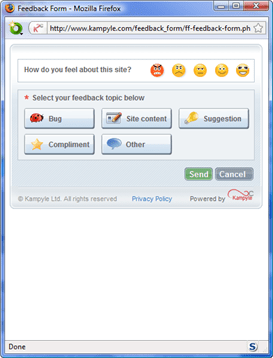
kampyleGetting good feedback from customers and prospective customers is essential to any business. I think I already do quite a good job of getting feedback from paying customers. But what about visitors who click around my site for a few minutes and then leave, never to return? I would love to know why they didn’t buy. This sort of feedback is much harder to come by, so I was interested to read about Kampyle in the article 14 free tools that reveal why people abandon your website.
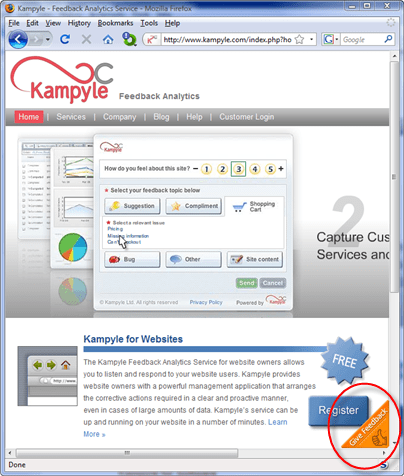
Kampyle adds a clickable image to a designated corner of your webpage. If a user clicks on this image they are shown a simple (and customisable) feedback form. Any feedback is collected by Kampyle and presented through a dashboard on their website. All you have to do is register, customise your feedback form and add some javascript inside the <head> and <body> tags of each page. Best of all, the service is free. You can see it in action on Kampyle’s own website.

kampyle1

Click the floating image in the bottom-right corner to show the feeback form

kampyle2

Leave feedback

You can also have Kampyle pop-up a survey question for a given percentage of users as they leave your site. I find such surveys annoying and never fill them in, so I haven’t felt inclined to try this yet.

Kampyle sounds great. Users have a simple way to supply feedback which doesn’t distract them from my key goal (buying my software). Sadly, very few visitors actually supplied feedback through Kampyle. I ran it for a month on some of the highest traffic pages on my Perfect Table Plan site and got a grand total of 4 comments from 3 visitors. Only two of these comments had any really useful feedback and both were from a single paying customer who probably would have emailed support anyway. I don’t feel the feedback justified the ‘cost’, in terms of the potential distraction of visitors and another potential failure mode for my website. Consequently I am now only running Kampyle on a couple of peripheral pages. Maybe the results would be better for different types of site. It only takes 10 minutes of so to set up, so it might be worth a try.

What do you buy a programmer for Christmas?

Easy, a T-shirt. Programmers love T-shirts.

It juuuuust so happens that I have created some T-shirt designs for software developers. Even better, all the commission will be split equally between two very worthy charities: jaipurfoot.org and sightsavers.org.

designs

sightsaversSightsavers works to alleviate sight problems around the world. Last year Sightsavers and their partners treated more than 23 million people for potentially blinding conditions and restored sight to over 244,000 people. Sightsavers is charity particularly close to my own heart, as I have suffered from eye problems myself. My vision without specs is very poor (-8 dioptres). A few years ago I suffered a detached retina due to a martial arts injury and ended up having emergency cryosurgery on both eyes. The possibilty of losing vision in one eye, let alone both eyes, was a frightening prospect. And yet it only costs:

  • $0.10 to protect someone from river blindness for a year.
  • $10 to pay for eyelid surgery for trachoma.
  • $35 for an adult cataract operation.

jaipurfootI first heard of this charity while watching a TV program Paul Merton in India. This organization pioneered the “Jaipur foot” (also known as the “Jaipur leg”) – an effective and easy-to-fit prosthetic lower limb that can be produced for a little as $30 and is provided for free by the charity. The prosthetic was first developed in the 1960s by an orthopedic surgeon and a sculptor. Since then the charity has provided over 300,000 limbs in 22 countries. In the television program a young boy arrived at the clinic hopping on one leg and left running on two, beaming. It was moving to watch. You can read more in this Time magazine article.

In these gloomy economic times it is easy to forget that there are people much worse off than ourselves. A little money goes a long way with either of these charities. So, how can you help?

Buy a T-shirt

Buy a T-shirt for yourself, your geeky friends, your work colleagues or your employees. Currently there are nine designs available. I have set up separate shops for North America (zazzle.com) and Europe (spreadshirt.net) to cut down on postage costs and shipping times.

North American shop: www.zazzle.com/successfulsoftware (the 12.5% commission included in each T-shirt sale will go to charity)

European shop: successfulsoftware.spreadshirt.net (the £1.50 commission included in each T-shirt sale will go to charity)

Design a T-shirt

Got an idea for a design? Add it in a comment below or email it to me. I will do what I can to turn some of the better ideas into T-shirts. You can supply graphics and/or text. I don’t have the artistic skills to turn your idea into graphics, but someone else might have. All commission from your design will go to charity. But your design must be original – no copyright violations please.

Gimme some link love

If you have a software-related blog or frequent a software-related forum, please link to this post and/or the online shops.

Trivia

My “It works on my machine” machine design predates Jospeh Cooney’s and Jeff Atwood’s by more than 4 years, as proved by this link to the (now sadly defunct) ntk.net ezine. The profits from those T-shirts went to the Jhai foundation – pioneers of bicycle powered Linux. Ironically I can’t sell this design in the European shop due to a bug in the Spreadshirt.net code.

** Update **

These T-shirts are no longer available. Sorry.

ISVtube

isvtubeISVtube was launched recently by Thomas Holz of easy2sync.com. The site aggregates videos of particular interest to microISVs and could be a very useful resource. To suggest  additional videos email Thomas at:email_e

The perils of localization

The sign below is supposed to say “No entry for heavy goods vehicles. Residential site only” in English and Welsh.

localization

Unfortunately the Welsh version says “I am not in the office at the moment. Send any work to be translated”.

Read the full story

The realities of software book publishing

Publishers of technical software books and magazines seem to struggling against the relentless onslaught of the Internet, crushed between the twin rocks of rapidly changing technology and free online content. In a recent .NET Rocks! podcast, accomplished technical author Charles Petzold (of Programming Windows fame) discusses the grim commercial realities of writing technical software books in the 21st century. It doesn’t sound good. His recent 3D programming for Windows book took 8 months to write and has sold less than 4,000 copies worldwide. As he gets royalties of around $3 per copy sold (less when sold outside the US), this equates to less than $12,000 for 8 months work. He could have made around $9,000 flipping burgers for minimum wage over the same period[1]. Ouch.

[1] Assuming 40 hours per week.

Virus Total

Virus Total is a free service that gives you aggregate results from 36 different malware scanners. Just browse to the file you want to check on your PC and click ‘Send file’. It will quickly return the results of all the scans, hash sizes and a list of Windows system calls that the software makes.

This is a great resource for checking software you are about to install doesn’t contain malware. It is also useful for checking that your own download files haven’t been tampered with and don’t trigger false positives. Note that some software protection systems have been known to trigger false positives from malware scanners.

Thanks to a poster on this BOS thread for bringing it to my attention.

Using defence in depth to produce high quality software

‘Defence in depth’ is a military strategy where the attacker is allowed to penetrate the defender’s lines, but is then gradually worn down by successive layers of defences. This strategy was famously used by the Soviet Army to halt the German blitzkrieg at the battle of Kursk, using a vast defensive network including trenches, minefields and gun emplacements. Defence in depth also has parallels in non-military applications. I use a defence in depth approach to detect bugs in my code. A bug has to pass through multiple layers of defences undetected before it can cause problems for my customers.

Layer 1: Compiler warnings

Compiler warnings can help to spot many potential bugs. Crank your compiler warnings up to maximum sensitivity to get the most benefit.

Layer 2: Static analysis

Static analysis takes over where compiler warnings leave off, examining code in great detail looking for potential errors. An example static analyser is Gimpel PC-Lint for C and C++. PC-Lint performs hundreds of checks for known issues in C/C++ code. The flip side of it’s thoroughness is that it can be difficult to spot real issues amongst the vast numbers of warnings and it can take some time to fine-tune the checking to a useful level.

Layer 3: Code review

A fresh set of eyes looking at your code will often spot problems that you didn’t see. There are various ways to go about this, including formal Fagan inspections, Extreme Programming style pair programming and informal reviews. There is quite a lot of documented evidence to suggest that this is one of the most effective ways to find bugs. It is also an excellent way to mentor less experienced programmers. But it is time consuming and can be hard on the ego of the person being reviewed. Also it isn’t really an option for solo developers

Layer 4: Self-checking

Of the vast space of states that a program can occupy, usually only a minority will be valid. E.g. it might makes no sense to set a zero or negative radius for a circle. We can check for invalid states in C/C++ with an assert() macro:

class Circle
{
    public:
        void setRadius( double radius );
    private:
        double m_radius;
}

void Circle::setRadius( double radius )
{
    assert( radius > 0.0 );
    m_radius = radius;
}

The program will now halt with a warning message if the radius is set inappropriately. This can be very helpful for finding bugs during testing. Assertions can also be useful for setting pre-conditions and post-conditions:

    void List::remove( Item* i )
    {
        assert( contains( i ) );
        ...
        assert( !contains( i ) );
    }

Or detecting when an unexpected branch is executed:

    switch ( shape )
    {
        case Shape::Square:
            ...
        break;

        case Shape::Rectangle:
            ...
        break;

        case Shape::Circle:
            ...
        break;

        case Shape::Ellipse:
            ...
        break;

        default:
            assert( false ); // shouldn't get here
        break;
    }

Assertions are not compiled into release versions of the software, which means they don’t incur any overhead in production code. But this also means:

  • Assertions are not a substitute for proper error handling. They should only be used to check for states that should never occur, regardless of the program input.
  • Calls to an assert() must not change the program state, or the debug and release versions will behave differently.

Different languages have different approaches, for example pre and post conditions are built into the Eiffel language.

Layer 5: Dynamic analysis

Dynamic checking usually involves automatically instrumenting the code in some way so that it’s runtime behaviour can be checked for potential problems such as: array bound violations, reading memory that hasn’t be written to and memory leaks. An example dynamic analyser is the excellent and free Valgrind for Linux. There are a few dynamic analysers for Windows, but they tend to be expensive. The only one I have tried in the last few years was Purify and it was flaky (do IBM/Rational actually use their own tools?).

Layer 6: Unit testing

Unit testing requires the creation of a test harness to execute various tests on a small unit of code (typically a class or function) and flag any errors. Ideally the unit tests should then be executed every time you make a change to the code. You can write your own test harnesses from scratch, but it probably makes more sense to use one of the existing frameworks, such as: NUnit (.NET), JUnit (Java), QUnit (Qt) etc.

According to the Test Driven Development approach you should write your unit tests before you write the code. This makes a lot of sense, but requires discipline.

Layer 7: Integration testing

Integration testing involves testing that different modules of the system work correctly together, particularly the interfaces between your code and hardware or third party libraries.

Layer 8: System testing

System testing is testing the system in it’s entirety, as delivered to the end-user. System testing can be done manually or automatically, using a test scripting tool.

Unit, integration and system testing should ideally be done using a coverage tool such as Coverage Validator to check that the testing is sufficiently thorough.

Layer 9: Regression testing

Regression testing involves running a series of tests and comparing the results to the same input data run on the previous release of the system. Any differences may be the result of bugs introduced since the last release. Regression testing works particularly well on systems that take a single input file and produce a single output file – the output file can just be diff’ed against the previous output.

Layer 10: Third party testing

Different users have different patterns of usage. You might prefer drag and drop, someone else might use right-click a lot and yet another person might prefer keyboard accelerators. So it would be unwise to release a system that has only ever been tested by the developer. Furthermore, the developer inevitably makes all sorts of assumptions about how the software will be used. Some of those assumptions will almost certainly be wrong.

There are a number of companies that can be paid by the day to do third party testing. I have used softwareexaminer.com in the past with some success.

Layer 11: Beta testing

End-user systems can vary in processor speed, memory, screen resolution, video card, font size, language choice, operating system version/update level and installed software. So it is necessary to test your software on a representative range of supported hardware + operating system + installed software. Typically this is done by recruiting users who are keen to try out new features, for example through a newsletter. Unfortunately it isn’t always easy to get good feedback from beta testers.

Layer 12: Crash reporting

If each of the above 11 layers of defence catches 50% of the bugs missed by the previous layer, we would expect only 1 bug in 2,048 to make it into production code undetected. Assuming your coding isn’t spectacularly sloppy in the first place, you should end up with very few bugs in your production code. But, inevitably, some will still slip through. You can catch the ones that crash your software with built-in crash reporting. This is less than ideal for the person whose software crashed. But it allows you to get detailed feedback on crashes and consequently get fixes out much faster.

I rolled my own crash reporting for Windows and MacOSX. On Windows the magic function call is SetUnhandledExceptionFilter. You can also sign up to the Windows Winqual program to receive crash reports via Windows’ own crash reporting. But, after my deeply demoralising encounter with Winqual as part of getting the “works with Vista” logo, I would rather take dance lessons from Steve Ballmer.

Test what you ship, ship what you test

A change of a single byte in your binaries could be the difference between a solid release and a release with a showstopper bug. Consequently you should only ship the binaries you have tested. Don’t ship the release version after only having tested the debug version and don’t ship your software after a bug fix without re-doing the QA, no matter how ‘trivial’ the fix. Sometimes it is better to ship with minor (but known) bugs than to try to fix these bugs and risk introducing new (and potentially much worse) bugs.

Cross-platform development

I find that shipping my software on Windows and MacOSX from a single code base has advantages for QA.

  • different tools with different strengths are available on each platform
  • the Gnu C++ compiler may warn about issues that the Visual Studio C++ compiler doesn’t (and vice versa)
  • a memory error that is intermittent and hard to track down on Windows might be much easier to find on MacOSX (and vice versa)

Conclusion

For the best results you need your layers of checks to be part of your day-to-day development, not something you do just before a release. This is best done by automating them as much as possible, e.g.:

  • setting the compiler to treat warnings as errors
  • performing static analysis and unit tests on code check-in
  • running regression tests on the latest version of the code every night

Also you should design your software in such a way that it is easy to test. E.g. building in log file output can make it much easier to perform regression tests.

Defence in depth can find a high percentage of bugs. But obviously the more bugs you start with the more bugs that will end up in your code. So it doesn’t remove the need for good coding practices. Quality can’t be ‘tested in’ to code afterwards.

I have used all 12 layers of defence above at some point in my career. Currently I am not using static analysis (I must update that PC-Lint licence), code review (I am a solo developer) and dynamic analysis (I don’t currently have a dynamic analyser for Windows or MacOSX). I could also do better on unit testing. But according to my crash reporting, the latest version of PerfectTablePlan has crashed just three times in the last 5000+ downloads (the same bug each time, somewhere deep down in the Qt print engine). Not all customer click the ‘Submit’ button to send the crash reports and crashes aren’t the only type of bug, but I think this is indicative of a good level of quality. It is probably a lot better than most of the other consumer software my customers use[1]. Assuming the crash reporting isn’t buggy, of course…

[1]Windows Explorer and Microsoft Office crash on a daily basis on my current machine.

The joys and challenges of running a nomadic software company

la digue island,seychellesIn theory an Internet based software business isn’t tied to any particular geographical location and can be run from a laptop anywhere there is an Internet connection. So why not travel the world, financed by your business? Trygve & Karen Inda are doing just that. They kindly agreed to write this guest post discussing the practicalities of running a nomadic software company.

The freedom to wander aimlessly around the planet, visiting whichever countries you want, is something many people dream about. We have actually achieved it through our microISV. For the past six years, we have been living and working in numerous countries, with nothing more than our Mac laptops, backpacks, assorted cables and adaptors and an insatiable thirst for adventure.

We were thirty years old, with no kids and no debt, working steady jobs in Reno, Nevada, and had a small microISV on the side. It was a “nights and weekends” business that earned us dining out money, or even covered the rent in a good month. After September 11th, my husband Trygve’s day-job slowly went away, giving him more time to devote to our microISV. By March 2002, when we first released EarthDesk, the microISV had become his full-time job.

The response to EarthDesk was phenomenal and we soon realized that we could move overseas, bringing our microISV with us. Within several months, we had sold the bulk of our possessions, moved out of our apartment in Reno and purchased one-way tickets to Tbilisi, Republic of Georgia.

The experiment begins

For six months, we tried to manage our software business while teaching English and doing odd jobs for NGOs, newspapers and radio stations. We had brought with us two Mac laptops (a PowerBook G4 and an iBook G3), which were both maxed out as far as hard drive and memory were concerned, an extra battery for the G4, an external keyboard, a digital camera, and various cables and worldwide plug adaptors. We had also brought a CD case full of original software discs.

Tbilisi home office

In the end, the multiple infrastructure problems that plague the Republic of Georgia (mostly a serious lack of electricity) proved too much for us to bear. We escaped to Germany, carrying 170 pounds of stuff, including our two laptops, a UPS we had purchased in Tbilisi and a Persian carpet we had bargained for while on Christmas holiday in Dubai.

After a few weeks recovering in Germany, we spent a few months in Prague, Czech Republic. When the cold weather arrived, we flew south and spent eight months travelling around the Indian Ocean, South East Asia and Oceania. Shortly thereafter, we landed a software development contract in Dubai and relocated there, but regularly escape to Prague during the blistering summer months. We currently own a flat in central Prague and have considered buying a flat in Dubai.

Kampala, Uganda

By keeping a small base in one or two countries, we can have a “home”, a decent place to work and a life, while still taking long trips with the backpacks. Running the business from an apartment in the developed world is fairly straightforward. What’s challenging is running the business from a backpack while spending several months on the road.

The essentials

Everyone wants to sit on a beach and work only four hours a day, but the reality is a little different. If you are actually running your business, you’ll spend as much time working on the beach as you would in a cubicle. It’s certainly possible to work only an hour a day for a few weeks, but to develop and grow your business, you will need to spend time actually working, rather than sightseeing. It’s not a permanent holiday, but rather an opportunity for frequent changes of scenery.

As a practical matter, you can only travel with what you can carry and a good backpack with detachable day-pack is the only serious option. Since you are carrying a few thousand dollars worth of equipment, security becomes an issue, especially in poorly developed parts of the world. We generally stay in the least expensive hotels we can find that have adequate security and cleanliness, while occasionally splurging on something nicer to maintain our sanity. It is very important to budget properly for long trips. For some people this may be as much as $200/day, and for others it may be only $50/day, but managing expenditures is even more important when on the road. Of course you’ll soon realize that for the same money spent during 4 days in London, you could spend weeks in South East Asia or poorer parts of the Middle East.

On journeys of a month or more, we generally bring two up-to-date Mac laptops (currently 15″ and 17″ MacBook Pros), worldwide plug adaptors, software CDs, two iPods (one for backing up data), a digital camera and two unlocked 4-band GSM mobile phones. For longer-term backup we burn a data DVD about once per month and post it home.

Essential software includes Excel, Entourage, Filemaker Pro, Skype, iChat and, of course, the Apple Xcode Developer Tools. Speed Download saved us in Tbilisi because of its ability to resume downloads after our dial-up internet connection dropped the line, which it did every four minutes!

Surprisingly, the best Internet we have found in the developing world was in Phnom Penh. WiFi can often be found at big hotels, but it is more common to connect via Ethernet in a cafe, where a basic knowledge of Windows networking will allow you to configure your laptop to match the existing settings of the cafe’s PC. In the least developed countries, modems are still the norm.

Kigali, Rwanda

One important consideration, especially in countries where censorship is common, is that many places require you to use their SMTP server for outgoing mail. This may not work with your domain as a return address. To get around this, it’s useful to have a VPN, such as witopia.net, and an SMTP server at your domain.

Visas, taxes and other nasty stuff

If you have a western passport, visas usually only become an issue when you want to stay somewhere more than three months. Often, it is possible to do a “visa run,” in which you briefly leave the country and immediately return for another three months. Many countries make it easy to set up a local company, which can allow you to obtain longer-term residency visas, but there is a lot of paperwork involved with this. Staying more than six months as a “tourist” anywhere can be a problem as you’ll almost certainly have to deal with immigration issues.

Hong Kong

Although Dubai has straightforward immigration procedures and is a fabulous place to spend winters, the UAE Government blocks more websites than just about any other country on Earth. Even Skype is blocked because the local telecommunications company doesn’t want any competition. Unless you are able to find a way around the blocks (wink, wink), running any kind of internet business from Dubai will be fraught with difficulty.

Even if you are living in a tax haven, if you are a US Citizen, you can never fully avoid US taxes, although you can take advantage of the Foreign Exclusion. Local taxes aren’t really an issue if you’re just a “tourist” spending a few weeks in a country, but they can become an issue for long-term stays. If you are planning to stay somewhere for more than a couple months, and “settle”, you’ll need to research tax ramifications.

Sana, Yemen

Since we left the US, our taxes have become much more complicated. Fortunately, we found an American tax attorney to handle our annual filings. He lives abroad and therefore understands the Foreign Exclusion and other tax laws regarding expats. For our microISV, payment is handled online by two providers (always have a backup!), and ends up in a company account in America. We use a payroll service to pay our salaries into personal accounts, which we can access by ATM. We also have established a managed office in Nevada to act as our company headquarters and handle mail, voicemail and legal services.

We have no regrets about having left the US for our big adventure. We have truly lived our dream of being able to travel indefinitely, but sometimes it is wearying not knowing which country we will be living in just a few months into the future. Our ultimate goal is to own two properties on two continents so that we can travel between them with just a laptop.

by Karen Inda

photographs by Trygve and Karen Inda

Trygve & Karen Inda are the owners of Xeric Design. Their products include EarthDesk, a screensaver with a difference for Windows and Mac. They were last spotted in Prague.