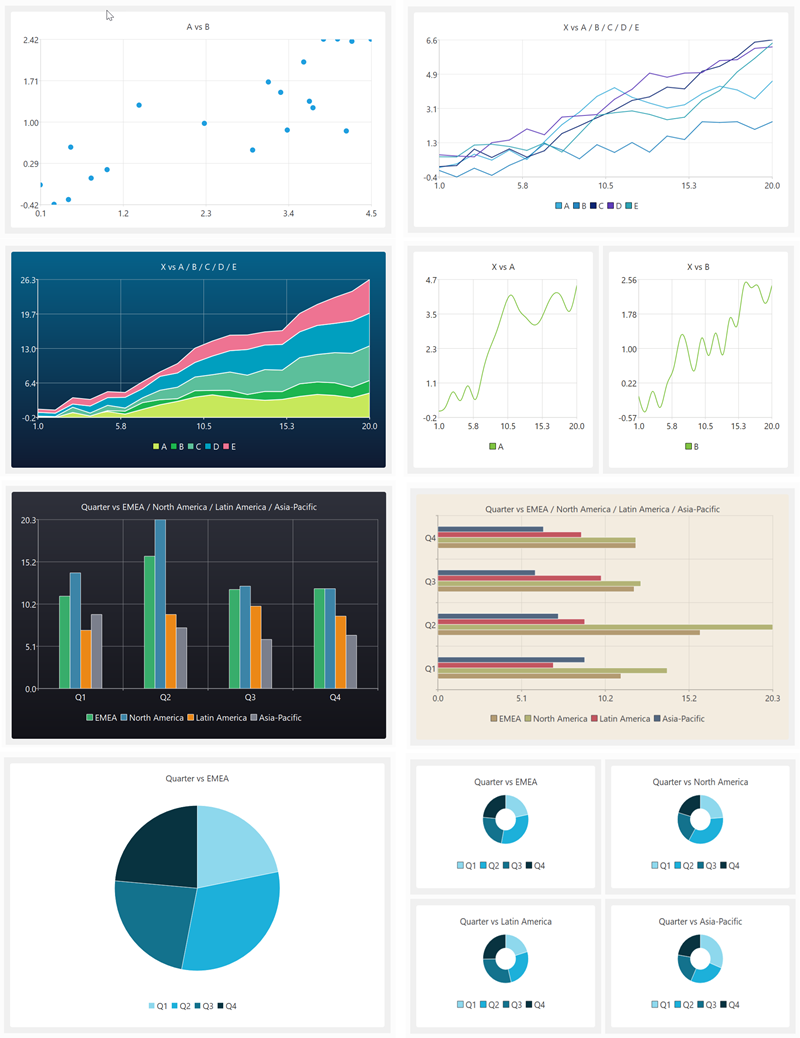
My data wrangling product, Easy Data Transform, got a major upgrade yesterday, with the addition of data visualization capabilities. Here are some examples of what it can produce in a few clicks:
You can see this new visualization feature in action in the video below:
(Likes and subscribes help me with the YouTube algorithm and are much appreciated)
Human brains are highly developed for visual processing. But data is often messy and in the wrong form for visualization. So data wrangling and visualization, tightly integrated together, is a powerful combination. It was a lot of work, but it makes Easy Data Transform a much more complete, end-to-end, solution. No more pasting data into Excel to get a chart!
At the same time, I have segmented Easy Data Transform into 2 products: Easy Data Transform Core Edition (data wrangling, one-time fee $99) and Easy Data Transform Advanced Edition (data wrangling+visualization, one-time fee $198). The Advanced Edition is a paid upgrade from the original product. Optional, of course. I sweetened the deal with a time-limited discount for existing customers who want to upgrade to Advanced Edition. The response from Easy Data Transform customers has been very positive.
Have you got some messy data, you want to turn into insights? Why not give Easy Data Transform Advanced Edition a try? It:
Runs natively on Windows and Mac.
Is drag and drop (no syntax to remember).
Does not store your precious data on someone else’s server.
Is deterministic and will not hallucinate!
Can process millions of rows in seconds.
Can create re-usable templates for repeatable processes.
You can download a free trial here. And you can get 15% off Easy Data Transform Advanced Edition until 17-Jul-2026 using this discount link.
I released Easy Data Transform v2 today. After no fewer than 80 (!) v1 production releases since 2019, this is the first paid upgrade.
Major improvements include:
Schema versioning, so you can automatically handle changes to the column structure of an input (e.g. additional or missing columns).
A new Verify transform so you can check a dataset has the expected values.
Currently there are 48 different verification checks you can make:
At least 1 non-empty value
Contains
Don’t allow listed values
Ends with
Integer except listed special value(s)
Is local file
Is local folder
Is lower case
Is sentence case
Is title case
Is upper case
Is valid EAN13
Is valid email
Is valid telephone number
Is valid UPC-A
Match column name
Matches regular expression
Maximum characters
Maximum number of columns
Maximum number of rows
Maximum value
Minimum characters
Minimum number of columns
Minimum number of rows
Minimum value
No blank values
No carriage returns
No currency
No digits
No double spaces
No duplicate column names
No duplicate values
No empty rows
No empty values
No gaps in values
No leading or trailing whitespace
No line feeds
No non-ASCII
No non-printable
No punctuation
No symbols
No Tab characters
No whitespace
Numeric except listed special value(s)
Only allow listed values
Require listed values
Starts with
Valid date in format
You can see any fails visually, with colour coding by severity:
Side-by-side comparison of dataset headers:
Side-by-side comparison of dataset data values:
Lots of extra matching options for the Lookup transform:
Allowing you to do exotic lookups such as:
Plus lots of other changes.
In v1 there were issues related to how column-related changes cascaded through the system. This was the hardest thing to get right, and it took a fairly big redesign to fix all the issues. As a bonus, you can now disconnect and reconnect nodes, and it remembers all the column-based options (within certain limits). These changes make Easy Data Transform feel much more robust to use, as you can now make lots of changes without worrying too much about breaking things further downstream.
Easy Data Transform now supports:
9 input formats (including various CSV variants, Excel, XML and JSON)
66 different data transforms (such as Join, Filter, Pivot, Sample and Lookup)
11 output formats (including various CSV variants, Excel, XML and JSON)
56 text encodings
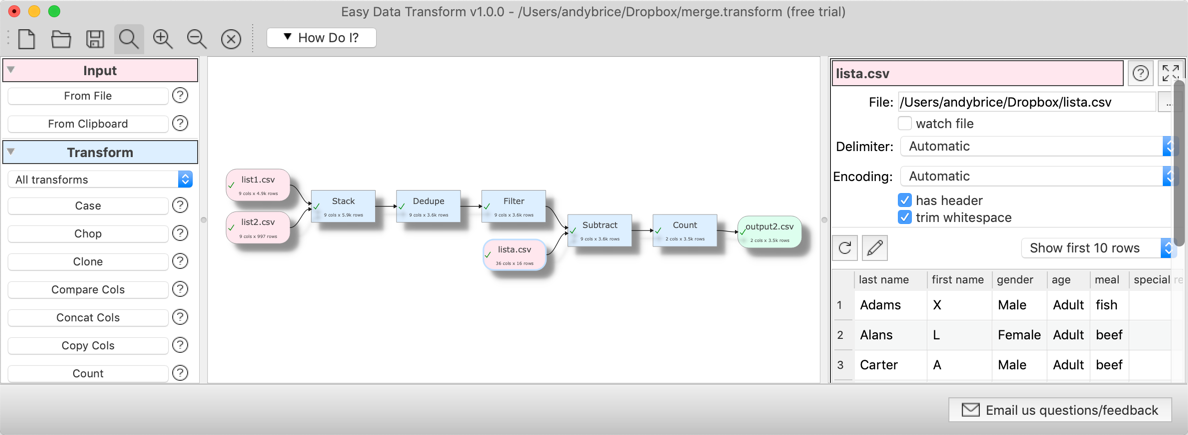
This allows you to snap together a sequence of nodes like Lego, to very quickly transform or analyse your data. Unlike a code-based approach (such as R or Python) or a command line tool, it is extremely visual, with pretty-much instant feedback every time you make a change. Plus, no pesky syntax to remember.
Eating my own dogfood, using Easy Data Transform to create an email marketing campaign from various disparate data sources (mailing lists, licence key databases etc).
Easy Data Transform is all written in C++ with memory compression and reference counting, so it is fast and memory efficient and can handle multi-million row datasets with no problem.
While many of my competitors are transitioning to the web, Easy Data Transform remains a local tool for Windows and Mac. This has several major advantages:
Your sensitive data stays on your computer.
Less latency.
I don’t have to pay your compute and bandwidth costs, which means I can charge an affordable one-time fee for a perpetual licence.
I think privacy is only going to become ever more of a concern as rampaging AIs try to scrape every single piece of data they can find.
Usage-based fees for online data tools are no small matter. For a range of usage fee horror stories, such as enabling debug logging in a large production ETL pipeline resulting in $100k of extra costs in a week, see this Reddit post. Some of my customers have processed more than a billion rows in Easy Data Transform. Not bad for $99!
It has been a lot of hard work, but I am please with how far Easy Data Transform has come. I think Easy Data Transform is now a comprehensive, fast and robust tool for file-based data wrangling. If you have some data to wrangle, give it a try! It is only $99+tax ($40+tax if you are upgrading from v1) and there is a fully functional, 7 day free trial here:
I am very grateful to my customers, who have been a big help in providing feedback. This has improved the product no end. Many heads are better than one!
The next big step is going to be adding the ability to talk directly to databases, REST APIs and other data sources. I also hope at some point to add the ability to visualize data using graphs and charts. Watch this space!
I finally released a paid version of Easy Data Transform today, for both Windows and Mac. I am very pleased with how it has turned out. Obviously it is only v1.0.0, so there is plenty of additional features I could add, including:
Batch processing
Support for JSON, XML, SQLite input/output
More transforms
A 64 bit version for Windows
A Linux version
But I need to listen carefully to prospective customers to decide which additional features to prioritize in future releases. It might be something I haven’t even thought of.
But v1.0.0 already has a really useful core of features. And, if you aren’t embarrassed by v1.0, you didn’t release it early enough. That said, I haven’t cut corners on quality. It has proper documentation and has been through extended beta testing, dogfooding and several rounds of usability and third party testing.
The product has a fully-functional 7 (non-consecutive) day free trial. I think that is enough for prospective customers to decide if it does what they need. I also have a 60 day money-back guarantee.
I have decided to go with a subscription model: $99 / €90 / £75 + tax per person per year. Which covers up to 3 computers. At this price point I can afford some paid promotion and to provide a decent level of support. I am not offering a monthly subscription, as I don’t really want people who are going to pay for 1 month (to do their annual TPS reports) and then cancel.
Have you got some data you need to merge, clean, reformat or de-dupe? Give it a try. You can get a 25% discount if you buy a subscription by the 27th December 2019 using this link.



 Successful Software