Summerfest 2023 is on. Loads of quality software for Mac and Windows from independent vendors, at a discount. This includes my own Easy Data Transform and Hyper Plan, which are on sale with a 25% discount.
This is a guest post from fellow software developer, Simon Kravis.
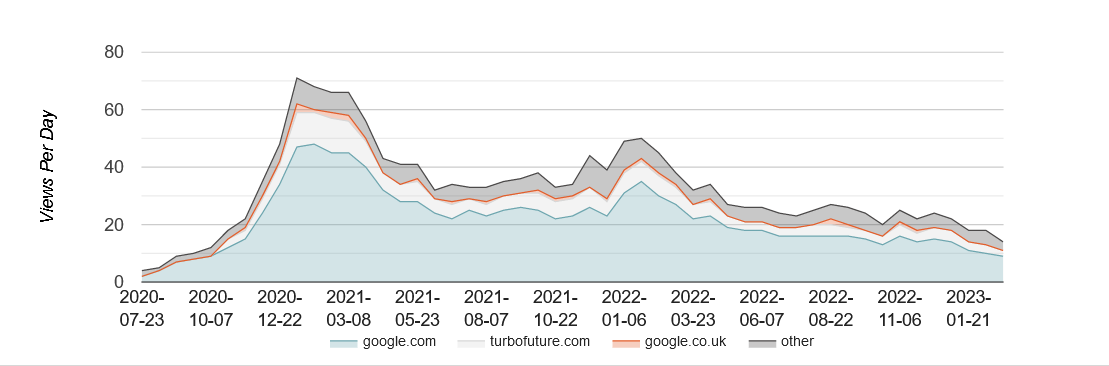
It’s sometimes said that software development is only 10% of what’s required to earn money from software and I can attest to that. Since 2018 I have been developing photo captioning and related software, more as a retirement diversion than a serious source of income (after a career mostly involved in writing scientific and engineering analysis software), in the hope that sales income would at least cover running costs. My best marketing tool has been writing reviews of the class of software that I produce, and the hosting site (Hub Pages) provides some useful analytics on how often these are accessed and for how long. Below is the graph for an article on tagging.
The decline since early 2022 is hard to explain – the article is periodically updated so the steady decline is not due to diminishing ‘freshness’ – which for Google is probably a file Modified date.
Here is another review article profile (Scanning Multiple Photos) showing a similar decline:
But another (Best Photo Captioning Software) has held up, though at a low level.
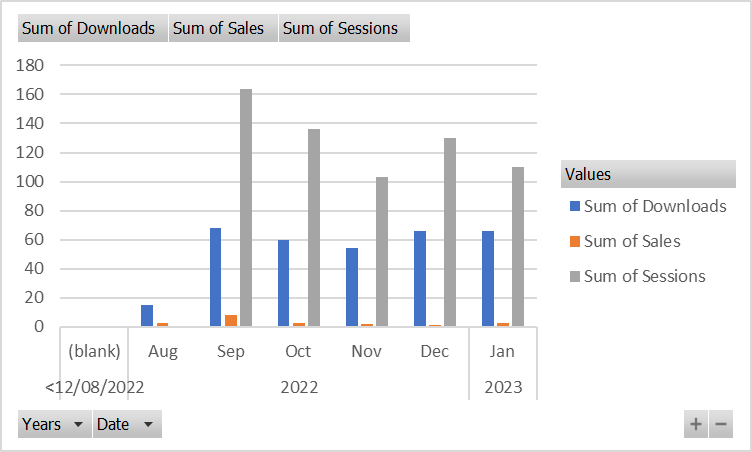
I offer digital photo captioning software (Caption Pro) on Windows and Mac platforms, and an iPhone captioning app (CaptionEdit), with the Windows version dating back to 2017. I also offer part of the functionality of Caption Pro on Windows for auto-cropping scans of multiple paper photos (ImageSplit). On Windows neither Caption Pro software downloads or sales seem to correlate with review accesses, despite about 1/3 of web site accesses coming from the review. However, downloads do show some correlation with Caption Pro web site sessions, as shown in the graph below.
Sales do not correlate with downloads, which perhaps explains why most advertising for niche products is not successful – it may increase downloads but this does not appear to increase sales. The observed proportion of downloads resulting in sales for ImageSplit and Caption Pro are 6% and 9% respectively. The lack of correlation between sales and downloads may be due to the small number of sales per month, which results in random fluctuation dominating the results.
The decision to enter the Apple “Walled Garden” of software was partly at the prompting of friends rather than a commercial evaluation. Apple Developer membership (costing ~US$100 per year) is required to prevent software being blocked from installation through being from an unknown publisher. Further costs were purchasing a fairly modern Mac on which to perform development, as the App Store will only accept software developed using recent versions of the Xcode development environment, which will only run on fairly recent hardware. The App Store takes a commission of 15% on sales, which is quite reasonable when compared to the difficulty of implementing e-commerce on Windows, where a PayPal account eases the problem of low-value foreign-currency transactions, but e-commerce plug-ins may stop working after years for no discernible reason. The review process for software acceptance into the App Store is generally fast, but seemly trivial issues can require resubmission. Features which have passed one review may be rejected in a later one. The review process is generally fast, but on one occasion took 4 weeks.
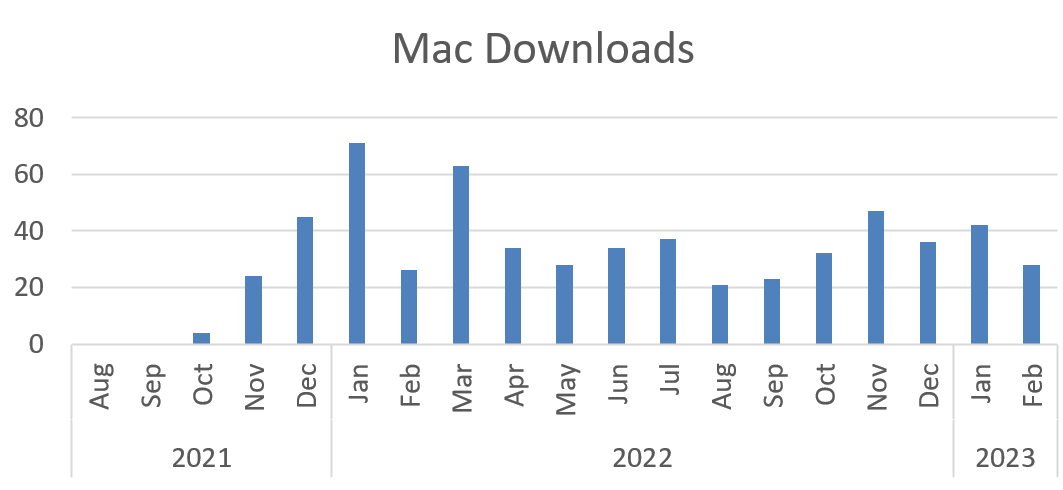
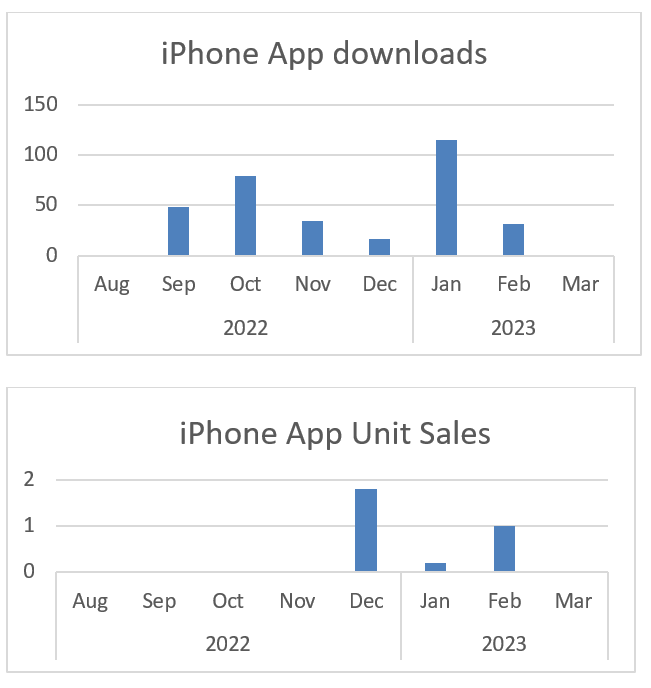
Caption Pro for Mac has been available (via the App Store) only since Sep 2021.It appears within the top 6 results for a search using “Caption Photos”, which is the source for most downloads. About 3.5% of downloads result in sales. This figure is much less than the Windows version of the same app, despite Mac users’ reputation for being more willing to pay for software. The iPhone app did not appear at all initially when searching for “Caption Photos” in the App Store. After 6 months it began appearing as result number 140, after it had 360 downloads. This poor ranking performance is probably because “Caption Photos” is a very popular keyword used by many apps, including those that only caption videos. It has had very few downloads and sales, despite Apple Search Ads and Apptimizer campaigns. The number of downloads increased dramatically during the Apptimizer campaign between Jan 24 and Feb 2 (as they were purchased) but the change in ranking from these downloads did not result in any sales, perhaps because no installs were purchased. The Apple search ads campaign (which resulted in the app being shown as an ad 1 in 50 times when the search phrase “Caption Photos” was used) did not greatly affect downloads or sales. A Facebook ad campaign to show a link to the app whenever “Genealogy” or “Genealogy Software” was searched for was also unsuccessful, and very expensive, as Facebook charges by impressions rather than clicks. Additional backlinks to the web site were purchased in September 2022 from Links Management in an attempt to improve the web site Google ranking, but this did not appear to have any effect on web traffic.
Mac and Windows users contacting me with problems have had a wide range of experience level – from completely naïve to former programmers. Most have been from the US, which reflects the geographic distribution of sales. There have many downloads to non-English speaking countries but very few sales.
Some results from the Mac and iPhone Apps are shown below:
On balance, developing for Apple platforms was not a good commercial decision, as the advantages of a mostly captive audience (completely captive in the case of the iPhone) do not seem to result in higher rates of downloads or sales. Competition for iPhone apps is so intense that niche products without massive advertising budgets are unlikely to succeed. The same is likely to apply to Android phone apps, which anecdotally have a less rigorous review process. My experience is that advertising and backlink purchase for any platform are not effective in increasing sales for niche software.
Simon Kravis runs Aleka Consulting, a small software and consultancy company in Canberra, Australia specializing in information management and offering a number of software products. He has mainly developed scientific and engineering programs, starting in the era of paper tape.
Back in 2011 I created eventcountdown.com. It had a snazzy downloadable, PerfectTablePlan-branded countdown clock for Windows and web-based countdown clock with ads for PerfectTablePlan. Both free. The idea was people searching for countdown clocks for events (such as their wedding) would find the site via Google, find out about PerfectTablePlan and a certain percentage would then buy my event seating planner software.
I paid other people to create the Windows and web versions of the countdown clock. The web-based clock was updated from time to time to add pre-built countdowns for events like superbowl, the olympics, christmas, thanksgiving etc. And I fielded the occasional support emails related to the Windows countdown clock.
This is the total traffic to the site from 2011 to 2023:
The peaks are mostly due to superbowl. The site got 38k hits in a single day just before superbowl 2019! The free Windows countdown clock also drew quite a lot of traffic. In total the site got some 1.7 million page views over 12 years. Only a small percentage of these visitors clicked through to PerfectTablePlan.com, but still a useful number. Perhaps some people were also prompted to investigate PerfectTablePlan by the branding on the downloadable clock. The site might have also had some SEO benefits for PerfectTablePlan.com. Who knows.
The eventcountdown.com website is now gone (the domain redirects to PerfectTablePlan.com). It didn’t seem worth the effort to keep adding events to the web countdown clock with the traffic now so low. Also both the website and windows clock were looking dated. But I think it was a worthwhile investment of my time and money.
I have also created various other contents pages and mini-sites over the years: articles on table planning, font collections, free clipart, place card templates etc. You can see similar trajectories for some of those.
The traffic seems to reach a peak after 3-7 years and then slowly decay away. Although I have shown them with the same vertical scale here, some generated a lot more traffic than others.
I did some basic on-page SEO for these content pages. For example, looking at Adwords keyword data to choose the page title and H1. But nothing beyond that. No paid promotion or backlink building campaigns.
I tried paying people to write articles related to events. But none of these ever generated any worthwhile traffic. Google could somehow smell the insincerity.
For my data cleaning software product I have been concentrating on ‘how to’ pages and supporting videos aimed at specific topics. These are intended to both help existing customers and to attract new traffic. For example, how to clean data. I have also been posting these videos on the Easy Data Transform YouTube channel. The numbers of hits monthly on the Youtube videos are relatively low, but they are quite targeted and hopefully will be generating traffic for years to come.
So content marketing take-aways based on my experience are:
Free content can be a useful way to bring free traffic to your website.
The amount of traffic you get is quite hit and miss. Some content has generated a lot more traffic than expected, some a lot less.
The content needs to be well targeted if you want to have any chance of converting it to sales.
Google will grow bored of it eventually. You might be able to increase the longevity by updating the content. I’ve not been very diligent with this, but even neglected content pages can generate useful traffic over 10+ year lifespan.
This is a guest post from serial software entrepreneur Dennis Gurock.
Thinking about product positioning (and matching branding) is especially important if you build a product for a crowded market with many established competitors (and there are many reasons why this can be a good idea). We were in exactly this situation when we initially thought about building and marketing our new test management tool.
Positioning will allow you to better focus on a specific market segment to target, it makes it easier to build a clearer and stronger message to reach customers, and it helps develop the initial product vision and feature set.
What does successful positioning mean for software products? It can mean identifying a unique angle to focus on so you can stand out with your product among other products and competitors. Especially if you are entering a crowded market, this allows you to better communicate the key benefits and features you have to offer. It will help you reach the right customers and ensures that customers remember you when they look for a new product to try.
To come up with positioning for your new product, you can focus on a specific customer segment or niche that you think will be easier to market to or that you think is underserved by existing offerings. It can also help you limit the initial product scope, so you can go to market faster. Then rigorously optimizing for this initial customer segment allows you to establish a market presence and expand to other segments more easily later.
Why is positioning useful?
There are many benefits of coming up with and deciding on positioning for your new software product early on. Once you decide on the positioning, many marketing, product management and sales decisions become more straightforward.
Clear message & benefits: it is not easy to stand out in a crowded market. Positioning allows you to come up with clear messaging so you can explain and highlight unique selling points in few words.
Target and identify niche/marketing opportunities: it can be difficult to decide which marketing options to try, which campaigns to book and which niches to target. Focusing on a specific market segment based on the product positioning can be a great way to identify matching niches and opportunities.
Identify customer fit during sales: one of the most important aspects of the sales process is identifying and ensuring prospects are actually a great fit for your product. It’s wasted time for both you and for your prospects to invest a lot of effort evaluating and piloting a product if they will not benefit from it. Positioning can help you quickly filter and identify which customers to focus on.
Better focus on initial product vision: there are a lot of directions to choose when building a new product. If you don’t have a clear vision to guide you, it is easy to be distracted by different directions and work on too many things at the same time. Clear positioning makes it easy to focus product management on specific goals and use cases.
Easier to choose features: when you start working with customers, you will (hopefully) receive a lot of feedback on features you should add. Positioning helps you decide which of these features you should actually implement. Often times the most successful products are developed by following strong opinions and saying ‘No’ to many requests.
Examples of software product positioning
Let’s look at a few examples of companies that use positioning to market and build their products. All these examples are from industries and product categories with many existing competitors and products.
Testmo: we entered a crowded market with many established testing tools when we developed our new product. Most existing offerings either focus on manual testing, or they offer a complete ALM toolset to handle the entire development lifecycle. With Testmo we had other ideas and wanted to position it differently, focusing on unified testing. This means we combine test cases, automation and exploratory testing in a single platform. At the same time it allows us to limit the scope of the product. We won’t add our own issue tracking, or CI pipelines, or existing DevOps features. Instead of we focus on integrating with other tools customers already use.
Another example is the documentation and wiki product GitBook. They heavily focus on software developers and position themselves as the primary tool for developers to publish user docs and to document internal knowledge. With this positioning in mind, they can focus on features that primarily make sense for developers, such as Git synchronization, Markdown support and code snippets. It also allows them to more easily market directly to software developers with a clear message.
Then there’s the application monitoring service Checkly. There are many services and products that enable you to monitor apps and sites for downtime and notify you about issues. Checkly positions itself as a tool that enables end-to-end monitoring with flexible scripting. So it doesn’t just make simple web requests to see if a site is still live. It allows customers to write custom scripts to implement complex user flows and thereby not just check if a site is reachable, but also test the entire stack with the front-end, database, authentication and much more. This focus allows them to build more targeted features for advanced use cases and thereby provides more value to customers compared to simpler competitors.
The popular email marketing service Campaign Monitor also started with very focused positioning. In the first few years they concentrated on providing the best possible campaign tool for web designers and design agencies. This focus allowed them to invest more in features designers needed, such as white labeling, reusable themes and live email previews. Once they established their market presence, they started to expand their customer base to capture a larger part of the overall market for newsletter tools.
These are just some examples of companies and products that have benefited from clear positioning. Of course there are also countless of examples of companies choosing not to have such clear positioning. There is nothing wrong with this and you can certainly be very successful even if you ignore these points. But more often than not positioning is a useful tool to improve focus on specific goals and customer needs, which increases your chance to build a successful software business.
Dennis Gurock is one of the founders of Testmo, a QA testing tool that unifies test case management with exploratory testing and test automation in one platform. He has been working on products that help teams improve software quality for more than 15 years.
If you want to find out how to do something, such as do a mail merge in Word or fix a leaky valve on a radiator, where do you look first? Probably Youtube. Videos are an excellent way to explain something. More bandwidth than text and more scaleable than a 1-to-1 demo.
I’ve done explainer videos for all 3 of my products. But I found it a real struggle. I would write a script and then try to read the script and do the screencast at the same time and do it all in one take. I would stutter and stumble and it would take multiple attempts. It took ages and results were passable at best. I got some better software to edit the stumbles out, so I didn’t have to do it in one go. But it still took me a fair few attempts and quite a bit of editing. It became one of my least favourite things to do and so I did less and less of it.
Recently, I came across these slides on video by Christian Genco. These and subsequent Twitter exchanges with Christian convinced me that I should stop being a perfectionist about video and just start cranking them out on the grounds that a ‘good enough’ video is better than no video at all (‘the perfect is the enemy of the good’) and I would get better at it over time. As Stalin supposedly said “Quantity has a quality all of it’s own”.
So I have ditched the scripts and the perfectionism and I’ve managed to create 13 short Easy Data Transform explainer videos in the last week or so. And I am getting faster at it and (hopefully) a bit more polished. I’m definitely not an expert on this (and probably never will be) but here are some tips I have picked up along the way:
Get some decent software. I use Camtasia on Windows and it seems pretty good.
Camtasia
Try to talk slower.
Try to sound upbeat (not easy if you are British and could voice double for Eeyore).
Try not to move the mouse and talk at the same time. This makes editing a lot easier. Some people like to do the audio and the visual separately, but that seems like too much hassle.
If you stumble, just take a deep breath, say it again and then edit the stumble out later.
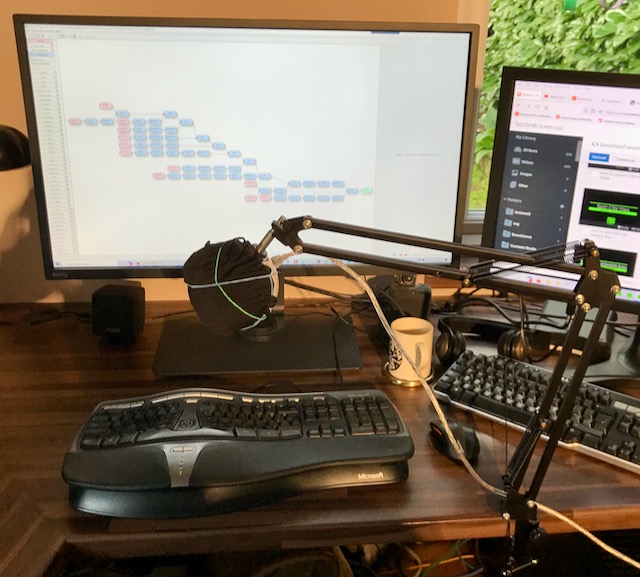
Get a reasonable mic. I have a snowball mic on a cantilevered stand. I covered it with a thin cloth to try to reduce pops.
The occasional ‘um’ is fine.
Have a checklist of things to do for each video, so you don’t forget anything (such as disabling your phrase expander software or muting the phone).
My setup. Note the high tech use of rubber bands.
I’m lucky to have a very quiet office, so I don’t have much background noise to contend with.
Using Camtasia I can easily add intos and outros, edit out stumbles and add various effects, such a mouse position highlighting and movement smoothing. I just File>Save as the previous project so that I don’t have to re-add the intro and outro. Unsurprisingly, Camtasia have lots of explainer videos. I wish there was a way to automatically ‘ripple delete’ any sections where there is no audio and no mouse movement (if there is, I haven’t found it). Some people recommend descript.com. It looks interesting, but I haven’t tried it.
I did an A/B test of recordings with my Senheiser headset mic against my Snowball mic and the consensus was that the headset was ok but the the Snowball mic sound quality was better.
Some people prefer to use synthetic voices, instead of their own voice. While these synthetic voices have improved a lot, they never sound quite right to me. Also it must be time consuming to type out all the text. Or you can pay to have a professional voiceover done, but this is surprisingly expensive (around $100 per minute, last time I checked) and almost certainly more time consuming than doing it yourself.
Some people aren’t confident about speaking on videos because they are not native speakers of that language and have an accent. Personally accents don’t bother me at all. In fact I like hearing English spoken with a foreign accent, as long as I can understand it. Also I think there is an authenticity to hearing a creator talk about their product in their own voice.
I’m not a big fan of music on explainer videos, so I don’t add any.
I let Youtube generate automatic captions for people that want them (which could be people in busy offices and on trains and planes, as well as the hearing impaired). They aren’t perfect, but they are good enough.
My videos are aimed at least as much at finding new users as helping existing users. So I make sure I research keyword terms (mostly in Google Adwords) before I decide which videos to make and what to title them. Currently I am targetting very specific keyword searches, such as How to convert CSV to Markdown. Easy Data Transform can do a lot more than just format conversion, but from an SEO point of view it is better to target the phrases that people are actually searching for.
I upload the videos as 1080P (1920 x 1080 pixels) on to the Easy Data Transform Youtube channel and onto my screencast.com account (which I pay a yearly fee for). I then embed the screencast.com videos on relevant easydatatransform.com pages using IFRAME embed codes created by screencast.com. I don’t use the Youtube videos on my website, because I don’t want people to be distracted by Youtube ads and ‘you may also like’ recommendations. They might be showing a competitor! I don’t host the videos on the website itsself as I worry that might slow down the website. I also link to the videos in screencast.com from my help documentation, as appropriate.
Some people like to embed video of themselves in screencasts, in the hope of making it more engaging. But personally I want people to concentrate on my software, rather than being distracted by the horror of my face. And not having to comb my hair or look smart was part of what got me into running my own software business.
In the next few months I will be checking my analytics to see how many views these videos get and whether they increase the time on page and reduce the bounce rate.
If you can spare a few seconds to go to my Youtube page and ‘like’ a video ot two or subscribe, that would be a big help!
Note that some of the above doesn’t apply when you are creating a demo video for your home page, rather than an explainer video. Your main demo video should be slick and polished.
Google Ads has emailed me to tell me that one of my ads has been disapproved for ‘shocking content’.
Yep, an ad for seating planning software that has been running continuously since 2011. You can see the full text of the ad above. I am at a loss to know what is shocking about it.
The following are covered under Google’s shocking content policy:
Promotions containing violent language, gruesome or disgusting imagery, or graphic images or accounts of physical trauma
Promotions containing gratuitous portrayals of bodily fluids or waste
Promotions containing obscene or profane language
Promotions that are likely to shock or scare
Er, no idea how any of those apply to my software. I don’t even see how it can even be falling foul of the Scunthorpe problem. Perhaps they are shocked how cheap it is?
This is far from my first brush with this sort of thing from Google Ads. Back in 2015 I was told that hyperlinking from my domain to any another domain was a breach of Adwords policy. Since 2005 I have paid Google tens of thousands of pounds to run ads on their system. In return they have wasted loads of my time with endless changes to the platform and arbitary and erroneous enforcement of their own policies. They feel less like a partner and more like an enemy.
I’m not too bothered about one ad being dissaproved. Especially during COVID, where almost no face-to-face events are happening anywhere in the world. But experience shows they will probably start disapproving many more over the next few weeks. I have clicked the link to appeal the disapproval. Hopefully, sometime in the next few weeks some under-paid, under-trained contractor, who might not speak great English, will re-approve the ad. But maybe not. Who can say in this opaque, Kafkaeaque, ‘computer says no’, outsourced world that we have collectively built for ourselves.
** Update 04-May-21 **
I appealed the dissaproval and the appeal failed. No reason given for why it is shocking. A second ad has been dissaproved for ‘shocking content’. I suspect many more will follow.
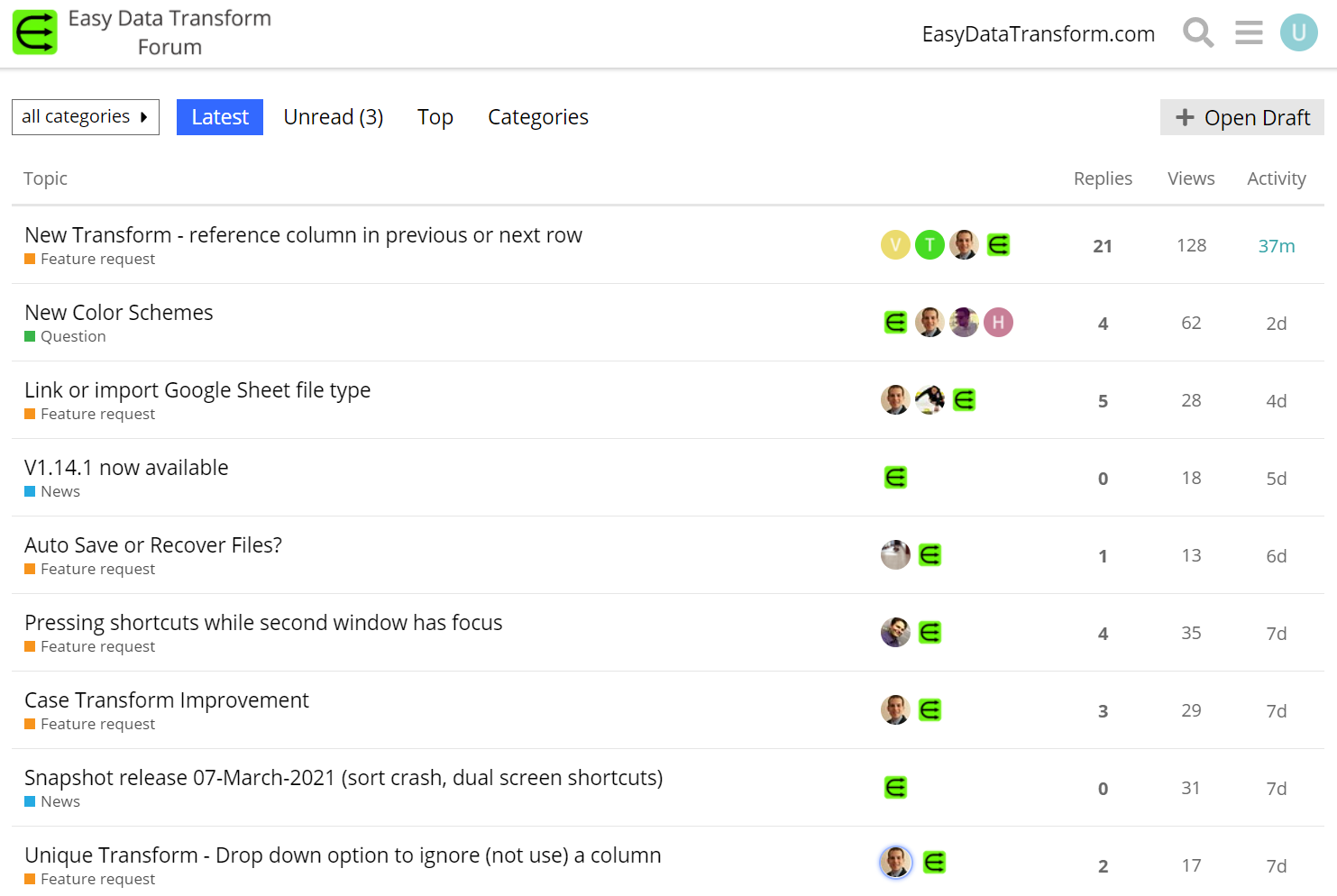
I started selling software online 16 years ago. Until this year I never had a forum for any of my products. I handled customer support for PerfectTablePlan and Hyper Plan by email and kept customers up-to-date with an opt-in email newsletter. But I rethought this position with my latest product, Easy Data Transform and started a forum at forum.easydatatransform.com in December 2020.
My ISP offered various forum software packages, but I really wanted Discourse, as I consider it head and shoulders above all the other forum software I have interacted with as a user (even if I find the badge system a bit patronising). I didn’t want the hassle of setting up and patching a Discourse server, so created the forum through www.communiteq.com (previously discoursehosting.com). It was suprisingly easy to set-up. And it gives the option to export everything, in case I want to part ways with them. The sheer number of options in Discourse are quite daunting, but I stuck with the defaults for the most part.
Some people use Facebook Groups for their product forums. Ugh. You have almost no control of such a forum. Facebook could even be showing ads for your competitors on your forums. Or they could just decide to shut you down and delete all the content. That is before we get on to the fact that Facebook make their money monetising hatred and abusing our privacy at an industrial scale. No thanks.
The advantages of a forum are:
Letting customers talk to each other, and post content helps to create a community around the product. Which, in turn, can add a lot of value to your product.
Customers can help each other with support questions. Sometimes they will answer before you are able to or will give a different perspective. Or even give a better answer.
If a customer asks a question that has already been asked, you can send them a link to the appropriate forum page.
It is a quick and easy channel to communicate with customers. I can post a link to a new snapshot release in a few minutes. This is much quicker than sending out an email newsletter. It is also more interactive as customers can respond on the forum and see each other’s responses.
A lively forum is ‘social proof’ that your product is worth buying.
A forum with lots of content should have a large SEO footprint.
The disadvantages of a forum are:
The time to maintain it. A forum that is broken or full of spam and unanswered questions is worse than no forum.
Disgruntled customers potentially airing their grievances in public.
The cost of the forum.
An empty forum looks bad.
Bad actors can be a pain. For example, people posting links to spam or competing products.
It probably only takes me 1-2 hours per week to post on the forum at present. Some of that is time I would have spent answering support emails. If that rises substantially then I may have to delegate it.
I try very hard to provide a good product, with good support and haven’t had any issues with negativity, so far. But I know from my experiences moderating Joel Spolsky’s Business of Software forum that moderating a busy forum can be tricky, time-consuming and emotionally draining.
The cost of the forum is currently around $20 per month, so pretty low. That may climb, but hopefully sales will be climbing as well.
I was a bit worried about whether the forum was going to look empty. I warned customers that the forum was an experiment and would be closed if there wasn’t enough activity, to manage their expectations. I also created a ‘sock puppet’ account and ‘seeded’ the forum with a few support questions that I had been previously asked by email (with the permission of those that asked) and then posted answers. But I only did this a handful of times and then the forum started to take off.
I have heard stories of people getting 1000+ spam posts a day on their forum. But I haven’t had any issues with bad actors, so far. I’m not sure how much of that is down to Discourse and how much of it is down to luck. But, no doubt issues will occur at some point.
I still have my product newsletter, which I send out every few weeks when there is a new production release.
Overall I am pretty happy with how the forum is going. Should you have a forum for your product? As always, it depends. I think you should consider it if:
Your customer base isn’t tiny.
You want to interact with your customers and get feedback. This might be less the case with mature products.
You have the time and energy to police and maintain it.
Your product is relatively open ended or complex. For example, if your product just checks whether website are up or down, there is probably a very limited amount you can discuss.
Microsoft Clarity is a new service that allows you to see, in detail, how visitors are interacting with your website. It includes:
heat maps, showing where visitors are clicking or touching or how far they are scrolling
recordings of visitor sessions, including mouse movement, clicks, touches and scrolling
You just need to get a Javascript snippet from clarity.microsoft.com (for which you need a Microsoft login) and paste it into the header of each page. You can then login to clarity.microsoft.com at a later time to see your results. The service is free.
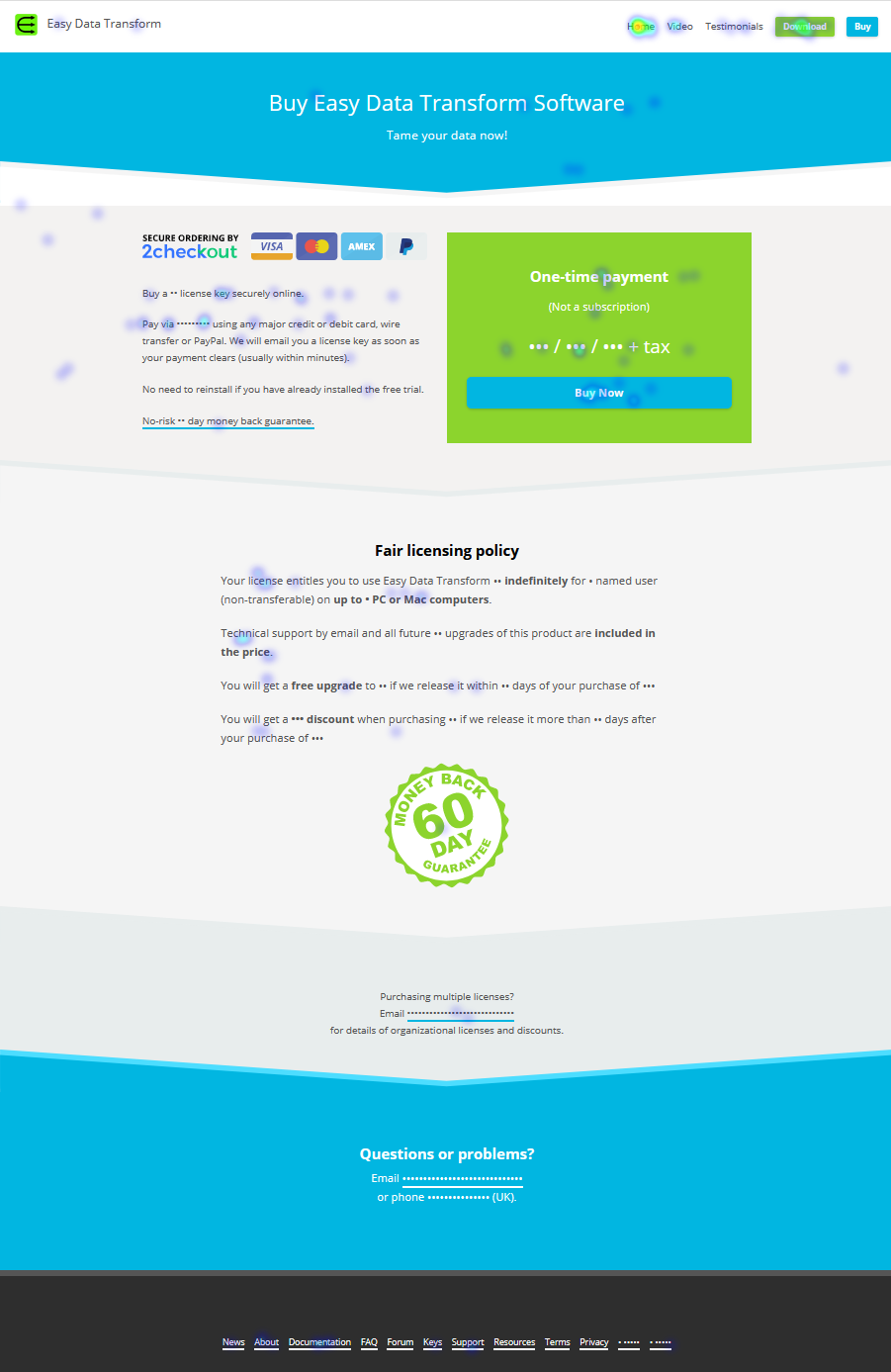
I tried it on my www.easydatatransform.com website. Here you can see a click heatmap for the buy page:
People are clicking all over non-hyperlinked text. Hmm. Perhaps they somehow couldn’t the see the effing enormous blue button next to it? Notice that numbers are starred out to avoid personal information, such as credit card numbers.
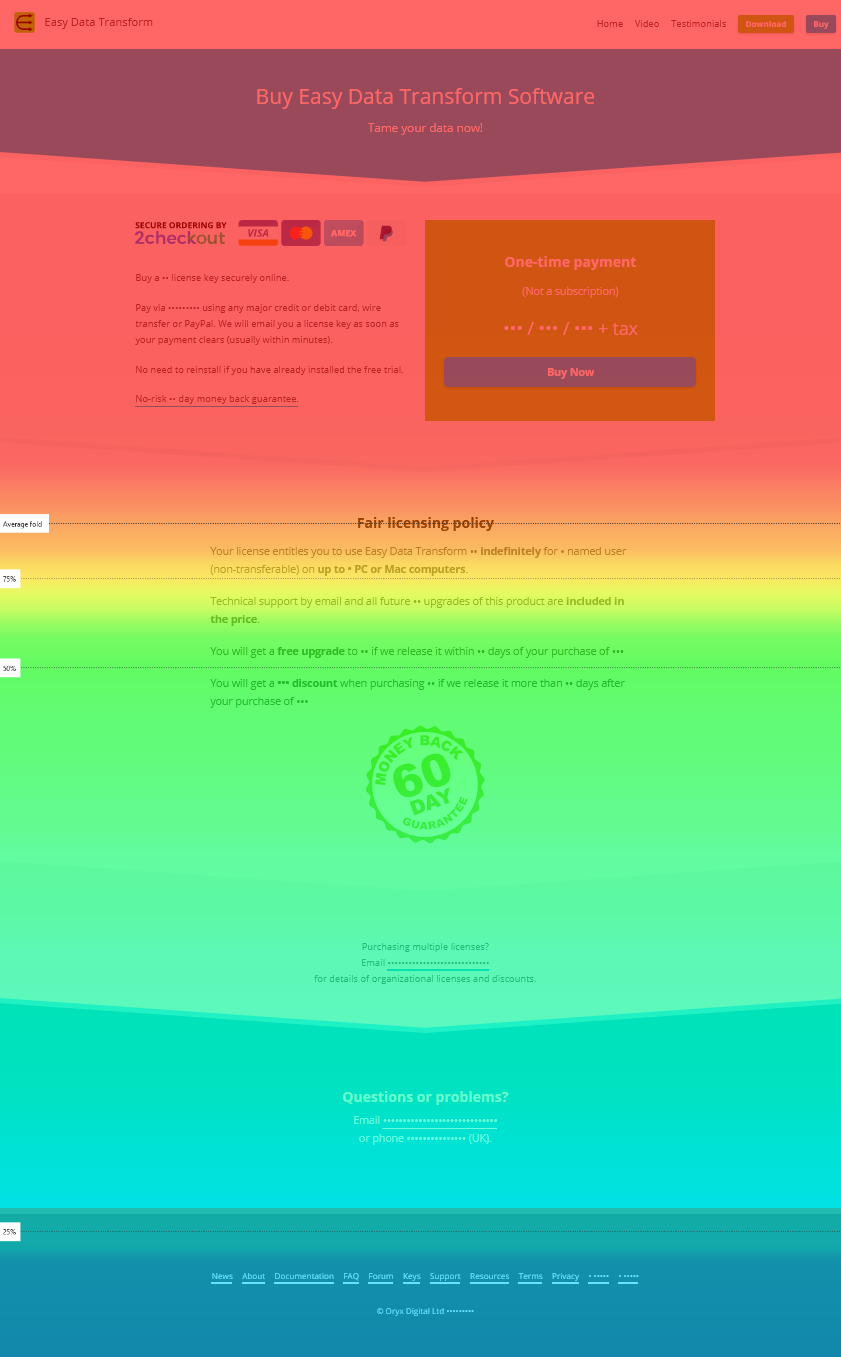
You can also see how far visitors scroll down the page with scroll heatmaps:
So I can see that the buy button is appearing well above the fold.
You can also watch recodings of people interacting with the website, showing their mouse movements, clicks, touches and scrolling. This is where things start to feel a bit stalkerish. You don’t get any identifiable information on the visitor beyond their country, browser and their operating system and I’m ok with people watching me interact with their websites like this. But it still feels a bit voyeuristic. The results are also a bit strange. Some people just click all over the place and highlight random text (touches are tracked separately from clicks). There is a distinct danger that you could watch hours of sessions and come away without much actionable information.
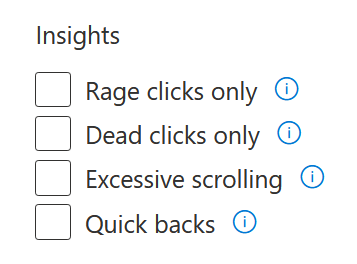
You can filter the information in various ways, including by country or referring website. You can even filter to see sessions with ‘Rage clicks’ (where the user has clicked or tapped repeatedly in the same area).
Watching a few sessions with ‘rage clicks’ I could see that some people indeed seem completely unable to see the effing enormous blue ‘buy now’ button on the buy page. So I have also added a text hyperlink where most people are clicking in the text and will probably try changing the button colour. Perhaps to shocking pink!
Running Pingdom Website Speed Test on the Easy Data Transform home page, both with and without Clarity a few minutes apart, I can see that it had some effect on speed, but not too much.
Without Clarity script: 175.2kb of scripts, 7 script requests.
With Clarity script: 194.3kb of scripts, 9 script requests.
The load time was actually 0.1s faster with Clarity. That is probably just an anomaly.
I have disabled Clarity for now. But may reenable it after I have made some changes to the website, to see the effect of the changes. Overall I was quite impressed with the service and it was surprisingly easy to set-up. But the cynic in me does wonder what exactly Microsoft is getting out of it.
I have been using Google Ads (previously Adwords) since 2005. A lot has changed in that in time. But it still remains basically an auction. You bid how much you are prepared to pay for a click when someone types a particular phrase into Google. Google then decides which ads to show based on bids and a variety of factors. It has always been a basic article of faith that (if you choose manual bidding) you are never charged more than the maximum cost per click you set. But this is no longer true. Check out this recent Google Ads report for my data transformation software, Easy Data Transform.
How can the average cost per click be 3x more than the maximum cost per click? I am using manual bidding, am not using ‘enhanced CPC’, have no positive bid adjustments and I haven’t recently changed these bids. I emailed Google technical support. This is the reply I got:
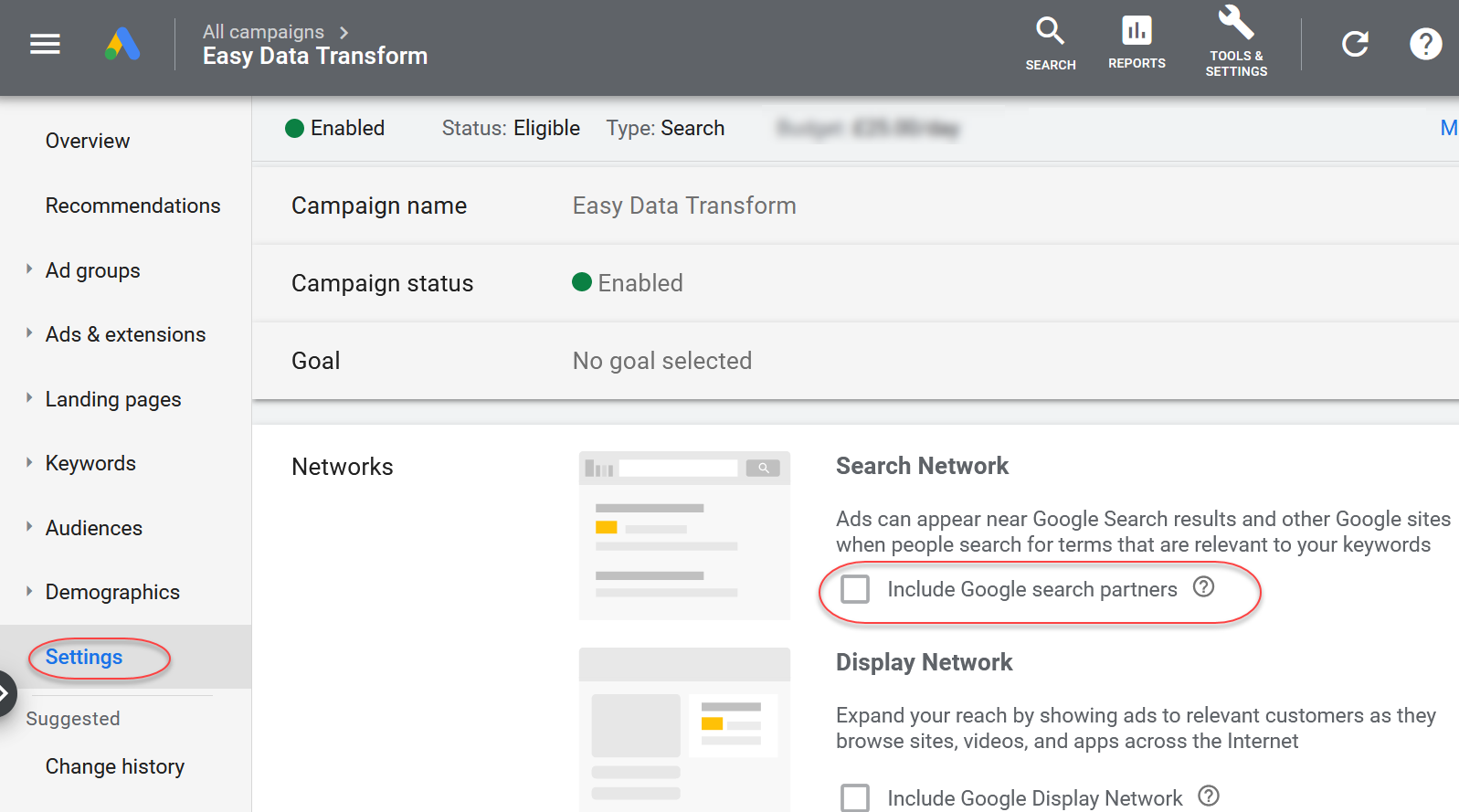
Post reviewing the search campaign : Easy Data Transform, I can see that you have applied Bidding strategy as Manual CPC, also you have included Google search partners due to which system has charged extra amount. As in Google search partners maximum capping would not work.
For example the keywords: [keyword redacted] in this the maximum cpc is set as while as you have included Google search partners due to which system has avg cpc charged £0.45.
‘Google search partners’ are “hundreds of non-Google websites, as well as YouTube and other Google sites”. New Adwords campaigns are opted in to search partners by default.
So I emailed back:
So when did this policy change?
Is there a limit what you can change for Search partners clicks? If I bid a Max CPC of £0.10 CPC can Adwords charge me £100.00, if it feels like it?
And the reply was:
Andy, I would like to inform you that there is no recent changes made in this policy. However, I would not be able to provide the exact date of change made in this policy. If you have applied the Max CPC of £0.10, system may charge you £100 if the search partner is enabled at your campaign level.
WHAT? They can ignore my maximum bid and charge me £100 per click (if I am using manual bidding, tracking conversions and opted in to search partners)! I don’t trust Google’s algorithms to bid for me based on prior experience. Presumably they can’t charge more than my daily budget, but they can use this whole budget in a single click, if they choose.
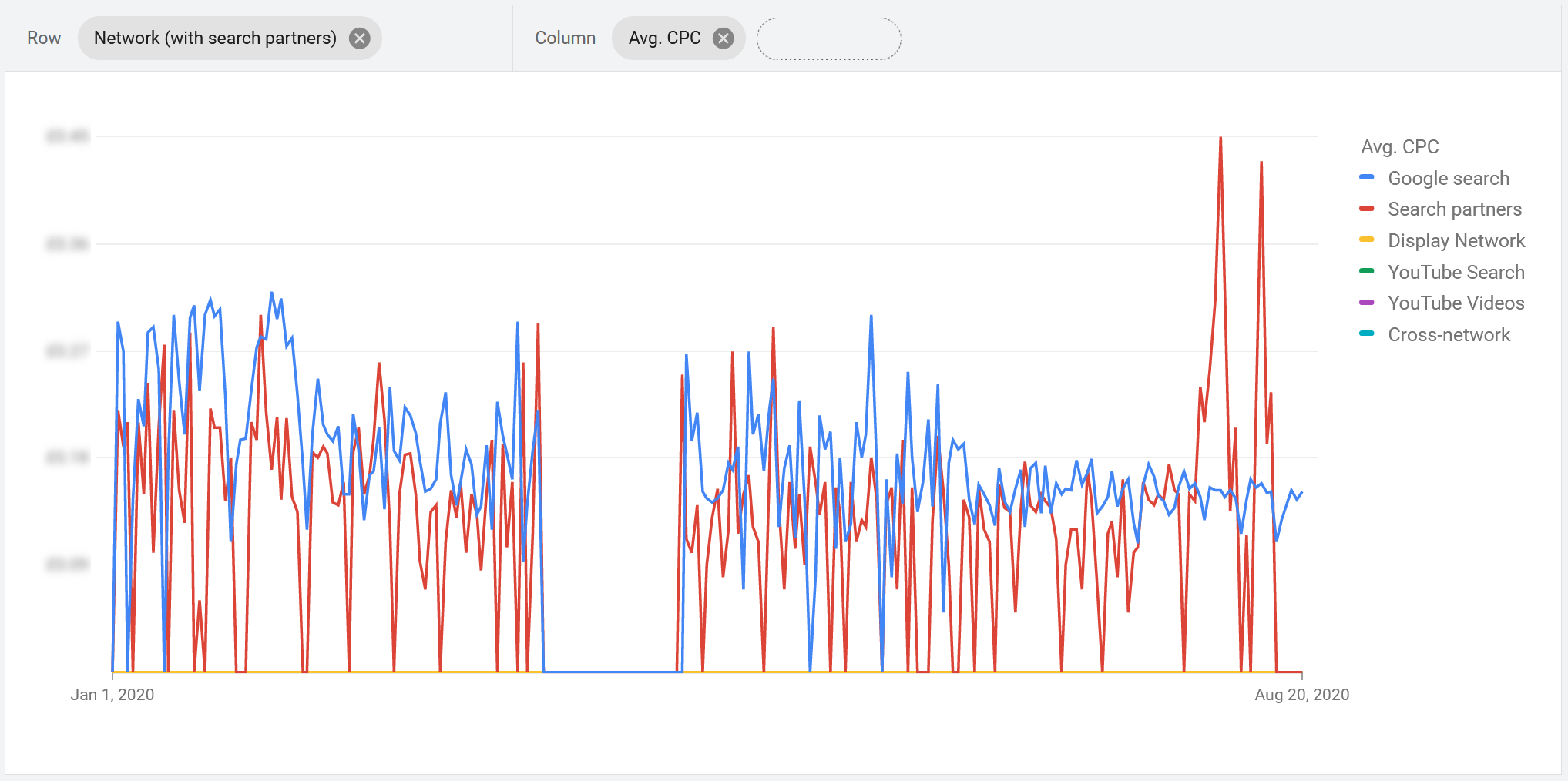
Running a report you can see that the average cost per click of the partner network (red) has shot up recently for my Easy Data Transform campaign:
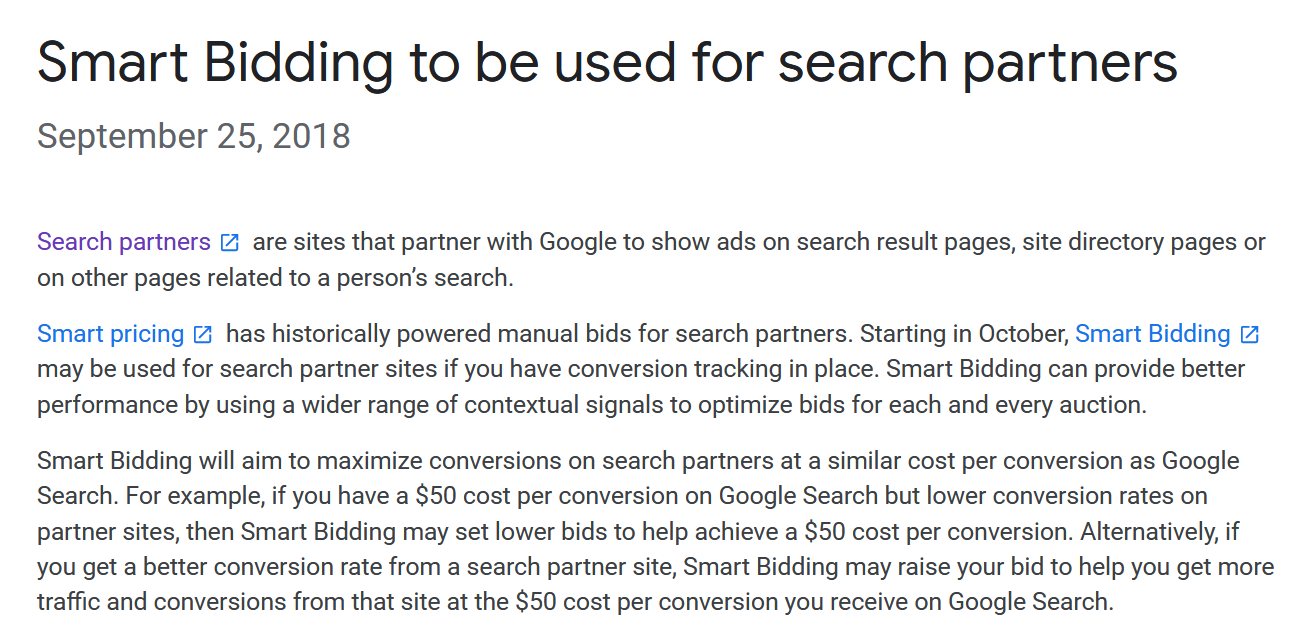
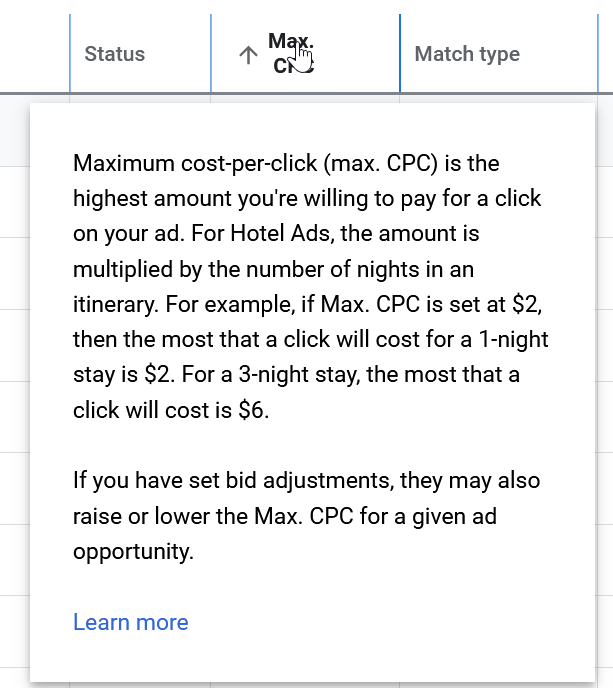
So it looks like they quietly introduced this new policy in October 2018. I don’t remember being told about this. It doesn’t mention this policy if you hover over max CPC:
It is only if you click ‘Learn more’ and read to the bottom of that page that they tell you about the exception for network partners.
I checked with my goto Google Ads expert, Aaron of softwarepromotions.com. He knows Google Ads inside out, but he hadn’t heard of this policy either.
Google Ads have a long history of quietly introducing major changes and not telling their customers, let alone asking them to opt-in. For example with in-app ads.
This change is particularly galling given that clicks from the partner network are generally lower quality and convert significantly worse than clicks from Google itsself.
So far the costs to me of this change don’t appear to be significant. But they could be very significant to people with larger accounts. I did a quick surf and I found this on webmasterworld.com, dated March 2019:
Don’t have all the numbers yet but it looks like so far this month about 60% of our spend this month has been on these inflated clicks. And when I say inflated, on the extreme end we have a keyword set to $0.27 CPC and the average CPC has been $4.67, and almost all clicks for the keyword have been from the search partner network.
I have turned off the Google partner network on all my campaigns. You might want to do the same.