 I have recently revamped the PerfectTablePlan payment pages. I asked Andrew Gibson of 3d-box-shot.com to create an image of the PerfectTablePlan packaging, using the existing artwork. I was very impressed with the result. The image is much cleaner and more aesthetically pleasing than I could have achieved by photographing the physical packaging. But I am much less keen on the practice of using box shots of software where is no box (i.e. download only). It seems disingenuous, at best. Andrew kindly agreed to write a guest article for this blog with an insider’s view on the art, science and ethics of software box shots.
Almost every time the subject of box shots is raised in any sort of software marketing forum, opinion seems to split diametrically in two opposing camps. The first group don’t see any ethical problem with displaying a box shot for a “download only” product. The typical argument used in favour of box shots is that it makes a product appear more tangible to consumers. They can see what you’re selling without having to read about it. It removes any doubt that the site they are looking at has software to sell and, when used effectively, can add an air of professionalism to a site. Finally, there’s a widely held belief that because of this, displaying a box shot can improve conversion rates.
In contrast, the opposing group believe that displaying a box shot for a “download only” product is ethically wrong and fundamentally dishonest. They maintain that customers would complain about not receiving a physical package in the post that’s identical in every respect to the “bogus” box shot displayed on the website. I run my own Micro ISV, selling amongst other applications, a product called 3D Box Shot. As a result, you might be inclined to think that I fall into the first camp. However, I’m actually quite ambivalent about the issue. I use box shots on some of my sites and have never received a single complaint from a customer about them not receiving a physical product in the mail. However, consumers in different markets don’t all behave the same way, which is why advice that works for some ISV’s can be commercial suicide for others. I’m entirely willing to accept that in some markets, some customers may indeed complain about not receiving a physical product. I just haven’t experienced this first-hand.
It’s worth noting that existing users of your product can often be persuaded to purchase additional copies to give as gifts. They may not even make this connection themselves, so why not put the thought in their heads? Send a festive email offering to ship additional physical copies of your products (gift wrapped) to friends and relatives. Add something like the following to your site to make the point visually:

click for a larger image
It’s often stated that adding a box shot to your site can dramatically improve conversion rates for your products. It may come as a surprise to learn that I’m not convinced that this is true in all cases. Generally speaking a box shot isn’t some sort of magic bullet that will transform your sales overnight. However, if it is an integrated part of your marketing strategy then it can make a real difference.
So how do you go about integrating a box shot into your marketing strategy? From a design perspective you can integrate a box design by keeping everything visually consistent. Use your company and product logo on the box and clearly display your website URL as well. This will help to increase the marketing potential of your box shot.
One less obvious method is to add you box shot to the image for your PAD Screenshot. Most download sites are worse than useless when it comes to driving traffic to your site. So instead of thinking of the screenshot referenced in your PAD file as just a screenshot, think of it as a blank advertising canvass that thousand of download sites are happy to display for you free of charge…
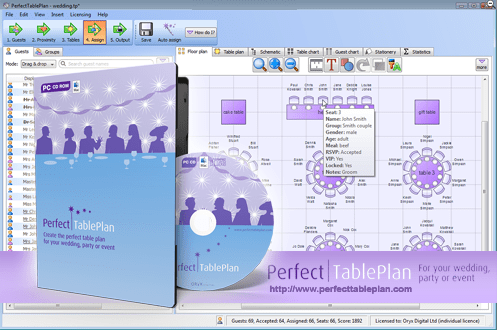
click for a larger image
Using this method, you can attract visitors to your site even from low quality download sites that don’t even supply a link back to your website.
So how do you get a box shot designed? As a designer I have a fairly unique approach to software box design. I treat a design as a conceptual puzzle than needs to be solved in order to create an effective cover. The criteria I use are simple. Someone needs to be able to look at the box shot and immediately understand what the product is and does. If a box doesn’t meet this challenge, then it isn’t doing it’s job. It’s normally possible to create an effective visual metaphor for a product that explains visually what it’s all about. Here are some examples of the sort of designs I’m talking about:

click for a larger image
Trends in box design can change. Not so long ago lots of people were asking for Windows Vista Style boxes, but as it became more apparent that Windows Vista was destined to be seen in the same light as Windows ME, this requirement has tailed off. Nowadays the vast majority of design jobs that I do are for DVD cases, both virtual box shots and full print insert designs.
If you’re artistically talented and have access to a good quality image editing tool like Adobe Photoshop and have an easy means of transforming your 2D designs into a 3D Box, then you may well be able to create an effective looking box shot yourself. However, once you consider the time this takes, hiring a designer seems a lot more reasonable. Since I design boxes commercially, I’ve acquired a lot of design resources including hundreds of royalty free vector images and a library of stock photography. I can draw on these resources when I’m creating a box design. This lets me develop designs quickly through the draft stage through towards the final design. However, as an experience box designer, I still find it challenging and rewarding work. But it is very time consuming.
If you’re determined to “do it yourself” then bear the following points in mind:
- The box shot needs to visually show what your product is and does. Show your design to someone that’s never seen your product and ask them to tell you what your product does. If they can’t do this, then your design isn’t up to the job.
- Make sure your website address is clearly visible on the box shot. If you ship a physical package you’ll have no way of controlling where it ends up. The box itself can drive traffic to your website. You don’t have to slap it on the front of the box, just make sure it’s there and can be seen.
- Try to design a cover that fits with the look and feel of your website. Use the same (or at least, non conflicting) colour scheme as your site and try to use the same fonts. This will prevent your box shot from standing out on your site like a sore thumb.
- Never use more than three different fonts in your design. Unless you are selling a font management application, this is sure way to spoil any design.
- Design so that text is still visible when the box is reduced to a 250 x 250 thumbnail. If the text is legible at this size on your design, then unless the design carries the message all by itself, the box won’t work very well as a marketing tool.

click for a larger image
The image above was created in a rendering application at very high resolution. It took around 6 hours to complete on a dual core system. The resulting image is big enough to be used in print ads, or can easily be resized for use on the web.
Andrew Gibson is the head developer and lead designer for www.3d-box-shot.com, provider of box shots, packaging design, e-book covers and more. Box shot images from scratch start at $100. Box shots images from existing artwork can be created for as little as $25. All the images in this article were created by them. The original PerfectTablePlan packaging was designed by Nicola and Adrian Metcalfe.

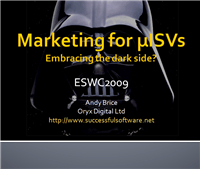 I will be off to ESWC 2009 in Berlin in a few days. I am doing a talk “Marketing for microISVs – embracing the dark side?” on the Saturday morning. It is going to be tough to tackle as huge a subject as marketing in 45 minutes including questions, but I like a challenge!
 We all know we need to do backups
 Am I the only one being totally bombarded with ‘Give your application the green light’ and related emails from Microsoft and its minions? I must have had at least 30 so far. I took a few minutes to list my product in the
  It is important to choose the right Ecommerce provider for your business. A bad choice can have a significant impact on your sales and switching provider can be a major headache. But which one is the right one? It is easy enough to find out about prices and features, but what about the all-important intangibles such as support, ease of set-up and reliability? I hear a lot of good and bad reports about various vendors. I thought it was time for something a bit more comprehensive and systematic – a survey. That’s where you come in.
 Bob Walsh has finally broken cover on his latest project and
  I am been very happy using


 I noticed yesterday that I didn’t have any emails older than 2 days in the IMAP ‘Sent’ folders on my various email accounts with ISP 1and1.co.uk. After a bit of investigation and some emails to 1&1 support it appears that 1&1 have quietly renamed my ‘Sent’ folders to ‘Sent Items’ as part of their upgrade to their webmail. All I needed to do to access them from my Mozilla Thunderbird client was:

 Successful Software