Getting your iPhone app listed in the iPhone App Store is a notoriously arcane, difficult and lengthy process. I think I have found out why.
|
|
|
| The App Store icon | The symbol of Freemasonry (from Flickr) |

Getting your iPhone app listed in the iPhone App Store is a notoriously arcane, difficult and lengthy process. I think I have found out why.
|
|
|
| The App Store icon | The symbol of Freemasonry (from Flickr) |

I have just finished reading “Blog Blazers, 40 top bloggers share their secrets to creating a high-profile, high-traffic and high-profit blog” the new book by the indefatigable Stephane Grenier of followsteph.com.
The bloggers interviewed are a diverse group, blogging on everything from personal finance to fashion. It also includes interviews with a number of software-related bloggers: Jeff Atwood, Ian Landsman, Patrick McKenzie, Dharmesh Shah[sic], Eric Sink, Rob Walling, Bob Walsh and yours truly. Stephane also interviews himself, which must have been a strange experience.
Each of the interviewees was asked a standard list of questions. Some of the questions are more interesting than others. For example the question “What makes a blog successful according to you” resulted in 40 minor variations on “It depends”. But there is a wealth of useful information for bloggers, beginner or veteran. It will take me a long time to work my way through the many links and digest it all. I might even end up buying The elements of style by Strunk and White, which is recommended several times.
Stephane has done a great job of pulling together interviews from such a wide range of bloggers, including A-list blogging celebrities such as Seth Godin. I was very flattered to be included. At $16.95 I would certainly recommend this book to anyone who writes a blog, or is thinking of writing a blog. You can buy the book and/or ebook online from blogblazers.com. The book is also available from amazon.com.
As an interviewee I received some free copies and I am giving away two of them. If you would like one, please add your email address in a comment below. I suggest you obfuscate it to avoid spam-bot harvesting e.g. me [at] domain.com . I will pick two at random on Friday 21st Nov.
This video shows all commercial air traffic in the world during a 24-hour period. Although the technique used is very simple in principal, it conveys a huge amount of information in a short space of time.
I use various simple visualisation techniques in my table planning software, for example males can be shown in blue and females in pink. This allows the host to check at a glance whether they have a good distribution of genders.
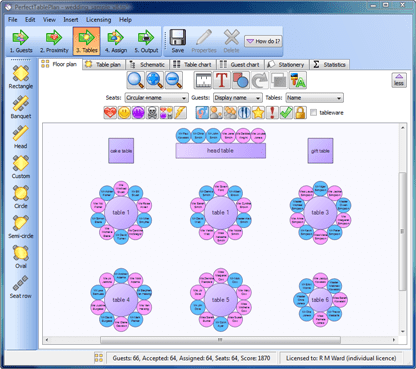
Could you use colour, shape, size, positioning, motion or other visual cues to better convey information to your users?
 I am thinking about a trip to New Zealand with the family (my wife is a Kiwi). As a microISV I need Internet access to keep the business running. I might be able to rent accommodation with broadband or find Internet cafes, but I would like to have mobile Internet access as a back-up. Unfortunately it looks as if my UK mobile Internet provider doesn’t even support roaming in NZ. Even if I swap to another UK provider, roaming costs would probably be prohibitive.
Ideally I would like to just rent a data card in NZ for a month. But a search on Google turned up nothing, apart from one service apparently only available to Australians. My only other thought is to ask one of my wife’s relatives to sign up with vodaphone.co.nz for their ‘no term’ mobile broadband plan, then cancel at the end of the trip. I will probably have to buy a new data card as well, as I doubt my Three Networks Huawei USB modem and SIM would work with Vodaphone NZ.
Any Kiwis reading this? Suggestions would be welcome.

Although some people regard C++ as the COBOL of the 21st century, it remains a force to be reckoned with in commercial development. For example it is currently ranked fourth in the language related tags on stackoverflow.com (despite the apparent biases of Stackoverflow owners Jeff Atwood and Joel Spolsky towards web and .Net oriented languages):
| Rank | Language | Tagged questions |
| 1 | C# | 4681 |
| 2 | Java | 2903 |
| 3 | ASP.Net | 2334 |
| 4 | C++ | 2040 |
| 5 | Javascript | 1677 |
| 6 | PHP | 1505 |
| 7 | Python | 1397 |
| 8 | C | 851 |
| 9 | Ruby | 719 |
| 10 | VB.Net | 548 |
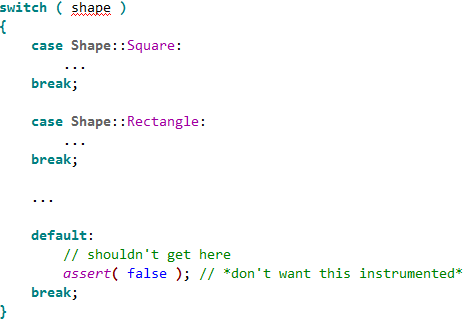
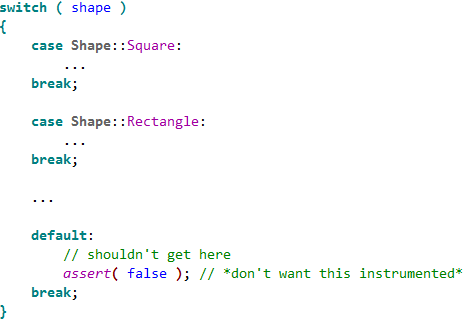
C++ has been one of the top commercial languages for a long time. But the world of computer software and hardware is changing fast and languages have to evolve to stay relevant. The first major revision to the C++ standard in a decade, known as C++ 0x, is expected be finalised in 2009 (otherwise the x will have to be hex). The draft standard includes lots of additions to the language and standard libraries, including: lambdas; closures; static (compile time) asserts; concepts; automatic types; variadic templates; a regular expressions library and improved threading support. Automatic garbage collection is notable by its absence.
For working C++ developers the new standard only really becomes important when it becomes available in mainstream compilers such as Visual C++ and Gnu C++. As Gnu C++ already has experimental support for C++ 0x and Microsoft released a preview of Visual Studio 2010 at PDC last month with support for some of new features it might be a good time to start paying attention to the new standard. You don’t want to look like an idiot next time one your colleagues starts talking about ‘lambdas’, do you?
I illustrate a few of the new features below. I have done this mainly as a way of understanding them better myself, not because I claim any sort of expertise on the new standard.
Lambdas and closures
A ‘lambda’ is an unnamed function, for example:
std::vector<int> values = getValues();

std::for_each( values.begin(), values.end(), [](int n) { cout << n << std::endl; } );
Lambdas can reference in-scope variables, for example:
std::vector<int> values = getValues();

int total = 0;

std::for_each( values.begin(), values.end(), [&total](int n) { total += n } );
This is known as a ‘closure’. Of course, all of this can be done with standard function calls, but lambdas are undoubtedly more compact and elegant. I am not convinced that they will make code any clearer or easier to debug or maintain however.
Automatic types
Automatic typing allows the compiler to infer a type. For example:
std::vector<int> values = getValues();

for ( std::vector<int>::const_iterator it = values.begin(); it != values.end(); ++it ) { f( it ); }
Can be re-written as:
auto values = getValues();

for ( auto it = values.begin(); it != values.end(); ++it ) { f( it ); }
Automatic types seem like an excellent way to let the compiler take some of the drudgery out of programming.
Concepts
Template error messages have improved over the years, but they can still be obscure. A ‘concept’ is a way to clearly define what types a templated class or function will accept. For example:
template<typename T> requires LessThanComparable<T>

const T& min(const T &x, const T &y)

{

return y < x ? y : x;

}
Specifies that min() will only accept types that support the concept LessThanComparable. LessThanComparable can then be defined so that the type must support the < operator:
auto concept LessThanComparable<typename T>

{

bool operator<(T, T);

}
Hopefully concepts will allow better defined template interfaces and clearer error messages.
Concurrency
The current C++ standard makes no real allowances for concurrency. This is a major problem in a world where multi-core CPUs are standard. The new standard will introduce a memory model that supports threading and a standard threading library.
Summary
C++ has many strengths. It scores quite highly on performance, expressiveness and portability, has an extensive tool and library ‘ecosystem’ and a proven track record in large scale system development. But it is also a sprawling and complex language, hobbled by many shortcomings inherited from its progenitor C (a language dating back to the early seventies). It isn’t clear to me whether the new standard will add enough features to keep C++ competitive as a commercial language for another decade. Or whether C++ will be regarded as a legacy language, too bloated and complex to attract new developers given the choice of simpler and more elegant languages. Time will tell.
Further reading:
 ISVtube was launched recently by Thomas Holz of easy2sync.com. The site aggregates videos of particular interest to microISVs and could be a very useful resource. To suggest additional videos email Thomas at:
The sign below is supposed to say “No entry for heavy goods vehicles. Residential site only” in English and Welsh.

Unfortunately the Welsh version says “I am not in the office at the moment. Send any work to be translated”.
 The nice folk at Software Verification have done a major new release of Coverage Validator, and the new version fixes many of the issues I noted in a previous post. In particular:
There are still a few issues:
But the technical support has been very responsive and new versions are released fairly frequently. Overall version 3 is a major improvement to a very useful tool. Certainly it helped me find a few bugs during the testing of version 4 of Perfect Table Plan on Windows. I just wish there was something comparable for MacOSX.
 Developing software is an indoor job with no heavy lifting. How dangerous can it be? Actually, the long term dangers to your health are all too real. Humans have bodies evolved for running around the African savanna, not sitting motionless in front of a computer for hours at a time. I have heard several stories of developer careers cut short by RSI. Imagine if you couldn’t type any more, because it was too painful? Yes, it could happen to you. I started to write an article about ergonomics for developers. Then I realised I knew someone who was a lot more knowledgeable about it than me. Derek kindly agreed to write it instead.
It may seem hard to believe that working at your desk can cause you long term harm, but unfortunately the real toll of sitting in the same location and doing the same operations over and over again may not be felt until it is too late. Here are some simple precautions you can take.
Make sure that your whole working environment is set up correctly. This includes your monitor, keyboard, mouse, your desk height, your chair, and possibly a foot rest. Adjusting your seating position relative to your workstation layout encourages good posture. Do this on a regular basis, not just when the ergonomic assessment forms come around once a year. Setting up your chair correctly is probably the most important step and is covered in detail at healthycomputing.com.
There are a wide range of ergonomic mice available nowadays, and while some of them may look a little strange, you may be surprised how comfortable they are compared to conventional mice. The Evoluent VerticalMouse is ergonomic, easy to use and available in left and right hand variants. If you find an ergonomic keyboard inconvenient for programming, consider looking into one with a small key travel distance, like the keyboards on laptops where the keys only need to be depressed a small amount, as this reduces the finger movements and effort required.
Staring at your computer screen for long periods will lead to eye strain, tiredness, headaches and dry eyes. Every few minutes, look up from your monitor and focus on objects in the distance, either by looking out of the window or at the most distant end of the room. You can do this by using ScreenRest set to remind you at fixed time intervals. It is also worth adjusting your monitor screen to eliminate reflections from light sources behind and above you.
Leaning forward, sinking down in your chair or resting you elbows on the desk places unnecessary pressure on your back. Poor posture, maintained over a period of time, leads to back pain and more serious back conditions. Make sure that you regularly correct your posture, sitting slightly reclined and supported in your chair with your shoulders relaxed.
Don’t forget to keep up your fluid levels throughout the day. Even mild dehydration can leave you feeling lightheaded or bring on a headache. Often when you feel hungry it is actually that you’re thirsty, so don’t reach for the biscuits, get a glass of water first. Staying hydrated will help keep you clearheaded, more alert and help counter the dry environment around computers.
Get up and walk around regularly, taking a few minutes to relax. Try to avoid the temptation of carrying on with that feature that is “nearly finished”, or doggedly tracking down that bug that you’ve “almost fixed”. Taking a break will refresh you both physically and mentally. Also, use the break as a reminder to change the type of task you’re performing. If you use the keyboard and mouse extensively, you may want to use ScreenRest set to remind you based on the amount of usage. It can be surprising how much you use a computer continuously without realizing.
As a programmer your livelihood depends on you being able to use a computer. Pay attention to any discomfort, tension or pain you may feel while using the computer. Don’t think that computer-related conditions won’t happen to you and ignore those nagging pains until they become something more serious.
Do not underestimate how severe and uncomfortable repetitive strain injury pains can become and how long they will persist throughout the day and even into the night and will eventually impact leisure activities you enjoy doing. Once the damage has been done even the simplest of movements, not just using the computer, can be enough to trigger pain. There are tools available, such as speech recognition software, to help with basic computer tasks such as emails and browsing basic websites, but it is of no use when controlling complex development IDEs. Speech recognition can frustrating to control at the best of times and is impractical in an open plan office environment, due to the background noise.
Derek Pollard
Derek Pollard is the developer of ergonomics software ScreenRest, for the prevention and relief of eye strain and the management of RSI while using your computer.
I came across a link on the Mac small business mailing list to a video of a talk called “hacking the press”. In it Mac journalist and author Adam C. Engst talks about the dos and don’ts of using the press to promote your software. While the talk has a Mac slant, I think 90% of it is also relevant to those developing commercial software for other platforms. It is particularly interesting to hear how things work from a journalist’s point of view.


 Successful Software