Start Small, Stay Small: A Developer’s Guide To Launching a Startup

I recently read ‘Start small, stay small: A developer’s guide to launching a startup’ by Rob Walling. The preface states:

“This book is aimed at developers who want to launch their startup with no outside funding. It’s for companies started by real developers solving real pain points using desktop, web and mobile applications.”

Many of you are probably already familiar with Rob’s work, including: a blog, a podcast and the micropreneur academy. Rob’s approach has been to develop a portfolio of niche websites as a solo founder (for example ApprenticeLinemanJobs.com), funding it with his own capital and outsourcing work where appropriate. The intention being to have a business that produces a decent income, but allows the founder a flexible lifestyle. He uses the portmanteau ‘micropreneur’ to refer to this approach. It is not a term I care for, with its awkward shunting together of Greek and French. But I guess it is no worse than ‘microISV’. He develops on these themes in the book, with a particular emphasis on the early phases (as implied by the title).

The chapter headings are:

  1. The chasm between developer and entrepreneur
  2. Why niches are the name of the game
  3. Your product
  4. Bulding a killer sales website
  5. Startup marketing
  6. Virtual assistants and outsourcing
  7. Grow it or start over

As with Rob’s blog and podcast, there is plenty of insight and actionable information based on real experience. Some of the writing is taken straight from the blog, but I believe most of it is new. There are links to useful online tools, some of which I hadn’t come across before. It even includes some of that rarest of commodities – real data. He also dispells a few myths – for example: that creating a software product is a quick and easy way to riches and that Facebook and Twitter are all the marketing you need.

The book is particularly strong on market research – a subject I haven’t seen covered much in the context of small software companies. He includes a step-by-step methodology for measuring market size. It also covers other useful subjects such as: pricing, choosing web vs desktop vs mobile vs plug-in, website design, SEO, mailing lists and buying and selling websites. The paper version of the book is 202 pages long. There isn’t a lot of unecessary waffling or padding, so you are getting a fair amount of information for your money. An index might have been useful. Perhaps for the next edition?

While the book will have most benefit for those first starting out, I think even experienced software entrepreneurs will probably find some of it useful. The book is available in paper, electronic and audio formats from $19 at www.startupbook.net. Given its niche market, I think this is good value.

Full disclosure: I recieved a free (paper) copy of the book from the author.

Ka-ching!

I have my email client set up so that it makes a cash register ‘ka-ching!’ noise every time I make a sale. I found this a real morale booster in the early days of Perfect Table Plan. Even now, several years later and with considerably higher sales volumes, I still haven’t grown tired of it. I particularly enjoy hearing ‘ka-ching!’s coming from my laptop while I am not working – it is wonderful to be able to earn money while drinking a glass of wine in front of the television.

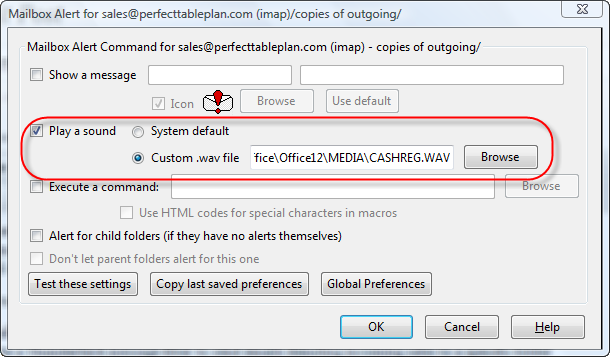
If you are running Mozilla Thunderbird you can set this up quite easily with a message filter and the Mailbox Alert add-on:

  1. Install the Mailbox Alert add-on.
  2. Create a Thunderbird message filter to send emails denoting incoming sales to a specific folder (‘Tools’>’Message filters…’).
  3. Set the Mailbox Alert add-on to play an appropriate sound whenever a new email arrives in this folder (select this folder, then select ‘Tools’>’Mailbox Alert Preferences’).

You shouldn’t have too much problem finding an appropriate .wav file to play. I use C:\Program Files\Microsoft Office\Office12\MEDIA\CASHREG.WAV.You can also find some online here.

Thank you to whoever wrote Mailbox Alert and to Nick Hebb of FlowBreeze Flowchart software for pointing me at it originally.

Eventcountdown.com

I have just launched at new website at eventcountdown.com.  This website contains free countdown clocks,  for both Windows and web, to allow you to count down the days, hours, minutes and seconds to any event. It can be a wedding, a birthday or a major cultural or sporting event. Are your children wondering how many days, hours, minutes and seconds it is to Christmas ? Wonder no more! You can also use it to count up from an event e.g. giving up smoking or Perl.
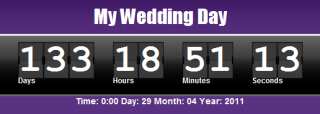
web countdown clockweb countdown clock for Mac, iPad, iPhone and Android


windows countdown clockWindows countdown clock

The hope is that a significant number of people interested in planning events will go to evencountdown.com for a free clock and a small percentage will click through to PerfectTablePlan.com and buy my software. I have no idea how successful this will be. I certainly don’t expect a quick payback on the investment. But hopefully it will pay for itself in a few years, and then anything after that is pure profit.

This project has also been a small scale experiment in outsourcing that might lead on to greater things.

  • The web design and CSS/HTML coding was done by Sergey Pozhilov of μISVStyle.
  • The Windows countdown clock was done by Milan Marusinec of VectorGraphica.
  • The Javascript for the web countdown clock was done by Paul Kossowski of Dolphin Futures.

They all did a great job and the total cost was less than I would have paid for a couple of ads in event industry newsletters (which I tried recently, with fairly miserable results).

I have quite a few ideas about how I can improve eventcountdown.com, but I wanted to get something out there ASAP. After all if you aren’t embarassed by v1.0 you didn’t release it early enough. I would be interested to hear any feedback. Backlinks to eventcountdown.com would also be very welcome. ;0)

milan@crossgl.com

Speccing my dream development PC

My main development machine is a 4 year old Dell desktop, PC running 32 bit Windows Vista. Time for a new PC. I have been doing a bit of research, mostly by looking through back copies of PC Pro magazine (which I recommend,  by the way). I am speccing it out here on my blog in the hope that I, and anyone else thinking about a new PC, can benefit from my research and (more importantly, given my limited knowledge of hardware) the assembled wisdom and experience of readers of this blog.

A system failure could lose me several days work and a lot of mental energy to sort out, so reliability is my number one requirement. After that I am interested in performance, particularly speeding up compilation and linking, as this has a significant effect on my productivity (my table planner software is now well over 100k lines of C++ code). Getting a fast machine also means it will last longer before it becomes obselete.

Form factor

Tower desktop. I don’t like using laptops for extended periods and there is plenty of space under the desk for a tower case. Having a bigger chassis means more options for upgrading and hopefully less chance of overheating. I like to have my PC physically locked to a ground anchor to reduce the possibility of theft. So the case needs to have a Kensington-compatible security slot I can attach a security cable to. Some LED bling wouldn’t hurt.

OS

Windows 7 64 bit Professional (or Ultimate is if I decide to use bitlocker drive encryption). Windows 7 is increasingly what my customers are using. 64 bit will allow me to address >4GB RAM.

As I develop for both Windows and Mac, I could use a Mac for my main development machine. But I am more familiar with Windows and its associated apps, you get more bang for your buck with a PC and I’m not keen on Apple’s authoritarian attitude to developers. So I prefer to use Windows for my main development machine and use a Mac Mini for porting.

RAM

8GB of DDR3 RAM. Maybe more, depending on cost. But I am not sure whether having more than 8GB of RAM will make much of a difference to real world performance. DDR3 memory seems to be fairly standard on high end PCs. I can’t imagine the clock speed of the memory (e.g. 1,333 MHz vs 1,600 MHz) affects development related performance much. I haven’t seen any data on this.

Storage

Possibly a 128GB Crucial RealSSD C300 SSD for storing \Windows and \Program files and a 600 GB 10,000 RPM WD Velociraptor HDD for storing everything else. SSDs seem to be increasingly the way to go for storage that is predominantly read-only and the prices are coming down. 128 GB should be ample for Windows and lots of applications. But there have been issues over the reliability and performance of some SSDs, notably those with Indilinx controllers. anandtech.com, Jeff Atwood and PC Pro all rate Crucial SSDs well. The WD Velociraptor is one of the fastest HDDs around and 600 GB is currently the biggest one you can buy. It is pricey though at around £0.30 per GB, with 7,200 RPM drives around £0.05 per GB. Especially if I buy an extra one to keep as a hot spare.

I am still making up my mind on this though. Having two separate drives means an extra possible point of failure. Also some people say that, while benchmark results are impressive, the difference in performance between SSD and fast HDDs isn’t that great in real world scenarios. I also wonder whether a 10,000 RPM HDD is going to be as reliable as a 7,200 RPM HDD, such as the Samsung Spinpoint F3. I don’t know of any independent data on HDD reliability between different makes and models. In the absense of such data I guess the next best bet is to look at how long the manufacturer warranties are. You need to be fairly confident on reliability to give a 5 year warrantly.

I am also considering encrypting the drives for extra security. This will keep my data secure in case of theft and it also means I can return a defective drive under warranty without worrying about the security of the data on it. The main alternatives are Truecrypt and Windows 7 Bitlocker. Tests show Truecrypt AES encryption adding a 5-12% performance penalty. Anecdotal reports seem to show that the difference is hardly noticeable in real world use, especially with a fast CPU. A comparison of Truecrypt and Bitlocker from April gives Bitlocker a small advantage for speed, but favours Truecrypt for its flexibility. Also Truecrypt is free, whereas Bitlocker is only available if you buy Windows 7 Ultimate.

My current PC has 2 disk HDDs in RAID1 (mirrored) configuration. This was intended to decrease the chance of data loss, but it has been a huge headache. I have had to replace one or other of the RAID1 HDDs 4 or 5 times while I have had this PC. I can only assume that RAID was responsible for this catastrophic failure rate, so I certainly won’t be going for RAID again.

Media

Any reputable make of DVD drive that can write dual layer DVDs should be fine. The 8.5 GB capacity of dual layer DVDs is useful for backups. I don’t see any need to pay a premium to get Bluray.

Motherboard

A Gigabyte or Asus motherboard with support for USB 3.0 and SATA/600. I have just bought a USB 3.0 external HDD for backup so I would like to make the most of the additional USB 3.0 performance and a fast SATA connection is necessary to get the most from a fast HDD. Gigabtye and Asus motherboards seem to do well in the PC Pro magazine tests.

Power supply

Any respectable make should be fine. If a power supply fails the power surge can wreck the whole machine, so it definitely isn’t worth risking a cheap and nasty power supply to save a few pounds.

USB ports

Lots, including some USB 3.0 ports.

Graphics card

AMD Radeon 6850. I don’t play a lot of computer games, but I want a graphics card fast enough to give me the option. I would also like to have the option of multiple monitors, so it needs to have at least 2 DVI outputs. PC Pro magazine are recommending the AMD Radeon 6850 as exellent value if you don’t need the fastest possible card.

CPU

Intel Core i5-750 (4 cores). Raw processor speed is obviously important, but you pay quite a premium to get the very fastest chip. The i5-750 seems like a good balance between price and performance. Multiple cores are useful for running VMs and compiling (apparently Visual Studio 2005 requires a tweak to use multiple cores for compilation). Quiet fans would be nice. I’m not interested in overclocking as I worry about the effect this could have on reliability.

Networking

Gigabit Ethernet.

VDU, keyboard and mouse

I will re-use my existing monitor, keyboard and mouse.

Software

The less crapware pre-installed with the OS the better.

Warranty

The longer and more comprehensive the better.

Manufacturer

I have neither the time, the inclination nor the aptitude to build a PC myself. So I will be looking for a UK company that can build a PC close to the above spec. I had a terrible experience trying to buy a media PC from gamingpc-guys.co.uk earlier this year (I had to do a chargeback to get my money back when neither PC or refund had appeared after a month), so I certainly won’t be approaching them. Thankfully they seem to have gone out of business anyway. Given the problems I have had with the current Dell and the ludicrous cost of Dell replacement parts, I won’t be going for Dell again either. UK PC manufacturers that regularly do well in PC Pro tests include:

So I will be investigating how close a system they can provide me to the above spec and for what price. Interestingly all these custom PC companies seem to have products aimed very much at gamers, not developers. Given that there are a lot of developers in the UK that seems surprising. I guess most developers get their PC bought for them by IT departments and don’t have the luxury of a custom built PC. I think these companies are missing a trick by not having a PC aimed at developers amongst their base specs.

If you had roughly £1000/$1700 to spend on a development machine, what would you choose differently from the above and why?

Problem exists between keyboard and chair

I like my customers. As well paying my salary, many of them have been incredibly helpful in tracking down bugs, suggesting improvements, giving me testimonials and recommending my event seating planner to other people. But every so often somebody buys my software and I really wish they hadn’t. They just don’t have the skills or attitude that is going to result in a happy relationship between me, my product and them.

It isn’t just me. Everyone who does software support has a few ‘war stories’ about crazy things their customers have said or done. I have collected a few of them here for your enjoyment. I hope they will also be educational to those considering selling software or (horror of horrors) working full-time in support. If nothing else, they might make you feel a bit more sympathetic to the person at the other end of the phone next time you have to email or phone someone in support. They come from the ASP forums and various microISVs of my acquaintance and are reprinted with permission. For obvious reasons the authors are anonymous.

Of course, we shouldn’t  feel too superior. Many (if not most) user errors could be avoid by better design and we’ve probably all done stupid things in areas outside our fields of expertise. But sometime the problem really does exist between keyboard and chair.

The litigious

A couple of weeks ago, we had one guy who threatened to sue us because he received a “second hand” CD from us. Turned out he installed our software from the CD and assumed that our included demo database was data from a previous customer.

The quart in a pint pot

Many years ago, back in the days before Hard Drives I spent some time on the phone with a chap who couldn’t get our software loaded. Eventually he issued the words “I had problems getting the disk into the machine in the first place, could that have something to do with it?” I tried to expand on this a little. He eventually said “The disk was too big, so I had to fold it in half”. He’d bought the 5.25″ floppy version and tried to fit it in a 3.5″ slot!!!

The dabbler

My favourite was the user who emailed me saying he’d tried every setting in the options dialog and the software wouldn’t work. I gave him instructions on how to set the options back to the defaults at which he mailed back saying it was now working.

The literalist

I told a customer to right-click on the desktop. I hear scribbling, then he says “I wrote it. Now what?”.

The shiftless

I spent time trying to figure out why someone couldn’t load our software. It was a CP/M based machine. I can’t remember the exact command now, but the instructions showed that to start the software you had to put the disk in the machine and type run “appname” then press enter. The customer on the phone kept getting some error saying file not found or something similar. I couldn’t figure out what was wrong. I’d got her to do a dir and the file was listed as on the disk. We’d scanned the disk for errors, no errors. Finally I had her read back to me what was on the screen. She said “run 2 appname 2”. Finally it clicked that she had no idea that she needed to press the shift key to get the quote character and she was just pressing the “2” key (UK keyboard). To be fair the application she was trying to run was a typing tutor.

The vague

Your program doesn’t work. Where do I have to click?

The misdirected

Someone calls for tech support. They tell me what they are tying to do. I tell them how to do it. They tell me either the steps I give them don’t exist or don’t work. Turns out, they arent using my software, they bought a different product.

The hasty

A customer told me that he had spent 8 hours on a task. What he had done was pretty bizarre, completely missing the entire point of the software. I gently point out that he could have done it in 10 minutes if he had spent 10 minutes reading the tutorial. He told me “I didn’t have the time to read the tutorial”.

The beyond help

My favorite of all time is a user who insisted that my app’s Options screen didn’t work.  He said he kept clicking on check-boxes and buttons but that nothing happened.  I had him reboot just to make sure there wasn’t a problem with Windows at the moment and he did so with the same complaint. Finally, while on the phone, I discovered he was clicking on the screen shot in the help file.  When I explained that images in help files aren’t the same as the application screens themselves he insisted that this was confusing and that I needed to put a large, bold notice below the picture in the help file explaining that the picture above was just a picture.

The blonde

I know im BLONDE trust me!! How the hell do I “DOWNLOAD & INSTALL XXXX”??? All I would truely would is my statement, Is that to hard to ask HELP? Im not the computer buffin. Got any suggestions to help blondie? I would be grateful.
XXXX

The irrelevant

Subject:
for father mobil problam
Message:
sir my father name is XXXX XXXX XXXX  live in india State is Rajasthan my Distt. is bharatpur and address is XXXX XXXX XXXX my father Mobil numbir is not work please help me.

The paranoid

tHIS IS THE  R EAL XXXX. WE HAVE REAL PROBLEMS…. iHAVE IDENITY THEIF GOIN ON AND YOUR FREE DOWNLOAD IS GETTIN SOMEONE INTO MY FILES AND COMPUTER AND THEY ARE SEEING ALL MY INFORMATION… tHIS HAS TO STOP. tHANKS XXXX LET ME KNOW I HAVE PEOPLE WORKING ON THIS ALREADY.

The clueless

There was this lady who had bought a license but could not enter it in the program. I politely responded and tried to guide her to the dialog where to enter it. Btw. this was all in the early days, I didn’t have canned responses yet, I didn’t have ready made screenshots yet, I think there wasn’t even a help file yet. Every day, for 10 days, she responded that she could not find it. I tried everything possible to politely explain it to her, also with screenshots. Her tone was getting nastier with the day, pointing out writing mistakes (UK “s” vs “USA “z”) etc. and claiming she “knew” computers as she had entered data for 40 years. Every day I digged deeper trying to figure this one out. The 10th day she explained that she had entered it in Windows Word, NotePad, Windows Run, and whatever else she could type the code in … yet *nothing had happened* that would rescue her CD data.

Turned out that she had not even installed the software yet. She fell from the sky when I told her to download and install the software first, THEN try to enter the code in the program.

The super signature

Subject:
the software did not work

Body:
Eschew cruelty. It is not only unkind, but unwise to start the spiraling decent that will lead to all parties falling to a lower level!.

Pray, for Obama, Psalm 109:8  “LET HIS DAYS BE FEW; AND LET ANOTHER TAKE HIS PLACE OF LEADERSHIP.”

What does the Lord require of you? To act justly, to love mercy, And to walk humbly with your God. (Micah 6:8)
[URL removed]
or e-smoke supplies at  [URL removed]
Never be arrogant.

[URL removed]

Whiskey makes you think you’re smarter than you are.

Always, always make sure you know who has the power.

Don’t mess with old men, they didn’t get old by being stupid.

The rambling

yes i’ve got to question the true & honest nature which encompasses your company as well as your free downloadeable software. it’s always been my personal experience when something “seems to good to be true”, more often than not it generally is. being a victim of a scam or two on & offline i’d be a complete idiot,  more honestly in laymans terms, that’s just “stupid”. i question everything, good, bad, or indifferent. point!, blank!, period!. so my bottom line question for whomever receives this msg. & responds is this; how do i know this isn’t another one of the 1,000s of  con/scam artists online waiting to take advantage of ignorant, naive people with the mind set of ” sure, why not? as long as it’s free,” type attitude to come along & with one click of a button fall prey just like i did years ago?  i learned real fast if i was going to continue surfing the net as such, i had alot of work/learning to do. as a result, i  became a vessel for stockpiling any/all information. i still look for the catch behind all FREE DOWNLOAD”, “JUST CLICK HERE & IT WILL TAKE CARE OF ANYTHING ELSE”, due to my lack of knowledge surrounding the internet & all the evil, dishonest, “i’m too lazy to get a real job & make an honest living”, “why work for someone else when i can be my own boss & constantly take advantage of all these stupid people?”. damn this is the life. inflate the truth a bit here & there;& wait,wait,& wait. hell, this is just like fishing. i’ve got my bait, my line,pole,&all the time it takes for someone to take hold of my hook, i so easily cast out there,. hell the hard parts over”_ now the easy part, slowly yet carefully reel them in,hence mission accomplished. ironically, they never added illegal activity & a jail /prison sentence into their day of fishing., but i digress &please respond as soon as possible. if nothing else, you’ve definitly sparked my curiousty. be advised in the event your response is filled with big $.50 words dressed in a blanket of bullshit you will be eventually facing several fraudulent type charges, a long time behind bars, not to mention a victiim of your own circumstance.

never again,

XXXX

If that isn’t enough check out Nico Westerdale growing increasingly exasperated by people confusing his magnifying glass application with the built in one on Windows (I’m not sure how many of the comments are other developers having a bit fun at Nico’s expense).

Thank you to everyone that contributed. Please feel free to add your own stories in the comments. If you are worried about the comments not being anonymous enough you can email them to me and I will post them for you.

Advertising your software on Facebook (=Fail)

Facebook previously didn’t allow the advertising of downloadable software. Someone told me that they had relaxed this policy, so I checked their guidelines. Sure enough they have removed the offending line in their guidelines that used to say:

No ad is permitted to contain or link, whether directly or indirectly, to a site that contains software downloads, freeware, or shareware.

It says in their guidelines that downloadable software that does naughty things such as “sneaks onto a user’s system and performs activities hidden to the user” is not allowed, which is fair enough (see section 14 of their ad guidelines for the details).

Woohoo! As part of my ongoing project to try every legitimate form of promotion known to man, I can try advertising my seating planner software to, for example:

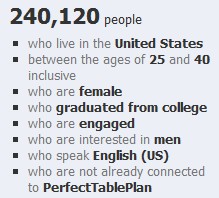
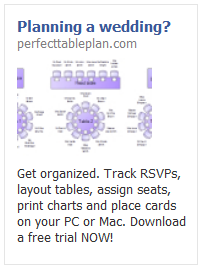
I ran 5 different ads over a couple of weeks. For example:

advertising software on facebookTrying to fit an attention grabbing and informative ad into the very limited strapline and image size was challenging. But I didn’t spend too long agonizing over the ‘creative’ (image and text), as this was just a feasibility study. The biggest problem was the minimum bid prices. Facebook was recommending I bid at least £0.40 per click. Given that the majority of my customers buy a single licence for £19.95 and typical conversion rates for clicks are around 1%, I would be likely to lose money if I bid £0.20 or more (especially when you consider ecommerce fees and support). I bid £0.10, but got no impressions at all. I bid £0.20 as an experiment and got a reasonable number of impressions. As soon as I dropped the bid to £0.15 the impressions slowed to a trickle.

Here are the stats from my experiments, as reported by Facebook:

Impressions: 357,366
Clicks: 310
Click through rate: 0.087%
Total cost: £46.60
Average cost per click: £0.15
Average cost per 1000 impressions: £0.13

Any of you who are used to Google Adwords might be surprised how low the CTR is. But apparently this is quite a reasonable CTR for Facebook. This isn’t too surprising when you consider that people are on Facebook to socialise, rather than to search for stuff.

Of course, the most important metric is the profit. So how many licences did I sell? According to my own cookie tracking: zero. Zilch, nada, nothing, not one. Cookie tracking isn’t 100% reliable, but it seems that a 1% conversion rate might be highly optimistic for a facebook ad. Advertising a £19.95 product on Facebook to people who might be planning to get married obviously wasn’t going to be profitable given my price point, the minimum bid prices and low conversion rate. So I created a new ad to try to target a more focussed demographic, who might convert better and perhaps buy one of the more expensive versions of my product. Ad number 6 was disallowed one minute after it had been approved.

Eh? This ad was very similar to the previous 5 approved ads and for the same product. Their email said:

The content advertised by this ad is restricted per section 5 of Facebook’s Advertising Guidelines. Restricted content includes, but is not limited to: 1. Downloadable products that may affect the user’s computer or browser performance in unexpected or undesirable ways; 2. Get rich quick and other money making opportunities that offer compensation for little or no investment, including “work from home” opportunities positioned as alternatives to part-time or full-time employment or promises of monetary gain with no strings attached. 3. “Free” offers that require users to complete several hidden steps or make additional purchases in order to receive the promised product. We reserve the right to determine what advertising we accept, and will not allow the creation of any further Facebook Ads of this type. Ads for this product, service or site should not be resubmitted.

I didn’t feel my ad/product violated any of those criteria. It was clear in the ad that only the trial was free (not the product) and it doesn’t do anything nasty or sneaky. I emailed them for clarification. Here is the response:

Hi Andy,

Thanks for your email. Please note that we don’t accept ads for downloadable products through our self-service advertising channel. We reserve the right to determine what advertising we accept, and will not allow the creation of any further Facebook Ads for this product.

In order to maintain legitimacy of the products and services promoted on Facebook, ads for downloadable or installable products are only permitted through a direct sales partnership with Facebook. At this time, we’re only able to provide this service to a small set of qualified advertisers.

We’re committed to providing high-quality support for all of our advertisers, and we’ll keep you and your business in mind for the future growth of our ads product. In the meantime, please continue to email us here with any questions you may have and we’ll be happy to answer them for you.

If you have any further questions about why your ad was disapproved for Restricted Content, please refer to our Help Center about downloads at:

http://www.facebook.com/help/?faq=18665

Thanks,

Gloria

Online Sales Operations

Facebook

So apparently, they still don’t accept advertising for downloadable software, unless you are an approved partner, because it ‘may affect the user’s computer’ (even if it doesn’t ). This wasn’t at all clear in their guidelines and they let me run 5 ads before they enforced it (these ads are still running BTW). Thanks Facebook, I like you less with every passing day (and I didn’t like you much to start with). At least I got enough data to show that I was unlikely to ever get a return on advertising a £20/$30 product. I also console myself with the fact that PerfectTablePlan is doing better financially than Facebook (after 7 years and with 500 million users Facebook are finally cash flow positive, but nowhere near recouping the estimated one billion dollars in venture capital) and my product will hopefully still be selling profitably after Facebook has  been buried by the ‘next great thing’ that comes along so regularly in the world of social media.

programmer-tshirts.com shutting shop

Back in 2008 I put together some programmer T-shirt designs to raise money for charity. The project was a modest success, selling 99 t-shirts (92 from zazzle.com and 7 from spreadshirt.com). I was hoping it would have done better, but was somewhat hampered by the high price of print-on-demand T-shirts (especially when you have a charity commission on top) and not finding anyone with the time and skills to make up for my lack of design talent. But it has still raised $302.33+£8.94 to be split between worthy charities sightsavers.org and jaipurfoot.org (plus a generous donation from microISV stalwart Patrick McKenzie).

The 3 most popular designs were:

  1. C++ programmers T-shirt
  2. engineer’s lament T-shirt
  3. I’m coding T-shirt

Sales have now slowed to a trickle. So I don’t intend to renew the programmer-tshirts.com domain and will shut down the shops in the next 7 days to pay out the rest of the commission. If you want to buy one of the t-shirt designs, I suggest you do it now! It would be nice to break 100. If anyone wants the domain I will transfer it for a donation to charity (email me).

Thanks for everyone who helped by sending me T-shirt ideas, linking from their blogs and buying T-shirts. Special thanks to Patrick McKenzie for setting up and hosting the programmer-tshirts.com web site and to Jeff Atwood for running some free ads on stackoverflow.com .

App stores set to dominate future software sales?

Following the success of the iPhone app store (over 6 billion downloads to date), app stores are becoming more and more of a feature of the software landscape. In case you missed it, Apple announced yesterday that there will be an App Store for Macs  ‘within 90 days’. In summary:

  • The Mac app store will be tightly integrated with Mac OS X, including automatic install and update.
  • There will be restrictions on technology, for example Java apps will not be allowed.
  • Apple will keep 30% of any revenue from sales.
  • $99/year subscription for developers.
  • Developers will still be able to sell their software outside the App store.

It is easy to see why Apple would want to do this:

  • A potentially huge new revenue stream from third party Mac software sales.
  • They get even more control over the customer experience.

And this could have advantages for Mac users:

  • Simpler payment and installation.
  • Screening out of low quality apps and malware.

And potential advantages for Mac developers:

  • Mac users might buy more software if it is easier to do so.
  • One main channel to concentrate your marketing efforts on.
  • Some of the boring infrastructure of selling software (licensing, shopping cart etc) can be taken care of by Apple.

But the disadvantages are all too obvious:

  • Your app could be rejected outright. And you won’t know until you submit it for approval. Apple are judge, jury and executioner. The iPhone app store has been infamous its capricious and opaque approval process.
  • 30% is a huge chunk of revenue. Typical payment processors take 5-10% of revenue. Where the new app store cannibalises existing sales (and it is hard to see that it won’t) vendors will lose 20-25% of existing sales revenues.
  • New apps and updates will be delayed by days or weeks as they go through the app store approval process.
  • A single centralised app store is likely to make it harder for niche/long-tail apps to make any sort of living. Certainly this is what seems to be happening in the iPhone App store.
  • Apple are control freaks and have traditionally taken a rather heavy handed approach with developers, including the liberal use of NDAs. The app store will give them even more control.

And worse might follow:

  • Apple makes a lot of their money from selling over-priced hardware. It may be in their interest to drive software prices down so they can sell more hardware. $5 is considered expensive in the iPhone App Store.
  • This could be the first step to making Mac OS X a closed system, like iPhone, where only Apple approved apps can be installed.

I guess they can’t piss off developers too much – a computer without third party applications isn’t going to be very attractive to customers. But I am finding it hard to work up any enthusiasm for a Mac app store. If it is successful I can either be in the store and give up a lot of freedom and cannibalize exisiting sales at a much lower margin, or stay out and be shut out of a large chunk of the market. It isn’t an attractive choice. As my app is written in C++/Qt, rather than Objective-C/Cocoa, I am not even sure that it will be eligible for inclusion in the store. I could just abandon Mac OS X, but Microsoft is also rumoured to be working on their own app store (despite the failure of DigitalLocker). That is a truly terrifying prospect given the awfulness of their ‘Works with Vista’ approval process (I speak from personal experience).

Suddenly web apps are looking more interesting.

Why statues weep

I have written articles for a range of different magazines and periodicals over the years. Many of the articles were related to software, but by no means all. A long-forgotten article I wrote for UK-based The Skeptic magazine some time back in the 1990s recently resurfaced when I was asked for permission to include it in a ‘best of’ compilation of 21 years of the magazine. Sucker that I am for seeing my name in print, I jumped at the chance.

The article ‘Myths of Secret Powers’ combines my long term interests in martial arts and skepticism and discusses whether the martial arts are able to unlock mystical secret powers unknown to western science  (executive summary: no). I am flattered that my name appears in print alongside many of the great and good in the skeptical movement, including: Richard  Wiseman; Susan Blackmore; Chris French; Ray Hyman and interviews with magician Paul Daniels and writer, broadcaster and ‘national treasure’ Stephen Fry. Other articles in the book cover a wide range of subjects, including:

  • Cryptozoology.
  • False memories.
  • The predictions of Nostradamus.
  • the Turin Shroud.
  • Alien abductions.
  • Alternative medicine.

There is much to interest anyone who thinks there is merit in taking a rational, evidence-based approach to understanding the world we live in. It is certainly a refreshing tonic to the tidal wave of woolly thinking foisted on us by a credulous and lazy media.

You can purchase the book from Philosphy Press or through Amazon.

First impressions count

Imagine you are on a blind date. You’ve heard great things about how funny and intelligent your date is and they are certainly very attractive. But it isn’t going well. They just sit there, staring at you with glassy eyes. Nothing you say gets more than a nod or a shake of the head. Maybe they are just shy, but you are never going to find out about their hidden depths if you climb out of the toilet window and run off into the night after twenty minutes.

Now imagine you have downloaded some new software. You have high expectations and your credit card to hand. But you just can’t figure out how to get started. It just sits there, a blank canvas. Totally inscrutable. Offering no clue as to what you should do next. How long would you click buttons and examine the menus before you gave up and downloaded a competing product. Two minutes perhaps? Competing products are only a few clicks away, after all.

As developers we spend months or years lovingly crafting our products. This makes it very hard for us to see them with the same eyes as potential customers. But those first few minutes are crucial for converting a download into a sale. Give the user some pointers on what to do first: show a set-up wizard, quick start guide or tutorial when the application first runs; populate the application with sample data; show hint text or images in the GUI (e.g. grey “start by typing your email here” text in the background of an edit field). If they feel they are making some progress within those first few minutes they are much more likely to buy. It really isn’t difficult to do, and yet it will probably have a bigger effect on your conversion rate than adding a complex feature that may take weeks or months to write.

I remember reading about usability problems with one of the early wordprocessor packages. Users weren’t used to wordprocessors and many just sat there, not knowing what to do. The solution was simple – to show a flashing cursor at the top of the page as a cue that this is where text would appear when they started typing. Usability improvements are usually simple in retrospect. But this apparently trivial change made a big difference to the initial experience.

How good a job are you doing at engaging users in those crucial first few minutes? Are they hitting the ground running, or just hitting a brick wall? Are you sure? Try comparing your download to conversion ratio to industry averages. Better still, do some testing. Find a few people in your target market that haven’t used your software before and watch them try to use it. Don’t help them, no matter how much you want to. It is often a painful experience, but I have yet to speak to anyone who has tried it and didn’t find it incredibly useful. Remember, you only get one chance to make a good first impression.

This article was also published as a guest post in the upload.com newsletter.