
 Floyd Price of Code Spaces has taken over the day-to-day running of microISV blog aggregator planetmicroisv.com from Baruch Even. He has already given it a fresh coat of paint. I appreciate the efforts of Baruch and Floyd to maintain this useful resource. planetmicroisv.com is well worth adding to your RSS feed if you are a microISV (or aspire to be).
Animated GIFs
The human brain and visual system is highly optimised to detect movement. If you don’t believe me, watch what happens to people’s attention when you turn on a TV in a room. Even if the sound is off, the program is dull and the conversation is interesting, people will find it very hard not to stare at the TV. You can exploit this by using animation on your website to grab the user’s attention. Animation is also a useful way of packing a lot of content into a limited space on your web page.
Animated GIFs are a useful low-tech way of adding animation to a website. They work in pretty much any browser, without requiring visitors to download a plug-in or even click a ‘play’ button. I use them on the PerfectTablePlan home page to show rotating testimonials and on adwords landing pages to give a brief visual overview of what PerfectTablePlan can do.
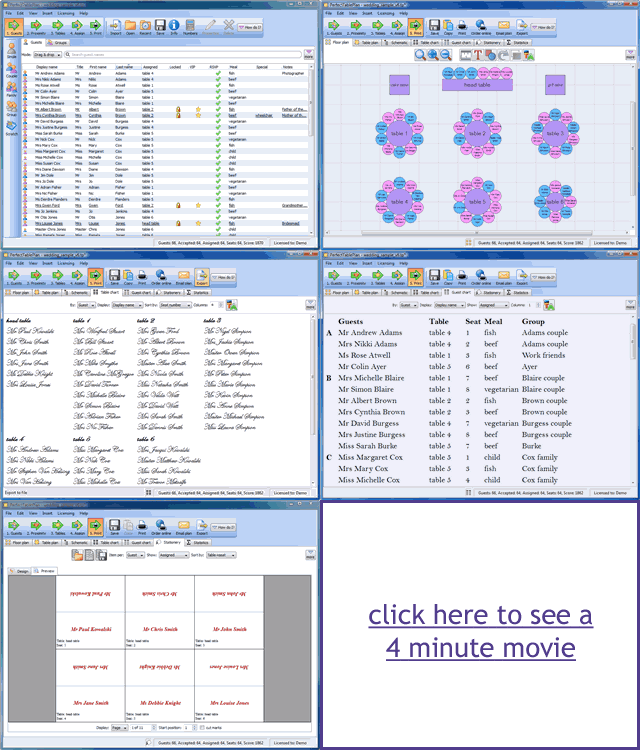
Animated GIFs are quite easy to create. Here is how I created the image above (on Windows):
- I used Sizer (freeware) to size the PerfectTablePlan main window to 960×750.
- I used SnagIt (commercial) to capture various screenshots, resize them to 320×250 and save them as separate 7-bit GIFs.
- I dragged the GIFs onto UnFreez (donationware) and created an animated GIF. (You can also use Adobe Photoshop, if you have it).
- I dragged the animated GIF onto SuperGIF (commercial with trial) to reduce the file size (by about 5% in this case).
The final result isn’t a work of art, but it is hopefully enough to grab the visitors attention and whet their appetite for more information.
Animated GIFs can get very large if you aren’t careful. But it rather defeats the object if your website visitor clicks ‘back’ before the image has loaded. I used 7-bit GIFs, small image dimensions, a limited number of frames and GIF optimisation to keep the file above to 72kb.
A word of warning – use animation sparingly or the effect can be quite overwhelming (don’t click this link if have epilepsy or a refined sense of taste).
Coverage Validator
 The sink is full of washing, I am wearing odd socks and I haven’t been out of the house in days. It must be time to put out that new release. But how can I be sure my testing hasn’t missed a hideously embarrassing bug? Maybe I introduced a major bug when I made that ‘cosmetic’ change at 2am?
In an ideal world I would just run a comprehensive automated regression test suite. Unfortunately it is difficult to automate graphical user interface (GUI) testing and the majority of lines of code in most applications are GUI. I estimate that the code for my own table planner software is at least 75% GUI code (not including generated code, which would push it even higher).
So I try to manually execute every line of my application before I release it. If I have to make any changes to the code, I start over again. This is very dull, but at least I have a tool to help me: Coverage Validator. Coverage Validator instruments code and shows, in real time, which lines have been executed. Click a few buttons on your application and watch the executed lines of code change colour from pink to yellow. Execute every line in the file and all the lines change colour to cyan. No recompilation or relinking is required and it doesn’t slow down the tested application too much. This real-time feedback is incredibly powerful for testing.
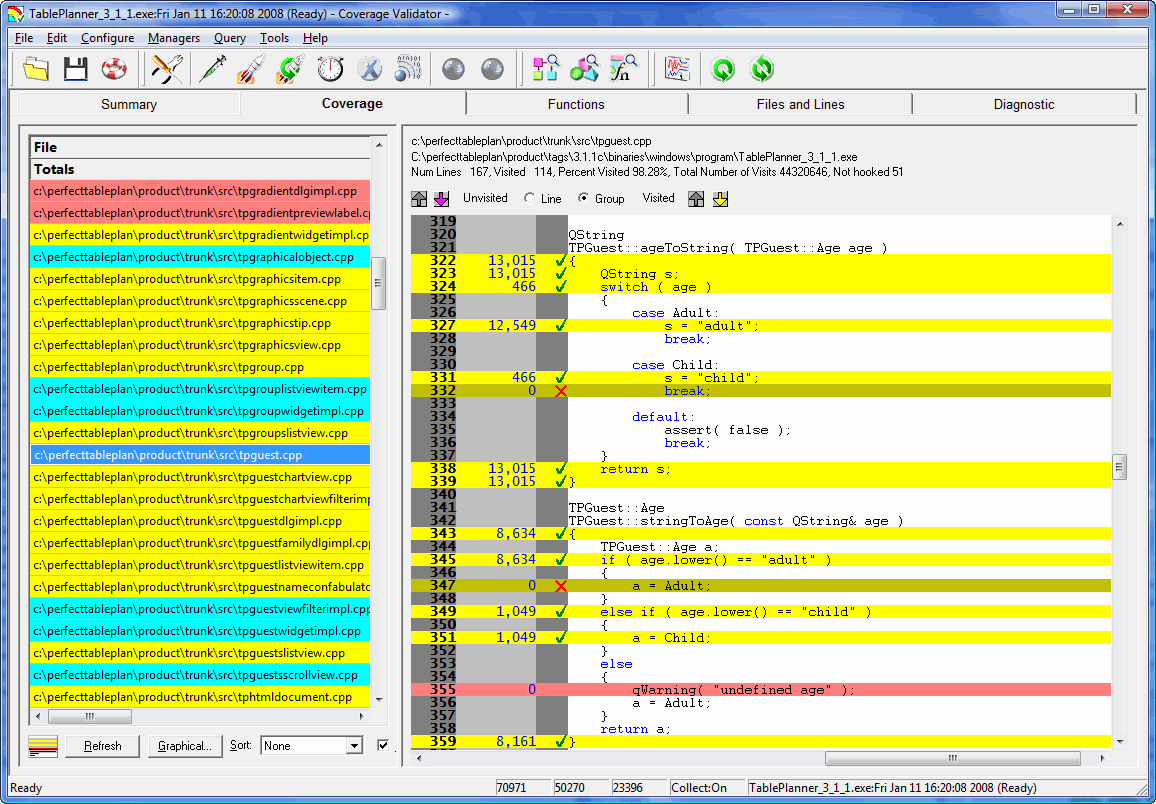
Unfortunately it also has a lot of shortcomings:
- The usability isn’t great. There is a confusing plethora of options for instrumenting your code that I would rather not have to know about.
- It isn’t able to ‘hook’ (instrument) all the lines of code. Whole blocks get missed out for reasons I don’t fully understand. Single line branches are particularly likely to be missed.
- The GUI isn’t great. For example, the display flashes horribly if you resize it.
- The automatic results merging is just plain weird. At the end of a session it can merge your coverage results into a previous session. This information isn’t much use to me at the end of a session. I want to merge previous results at the start of a session so I know which lines I haven’t tested.
- The GUI is quite ugly. They really need to update those tired old icons.
However being able to see line coverage information in real time is just so incredibly useful that I am prepared to put up with the many shortcomings. I just run my application alongside Coverage Validator and, file-by-file and function-by-function, I try to turn the lines of code yellow (or, better still, cyan). Every time I have used Coverage Validator I have found at least one potentially embarrassing bug that I hadn’t discovered by any other means. The support has also been responsive. It is just a pity about the flaws, without them this would be a ‘killer app’ for testing.
Coverage Validator works with C++, Delphi and VB on Windows NT4, 2000, 2003 and XP[1]. A single licence costs $199. A free 30-day evaluation licence is available.
[1]I am using it on Vista currently, and it seems to work fine.
RegSoft customers beware
It looks like Digital River have added ‘Reservation rewards’ to at least some of their RegSoft customers’ shopping baskets, as they did earlier with SWREG. If you take the bait and sign up for Reservation Rewards, you will be billed $9 per month forever, and get nothing useful in return. It is an absolute disgrace. If you are with RegSoft (or any other Digital River company) I suggest you check your shopping backet ASAP and seriously consider moving to an non-Digital River alternative.
Calculating volume discounts for software
 If people buy your software in bulk they expect to get a discount. But how much of a discount should you give them? A simple formula I have seen used is:
discounted price = unit price * n^f
Where n is the total number of units purchased and f is a scaling factor between 0 and 1. So, for example, if my unit price is 24.95 (pounds, dollars etc) and f is 0.8, the discounted price for 10 units is = 24.95 * 10^0.8 = 157.42, which you can then round to a more aesthetically appealing number.
This is a little over-simplistic, as it doesn’t take account of the cost to you of each unit (for example the duplication and postage cost of CDs and the cost of payment processing). We can get around this by breaking the price into a fixed cost and a margin and only applying the discount to the margin. Below is a link to a simple Excel spreadsheet that does this for you. You can change any of the values in the orange fields. f seems to give sensible results in the range 0.75 to 0.9.

discount spreadsheet (29kb, Excel 97-2003 format)
This spreadsheet can be useful to give you a starting point, but you also need to consider what the customer is prepared to pay. You maximise your profit by giving the buyer the minimum discount that is required to make the sale. For example, a reseller is out to make a profit and will probably expect a bigger discount on the same number of units than a large company buying in bulk for their end users. When in doubt, reduce the discount. You can always increase it a bit later if they don’t buy.
MicroISV Sites that Sell!
 I have belatedly got around to reading Bob Walsh’s new e-book: “MicroISV Sites that Sell! Creating and Marketing Your Unique Selling Proposition”. This is the first in a series of e-books for microISVs that allows Bob to go into selected subjects in more depth than was possible in his book “Micro-ISV: From Vision to Reality“.
The e-book is aimed very specifically at microISVs looking to create a website to sell their software effectively. It has a lot of detailed advice that I think will be invaluable to anyone creating their first microISV website. I have lost count of the number of microISV sites that make some of the mistakes Bob identifies, including:
- it isn’t immediately clear what the product does
- selling on features instead of benefits
- too much text
- inappropriate use of technical jargon
The content will inevitably be less useful for established microISVs, but you only need to find one useful idea to justify the cost of the e-book. My only real gripe is the comparison between programming patterns and marketing. I didn’t find this a helpful comparison. Marketing is a very different beast to programming and the sooner we face up to it, the better.
You can get a copy for $19 here.
Full disclosure: I got a free review copy of this e-book.
svp.co.uk
 In the 10 months that I have been writing this blog I have pointed the finger at quite a few companies I consider to be giving less than great service. I would like to even that up a bit by recommending svp.co.uk [1]. SVP supply blank CDs, printer paper, printer cartridges and an ever increasing range of computer related consumables and other items at very good prices. Their service has also been consistently good in the several years that I have used them. If you are based in the UK, you should check them out.
[1] I have no financial interest in SVP. I am just a happy customer.
The great digital certificate ripoff?
 Ripoff: A ripoff (or rip-off) is a bad deal. Usually it refers to an incident in which a person pays too much for something. A ripoff is distinguished from a scam in that a scam involves wrongdoing such as fraud. From Wikipedia.
Digitally signing your software allows you to show that you are the author of the software and that the application hasn’t been tampered with. If your software isn’t signed, Windows displays scary looking warnings when customers download it. So it makes a lot of sense to digitally sign your software if you are distributing it on Windows. So far so good.
Anyone can create their own digital signature, but Windows only ‘trusts’ signatures that have been created by certain third parties. While there are quite a few Microsoft root certificate program members, I am only aware of 3 that sell code signing (‘authenticode’) certificates. This is where it starts to get ugly. Here are their published prices per year:
Verisign: $499.00
Thawte: $299.00
Comodo: $119.95
That seems an awful lot considering that all they appear to do is check a document (e.g. a scan of your certificate of incorporation), check your whois record, multiply a couple of large prime numbers and then send you a certificate file. Much of this process is (or should be) automated. No wonder the founder of Thawte could afford to be one of the first space tourists.
Given that authenticode certificates from these three companies are functionally identical[1], as far as I can tell, why the price difference? It seems even more bizarre when you consider that Verisign now own Thawte. If you had the misfortune to sign up for the Microsoft ‘works with Vista’ program you could get a 1-year Verisign code signing certificate for $99. I doubt they were doing this at a loss, so how can they justify selling the exact same certificate for $499? I would guess that at least 99% of customers will never check who issued a certificate, so it can hardly be due to the power of the brand.
So why doesn’t someone just set up their own certificating authority, get approved by Microsoft, and undercut these 3 companies? Because their root certificate wouldn’t be installed on all the millions of PCs currently out there. It would be worthless until the vast majority of PCs had the new root certificate. What a fantastic lock-in!
The good news is that you can buy Comodo certificates for much more reasonable prices from these resellers:
Tucows: $75 [2]
KSoftware: $85 ($75 for ASP members)
Which rather begs the question – if resellers can make a profit at $75, why are Comodo charging $119? Because they can, I suppose. I emailed Verisign, Thawte and Comodo to ask about the disparities in price. I only received a reply from Comodo:
This [difference between their price and the reseller price] is simply due to Retail Vs Wholesale solutions we offer. Our Resellers commit to a specific program which enables discounted prices allowing them to make margins on the product as they see fit. Whether that be reduced prices, or make a cash profit from the sale.
All 3 companies have had major price hikes in the last few years. With so little competition, why wouldn’t they? So what is Microsoft’s role is in all of this? One would have thought that they would want to keep certificate prices low to encourage their wider adoption. I emailed Microsoft’s PR people to ask about pricing and whether they had any financial interest in Verisign. Here is the response:
1) Why does Microsoft “insist” on VeriSign certificates?
Microsoft Windows Quality Labs only recognizes files that are signed with a Verisign Class 3 Certificate of Authority (COA). Windows Quality Labs is evaluating recognizing other COA’s. There is a USD $399 offer for Class 3 COAs for those partners (IHVs, OEMS, ISVs) – who plan to submit solutions for Microsoft certification. More details are available at http://www.verisign.com/code-signing/msft-organizational-certificates/.
2) Does Microsoft have any comment to make on the disparity in price?
VeriSign also offers a USD $99 Organizational ID certificate. This provides authentication for organizations to Microsoft Windows Quality Labs, providing access to various services, such as creating submission IDs for products to undergo Microsoft testing. This certificate is not valid for signing drivers or executable files.
Information pertaining to Microsoft Investments can be located at the MSFT Investor Relations site, under Investments/Acquisitions: http://www.microsoft.com/msft/default.mspx.
Steve Bell, Senior Product Manager – Server Certification Programs, Windows Server
After a bit of surfing I found this page which says that Microsoft invested in Verisign in 1996. I don’t know how much they invested, but it certainly puts things in a rather different light. So Windows authenticode certificates are effectively controlled by just 2 companies, at least one of whom is part-owned by Microsoft[3]. Companies are in business to make profits, but it seems to me that these companies are using their effective monopoly to take advantage of the situation. I only see the situation getting worse as Windows displays ever more scary warnings for unsigned software. Perhaps this is something government regulators should be investigating. Let’s hope that Verisign don’t buy Comodo as well.
[1] Only Verisign certificates are recognised for some of the Microsoft certification programs, for example x64 Vista driver signing.
[2] You need to register with Tucows to login.
[3] Assuming they haven’t sold their Verisign stock. I am not aware that Microsoft owns any Comodo stock. I haven’t been able to find any further details by Googling.
Credit card fraud
 Fraud can be a very big problem for online software vendors. Fraudsters can easily use throwaway email addresses that can’t be traced back to them (e.g. Hotmail) and IP addresses aren’t difficult to hide. Not only does the vendor lose the payment when the fraud is reported, they also often get hit with a chargeback fee. This is pretty outrageous when you think about it – the credit card companies are charging vendors for the fraudulent transactions that they themselves have failed to detect.
Thankfully I have had relatively few fraudulent transactions in the last 3 years of running my own business. However some more mainstream B2C businesses aren’t as lucky. Below are the experiences of one software vendor I have corresponded with [1]. It makes for scary reading. The vendor wishes to remain anonymous for understandable reasons.
I tracked one of our recent chargeback emails to a forum were they had been openly selling stolen credit card information for $2 each. If you do have a popular product that may be prone to chargebacks then it is a small nightmare unless you have a fraud system in place as there are 1000s of credit card info out there with full contact details. There is not a day goes by that we don’t get at least 3 stolen credit card purchase attempts.
We use WorldPay and they have a quick check on cv2 code and if the country, postal address and postcode match. But almost all of these purchases pass the simple fraud checks. You cannot even rely on IP checking as the fraudsters are pretty smart and use proxies, or even hijack PCs to make purchases from the same country the credit card is issued. PayPal is not quite as serious, but we do still receive quite a few hijacked account purchases also.
WorldPay fraud checking is next to useless. Even the ones they warn on are usually legitimate. They have recently released a new backend, but they have made the problem worse as they seem to warn if the IP address isn’t from the same country. The problem with that is we get a lot of sales that don’t match, from military based in different countries. Our whitelist used to let them go through automatically, but now we have to manually capture the payment.
The number of fraudulent purchases changes depending if you make a new release etc or if your software is hard to find an easy crack. It can be from 1% to 15% depending, as you may have a single user trying to hit you on certain days.
We were forced to make our own fraud checking system. At least we had all the information at hand as we make users sign up to our site before making a purchase and we log all activity from a user, but to get that information we had to lose many thousands of pounds in fees. Since implementing our own fraud check (as fraudsters do tend to use amazingly similar criteria each time) we have reduced it to on average 1-2 a week, which are almost impossible to catch.
I think the level of fraud has to do with the type of users we sell software to. They are the sort of people that know exactly where to find cracks/keygens. Our software does have pretty good protection and online activation, so it is not so easy to get an easy “working” crack/keygen for it. We also have large volume sales over the past few years, so we have more information than most developers would see.
The credit card companies can’t really lose, especially with “no card holder signature” sales. Chargebacks cost on average 15 Euros. I have even contacted the likes of PayPal telling them that sales are fraudulent, and quite a lot of times they do not care.
We get to see all our sales, I would hate to think what is happening at these merchant services like Regsoft etc. How many sales are being refused that may be legitimate? I tried paying a programmer once who accepted payments using Regnow from my PayPal account and they refused it. My account was verified and had been in good standing for many years. It wouldn’t have been so bad but the person I was paying did not have a clue it was refused.
So, if you have a successful consumer product that fraudsters might be interested in, be prepared to expend a significant amount of money and effort dealing with online fraud. And don’t expect the payment processors and credit card companies to give you much help. I guess the credit card companies don’t have much incentive to reduce fraud. As long as they can keep pushing the cost of fraud onto the vendors and the fraudsters don’t bring the whole system down, the credit card companies seem quite happy. Why wouldn’t they be?
[1] I have spliced together the contents of several emails and edited it for continuity and brevity.
Windows Vista service pack 1
 Microsoft have announced that service pack 1 for Windows Vista has been released to manufacturing. Microsoft claim “great progress in performance, reliability and compatibility”. SP1 will be rolled out through Windows update from mid-March.
My own stats show that Vista has been slowly increasing market share at 1% per month. At this rate it will take it another 5 years to reach the 75% share currently held by XP. But perhaps a lot of people have been wisely waiting for SP1 before committing?
I have been using Vista on my main development machine for the last few months. It is OK once you turn the deeply annoying UAC off. But it is still hard to see any compelling reason to upgrade from XP.
 Successful Software