Category Archives: C++

Updating application icons for macOS 26 Tahoe and Liquid Glass

The application icon for my data wrangling software looks like this on a Mac up to macOS 15.x:

However, Apple has once again nuked everything from orbit. Now it looks like this in macOS 26 Tahoe when the application is inactive or if you choose any Icon & widget style apart from Default:

Thanks Apple. It is such a joy to develop for Mac.

With some help from a designer and hours of going around in circles, I have finally managed to fix things to support the new ‘liquid glass’ look. This is how it should look in the next release, depending on the setting in Appearance>Icon & widget style:

Default
Dark
Clear/Light
Clear/Dark
Tinted

I’m not convinced it is an improvement in terms of usability. But, at least my app icon doesn’t look like shit.

What you need to know

The new macOS 26 icon format is .icon. It is a folder full of various resources and is totally different to the old .icns format.

The .icon file can be created by Apple Icon Composer. I used a freelancer on Fiverr who did a good job of converting my existing vector artwork and was very cheap. The .icon file should contain a maximum of 4 groups (which seem to be like layers) other it won’t compile to a resource properly.

Note that macOS hide the extension of .icon folders by default, which was a source of some confusion.

The .icon file then has to be processed into an Assets.car file using actool. For example:

xcrun actool application.icon --compile ./icons/macosx --output-format human-readable-text --notices --warnings --errors --output-partial-info-plist temp.plist --app-icon Icon --include-all-app-icons --enable-on-demand-resources NO --development-region en --target-device mac --minimum-deployment-target 26.0 --platform macosx

You will need to change the bold parts above, as appropriate.

I had to update my Mac laptop to macOS 26, Xcode 26 and the macOS 26 SDK for the above to work.

You can check the Assets.car file using assetutil to create a .json file listing the contents:

xcrun --sdk macosx assetutil --info ./icons/macosx/Assets.car > ./icons/macosx/temp.json 

You will need to change the bold parts above, as appropriate.

Then you need to reference the new icon in your existing application .plist file. For example, add at the same level as CFBundleGetInfoString:

<key>CFBundleIconName</key>
<string>application</string>

You will need to change the bold part above, as appropriate. I believe the string value if based on the file stem of the original .icon file. But I’m not 100% sure about that. Look at the .json file produced by assetutil for clues. Mine contained this:

The temp.plist file generated by actool is apparently supposed to give you a .plist file that refers to the icon resource. It didn’t and was completely useless.

Then place both Assets.car and your old .icns file in the Resource folder of your application (before you sign it). That way it should look ok on both macOS 26 and earlier OSes.

If you develop using XCode, it will probably do some of the above for you. I develop in C++/Qt using Qt Creator, so I had to do it all manually.

I was able to generate the Assets.car on macOS 26 and then incorporate it into the build on my macOS 12 development machine.

I hope the above saves someone a few hours. Now I need to repeat the process for PerfectTablePlan.

You might also find this post useful (where I got some of the information):

https://www.hendrik-erz.de/post/supporting-liquid-glass-icons-in-apps-without-xcode

20 years working on the same software product

I released version 1 of my table seating planning software, PerfectTablePlan, in February 2005. 20 years ago this month. It was a different world. A world of Windows, shareware and CDs. A lot has changed since then, but PerfectTablePlan is now at version 7 and still going strong.

PerfectTablePlan v1

PerfectTablePlan v7

I have released several other products since then, and done some training and consulting, but PerfectTablePlan remains my most successful product. It’s success is due to a lot of hard work, and a certain amount of dumb luck.

I was getting married and I volunteered to do the seating plan for our wedding reception. It sounded like a relatively straightforward optimization problem, as we only had 60 guests and no family feuds to worry about. But it was surprisingly difficult to get right. I looked around for some software to help me. There were a couple of software packages, but I wasn’t impressed. I could do better myself! So I wrote a (very rough) first version, which I used for our wedding.

Things weren’t going great at my day job, at a small software startup. Maybe I could commercialize my table planner? I was a bit wary, as my potential competitors all seemed rather moribund and I didn’t think I would be able to make a living off it. But I thought I could do everything worth doing in 6-12 months and then start on the next product. Wrong on both counts!

Web-based software was still in its infancy in 2005. So I decided to write it as desktop software using C++ and cross-platform framework Qt, which I had plenty of experience in. Initially, I just released a Windows version. But I later added a Mac version as well. Qt has had its commercial ups and downs in the last 20 years, but it has grown with me and is now very robust, comprehensive and well documented. I think I made a good choice.

I financed PerfectTablePlan out of my own savings and it has been profitable every year since version 1 was launched. I could have taken on employees and grown the business, but I preferred to keep it as a lifestyle business. My wife does the accounts and proof reading and I do nearly everything else, with a bit of help from my accountant, web designers and a few other contractors. I don’t regret that decision. 20 years without meetings, ties or alarm clocks. My son was born 18 months after PerfectTablePlan was launched and it has been great to have the flexibility to be fully present as a Dad.

CDs, remember them? I sent out around 5,000 CDs (with some help from my father), before I stopped shipping CDs in 2016.

During the lifetime of PerfectTablePlan it became clear that things were increasingly moving to the web. But I couldn’t face rewriting PerfectTablePlan from scratch for the web. Javascript. Ugh. Also PerfectTablePlan is quite compute intensive, using a genetic algorithm to generate an automated seating plan and I felt it was better running this on the customer’s local computers than my server. And some of my customers consider their seating plans to be confidential and don’t want to store them on third party servers. So I decided to stick with desktop. But, if I was starting PerfectTablePlan from scratch now, I might make a different decision.

Plenty of strange and wonderful things have happened over the last 20 years, including:

  • PerfectTablePlan has been used by some very famous organizations for some very famous events (which we mostly don’t have permission to mention). It has seated royalty, celebrities and heads of state.
  • PerfectTablePlan was used as part of a demonstration of the (controversial) first commercial quantum computer by D-Wave.
  • A mock-up of PerfectTablePlan, including icons I did myself, was used without our permission by Sony in their ‘Big day’ TV comedy series. I threated them with legal action. Years later, I am still awaiting a reply.
  • I got to grapple with some interesting problems, including the mathematics of large combinatorial problems and elliptical tables. Some customers have seated 4,000 guests and 4000! (4000x3999x3998 .. x 1) is a mind-bogglingly huge number.
  • A well known wedding magazine ran a promotion with a valid licence key clearly visible in a photograph of a PerfectTablePlan CD. I worked through the night to release a new version of PerfectTablePlan that didn’t work with this key.
  • I found out that CDs are edible.
  • I sponsored the building of a kindergarten in Nepal.
  • I once had to stay up late, in a state of some inebriation, to fix an issue so that a world famous event wasn’t a disaster (no I can’t tell you the event).

The lowest point was the pandemic, when sales pretty much dropped to zero.

Competitors and operating systems have come and gone and the ecosystem for software has changed a lot, but PerfectTablePlan is still here and still paying the bills. It is about 145,000 lines of C++. Some of the code is a bit ugly and not how I would write it now. But the product is very solid, with very few bugs. The website and user documentation are also substantial pieces of work. The PDF version of the documentation is nearly 500 pages.

I now divide my time between PerfectTablePlan and my 2 other products: data wrangling software Easy Data Transform and visual planner Hyper Plan. Having multiple products keeps things varied and avoids having all my eggs in one basket. In May 2024 I released PerfectTablePlan v7 with a load of improvements and new features. And I have plenty of ideas for future improvements. I fully expect to keep working on PerfectTablePlan until I retire (I’m 59 now).

Inputting and outputting to Excel XLSX/XLS using the LibXL library

I needed a way to input from and output to Excel .xlsx and .xls file in my data wrangling software, Easy Data Transform. I had previously used Qt’s ActiveQt classes to talk to Excel via ActiveX, in my seating planner software, PerfectTablePlan. But this came with distinct limitations:

  • Excel must be installed on the customer computer.
  • ActiveQt only works on Windows.

I wanted to be able to read and write Excel file on Windows and Mac from my C++/Qt application, whether Excel is installed or not. I would rather commit suicide with a cheese grater, than try to write my own code to parse whatever horrific format Excel is written in. So I looked around for a library.

I ended up buying a licence for LibXL, from XLWare, back in 2019. It has been working great ever since. I now also use it in PerfectTablePlan v7.

Things to like:

  • Available as a library for Windows, Mac, Linux and iOS (I have only used it for Windows and Mac, so far).
  • Accessible from lots of languages, including: C, C++, .Net, Delphi, PHP, Python, PowerBASIC and Fortran.
  • Example code is available in C++, C, C# and Delphi.
  • Good support.
  • Regular updates.
  • Reasonable pricing.
  • No per-user fees.

The API is a little low-level for my taste, but I guess that is inevitable when you support C as well as C++. Reading and writing is slow compared to reading and writing the same data to/from a CSV file. But, no doubt, that is due to the limitations of the Excel file format.

I don’t have any affiliation with LibXL beyond being a paying customer, and I haven’t been asked to write this. I just wanted to give a shout-out to the developer, Dmytro, for his sterling work. Long may it continue.

What is the index of an empty string in an empty string?

This sounds like a question a programmer might ask after one medicinal cigarette too many. The computer science equivalent of “what is the sounds of one hand clapping?”. But it is a question I have to decide the answer to.

I am adding indexOf() and lastIndexOf() operations to the Calculate transform of my data wrangling (ETL) software (Easy Data Transform). This will allow users to find the offset of one string inside another, counting from the start or the end of the string. Easy Data Transform is written in C++ and uses the Qt QString class for strings. There are indexOf() and lastIndexOf() methods for QString, so I thought this would be an easy job to wrap that functionality. Maybe 15 minutes to program it, write a test case and document it.

Obviously it wasn’t that easy, otherwise I couldn’t be writing this blog post.

First of all, what is the index of “a” in “abc”? 0, obviously. QString( “abc” ).indexOf( “a” ) returns 0. Duh. Well only if you are a (non-Fortran) programmer. Ask a non-programmer (such as my wife) and they will say: 1, obviously. It is the first character. Duh. Excel FIND( “a”, “abc” ) returns 1.

Ok, most of my customers, aren’t programmers. I can use 1 based indexing.

But then things get more tricky.

What is the index of an empty string in “abc”? 1 maybe, using 1-based indexing or maybe empty is not a valid value to pass.

What is the index of an empty string in an empty string? Hmm. I guess the empty string does contain an empty string, but at what index? 1 maybe, using 1-based indexing, except there isn’t a first position in the string. Again, maybe empty is not a valid value to pass.

I looked at the Qt C++ QString, Javascript string and Excel FIND() function for answers. But they each give different answers and some of them aren’t even internally consistent. This is a simple comparison of the first index or last index of text v1 in text v2 in each (Excel doesn’t have an equivalent of lastIndexOf() that I am aware of):

Changing these to make the all the valid results 1-based and setting invalid results to -1, for easy comparison:

So:

  • Javascript disagrees with C++ QString and Excel on whether the first index of an empty string in an empty string is valid.
  • Javascript disagrees with C++ QString on whether the last index of an empty string in a non-empty string is the index of the last character or 1 after the last character.
  • C++ QString thinks the first index of an empty string in an empty string is the first character, but the last index of an empty string in an empty string is invalid.

It seems surprisingly difficult to come up with something intuitive and consistent! I think I am probably going to return an error message if either or both values are empty. This seems to me to be the only unambiguous and consistent approach.

I could return a 0 for a non-match or when one or both values are empty, but I think it is important to return different results in these 2 different cases. Also, not found and invalid feel qualitatively different to a calculated index to me, so shouldn’t be just another number. What do you think?

*** Update 14-Dec-2023 ***

I’ve been around the houses a bit more following feedback on this blog, the Easy Data Transform forum and hacker news and this what I have decided:

IndexOf() v1 in v2:

v1v2IndexOf(v1,v2)
1
aba
aba1
aa1
aaba1
xy
worldhello world7

This is the same as Excel FIND() and differs from Javascript indexOf() (ignoring the difference in 0 or 1 based indexing) only for “”.indexOf(“”) which returns -1 in Javascript.

LastIndexOf() v1 in v2:

v1v2LastIndexOf(v1,v2)
1
aba
aba4
aa1
aaba3
xy
worldhello world7

This differs from Javascript lastIndexOf() (ignoring difference in 0 or 1 based indexing) only for “”.indexOf(“”) which returns -1 in Javascript.

Conceptually the index is the 1-based index of the first (IndexOf) or last (LastIndexOf) position where, if the V1 is removed from the found position, it would have to be re-inserted in order to revert to V2. Thanks to layer8 on Hacker News for clarifying this.

Javascript and C++ QString return an integer and both use -1 as a placeholder value. But Easy Data Transform is returning a string (that can be interpreted as a number, depending on the transform) so we aren’t bound to using a numeric value. So I have left it blank where there is no valid result.

Now I’ve spent enough time down this rabbit hole and need to get on with something else! If you don’t like it you can always add an If with Calculate or use a Javascript transform to get the result you prefer.

*** Update 15-Dec-2023 ***

Quite a bit of debate on this topic on Hacker News.

How to add a dark theme to your Qt application

Dark themes are now available for Windows 10 and Mac and it is increasingly expected that desktop applications will offer a dark theme. Previously Qt support for dark themes was patchy. But I am happy to say that it now seems to work fine with Qt 5.12.2, and I have added dark themes to both Windows and Mac versions of my Easy Data Transform and Hyper Plan applications.

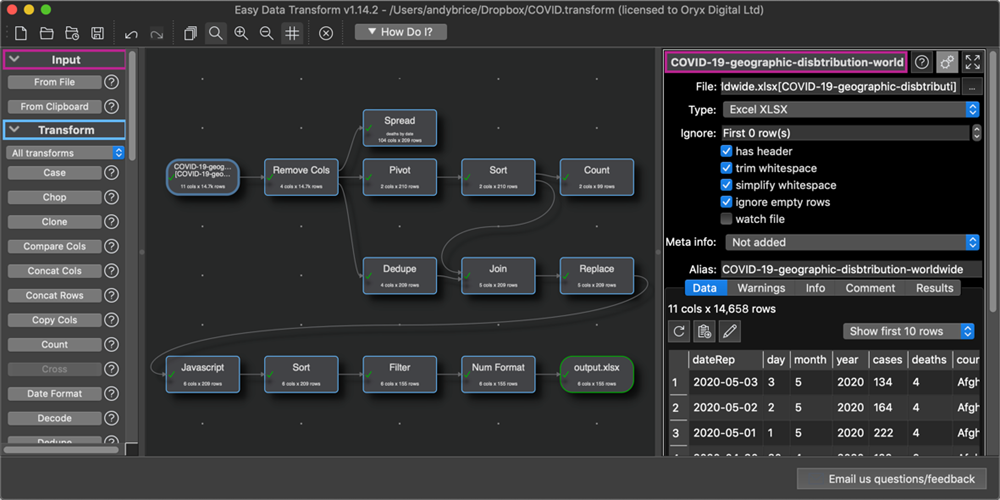
Easy Data Transform for Mac with a dark theme:

Easy Data Transform for Windows with a dark theme:

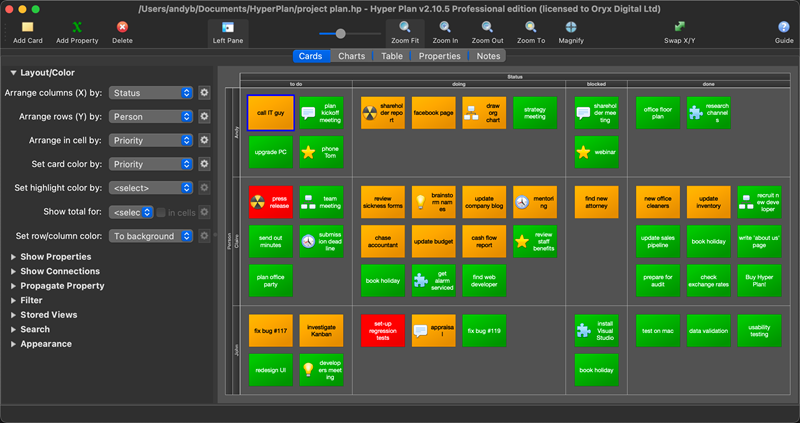
Hyper Plan for Mac with a dark theme:

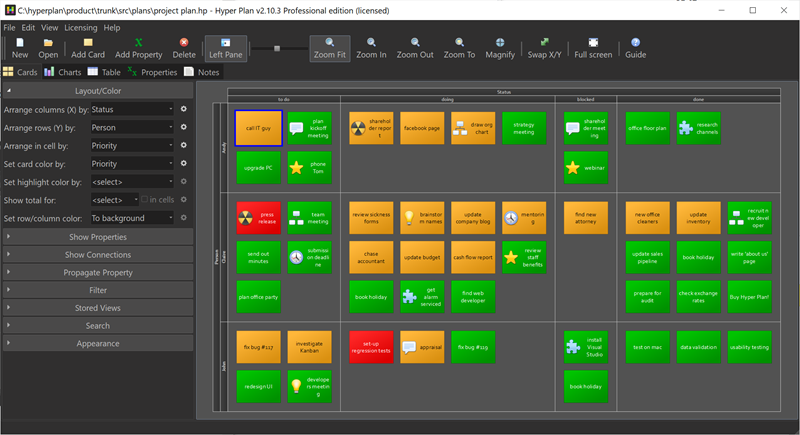
Hyper Plan for Windows with a dark theme:

I haven’t decided yet whether to add a dark theme to PerfectTablePlan.

Adding dark themes was a fair amount of work. But a lot of that was scouring forums to work out how to integrate with macOS and Windows. Hopefully this article will mean you don’t have to duplicate that work.

Dark themes work a bit differently on Windows and Mac. On Windows changing the UI theme to dark won’t directly affect your Qt application. But you can use an application stylesheet to set the appearance. On Mac changing the UI theme to dark will automatically change your application palette, unless you explicitly block this in your Info.plist file (see below). On both platforms you will need to change any icons you have set to the appropriate light/dark version when the theme changes. Some of this may change in future as dark themes are more closely integrated into Qt on Windows and Mac.

macOS

You can add the following helper functions to a .mm (Objective-C) file:

#include "Mac.h"
#import <Cocoa/Cocoa.h>

bool macDarkThemeAvailable()
{
    if (__builtin_available(macOS 10.14, *))
    {
        return true;
    }
    else
    {
        return false;
    }
}

bool macIsInDarkTheme()
{
    if (__builtin_available(macOS 10.14, *))
    {
        auto appearance = [NSApp.effectiveAppearance bestMatchFromAppearancesWithNames:
                @[ NSAppearanceNameAqua, NSAppearanceNameDarkAqua ]];
        return [appearance isEqualToString:NSAppearanceNameDarkAqua];
    }
    return false;
}

void macSetToDarkTheme()
{
   // https://stackoverflow.com/questions/55925862/how-can-i-set-my-os-x-application-theme-in-code
   if (__builtin_available(macOS 10.14, *))
   {
        [NSApp setAppearance:[NSAppearance appearanceNamed:NSAppearanceNameDarkAqua]];
   }
}

void macSetToLightTheme()
{
    // https://stackoverflow.com/questions/55925862/how-can-i-set-my-os-x-application-theme-in-code
    if (__builtin_available(macOS 10.14, *))
    {
        [NSApp setAppearance:[NSAppearance appearanceNamed:NSAppearanceNameAqua]];
    }
}

void macSetToAutoTheme()
{
    if (__builtin_available(macOS 10.14, *))
    {
        [NSApp setAppearance:nil];
    }
}

The macSetToLightTheme() and macSetToDarkTheme() are useful if you want to give the user the option to ignore the OS theme. Call macSetToAutoTheme() to set it back to the default.

Corresponding header file:

#ifndef MAC_H
#define MAC_H

bool macDarkThemeAvailable();
bool macIsInDarkTheme();
void macSetToDarkTheme();
void macSetToLightTheme();
void macSetToAutoTheme();

#endif // MAC_H

You then need to add these files into your .pro file:

macx {
   ...
   HEADERS += Mac.h
   OBJECTIVE_SOURCES += Mac.mm
}

You can detect a change of theme by overriding changeEvent():

void MainWindow::changeEvent( QEvent* e )
{
#ifdef Q_OS_MACX
    if ( e->type() == QEvent::PaletteChange )
    {
        // update icons to appropriate theme
        ...
    }
#endif
    QMainWindow::changeEvent( e );
}

If you decide you *don’t* want to add a dark theme to your Mac app, the you should add the bold entry below to your Info.plist file:

<?xml version="1.0" encoding="UTF-8"?>
<!DOCTYPE plist PUBLIC "-//Apple//DTD PLIST 1.0//EN" "http://www.apple.com/DTDs/PropertyList-1.0.dtd">
<plist version="1.0">
<dict>
    ...
    <key>NSRequiresAquaSystemAppearance</key>
    <true/>
</dict>
</plist>

This will then force it to be shown in a light theme, regardless of the theme the operating system is in.

Windows

To set a dark theme palette you can use a stylesheet:

QFile f( ":qdarkstyle/style.qss" );
if ( !f.exists() )
{
   qWarning() << "Unable to set dark stylesheet, file not found";
}
else
{
   f.open( QFile::ReadOnly | QFile::Text );
   QTextStream ts( &f );
   getApp()->setStyleSheet( ts.readAll() );
}

The stylesheet I used was a modified version of qdarkstyle from a few years ago.

To unset the stylesheet and return to a light theme just call:

getApp()->setStyleSheet( "" );

Alternatively you can do it by changing the application palette.

Windows helper functions:

bool windowsDarkThemeAvailable()
{
    // dark mode supported Windows 10 1809 10.0.17763 onward
    // https://stackoverflow.com/questions/53501268/win10-dark-theme-how-to-use-in-winapi
    if ( QOperatingSystemVersion::current().majorVersion() == 10 )
    {
        return QOperatingSystemVersion::current().microVersion() >= 17763;
    }
    else if ( QOperatingSystemVersion::current().majorVersion() > 10 )
    {
        return true;
    }
    else
    {
        return false;
    }
}

bool windowsIsInDarkTheme()
{
    QSettings settings( "HKEY_CURRENT_USER\\Software\\Microsoft\\Windows\\CurrentVersion\\Themes\\Personalize", QSettings::NativeFormat );
    return settings.value( "AppsUseLightTheme", 1 ).toInt() == 0;
}

Currently there seems to be no way to conect to a signal or event that shows the theme has changed in Windows. So I connected to a signal from a QTimer that fires every 5 seconds to check windowsIsInDarkTheme().

Icons

When the theme changes you potentially need to update any icons you have set, e.g. for the toolbar.

In a light theme you can usually set the active icons and let Qt calculate the corresponding disabled icons. This doesn’t work for a dark theme as you want the disabled icons to be darker than the enabled icons, rather than lighter. So you can either calculate the disabled icons programmatically or you can provide a set of disabled icons as well. I opted for the former.

Assuming your icons are set up as resources under :/icons/dark and :/icons/light you can do something like this:

QString getResourceName( const QString& iconName, bool dark )
{
    return QString( ":/icons/%1/%2" ).arg( dark ? "dark" : "light" ).arg( iconName );
}

QPixmap getPixmapResource( const QString& iconName, bool dark )
{
    QString resourceName = getResourceName( iconName, dark );
    QPixmap pixmap = QPixmap( resourceName );
    Q_ASSERT( !pixmap.isNull() );
    return pixmap;
}

QIcon getIconResource( const QString& iconName, bool dark )
{
    QIcon icon;
    QPixmap pixmap = getPixmapResource( iconName, dark );
    icon.addPixmap( pixmap );
    if ( dark )
    {
        // automatic disabled icon is no good for dark
        // paint transparent black to get disabled look
        QPainter p( &pixmap );
        p.fillRect( pixmap.rect(), QColor( 48, 47, 47, 128 ) );
        icon.addPixmap( pixmap, QIcon::Disabled );
    }
    return icon;
}

Then you can reset the icon for the appropriate theme with:

bool isDark()
{
#ifdef Q_OS_MACX
   return macIsInDarkTheme();
#else
   return windowsIsInDarkTheme();
#endif
}
...
myButton->setIcon( getIconResource( "my_icon.png", isDark() ) );
...

You may also be able to update icons through QIcon::setThemeName(). But I didn’t explore this in any detail.

Note that you probably don’t want the enabled icons to be pure white, as it is a bit too visually jarring against a dark theme.

Easy Data Transform v1.6.0

I have been working hard on Easy Data Transform. The last few releases have included:

  • a 64 bit version for Windows
  • JSON, XML and vCard format input
  • output of nested JSON and XML
  • a batch processing mode
  • command line arguments
  • keyboard shortcuts
  • various improvements to transforms

Plus lots of other improvements.

The installer now includes 32 and 64 bit version of Easy Data Transform for Windows and installs the one appropriate to your operating sytem. This is pretty easy to with the Inno Setup installer. You just need to use Check: Is64BitInstallMode, for example:

[Files]
Source: "..\binaries\windows\program\{#MyAppExeName}"; DestDir: "{app}"; Flags: ignoreversion; Check: not Is64BitInstallMode
Source: "..\binaries\windows\program64\{#MyAppExeName}"; DestDir: "{app}"; Flags: ignoreversion; Check: Is64BitInstallMode

But it does pretty much double the size of the installer (from 25MB to 47MB in my case).

The 32 bit version is restricted to addressing 4GB of memory. In practise, this means you may run out of memory if you get much above a million data values. The 64 bit version is able to address as much memory as your system can provide. So datasets with tens or hundreds of millions of values are now within reach.

I have kept the 32 bit version for compatibility reasons. But data on the percentage of customers still using 32 bit Windows is surprisingly hard to come by. Some figures I have seen suggest <5%. So I will probably drop 32 bit Windows support at some point. Apple, being Apple, made the transition to a 64 bit OS much more aggressively and so the Mac version of Easy Data Transform has always been 64 bit only.

I have also been doing some benchmarking and Easy Data Transform is fast. On my development PC it can perform an inner join of 2 datasets of 900 thousand rows x 14 columns in 5 seconds. The same operation on the same machine in Excel Power Query took 4 minutes 20 seconds. So Easy Data Transform is some 52 times faster than Excel Power Query. Easy Data Transform is written in C++ with reference counting and hashing for performance, but I am surprised by just how much faster it is.

The Excel Power Query user interface also seems very clunky by comparison. The process to join two CSV files is:

  • Start Excel.
  • Start Power Query.
  • Load the two data files into Excel power query.
  • Choose the key columns.
  • Choose merge.
  • Choose inner join. Wait 4 minutes 20 seconds.
  • Load the results back into Excel. Wait several more minutes.
  • Save to a .csv file.
  • Total time: ~600 seconds

Whereas in Easy Data Transform you just:

  • Start Easy Data Transform.
  • Drag the 2 files onto the center pane.
  • Click ‘join’.
  • Select the key columns. Wait 5 seconds.
  • Click ‘To file’ and save to a .csv file.
  • Total time: ~30 seconds

join-op

If you have some data to transform, clean or analyze please give Easy Data Transform a try. There is a fully functional free trial. Email me if you have any questions.


Bloviate

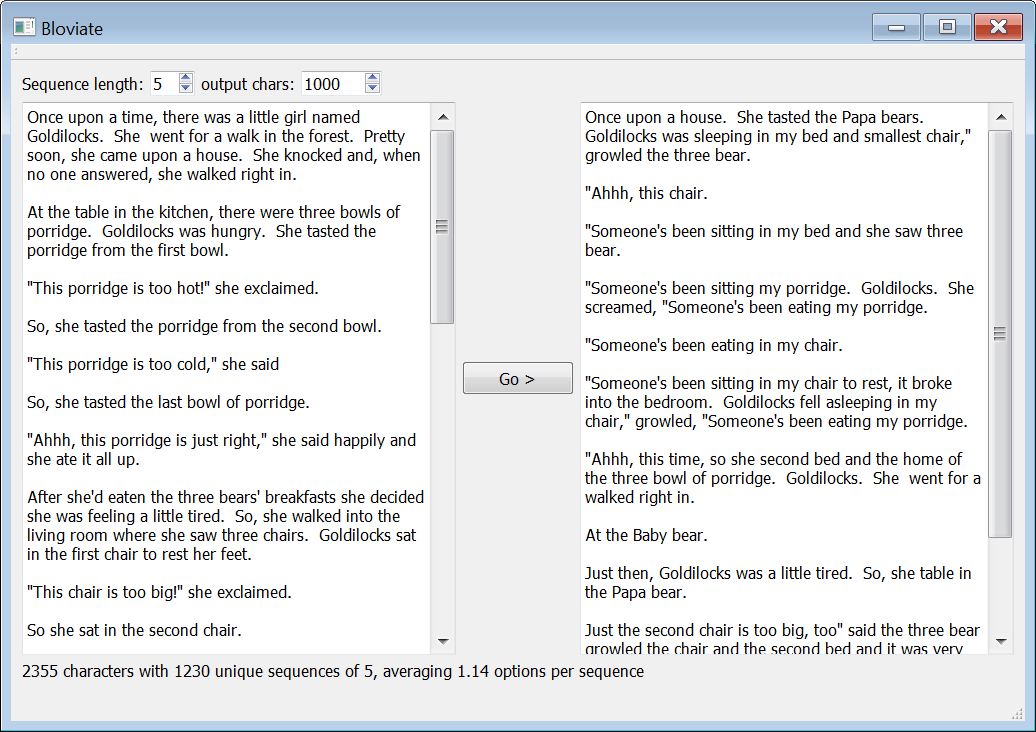
I wondered what it would look like if you took a body of text and then used it to generate new text, using Markov chains of different lengths. So I knocked up  quick program to try it.  ‘Bloviate’.

bloviate

Bloviate analyses your source text to find every sequence of N characters and then works out the frequency of characters that come next.

For example, if you set N=3 and your source text contains the following character sequences staring with ‘the’:

‘the ‘, ‘then’, ‘they’, ‘the ‘

Then ‘the’ should be followed 50% of the time by a space, 25% of the time by an ‘n’ and 25% of the time by a ‘y’.

Bloviate then creates output text, starting with the first N characters of the source text and filling in the rest randomly using the same sequence frequencies as the source text.

Note that a character is a character to Bloviate. It treats upper and lower case as different characters, makes no attempt to differentiate between letters, punctuation and white space and does not attempt to clean up the source text. Which also means it works on any language.

Bloviate also tells you the average number of different characters following each unique sequence of N, which I will call F here. As F approaches 1.0 the output text becomes closer and closer to the input text.

Using ‘Goldilocks and the 3 bears’ as input:

If N=1 (F=7.05) the output is garbage. Albeit garbage with the same character pair frequency as the original.

On cre She sl s ramy raked cheais Bus ore than s sherd up m. ged. bend staireomest p!”Sof ckstirigrorr a ry ps.

” f waine tind s aso Sowa t antthee aime bupis stht stooomed pie k is beche p!

At N=3 (F=1.44) it looks close to English, but jibberish:

Once up and been sight,” she this timed. Pretty so soon, she second soft. She screame up and she screame hot!” cried the Mama bed the Papa been sleeping in the Papa bear

“Someone’s bear growl.

At N=5 (F=1.14) it starts to look like proper English, but semantically weird:

Once upon a time, so she went for a walked right,” she lay down into the kitchen, Goldilocks sat in the porridge from the three chair,” growled, “Someone’s been sitting my porridge and she tasted the door, and ran down the bedroom. Goldilocks woke up and she second bowl.

And it comes out with occasional gems such as:

“Someone’s been sitting my porridge,” said the bedroom.

At N=10 (F=1.03) it starts to become reasonably coherent:

Once upon a time, there was a little tired. So, she walked into the forest. Pretty soon, she came upon a house. She knocked and, when no one answered, she walked right in.

At the table in the kitchen, there were three bowls of porridge.

At N=15 (F=1.01) it starts to get pretty close to the original text, but doesn’t follow quite the same order:

Once upon a time, there was a little girl named Goldilocks. She went for a walk in the forest. Pretty soon, she came upon a house. She knocked and, when no one answered, she walked right in.

At the table in the kitchen, there were three bowls of porridge. Goldilocks was very tired by this time, so she went upstairs to the bedroom. She lay down in the first bed, but it was too hard. Then she lay down in the third bed and it was just right. Goldilocks fell asleep.

At N=12 (F=1.07) the whole 680k characters of ‘Pride and prejudice’ produces:

It is a truth universally contradict it. Besides, there was a motive within her of goodwill which could not help saying:

“Oh, that my dear mother had more command over herself! She can have her own way.”

As she spoke she observed him looking at her earnest desire for their folly or their vice. He was fond of them.”

Obviously the source text is important. The Bohemian Rhapsody lyrics make nearly as much (or as little sense) at N=5 (F=1.08) as the original:

Is this to me, for me, to me

Mama, just a poor boy from this to me

Any way the truth

Mama, life? Is this time tomorrow

Carry on as if nothing all behind and face the truth

Mama, ooh, didn’t mean to me, baby!

Just gotta leave me and lightning, very fright out, just killed a man

Put a gun against his head

Pulled my time to die?

At N=12 (F=1.05) 160k characters of Trump election speeches produces:

Hillary brought death and disaster to Iraq, Syria and Libya, she empowered Iran, and she unleashed ISIS. Now she wants to raise your taxes very substantially. Highest taxed nation in the world is a tenant of mine in Manhattan, so many great people. These are people that have been stolen, stolen by either very stupid politicians ask me the question, how are you going to get rid of all the emails?” “Yes, ma’am, they’re gonna stay in this country blind. My contract with the American voter begins with a plan to end government that will not protect its people is a government corruption at the State Department of Justice is trying as hard as they can to protect religious liberty;

Supply your own joke.

I knocked together Bloviate in C++/Qt in a couple of hours, so it is far from commercial quality. But it is fairly robust, runs on Windows and Mac and can rewrite the whole of ‘Pride and prejudice’ in a few seconds. The core of Bloviate is just a map of the frequency of characters mapped to the character sequence they follow:

QMap< QString, QMap< QChar, int > >

You can get the Windows binaries here (~8MB, should work from Windows 7 onwards).

You can get the Mac binaries here (~11MB, should work from macOS 10.12 onwards).

Note that the Bloviate executable is tiny compared to the Qt library files. I could have tried to reduce the size of the downloads, but I didn’t.

To use Bloviate just:

  1. paste your source text in the left pane
  2. set the sequence length
  3. press the ‘Go >’ button

I included some source text files in the downloads.

You can get the source for Bloviate here (~1MB).

It should build on Qt 4 or 5 and is licensed as creative commons. If you modify it, just give me an attribution and send me a link to anything interesting you come up with.

Getting Qt 5.9 working on Windows (eventually)

I have had Qt 5.5 and 5.6 installed on my development machines for some time. Now that I have purchased a new Mac development box (an iMac with a lickably beautiful 27″ screen) I thought it was a good time to update to a more recent version of Qt. I went for Qt 5.9, rather than Qt 5.10, as 5.9 has been designated as an LTS (long term support) release. Upgrading turned into a real chore. I am quickly writing it up here in the hope that it helps someone else, and as a reminder to myself a few years down the line.

I like to build Qt from source. Because then I know it was built using the same compiler, headers, SDK etc as I am using to build my product. And I have more control over how Qt is configured. Also I can patch the source and rebuild it, if I need to. But I have had problems building Qt on Mac before. So I decided to install the pre-built binaries on my new Mac. I installed the latest version of XCode and then the Q5.9.4 binaries. This was a couple of big downloads, but it all went pretty smoothly.

I successfully built Qt 5.5 from source on my Windows machine previously, so I decided to try that for Qt 5.9. I have Visual Studio 2010 installed. This isn’t supported for Qt 5.9.4, so I downloaded Visual Studio 2017. I unzipped the Qt source into C:\Qt\5.9.4, ran ‘x86 native tools command prompt for VS 2017’, made sure Python and Perl were in the path and then:

cd C:\Qt\5.9.4

set QTDIR=C:\Qt\5.9.4\qtbase

set PATH=%QTDIR%\bin;%PATH%

configure -opensource -confirm-license -opengl desktop -nomake tests -nomake examples -no-plugin-manifests -debug-and-release -platform win32-msvc -verbose

nmake

Note that you are told by the nmake script to do nmake install at the end of this. But it tells you somewhere in the Qt Windows documentation not to do this, unless you have set the prefix argument (confusing, I know)

The build failed part way through making qtwebengine. Something to do with a path being too long for Perl or Python (I forget). It seems to be a known problem. Odd as the root path was just C:\Qt\5.9.4. I don’t need qtwebengine at present, so I deleted everything and tried again with -skip qtwebengine:

configure -opensource -confirm-license -opengl desktop -skip qtwebengine -nomake tests -nomake examples -no-plugin-manifests -debug-and-release -platform win32-msvc -verbose

nmake

It seemed to complete ok this time. But using this version of Qt to build Hyper Plan I got an error:

Unknown module(s) in QT:svg

On further examination the SVG DLL  had been built, but hadn’t been copied to the C:\Qt\5.9.4\qtbase\bin folder. Similarly for a lot of the other Qt DLLs. I couldn’t find any obvious reason for this looking through logs, Stackoverflow and Googling. I could possibly do without the SVG functionality, but I wasn’t sure what else was broken. So I decided to give up on bulding from source on Windows as well.

I download the Qt 5.9.4 binaries for Visual Studio 2017. This seemed to go ok, but then I discovered that I could only build a 64-bit application from these. No 32-bit version was available for Visual Studio 2017. Many of my customers are still on 32 bit versions of Windows. So I need to be able to ship my product as a 32 bit executable + DLLs[1].

So I uninstalled Visual Studio 2017 and installed Visual Studio 2015. I then got an error message about Visual Studio 2017 redistributables that I hadn’t uninstalled. So I had to uninstall those and run a repair install on Visual Studio 2015. That seemed to work ok. So then I download the 32-bit Qt 5.9.4 binaries for Visual Studio 2015. I had to download these into a different top level folder (C:\Qtb), so as not to risk wiping existing Qt installs that I had previously managed to build from source.

Eventually I managed to build Hyper Plan and PerfectTablePlan on Mac and Windows. What a palaver though! Qt is an amazing framework and I am very grateful for everyone who works on it. But I wish they would make it a bit easier to install and upgrade! Has anyone actually managed to get Qt 5.9 built from source on Windows?

[1] I don’t bother shipping a 64-bit executable on Windows as the 32-bit executable works fine on 64-bit versions of Windows (my software doesn’t require excessive amounts of memory). I only ship a 64-bit executable on macOS as almost no-one uses 32-bit versions of macOS now.

How much code can a coder code?

Lines of code (LOC) is a simple way to measure programmer productivity. Admittedly it is a flawed metric. As Bill Gates famously said “Measuring programming progress by lines of code is like measuring aircraft building progress by weight”. But it is at least easy to measure.

So how much code do programmers average per day?

  • Fred Brooks claimed in ‘The Mythical Man-Month’ that programmers working on the OS/360 operating system averaged around 10 LOC per day.
  • Capers Jones measured productivity of around 16 to 38 LOC per day across a range of projects.
  • McConnell measured productivity of 20 to 125 LOC per day for small projects (10,000 LOC) through to 1.5 to 25 LOC per day for large projects (10,000,000 LOC).

It doesn’t sound a lot, does it? I’m sure I’ve written hundreds of lines of code on some days. I wondered how my productivity compared. So I did some digging through my own code. In the last 12 years I have written somewhere between 90,000 and 150,000 C++ LOC (depending on how you measure LOC) for my products: PerfectTablePlan, Hyper Plan and Keyword Funnel. This is an average of round 50 lines of code per working day. Not so different from the data above.

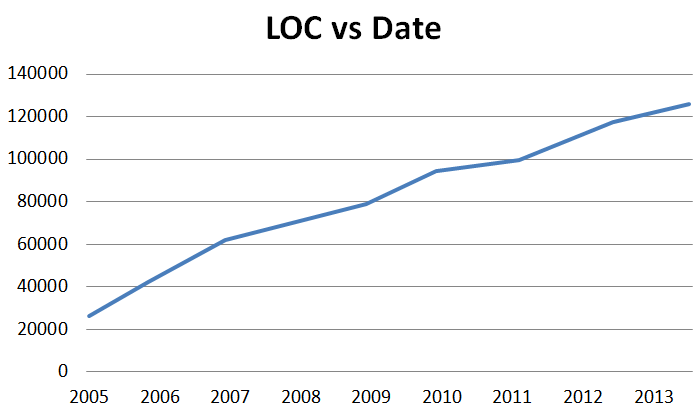
I also looked at how PerfectTablePlan LOC increased over time. I was expecting it to show a marked downward trend in productivity as the code base got bigger, as predicted by McConnell’s data. I was surprised to see that this was not the case, with LOC per day remaining pretty constant as the code base increased in size from 25k to 125k.

loc

Some qualifications:

  • I give a range for LOC because ‘line of code’ isn’t very well defined. Do you count only executable statements, or any lines of source that aren’t blank?
  • My data is based on the current sizes of the code bases. It doesn’t include all the code I have written and then deleted in the last 12 years. I have just spent several months rewriting large parts of PerfectTablePlan to work with the latest version of Qt, which involved deleting large swathes of code.
  • It doesn’t include automatically generated code (e.g. code generated by the Qt framework for user interfaces and signals/slots code).
  • I only counted code in products shipped to the user. I didn’t count code I wrote for licence generation, testing etc.
  • All the code is cross-platform for Windows and Mac, which makes it more time consuming to write, test and document.
  • Programming is only one of the things I do. As a one-man-band I also do marketing, sales, QA, support, documentation, newsletters, admin and nearly everything else. I have also done some consulting and training not directly related to my products in the last 12 years.

Given that I probably spend less than half my time developing (I have never measured the ratio), my productivity seems fairly good. I think a lot of this may be the fact that, as a solo developer, I don’t have to waste time with meetings, corporate bullshit and trying to understand other people’s code. Also writing desktop Windows/Mac applications in C++ is a lot easier than writing an new operating system with 1970s tools.

50 lines of code per day doesn’t sound like a lot. But the evidence is that you are unlikely to do much better on a substantial project over an extended period. Bear that in mind next time you estimate how long something is going to take.

If you have data on LOC per day for sizeable projects worked on over an extended period, please post it in the comments. It will only take you a few minutes to get the stats using Source Monitor (which is free).


Pretty printing C++ with Clang-Format

I use some of the code generation and refactoring tools in QtCreator. These save a lot of time, but they don’t format C++ code how I like it. For example they produce C++ code like this:

void MyClass::foo(int *x)

But I like my code formatted like this:

void MyClass::foo( int* x )

The differences may seem minor, but they are a source of significant irritation to me. I like my code how I like it, goddammit! And consistent formatting enhances readability. However re-formatting it by hand is time-consuming and tedious.

What I need is a tool that can enforce consistent formatting in the style that I like, or something close. I have tried to use automatic C++ formatting (pretty printing) tools in the past, but I couldn’t get them to produce a format that was close enough to what I wanted. But I have finally found the tool for the job. Clang-Format.

Clang-Format is part of the LLVM family of tools. It is a free, command-line tool that reformats C++, Objective-C or C according to the settings in a config file. As with many free tools, it isn’t terribly well documented. Some of the documentation on the web is out of date and some of it is incomplete. But I have managed to find out enough to configure it how I like it.

To run it you just need to place your options in a .clang-format file, make sure the clang-format executable is in the path and then run it:

clang-format.exe -i -style=file <C++ file>

Here are the settings I am currently using in my .clang-format file:

Language: Cpp
AccessModifierOffset: -4
AlignAfterOpenBracket: false
AlignConsecutiveAssignments: false
AlignConsecutiveDeclarations: false
AlignEscapedNewlinesLeft: false
AlignOperands: true
AlignTrailingComments: false
AllowAllParametersOfDeclarationOnNextLine: false
AllowShortBlocksOnASingleLine: false
AllowShortCaseLabelsOnASingleLine: false
AllowShortFunctionsOnASingleLine: Inline
AllowShortIfStatementsOnASingleLine: false
AllowShortLoopsOnASingleLine: false
AlwaysBreakAfterDefinitionReturnType: None
AlwaysBreakAfterReturnType: None
AlwaysBreakBeforeMultilineStrings: false
AlwaysBreakTemplateDeclarations: false
BinPackArguments: true
BinPackParameters: true
BraceWrapping:
  AfterClass:      true
  AfterControlStatement: true
  AfterEnum:       true
  AfterFunction:   true
  AfterNamespace:  true
  AfterObjCDeclaration: true
  AfterStruct:     true
  AfterUnion:      false
  BeforeCatch:     true
  BeforeElse:      true
  IndentBraces:    false
BreakBeforeBinaryOperators: None
BreakBeforeBraces: Allman
BreakBeforeTernaryOperators: true
BreakConstructorInitializersBeforeComma: false
ColumnLimit: 0
CommentPragmas: '^ IWYU pragma:'
ConstructorInitializerAllOnOneLineOrOnePerLine: false
ConstructorInitializerIndentWidth: 0
ContinuationIndentWidth: 4
Cpp11BracedListStyle: true
DerivePointerAlignment: false
DisableFormat: false
ExperimentalAutoDetectBinPacking: false
ForEachMacros: [ foreach, Q_FOREACH, BOOST_FOREACH ]
IndentCaseLabels: true
IndentWidth: 4
IndentWrappedFunctionNames: false
KeepEmptyLinesAtTheStartOfBlocks: true
MacroBlockBegin: ''
MacroBlockEnd: ''
MaxEmptyLinesToKeep: 2
NamespaceIndentation: None
PenaltyBreakBeforeFirstCallParameter: 100
PenaltyBreakComment: 300
PenaltyBreakFirstLessLess: 120
PenaltyBreakString: 1000
PenaltyExcessCharacter: 10000
PointerAlignment: Left
ReflowComments: true
SortIncludes: false
SpaceAfterCStyleCast: false
SpaceBeforeAssignmentOperators: true
SpaceBeforeParens: ControlStatements
SpaceInEmptyParentheses: false
SpacesBeforeTrailingComments: 1
SpacesInAngles: true
SpacesInContainerLiterals: true
SpacesInCStyleCastParentheses: true
SpacesInParentheses: true
SpacesInSquareBrackets: true
Standard: Cpp11
TabWidth: 4
UseTab: Never

It took me a few hours of fiddling with the settings to find the best combination. It would be really useful if someone could write a tool that would analyze your C++ code and create a .clang-format file for you. You would probably only want to do this once though, so I don’t think it has much potential as a commercial product.

There are only two things I couldn’t get quite right in the formatting:

  1. I couldn’t get it to add a blank line after public, protected and private declarations. I fixed this with a quick Perl hack (see below).
  2. I couldn’t get it to indent continuation lines how I would like (ideally indented 1 or 2 spaces from the first line). It is a small price to pay and I am just putting up with it for now.

Perhaps there are options to do these and I just didn’t find them.

Here is the Windows .bat script I used to format all the C++ files in a folder.

for %%f in (*.h *.cpp *.inl) do (
clang-format.exe -i -style=file %%f
)

for %%f in (*.h) do (
clang-format.exe -i -style=file %%f
perl -p -i.bak -e "s/public:/public:\n/g" %%f
perl -p -i.bak -e "s/protected:/protected:\n/g" %%f
perl -p -i.bak -e "s/private:/private:\n/g" %%f
perl -p -i.bak -e "s/    Q_OBJECT/Q_OBJECT/g" %%f
)

del *.bak
del *.tmp

No doubt there is a more elegant way to do the Perl, but it works.

I now just run this batch periodically to keep my code beautiful and consistent.