Category Archives: macOS

Is it worth advertising Mac software on Google Adwords?

I learnt a long time ago that people will happily click on totally irrelevant pay per click ads. For example, if you bid on “seating plan” I can assure you that a significant percentage of people searching for “boeing 747 seating plan” will happily click on your ad titled “wedding seating plan”. They won’t buy anything, as they aren’t interested in wedding seating plans, but you still have to pay for each click. You can stop your ad showing to these searchers by adding “boeing” and “747” as negative keywords. Problem solved.

But what do you do if you are selling software that only runs on Mac OS X? The vast majority of searchers are running Windows. Indiscriminate clicks by them could quickly turn your Adwords ROI negative. In your Adwords campaign settings you can choose to only show ads on desktop computers and laptops. But you can’t choose the operating system.

As discussed above, putting “Mac” in the title is unlikely to be enough. You can’t use negative keywords, because the vast majority of Windows users searching for, say, backup software will type “backup software” not “Windows backup software”. You can just bid on searches containing keywords “Mac”, “Apple” or “OS X”, but will this be enough? My general advice to Mac only software vendors was to avoid Adwords, unless the ticket price of their software was in the hundreds of dollars. But, as my software runs on both Windows and Mac, I didn’t have any data to back this up.

Recently I got some data on Adwords clickthrough rates for a Mac only app (www.puzzlemakermac.com) by Hokua Software. They have kindly allowed me to share the data.

Initially they bid on generic keywords, such as “crossword maker” and ran ads such as the following with “Mac” displayed prominently in the title:

The results from analytics: 60% of the people clicking on the ads were on Windows and 40% on Mac.

Then Google banned them from the word “Mac” in their ads (it is possible to get this reversed with the express permission of Apple, but I don’t know how likely they are to grant this). So they switched to “OS X” in the ad, which hasn’t been blocked (yet).

The results from analytics: 73% of the people clicking on the ads were on Windows and 27% on Mac.

Then they restricted their bids to Mac targeted keywords such as “mac crossword maker”.

The results from analytics: 23% of the people clicking on the ads were on Windows and 73% on Mac. But there was a big drop in the number of impressions.

I think it is going to be almost impossible for anyone to get a return from Adwords when the majority of their clicks have no chance of generating a sale. So only bidding on Mac specific keywords seems to be the way to go. But there will still be a significant number of wasted clicks from Windows users. Also any Mac users who don’t use the appropriate keywords won’t see your ad. Consequently the return on time and money invested is likely to be a lot lower than Windows, cross-platform and web developers can expect. If you have a Mac only product with: a high ticket price product, well-defined keywords and limited competition, it might be worth trying Adwords. But otherwise it is probably better to wait and see if Google release OS targeting.

Of course, you could always use one of the free Adwords vouchers that Google are handing out like confetti (I get one every month in my PC Pro magazine) and try for yourself. This is how Hokua software got the results above. If you do, I would be interested to know how your results compare.

App stores set to dominate future software sales?

Following the success of the iPhone app store (over 6 billion downloads to date), app stores are becoming more and more of a feature of the software landscape. In case you missed it, Apple announced yesterday that there will be an App Store for Macs  ‘within 90 days’. In summary:

  • The Mac app store will be tightly integrated with Mac OS X, including automatic install and update.
  • There will be restrictions on technology, for example Java apps will not be allowed.
  • Apple will keep 30% of any revenue from sales.
  • $99/year subscription for developers.
  • Developers will still be able to sell their software outside the App store.

It is easy to see why Apple would want to do this:

  • A potentially huge new revenue stream from third party Mac software sales.
  • They get even more control over the customer experience.

And this could have advantages for Mac users:

  • Simpler payment and installation.
  • Screening out of low quality apps and malware.

And potential advantages for Mac developers:

  • Mac users might buy more software if it is easier to do so.
  • One main channel to concentrate your marketing efforts on.
  • Some of the boring infrastructure of selling software (licensing, shopping cart etc) can be taken care of by Apple.

But the disadvantages are all too obvious:

  • Your app could be rejected outright. And you won’t know until you submit it for approval. Apple are judge, jury and executioner. The iPhone app store has been infamous its capricious and opaque approval process.
  • 30% is a huge chunk of revenue. Typical payment processors take 5-10% of revenue. Where the new app store cannibalises existing sales (and it is hard to see that it won’t) vendors will lose 20-25% of existing sales revenues.
  • New apps and updates will be delayed by days or weeks as they go through the app store approval process.
  • A single centralised app store is likely to make it harder for niche/long-tail apps to make any sort of living. Certainly this is what seems to be happening in the iPhone App store.
  • Apple are control freaks and have traditionally taken a rather heavy handed approach with developers, including the liberal use of NDAs. The app store will give them even more control.

And worse might follow:

  • Apple makes a lot of their money from selling over-priced hardware. It may be in their interest to drive software prices down so they can sell more hardware. $5 is considered expensive in the iPhone App Store.
  • This could be the first step to making Mac OS X a closed system, like iPhone, where only Apple approved apps can be installed.

I guess they can’t piss off developers too much – a computer without third party applications isn’t going to be very attractive to customers. But I am finding it hard to work up any enthusiasm for a Mac app store. If it is successful I can either be in the store and give up a lot of freedom and cannibalize exisiting sales at a much lower margin, or stay out and be shut out of a large chunk of the market. It isn’t an attractive choice. As my app is written in C++/Qt, rather than Objective-C/Cocoa, I am not even sure that it will be eligible for inclusion in the store. I could just abandon Mac OS X, but Microsoft is also rumoured to be working on their own app store (despite the failure of DigitalLocker). That is a truly terrifying prospect given the awfulness of their ‘Works with Vista’ approval process (I speak from personal experience).

Suddenly web apps are looking more interesting.

Apple resort to FUD marketing

Apple have resorted to ugly FUD marketing in their latest ad. This seems a bit rich given that Mac OS X 10.6 has a bug that can delete all your user data.

Qt visual artefacts on Mac OS X 10.6

deploy_nearly_everywhereThe release of Mac OS X 10.6 (Snow Leopard) snuck up on me while I have been working hard on a major new release of PerfectTablePlan plan. I didn’t really want to risk messing up my stable Mac development machine by installing it, so I asked testlab2.com (who have been doing some third party testing for me) to test my latest beta on it.

Bad news. All the combo boxes in my application (which work fine in Mac OS X 10.3, 10.4 and 10.5) have visual artefacts on Mac OS X 10.6. They work fine, but they don’t look right. I wondered if the artefact could be unique to some weird configuration on testlab2’s test machine, so I asked the fine folk on macsb mailing list to see if they could replicate it. 4 of them tried (thanks Cesar, Jon, Aaron and Pierre) and they all saw the visual artefacts. Damn.

I posted a question on the qt-interest forum. The single response (thanks Francesco) mentioned that this issue had been reported in the Qt development blog. I managed to find the blog post, applied the recommended single line code patch to Qt 4.4.2 and rebuilt everything. Cesar from macsb kindly re-tried the new binaries and reports that this improved things, but some artefacts are still visible the first time a combo box is shown. Perhaps the patch works better for Qt 4.5.

Note the artefacts at the top and bottom of the combo box drop-down list

Note the artefacts at the top and bottom of the combo box drop-down list

It looks like I am going to have to release it like this, unless someone knows of a better patch. This is very annoying after the months of hard work I have put into the new release. Aesthetics are important for commercial software, especially on the Mac. This could cost me quite a few sales.

I am not on the very latest release of Qt, but apparently this issue would still occur even if I was. Qt/Nokia have announced that they don’t expect to  support Mac OS X 10.6 until they release Qt 4.6, whenever that might be. What use is a cross-platform toolkit that doesn’t support the latest major OSs?

Developer releases of 10.6 have been available for a while – I believe the Qt team should have burnt the midnight oil to make sure they had a release that properly supported 10.6 as soon as it became generally available.  I know that isn’t easy given the size of the Qt framework and Apple’s penchant for secretiveness. But that is the game they are in and that is what I expect. I think they have seriously dropped the ball here, and this is coming from a longtime Qt fan-boy. Perhaps they have spread themselves a bit too thin by moving to LGPL licensing.

I have written this post as a quick heads up to other Qt developers. Thanks to everyone that helped me get this far.

Using a Mac mini for development

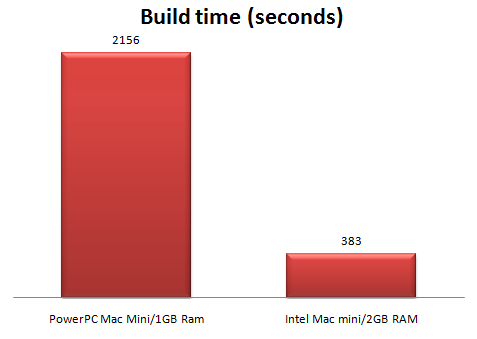
mac miniI have been using a Mac mini to port my C++/Qt based code to Mac OS X for the last 3.5 years. This is one of the early PowerPC based Mac minis, upgraded to 1GB of RAM. Being Apple hardware, it is expensive for what you get. But it has served me well. The small form factor (approx 17 x 17 x 5 cm) has also been useful in my cramped office, where I have it attached to the same monitor, mouse and keyboard as my Windows box through a KVM switch. But it is struggling to keep up with PerfectTablePlan’s ever increasing code base. A clean build of the PerfectTablePlan source into a Universal (fat) binary now takes an eye-watering 36 minutes to compile and link on the Mac mini. Building a PowerPC-only debug version still takes nearly half that time. That is painful, even just for occasional porting work.

As my main development environment is Windows, I can’t really justify the cost (or office space requirements) of a Mac Pro. So I decided to buy a new Mac mini, with an Intel Core 2 Duo processor. I did look around to see if I could find one at a discount. However, this being Apple hardware, no-one dares sell  at anything significantly less than Apple’s RRP. I bought the smaller (120GB) disk variant and had the dealer upgrade it to 2GB RAM, which tests on my old Mac mini indicated should be plenty for compiling and linking. I didn’t want to do the memory upgrade myself as I know, from experience with my first Mac mini, that removing the case involves putty knives and some very worrying cracking noises.

I had all sorts of problems trying to get the right cables. Firstly I wanted a Firewire cable so I could copy the set-up across from the old machine to the new machine using Apple’s Migration Assistant software. But it turns out that the old Mac Mini has a Firewire 400 6-pin socket, whereas the new Mac Mini has a Firewire 800 9-pin socket. I ordered a 6-pin to 9-pin Firewire cable cable. Then I discovered that there is more than one type of DVI cable. The old Mac mini was attached to my KVM switch with a DVI-I cable. The new Mac mini only accepts mini-DVI or (via a supplied adaptor) DVI-D. So I ordered a dual link DVI-D to DVI-D cable as well.

Once I had the right cables things went relatively smoothly. The Migration Assistant software copied almost all the apps and data across from the old machine to the new one. It even preserved settings for the apps, e.g. the email accounts in my Thunderbird email client. I just had to re-install XCode (which wasn’t copied across) and rebuild my Qt libraries (to avoid copious warnings due to the fact they had been built with an earlier version of XCode/gcc).

To use the migration assistant you simply:

  1. connect the 2 machines with a Firewire cable
  2. start-up the old machine with the ‘T’ key depresses to put it in ‘Target’ mode
  3. start-up the new machine
  4. follow the on-screen instructions

Nice. If only it was was that easy to set-up a new Windows machine.

A quick test shows that the new Mac mini is nearly 6 times faster at compiling and linking a Universal binary of PerfectTablePlan from scratch[1]:

mac mini performance

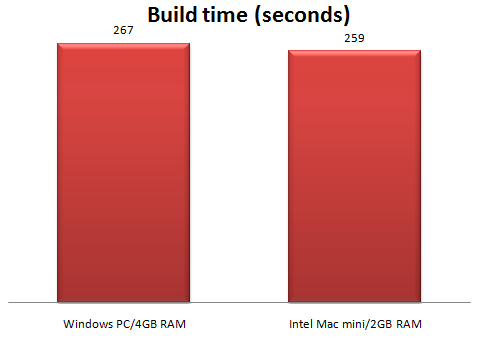
The time the new Mac mini takes to compile and link an Intel-only debug release of PerfectTablePlan also compares favourably with a similar build on my Windows 2.13 GHz Intel Core 2 Duo box with 4GB of RAM[2].

mac mini performance 2

This isn’t a fair hardware comparison, as the two machines are using completely different compilers and linkers and the Windows box was running various background services. But it certainly shows that Intel-based Mac minis are worth considering for use as development machines.

[1] The newer machine is using a newer version of XCode/gcc.

[2] The Windows box is using Visual Studio 2005.

GraphicDesignerToolbox

I launched my product a year ago, but so far haven’t had much luck selling it. I desperately needed advice from a person that could take a look at my situation and help figure out what’s wrong and how to move on. Andy Brice has been through all this and knew exactly what I was struggling with.

Simon Strandgaard, www.GraphicDesignerToolbox.com

gdt-screenshot

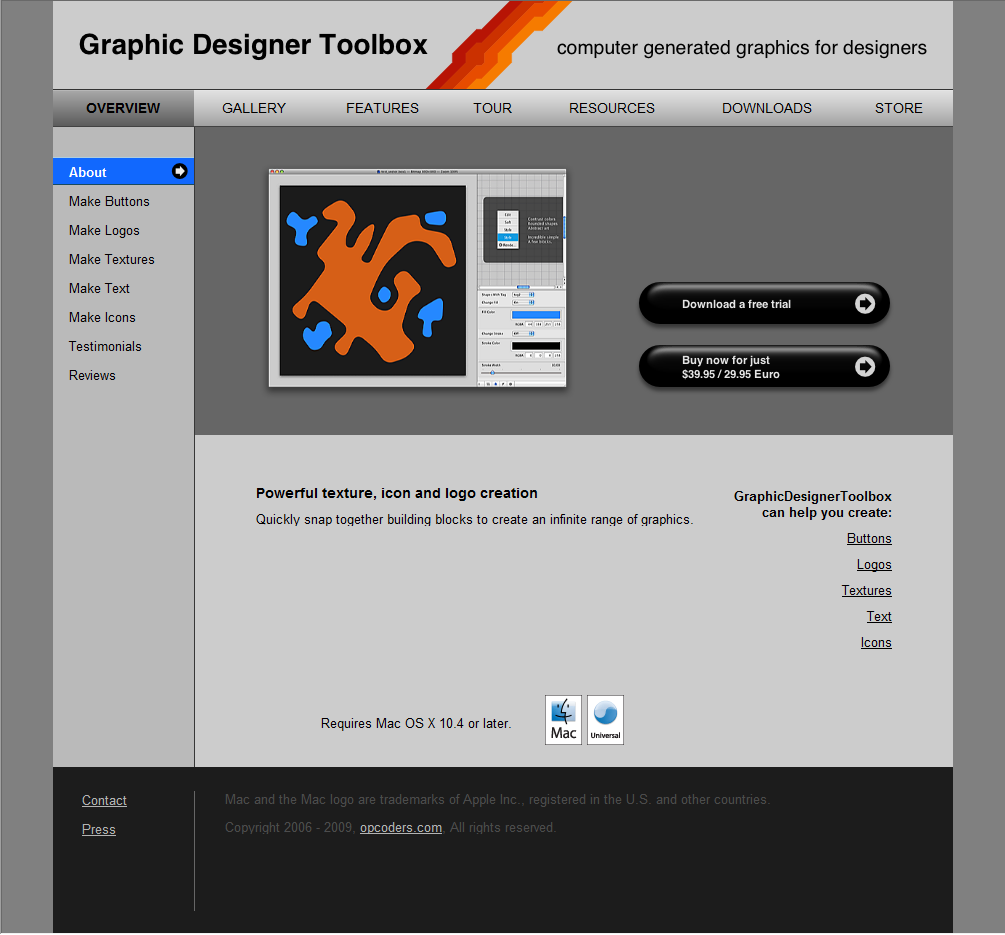
GraphicDesignerToolbox is a Mac OS X application for creating computer generated graphics. It allows users to snap together generative and filter blocks to create a vast range of different types of images, without any drawing or programming. It is an impressively slick and well engineered piece of software. But sales were unsatisfactory. I did some consulting for the author, Simon Strandgaard, focussed on improving the marketing and the user’s initial experience of the product. As a result he has made a lot of changes, including:

  • Re-thought the product positioning, marketing message and target customer.
  • Renamed the application to GraphicDesignerToolbox (from the less descriptive ToolboxApp).
  • Moved the website from ToolboxApp.com to GraphicDesignerToolbox.com.
  • Commissioned a new application icon.
  • Completely rewritten the website.
  • Improved the initial user experience with a quick tour and easy to load samples.
  • Improved the product documentation.
  • Changed the trial model.
  • Increased the price.
  • Released version 1.0.

You can see captures of old and new versions of the website below:

toolboxapp_cropped1

Old home page - click to enlarge

graphicdesignertoolbox

New home page - click to enlarge

It is has been very rewarding to see the product and marketing improve so much in just three months. Especially as someone else was doing all the hard work! I think the changes are a huge improvement all round and I wish Simon and GraphicDesignerToolbox every success. v1.0 was released today and Simon tells me he has sold as many licences today as in the previous 5 months.

If you have a Mac you can head over to GraphicDesignerToolbox.com and download the trial.

Mac OS X market share accelerates in 2008

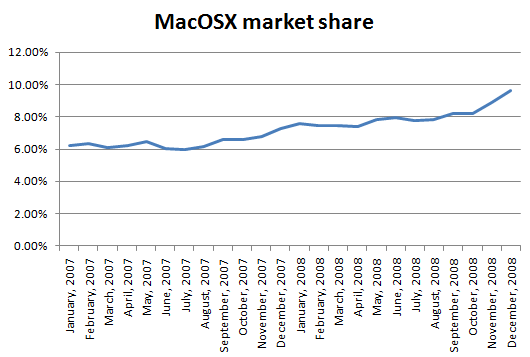
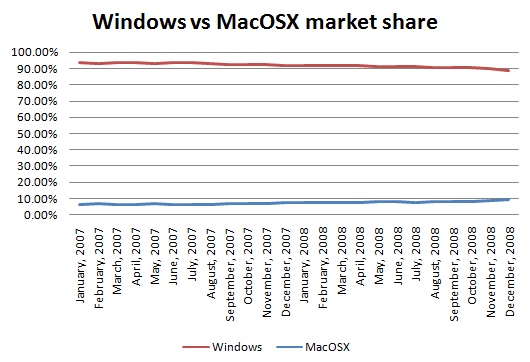
2008 was a good year for Apple and Mac OS X. According to netapplications.com data (via sharewarepromotions blog) Mac OS X’s share of the OS market increased from 7.31% in Dec 2007 to 9.63% in Dec 2008. That is a 32% increase in market share during 2008, compared to a 22% increase during 2007.

macosx_market_share_2007_2008

Windows market share fell from 91.79% to 88.68% in the same time. While Mac OS X’s annual gains are impressive, it has a long way to go to catch Windows. 15 years if you project the 2008 gains forward.

macosx_vs_windows_market_share_2007_2008Of course, it is highly questionable to project 15 years from a single year of data, but it gives an idea how much work Apple still has to do.

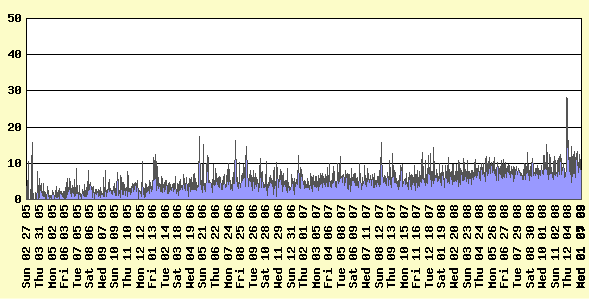
I sell table planning software for Windows and Mac OS X. Mac visitors to my website have followed the general trend, up from 7.41% in 2007 to 8.5% in 2008 and accounting for around of 10% of visitors at the end of 2008.

macosx_visitor_percentage% Mac visitors to http://www.perfecttableplan.com

My data also shows that Mac users are twice as likely to purchase my software as Windows users (I have heard similar figures have reported by others). So Mac users currently account for 20% of my sales. I wouldn’t want to live off my Mac sales, but it is very useful additional income. Given the disparity in cost between Windows and Mac hardware it is hardly surprising that Mac users are more ready to reach for their credit card.

My software is built on top of the Qt cross-platform toolkit. The recent porting of Qt 4.5 to Cocoa gives me the opportunity to further improve PerfectTablePlan’s Mac look and feel and to release a 64 bit version. Hopefully this, coupled with increasing Mac market share, will further improve my Mac sales.

A beta of Windows 7 has just been released.  It will be interesting to see if it can repair some of the damage caused by Vista and slow the growth of Mac OS X. Personally, I doubt it – the Windows 7 feature list certainly doesn’t set my pulse racing.

Meh for Mapple

** update **

There was a link to a few minutes of the Simpsons making fun of Apple. The video has now been removed due to a “breach of terms of use”. I wonder whose lawyers got to it first, Apple or Fox?

Installing MacOSX 10.5 (Leopard) on an external harddisk

install macosx 10.5 leopardI need to support both MacOSX 10.4 (Tiger) and 10.5 (Leopard) for the latest release of PerfectTablePlan. I could have created a new partition on the current harddisk for 10.5, but apparently you can’t do that without erasing the whole disk. I really didn’t want to mess with my existing 10.4 setup, so I purchased a 320GB WD MyBook USB/Firewire external harddisk to install 10.5 on to. 320GB for £75, bargain! But I had quite a bit of trouble installing Leopard on to it. After about the tenth time looking at a “Mac OS X could not be installed on your computer. The installer cannot prepare the volume for installation.” message I finally got it working. In case anyone else gets stuck, here are some hints:

  • When you set up the new harddisk partitions using Disk Utility make sure you choose Apple Partition Map using the Options button (it may be set to Master Boot Record if the disk is shipped set-up for Windows).
  • Disconnect the harddisk USB cable. Just use the Firewire cable.

I hope this saves someone else a few hours. Thanks to Jeff B for a hint that got me moving in the right direction.

Optimising your application

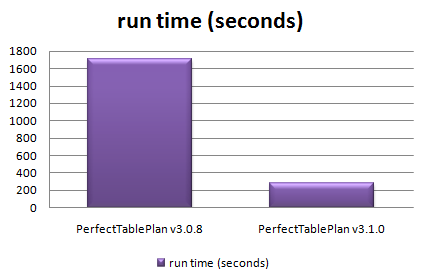
When I first released PerfectTablePlan I considered 50-200 guests as a typical event size, with 500+ guests a large event. But my customers have been using the software for ever larger events, with some as large as 3000 guests. While the software could cope with this number of guests, it wasn’t very responsive. In particular the genetic algorithm I use to optimise seating arrangements (which seats people together or apart, depending on their preferences) required running for at least an hour for the largest plans. This is hardly surprising when you consider that seating assignment is a combinatorial problem in the same NP-hard class as the notorious travelling salesman problem. The number of seating combinations for 1000 guests in 1000 seats is 1000!, which is a number with 2,658 digits. Even the number of seating combinations for just 60 guests is more than the number of atoms in the known universe. But customers really don’t care about how mathematically intractable a problem is. They just want it solved. Now. Or at least by the time they get back from their coffee. So I made a serious effort to optimise the performance in the latest release, particularly for the automatic seat assignment. Here are the results:
ptp308_vs_ptp_310.png

Total time taken to automatically assign seats in 128 sample table plans varying in size from 0 to 1500 guests

The chart shows that the new version automatically assigns seats more than 5 times faster over a wide range of table plans. The median improvement in speed is 66%, but the largest plans were solved over ten times faster. How did I do it? Mostly by straightening out a few kinks.

Some years ago I purchased my first dishwasher. I was really excited about being freed from the unspeakable tyranny of having to wash dishes by hand (bear with me). I installed it myself – how hard could it be? It took 10 hours to do a wash cycle. Convinced that the dishwasher was faulty I called the manufacturer. They sent out an engineer who quickly spotted that I had kinked the water inlet pipe as I had pushed the dishwasher into place. It was taking at least 9 hours to get enough water to start the cycle. Oops. As soon as the kink was straightened it worked perfectly, completing a cycle in less than an hour. Speeding up software is rather similar – you just need to straighten out the kinks. The trick is knowing where the kinks are. Experience has taught me that it is pretty much impossible to guess where the performance bottlenecks are in any non-trivial piece of software. You have to measure it using a profiler.

Unfortunately Visual Studio 2005 Standard doesn’t seem to include profiling tools. You have to pay for one of the more expensive versions of Visual Studio to get a profiler. This seems rather mean. But then again I was given a copy of VS2005 Standard for free by some nice Microsofties – after I had spent 10 minutes berating them on the awfulness of their “works with vista” program (shudder). So I used an evaluation version of LTProf. LTProf samples your running application a number of times per second, works out which line and function is being executed and uses this to build up a picture of where the program is spending most time.

After a bit of digging through the results I was able to identify a few kinks. Embarrassingly one of them was that the automatic seat assignment was reading a value from the Windows registry in a tight inner loop. Reading from the registry is very slow compared to reading from memory. Because the registry access was buried a few levels deep in function calls it wasn’t obvious that this was occurring. It was trivial to fix once identified. Another problem was that some intermediate values were being continually recalculated, even though none of the input values had changed. Again this was fairly trivial to fix. I also found that one part of the seat assignment genetic algorithm took time proportional to the square of the number of guests ( O(n^2) ). After quite a bit of work I was able to reduce this to a time linearly proportional to the number of guests (O(n) ). This led to big speed improvements for larger table plans. I didn’t attempt any further optimisation as I felt was getting into diminishing returns. I also straightened out some kinks in reading and writing files, redrawing seating charts and exporting data. The end result is that the new version of PerfectTablePlan is now much more usable for plans with 1000+ guests.

I was favourably impressed with LTProf and will probably buy a copy next time I need to do some optimisation. At $49.95 it is very cheap compared to many other profilers (Intel VTune is $699). LTProf was relatively simple to use and interpret, but it did have quirks. In particular, it showed some impossible call trees (showing X called by Y, where this wasn’t possible). This may have been an artefect of the sampling approach taken. I will probably also have a look at the free MacOSX Shark profiler at some point.

I also tried tweaking compiler settings to see how much difference this made. Results are shown below. You can see that there is a marked difference with and without compiler optimisation, and a noticeable difference between the -O1 and -O2 optimisations (the smaller the bar, the better, obviously):

vs2005_optimisation_speed.png

Effect of VS2005 compiler optimisation on automatic seating assignment run time

Obviously the results might be quite different for your own application, depending on the types of calculations you are doing. My genetic algorithm is requires large amounts of integer arithmetic and list traversal and manipulation.

The difference in executable sizes due to optimisation is small:

vs2005_optimisation_size.png

I tried the two other optimisation flags in addition to -O2.

  • /OPT:NOWIN98 – section alignment does not have to be optimal for Windows 98.
  • /GL – turns on global optimisation (e.g. across source files, instead of just within source files).

Neither made much noticeable difference:

vs2005_additional_opt.png

However it should be noted that most of the genetic algorithm is compiled in a single file already, so perhaps /GL couldn’t be expected to add much. I compared VC++6 and VS2005 version of the same program and found that VS2005 was significantly faster[1]:

vc6_vs_vs2005_optimisation_speed1.png

I also compared GCC compiler optimisation for the MacOSX version. Compared with VS2005 GCC has a more noticeable difference between optimised and unoptimised, but a smaller difference between the different optimisations:

gcc_optimisation_speed.png

Surprisingly -O3 was slower than -O2. Again the effect of optimisation on executable size is small.

gcc_optimisation_size2.png

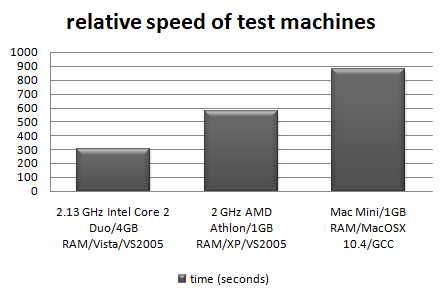
I also tested the relative speeds of my 3 main development machines[2]:
relative-machine-speed.png

It is interesting to note that the XP box runs the seat assignment at near 100% CPU utilisation, but the Vista box never goes above 50% CPU utilisation. This is because the Vista box is a dual core, but my the seat assignment is currently only single threaded. I will probably add multi-threading in a future version to improve the CPU utilisation on multi-core machines.

In conclusion:

  • Don’t assume, measure. Use a profiler to find out where your application is spending all its time. It almost certainly won’t be where you expected.
  • Get the algorithm right. This can make orders of magnitude difference to the runtime.
  • Compiler optimisation is worth doing, perhaps giving a 2-4 times speed improvement over an application built without compiler optimisation. It probably isn’t worth spending too much time tweaking compiler settings though.
  • Don’t let a software engineer fit your dishwasher.

Further reading:

“Programming pearls” by Jon Bentley a classic book on programming and algorithms

“Everything is fast for small n” by Jeff Atwood on the Coding Horror blog

[1] Not strictly like-for-like as the VC++6 version used dynamic Qt libraries, while the VS2005 version used static Qt libraries.

[2] I am assuming that VS2005 and GCC produce comparably fast executables when both set to -O2.