Category Archives: software

Pivot Tables demystified

pivot tablesOnline businesses generate a lot of data. Sales data, marketing data, traffic data etc. Pivot tables can be a useful tool for analysing and extracting useful information from this sea of data. A lot of people seem to have heard of Pivot Tables without understanding what they are or how to use them. Despite the slightly cryptic name they are really just a way of summarizing tables of data. Nothing to be intimidated by. I’m going to try to demystify them here with a simple example.

Let’s imagine you have got an Excel spreadsheet with a month of (fictitious) sales transaction. It looks like this:

sales spreadsheet

You want to find out:

  1. The total value of sales of each product
  2. The number of sales of each product
  3. The total value of sales of each product by country
  4. The total value of sales of each product by day of the week

How would you do it? You can crunch the numbers using a calculator, but that is very tedious and error prone. If you are a programmer you can export the data to a .csv file and write a small program in your favourite language to read it in, crunch the data and write the results out. You probably think you can do it in 10 minutes, but I bet it will take you at least an hour to get it working and debugged. I did all the above in 1 minute and 20 seconds using Excel pivot tables.

Here is how you can do it (screenshots from Excel 2007). You can download the spreadsheet if you want to try it yourself.

Select all the data, including the header (A1 to D222).

Click on Insert in the Excel Ribbon bar.

Click on PivotTable.

pivot table 1

The Create Pivot Table window will appear. Click OK.

pivot table 2

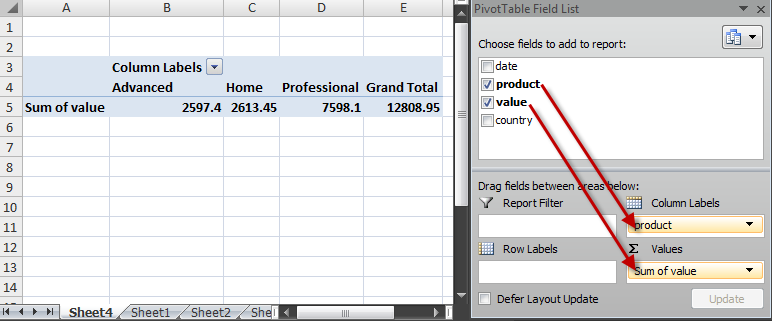
The PivotTable Field List will appear. We want to find the number of sales for each product. Drag the product field to Column labels and the value field to Values. This gives us the total value of sales by product.

pivot table 3

To change this to the number of sales pull down the Sum of value drop-down list and select Value Field Settings….

pivot table 4

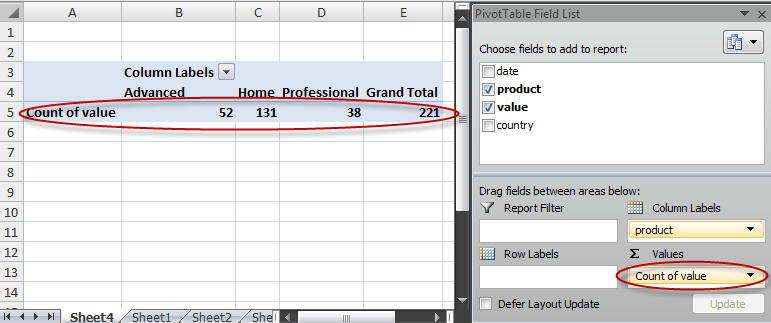
Change Summarize value field by from Sum to Count and click OK.

pivot table 5

The number of sales of each product are now shown.

pivot table 6

Now drag the country field to Row labels. Then click on Count of value, select Value Field Settings…, change it back to Sum and click OK. The total value of sales of each product by country is now displayed.

pivot table 7

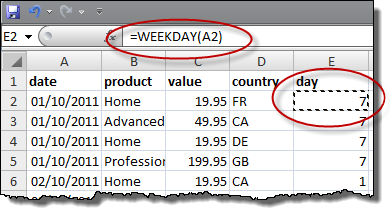
We now need to add a day of the week column. Click on Sheet 1 and add a new column as shown.

pivot table 8

Now select all the data from A1 to E222 and insert a new pivot table, as before.

pivot table 9

Drag the fields as shown to get the total value of sales of each product by day of the week.

pivot table 10

(We’ll quietly ignore the fact that the number of days aren’t divisible by 7 in the data.)

We can even display by product, day of the week and country with one more drag.

pivot table 11

Excel also supports pivot charts if you prefer your results in graphical form.

pivot chart

Obviously this is a very simple example, but pivot tables can be used to quickly analyse much larger and more complex data sets. Next time you have got some data to analyse consider whether you would be better using pivot tables or pivot charts.

*** UPDATE ***

You can also use my Hyper Plan software to create pivot tables. It is a lot simpler than the above! There is a free trial.

Promoting your software

This is a video of a “Promoting your software” talk I did at ESWC 2011. In it I discuss my experiences attempting to try every form of promotion known to man including: SEO, Google Adwords, magazine ads, affiliates, Facebook ads and hanging out in wedding forums using a female pseudonym. With real data! You can’t read the slide text in the video, but I have included the slides below.

A couple of people asked me afterwards whether anything I tried had worked. Yes! I wouldn’t have survived long as a microISV otherwise. But I didn’t really want to dwell on what had worked for me because it might not be relevant for different products with different price points in different markets. Also that isn’t the sort of information I want to give to my competitors.

Things were running a bit late due to problems with the projector, so I didn’t have time for the audience participation at the end. Projector problems are really not what you need when you are just about to do a talk to a room full of people! Many thanks to Alwin and Sytske of Collectorz for doing the video and to Dave and Aaron of Software Promotions for helping to sort out the unruly projector.

Cppcheck – A free static analyser for C and C++

I got a tip from Anna-Jayne Metcalfe of C++ and QA specialists Riverblade to check out Cppcheck, a free static analyser for C and C++. I ran >100 kLOC of PerfectTablePlan C++ through it and it picked up a few issues, including:

  • variables uninitialised in constructors
  • classes passed by value, rather than as a const reference
  • variables whose scopes could be reduced
  • methods that could be made const

It only took me a few minutes from downloading to getting results. And the results are a lot less noisy than lint. I’m impressed. PerfectTablePlan is heavily tested and I don’t think any of the issues found are the cause of bugs in PerfectTablePlan, but it shows the potential of the tool.

The documentation is here. But, on Windows, you just need to start the Cppcheck GUI (in C:\Program files\Cppcheck, they appear to be too modest to add a shortcut to your desktop), select Check>Directory… and browse to the source directory you want to check. Any issues found will then be displayed.

You can also set an editor to integrate with, in Edit>Preferences>Applications. Double clicking on an issue will then display the appropriate line in your editor of choice.

Cppdepend is available with a GUI on Windows and as a command line tool on a range of platforms. There is also an Eclipse plugin. See the sourceforge page for details on platforms and IDEs supported. You can even write your own Cppcheck rules.

Cppcheck could be a very valuable additional layer in my defence in depth approach to QA. I have added it to my checklist of things to do before each new release.

ESWC 2011

No proper post this week. I’m too busy finishing off my talk ‘Promoting your software’ for ESWC 2011 in London next weekend (19-20 Nov). I am going to talk about my experiences attempting to try every form of promotion known to man including: SEO, Google Adwords, magazine ads, affiliates, Facebook ads and hanging out in wedding forums using a female pseudonym. With audience participation! Plus real data!

There are also some other interesting looking talks. Chatting to other people in the business over coffee or beer is also invaluable. If you haven’t booked a ticket, it isn’t too late. Don’t worry if it is your first time – people are very friendly. Do come and say hello.

On the subject of conferences, the ASP is putting on ISVCon in Reno, Nevada, USA in July 2012. Being UK based it is probably further than I am prepared to fly for a conference. But I hope it is a huge success.

13 ways to fail at commercial software

  1. Don’t bother with market research, because you just know lots of people are itching to buy your new product.
  2. Only release the product once it is perfect. However long that takes.
  3. Go into a market with very strong competition and compete with them head-on, because you only need a measly 1% of this market to get rich.
  4. Go into a market with no competition. How hard can creating a new market and educating all the potential customers be?
  5. Only think about marketing once the code is nearly complete.
  6. Write software for people who can’t or won’t buy software (e.g. 10 year olds, prisoners, Linux fanatics, people in developing countries, developers).
  7. Don’t worry about marketing, because good software sells itself.
  8. Concentrate on the technology and impressing other developers.
  9. Don’t listen to what your customers say, because you know best.
  10. Don’t worry about usability. It took you thousands of hours to write the software. Surely the customer can spend an hour or two learning to use it.
  11. Embrace bleeding-edge technology.
  12. Don’t worry about backups, because modern harddisks are very reliable.
  13. Don’t even try. Just give your software away for free.

Did I miss any?

What type of free trial should I offer for my software?

Once upon a time, the idea that you would allow people to try your software before they bought it was revolutionary. But now, thanks to the shareware movement and the ease with which software can be downloaded from the Internet, free trials are the norm for most types of off-the-shelf software. Prospective customers no longer have to rely on reviews of questionable independence or reading the packaging in a shop. They can try the software for themselves before making any commitment. This has been overwhelmingly a good thing for software users. It has also been a boon for vendors of good software.

When I surveyed 92 small software product vendors in 2009, 100% of them offered a free trial.

Eric Sink says:

Every small ISV today should give its customers an opportunity to try before they buy. It is officially now absurd to do otherwise. Customers will come to your Web site and expect to find a demo download.

And that was in 2004.

So, for most software products, the question isn’t – should I have a free trial? The questions is – what sort of free trial should I have? As with everything related to marketing, it depends. There are many different approaches. Below I describe some of the more common ones.

Time-limited

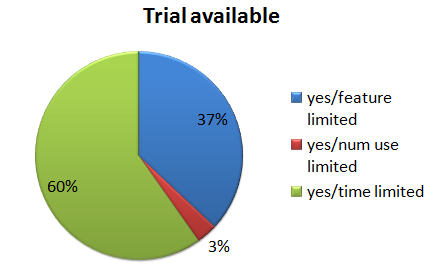
Typically this takes the form of a fixed number of contiguous days of free and unrestricted use. The software then stops working  and you need to buy a licence to continue using it. The time period is often 30 days. As you can see in the pie chart above, this was the most common type of trial in my survey.

The advantage of this approach is that it allows the user to try the full functionality of the software. But it does have a number of issues:

  • The trial might expire before they have finished their evaluation.
  • It isn’t suitable for software that might only be needed for a limited time. For example, a 30 day time-limited trial wouldn’t be a good idea for my wedding seating arrangement software as a wedding is a one-off event (we hope), and people could just start the trial 30 days before their wedding.
  • You have to find some way to hide the data about the date the trial starts.
  • It is relatively easy to circumvent. Even if you hide the install date well and check for changes to the system clock a potential customer can just keep reinstalling the software inside a new virtual machine each time the trial expires.
  • Cookie expiration is an problem. For example, Google Adwords conversion tracking cookies only last a maximum of 30 days. So Adwords conversion tracking won’t count a sale on day 31, which is probably where most of your sales will happen with a 30 day trial.
  • As most sales will only happen after your trial expires, you will have to wait longer to get your money.

I have sometimes downloaded software, started to evaluate it, got distracted and then returned only to find the trial has timed out. Very frustrating and unlikely to result in a sale. So I am generally not a fan of fixed duration trials. There are a couple of ways you can try to work around this issue:

  • Only limit the amount of time they are actually actively using the software. For example, allow them 8 hours of total active usage. This shouldn’t be too hard to program. For example, stop the timer if there hasn’t been a key press or mouse click event in 2 minutes.
  • Allow them to request an extension. Then at least you have got their email address and can follow them up.

Usage-limited

In this approach you limit the number of times a certain action can be performed. For example the number of pages they can print or the number of times they can start the software. This avoids the issue of a time-limited trial which expires before the user has finished their evaluation.

Feature-limited

In this approach the trial disables an important function of the software, for example printing or saving.  The problem is that a user won’t know if this feature works properly until they buy the full version. This may put some people off.

It has the advantage that you can ship a separate trial version with features missing completely from the executable, which makes life a little harder for crackers (note that they can still get hold of the non-trial version to crack if they want to, e.g. with a stolen credit card number). But it also makes life harder for customers, as they have to install the software a second time after purchase. Personally I care more about making life easy for my paying customers.

Capacity-limited

A capacity-limited trial restricts the amount of data that can be entered. For example, a password manager might only allow you to enter 50 passwords into the trial version. This approach can be problematic when performance is important. For example, if you limit a database trial to one thousand records, how can the user test whether the search performance is adequate for a database with a million records?

Output-limited

Many products exist purely to produce some form of physical or electronic output, for example image editors and label printers. Adding a watermark, or altering the output in some other way, can be an effective way to limit a trial. But you need to make sure that the modification to the output can’t easily be removed or worked around (e.g. using screen capture). You also need to be sure the user doesn’t think the modifications in the output are due to a bug in the software.

Nagware

Nagware allows you to use the software without restrictions, but ‘nags’ you periodically to pay for it. Usually this takes the form of a window that pops up when you start or exit the software. But I once used some software that also nagged you in audio. A woman’s voice with a heavy Scottish accent no less. It got uninstalled very quickly! Nagware isn’t very effective in my experience. I never did buy WinZip. Did you? After a while you just click the ‘continue’ button without thinking about it. Little tricks, like moving the ‘continue’ button or greying out for a few seconds are just annoying. And annoying people doesn’t seem like a great start to a business relationship.

No trial

Some software has no trial, just a money back guarantee. If your software is an enterprise system that takes significant effort to configure, then this is entirely understandable. But if it is off-the-shelf, downloadable software, what are you trying to hide? On the plus side it avoids the issue of people downloading software and then never getting around to trying it. My own stats show that only some 40% of people who start a download of my software actually install and run it. Also many people won’t ask for their money back even if they don’t like your product. So you might get sales to people who wouldn’t have purchased with a trial. But do you really want these people as customers? Personally I am unlikely to buy a software with no trial, unless there is no real alternative. I assume you won’t let me try your software because it isn’t very good. I’m sure many other people feel the same way.

Hybrid trial

Hybrids of the above approaches are also possible. For example, the trial of my wedding seating arrangement software doesn’t allow you to save, print or export plans with more than 30 guests – a hybrid of the capacity-limited and feature-limited approaches. I figure that 30 guests is enough to show what the product does, but not enough to be useful for most events. Also no-one is likely to pay for event planning software for an event with 30 or fewer guests.

Conclusion

A good trial is a balancing act. You need to give prospective customers enough to show them your software could solve their problem, but not enough to actually solve their problem. But if you are too restrictive they might go to a competitor with a more relaxed trial policy. It can be tough to get the balance right or to know whether a different approach would get better results.

Obviously, the best type of trial depends very much on your product. If it is a product that is likely to be used a lot and  is going to increase in value as it is used, then you might be best offering a generous time-limited or usage-limited trial. But if it is a product that is only needed for a one-off task or a limited period of time, then a feature-limited, capacity-limited or output-limited trial probably makes more sense.

For example, most consumers will (unless they are very unlucky) only want to use disk recovery software once. So it wouldn’t make sense to offer a 30 day free trial. It would probably make more sense to offer a feature-limited trial that allows them to see what data could be recovered, but not actually allow them to do the recovery until they pay up. But if you are selling to professional disk recoverers, then a time or usage-limited trial might be appropriate.

I asked  Craig Peterson of the Beyond Compare file comparison tool about their very generous trial policy (30 non-contiguous days of use) in an interview and he said:

That goes back to competing with all the other products out there.  If someone installs two programs to evaluate, and then doesn’t have a chance to really try them out until a month later, the one that works is more likely to get the sale.  It also makes it more likely that potential customers will learn the application and start relying on it, so when it does come time to pay they’re less likely to throw out that investment and switch to another tool.

Data comparing different types of trial is hard to come by:

  • My 2009 survey didn’t show any clear difference in mean conversion rate between time and feature-limited trials (there wasn’t enough data for usage-limited trials to be worth counting):
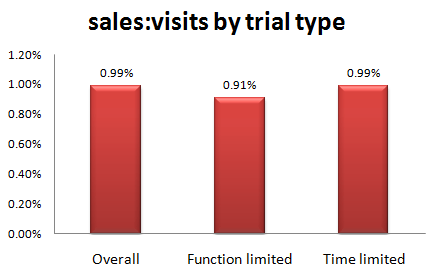
The nagware vs feature-limited result is fairly conclusive. But, apart from that, there doesn’t seem to be much hard data to go on. Even if there was more data, it wouldn’t necessarily apply for different products in different markets. So, unless you want to program multiple types of trial and run lots of split tests (trial and error?),  you are going to have to ‘go with your gut’. It is tempting to pick the same trial model as your competitors. But remember that part of successful marketing is being different.

So there are no easy answers. But don’t just choose a 30 day time-limited trial because that is what everyone else is doing. Have a think about what fits best with your product, market and customers. Be creative.

Product ideas wanted

Joannes Vermorel’s guest post ‘3 Low-Competition Niches In Retail Software’ got quite a lot of interest. I also have various ideas for software-based products and services that I am never likely to develop due to a lack of time, money, skills or interest. I’m sure many of you reading this do as well. It seems a shame to leave all these ideas gathering dust when there is someone out there just about to waste a huge amount of energy writing the 2,133th Twitter app (and counting) due to lack of a better idea.

So I am inviting you to email in promising but neglected software-based product and service ideas so that I can publish the best ones here. Maybe it is a tool you would like to use or something that you think might be a good business but, either way, you are never going to implement it. They can be ideas for: enterprise SAAS, Windows programming libraries, iPad games, development tools  – anything with a significant software component. It doesn’t have to be a radically new idea, it could be just a significantly different take on an existing idea. Hopefully some budding entrepreneurs will pick up some of these ideas and run with them. Note: By sending me your idea you are giving me permission to put it into the public domain for anyone to see.

Please email them to me at andy at oryxdigital at com with the subject line “product idea” by 12-Sep-11. They should be in plain text and conform to the following basic template:

——————————————————————————

Title:
A one sentence description of product.

Description:
A longer description of the product. Ideally 1 or 2 paragraphs.

Customer:
Who you think the typical customer would be.

Price point:
What you think the software would sell for.

Platform:
Windows, Mac, iPad, iPhone, web etc.

Competitors:
Closest competitors (URLs ideally).

Differentiation:
How your idea is different to the competitors.

Challenges:
Any particular challenges in creating or marketing this product.

Commercial potential:
What commercial potential does this product have? How many people do you think it could sustain full time?

Why not you?:
If it is such as great idea, why haven’t you created it?

Market research:
How much market research you have done. ‘None’ is an acceptable answer.

Contact:
(optional) Your contact details, if anyone wants to discuss the idea further. Can be an email, hyperlink, twitter account etc. It is also fine if you want to use a pseudonym or be anonymous.

——————————————————————————

For example:

Title:
Qt GUI checker.

Description:
Every time I create a new Windows using the Qt application framework I have to manually check all the controls have:

  • tooltips
  • non-conflicting keyboard shortcuts
  • the correct left-right and top-to-bottom tab order
  • correctly capitalised text
  • etc

It is quite tedious when you do a lot of GUI development.

Customer:
Qt developers.

Price point:
I’d pay $30.

Platform:
Windows, Mac, Linux and other Qt platforms.

Competitors:
None that I know of.

Differentiation:
QtDesigner lets you do these tasks manually, but I don’t know of any software that can do this automatically.

Challenges:
I don’t think it would be that difficult. You just need to parse the XML in a .ui file and present the results in a legible form.

Commercial potential:
Limited. Only of interest to Qt developers. Many people are using Qt for free, and people using free tools generally don’t like to pay for add-ons. It might make a good student or open source project though.

Why not you?:
I’ve got too much else on my plate! Also I am not convinced about the commercial potential.

Market research:
No formal research, but I’ve been using Qt for over 10 years.

Contact:
http://www.successfulsoftware.net .

Programming skills wanted

I am looking to outsource some self-contained programming tasks in areas that I don’t have expertise in. I am hoping that someone reading this blog might be able to help (or know someone that can) so I don’t have to go through outsourcing sites. These are the two skills sets I am currently looking for:

  1. Javascript/CSS/HTML – To write a single page web app. This will have a relatively simple UI displaying data read from XML. The app will need to work on a wide range of browsers and devices. Ideally you should also have some web design skills, but this isn’t essential.
  2. C++/Qt 4/OpenGL – To write a relatively simple 3D visualization model that runs on Windows and Mac. This will involve populating a 3D space with specified shapes and allowing simple movement around it.

Details:

  • I am expecting that I will need 2 different people, but it is possible there might be someone out there with experience in both.
  • These are small projects (probably less than 2 weeks for task 1 and less than 1 week for task 2). But they might lead on to more work in future.
  • Time scales are reasonably relaxed. Ideally I would like the work to be finished by the end of September.
  • You can be based anywhere in the world, but must be able to communicate in English (written and spoken).
  • Full copyright to the work will pass to my company on full payment.
  • Obviously cost is an issue. If I have 2 promising candidates, I am likely to pick the cheaper one.

If you are interested in doing either of these tasks please email me ( andy at oryxdigital.com ) before the end of Friday 26th August with subject “programming work” and a brief outline of:

  • Which of the 2 tasks you are interested in.
  • Your relevant experience. Ideally including details of related projects completed.
  • Your daily rate in Pounds Sterlings or US dollars.

I will send detailed specs to a shortlist of the best candidates. The work will be awarded on the basis of fixed price bids against the spec. Please don’t apply unless you have relevant experience – if I wanted a programmer without experience in these areas I could do it myself. ;0)

Easy2Sync file synchronization software

I recently did a day of consulting for Thomas Holz looking at his file synchronization software, Easy2Sync. We covered a lot of issues, including: Adwords, website design, product ‘look & feel’, usability, positioning, pricing, logos and why his software is still at v1 after 10 years! He was kind enough to write me this testimonial:

I’ve been running a software company for over 10 years now and thought that I knew most of the tricks and had fixed most of the usual issues. Still, I hired Andy to check my file sync software to see what I’ve been missing. And that were quite a few things. Actually I was surprised at the wide range of angles that Andy checked. Not only the software and website (as it was to be expected), but also Adwords, business, sales and marketing tactics. I’m still working on implementing the changes, but I’m already sure that this was a very good investment which will easily pay off – not only for my file sync product, but also for my other products.

Thomas Holz, http://www.easy2sync.com

If you are looking for Windows file sync software that doesn’t store your data on a third party server, check out Easy2Sync.

Selling software vs selling eyeballs

Lets say I’ve written some downloadable software and I want to make some money from it (‘monetize it’  in the ghastly common parlance). Should I charge people for using the software or should I give them the software for free and make my money from ads?

Lets look at some numbers.

The typical conversion rate for downloadable software is around 1%. That means that about 1% of the people that visit your site will typically buy your software. So, for each $1 of your sale price you will make around $0.01 per unique visit. Downloadable software is often priced around $30, so lets say $0.30 per unique visitor. Some software sells for less than $30, and some for a lot more. Also I haven’t taken account of the lifetime value of a customer (e.g. upgrades) – which will increase the value per customer; or payment processing and advertising costs – which will reduce the value per customer. It is just a ball park figure.

How much money could I make from advertising if I give the software away instead? I have been doing some research for a while on this. Based on various data I have gleaned from the BOS forum and blogs, advertisers typically pay per $1-$2 per 1000 impressions (CPM). Some data points:

  • A well known ad network offered me a $2 CPM (-19% commission) to put ads on this blog.
  • Dating site plentyoffish.com reported making $10k/day from Adsense off 200 million pages per month in 2006, which is a CPM of $1.5
  • A sample of 8 Facebook app developers were averaging less than $1 CPM.
  • “If a site like Stack Overflow, which does almost a million pageviews a day, can’t make enough to cover even one person at half time using Google AdSense, how does anyone make a living with AdSense? Does it even work?” (Stackoverflow blog)
  • “Charging your end user isn’t the only way of pricing software. You can choose to give it away for free and then make money by, for example, charging for consulting, installation and training; or selling advertising. The latter, although a common model for web sites, is extremely hard to make work. CPM – the cost per thousand impressions – can be as low as a dollar. In other words, to generate one thousand dollars of revenue you might need to serve up as many as a million pages. To generate enough revenue to support a team of three or four people, that means having ten million page views per month. Most web applications simply aren’t going to attract that sort of traffic.” (p57 of “Don’t just roll the dice”)

So, taking a ballpark CPM of $1.5, I would be making $0.0015 per page impression.

Obviously I am comparing apples (unique visitors) and pears (impressions) here. How many impressions does 1 unique visitors equal? My own table planning software averages around 2 impressions per unique visitor (many visitors bounce out after reading 1 page, even those that buy might only visit the home, download and purchase pages). So, assuming this is typical, the product based site described above should be making around $0.15 per page impression. Based on these (admittedly rough) numbers an ad driven site needs approximately 100 times as many page impressions per day to make the same money as a product driven site. To make around $100k per year the product site would need about 900 visitors/1,800 impressions per day. To make the same amount the ad driven site would need around 90,000 visitors/180,000 impressions per day. But it is worse than that because the ad driven site is going to have significant hosting fees and potentially many more users to provide support for. I know which business model I prefer.

So why not get the best of both worlds – sell the software AND put ads on the site? Because then you are sending out all sorts of bad vibes (“this software isn’t good enough that they can make a living off it”) for a measly 1% extra income from the ads. I’m confident the presence of ads will lose you >1% in product sales.

An ad supported model is only viable when you have lots of traffic. Most downloadable software (or web apps) won’t be able to generate that sort of traffic, even if it is good and you give it away for free. If you really want to run an ad supported business, you are probably better off basing it around forums and user generated content than free software.

In the final analysis if you are creating software I think it makes more sense to create something of value, grow some balls and charge for it. Rather than giving it away and selling eyeballs in the hope that someone else will take their money and throw you some scraps. Think balls, not eyeballs.