
I have put together a page of categorised links to blog posts and articles that I think might be useful to developers and marketers of commercial software in general, and microISVs/indie developers in particular. I intend to add more links from time-to-time. My rules for inclusion are secret, arbitrary and capricious, so please don’t ask to have your link added.
Outsourcing software testing
 Every time I write a post for this blog I carefully check it for typos. I then get my wife to proof-read it. She always finds at least one typo. Often there will be whole words missing that my brain must have interpolated when I checked it. I read what I thought I had written. She is unencumbered by such preconceptions.
Similarly, it isn’t sufficient to do all your own testing on software you wrote, no matter how hard you try. You will tend to see what you intended to program, not what you actually programmed. Furthermore your users have different experiences, assumptions, and patterns of usage to you. Even in the unlikely event that you manage 100% code coverage in your testing, those pesky users won’t execute those lines of code in the same order you did. I have spent hours testing a program without finding a bug, only to see someone else break it within minutes or even seconds.
So it is essential to involve people other than the original programmer in testing, in addition to (but not instead of) the testing programmers do on their own code. This poses something of a challenge to one-man-bands such as my own. I don’t have other programmers, let alone QA staff, to call on. I can, and do, use volunteer customers for beta testing. But, in my experience, beta testing is not an effective substitute for professional testing:
- It is haphazard. I never hear from ~90% of my beta testers.
- You can’t control beta testers sufficiently, for example you can’t set them tight deadlines, make them concentrate on a particular feature or do their testing on a particular operating system
- The quality of bug reports from customers is often poor. Customers often don’t understand (or don’t have the patience) to describe a bug in enough detail for you to reproduce it.
- Professional testers know how to break software.
- The new release should be as polished as possible before any customers see it. Your beta testers will be some of your most enthusiastic customers. You don’t want to use up that goodwill by sending them buggy software.
Consequently I like to pay third party testers to test my own PerfectTablePlan product after I have finished my own testing and before I do any beta testing. Previously I have used softwareexaminer.com, but they are no longer in business. So I decided to try a couple of other offshore testing companies I had heard about:
 |
testlab2.com |
 |
qsgsoft.com |
The problem with paying a testing company is that it is hard to assess the quality of their work until it is too late. If they report few bugs it could because there are few bugs or because they didn’t do a very good job of testing. By using 2 companies to test the same software release I was also testing the testers (I didn’t tell them this).
I paid each company to do approximately 3 days testing on the Windows and Mac versions of PerfectTablePlan. I was very pleased with the results. Both companies found a useful number of bugs in the software. They were also able to test on platforms that I didn’t have access to at the time (64 bit Windows 7 and Mac OS X 10.6). I didn’t keep an exact score, but I would say that QSG found more bugs, while TestLab2 was more responsive.
QSG found some quite obscure bugs. They were even able to tell me how to reproduce a very rare and obscure bug that I had been trying to track down for months without success. Communications were sometimes a little slow (at least partly due to us being in different time zones) but it wasn’t a huge issue. My only real grumble is their billing. Despite several reminder emails from me I am still waiting to be invoiced for the work several months later. I like to pay my bills promptly and then forget about them.
TestLab2 didn’t find quite as many bugs, but I was impressed with their responsiveness. They installed Mac OS X 10.6 within a few days of it being released, so they could test PerfectTablePlan on it. When I emailed them on a Saturday about a last minute bug fix for Mac OS X 10.6 they tested the fix the same day. That is great service.
TestLab2 and QSG are based in Ukraine and India, respectively. At around $15/hour they are about a third the price of equivalent US/European companies I contacted (who might also outsource the work to Eastern Europe and India, for all I know). Some people believe outsourcing work to countries with lower costs of living is evil. I’m not one of them. I sell my software worldwide and I am also happy to buy my services worldwide, especially if I can get significantly better value for money by doing so. While there are rational arguments to be made about problems caused by differences in culture, language and time zone caused by outsourcing to other countries, I didn’t find any of these to be a major issue in this case. Most of the other arguments I have heard boil down to the simple ugly fact that some westerners feel they are entitled to a disproportionate share of the global pie. But I don’t see any reason why someone in Europe or North America is any more deserving of a job than someone in Ukraine or India.
With the help of these two companies I was able to put out a really solid PerfectTablePlan v4.1.0 release, despite the large number of new features. In fact, I am only just putting out a v4.1.1 with some bugs fixes several months later. I plan to use both companies again. I hope readers of this blog will give them some additional work to ensure they stay in business. But not so much that they don’t have time to do my next round of testing!
Easy screen sharing with Skype
The latest version of Skype allows you to share all or part of your screen with another Skype user in a couple of clicks.
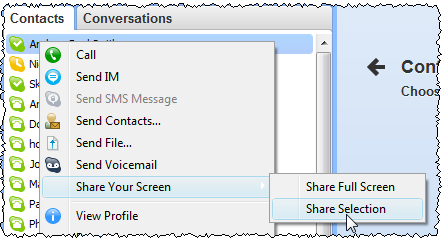
This can be incredibly useful. So far I have used it for:
- support – Sometimes email just doesn’t cut it. If your customer has Skype, you can use screen sharing to see exactly what your customer is doing while talking to them.
- remote usability testing – Usability testing is very important. But luring a stream of fresh victims to your office to take part is a logistical headache. If you use Skype screen sharing neither of you has to leave the comfort of your own computer. I have used it successully to do usability testing with people on the other side of the world.
Skype screen sharing has its limitation. The images are bit blurry, there is some latency and you can’t interact with the remote computer (as you can with services such as Copilot). But it is good enough for most purposes, and it’s free!
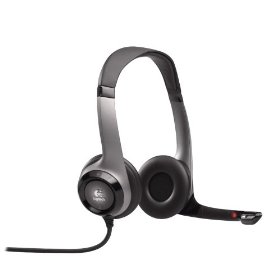
If you are going to be using Skype much, then I strongly recommend buying a USB headset. It is much more comfortable than holding a phone to your ear for extended periods and it keeps your hands free for typing. I use a Logitech headset and I have been quite happy with it. I sometimes get sweaty ears during a long call, but it seems a small price to pay.
Marketing for microISVS
Below are the video and slides of the “Marketing for microISVS – embracing the ‘dark side’?” talk I gave at ESWC 2009 in Berlin. This is a high-speed ramble through a vast subject. In the 45 minutes available I do my best to dispel some of the myths software developers have about marketing and discuss some marketing concepts, including: branding; positioning; pricing; and segmentation. Taking in Harley Davidsons, tinned tomatoes, Coca Cola and food blenders on the way. The first couple of minutes, where I dispel the myth that good software sells itself without marketing, are missing from the video due to a dead camera battery. But you knew that anyway, so I don’t think this detracts much overall.
Video:
Slides (which might not make much sense without the video):
NB/ When I said 47Signals, I meant 37Signals (brand inflation?). Thanks to Tarek for the correction.
Links to some of the things mentioned in the talk:
- Brief reviews of all the books mentioned (plus a few others)
- Bob Walsh’s ‘microISV sites that sell!’ e-book
- Neil Davidson’s ‘Don’t Just Roll The Dice – A Usefully Short Guide to Software Pricing’ e-book (PDF)
- Brandz ‘Top 100 brand ranking 2008’ (PDF)
- Will it blend?
- Headset hotties
- Alwin Hoogerdijk’s blog
- Eric Sink’s blog
A big thank you to Alwin and Sytske of collectorz.com for hot-footing it from Alwin’s talk to do the video (you can see Alwin’s excellent talk on web app pros and cons here). And also to David and Panagiota for all the hard work that goes on behind the scenes organizing ESWC.
If you found this talk useful you might also like 10 mistakes microISVS make.
Presents for programmers
It is coming up to that time of year again. You had better start dropping some hints on what you want for Christmas if you don’t want socks again. How about a software themed T-shirt? You can never have too many T-shirts and it means you can go an extra day before you have to do the laundry.
It just so happens that www.programmer-tshirts.com (set up by myself and Patrick McKenzie last year) carries a range of wittily(?) captioned T-shirts for software types of all stripes including: microISVS, C++ programmers, LISP programmers, Mac developers, software engineers, managers and bloggers. Following on from a conversation at ESWC 2009 (with someone who might prefer to remain anonymous) I have just added another design for server programmers:
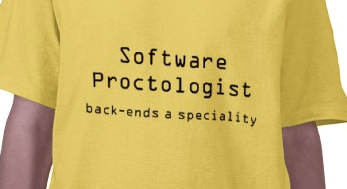
I know the T-shirts aren’t cheap (print-on-demand is expensive), but I have ordered a couple myself from the European shop and the quality is very good. Also you can customise the t-shirts (e.g. choose a different colour). Best of all the commission on each T-shirt (12.5% for the US shop and £1.50 for the European shop) goes to two very worthy charities:
- Sightsavers International works to alleviate sight problems around the world. Every year Sightsavers and their partners treat millions of people for potentially blinding conditions. It costs as little as $0.10 to protect someone from river blindness for a year.
- Jaipur Foot have developed an effective and easy-to-fit prosthetic lower limb that can be produced for a little as $30. The charity has distributed over 300,000 limbs free of charge in 22 countries.
It won’t be a surprise to regular readers that I am going to finish this post with a less than subtle call-to-action.

(STOP PRESS: 15% off everything in the European shop until 29-Nov-2009, use voucher code: NOVEMBERSALE)
microISV reading list
I have added a microISV reading list page to this blog. Please feel free to add your own comments to the page on the books listed or any other books you feel are relevant.
Off to ESWC 2009
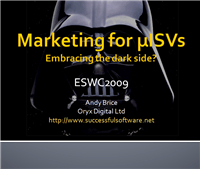 I will be off to ESWC 2009 in Berlin in a few days. I am doing a talk “Marketing for microISVs – embracing the dark side?” on the Saturday morning. It is going to be tough to tackle as huge a subject as marketing in 45 minutes including questions, but I like a challenge!
I am also looking forwarding to touching base with old acquaintances and meeting some new people. If you are going to there, do come and say hello.
How good are your backups?
 We all know we need to do backups. But that is only half the story. Have you actually checked you can read them back if you need to? I have heard stories of people religiously backing up to mag tape every day for years, only to find out the tapes were corrupt and couldn’t be read back when needed.
I checked my backups recently to ensure I could read them back. Here is what I found out:
- I was backing up my SVN repository on my Mac Mini to a single .tar.gz file which I then copied across onto a USB disk attached to a Windows box. The file had grown unnoticed to >4GB in size. But the USB disk was in FAT format, which has a maximum file size of 4GB. The the file was quietly being truncated to 4GB and I couldn’t uncompress the file when I tried with gunzip.
- I was backing up from my Windows box to DVDs in ‘live’ format. These were not readable by my Mac mini, which would have been a problem if neither of my Windows boxes were working. I have now changed to ‘mastered’ format, which is readable by Windows and Mac.
- I was backing up the .mdf file my OnTime bug tracking database. It turns out you can’t just swap one .mdf file for another and re-start OnTime, as you get an internal consistency error. I am now creating and backing up .bak files, which you can restore.
I have lots of redundancy in my backups – backing up in multiple formats (files, SVN repository and Acronis disk images) to multiple media (multiple machines, USB disks, DVD and online). So none of the above would have spelt disaster. But it does bring home the importance of testing your backups from time to time and of having multiple forms of backup. If you think backing up to a single USB disk is enough you should read this. If you are relying purely on an third party online backup service you should consider what would happen if they went bankrupt – not inconceivable in the current economic climate.
Are you relying on a single backup strategy? When was the last time you tested your backups?
Apple resort to FUD marketing
Apple have resorted to ugly FUD marketing in their latest ad. This seems a bit rich given that Mac OS X 10.6 has a bug that can delete all your user data.
Why I won’t be bothering with the Windows 7 logo program
 Am I the only one being totally bombarded with ‘Give your application the green light’ and related emails from Microsoft and its minions? I must have had at least 30 so far. I took a few minutes to list my product in the Windows 7 compatibility guide (beware, cheesy audio). But that is all I intend to do.
I went to the trouble of getting the ‘works with Vista’ logo in 2007. The process was very broken:
- The winqual and Partner websites give me “certified by unknown authority” warnings.
- The Winqual website didn’t work at all in FireFox.
- There was a complete lack of clear guidance about what you needed to do next at each stage.
- The documentation was very poor, with broken links and much of it completely out of date (i.e. “more information will be available in 2006”, this was 2007).
- It took me about an hour of rummaging around on the winqual site and an email to tech support to work out that you can ‘sign’ the legal documents online (you have to tick a permissions checkbox on a separate page and do a few refreshes).
- You had to download a signing tool. It was in a zip file with a password. They didn’t tell you what the password was! Luckily I already had signcode.exe installed.
It was easily the most frustrating thing I have done in my career as a microISV. For that I ended up with an ugly ‘works with Vista’ logo (that probably just made customers think my software didn’t work on Windows XP), an entry in Windows marketplace (I already had one) and a Verisign authenticode certificate that I wasn’t allowed to use to sign my software.
Hopefully Microsoft have cleaned up their broken logo process since the Vista launch. But the benefits of the Windows 7 logo program seem slim:
- a “Compatible with Windows 7” logo (prettier than the ghastly “works with Vista” logo admittedly)
- 30 Partner Points for use in the Microsoft Partner Program (I have no idea what I would want those for)
- some PR templates (when did having a near identical press release to thousands of other companies become a benefit?)
- priority Listing in the “Windows 7 Compatibility Center” (I doubt any of my customers know or care about this)
- Windows built-in error reporting (I rolled my own, thanks)
Worst of all I would have to buy another overpriced Verisign certificate to authenticate myself to Microsoft winqual, even though I already have a perfectly valid authenticode certificate from Comodo.
I think I’ll pass.
 Successful Software