Tag Archives: marketing

Ten mistakes microISVs make

Here is a video of the “Ten mistakes microISVs make” talk I gave at the Software Industry Conference 2009 in Boston. Total duration: 27 minutes.

The slides aren’t terribly easy to read, due to the resizing and compression of the video. But you can also download the paper and slides:

A big thank you to Alwin and Sytske of collectorz.com for doing the video. You can read Alwin’s excellent software marketing blog at alwinhoogerdijk.com.

Feel free to embed this video, as long as you include a credit and a link back to this blog.

How many of these mistakes have you made? How many are you still making?

Lazy instantiation marketing

lazy instantiationIt is often hard to know what sort of additional services customers will be interested in. Might they be interested in:

  • a yearly subscription instead of a one-off payment?
  • hosting their own server?
  • paying extra for 24 hour support?
  • a port of your product to Mac OS X?

You can implement the new service and then offer it to customers. But this can be a huge waste of time and money if it turns out nobody wants it. An alternative approach is to borrow the idea of “Lazy instantiation” from programming (also called RAII – Resource Acquisition Is Initialization).

Programs need to initialise various system resources, such as databases, files and hardware devices. It is generally considered good practice to only initialise these resources as they are needed. This is called “lazy instantiation” and results in faster start-up times and no wasteful initialisation of resources that turn out not to be needed. For example in C++ (glossing over various details of cost, smart pointers, copy constructors, error handling etc to keep the example code simple):

lazy_instantiation

So we can only access the resource by calling MyClass:getResource(), it will get initialised on first use and it will be cleaned up when MyClass goes out of scope. This much more elegant, efficient and less error prone than always initialising the resource at start-up or adding lots of checks throughout the code to see if the resource is already initialised.

A similar approach can be applied to marketing. For example, instead of spending days sorting out the intricacies of subscription payments, you just add the following to your purchase page:

Please email support@acme.com if you are interested in purchasing an annual subscription instead of making a one-off payment.

This will take you a few minutes. If someone emails you that they would prefer a subscription you reply along the lines of:

Thank you for your interest in purchasing Acme server via an annual subscription. We are currently assessing the commercial viability of a subscription approach. We will contact you if and when we decide to make Acme server available through annual subscription. But, for now, you can only purchase Acme server through a one-off payment, as detailed on our purchase page. … etc

If you get enough interest you go ahead and do the work to implement subscription payments. If you don’t – well, you didn’t waste much time on it.

MyClass::MyClass()
{
   myResource = NULL;
}

What are they smoking in Redmond?

I scanned the Microsoft ad below from a recent QBS catalogue.

microsoft_ad

click for larger image

I am still struggling to understand the underlying message. Use Team System and Microsoft will get its tentacles around you? I don’t know which is more unlikely, the basketball playing Cthonians or the athletic and good looking development team.

The two types of reseller

resellersIn theory, the Internet allows customers to find products without the need for middlemen (unless you count Google). In reality, the age of full disintermediation has not yet arrived, and perhaps never will. Middlemen are still important. One of the more important types of middlemen for a software vendor is the reseller. However it is important to realise that there are two completely different types of reseller. One can be very useful to you as a software vendor, the other is generally a pain in the backside. They should be treated accordingly.

Value added resellers

A value added reseller buys your product and then resells it to their customers. Usually they will buy from you at a discount and resell to their customer at full price, pocketing the difference. Typically a reseller will expect between 25-50% discount depending on a range of factors including what services they provide (e.g. localisation and support), the price of the product  and volumes sold. Often the discounts are on a sliding scale, with the discount increasing with sales volume. This type of reseller can add value for you and the cusomer in various ways. They may:

  • have expertise in markets that you don’t
  • be able to reach markets that you can’t, due to barriers of language, culture or geography
  • localise your product and marketing materials
  • provide first level support.
  • sell your software as part of a package including other services, software and/or hardware.

However there are a few things you have to look out for:

  • You don’t want to end up competing directly against your own resellers in existing markets.
  • Resellers may undercut you on price.
  • Beware of offering any sort of exclusivity.
  • Customers may sign up as resellers just to get a discount for a single purchase.

You can try to avoid direct competition with resellers by only picking resellers in different markets. You may also be able to specify certain terms and conditions, for example that they can’t bid against you on certain phrases in Google Adwords. But, depending on the law where you live, you can’t tell a reseller what to charge the customer. For example, under UK law, this is considered  ‘price fixing’ and is illegal. So make sure you charge a reseller a percentage of your recommended price, not a percentage of their sale price, to make price cutting less attractive. For example, if your product retails for $50, charge the retailer X% of $50. Not X% of what they sell for. Otherwise they could undercut you by selling for $30, and still make a profit, or even give your software away for free.

Resellers will often ask for exclusivity. Exclusivity can provide extra motivation to the reseller (a reseller won’t want to put a lot of effort into marketing your software if you can pull the plug at any time for no reason), but what if the reseller loses interest in your product?  It happens. You could be left in a very bad position unless you can terminate the agreement. So you should agree some sort of minimum volume of sales for a reseller to retain exclusivity.

Offering a sliding scale discount with no discount for the first purchase will discourage customers from trying to take advantage of reseller discounts.

Value subtracted resellers

The other type of middleman that call themself a reseller are really just acting as outsourced purchasing for your customer. They buy your software on the customer’s behalf so that the poor darlings in the customer’s accounts department only get a single invoice for software sales per month, instead of one per vendor. They don’t add any value at all as far the vendor is concerned.  In fact they just make the vendor’s life more difficult by getting between the vendor and the real customer. I had one reseller of this type who, after some twenty emails exchanged, failed to workout how to buy my software from my website. How dim can you be that you can’t click a ‘buy now’ button and fill in a few details when that is what you do for a living? Hence I call them ‘value subtracted resellers’.

This type of reseller will often ask for a discount. Don’t give it to them. The real customer has probably already instructed them to buy your product, so a discount won’t help to close the sale. Also the reseller might pocket the discount instead of passing it on to the customer. If anything, charge them more.

The history of marketing, in 3 minutes

The history of marketing, by Scholz & Friends (via the quirky, eclectic and always interesting DarkRoastedBlend.com ). Sound optional.

Interview with Craig Peterson of Beyond Compare

craig-peterson

I am a fan of file and folder comparison utility Beyond Compare from Scooter Software. It is a very polished and powerful piece of software with a big following. But I was intrigued by some of the unusual decisions they had taken: competing in a market with lots of free alternatives; going 6 years between major upgrades; re-writing from scratch; releasing a Linux version; and having an extremely generous trial policy. How had they succeeded despite ignoring much of the conventional wisdom? Craig Peterson of Scooter Software kindly agreed to answer my questions.

Can you tell me a bit about your background before working on Beyond Compare.
I started at Scooter Software straight out of college.  I did a lot of programming for fun before then, but this was my first professional job and my first introduction to Delphi.

How long have you been working on Beyond Compare and what is your role?
I’m the lead developer and I started here in late 2000, a few months before significant development on v2 started.  Most of my time is spent working on the directory comparison and the virtual filesystem layer (ftp, zips, version control), but there are very few places in the program that I haven’t worked on.  My non-development tasks include managing the build process, interfacing with our component vendors, keeping track of any interns, and tech support, when there’s difficult questions or when the dedicated staff don’t have time.

How many other people work on Beyond Compare on the business side and on the development side?
There’s one other full-time developer, one part time developer, two in tech support, two in sales, and our president, who handles everything else.

There are lots of different file comparison tools. How do you manage to run a successful business with so many competitors, many of them free?
Competing with the free tools hasn’t been as hard as I expected.  The big advantage we have here is that people are paying us for the software, so we have strong incentive to provide good tech support and to provide the features they want.  We work 8 hours a day on it, which gives us more time to develop new features than someone doing it as a hobby, and we can afford commercial libraries that someone providing a free utility can’t.

As for the commercial competitors, it’s mostly a matter of providing something that they don’t.  In our case BC’s directory comparison is much more powerful than the alternatives, and we have viewers for other file types like images, binary files, and data files.  That allowed us to keep competing even when we were lagging in other areas.

What are the main methods you use to promote Beyond Compare?
We rely almost entirely on word of mouth.  We’ve had lots of customers tell us that they brought BC with them when they switched jobs and ended up getting their companies to spring for larger licenses.  We do spend some money on Google AdWords, and we hired a company to periodically submit our site to search engines and download sites, but we’ve never run a print or banner ad.

scootersoftware.com has an enviable Google page rank of 6 and ranks second for “file comparison software”. Have you spent a lot of effort on SEO?
We had a company help with SEO for a lot of the 2.x lifetime, and they’d suggest tweaks to improve things.  For v3 we took a different approach and redesigned the site to make it more accessible to potential customers.  I’m sure some of those changes helped, since we ended up adding more descriptions and using more synonyms, but it was primarily a case of asking how we could make it easier to find the information someone would want and expanding on that.  We still have a fairly wordy page title though, and I think that’s entirely for the search engines’ benefit.

Are most of your customers programmers, or does the software appeal to a wider audience?
I’d say more than 50% are programmers, but there’s definitely a wider audience.  System administrators use it for migrating servers, web developers use it instead of a traditional FTP client, and non-techs use it for backups or synching their laptops and desktops.

How long do you allow people to use the trial version?
The trial is for 30 days, but it only counts days you actually run it, so if you use it infrequently you could easily go six months or more before it times out.

I used Beyond Compare for ages before I bought a licence. I would have bought it sooner if you had been less generous with the trial. Why did you go for such a long trial period?
That goes back to competing with all the other products out there.  If someone installs two programs to evaluate, and then doesn’t have a chance to really try them out until a month later, the one that works is more likely to get the sale.  It also makes it more likely that potential customers will learn the application and start relying on it, so when it does come time to pay they’re less likely to throw out that investment and switch to another tool.

I understand Beyond Compare v3 is a complete re-write. Why did you feel a complete re-write was necessary? Was it a good business decision in hindsight?
There were two reasons why we felt a re-write was justified: (1) we had a lot of features we wanted to implement that wouldn’t work in the current framework, and (2) we over-estimated the speed that we could re-write it.

In the text compare we wanted inline editing with dynamic re-comparisons and 3-way merge, neither of which would have been easy to integrate into the v2 codebase.  The directory compare had similarly major changes, though a lot of that is internal and in preparation for other features, so it isn’t as visible.  There was also all the work we did to get a Linux release out.  It wasn’t a complete re-write though.  Anything that didn’t need significant changes, like our reporting engine, was brought over mostly as is.

I think it was a good business decision in that it allowed us to rethink and rework a lot of things without the old baggage, but it was bad in that it significantly limited what we could release in the meantime.  We ended up going 6 years between major versions and even though we were always busy adding new features, we couldn’t release them until we got back to feature parity with v2.

Beyond Compare is written is Delphi. What would you say are the advantages and disadvantages of Delphi compared to other development ‘stacks’?
I think Delphi is still the best tool for developing a native Windows application quickly.  It’s very easy to mock up interfaces and then fill them in with code.  The resulting exes don’t have any external dependencies, which makes redistributing them easy.  The VCL (UI framework) ships with source code,  and that has permeated the community, so the vast majority of third-party components also include source.

On the flip side, it still can’t produce 64-bit executables and isn’t cross platform.  It doesn’t have a garbage collector or as large of a class library as Java or C#.  The community isn’t as large either, so there’s usually only a couple of choices when you’re looking for specific components, and if that vendor stops developing it, there aren’t as many people to pick up the slack.

If you had to do it all again, starting now, would you still choose Delphi?
Probably, but I would seriously consider C# or Qt.  In our case we have a lot of experience with Delphi and we know the libraries, so starting from scratch in another language would be a significant barrier.

Beyond Compare has a very slick user interface. Did you do any usability testing?
Not as such.  Our primary usability improvements come from using our own product.  We use BC every day, for every comparison we do, so anything that sticks out tends to get squashed quickly.  We also get alpha/beta versions into customers’ hands as soon as possible, and keep iterating until they’re happy.  V2 and v3 both had private beta tests that lasted over a year and a half, and some of the features changed dramatically in response to that feedback.

Beyond Compare has a nice integration with Windows Explorer. Was that difficult to do? Were you able to do it in Delphi?
The first version of it was submitted by a user, so it wasn’t difficult at all.  It has taken a lot of refinement to get perfect though, and we were changing it all the way through to the final 3.0 release.  It is written in Delphi, though I did rewrite it in C++ in order to get a 64-bit version working.  FreePascal has since started producing 64-bit binaries, so we’re back to the single Delphi version again.

You have Windows and Linux versions. What did you use to write the Linux version?
We’re using a heavily customized version of Borland’s now-dead Kylix product, which was Delphi for Linux.  It does allow us to compile both versions from the same source code, but it’s showing its age and I wouldn’t recommend it to anyone else.  Our driving goal is to have the best Windows version we can, which means sticking with Delphi and using what’s available to produce the Linux version.  If OS X and Linux support outweighed that we would use a cross-platform option like Qt or Java, but we believe the Windows version would suffer in that case.

Do you sell many licences for Linux?
We sell enough to fund its development, so it’s a successful product.  It does introduce new challenges though, both in development and tech support, so if we were a smaller developer it probably wouldn’t be worth the overhead.

Do you think there will there ever be a web version of Beyond Compare?
I can see it as a possibility, and it would be interesting to explore, but it’s not something we’re looking into right now.  I think it would have a different audience than the current product, and would probably never be as powerful as what we can do locally.

How did you choose the price?
Our $30 standard edition is about the same price as our commercial competitors, and seems to be the standard shareware utility price.  The pro edition was priced based on our competitors, what our customers were telling us they’d pay, and what we felt the downward pressure of the freeware/opensource alternatives introduced.  We keep the price low in order to make our profits on larger quantities sold, instead of a larger margin per-unit.  We have increased our multi-user pricing considerably over the years though;  the discounts were very steep in v1 and v2, and the feedback we got was that it was just too cheap for what it provided.

I see some translator credits on the website. Is v3 available in languages other than English?
Not officially, but we have just released beta versions of a couple of languages.  The current credits are for the v2 translators, who are generally the same people working on v3 translations.

How important are resellers to your sales?
We get a lot of sales through resellers, but it’s generally from people who would buy it either way. Foreign resellers are a help to the customers though, because they allow them to order in their own language using the local currency.

Does Scooter Software have any other products besides Beyond Compare?
No, BC keeps us plenty busy.

Thank you Craig.

You can download a free trial of Beyond Compare from the Scooter Software website. I have no affiliation with Scooter Software beyond being a paying customer.

Marketing your software through affiliates

affiliate marketingThe idea of paying someone for sending you business has been around for a long time. Affiliate marketing is just a new, Internet-based, take on it. An affiliate sends traffic to your website and is paid a commission on each sale.  For software this commission will typically be in the range 20-50% of the sale price (although commissions of 75% or more aren’t unheard of). Commission is usually calculated by using cookies to track the number of successful sales (‘conversions’) due to each affiliate.

In theory you can set up your own affiliate commission tracking system, but affiliates would have to trust that your system is honest. It would also involve quite a bit of wheel reinventing. Consequently most vendors use affiliate marketing systems administered by third parties such as shareasale, clickbank or commission junction. Payment processors, such as Avangate and e-junkie, also have their own affiliate marketing systems.

It sounds great. The affiliates are doing marketing for you and you only pay them when you make a sale. How can you possibly lose? In fact there are quite a few potential downsides:

  • You may end up paying commission on sales through affiliates that would otherwise have come to you direct.
  • Affiliates won’t be happy if there is any way to purchase where they don’t get their commission (‘leaks’). This might mean you may not be able to offer some forms of payment, such as cheque or credit card over the phone.
  • You will be competing against your affiliates for search engine ranking.
  • Somebody who wants to buy several copies of your software could sign up as an affiliate to get the commission on their own purchase. You then have to pay commission, but get no additional sales.
  • Affiliates may compete against you in PPC ads, driving up the cost of your ads.
  • Even though you make less on the sale, you still have the full cost of supporting the customer.
  • Some affiliates operate at the shadier end of the market and may resort to various dodgy, or even criminal, practises to get their commission, including:
    • Spam.
    • Annoying pop-up ads.
    • Cookie stuffing.
    • Misrepresenting your product.
    • Adware.
    • Buying your product with a stolen credit card.

You maybe be able to prevent some of the above abuses with appropriate terms and conditions. ( I should also point out, in the interest of fairness, that there are various ways that the affiliate might lose out on commission that is rightfully theirs. For example customers who block cookies and even fraud by vendors.)

Drawing up agreements, recruiting affiliates, providing them with marketing materials, doing the accounts and paying your affiliates all takes time. You can automate quite a lot of it, but it still takes time to set-up the system, answer questions, keep everything running smoothly and check that affiliates are behaving themselves. Time that you could be spending doing other more lucrative and interesting things. As always, there is no such thing as a free lunch.

Joel Spolsky has been an outspoken critic of affiliate marketing:

We did an affiliate program, and found it to be a big waste of time. It generated only a trickle of sales; most of the people in the affiliate program would have linked to us anyway; probably 80% of the affiliates just became affiliates to get a kickback on the one item they bought for themselves or their job.

Affiliate links only works well for mega retail sites like Amazon, where an affiliate has a chance of making a reasonable amount of money.

Our affiliate program was one of those cases where we learned that time spent improving our product pays off many times as much as time spent dinking around with so-called clever marketing schemes.

Don’t waste your time. Move on. Do something to make your product better and Just Say No.

Joel Spolsky on the Business of Software Forum

I am inclined to agree with Joel. Hard data isn’t easy to come by. But, from reading around and talking to other vendors, it seems that very few of them are getting more than 5% of their sales through affiliates. I did have a home-rolled affiliate program for Perfect Table Plan, but I shut it down because the number of sales just wasn’t worth the administration overhead. Some of the affiliates never sold a single licence. I might be more successful if I used a more automated affiliate marketing system and put more effort into recruiting higher calibre affiliates, but I still don’t think it would be the best use of my time.

I have heard that there are ‘super affiliates’ with mythical powers to drive serious sales. But these people, if they really exist, get to pick and choose amongst thousands of products to market. They are going to pick mass-market products with a proven track record and they are going to want a big commission percentage. And how do you tell who is a super affiliate and who is a wannabe? They all talk a good game.

Affiliate marketing is big business, with estimated sales of over £2 billion in the UK alone in 2006. But I suspect a lot of it is from selling ‘get rich quick’ schemes, gambling and porn – not software. Particularly not software from small companies and microISVs. Obviously a lot depends on your product and market. Perhaps if you are selling mass market software (e.g. back-up utilites or virus scanners) and you have dedicated marketing staff, it might be worth your while to run an affiliate program. But make sure you automate as much of the system as possible and be realistic about the results.

100 ways to increase your software sales

Increase targeted traffic to your website:

  1. SEO your website.
  2. Write a blog or newsletter of interest to the sort of people who might buy your software.
  3. Get more links to your website.
  4. Try Google Adwords Pay Per Click (PPC) ads.
  5. Write a guest post on someone else’s blog.
  6. Try CNet Pay Per Download ads.
  7. Promote your software through download sites using the ASP PAD repository, a paid submission tool or free submission tool.
  8. Promote your software through platform sites e.g. Apple downloads or Office online.
  9. Start an affiliate program.
  10. Try Microsoft Adcentre PPC ads.
  11. Bid higher for your PPC phrases.
  12. Advertise on stumbleupon.
  13. Write additional content for your site.
  14. Give away a ‘lite’ version of your software.
  15. Offer discount coupons.
  16. Add a forum to your website.
  17. Offer free review copies of your software to bloggers.
  18. Do a press release.
  19. Run a competition.
  20. Write better ads for your PPC campaign.
  21. Direct (snail) mail.
  22. Run ads in print magazines.
  23. Include your URL when posting on relevant forums.
  24. Try Yahoo Search Marketing PPC ads.
  25. Buy banner ads on targeted blogs, forums and other websites.
  26. Add extra keywords to your PPC campaigns.
  27. Talk about your software on a podcast.
  28. Add a viral element to your software.
  29. Do a publicity stunt.
  30. Get word of mouth recommendations by giving great support.
  31. Get listed in online directories such as DMOZ.
  32. Post a screencast on YouTube.

Increase your visitor->download rate:

  1. Have an online demo movie.
  2. Offer a free trial.
  3. Offer a money back guarantee.
  4. Port your software to additional platforms e.g. iPhone.
  5. Have a clean and professional website.
  6. Add case studies to your website.
  7. Make sure your website functions with all the major browsers.
  8. Get someone else to proof read the copy on your website.
  9. Talk to visitors in a language they understand i.e. not technical jargon, unless they are techies.
  10. Reduce the number of barriers to downloading the trial (don’t require an email address).
  11. Add a product FAQ to your website.
  12. Show your price prominently.
  13. Improve the usability of your website.
  14. Include your contact details on the website.
  15. Make sure the people can understand what your software does within 2 seconds of arriving at your site.
  16. Make the ‘download’ button more prominent on your website.
  17. Fix any errors in your website.
  18. Include screenshots on your home page.
  19. Add a list of famous customers to your website.
  20. Use a digital certificate for your installer and executable.
  21. Add (genuine!) testimonials to your website.
  22. Create better landing pages for your PPC campaigns.
  23. Add a privacy policy to your website.
  24. Add live online support to your website.
  25. Check your web logs/analytics to find out why/where visitors are leaving your website.

Increase your download->sale rate:

  1. Offer more than one payment processor.
  2. Improve the usability of your software.
  3. Accept purchase orders.
  4. Offer Trialpay as an alternative payment method.
  5. Offer sensible prices in additional currencies.
  6. Require an email address to download your software and follow-up with marketing emails.
  7. Increase or reduce the price of your software.
  8. Fix bugs in your software.
  9. Lengthen or shorten the trial period.
  10. Offer bulk purchase discounts.
  11. Improve your installer.
  12. Make the ‘buy’ button more prominent on your website.
  13. Make your software more beautiful.
  14. Allow users to buy your product easily from within the software itself.
  15. Localize your software into another language.
  16. Offer organizational licences.
  17. Try limiting your trial by features instead of time (or vice versa).
  18. Improve the speed/memory performance of your software.
  19. Improve your product documentation.
  20. Offer alternative payment models (e.g. an annual subscription instead of a one-off fee).
  21. Offer alternative licensing models (e.g. per site instead of per user).
  22. Write an introductory tutorial.
  23. Reduce the number of clicks and key presses required to make a sale.
  24. Add that new feature that people keep asking for.

Increase the value of each sale:

  1. Increase the price of your software.
  2. Charge extra for optional modules.
  3. Upsell additional products and services of your own or as an affiliate.
  4. Charge for major upgrades.
  5. Offer multiple versions at different price points e.g. standard/business/enterprise.
  6. Offer an optional CD.
  7. Charge an annual maintenance fee.
  8. Charge for support.
  9. Offer a premium support plan.

Explore alternative sales channels:

  1. Sell through resellers.
  2. Exhibit at tradeshows.
  3. Cold call prospects.
  4. Allow other companies to sell white label versions of your software.
  5. Include your software on cover-mounted magazine CDs.
  6. Sell through retail stores.
  7. Sell on Ebay.
  8. Sell on Amazon.
  9. Promote your software on one day sale sites, such as BitsDuJour or GiveAwayOfTheDay.
  10. Create a new product.

Notes:

  • Items are in no particular order in each category.
  • Some of the items are mutually exclusive.
  • I have tried about 80% of the above. Some worked, some didn’t. In fact, many of them were a total waste of time and money. But the ones that didn’t work for me might work great in a different market (and vice versa). I discuss my experiences with some of them in more detail here: Promoting your software part1, part2, part3, part4, part5, part6.
  • This is by no means an exhaustive list. Feel free to suggest more in the comments.
  • Don’t know where to start? Perhaps you need a fresh pair of eyes.

Thanks to Stuart Prestedge of Softalk for suggesting some of the above.

Getting website feedback with Kampyle

kampyleGetting good feedback from customers and prospective customers is essential to any business. I think I already do quite a good job of getting feedback from paying customers. But what about visitors who click around my site for a few minutes and then leave, never to return? I would love to know why they didn’t buy. This sort of feedback is much harder to come by, so I was interested to read about Kampyle in the article 14 free tools that reveal why people abandon your website.
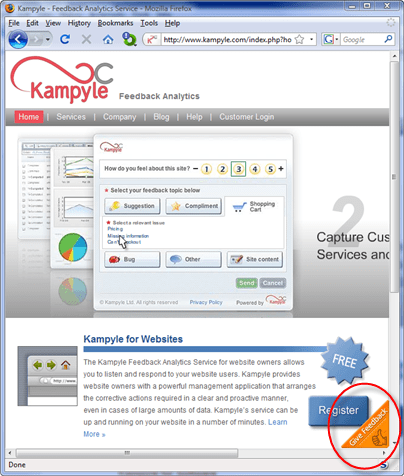
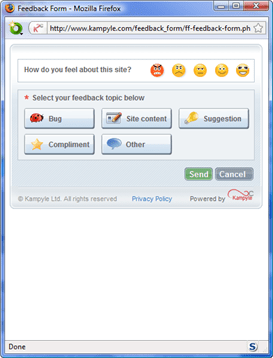
Kampyle adds a clickable image to a designated corner of your webpage. If a user clicks on this image they are shown a simple (and customisable) feedback form. Any feedback is collected by Kampyle and presented through a dashboard on their website. All you have to do is register, customise your feedback form and add some javascript inside the <head> and <body> tags of each page. Best of all, the service is free. You can see it in action on Kampyle’s own website.

kampyle1

Click the floating image in the bottom-right corner to show the feeback form

kampyle2

Leave feedback

You can also have Kampyle pop-up a survey question for a given percentage of users as they leave your site. I find such surveys annoying and never fill them in, so I haven’t felt inclined to try this yet.

Kampyle sounds great. Users have a simple way to supply feedback which doesn’t distract them from my key goal (buying my software). Sadly, very few visitors actually supplied feedback through Kampyle. I ran it for a month on some of the highest traffic pages on my Perfect Table Plan site and got a grand total of 4 comments from 3 visitors. Only two of these comments had any really useful feedback and both were from a single paying customer who probably would have emailed support anyway. I don’t feel the feedback justified the ‘cost’, in terms of the potential distraction of visitors and another potential failure mode for my website. Consequently I am now only running Kampyle on a couple of peripheral pages. Maybe the results would be better for different types of site. It only takes 10 minutes of so to set up, so it might be worth a try.

Microsoft adCenter over reporting conversions

I have long suspected that Microsoft adCenter is over reporting conversions. Here is the confirmation from my adCenter reporting:

I am guessing that the purchaser visited the ‘thank you for your purchase’ page (which contains the conversion tracking script) 5 times, for whatever reason. I can’t think of any other way this situation could occur – the conversion tracking isn’t set up to take account of multiple purchases in one transaction. How difficult would it be to only count the first visit? Google can do it.

Being cynical, perhaps the over reporting suits Microsoft? But it makes it much more difficult for me to assess the real effectiveness of keywords and ads. Another good reason to concentrate my efforts on Google Adwords instead.