When people are trying to convey a quantity, they will generally try to compare it to something that they think people already have a feel for. For example, ‘weighing as much as 10 elephants’ or ‘twice the area of a tennis court’. But people often come up with terrible comparisons, and this grates on my nerves. So I have done a little side project to generate comparisons for you. I named it ‘How many elephants’ as elephants (and Jumbo jets) seem to figure a lot in these comparisons.
It allows you to create comparisons for:
Length/Height
Area
Volume
Mass/Weight
Time
Velocity/Speed
Energy
I might add more dimensions, such as force, acceleration and pressure, later on.
It is just a single page of HTML + CSS + JQuery. I used Microsoft Copilot to generate the image and, as a sort of turbocharged Stackoverflow, to help me with the coding.
Did I miss a good comparison or make a mistake? Feel free to give some feedback in the comments.
WordPress offered to generate an image for my last blog post. Here is the prompt it suggested:
“Generate a high-resolution, highly detailed image capturing the essence of “20 Years of PerfectTablePlan Software.” The main subjects should be two screenshots side-by-side: one showcasing PerfectTablePlan version 1, reflecting a vintage desktop interface with a Windows aesthetic from 2005, and the other displaying version 7 with a sleek, modern design. The lighting should be bright and inviting, emphasizing the contrast between the older and newer software. The style should blend nostalgia with innovation, showcasing the journey of the product over two decades. Ensure the image has sharp focus and intricate details to attract the reader’s attention.”
And here 5 images it came up with, from that prompt:
They are simulateously very impressive and hilariously awful. Quite apart from the weird text (“sex 20”?), none of the screenshots look even slightly like PerfectTablePlan. I think I’ll pass!
My main development PC is now 5 years old and the end of life for Windows 10 is looming. I might be upgrade it to Windows 11 (there is apparently a BIOS hack if your chip doesn’t have the required TPM module), but it is quite crufty from 5 years of daily use. And it recently crashed and spent 20 minutes doing a Windows spontaneous repair, which is not very confidence inspriring. Plus the thought of a faster processor, more memory and a bigger SSD is always alluring. Time for a spanky new Windows 11 PC.
I ordered a PC to my own spec from pcspecialist.co.uk using their online configurator. I have used them a few times previously and have been suitably impressed with the service.
The new PC has:
Windows 11 Home
AMD Ryzen 9 9900X 12-Core processor
NVidia 3050 graphics card
64 GB DDR5 RAM
4 TB Samsung PRO M.2 SSD
2 x Seagate Barracuda 4TB HDDs
Corsair Gold Ultra Quiet 650W power supply
Reliability in the key issue for me, so I won’t be messing around with overclocking or other tweaks.
I’ve had a power supply blow up and take out the motherboard before, so I went for a branded power supply.
I didn’t see any real need for Windows 11Pro.
I wanted a quiet case that would sit under my desk, rather than the bling LED disco cases offered by PC Specialist. Or, even worse, a white case (god no). So I ordered a black mid size Fractal Design Define 7 case and had it delivered to them for the build.
The finished PC turned up after a couple of weeks. They have did a nice job, with some neat cabling.
Now it is just the tedious job of setting it all up. Windows offered to copy across the settings from my previous machine, but I wanted a cruft-free, clean install. So I manually installed everything from scratch:
Where possible I tried to download software direct from the manufacturers website. In a few cases where I didn’t want to pay to upgrade, and the old version wasn’t available, I used old downloads that I had kept.
I needed Microsoft Visual Studio 2019, rather than 2022, due to compatibility issues with Qt. The 2019 version is not easy to find online, but is currently still available.
The Easy Data Transform compile time has gone from 51 seconds, on the old PC, to 26 seconds, on the new PC.
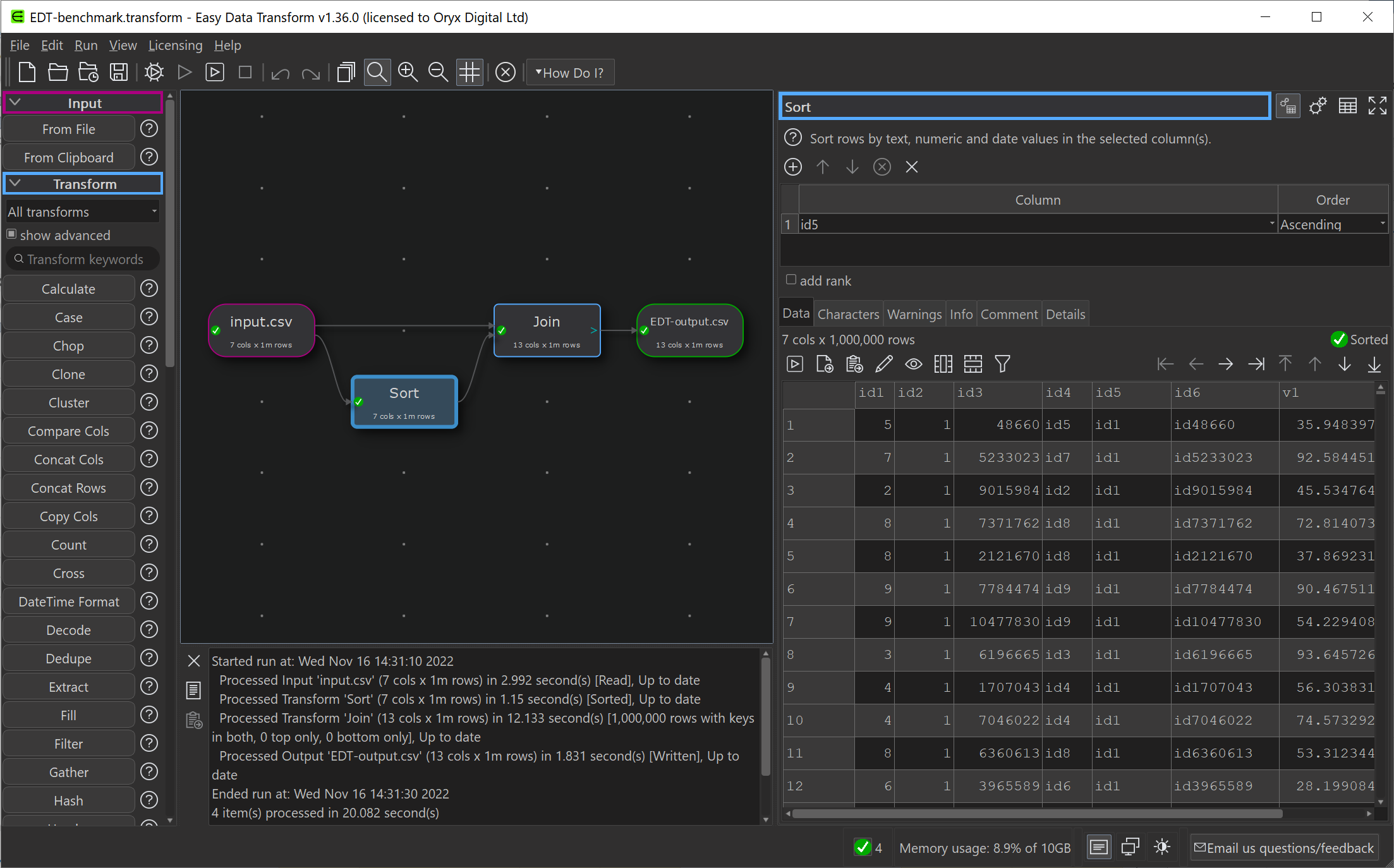
An Easy Data Transform benchmark that inputs, joins, sorts and outputs a million row dataset, has gone from 14.3 seconds , on the old PC, to 10.3 seconds, on the new PC.
So a significant speed improvement.
Currently I have 3 PCs and 1 Mac, 3 monitors, 4 mice and 4 keyboards. It is a mess. I have tried a physical KVM switch in the past, but it felt very clunky. Following a tipoff from a friend, I am going to investigate www.sharemouse.com as a way to make this more manageable. Do you have a good way to manage multiple monitors, mice and keyboards? Please let me know in the comments.
I wanted to be able to read and write Excel file on Windows and Mac from my C++/Qt application, whether Excel is installed or not. I would rather commit suicide with a cheese grater, than try to write my own code to parse whatever horrific format Excel is written in. So I looked around for a library.
I ended up buying a licence for LibXL, from XLWare, back in 2019. It has been working great ever since. I now also use it in PerfectTablePlan v7.
Things to like:
Available as a library for Windows, Mac, Linux and iOS (I have only used it for Windows and Mac, so far).
Accessible from lots of languages, including: C, C++, .Net, Delphi, PHP, Python, PowerBASIC and Fortran.
Example code is available in C++, C, C# and Delphi.
Good support.
Regular updates.
Reasonable pricing.
No per-user fees.
The API is a little low-level for my taste, but I guess that is inevitable when you support C as well as C++. Reading and writing is slow compared to reading and writing the same data to/from a CSV file. But, no doubt, that is due to the limitations of the Excel file format.
I don’t have any affiliation with LibXL beyond being a paying customer, and I haven’t been asked to write this. I just wanted to give a shout-out to the developer, Dmytro, for his sterling work. Long may it continue.
I released Easy Data Transform v2 today. After no fewer than 80 (!) v1 production releases since 2019, this is the first paid upgrade.
Major improvements include:
Schema versioning, so you can automatically handle changes to the column structure of an input (e.g. additional or missing columns).
A new Verify transform so you can check a dataset has the expected values.
Currently there are 48 different verification checks you can make:
At least 1 non-empty value
Contains
Don’t allow listed values
Ends with
Integer except listed special value(s)
Is local file
Is local folder
Is lower case
Is sentence case
Is title case
Is upper case
Is valid EAN13
Is valid email
Is valid telephone number
Is valid UPC-A
Match column name
Matches regular expression
Maximum characters
Maximum number of columns
Maximum number of rows
Maximum value
Minimum characters
Minimum number of columns
Minimum number of rows
Minimum value
No blank values
No carriage returns
No currency
No digits
No double spaces
No duplicate column names
No duplicate values
No empty rows
No empty values
No gaps in values
No leading or trailing whitespace
No line feeds
No non-ASCII
No non-printable
No punctuation
No symbols
No Tab characters
No whitespace
Numeric except listed special value(s)
Only allow listed values
Require listed values
Starts with
Valid date in format
You can see any fails visually, with colour coding by severity:
Side-by-side comparison of dataset headers:
Side-by-side comparison of dataset data values:
Lots of extra matching options for the Lookup transform:
Allowing you to do exotic lookups such as:
Plus lots of other changes.
In v1 there were issues related to how column-related changes cascaded through the system. This was the hardest thing to get right, and it took a fairly big redesign to fix all the issues. As a bonus, you can now disconnect and reconnect nodes, and it remembers all the column-based options (within certain limits). These changes make Easy Data Transform feel much more robust to use, as you can now make lots of changes without worrying too much about breaking things further downstream.
Easy Data Transform now supports:
9 input formats (including various CSV variants, Excel, XML and JSON)
66 different data transforms (such as Join, Filter, Pivot, Sample and Lookup)
11 output formats (including various CSV variants, Excel, XML and JSON)
56 text encodings
This allows you to snap together a sequence of nodes like Lego, to very quickly transform or analyse your data. Unlike a code-based approach (such as R or Python) or a command line tool, it is extremely visual, with pretty-much instant feedback every time you make a change. Plus, no pesky syntax to remember.
Eating my own dogfood, using Easy Data Transform to create an email marketing campaign from various disparate data sources (mailing lists, licence key databases etc).
Easy Data Transform is all written in C++ with memory compression and reference counting, so it is fast and memory efficient and can handle multi-million row datasets with no problem.
While many of my competitors are transitioning to the web, Easy Data Transform remains a local tool for Windows and Mac. This has several major advantages:
Your sensitive data stays on your computer.
Less latency.
I don’t have to pay your compute and bandwidth costs, which means I can charge an affordable one-time fee for a perpetual licence.
I think privacy is only going to become ever more of a concern as rampaging AIs try to scrape every single piece of data they can find.
Usage-based fees for online data tools are no small matter. For a range of usage fee horror stories, such as enabling debug logging in a large production ETL pipeline resulting in $100k of extra costs in a week, see this Reddit post. Some of my customers have processed more than a billion rows in Easy Data Transform. Not bad for $99!
It has been a lot of hard work, but I am please with how far Easy Data Transform has come. I think Easy Data Transform is now a comprehensive, fast and robust tool for file-based data wrangling. If you have some data to wrangle, give it a try! It is only $99+tax ($40+tax if you are upgrading from v1) and there is a fully functional, 7 day free trial here:
I am very grateful to my customers, who have been a big help in providing feedback. This has improved the product no end. Many heads are better than one!
The next big step is going to be adding the ability to talk directly to databases, REST APIs and other data sources. I also hope at some point to add the ability to visualize data using graphs and charts. Watch this space!
Visual programming tools (also called ‘no-code’ or ‘low-code’) have been getting a lot of press recently. This, in turn, has generated a lot of discussion about whether visual or text based programming (coding) is ‘best’. As someone who uses text programming (C++) to create a visual programming data wrangling tool (Easy Data Transform) I have some skin in this game and have thought about it quite a bit.
At some level, everything is visual. Text is still visual (glyphs). By visual programming here I specifically mean software that allows you to program using nodes (boxes) and vertexes (arrows), laid out on a virtual canvas using drag and drop.
A famous example of this sort of drag and drop visual programming is Yahoo Pipes:
But there are many others, including my own Easy Data Transform:
Note that I’m not talking about Excel, Scratch or drag and drop GUI designers. Although some of the discussion might apply to them.
By text programming, I mean mainstream programming languages such as Python, Javascript or C++, and associated tools. Here is the QtCreator Interactive Development Environment (IDE) that I use to write C++ in, to create Easy Data Transform:
The advantages of visual programming are:
Intuitive. Humans are very visual creatures. A lot of our brain is given over to visual processing and our visual processing bandwidth is high. Look at pretty much any whiteboard, at any company, and there is a good chance you will see boxes and arrows. Even in non-techie companies.
Quicker to get started. Drag and drop tools can allow you to start solving problems in minutes.
Higher level abstractions. Which means you can work faster (assuming they are the right abstractions).
Less hidden state. The connections between nodes are shown on screen, rather than you having to build an internal model in your own memory.
Less configuration. The system components work together without modification.
No syntax to remember. Which means it is less arcane for people who aren’t experienced programmers.
Less run-time errors, because the system generally won’t let you do anything invalid. You don’t have to worry about getting function names or parameter ordering and types right.
Immediate feedback on every action. No need to compile and run.
The advantages of text programming are:
Denser representation of information.
Greater flexibility. Easier to do things like looping and recursion.
Better tooling. There is a vast ecosystem of tools for manipulating text, such as editors and version control systems.
Less lock-in. You can generally move your C++ or Python code from one IDE to another without much problem.
More opportunities for optimization. Because you have lower-level access there is more scope to optimize speed and/or memory as required.
The advantages and disadvantages of each are two sides of the same coin. A higher level of abstraction makes things simpler, but also reduces the expressiveness and flexibility. The explicit showing of connections can make things clearer, but can also increase on-screen clutter.
The typical complaints you hear online about visual programming systems are:
It makes 95% of things easy and 5% of things impossible
Visual programming systems are not as flexible. However many visual programming systems will let you drop down into text programming, when required, to implement that additional 5%.
Jokes aside, I think this hybrid approach does a lot to combine the strengths of both approaches.
It doesn’t scale to complex systems
Managing complex systems has been much improved over the years in text programming, using techniques such as hierarchy and encapsulation. But there is no reason these same techniques can’t also be applied to visual programming.
It isn’t high enough performance
The creators of a visual programming system are making a lot of design decisions for you. If you need to tune a system for high performance on a particular problem, then you probably need the low level control that text based programming allows. But with most problems you probably don’t care if it takes a few extra seconds to run, if you can do the programming in a fraction of the time. Also, a lot of visual programming systems are pretty fast. Easy Data Transform can join 2 one million row datasets on a laptop in ~5 seconds, which is faster than base R.
I’m sure we’ve all seen examples of spaghetti diagrams. But you can also create horrible spaghetti code with text programming. Also, being able to immediately see that a visual program has been sloppily constructed might serve as a useful cue.
If you are careful to layout your nodes, you can keep things manageable (ravioli, rather than spaghetti). But it starts to become tricky when you have 50+ nodes with a moderate to high degree of connectivity, especially if there is no support for hierarchy (nodes within nodes).
Automatic layout of graphs for easier comprehension (e.g. to minimize line crossings) is hard (NP-complete, in the same class of problems as the ‘travelling salesman’).
No support for versioning
It is possible to version visual programming tools if they store the information in a text based file (e.g XML). Trying to diff raw XML isn’t ideal, but some visual based programming tools do have built-in diff and merge tools.
It isn’t searchable
There is no reason why visual programming tools should not be searchable.
Too much mousing
Professional programmers love their keyboard shortcuts. But there is no reason why visual programming tools can’t also make good use of keyboard shortcuts.
Vendor lock-in
Many visual programming tools are proprietary, which means the cost can be high for switching from one to another. So, if you are going to invest time and/or money heavily in a visual programming tool, take time to make a good choice and consider how you could move away from it if you need to. If you are doing quick and dirty one-offs to solve a particular problem that you don’t need to solve again, then this doesn’t really matter.
‘No code’ just means ‘someone else’s code’
If you are using Python+Pandas or R instead of Easy Data Transform, then you are also balancing on top of an enormous pile of someone else’s code.
We are experts, we don’t need no stinkin drag and drop
If you are an experienced text programmer, then you aren’t really the target market for these tools. Easy Data Transform is aimed at the analyst or business guy trying to wrangle a motley collection of Excel and CSV files, not the professional data scientist who dreams in R or Pandas. However even a professional code jockey might find visual tools faster for some jobs.
Both visual and text programming have their places. Visual programming is excellent for exploratory work and prototyping. Text based programming is almost always a better choice for experts creating production systems where performance is important. When I want to analyse some sales data, I use Easy Data Transform. But when I work on Easy Data Transform itself, I use C++.
Text programming is more mature than visual programming. FORTRAN appeared in the 1950s. Applications with graphical user interfaces only started becoming mainstream in the 1980s. Some of the shortcomings with visual programming reflect it’s relative lack of maturity and I think we can expect to see continued improvements in the tooling associated with visual programming.
Visual programming works best in specific domains, such as:
3d graphics and animations
image processing
audio processing
game design
data wrangling
These domains tend to have:
A single, well defined data type. Such as a table of data (dataframe) for data wrangling.
Well defined abstractions. Such as join, to merge 2 tables of data using a common key column.
A relatively straightforward control flow. Typically a step-by-step pipeline, without loops, recursion or complex control flow.
Visual programming has been much less successful when applied to generic programming, where you need lots of different data types, a wide range of abstractions and potentially complex control flow.
I’ve been a professional software developer since 1987. People (mostly in marketing) have talked about replacing code and programmers with point and click tools for much of that time. That is clearly not going to happen. Text programming is the best approach for some kinds of problems and will remain so for the foreseeable future. But domain-specific visual programming can be very powerful and has a much lower barrier to entry. Visual programming empowers people to do things that might be out of their reach with text programming and might never get done if they have to wait for the IT department to do it.
So, unsurprisingly, the answer to ‘which is better?’ is very much ‘it depends’. Both have their place and neither is going away.
Summerfest 2023 is on. Loads of quality software for Mac and Windows from independent vendors, at a discount. This includes my own Easy Data Transform and Hyper Plan, which are on sale with a 25% discount.
I have been using altool to notarize my Mac apps for some years. However Apple, being Apple, have deprecated altool in favour of the new notarytool. altool will stop working at some point in 2023. And Apple, being Apple, have made little attempt to keep consistency between the two.
I didn’t find anything online to tell me how arguments between the two tools related. Consequently I spent a while trying to guess which arguments mapped to which. I got locked out for a while for trying to wrong combination too many times. In the end I went from this:
On the plus side the --wait option doesn’t exit until the notarization is complete, which means you can easily do you whole build, sign and notarize process in a single script. Hoorah.
Note that you still need to run the ‘stapling’ step after notarization:
Easy Data Transform and Hyper Plan Professional edition are both on sale for 25% off at Winterfest 2022. So now might be a good time to give them a try (both have free trials). There is also some other great products from other small vendors on sale, including Tinderbox, Scrivener and Devonthink. Some of the software is Mac only, but Easy Data Transform and Hyper Plan are available for both Mac and Windows (one license covers both OSs).
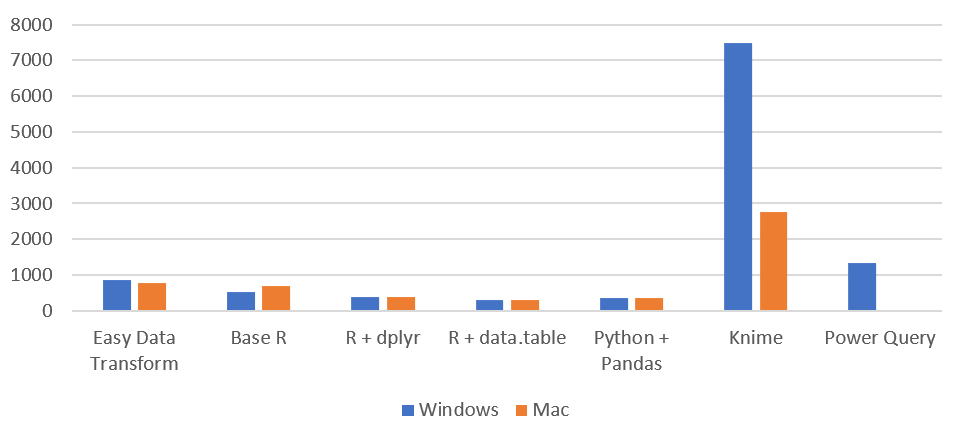
I have been gradually improving my data wrangling tool, Easy Data Transform, putting out 70 public releases since 2019. While the product’s emphasis is on ease of use, rather than pure performance, I have been trying to make it fast as well, so it can cope with the multi-million row datasets customers like to throw at it. To see how I was doing, I did a simple benchmark of the most recent version of Easy Data Transform (v1.37.0) against several other desktop data wrangling tools. The benchmark did a read, sort, join and write of a 1 million row CSV file. I did the benchmarking on my Windows development PC and my Mac M1 laptop.
Here is an overview of the results:
Time by task (seconds), on Windows without Power Query (smaller is better):
I have left Excel Power Query off this graph, as it is so slow you can hardly see the other bars when it is included!
Time by task (seconds) on Mac (smaller is better):
Memory usage (MB), Windows vs Mac (smaller is better):
So Easy Data Transform is nearly as fast as it’s nearest competitor, Knime, on Windows and a fair bit faster on an M1 Mac. It is also uses a lot less memory than Knime. However we have got some way to go to catch up with the Pandas library for Python and the data.table package for R, when it comes to raw performance. Hopefully I can get nearer to their performance in time. I was forbidden from including benchmarks for Tableau Prep and Alteryx by their licensing terms, which seems unnecessarily restrictive.
Looking at just the Easy Data Transform results, it is interesting to notice that a newish Macbook Air M1 laptop is significantly faster than a desktop AMD Ryzen 7 desktop PC from a few years ago.







 Successful Software