Interviewed on the Startup Success Podcast

startup-success-podcastI was recently interviewed by Bob Walsh and Patrick Foley for The Startup Success Podcast, episode 25. We cover a wide ange of topics including: microISVs, conversion ratios, being specific, PerfectTablePlan, usability, the global recession, software award scams, ‘works with vista’ certification, stackoverflow.com and twitter. I wonder how much I have to pay them to edit out the ‘ums’?

Download the MP3

Consulting testimonial: Reserviz

Working as a micro-ISV needs lots of different skills, but no-one can have all of them. When you’re developing a software product for your independent venture, it’s easy to lose sight of some issues, just because there are so many of them to cover, and so few hours in a day. I realised that to help me re-focus and prioritise the key tasks after the code was complete needed the catalyst of a fresh pair of eyes, to verify or change the plans I had. Simply chatting to a knowledgeable professional made all the difference to perspective and priorities. I was expecting that from Andy Brice, as I’d read about his work with other micro-ISVs. What I wasn’t expecting was his breadth of business knowledge as well as his technical knowledge. Being able to discuss business objectives, markets, pricing, promotion as well as SEO and coding was a great punctuation point in the development of the Reserviz online service, and it helped me develop a much more focussed set of priorities to complete the initial launch period. Don’t expect from Andy a glib confirmation that everything you’ve done is fine – he’ll give you an honest assessment, and then help you work out a plan. Think of Andy as the Swiss Army Knife you need in your toolbox!

Mike Gorman, www.Reserviz.com

reserviz appointment and room booking

I have been doing some consulting for Mike Gorman of Quartile Software on Reserviz. Reserviz is an online service for booking rooms, people and other resources. I have primarily been helping Mike with positioning (deciding which vertical markets to focus on), online marketing (including SEO and Google Adwords) and testing the usability of the website. It was a slight departure for me, as most of my experience is with desktop apps. But it just proved that the vast majority of what is true for the marketing and usability of desktop apps also applies to web apps.

I think Reserviz has a very attractive website with a nice balance between simplicity and flexibility. If you know anyone who is still using a tatty old appointment book? Tell them to checkout Reserviz for simple online appointment and resource booking (first month free!).

Getting ready for Windows 7

windows-7I am currently downloading the new Windows 7 release candiate. It is 2.36 GB and the ActiveX download control predicts it will take around 10 hours in total (NB I am also doing a large FTP upload, which is probably slowing it down considerably). Once the download is complete I intend to install it in a VM to test my table planning software.

You can download the latest Windows 7 release candidate here. It is free to download and use, but  it expires on 01-June-2010 and will shutdown every 2 hours starting on 01-March-2010 (insert your own joke here). A couple of points to note from the Windows 7 FAQ:

While the RC is stable and has been thoroughly tested, it’s not the finished product. Your computer could crash and you could lose important files. So please back up your data and please don’t test the RC on your primary home or business PC.

When you use the RC, your PC sends information to our engineers to help them check the fixes and changes they made based on Beta tests.

Microsoft hasn’t officially announced when Windows 7 will be for sale. But there are rumours that it is planned for October 2009. Will you be ready?

Twitter backlash begins?

Vodpod videos no longer available.

From current.com via Sean Prescott on the ASP members forum.

It didn’t take long for Twitter to move from hype to backlash (although blaming Twitter for the current recession is perhaps a little unfair). Dave Collins offered a $100 Amazon voucher to anyone who could convince him there was a business case for spending his time on Twitter. None of the responses convinced me it was a good use of my time. My favourite was from Mark Roseman:

I find myself sometimes drifting back towards improving my software, answering email (email! can you believe it?) from customers, or other arcane activities, but I know these are just procrastination techniques, dragging me away from the truly important work of Twittering.

To me the real question isn’t whether Twitter has any value, but whether it is the most useful thing you can be doing with your time. What business value does Twitter have?:

  • Updating your customers: What is wrong with a newsletter? I would like to think a lot of my customers love my software, but surely even its most ardent fans don’t need updates several times per day? Only a stalker needs to know what you are doing in real time.
  • Following others: I tried using Twitter to follow a few people who write excellent blogs. This experiment only proved that even intelligent and articulate people can’t write anything useful in 140 characters. Following the links posted can be entertaining, but is a black hole for productivity.
  • Monitoring conversations: I can set up a search and appear, genie like, every time someone types the relevant phrase. But this sort of 1:1 marketing doesn’t scale very well and it can come across as creepy/spammy.
  • Increasing your online presence: Twitter is touted as another way to increase your online ‘foot print’. I can see some value to ‘tweeting’ a link to each post you write for Twitter searches to find, but I doubt it would lead to much additional traffic.

Isn’t Twitter just ICQ for “web 2.0”? How long before Twitter is overrun with spam from bots? Will they ever fix their scaling issues (I saw the ‘fail whale’ a fair number of times in my limited dabblings)? Can Twitter save us from swine flu?

Perhaps the real business value of Twitter is that it distracts your competitors while you get on with improving your product, improving your marketing and giving great support.

The truth about conversion ratios for downloadable software

conversion funnel?Overview

An anonymous survey of software vendors shows that the average sale to visit ratio is very close to the much quoted “industry average” of 1%. However the data shows large variations between products and across different sectors (e.g. Windows vs Mac OS X).

The data

The data set comprises 92 valid survey responses to an 8 question survey in April 2009. The survey was advertised through a request on this blog, posts on  BOS, ASP, MACSB, OISV and BOSnetwork forums and emails to the author’s contacts. The results are inevitably biased towards small software vendors, due to the places where the survey was advertised. As the survey was anonymous it is impossible to verify the accuracy of the data. However it is unlikely that many vendors would have completed a survey that wasn’t anonymous.

The survey consisted of 3 compulsory questions (unique visits, downloads and sales over a given timeframe) and 5 optional questions (the time frame of the data, primary market, primary OS, licence price and trial type). One record had 0 visits (an iPod app), another had 0 downloads (presumably a web app) and a few had numbers that I didn’t consider statistically valid for some purposes (e.g. <500 visits per month or <3 sales transactions per month).  I did the best I could with the data available, ignoring obvious outliers in some cases.

The data set comprises a total of:

  • 8.1 million unique website visits
  • 2.2 million downloads
  • 110 thousand sales transactions

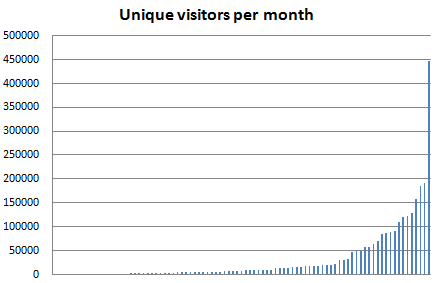
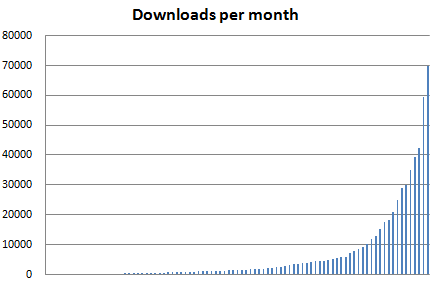
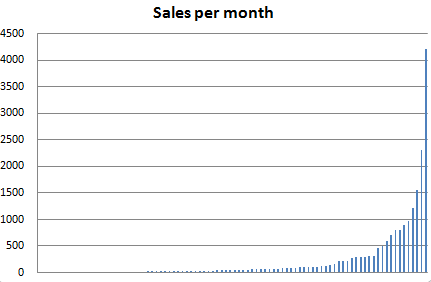
Where a time frame for the results was given it is possible to work out the range of visitors, downloads and sales per month.

metrics_all_visitors

metrics_all_downloads

metrics_all_sales

Interestingly the distribution of monthly visits, downloads and sales across the different products all follow the Pareto 80:20 power law quite closely:

  • 22% of the products account for 80% of the visits
  • 21% of the products account for 80% of the downloads
  • 19% of the products account for 80% of the sales

This gives me some faith that the data is reasonably accurate and representative of the industry as a whole.

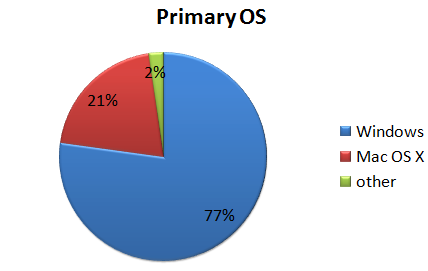
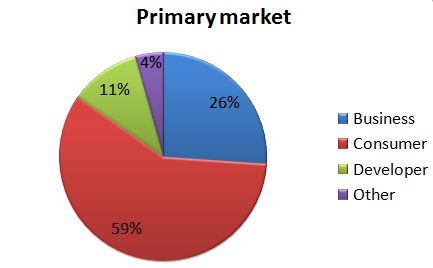
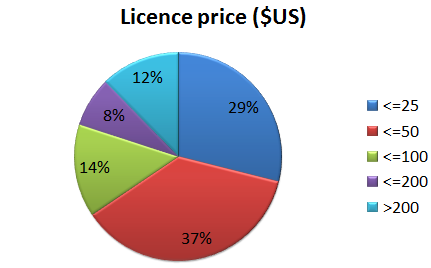
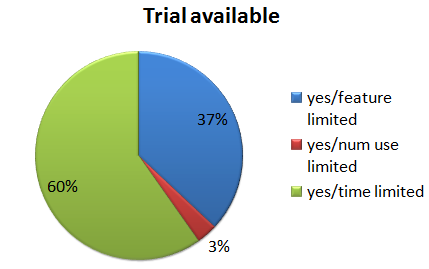
The data is broken down by OS, market, price and trial type as follows:

metrics_all_os

metrics_all_market

metrics_all_price1

metrics_all_trial

Analysis

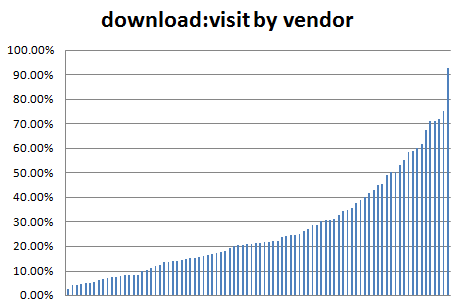
The average (mean) ratio of downloads:visits across all products is 28%. 50% of products are in the range 12.1% to 35.3%.

metrics_download_visit_ratio

I am surprised at how high the average ratio is. This could partly be due to products that receive a high percentage of downloads from download sites, without the downloader ever visiting the product site. Conversely sites where visitors make frequent returns after purchase (e.g. to read forums) will have a lower downloads:visits ratio.

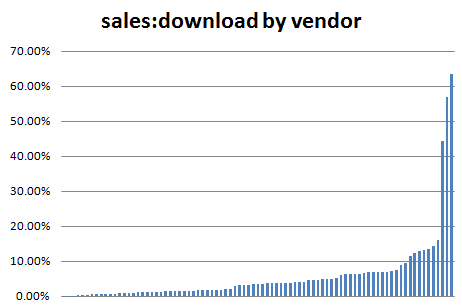
The average ratio of sales:downloads across all products is 4.5%. 50% of products are in the range 1.3% to 6.4%.

metrics_sale_download_ratio

The average sales:downloads ratio is noticeably lower than the average downloads:visits ratio. The sales:downloads ratio is noticeably skewed on the right of the graph – a sales:downloads ratio >20% seems very high.

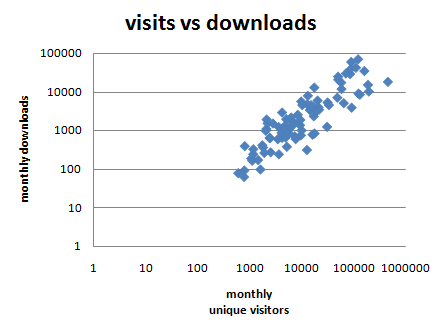
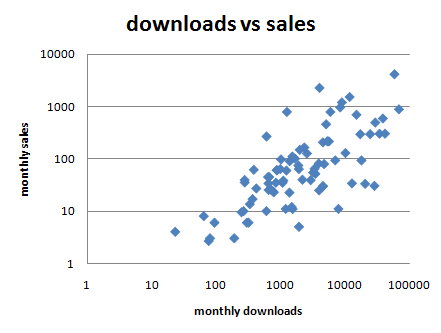
The (logarithmic) scatter plots below show that the downloads:sales ratio varies a lot more than visits:downloads ratio.

metrics_visits_vs_downloads

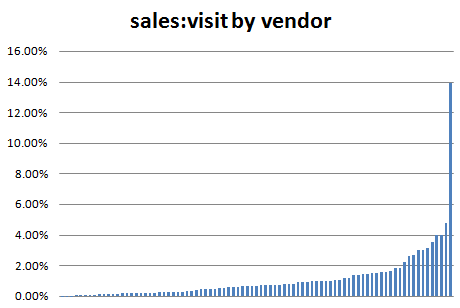
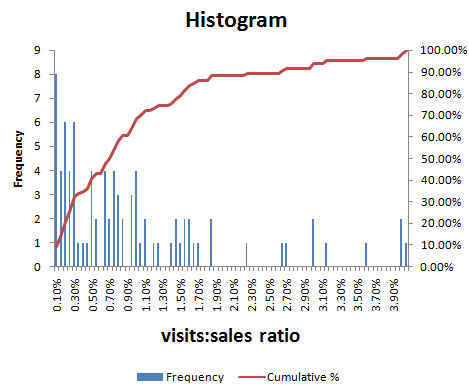
metrics_downloads_vs_salesThe average (mean) sales:visits ratio of all products is 1.16%[1]. However one of the product ratios is an obvious outlier at 13.94% (see below). With this outlier removed the average sales:visits conversion ratio across all the products is 0.99%. 50% of products are in the range 0.28% to 1.39%.

metrics_sale_visit_ratio

0.99% is suspiciously close to the mythical ‘industry average’ of 1%. But I haven’t (consciously) massaged the results to get this figure.

You can work out how you compare to this data set using the red (cumulative) graph in the histogram below. For example, if your product sales:visits ratio is 1.5%, then it is higher than approximately 80% of the products in the data set.

conversion-ratio-distribution2

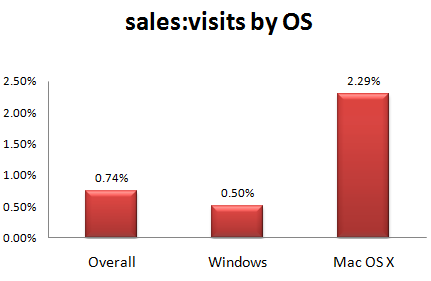
We can also look at how the ratios vary across sectors. Surprisingly the average Mac product conversion ratio is more than 4 times the Windows product conversion ratio.

metrics_sale_visit_ratio_by_os1Even if we try to compare like for like, and only compare consumer products selling for <= $50, the ratios are still 2.27% for Mac and 0.51% for Windows. Possible reasons for this large disparity include:

  • Mac owners more ready to spend money.
  • There is less competition in the Mac software market.
  • Mac vendors have a higher percentage of purchasers  who never visit their site due to higher quality of Mac download sites.
  • It is a statistical blip (there are a lot less Mac products in the survey).

My own experience with selling a cross-platform product (Perfect Table Plan) on Windows and Mac OS X is that the Mac sales:visits ratio is approximately double that for Windows.

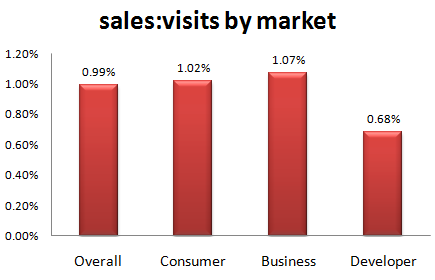
The sales:visits ratio is similar for business and consumer products, with developer products lagging behind. However there are too few developer products in the data set to draw any real conclusions.

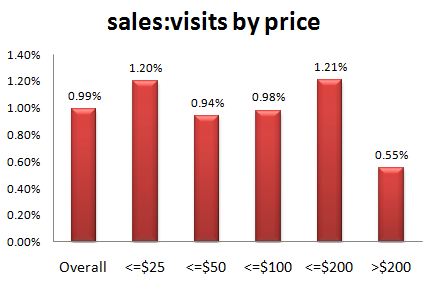
metrics_sale_visit_ratio_by_market1The sales:visits ratio does vary across the price range. However there are too few products with price >$50 in the data set to draw any real conclusions.

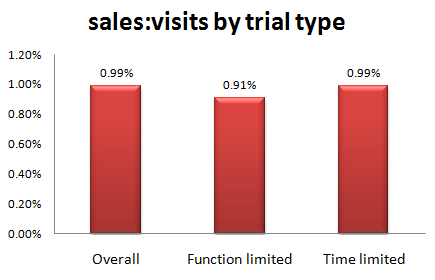
metrics_sale_visit_ratio_by_price2The sales:visits ratio does not seem to vary significantly by trial type. There were insufficient ‘number of use’ trial products to include them.

metrics_sale_visit_ratio_by_trial1

Conclusion

One has to be careful about drawing conclusions from a relatively small and unverifiable data set. However the results certainly seem to support the much-quoted “industry standard” sales:visits conversion ratio of 1%. But there are huge variations between products.

The fact that the sales:downloads ratio is both lower on average and more variable than the downloads:visitors ratio implies that getting people to download is the easy bit and converting the download to a sale is a tougher challenge.

The average sales:visits conversion ratio is noticeably higher for Mac OS X products than Windows products. This is supported by anecdotal evidence and the author’s own experience with a cross-platform product. However the number of Mac respondents to the survey is too small for the result to be stated with any great confidence. Also remember that the Mac market is still a lot smaller than the Windows market before you rush off to start learning Cocoa and Objective-C.

These ratios can be useful for a number of purposes, including: identifying a bottleneck in your conversion funnel (is your downloads:visitors ratio low compared to other products?); estimating how much traffic you might need for a viable business; or estimating how much you can afford to bid on Google Adwords. And it is useful to track how these ratios change over time (I track mine on a monthly basis). But make sure you compare like with like if you are comparing your ratios with other products. For example, a 10% sales:downloads ratio might be achievable for a niche business product, but unrealistic for a casual game. And remember that these ratios are only one part of a bigger picture. There are other, more important, metrics. Profitability for a start.

The data set is available here:

Raw data (some invalid records deleted), CSV format

Processed data, Excel XLSX format

Feel free to publish your own analysis. Thank you to everyone that took part in the survey.

[1] Calculating the mean of all the ratios probably isn’t the way a proper statistician would do it. But anything more seems overkill given the limited size and unverifiable nature of the data set.

Tips on travelling with a laptop

airbus a380I recently returned from a month’s holiday in New Zealand. As a one-man software company I still have to check my email every day, even on holiday. Here are a few tips from my experiences of running my business from a laptop whilst travelling.

Laptop

In theory you can run your business from a Blackberry or a mobile phone that supports email. But it is impossible to answer some support emails if you can’t run your own software. So I took a Toshiba laptop PC with a 13 inch screen with me. I find a 13 inch screen is a good compromise between portability and ease of use. Much bigger and it would have been too bulky. Much smaller and I would have struggled with the screen and keyboard.

The laptop contained my licence key generator and customer database. I owe it to my business and my customers to keep these secure and the Windows password is no protection at all if someone gains physical access to  your machine. So anything sensitive was encrypted using the free Truecrypt software. Whenever I brought the laptop out of hibernation or restarted it I just had to type the password to mount the Truecrypt volume as a virtual drive[1][2].

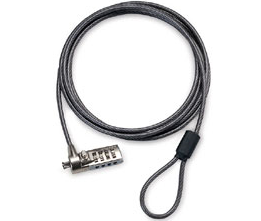
laptop lockI took a combination laptop lock, but I rarely used it. The problem with laptop locks is that the only things strong enough to secure your laptop to are usually in plain view, and a laptop left in plain view is a bit of an invitation. Locked or not. I am also not convinced how strong the laptop security slot is. I suspect an attempted theft would wreck the laptop, even if it wasn’t successful. So I generally prefer to keep the laptop with me or hide it somewhere a crook wouldn’t think to look. I have since found out that laptop locks aren’t even very secure (see here and here). There are still occasions when a laptop lock is better than nothing though. Incidentally, don’t rely on that padlock on your hold baggage either.

The laptop was also invaluable for playing Thomas the Tank Engine DVDs (using Windows Media Player) to keep my little one occupied for part of the very long flights and for backing up photos from the digital camera. I also took a universal power adapter.

Laptop bag

I have a traditional Targus laptop bag with a shoulder strap. But I have found this uncomfortable for carrying a laptop any distance due to the uneven distribution of weight. It also makes it extremely obvious that you have a laptop. A fact I would rather not advertise.

wenger-swissgear-hudson-1wenger swissgear hudson laptop rucksack bagFor this trip I purchased a Swissgear Hudson laptop rucksack from Swiss Army knife manufacturer Wenger. It was much more comfortable to wear with the weight distributed across both shoulders and left both hands free for dealing with passports, boarding passes and a bored two year old. It was small enough to take on to an aircraft as hand luggage, but surprisingly spacious. It also had some useful extras, including: a carry handle, a breathable back and a compartment for an MP3 player. I was impressed with the quality of the construction and finish. My only quibble is that there wasn’t as much padding around the top and bottom of the laptop as I might have liked. So I wrapped my laptop in bubblewrap for additional protection. But on the whole I would recommend this bag highly for travelling.

Back-ups

As well a backup on DVD I also took a 2 Gig USB memory stick that contained everything I would need should my laptop malfunction or be stolen. This included copies of my licence key generator, customer database and various passwords. All the sensitive files were encrypted using the free Axxcrypt software, except my passwords which were encrypted using the free Keepass software. The memory stick also stored various third party software installers (including Axxcrypt and Keepass). I kept the memory stick on a lanyard around my neck when I wasn’t sleeping.

I also stored an additional encrypted back-up on a secure server.

Internet access

Trying to find holiday accommodation that was the right size and budget, in the right location and free at the right time was problematic. Insisting on broadband Internet as well was a step too far. I also wasn’t keen on relying on broadband at accommodation. What if it didn’t work? Relying on Internet cafes seemed an even worse idea. What if I couldn’t find one? And the security issues of using Internet cafes are very real. So I needed my own mobile Internet access.

The roaming charges for using my UK three networks mobile Internet in New Zealand are an outrageous £6/MB. Vodaphone has more sensible roaming charges for some plans, but I couldn’t justify the high monthly price for the occasional trip abroad. So I tried to find a company that would rent me mobile data access in New Zealand for a month, without success. In the end my brother-in-law very kindly sorted me out with a USB mobile modem and a 1GB/mo data plan with Telecom New Zealand. He picked the modem up cheap second-hand on trademe.co.nz and the data plan was of the order of $70NZD/mo, with no minimum term. So, rather than paying >£1000, I ended up paying about £50 (thanks Derek!). There is definitely a business opportunity for someone there.

I am glad I didn’t rely on broadband at the accommodation. It turns out that most of the New Zealand ISPs have restricted SMTP access to prevent spam. So I could receive email via IMAP when plugged in to an xtra.co.nz broadband cable, but I couldn’t connect to their SMTP server to send email. Thankfully I didn’t have this problem with the mobile broadband or I would have been stuck with webmail for a month (the horror!).

Mobile coverage is patchy outside the bigger cities in the South Island of New Zealand, due to the low population density (sheep can’t afford broadband). But I was able to get some sort of signal everywhere we stayed. This might have been helped by the aerial attached to the mobile modem. During the month a I used approximately 40% of the 1GB allowance. I could have used quite a lot less, if necessary.

Stopping over in Singapore I just purchased wifi access from the hotel. It was quite expensive, but I didn’t need it for long. Wifi and hardwired Internet access are available for free in Singapore airport (I couldn’t get the wifi to work, so I just plugged in a network cable).

Conclusion

Running an Internet-based business while travelling isn’t that difficult, with a bit of planning. I doubt my customers even realised I was on holiday. What are you waiting for?

PS/ New Zealand is lovely.

[1] Truecrypt can also encrypt the whole OS, but that seemed excessive for my requirements and I wasn’t sure what impact it would have on performance.

[2] If Truecrypt is so easy to set-up and use, why is it apparently beyond the capabilites of the UK government to encrypt sensitive data?

Photo of Airbus A380 by Claire Brice

Is the average visitor conversion ratio really 1%?

We have probably all heard that the industry standard conversion rate is 1%. But where did this data come from? Is that the visitor to sale ratio or download to sale ratio (I have seen it quoted for both) and just how standard is it across the industry? I have put together a survey in an attempt to find out.

There are 8 questions in the survey, but only 3 are compulsory. It should only take you a few minutes to complete and it is completely anonymous. The results will be posted on this blog, assuming I get enough responses to make it worthwhile. If you are selling downloadable commercial software on the web then please spare a few minutes to do the survey.

Click here to go to the survey

** Update : the survey is now closed **

Aren’t captchas supposed to be human readable?

I have been having increasing problems reading the captchas that now permeate everything we do on the web. I realise they are supposed to be hard for bots to read, but it is rather defeating the point if humans can’t read them either. Here are two particularly impressive specimens from twitter.com yesterday:

twitter capcha

twitter captcha

In each case my tired old eyes can just about make out what the first word says, but I haven’t a clue what the second word is. Do you? The above might be slightly lower resolutions than the originals, but not much. Try some more.

In any case, captchas don’t seem to work that well. Most can be cracked by image recognition software and those that can’t can always be beaten by crowdsourcing and free porn. I guess the last hope for captchas is that masturbation really does makes you go blind.

GraphicDesignerToolbox

I launched my product a year ago, but so far haven’t had much luck selling it. I desperately needed advice from a person that could take a look at my situation and help figure out what’s wrong and how to move on. Andy Brice has been through all this and knew exactly what I was struggling with.

Simon Strandgaard, www.GraphicDesignerToolbox.com

gdt-screenshot

GraphicDesignerToolbox is a Mac OS X application for creating computer generated graphics. It allows users to snap together generative and filter blocks to create a vast range of different types of images, without any drawing or programming. It is an impressively slick and well engineered piece of software. But sales were unsatisfactory. I did some consulting for the author, Simon Strandgaard, focussed on improving the marketing and the user’s initial experience of the product. As a result he has made a lot of changes, including:

  • Re-thought the product positioning, marketing message and target customer.
  • Renamed the application to GraphicDesignerToolbox (from the less descriptive ToolboxApp).
  • Moved the website from ToolboxApp.com to GraphicDesignerToolbox.com.
  • Commissioned a new application icon.
  • Completely rewritten the website.
  • Improved the initial user experience with a quick tour and easy to load samples.
  • Improved the product documentation.
  • Changed the trial model.
  • Increased the price.
  • Released version 1.0.

You can see captures of old and new versions of the website below:

toolboxapp_cropped1

Old home page - click to enlarge

graphicdesignertoolbox

New home page - click to enlarge

It is has been very rewarding to see the product and marketing improve so much in just three months. Especially as someone else was doing all the hard work! I think the changes are a huge improvement all round and I wish Simon and GraphicDesignerToolbox every success. v1.0 was released today and Simon tells me he has sold as many licences today as in the previous 5 months.

If you have a Mac you can head over to GraphicDesignerToolbox.com and download the trial.

I will be speaking at SIC 2009

sic2009I will be giving a talk entitled “10 mistakes microISVs make” at the Software Industry Conference 2009 (July 16-18, Boston). The talk will be based around 10 of the most common mistakes I see as a member of the microISV community, as a buyer of software and as a consultant to microISVs (some of which I have made myself).

SIC is the largest conference aimed at microISVs, shareware authors and other small software vendors. This will be the first time I have been to SIC and I am really looking forward to it.

Registration for SIC is only $229 if you register before 1st April.