Category Archives: software

Mac OS X market share accelerates in 2008

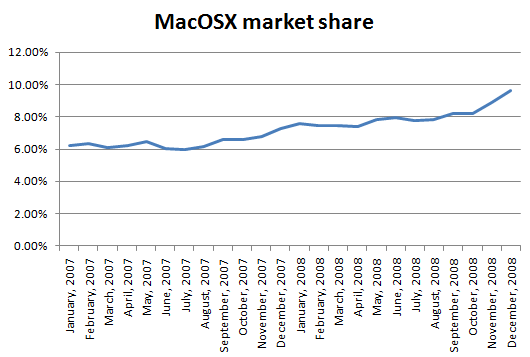
2008 was a good year for Apple and Mac OS X. According to netapplications.com data (via sharewarepromotions blog) Mac OS X’s share of the OS market increased from 7.31% in Dec 2007 to 9.63% in Dec 2008. That is a 32% increase in market share during 2008, compared to a 22% increase during 2007.

macosx_market_share_2007_2008

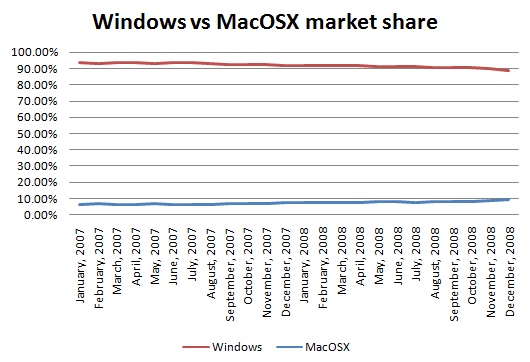
Windows market share fell from 91.79% to 88.68% in the same time. While Mac OS X’s annual gains are impressive, it has a long way to go to catch Windows. 15 years if you project the 2008 gains forward.

macosx_vs_windows_market_share_2007_2008Of course, it is highly questionable to project 15 years from a single year of data, but it gives an idea how much work Apple still has to do.

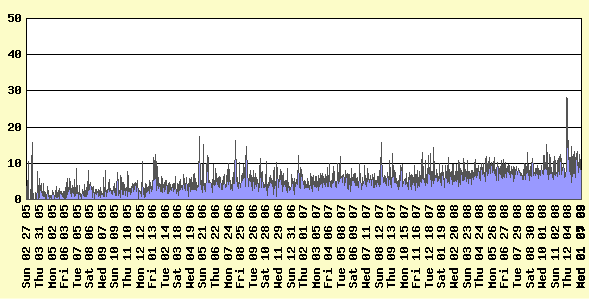
I sell table planning software for Windows and Mac OS X. Mac visitors to my website have followed the general trend, up from 7.41% in 2007 to 8.5% in 2008 and accounting for around of 10% of visitors at the end of 2008.

macosx_visitor_percentage% Mac visitors to http://www.perfecttableplan.com

My data also shows that Mac users are twice as likely to purchase my software as Windows users (I have heard similar figures have reported by others). So Mac users currently account for 20% of my sales. I wouldn’t want to live off my Mac sales, but it is very useful additional income. Given the disparity in cost between Windows and Mac hardware it is hardly surprising that Mac users are more ready to reach for their credit card.

My software is built on top of the Qt cross-platform toolkit. The recent porting of Qt 4.5 to Cocoa gives me the opportunity to further improve PerfectTablePlan’s Mac look and feel and to release a 64 bit version. Hopefully this, coupled with increasing Mac market share, will further improve my Mac sales.

A beta of Windows 7 has just been released.  It will be interesting to see if it can repair some of the damage caused by Vista and slow the growth of Mac OS X. Personally, I doubt it – the Windows 7 feature list certainly doesn’t set my pulse racing.

Yahoo can modify your PPC campaign without your permission

I tried Yahoo pay-per-click a few years ago, but gave up due to low traffic, high minimum bid prices and a horrible user interface. I am glad I did. Apparently Yahoo Search Marketing have given themselves permission to:

  • create ads
  • add and/or remove keywords
  • optimize your account(s)

for US advertisers, without asking their permission first. One can only wonder what ‘optimize’ means – double your bid price? You can revert their changes, but you are still liable for any costs their changes incur. Isn’t this a bit like the phone company deciding you aren’t making enough calls and phoning people on your behalf? There doesn’t even appear to be an opt-out. Yahoo must be getting pretty desperate. Let’s hope they are better at picking new keywords than Microsoft Advertising.

More details here:

If you have a Yahoo PPC campaign you might want to think about cancelling it. Or at least keep a very close eye on it. If you have actually experienced Yahoo making changes to your campaigns please post details in the comments.

(via Adriana Iordan of Avanagate)

Running a microISV

microISVConsumers and businesses are being more careful with their money now, but they are still buying software if it will save them time and/or money. If you have been laid off in the current recession, perhaps now is a good time to start that microISV you have been thinking about. But starting your own business can be a bit daunting if you haven’t done it before. What is actually involved in the day to day running of a small software business?

Disclaimer: The information below is based on my my experience of running a microISV as a UK-based limited company for 4 years. It is far from comprehensive and is merely intended to give you some pointers. I am not an accountant. I am not a lawyer. Some of the information will not be relevant to businesses based outside the UK.  Seek appropriate professional advice.

Accountants

Probably the first thing you should do when you decide to go into business is to get an accountant. An accountant will be able to advise you on bookkeeping, tax, VAT, company rules and regulations and any number of other topics. As you aren’t a large or publicly listed company they don’t have to be a chartered accountant. Changing accountant later may be painful, so try to get it right first time. Ideally try to find your accountant by personal recommendation and someone you think you will get on with. Everything can be done by phone and email, so they don’t have to be in the same town.

Setting up a company

You don’t have to have a company. But it does have some advantages:

  • It makes it easier to separate your personal and business finances, which can only be a good thing.
  • It gives you some legal protection. If someone decides to sue due to a bug in your software, they will have to sue your company, rather than you personally. So you have less chance of losing your house.
  • It has some tax advantages.
  • You can impress members of the opposite sex by putting ‘Director’ on your business card.

Having a company also has certain obligations, such as filing annual returns and company accounts. Much of it can now be done online. The company annual return is pretty straightforward. You just need to list who the company officers and shareholders are. The tax return is more complicated and something I wouldn’t want to do without the help of an accountant.

Setting up a limited company in the UK is fairly easy, simple and cheap. In theory you could read all the necessary documents and do all the paperwork yourself. But surely there are better uses of your time when you can get an accountant to do it for you for as little as £90.

Banking

When you choose a bank you need to consider:

  • Charges – per month and per transaction.
  • Services – e.g. foreign currency accounts.
  • Customer service – how long will you have to wait on the phone to speak to someone?
  • Convenience – you don’t want to have to drive to the next town to pay in a cheque.
  • Interest – are their rates competitive?
  • Guarantees – is the money guaranteed if the bank goes bust?

It may also be a good idea to choose a separate bank from your personal bank, to keep your business and personal finances separate. This could also be important if you ever got into a dispute with your bank.

Having had very good experiences with HSBC through FirstDirect, I chose HSBC for my business banking. However I was unimpressed by the service I received. This included queuing 40 minutes to pay in a cheque and calls to the branch 2 miles away being routed via India (I got fed up of spelling out H-i-g-h W-y-c-o-m-b-e). I was also irked by the service charges. £0.60 to pay in a cheque! When I told them what I thought of their service they made an appointment for someone to come and see me. They never turned up. No apology, nothing.

I have since switched my banking to Alliance and Leicester business bank. I have been happy with the service and there are no charges as long as you pay in at least £1,000 per month. I can also pay in cheques at any Post Office (if the UK government doesn’t close them all).

Invoices

If you are selling to other companies, rather than just consumers, you will have to deal with invoices. Invoices are a subject of mystery to many developers, but really they are just a note to someone that they owe you money. In theory the sequence is:

  1. Customer asks for a quote.
  2. You send a quote (include an expiry date).
  3. Customer sends a signed purchase order.
  4. You send the software licence key with an invoice.
  5. Customer pays the invoice within the time specified by the invoice.

Yeah, right. In reality many companies pay months late. This helps to improve their cash flow at your expense. But, according to Hanlon’s razor, one should ‘Never attribute to malice that which is adequately explained by stupidity’ and I am sure that the apathy and incompetence of accounting staff is also a large factor.

The invoice itself is nothing special. It should include:

  • The word ‘INVOICE’ in large letters.
  • Your company details (including your VAT details, if registered).
  • A unique invoice number.
  • The date.
  • Customer details, including their purchase order number.
  • A description of the product sold and the price (including the currency).
  • Details of how to pay, e.g. your SWIFT/IBAN code and/or who to make the cheque payable to.
  • The payment terms (typically 30 days).

You might want to number your first invoice 0100, rather 0001, if you don’t want early customers to know you are a newbie.

Dealing with the late payment of invoices is a whole topic on it’s own. Personally I don’t invoice for payments of <£100 or $200 – it just isn’t worth the hassle. And I always pay my bills on time. It is the right thing to do.

Bookkeeping

Don’t fight the system, you can’t win. Computing is <70 years old. Accounting is as old as recorded history. Suck it up and learn the appropriate terminology. Consider doing a class on basic bookkeeping.

An accountant is not a bookkeeper. They may agree to do your bookkeeping, but it is likely to be expensive. Personally, I do my own bookkeeping. It is a bit tedious, but it means I know exactly where every penny goes and I can listen to a podcast at the same time to alleviate the boredom.

I started off using Excel for my bookkeeping. In retrospect this was a mistake.

  • You are on your own when it comes to generating reports, such as profit and loss.
  • Mistakes are easy to make and hard to find in large Excel spreadsheets.
  • Excel doesn’t scale very well to hundreds or thousands of transactions.
  • Your custom Excel spreadsheet is much more difficult (=expensive) for your accountant to work with than the package he normally uses.

Sales receipts, advertising, salary, dividends, ISPs, postage, stationery, professional fees etc.  can add up to a lot of transactions. Even with sales batched up into weekly blocks, a one man business such as mine can easily generate over 600 transactions a year. You really don’t want to be trying to track all this in Excel. Much better to use a purpose-built accounting package.

The market leading package for small businesses worldwide appears to be Intuit Quickbooks. Others are Sage (popular in the UK) and MYOB. I recommend you chose whatever package your accountant is happiest to work with. Get your accountant to set it up for you. Trying to use a personal finance package, such as Microsoft money, to run a business is almost certainly a bad idea.

I switched from Excel to Intuit QuickBooks. Initially I hated it. But once I accepted that it was written for bookkeepers, not software developers, we reached a grudging acceptance of each other. Now I just spend an hour or so updating Quickbooks every 1-2 weeks and making sure it tallies with my bank statements. I then send my accountant a copy of the database at the end of each financial year. He then uses this data to create the company annual accounts and tax return.

Don’t leave the bookkeeping until the end of the tax year. You will end up with hundred of scraps of paper to match up with hundreds of transactions. This is an N^2 problem. As with any polynomial problem, you should try to keep N small. Also, your accountant has lots of other clients and won’t thank you for asking him to create your annual report by midnight to meet the filing deadline.

Try to get a receipt for everything. I number receipts sequentially, write that number on the receipt and include it in the Quickbooks transaction memo. I then file the paper receipt in a folder partitioned by month. This should mean that I can easily find the appropriate receipt if (when?) I get audited by the tax man.

In my experience it is common to be invoiced for the wrong amount or twice for the same things. Some companies will even try it on by invoicing you for things you didn’t agree to buy. So check every incoming invoice. Companies don’t appear to put their best, brightest and most cooperative in the accounts department.  Get used to it.

Managing cash flow is a huge issue for businesses. Any number of healthy and profitable businesses have gone to the wall due to cash flow problems. This shouldn’t be an issue for most microISVs as we don’t have to spend a large proportion of our income on equipment or maintain expensive inventories. Hooray for software.

Currencies

I accept payment in various currencies through PayPal. PayPal charge a 2% fee for converting these payments to pounds sterling on top of their other fees. I have previously looked into opening a US dollar account, but it didn’t seem worth the hassle or expense. The Alliance and Leicester Bank charge a £10 fee to cash a cheque in US dollars.

Tax

MicroISVs, like other one-man limited companies, typically pay themselves a minimal salary (around 5k per year) and the rest as dividends. This means that no income tax is payable on your salary. Instead you pay corporation tax on the dividends. As corporation tax is typically lower than basic rate income tax, this is more tax efficient. However you still have to pay higher rate income tax if your income exceeds the higher rate income tax threshold.

Whenever I pay a dividend I transfer the amount of corporation tax that will be due on the profit to my business reserve account. At the end of the tax year I then know I have enough in this account to pay my corporation tax.

If you sell more than £67k per year (currently) of goods inside the EU you must register for VAT. If you sell less than this, registering for VAT is optional.

Advantages of registering for VAT:

  • You can claim back VAT on all purchases.
  • Not having a VAT number may make you seem ‘not a real business’ to other businesses.

Disadvantages of registering for VAT:

  • You have to charge VAT on all sales inside the EU. Businesses can claim this back, but consumers can’t.
  • More paperwork.

Consequently a B2C software vendor with large profit margins probably shouldn’t register until they have to. But VAT registration might be much more attractive to a B2B software vendor with lots of expenses. Apparently you can claim back some of your VAT payments retrospectively when you register.

Some other points on tax:

  • You can give your spouse shares in the company and pay them that proportion of the dividends. This is tax efficient if they earn less then you. But will only add to your woes if they ever run off with the milkman/milkwoman.
  • When you are applying for a mortgage some banks will only count your salary, not your dividends. A £5k salary doesn’t go far, even in the current housing market.
  • If you work at home you can charge a percentage of your heating, electricity, council tax etc or rent part of the house to your company. But you may then be liable to pay capital gains tax on any increase in value of the house.
  • In the UK you can claim £55 per week tax-free in childcare vouchers. The childcare provider must be registered with OFSTED. You don’t need a physical paper voucher – just pay the childcare provider direct from your company and keep all the appropriate records (including their OFSTED number).
  • The UK government pays a reasonable rate of interest on early payments of corporation tax. You might get more interest paying your corporation tax early than leaving it in a savings account. Also you don’t have to worry about the bank going under with your savings. Of course you will still have to pay tax on the interest next year.
  • I have also written an article on the basics of VAT for software vendors.

Additional resources

  • UK Business Link. Business link is a free business advice and support service, available online and through local advisers. Useful for generic business advice – don’t expect them to know anything about the software business.
  • UK Companies house. Where you go to set up your company and make annual returns.
  • UK HM Revenue and Customs. They have always been very helpful when I rang them with a query.
  • Andrew Wells. The accountant I use. Good service at a reasonable price. UK based.

100 ways to increase your software sales

Increase targeted traffic to your website:

  1. SEO your website.
  2. Write a blog or newsletter of interest to the sort of people who might buy your software.
  3. Get more links to your website.
  4. Try Google Adwords Pay Per Click (PPC) ads.
  5. Write a guest post on someone else’s blog.
  6. Try CNet Pay Per Download ads.
  7. Promote your software through download sites using the ASP PAD repository, a paid submission tool or free submission tool.
  8. Promote your software through platform sites e.g. Apple downloads or Office online.
  9. Start an affiliate program.
  10. Try Microsoft Adcentre PPC ads.
  11. Bid higher for your PPC phrases.
  12. Advertise on stumbleupon.
  13. Write additional content for your site.
  14. Give away a ‘lite’ version of your software.
  15. Offer discount coupons.
  16. Add a forum to your website.
  17. Offer free review copies of your software to bloggers.
  18. Do a press release.
  19. Run a competition.
  20. Write better ads for your PPC campaign.
  21. Direct (snail) mail.
  22. Run ads in print magazines.
  23. Include your URL when posting on relevant forums.
  24. Try Yahoo Search Marketing PPC ads.
  25. Buy banner ads on targeted blogs, forums and other websites.
  26. Add extra keywords to your PPC campaigns.
  27. Talk about your software on a podcast.
  28. Add a viral element to your software.
  29. Do a publicity stunt.
  30. Get word of mouth recommendations by giving great support.
  31. Get listed in online directories such as DMOZ.
  32. Post a screencast on YouTube.

Increase your visitor->download rate:

  1. Have an online demo movie.
  2. Offer a free trial.
  3. Offer a money back guarantee.
  4. Port your software to additional platforms e.g. iPhone.
  5. Have a clean and professional website.
  6. Add case studies to your website.
  7. Make sure your website functions with all the major browsers.
  8. Get someone else to proof read the copy on your website.
  9. Talk to visitors in a language they understand i.e. not technical jargon, unless they are techies.
  10. Reduce the number of barriers to downloading the trial (don’t require an email address).
  11. Add a product FAQ to your website.
  12. Show your price prominently.
  13. Improve the usability of your website.
  14. Include your contact details on the website.
  15. Make sure the people can understand what your software does within 2 seconds of arriving at your site.
  16. Make the ‘download’ button more prominent on your website.
  17. Fix any errors in your website.
  18. Include screenshots on your home page.
  19. Add a list of famous customers to your website.
  20. Use a digital certificate for your installer and executable.
  21. Add (genuine!) testimonials to your website.
  22. Create better landing pages for your PPC campaigns.
  23. Add a privacy policy to your website.
  24. Add live online support to your website.
  25. Check your web logs/analytics to find out why/where visitors are leaving your website.

Increase your download->sale rate:

  1. Offer more than one payment processor.
  2. Improve the usability of your software.
  3. Accept purchase orders.
  4. Offer Trialpay as an alternative payment method.
  5. Offer sensible prices in additional currencies.
  6. Require an email address to download your software and follow-up with marketing emails.
  7. Increase or reduce the price of your software.
  8. Fix bugs in your software.
  9. Lengthen or shorten the trial period.
  10. Offer bulk purchase discounts.
  11. Improve your installer.
  12. Make the ‘buy’ button more prominent on your website.
  13. Make your software more beautiful.
  14. Allow users to buy your product easily from within the software itself.
  15. Localize your software into another language.
  16. Offer organizational licences.
  17. Try limiting your trial by features instead of time (or vice versa).
  18. Improve the speed/memory performance of your software.
  19. Improve your product documentation.
  20. Offer alternative payment models (e.g. an annual subscription instead of a one-off fee).
  21. Offer alternative licensing models (e.g. per site instead of per user).
  22. Write an introductory tutorial.
  23. Reduce the number of clicks and key presses required to make a sale.
  24. Add that new feature that people keep asking for.

Increase the value of each sale:

  1. Increase the price of your software.
  2. Charge extra for optional modules.
  3. Upsell additional products and services of your own or as an affiliate.
  4. Charge for major upgrades.
  5. Offer multiple versions at different price points e.g. standard/business/enterprise.
  6. Offer an optional CD.
  7. Charge an annual maintenance fee.
  8. Charge for support.
  9. Offer a premium support plan.

Explore alternative sales channels:

  1. Sell through resellers.
  2. Exhibit at tradeshows.
  3. Cold call prospects.
  4. Allow other companies to sell white label versions of your software.
  5. Include your software on cover-mounted magazine CDs.
  6. Sell through retail stores.
  7. Sell on Ebay.
  8. Sell on Amazon.
  9. Promote your software on one day sale sites, such as BitsDuJour or GiveAwayOfTheDay.
  10. Create a new product.

Notes:

  • Items are in no particular order in each category.
  • Some of the items are mutually exclusive.
  • I have tried about 80% of the above. Some worked, some didn’t. In fact, many of them were a total waste of time and money. But the ones that didn’t work for me might work great in a different market (and vice versa). I discuss my experiences with some of them in more detail here: Promoting your software part1, part2, part3, part4, part5, part6.
  • This is by no means an exhaustive list. Feel free to suggest more in the comments.
  • Don’t know where to start? Perhaps you need a fresh pair of eyes.

Thanks to Stuart Prestedge of Softalk for suggesting some of the above.

programmer-tshirts.com

programmer-tshirtMany thanks to all the bloggers who linked to my programmer T-shirts for charity project. Patrick McKenzie has very generously donated his time[1] and some space on his server to set-up a dedicated website at programmer-tshirts.com. If any of you feel like promoting the new website you could put a small ad on the side of your blog (see right) or display the flash panel shown on the new website (wordpress.com apparently doesn’t allow embedded flash).

The HTML for the ad is:

<table style="text-align:left;width:200px;"
       border="1" cellpadding="2" cellspacing="0">
  <tbody>
    <tr>
      <td>
      <table style="text-align:left;width:200px;"
             border="0" cellpadding="2" cellspacing="2">
        <tbody>
          <tr align="center">
            <td>
              <big><a href="http://www.programmer-tshirts.com/">
              T-shirts for programmers</a></big>
            </td>
          </tr>
          <tr align="center">
            <td>
                 <a href="http://www.programmer-tshirts.com/">
                 <img style="border:0 solid;width:172px;height:175px;"
                 alt="programmer t-shirts"
                 src="https://successfulsoftware.net/wp-content/uploads/2008/11/programmer-tshirt.png"></a>
            </td>
          </tr>
          <tr align="center">
            <td>All proceeds to charity</td>
          </tr>
        </tbody>
      </table>
      </td>
    </tr>
  </tbody>
</table>

In WordPress you can just add it as a text widget (Dashboard>Appearance>Widgets).

The source for the flash panel is:

<embed wmode="transparent"
   src="http://www.zazzle.com/utl/getpanel?zp=117873325148652352"
   FlashVars="feedId=117873325148652352&path=http://www.zazzle.com/assets/swf/zp/skins"
   width="450" height="300" TYPE="application/x-shockwave-flash">
</embed>

Even if you just run it for a week or two before Xmas that would be great.

[1]A resource in short supply for a salaryman in Japan. Especially one that commutes in from a rice field and runs his own microISV.

Programming with your feet

footI started feeling a mild burning sensation in my left wrist a few weeks ago. This is a classic early sign of Repetitive Strain Injury.  Uh-oh. I had an email exchange not long ago with someone who now has to use voice activation because typing is too painful. I can’t imagine how frustrating that must be. I decided to ignore Jane Fonda’s advice to “feel the burn” and looked for a way to alleviate the problem.

One approach is to reduce the amount of typing I do. But that is tough when you are running a microISV and writing a blog. I already use the text expander capabilities of the excellent Direct Access software to save a lot of typing (it tells me that it has saved me 51 hours of typing so far). I decided to try an ergonomic keyboard.

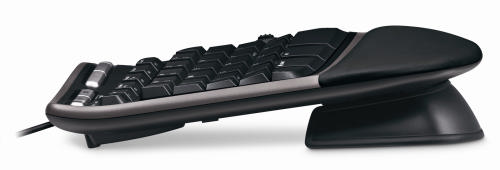
I bought myself a Microsoft 4000 Ergonomic keyboard. This is shaped to allow more natural positioning of the forearms and elbows.

microsoft_natural_keyboard_4000

Microsoft Natural Ergonomic Keyboard 4000

For more comfortable wrist positioning it also has a built-in wrist rest and the front of the keyboard is higher than the back.

microsoft_natural_keyboard_4000

Note the front of the keyboard (right) is higher than the back (left)

I was quite surprised how physically large it was when it turned up. The shape of the keyboard felt very strange to start with and it took me a few days of slow typing to get used it. The feel of the keys is nothing special and I haven’t yet used the extra gizmos, such as the integral zoom button. But I feel it is an improvement in comfort over the conventional keyboard I had before.

An unexpected advantage of the new keyboard is that it has improved my typing. If you watch a good touch typist, their hands hardly move. I (unfortunately) never learnt to touch type, I just didn’t have the patience. The clearer separation between keys for the left hand and keys for the right hand on the new keyboard made me realise that I was moving both hands left and right, more like a concert pianist than a touch typist. I am now moving my hands less and I think my typing speed has improved as a consequence.

I didn’t feel the new keyboard on it’s own was going to solve my impending RSI problems though. The major problem seems to be the continual Ctrl-C, Ctrl-V, Ctrl-A, Windows-D, Windows-E and Alt-Tab key combinations I do with my left hand, hundreds of times a day. Using the right hand Ctrl key instead of the left one helped a bit. But it occurred to me – why are my hands doing all the work? My legs are doing so little that I often feel stiff when I stand up from a long programming session. Why not put them to use?

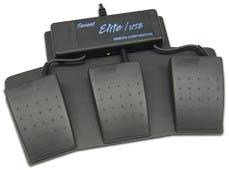
I Googled for foot pedals for computers. After wading through lots of hits for music and dictation foot pedals I finally found the Savant Elite Triple Foot Switch. This is a programmable 3-pedal foot-switch that plugs into a USB port.

savant_elite_foot_switch

Savant Elite Triple Foot Switch

At £86.00+VAT it isn’t cheap. But what price do you put on your health? I ordered one.

When it arrived I wanted to program the pedals to map to the Ctrl, Shift and Windows keys. But I couldn’t install the device driver to program the pedals. After a call to the retailer it turns out the device driver doesn’t work on Vista, despite assurance on the website that the pedals could be used with “virtually any computer”[1]. Grrrrr. How long has Vista been out? I finally managed to program the pedals using my wife’s laptop – my last remaining XP box.

So now I can type using my feet for most of the modifier keys. I am using the pedals as I type this. I am still getting used to them, but the burning in my left wrist has definitely reduced. I think I can also type a little faster, but I am too lazy to do the speed tests with and without the pedals to verify this.  On the negative side:

  • Working out where to put your feet when you aren’t typing can be a little awkward.
  • The pedals tend to move around the carpet, despite being metal and quite heavy. Some small spikes might have helped.
  • Although the travel on the pedals is small, they are surprisingly stiff.

When I told a friend about the pedals he asked – why stop there? I could also be using my elbows, knees and head like a one-man-band. I could be working-out and typing at the same time. It is an intriguing prospect.

I just hope I don’t end up with burning ankles.

[1] System requirements have since been added to the website.

Meh for Mapple

** update **

There was a link to a few minutes of the Simpsons making fun of Apple. The video has now been removed due to a “breach of terms of use”. I wonder whose lawyers got to it first, Apple or Fox?

Getting website feedback with Kampyle

kampyleGetting good feedback from customers and prospective customers is essential to any business. I think I already do quite a good job of getting feedback from paying customers. But what about visitors who click around my site for a few minutes and then leave, never to return? I would love to know why they didn’t buy. This sort of feedback is much harder to come by, so I was interested to read about Kampyle in the article 14 free tools that reveal why people abandon your website.
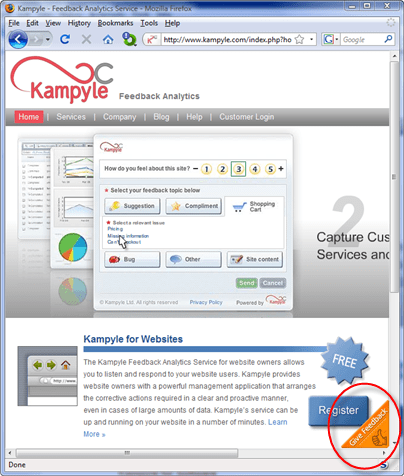
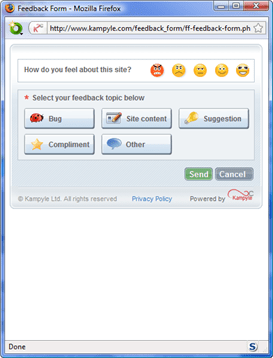
Kampyle adds a clickable image to a designated corner of your webpage. If a user clicks on this image they are shown a simple (and customisable) feedback form. Any feedback is collected by Kampyle and presented through a dashboard on their website. All you have to do is register, customise your feedback form and add some javascript inside the <head> and <body> tags of each page. Best of all, the service is free. You can see it in action on Kampyle’s own website.

kampyle1

Click the floating image in the bottom-right corner to show the feeback form

kampyle2

Leave feedback

You can also have Kampyle pop-up a survey question for a given percentage of users as they leave your site. I find such surveys annoying and never fill them in, so I haven’t felt inclined to try this yet.

Kampyle sounds great. Users have a simple way to supply feedback which doesn’t distract them from my key goal (buying my software). Sadly, very few visitors actually supplied feedback through Kampyle. I ran it for a month on some of the highest traffic pages on my Perfect Table Plan site and got a grand total of 4 comments from 3 visitors. Only two of these comments had any really useful feedback and both were from a single paying customer who probably would have emailed support anyway. I don’t feel the feedback justified the ‘cost’, in terms of the potential distraction of visitors and another potential failure mode for my website. Consequently I am now only running Kampyle on a couple of peripheral pages. Maybe the results would be better for different types of site. It only takes 10 minutes of so to set up, so it might be worth a try.

What do you buy a programmer for Christmas?

Easy, a T-shirt. Programmers love T-shirts.

It juuuuust so happens that I have created some T-shirt designs for software developers. Even better, all the commission will be split equally between two very worthy charities: jaipurfoot.org and sightsavers.org.

designs

sightsaversSightsavers works to alleviate sight problems around the world. Last year Sightsavers and their partners treated more than 23 million people for potentially blinding conditions and restored sight to over 244,000 people. Sightsavers is charity particularly close to my own heart, as I have suffered from eye problems myself. My vision without specs is very poor (-8 dioptres). A few years ago I suffered a detached retina due to a martial arts injury and ended up having emergency cryosurgery on both eyes. The possibilty of losing vision in one eye, let alone both eyes, was a frightening prospect. And yet it only costs:

  • $0.10 to protect someone from river blindness for a year.
  • $10 to pay for eyelid surgery for trachoma.
  • $35 for an adult cataract operation.

jaipurfootI first heard of this charity while watching a TV program Paul Merton in India. This organization pioneered the “Jaipur foot” (also known as the “Jaipur leg”) – an effective and easy-to-fit prosthetic lower limb that can be produced for a little as $30 and is provided for free by the charity. The prosthetic was first developed in the 1960s by an orthopedic surgeon and a sculptor. Since then the charity has provided over 300,000 limbs in 22 countries. In the television program a young boy arrived at the clinic hopping on one leg and left running on two, beaming. It was moving to watch. You can read more in this Time magazine article.

In these gloomy economic times it is easy to forget that there are people much worse off than ourselves. A little money goes a long way with either of these charities. So, how can you help?

Buy a T-shirt

Buy a T-shirt for yourself, your geeky friends, your work colleagues or your employees. Currently there are nine designs available. I have set up separate shops for North America (zazzle.com) and Europe (spreadshirt.net) to cut down on postage costs and shipping times.

North American shop: www.zazzle.com/successfulsoftware (the 12.5% commission included in each T-shirt sale will go to charity)

European shop: successfulsoftware.spreadshirt.net (the £1.50 commission included in each T-shirt sale will go to charity)

Design a T-shirt

Got an idea for a design? Add it in a comment below or email it to me. I will do what I can to turn some of the better ideas into T-shirts. You can supply graphics and/or text. I don’t have the artistic skills to turn your idea into graphics, but someone else might have. All commission from your design will go to charity. But your design must be original – no copyright violations please.

Gimme some link love

If you have a software-related blog or frequent a software-related forum, please link to this post and/or the online shops.

Trivia

My “It works on my machine” machine design predates Jospeh Cooney’s and Jeff Atwood’s by more than 4 years, as proved by this link to the (now sadly defunct) ntk.net ezine. The profits from those T-shirts went to the Jhai foundation – pioneers of bicycle powered Linux. Ironically I can’t sell this design in the European shop due to a bug in the Spreadshirt.net code.

** Update **

These T-shirts are no longer available. Sorry.