I wanted to be able to read and write Excel file on Windows and Mac from my C++/Qt application, whether Excel is installed or not. I would rather commit suicide with a cheese grater, than try to write my own code to parse whatever horrific format Excel is written in. So I looked around for a library.
I ended up buying a licence for LibXL, from XLWare, back in 2019. It has been working great ever since. I now also use it in PerfectTablePlan v7.
Things to like:
Available as a library for Windows, Mac, Linux and iOS (I have only used it for Windows and Mac, so far).
Accessible from lots of languages, including: C, C++, .Net, Delphi, PHP, Python, PowerBASIC and Fortran.
Example code is available in C++, C, C# and Delphi.
Good support.
Regular updates.
Reasonable pricing.
No per-user fees.
The API is a little low-level for my taste, but I guess that is inevitable when you support C as well as C++. Reading and writing is slow compared to reading and writing the same data to/from a CSV file. But, no doubt, that is due to the limitations of the Excel file format.
I don’t have any affiliation with LibXL beyond being a paying customer, and I haven’t been asked to write this. I just wanted to give a shout-out to the developer, Dmytro, for his sterling work. Long may it continue.
This sounds like a question a programmer might ask after one medicinal cigarette too many. The computer science equivalent of “what is the sounds of one hand clapping?”. But it is a question I have to decide the answer to.
I am adding indexOf() and lastIndexOf() operations to the Calculate transform of my data wrangling (ETL) software (Easy Data Transform). This will allow users to find the offset of one string inside another, counting from the start or the end of the string. Easy Data Transform is written in C++ and uses the Qt QString class for strings. There are indexOf() and lastIndexOf() methods for QString, so I thought this would be an easy job to wrap that functionality. Maybe 15 minutes to program it, write a test case and document it.
Obviously it wasn’t that easy, otherwise I couldn’t be writing this blog post.
First of all, what is the index of “a” in “abc”? 0, obviously. QString( “abc” ).indexOf( “a” ) returns 0. Duh. Well only if you are a (non-Fortran) programmer. Ask a non-programmer (such as my wife) and they will say: 1, obviously. It is the first character. Duh. Excel FIND( “a”, “abc” ) returns 1.
Ok, most of my customers, aren’t programmers. I can use 1 based indexing.
But then things get more tricky.
What is the index of an empty string in “abc”? 1 maybe, using 1-based indexing or maybe empty is not a valid value to pass.
What is the index of an empty string in an empty string? Hmm. I guess the empty string does contain an empty string, but at what index? 1 maybe, using 1-based indexing, except there isn’t a first position in the string. Again, maybe empty is not a valid value to pass.
I looked at the Qt C++ QString, Javascript string and Excel FIND() function for answers. But they each give different answers and some of them aren’t even internally consistent. This is a simple comparison of the first index or last index of text v1 in text v2 in each (Excel doesn’t have an equivalent of lastIndexOf() that I am aware of):
Changing these to make the all the valid results 1-based and setting invalid results to -1, for easy comparison:
So:
Javascript disagrees with C++ QString and Excel on whether the first index of an empty string in an empty string is valid.
Javascript disagrees with C++ QString on whether the last index of an empty string in a non-empty string is the index of the last character or 1 after the last character.
C++ QString thinks the first index of an empty string in an empty string is the first character, but the last index of an empty string in an empty string is invalid.
It seems surprisingly difficult to come up with something intuitive and consistent! I think I am probably going to return an error message if either or both values are empty. This seems to me to be the only unambiguous and consistent approach.
I could return a 0 for a non-match or when one or both values are empty, but I think it is important to return different results in these 2 different cases. Also, not found and invalid feel qualitatively different to a calculated index to me, so shouldn’t be just another number. What do you think?
*** Update 14-Dec-2023 ***
I’ve been around the houses a bit more following feedback on this blog, the Easy Data Transform forum and hacker news and this what I have decided:
IndexOf() v1 in v2:
v1
v2
IndexOf(v1,v2)
1
aba
aba
1
a
a
1
a
aba
1
x
y
world
hello world
7
This is the same as Excel FIND() and differs from Javascript indexOf() (ignoring the difference in 0 or 1 based indexing) only for “”.indexOf(“”) which returns -1 in Javascript.
LastIndexOf() v1 in v2:
v1
v2
LastIndexOf(v1,v2)
1
aba
aba
4
a
a
1
a
aba
3
x
y
world
hello world
7
This differs from Javascript lastIndexOf() (ignoring difference in 0 or 1 based indexing) only for “”.indexOf(“”) which returns -1 in Javascript.
Conceptually the index is the 1-based index of the first (IndexOf) or last (LastIndexOf) position where, if the V1 is removed from the found position, it would have to be re-inserted in order to revert to V2. Thanks to layer8 on Hacker News for clarifying this.
Javascript and C++ QString return an integer and both use -1 as a placeholder value. But Easy Data Transform is returning a string (that can be interpreted as a number, depending on the transform) so we aren’t bound to using a numeric value. So I have left it blank where there is no valid result.
Now I’ve spent enough time down this rabbit hole and need to get on with something else! If you don’t like it you can always add an If with Calculate or use a Javascript transform to get the result you prefer.
*** Update 15-Dec-2023 ***
Quite a bit of debate on this topic on Hacker News.
I use some of the code generation and refactoring tools in QtCreator. These save a lot of time, but they don’t format C++ code how I like it. For example they produce C++ code like this:
void MyClass::foo(int *x)
But I like my code formatted like this:
void MyClass::foo( int* x )
The differences may seem minor, but they are a source of significant irritation to me. I like my code how I like it, goddammit! And consistent formatting enhances readability. However re-formatting it by hand is time-consuming and tedious.
What I need is a tool that can enforce consistent formatting in the style that I like, or something close. I have tried to use automatic C++ formatting (pretty printing) tools in the past, but I couldn’t get them to produce a format that was close enough to what I wanted. But I have finally found the tool for the job. Clang-Format.
Clang-Format is part of the LLVM family of tools. It is a free, command-line tool that reformats C++, Objective-C or C according to the settings in a config file. As with many free tools, it isn’t terribly well documented. Some of the documentation on the web is out of date and some of it is incomplete. But I have managed to find out enough to configure it how I like it.
To run it you just need to place your options in a .clang-format file, make sure the clang-format executable is in the path and then run it:
clang-format.exe -i -style=file <C++ file>
Here are the settings I am currently using in my .clang-format file:
It took me a few hours of fiddling with the settings to find the best combination. It would be really useful if someone could write a tool that would analyze your C++ code and create a .clang-format file for you. You would probably only want to do this once though, so I don’t think it has much potential as a commercial product.
There are only two things I couldn’t get quite right in the formatting:
I couldn’t get it to add a blank line after public, protected and private declarations. I fixed this with a quick Perl hack (see below).
I couldn’t get it to indent continuation lines how I would like (ideally indented 1 or 2 spaces from the first line). It is a small price to pay and I am just putting up with it for now.
Perhaps there are options to do these and I just didn’t find them.
Here is the Windows .bat script I used to format all the C++ files in a folder.
for %%f in (*.h *.cpp *.inl) do (
clang-format.exe -i -style=file %%f
)

for %%f in (*.h) do (
clang-format.exe -i -style=file %%f
perl -p -i.bak -e "s/public:/public:\n/g" %%f
perl -p -i.bak -e "s/protected:/protected:\n/g" %%f
perl -p -i.bak -e "s/private:/private:\n/g" %%f
perl -p -i.bak -e "s/    Q_OBJECT/Q_OBJECT/g" %%f
)

del *.bak
del *.tmp
No doubt there is a more elegant way to do the Perl, but it works.
I now just run this batch periodically to keep my code beautiful and consistent.
I use QtCreator for my C++ development IDE. It is very good. But it doesn’t always lay out my C++ code the way I want it to. In particular the refactoring operations mess up my white space. I want my code to look like:
void foo( int* x, int& y )
But it keeps changing it to:
void foo(int *x, int &y)
Grrrrrr.
So I am constantly battling with QtCreator to layout my code how I like it. There are plenty of C++ pretty printers around. I played with some of the leading ones using UniversalIndentGUI, but I couldn’t get any of them to layout my code quite how I wanted. Maybe they could have done it, but I got fed up with fiddling with the settings.
What I need is a code pretty printer that I can configure to layout my code exactly how I want without me having to tweak 100 settings.
Ideally I want a code pretty printer that I can train. So I just point it at a few files of my code that are laid out how I want and it works out all my preferences (where to put braces, how to indent case statements, where to put the * for a pointer declaration etc) and can then apply them to any other code. It wouldn’t need a GUI. Or perhaps just enough to select the training files and then preview the results on other files.
I have no idea if this is a viable product idea. But I would pay $100 for it, if it worked well. Perhaps bigger software companies would pay a lot more? Or maybe something like this already exists and I just don’t know about it?
I got a tip from Anna-Jayne Metcalfe of C++ and QA specialists Riverblade to check out Cppcheck, a free static analyser for C and C++. I ran >100 kLOC of PerfectTablePlan C++ through it and it picked up a few issues, including:
variables uninitialised in constructors
classes passed by value, rather than as a const reference
variables whose scopes could be reduced
methods that could be made const
It only took me a few minutes from downloading to getting results. And the results are a lot less noisy than lint. I’m impressed. PerfectTablePlan is heavily tested and I don’t think any of the issues found are the cause of bugs in PerfectTablePlan, but it shows the potential of the tool.
The documentation is here. But, on Windows, you just need to start the Cppcheck GUI (in C:\Program files\Cppcheck, they appear to be too modest to add a shortcut to your desktop), select Check>Directory… and browse to the source directory you want to check. Any issues found will then be displayed.
You can also set an editor to integrate with, in Edit>Preferences>Applications. Double clicking on an issue will then display the appropriate line in your editor of choice.
Cppdepend is available with a GUI on Windows and as a command line tool on a range of platforms. There is also an Eclipse plugin. See the sourceforge page for details on platforms and IDEs supported. You can even write your own Cppcheck rules.
Cppcheck could be a very valuable additional layer in my defence in depth approach to QA. I have added it to my checklist of things to do before each new release.
I am looking to outsource some self-contained programming tasks in areas that I don’t have expertise in. I am hoping that someone reading this blog might be able to help (or know someone that can) so I don’t have to go through outsourcing sites. These are the two skills sets I am currently looking for:
Javascript/CSS/HTML – To write a single page web app. This will have a relatively simple UI displaying data read from XML. The app will need to work on a wide range of browsers and devices. Ideally you should also have some web design skills, but this isn’t essential.
C++/Qt 4/OpenGL – To write a relatively simple 3D visualization model that runs on Windows and Mac. This will involve populating a 3D space with specified shapes and allowing simple movement around it.
Details:
I am expecting that I will need 2 different people, but it is possible there might be someone out there with experience in both.
These are small projects (probably less than 2 weeks for task 1 and less than 1 week for task 2). But they might lead on to more work in future.
Time scales are reasonably relaxed. Ideally I would like the work to be finished by the end of September.
You can be based anywhere in the world, but must be able to communicate in English (written and spoken).
Full copyright to the work will pass to my company on full payment.
Obviously cost is an issue. If I have 2 promising candidates, I am likely to pick the cheaper one.
If you are interested in doing either of these tasks please email me ( andy at oryxdigital.com ) before the end of Friday 26th August with subject “programming work” and a brief outline of:
Which of the 2 tasks you are interested in.
Your relevant experience. Ideally including details of related projects completed.
Your daily rate in Pounds Sterlings or US dollars.
I will send detailed specs to a shortlist of the best candidates. The work will be awarded on the basis of fixed price bids against the spec. Please don’t apply unless you have relevant experience – if I wanted a programmer without experience in these areas I could do it myself. ;0)
It is coming up to that time of year again. You had better start dropping some hints on what you want for Christmas if you don’t want socks again. How about a software themed T-shirt? You can never have too many T-shirts and it means you can go an extra day before you have to do the laundry.
It just so happens that www.programmer-tshirts.com (set up by myself and Patrick McKenzie last year) carries a range of wittily(?) captioned T-shirts for software types of all stripes including: microISVS, C++ programmers, LISP programmers, Mac developers, software engineers, managers and bloggers. Following on from a conversation at ESWC 2009 (with someone who might prefer to remain anonymous) I have just added another design for server programmers:
I know the T-shirts aren’t cheap (print-on-demand is expensive), but I have ordered a couple myself from the European shop and the quality is very good. Also you can customise the t-shirts (e.g. choose a different colour). Best of all the commission on each T-shirt (12.5% for the US shop and £1.50 for the European shop) goes to two very worthy charities:
Sightsavers International works to alleviate sight problems around the world. Every year Sightsavers and their partners treat millions of people for potentially blinding conditions. It costs as little as $0.10 to protect someone from river blindness for a year.
Jaipur Foot have developed an effective and easy-to-fit prosthetic lower limb that can be produced for a little as $30. The charity has distributed over 300,000 limbs free of charge in 22 countries.
It won’t be a surprise to regular readers that I am going to finish this post with a less than subtle call-to-action.
(STOP PRESS: 15% off everything in the European shop until 29-Nov-2009, use voucher code: NOVEMBERSALE)
I have been using a Mac mini to port my C++/Qt based code to Mac OS X for the last 3.5 years. This is one of the early PowerPC based Mac minis, upgraded to 1GB of RAM. Being Apple hardware, it is expensive for what you get. But it has served me well. The small form factor (approx 17 x 17 x 5 cm) has also been useful in my cramped office, where I have it attached to the same monitor, mouse and keyboard as my Windows box through a KVM switch. But it is struggling to keep up with PerfectTablePlan’s ever increasing code base. A clean build of the PerfectTablePlan source into a Universal (fat) binary now takes an eye-watering 36 minutes to compile and link on the Mac mini. Building a PowerPC-only debug version still takes nearly half that time. That is painful, even just for occasional porting work.
As my main development environment is Windows, I can’t really justify the cost (or office space requirements) of a Mac Pro. So I decided to buy a new Mac mini, with an Intel Core 2 Duo processor. I did look around to see if I could find one at a discount. However, this being Apple hardware, no-one dares sell at anything significantly less than Apple’s RRP. I bought the smaller (120GB) disk variant and had the dealer upgrade it to 2GB RAM, which tests on my old Mac mini indicated should be plenty for compiling and linking. I didn’t want to do the memory upgrade myself as I know, from experience with my first Mac mini, that removing the case involves putty knives and some very worrying cracking noises.
I had all sorts of problems trying to get the right cables. Firstly I wanted a Firewire cable so I could copy the set-up across from the old machine to the new machine using Apple’s Migration Assistant software. But it turns out that the old Mac Mini has a Firewire 400 6-pin socket, whereas the new Mac Mini has a Firewire 800 9-pin socket. I ordered a 6-pin to 9-pin Firewire cable cable. Then I discovered that there is more than one type of DVI cable. The old Mac mini was attached to my KVM switch with a DVI-I cable. The new Mac mini only accepts mini-DVI or (via a supplied adaptor) DVI-D. So I ordered a dual link DVI-D to DVI-D cable as well.
Once I had the right cables things went relatively smoothly. The Migration Assistant software copied almost all the apps and data across from the old machine to the new one. It even preserved settings for the apps, e.g. the email accounts in my Thunderbird email client. I just had to re-install XCode (which wasn’t copied across) and rebuild my Qt libraries (to avoid copious warnings due to the fact they had been built with an earlier version of XCode/gcc).
To use the migration assistant you simply:
connect the 2 machines with a Firewire cable
start-up the old machine with the ‘T’ key depresses to put it in ‘Target’ mode
start-up the new machine
follow the on-screen instructions
Nice. If only it was was that easy to set-up a new Windows machine.
A quick test shows that the new Mac mini is nearly 6 times faster at compiling and linking a Universal binary of PerfectTablePlan from scratch[1]:
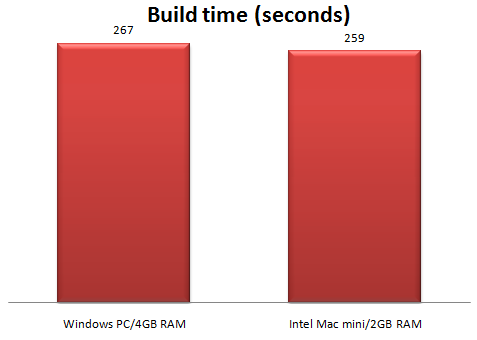
The time the new Mac mini takes to compile and link an Intel-only debug release of PerfectTablePlan also compares favourably with a similar build on my Windows 2.13 GHz Intel Core 2 Duo box with 4GB of RAM[2].
This isn’t a fair hardware comparison, as the two machines are using completely different compilers and linkers and the Windows box was running various background services. But it certainly shows that Intel-based Mac minis are worth considering for use as development machines.
[1] The newer machine is using a newer version of XCode/gcc.
Although some people regard C++ as the COBOL of the 21st century, it remains a force to be reckoned with in commercial development. For example it is currently ranked fourth in the language related tags on stackoverflow.com (despite the apparent biases of Stackoverflow owners Jeff Atwood and Joel Spolsky towards web and .Net oriented languages):
Rank
Language
Tagged questions
1
C#
4681
2
Java
2903
3
ASP.Net
2334
4
C++
2040
5
Javascript
1677
6
PHP
1505
7
Python
1397
8
C
851
9
Ruby
719
10
VB.Net
548
C++ has been one of the top commercial languages for a long time. But the world of computer software and hardware is changing fast and languages have to evolve to stay relevant. The first major revision to the C++ standard in a decade, known as C++ 0x, is expected be finalised in 2009 (otherwise the x will have to be hex). The draft standard includes lots of additions to the language and standard libraries, including: lambdas; closures; static (compile time) asserts; concepts; automatic types; variadic templates; a regular expressions library and improved threading support. Automatic garbage collection is notable by its absence.
I illustrate a few of the new features below. I have done this mainly as a way of understanding them better myself, not because I claim any sort of expertise on the new standard.
Lambdas can reference in-scope variables, for example:
std::vector<int> values = getValues(); int total = 0;
std::for_each( values.begin(), values.end(), [&total](int n){ total += n });
This is known as a ‘closure’. Of course, all of this can be done with standard function calls, but lambdas are undoubtedly more compact and elegant. I am not convinced that they will make code any clearer or easier to debug or maintain however.
Automatic types
Automatic typing allows the compiler to infer a type. For example:
std::vector<int> values = getValues(); for(std::vector<int>::const_iterator it = values.begin(); it != values.end(); ++it ) { f( it ); }
Can be re-written as:
auto values = getValues(); for(auto it = values.begin(); it != values.end(); ++it ) { f( it ); }
Automatic types seem like an excellent way to let the compiler take some of the drudgery out of programming.
Concepts
Template error messages have improved over the years, but they can still be obscure. A ‘concept’ is a way to clearly define what types a templated class or function will accept. For example:
template<typename T> requires LessThanComparable<T>

const T& min(const T &x, const T &y)

{

return y < x ? y : x;

}
Specifies that min() will only accept types that support the concept LessThanComparable. LessThanComparable can then be defined so that the type must support the < operator:
auto concept LessThanComparable<typename T>

{

bool operator<(T, T);

}
Hopefully concepts will allow better defined template interfaces and clearer error messages.
Concurrency
The current C++ standard makes no real allowances for concurrency. This is a major problem in a world where multi-core CPUs are standard. The new standard will introduce a memory model that supports threading and a standard threading library.
Summary
C++ has many strengths. It scores quite highly on performance, expressiveness and portability, has an extensive tool and library ‘ecosystem’ and a proven track record in large scale system development. But it is also a sprawling and complex language, hobbled by many shortcomings inherited from its progenitor C (a language dating back to the early seventies). It isn’t clear to me whether the new standard will add enough features to keep C++ competitive as a commercial language for another decade. Or whether C++ will be regarded as a legacy language, too bloated and complex to attract new developers given the choice of simpler and more elegant languages. Time will tell.
I received two working programs that attempted to solve my ellipse problem. Both were creditable attempts, but neither of them were quite accurate enough for my requirements. One had small (but visible) gaps between the first and last circle and the other didn’t work well for small or large n. However they made me think that a heuristic approach might be workable.
I made a couple of attempts to work out the quartic equations I would have to solve to find the solution analytically. But my brain started to bleed.
After much thinking about it I coded a heuristic approach myself in a day (till 3am!). It works from n=1 to n=100 for variable a/b without noticeable gaps or overlaps for n>7. There is some slight overlapping at n=7 and a/b=1.5. But I can fudge that by changing a/b to 1.6!
The approach is:
use Ramunajan’s formula to work back to a reasonable starting value for b (semi-minor axis)
lay out the n circles
work out the gap/overlap between the first and last circle
if gap/overlap error acceptable, stop, otherwise go to 2
There is also a bit of extra fudging for small n.
I used the secant method to interpolate the values for steps 1,2 and 4. As the functions were all smooth and well-behaved this converged on accurate answers very rapidly (typically 5 or 6 iterations per calculation).
Despite the fact that it is doing 2 levels of iterative calculation, it is surprisingly fast. Even going for high accuracy it takes <1ms for n=50 and <2ms for n=100 on my Windows box. About double that on my old Mac mini. And I can easily cache results in memory for more speed.
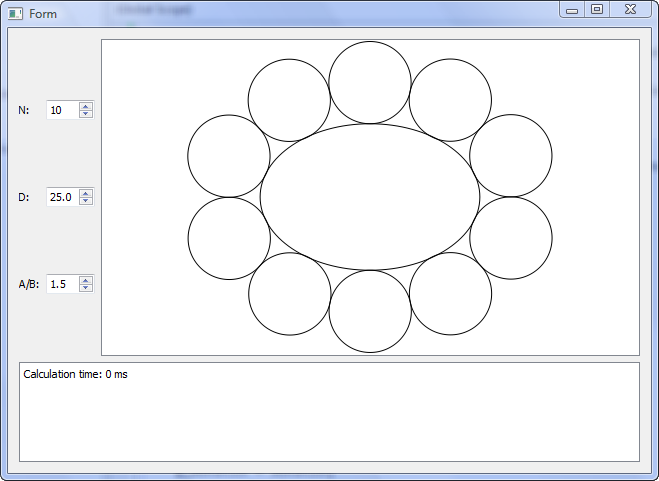
You can download and play with the test harness binaries here, if you are so inclined:
Both Windows and Mac versions are created from a single set of C++ using the Qt cross-platform toolkit. Note that the timer resolution is 1ms, so times <1ms show as 0ms.
So the next version of my table planner softwarewill have oval tables. As always, there was something I hadn’t though of. I had to do a bit of extra work to calculate the normal to the ellipse circumference (which isn’t the same as the line that joins the ellipse centre and the circumference – as I had initially assumed).
Without calculating normals.
With calculated normals
The commercial value of this feature probably isn’t worth the time I have spent on it. But it will make some of my customers very happy and it was an interesting problem. Part of the reason I set up as a microISV was to do things that I find interesting.
Many thanks to everyone that contributed code or suggestions to the original post.





 I have been using a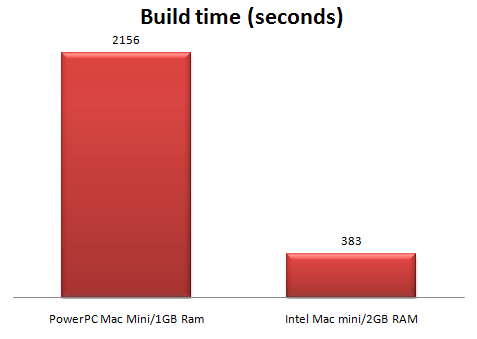



 Successful Software